上截图
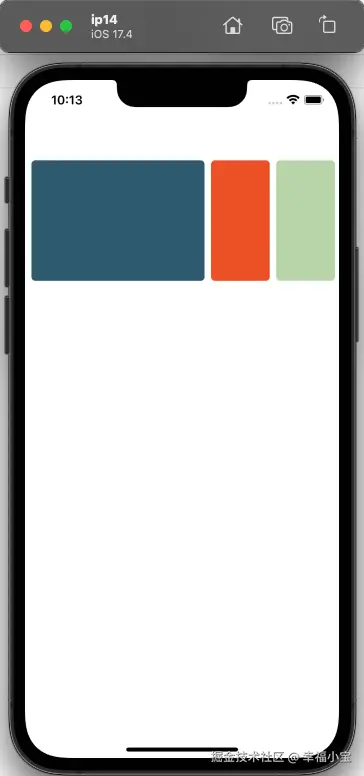
支持 web ios android
上代码
js
<template>
	<view class="joy-swiper" @touchstart="handleTouchStart" @touchmove="handleTouchMove" @touchend="handleTouchEnd"
		@touchcancel="handleTouchEnd">
		<!-- 实际数据+填充数据实现无缝循环 -->
		<view class="swiper-warap" :style="{
        transform: `translate3d(${offsetX}px, 0, 0)`,
        transition: transitionStyle
      }">
			<view v-for="(item, index) in local_list" :key="index" :id="`item-${index}`" class="swiper-item"
				:class="{active: currentIndex == index}" @click.stop="itemClick(item)">
				<image class="image" :style="{
            transition: transitionWidth,
            backgroundColor: item.filePath
          }" :src="item.filePath" mode="aspectFill" />
			</view>
		</view>
	</view>
</template>

<script>
	export default {
		props: {
			list: {
				type: Array,
				default: () => {
					return []
				}
			},
			autoplay: {
				type: Boolean,
				default: false
			},
			duration: {
				type: Number,
				default: 3000
			}
		},
		watch: {
			list: {
				immediate: true,
				handler(list) {
					this.leng = list.length
					if (1 < this.leng) {
						// 复制数组 数组1 数组2 数组3
						this.local_list = [...list, ...list, ...list]
						this.currentIndex = list.length
						clearTimeout(this.timeout2)
						this.timeout2 = setTimeout(() => {
							this.getItemDom().then((res) => {
								this.itemWidth = res.width
								this.offsetX = -this.currentIndex * this.itemWidth
								clearTimeout(this.timeout3)
								this.timeout3 = setTimeout(() => {
									this.transitionStyle = "transform 0.2s ease-out"
									this.transitionWidth = "all ease 0.2s"
									clearTimeout(this.timeout2)
									clearTimeout(this.timeout3)
								}, 50)
							})
						}, 0)
					} else {
						this.local_list = list
						this.currentIndex = 0
						this.offsetX = 0
					}
				}
			},

			autoplay: {
				immediate: true,
				handler(val) {
					this.local_autoplay = val
				}
			},
			local_autoplay: {
				handler(val) {
					if (val) {
						this.autoplayHandler()
					} else {
						this.interval && clearInterval(this.interval)
					}
				},
				immediate: true,
			}
		},
		data() {
			return {
				itemWidth: 0, // 单项宽度
				isDragging: false, // 防止断触
				startX: 0,
				startY: 0,
				distance: 0,
				miniDistance: 25, // 最小距离
				offsetX: 0,
				damping: 0.38, // 阻尼系数
				transitionStyle: "none",
				transitionWidth: "all ease 0.2s",
				leng: 0, // 原始数组length
				currentIndex: 0, // 当前选中项索引
				local_list: [], // 新的数组数据
				local_autoplay: false,
				interval: null,
				timeout1: null,
				timeout2: null,
				timeout3: null,
			};
		},
		methods: {
			handleTouchStart(e) {
				this.distance = 0;
				this.local_autoplay = false;
				if (this.leng == 1) return;
				this.startX = e.touches[0].pageX;
				this.startY = e.touches[0].pageY;
				this.isDragging = true;
				// 拖拽时禁用过渡
				this.transitionStyle = "none";
				this.transitionWidth = "none";
			},
			handleTouchMove(e) {
				this.local_autoplay = false;
				if (this.leng == 1) return;
				if (!this.isDragging) return;
				// 阻止事件冒泡,上调允许上下滚动的阈值
				if (Math.abs(e.touches[0].pageY - this.startY) < 50) {
					e.stopPropagation()
				}
				// 手姿移动的距离
				this.distance = e.touches[0].pageX - this.startX;
				// 盒子实际移动的距离 = 手势距离 * 阻尼系数
				const domDistance = this.distance * this.damping
				// X轴方向位移距离,判断允许左右滚动的阈值
				if (this.miniDistance < Math.abs(this.distance)) {
					this.offsetX = -this.currentIndex * this.itemWidth + domDistance;
				}
			},
			handleTouchEnd() {
				this.local_autoplay = this.autoplay;
				if (this.leng == 1) return;
				if (Math.abs(this.distance) <= this.miniDistance) return;
				this.changeHandler()
			},
			changeHandler(eventType) {
				// 开启过渡
				this.transitionStyle = "transform 0.2s cubic-bezier(0.2, 0.7, 0.3, 1)";
				this.transitionWidth = "all ease 0.2s";
				if (eventType === 'autoplayHandler') {
					this.currentIndex++;
				} else {
					// 计算是否超过一个item的宽度,超过则移动一个item宽度的距离
					const delta = Math.round(this.distance * this.damping / this.itemWidth);
					if (1 <= Math.abs(delta)) {
						// 根据 distance 正负判断滑动的方向
						if (0 < this.distance) {
							this.currentIndex--;
						} else {
							this.currentIndex++;
						}
					}
				}
				// X轴方向位移距离
				this.offsetX = -this.currentIndex * (this.itemWidth)
				// 过渡动画结束时重置索引,实现无缝滑动效果
				this.timeout1 && clearTimeout(this.timeout1)
				this.timeout1 = setTimeout(() => {
					// 修改数据时禁用过渡动画以实现视觉欺骗,否则盒子和元素会出现跳动
					this.transitionStyle = "none";
					this.transitionWidth = "none";
					// 向右滑到 0 时,截取数组3放在最前面
					if (this.currentIndex === 0) {
						const temp = this.local_list.splice(this.leng * 2, this.leng)
						this.local_list = [...temp, ...this.local_list]
					}
					// 向右滑到 this.list.length * 2 时,截取数组1放在最后面
					if (this.currentIndex === this.leng * 2) {
						const temp = this.local_list.splice(0, this.leng)
						this.local_list = [...this.local_list, ...temp]
					}
					// 重置索引为 this.list.length
					if (this.currentIndex === 0 || this.currentIndex === this.leng * 2) {
						this.currentIndex = this.leng
						this.offsetX = -this.currentIndex * this.itemWidth
					}
					// 恢复
					this.isDragging = false;
				}, 220)
			},
			autoplayHandler() {
				this.interval && clearInterval(this.interval)
				this.interval = setInterval(() => {
					this.changeHandler('autoplayHandler')
				}, this.duration);
			},
			getItemDom() {
				return new Promise((resolve, reject) => {
					let selectorQuery = uni.createSelectorQuery().in(this);
					// #ifdef MP-ALIPAY
					selectorQuery = uni.createSelectorQuery();
					// #endif
					selectorQuery
						.select("#item-1")
						.boundingClientRect()
						.exec((res) => {
							resolve(res[0])
						})
				})
			},
			itemClick(item) {
				this.$emit('click', JSON.parse(JSON.stringify(item)))
			}
		},
		destroyed() {
			clearTimeout(this.timeout1)
			clearTimeout(this.timeout2)
			clearTimeout(this.timeout3)
			clearInterval(this.interval)
		},
	};
</script>

<style lang="scss">
	.joy-swiper {
		padding-top: 100px;
		width: 100vw;
		overflow: hidden;
		position: relative;

		.swiper-warap {
			display: flex;
			flex-wrap: nowrap;
			padding: 0 4px;

			.swiper-item {
				display: flex;
				position: relative;
				flex-shrink: 0;
				padding: 0 4px;

				.image {
					display: block;
					width: 73px;
					height: 150px;
					border-radius: 5px;
				}

				&.active .image {
					width: calc(100vw - 175px);
					border-radius: 5px;
				}
			}
		}
	}
</style>
使用姿势
js
<template>
	<view>
		<joy-swiper :list="swiper" @click="clickItem" />
	</view>
</template>

<script>
    export default {
        data() {
            return {
                // 建议数组长度在3个以上
                // 假数据是用背景色代替图片路径,引入插件后在插件内删除image的backgroundColor属性即可
                swiper: [
                    {
                        filePath: '#815c94'
                    },
                    {
                        filePath: '#2E5A6F'
                    },
                    {
                        filePath: '#ed5126'
                    },
                    {
                        filePath: '#B6D7A8'
                    },
                    {
                        filePath: '#2A52BE'
                    },
                    {
                        filePath: '#96c24e'
                    },
                ]
            }
        },
        methods: {
            clickItem(item) {
                console.log(item)
            }
        }
    }
</script>

<style>

</style>