初始化项目
bash
# 创建项目
mkdir weather-express
cd weather-express

# 安装依赖
npm install express cors dotenv
npm install -D nodemon
创建如下目录结构
bash
weather-express/
├── src/
│   ├── app.js           # Express应用配置
│   ├── server.js        # 服务器启动文件
│   utils/
│   ├── fileHandler.js
├── data/
│   ├── cities.json
├── package.json
└── .env
.env文件:
ini
PORT=3000
NODE_ENV=development
package.json 配置scripts命令
json
{
  "type": "module",
  "scripts": {
    "dev": "nodemon src/server.js",
    "start": "node src/server.js"
  }
}
主要代码
src/app.js:
js
import express from "express";

// 用于从 .env文件加载环境变量到 process.env中。
import dotenv from "dotenv";

// 引入中文转拼音库
import { pinyin } from "pinyin-pro";

// 引入文件操作帮助函数
import {
  readCitiesFile,
  addCityToFile,
  deleteCityFromFile,
  updateCityInFile,
} from "../utils/fileHelper.js";

// 配置环境变量
dotenv.config();

const app = express();

// 基本中间件
app.use(express.json()); // 解析JSON请求体
app.use(express.urlencoded({ extended: true })); // 解析表单数据

// 简单日志中间件
app.use((req, res, next) => {
  console.log(
    `请求方法: ${req.method},
    请求路径: ${req.path},
    请求时间: ${new Date().toLocaleString()}`
  );
  next();
});

// 根路由
app.get("/", (req, res) => {
  res.json({
    message: "天气API服务",
    endpoints: [
      "GET  /weather",
      "GET  /weather/:city",
      "POST /weather",
      "PUT  /weather",
      "DELETE /weather/:city",
    ],
  });
});

//  健康检查
app.get("/health", (req, res) => {
  res.json({
    status: "ok",
    message: "天气API服务运行正常",
    timestamp: new Date().toISOString(),
  });
});

// 获取所有城市天气数据
app.get("/weather", async (req, res) => {
  const cities = await readCitiesFile();
  res.json({
    success: true,
    count: cities.length,
    data: cities,
  });
});

// 获取指定城市天气数据
app.get("/weather/:city", async (req, res) => {
  const { city } = req.params;
  const cities = await readCitiesFile();
  const weather = cities.find((c) => c.city === city);
  if (!weather) {
    return res.status(404).json({
      error: "404 未找到,请求的城市不存在",
    });
  }
  res.json({
    success: true,
    data: weather,
  });
});

// 新增城市天气数据
app.post("/weather", async (req, res) => {
  const { city, temperature, condition } = req.body;

  if (!city || !temperature || !condition) {
    return res.status(400).json({
      error: "400 缺失必要字段",
    });
  }
  const id = city.toLowerCase();
  const cities = await readCitiesFile();
  if (cities.find((c) => c.city.toLowerCase() === id)) {
    return res.status(400).json({
      error: "400 城市已存在",
    });
  }
  const addCity = {
    id: pinyin(city, { toneType: "none" }),
    city,
    temperature: temperature + "℃",
    condition,
    lastUpdated: new Date().toISOString(),
  };
  await addCityToFile(addCity);
  res.status(201).json({
    success: true,
    data: addCity,
    message: "城市天气数据新增成功",
  });
});

// 更新指定城市天气数据
app.put("/weather", async (req, res) => {
  const { temperature, condition, city } = req.body;
  const cities = await readCitiesFile();
  const index = cities.findIndex((c) => c.city === city);
  if (index === -1) {
    return res.status(404).json({
      error: "404 未找到,请求的城市不存在",
    });
  }
  await updateCityInFile({
    ...cities[index],
    temperature: temperature + "℃",
    condition,
    lastUpdated: new Date().toISOString(),
  });
  res.status(200).json({
    success: true,
    data: cities[index],
    message: "城市天气数据更新成功",
  });
});

// 删除城市天气数据
app.delete("/weather/:city", async (req, res) => {
  const { city } = req.params;
  const cities = await readCitiesFile();
  const index = cities.findIndex((c) => c.city === city);
  if (index === -1) {
    return res.status(404).json({
      error: "404 未找到,请求的城市不存在",
    });
  }
  await deleteCityFromFile(city);
  res.status(200).json({
    success: true,
    message: "城市天气数据删除成功",
  });
});

// 404处理
app.use((req, res, next) => {
  console.log(`请求路径: ${req.path}`);

  res.status(404).json({
    error: "404 未找到,请求的资源不存在",
  });
});

// 错误处理
app.use((err, req, res, next) => {
  console.error("❌ 错误:", err.message);
  res.status(500).json({
    error: "500 服务器内部错误",
  });
});

export default app;
fileHandler.js:
js
// 用于文件操作的帮助函数
import fs from "fs/promises";

// 用于处理文件路径的模块
import path from "path";

// process.cwd()表示的是当前执行脚本的目录:weather-express

const DATA_FILE = path.join(process.cwd(), "data", "cities.json");

// 读取城市数据文件
export async function readCitiesFile() {
  try {
    const data = await fs.readFile(DATA_FILE, "utf8");
    return JSON.parse(data).cities;
  } catch (error) {
    console.error("读取城市数据文件失败:", error);
    throw error;
  }
}

// 添加城市数据到文件
export async function addCityToFile(city) {
  try {
    const cities = await readCitiesFile();
    cities.push(city);
    await fs.writeFile(DATA_FILE, JSON.stringify({ cities }, null, 2));
    console.log("城市数据添加成功");
  } catch (error) {
    console.error("添加城市数据到文件失败:", error);
    throw error;
  }
}

// 删除城市数据文件中的城市
export async function deleteCityFromFile(city) {
  try {
    const cities = await readCitiesFile();
    const updatedCities = cities.filter((c) => c.city !== city);
    await fs.writeFile(
      DATA_FILE,
      JSON.stringify({ cities: updatedCities }, null, 2)
    );
    console.log("城市数据删除成功");
  } catch (error) {
    console.error("删除城市数据文件中的城市失败:", error);
    throw error;
  }
}

// 更新城市数据文件中的城市
export async function updateCityInFile(updatedCity) {
  try {
    const cities = await readCitiesFile();
    const index = cities.findIndex((c) => c.id === updatedCity.id);
    cities[index] = updatedCity;
    await fs.writeFile(DATA_FILE, JSON.stringify({ cities }, null, 2));
    console.log("城市数据更新成功");
  } catch (error) {
    console.error("更新城市数据文件中的城市失败:", error);
    throw error;
  }
}
src/server.js:
js
import app from "./app.js";

const PORT = process.env.PORT || 3000;

app.listen(PORT, () => {
  console.log(`🚀 服务器运行在: http://localhost:${PORT}`);
});
初始化cities.json
当然可以在readCitiesFile函数中使用代码初始化
json
{
  "cities": []
}
运行
命令行中输入
bash
npm run dev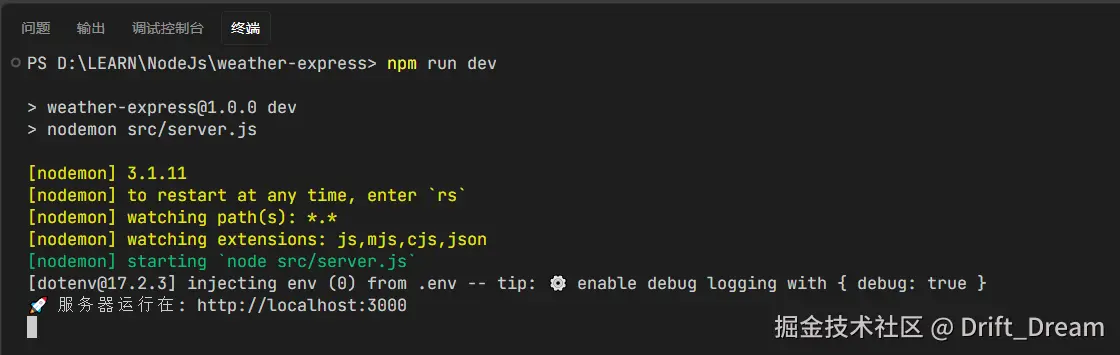
测试
可以起一个简单的vue3项目来测试我们的接口
xml
<template>
  <div>
    <section>
      <h2>获取全部天气数据</h2>
      <button @click="getAllCityWeather">获取全部天气数据</button>
      <div class="weather-data">{{ allCityWeather }}</div>
    </section>
    <section>
      <h2>获取指定城市天气数据</h2>
      <input v-model="cityName" type="text" placeholder="请输入城市名称" />
      <button @click="getCityWeather">获取指定城市天气数据</button>
      <div class="weather-data">{{ cityData }}</div>
    </section>
    <section>
      <h2>添加城市天气</h2>
      <input
        v-model="addCityData.city"
        type="text"
        placeholder="请输入城市名称"
      />
      <input
        v-model="addCityData.condition"
        type="text"
        placeholder="请输入城市天气"
      />
      <input
        v-model="addCityData.temperature"
        type="text"
        placeholder="请输入城市温度"
      />
      <button @click="addCityWeather">添加城市天气数据</button>
    </section>
    <section>
      <h2>删除城市天气</h2>
      <input
        v-model="delCityName"
        type="text"
        placeholder="请输入要删除的城市名称"
      />
      <button @click="deleteCityWeather">删除城市天气数据</button>
    </section>
    <section>
      <h2>更新城市天气</h2>
      <input
        v-model="updateCityData.city"
        type="text"
        placeholder="请输入城市名称"
      />
      <input
        v-model="updateCityData.condition"
        type="text"
        placeholder="请输入城市天气"
      />
      <input
        v-model="updateCityData.temperature"
        type="text"
        placeholder="请输入城市温度"
      />
      <button @click="updateCityWeather">更新城市天气数据</button>
    </section>
  </div>
</template>
<script setup lang="ts">
import { reactive, ref } from "vue";

const allCityWeather = ref([]);

const cityData = ref({});

const cityName = ref("");

const addCityData = reactive({
  city: "",
  condition: "",
  temperature: "",
});

const delCityName = ref("");

const updateCityData = reactive({
  city: "",
  condition: "",
  temperature: "",
});

const getAllCityWeather = async () => {
  const response = await fetch("/weather");
  const { data } = await response.json();
  allCityWeather.value = data;
};

const getCityWeather = async () => {
  if (!cityName.value) {
    alert("请输入城市名称");
    return;
  }
  const response = await fetch(`/weather/${cityName.value}`);
  const { data } = await response.json();
  cityData.value = data;
};

const addCityWeather = async () => {
  if (!addCityData.city || !addCityData.condition || !addCityData.temperature) {
    alert("请输入完整的城市天气信息");
    return;
  }
  const response = await fetch("/weather", {
    method: "POST",
    headers: {
      "Content-Type": "application/json",
    },
    body: JSON.stringify(addCityData),
  });
  const { data } = await response.json();
  alert(`城市${data.city}的天气数据已添加`);
};

const deleteCityWeather = async () => {
  if (!delCityName.value) {
    alert("请输入要删除的城市名称");
    return;
  }
  const response = await fetch(`/weather/${delCityName.value}`, {
    method: "DELETE",
  });
  const { data } = await response.json();
  alert(`城市${data.city}的天气数据已删除`);
};

const updateCityWeather = async () => {
  if (
    !updateCityData.city ||
    !updateCityData.condition ||
    !updateCityData.temperature
  ) {
    alert("请输入完整的城市天气信息");
    return;
  }
  const response = await fetch(`/weather`, {
    method: "PUT",
    headers: {
      "Content-Type": "application/json",
    },
    body: JSON.stringify(updateCityData),
  });
  const { data } = await response.json();
  alert(`城市${data.city}的天气数据已更新`);
};
</script>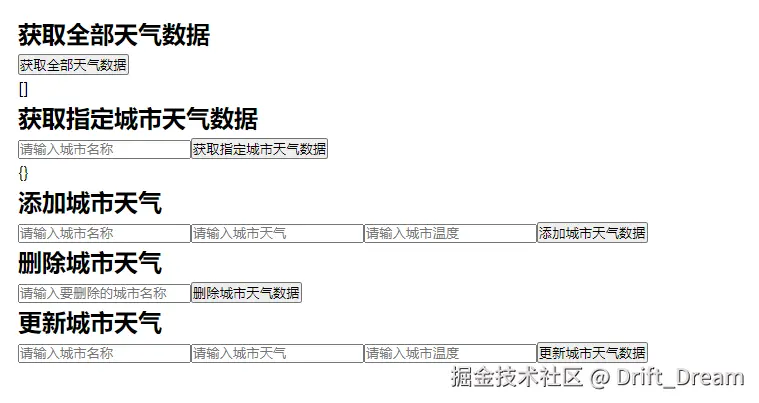
多说一句,需要在vue项目的vite.config.ts文件中配置代理,来解决请求跨域的问题。
ts
import { defineConfig } from "vite";
import vue from "@vitejs/plugin-vue";

// https://vite.dev/config/
export default defineConfig({
  plugins: [vue()],
  resolve: {
    alias: {
      "@": "/src",
    },
  },
  server: {
    proxy: {
      "/weather": {
        target: "http://localhost:3000",
        changeOrigin: true,
        secure: false,
      },
    },
  },
});
经测试,接口与文件内容写入正常
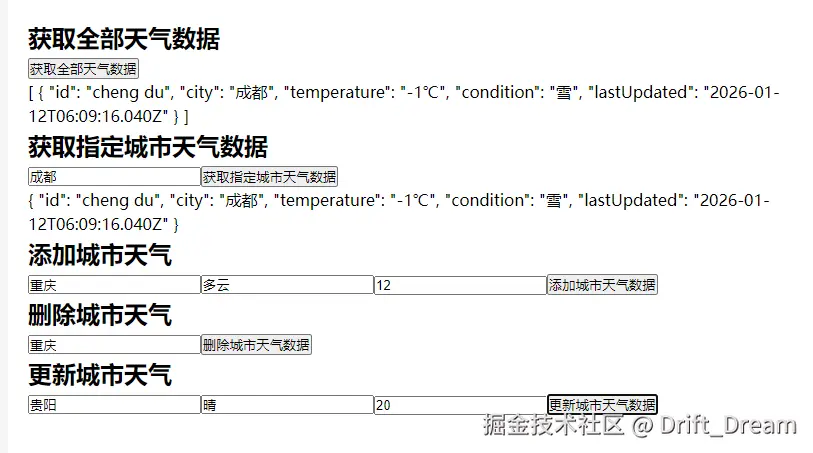
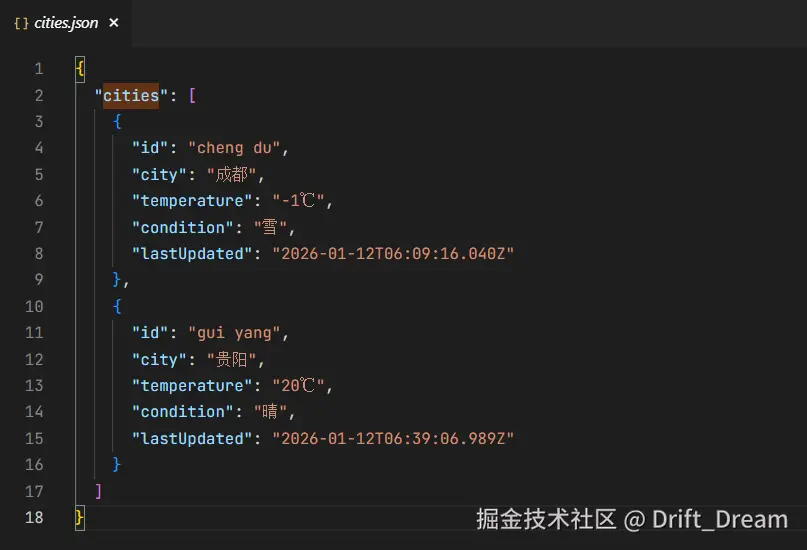
🎯总结
✅ dotenv 用于从 .env文件加载环境变量到 process.env中。
js
import dotenv from "dotenv";

// 配置环境变量
dotenv.config();可以使用process.env.PORT访问到.env文件中配置变量
✅ process.cwd()表示的是当前执行脚本的目录:weather-express
js
// 获取到文件路径
const DATA_FILE = path.join(process.cwd(), "data", "cities.json");
✅ 通过writeFile 与 readFile 写文件与读文件
✅ 基本中间件
js
app.use(express.json()); // 解析JSON请求体
app.use(express.urlencoded({ extended: true })); // 解析表单数据

// 简单日志中间件
app.use((req, res, next) => {
  console.log(
    `请求方法: ${req.method},
    请求路径: ${req.path},
    请求时间: ${new Date().toLocaleString()}`
  );
  next();
});