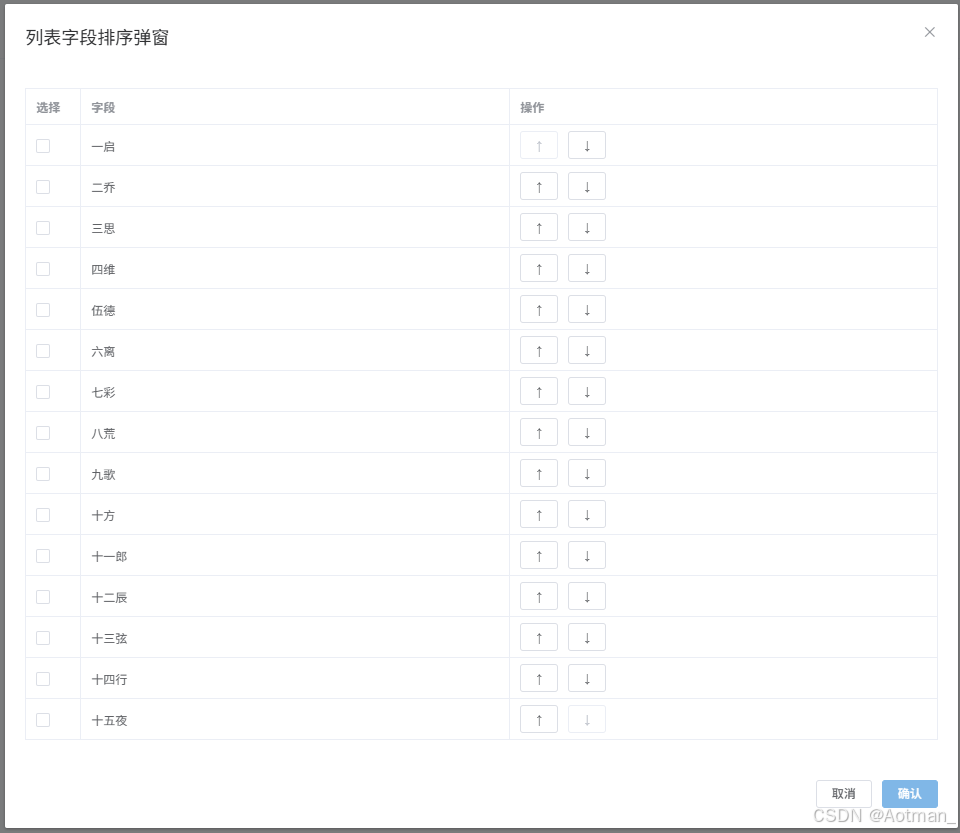
<template>
  <div>
    <button @click="showModal = true">打开弹窗</button>
    <el - dialog :visible.sync="showModal" title="列表弹窗">
      <el - table :data="tableData" border>
        <el - table - column type="selection" width="55"></el - table - column>
        <el - table - column label="字段" prop="field"></el - table - column>
        <el - table - column label="操作">
          <template slot - scope="scope">
            <el - button size="mini" @click="moveUp(scope.$index)" :disabled="scope.$index === 0">↑</el - button>
            <el - button size="mini" @click="moveDown(scope.$index)" :disabled="scope.$index === tableData.length - 1">↓</el - button>
          </template>
        </el - table - column>
      </el - table>
      <div slot="footer" class="dialog - footer">
        <el - button @click="showModal = false">取 消</el - button>
        <el - button type="primary" @click="confirm">确 认</el - button>
      </div>
    </el - dialog>
  </div>
</template>

<script>
export default {
  data() {
    return {
      showModal: false,
      tableData: [
        { field: '一启' },
        { field: '二乔' },
        { field: '三思' },
        { field:'四维' },
        { field: '伍德' },
        { field: '六离' },
        { field: '七彩' },
        { field: '八荒' },
        { field: '九歌' },
        { field: '十方' },
        { field: '十一郎' },
        { field: '十二辰' },
        { field: '十三弦' },
        { field:'十四行' },
        { field:'十五夜' }
      ]
    };
  },
  methods: {
    moveUp(index) {
      if (index > 0) {
        const temp = this.fields[index];
        this.tableData.splice(index, 1);
        this.tableData.splice(index - 1, 0, temp);
      }
    },
    moveDown(index) {
      if (index < this.tableData.length - 1) {
        const temp = this.fields[index];
        this.tableData.splice(index, 1);
        this.tableData.splice(index + 1, 0, temp);
      }
    },
    confirm() {
      // 这里可以处理勾选的数据等逻辑
      const selectedRows = this.$refs.table.selection;
      console.log('勾选的数据:', selectedRows);
      this.showModal = false;
    }
  }
};
</script>

<style scoped>
/* 可以根据需要添加样式 */
.el-table .el-table__header .cell .el-checkbox__inner{
    display: none !important;
}
.el-table .el-table__header .el-table-column--selection .cell::before{
    content: '选择';
    text-align: center;
    line-height: 37px;
}
</style>