一个用于将Labelme标注后的图片以及标签同时旋转一定角度的工具。
默认逆时针旋转90度(通过更改 parser 参数来改变逆时针旋转的角度)。
注意:只要你输出路径和原文件路径不同,就不会破坏原有数据。如果你不放心,可以先备份,再使用。
两种使用方式(选一即可):
-
将 main() 函数中 parser 的所有 default 参数配置完成后,直接运行脚本文件。
-
在命令行调用,引号内需要你填入相应的参数:
python# 指定输入输出文件夹,逆时针旋转180度 python rotate_labelme.py \ --img_dir "你的图片路径" \ --json_dir "你的json文件路径" \ --out_img_dir "输出图片路径" \ --out_json_dir "输出json路径" \ --angle 90
使用建议:
最好是旋转90度的整数倍,否则标签可能不会完全贴合。比如一个旋转45°的例子:
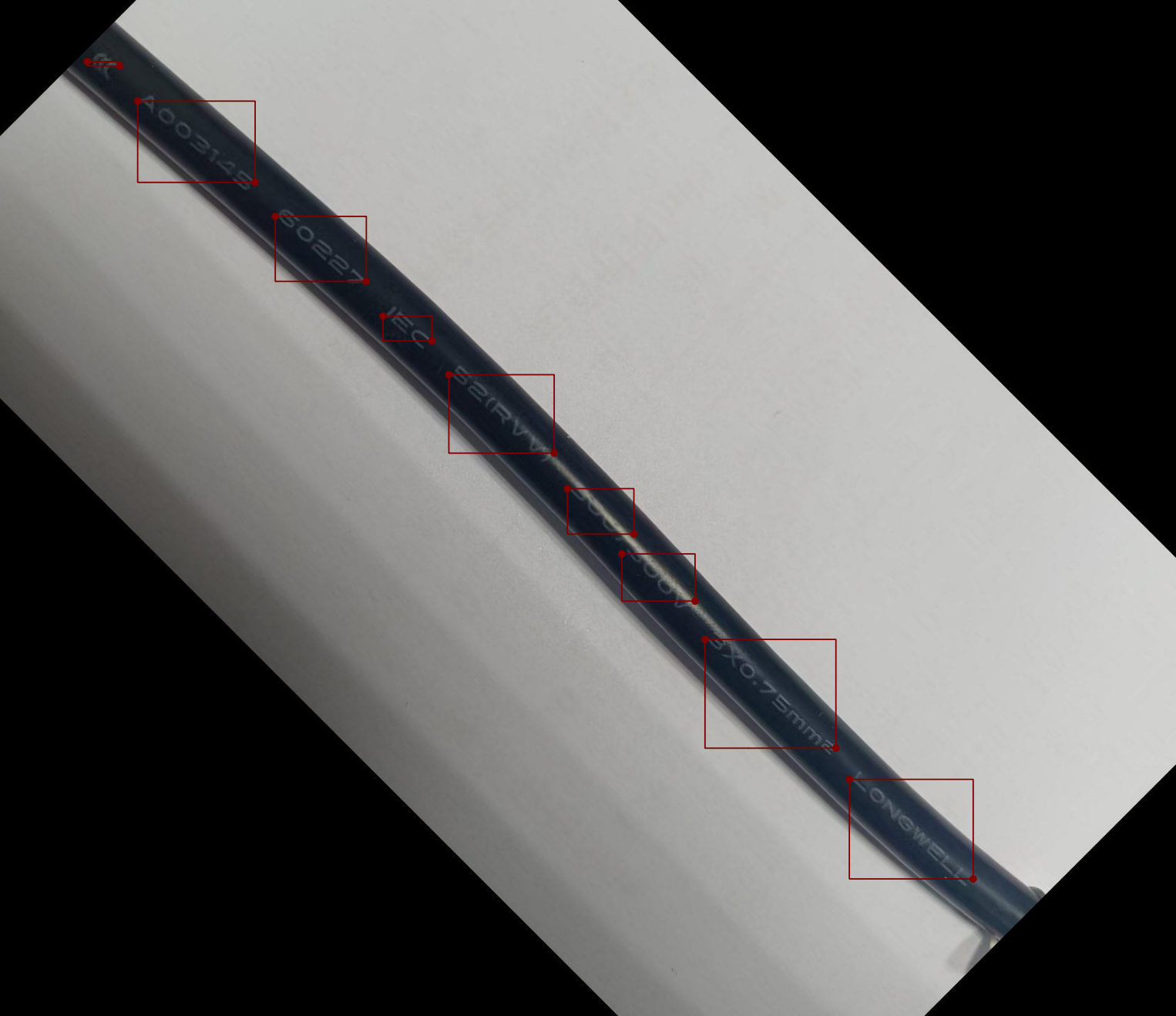
代码:
python
import os
import sys
import json
import math
import argparse
from PIL import Image, ImageOps


def rotate_one(img_path, json_path, out_img_path, out_json_path, angle):
    """
    旋转图片 + labelme 的 polygon 标注点
    angle: 逆时针旋转角度(正数 = 逆时针)
    """
    # 1. 读取并修正 exif 方向
    img = Image.open(img_path)
    img = ImageOps.exif_transpose(img)
    orig_width, orig_height = img.size

    # 2. 旋转图像(带 expand,画布会自动扩大)
    rotated_img = img.rotate(
        angle,
        expand=True,
        resample=Image.Resampling.BICUBIC
    )
    new_width, new_height = rotated_img.size

    # 3. 计算正确的旋转矩阵(图像坐标系:y向下)
    # 逆时针旋转 → 在 y 向下坐标系需要调整 sin 符号
    angle_rad = math.radians(angle)
    cos_a = math.cos(angle_rad)
    sin_a = math.sin(angle_rad)

    # 4. 读取 labelme json
    with open(json_path, "r", encoding="utf-8") as f:
        data = json.load(f)

    # 5. 变换每一个点的坐标
    for shape in data.get("shapes", []):
        new_points = []
        for x, y in shape["points"]:
            # -------------------------------
            #   步骤1:移到原图中心
            # -------------------------------
            dx = x - orig_width / 2.0
            dy = y - orig_height / 2.0

            # -------------------------------
            #   步骤2:图像坐标系下的逆时针旋转
            #   (注意 sin 前的符号与数学标准相反)
            # -------------------------------
            new_dx =  dx * cos_a + dy * sin_a
            new_dy = -dx * sin_a + dy * cos_a

            # -------------------------------
            #   步骤3:移到新画布中心
            # -------------------------------
            new_x = new_dx + new_width / 2.0
            new_y = new_dy + new_height / 2.0

            new_points.append([new_x, new_y])

        shape["points"] = new_points

    # 6. 更新 json 元信息
    data["imageWidth"] = new_width
    data["imageHeight"] = new_height
    data["imagePath"] = os.path.basename(out_img_path)
    if "imageData" in data:
        data["imageData"] = None   # 建议清空,避免 base64 过大

    # 7. 保存
    rotated_img.save(out_img_path, quality=95)  # jpg 可加 quality
    with open(out_json_path, "w", encoding="utf-8") as f:
        json.dump(data, f, indent=2, ensure_ascii=False)


def batch_rotate(img_dir, json_dir, out_img_dir, out_json_dir, angle):
    os.makedirs(out_img_dir, exist_ok=True)
    os.makedirs(out_json_dir, exist_ok=True)

    # 先收集所有需要处理的文件(这样才能知道总数)
    tasks = []

    for name in os.listdir(img_dir):
        if not name.lower().endswith((".jpg", ".jpeg", ".png", ".bmp")):
            continue

        base = os.path.splitext(name)[0]
        img_path = os.path.join(img_dir, name)
        json_path = os.path.join(json_dir, base + ".json")

        if not os.path.isfile(json_path):
            print(f"[SKIP] 缺少 json: {name}")
            continue

        out_img = os.path.join(out_img_dir, name)
        out_json = os.path.join(out_json_dir, base + ".json")

        tasks.append((img_path, json_path, out_img, out_json, name))


    total = len(tasks)
    if total == 0:
        print("没有找到任何需要处理的文件")
        return

    print(f"总共找到 {total} 个文件需要处理\n")

    processed_count = 0
    error_count = 0
    error_list = []

    for i, (img_path, json_path, out_img, out_json, name) in enumerate( tasks, 1):
        try:
            processed_count += 1
            rotate_one(img_path, json_path, out_img, out_json, angle)
        except Exception as e:
            error_count += 1
            error_list.append(e)

        # 无论成功失败都更新进度条
        progress_bar(i, total, bar_length=40)


    print(f"处理完成:成功 {processed_count} 个,失败 {error_count} 个")


def progress_bar(current, total, bar_length=40, prefix="完成进度"):
    percent = current / total
    filled = int(bar_length * percent)
    bar = '█' * filled + '░' * (bar_length - filled)

    sys.stdout.write(f'\r{prefix}: |{bar}| {percent * 100:.1f}%  {current}/{total}')
    sys.stdout.flush()

def main():
    parser = argparse.ArgumentParser(description='旋转 labelme 标注图片与对应 json 文件')
    parser.add_argument("--img_dir",  default='./path_to_your_img', help="原始图片目录")
    parser.add_argument("--json_dir", default='./path_to_your_json', help="原始 labelme json 目录")
    parser.add_argument("--out_img_dir",  default='./path_to_output_img', help="输出旋转后图片目录")
    parser.add_argument("--out_json_dir",  default='./path_to_output_label', help="输出旋转后 json 目录")
    parser.add_argument("--angle",type=float, default=90, help="逆时针旋转角度(单位:度,可为任意浮点数)")

    args = parser.parse_args()

    batch_rotate(
        args.img_dir,
        args.json_dir,
        args.out_img_dir,
        args.out_json_dir,
        args.angle
    )


if __name__ == "__main__":
    main()