一、简介
本文基于 ESP32 开发板 + SSD1306 128×64 OLED 显示屏,实现一个完整的物联网小项目,功能包括:
- ESP32 通过 I2C 驱动 OLED
- 使用 U8g2 库显示中文(无外置字库)
- 通过 HTTP 请求天气 API 获取实时天气
- 使用 NTP 网络时间协议自动校时
- OLED 实时显示:日期、时间、城市、温度、天气情况
- 自动刷新时间,天气数据动态更新
适合作为 ESP32 + OLED + 网络通信 的综合入门示例。
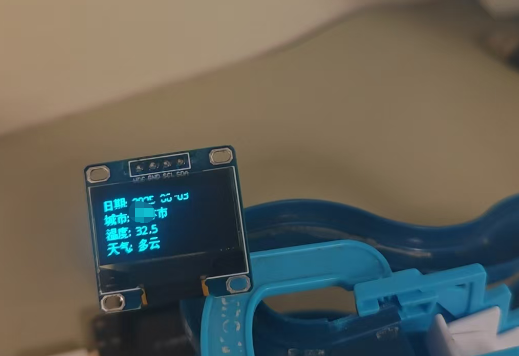
二、硬件连接说明
1. 接线方式(SSD1306 I2C)
| OLED 引脚 | ESP32 引脚 |
|---|---|
| VCC | 3V3 |
| GND | GND |
| SDA | GPIO 21 |
| SCL | GPIO 22 |
ESP32 默认 I2C 引脚:
SDA → GPIO21,SCL → GPIO22
三、软件环境与依赖库
1. 开发环境
- Arduino IDE(或 PlatformIO)
- ESP32 Board Support Package
2. 需要安装的库
text
U8g2
ArduinoJson
NTPClient
WiFi.h 与 HTTPClient.h 为 ESP32 自带库。
四、天气 API 说明
本文使用的天气接口:
text
http://t.weather.itboy.net/api/weather/city/101010100特点:
- 免费
- 无需 Key
- 返回 JSON,支持中文
- 城市通过城市代码区分
五、完整示例代码(已添加中文注释)
⚠️ 以下代码为 最终整合版本:
- 中文显示
- 天气获取
- NTP 自动更新时间
- OLED 实时刷新
cpp
#include <Wire.h>
#include <U8g2lib.h>
#include <WiFi.h>
#include <HTTPClient.h>
#include <ArduinoJson.h>
#include <NTPClient.h>
#include <WiFiUdp.h>

/* ================= WiFi 配置 ================= */
const char* ssid = "wifi帐号";
const char* password = "Wifi密码";

/* ================= 天气 API ================= */
String apiUrl = "http://t.weather.itboy.net/api/weather/city/101010100";

/* ================= OLED 初始化 =================
   使用硬件 I2C,ESP32 默认:
   SDA -> GPIO21
   SCL -> GPIO22
*/
U8G2_SSD1306_128X64_NONAME_F_HW_I2C u8g2(
  U8G2_R0,
  U8X8_PIN_NONE,
  SCL,
  SDA
);

/* ================= NTP 时间配置 =================
   时区偏移:28800 秒(UTC+8,中国时间)
   更新时间间隔:60000 ms
*/
WiFiUDP udp;
NTPClient timeClient(udp, "pool.ntp.org", 28800, 60000);

/* ================= 刷新控制 ================= */
unsigned long lastUpdateTime = 0;
unsigned long interval = 1000;  // 每秒刷新一次显示

/* ================= 天气数据结构体 ================= */
struct WeatherData {
  String city;          // 城市
  String temperature;   // 温度
  String weatherType;   // 天气类型
  String timedate;      // 日期时间
};

void setup() {
  Serial.begin(115200);

  /* -------- 连接 WiFi -------- */
  WiFi.begin(ssid, password);
  Serial.print("Connecting to WiFi");

  while (WiFi.status() != WL_CONNECTED) {
    delay(1000);
    Serial.print(".");
  }

  Serial.println("\nWiFi Connected");
  Serial.print("IP Address: ");
  Serial.println(WiFi.localIP());

  /* -------- OLED 初始化 -------- */
  u8g2.begin();
  u8g2.enableUTF8Print();  // 必须开启 UTF-8,否则中文乱码

  /* -------- 启动 NTP -------- */
  timeClient.begin();
}

void loop() {
  unsigned long currentMillis = millis();

  /* 每秒更新一次显示 */
  if (currentMillis - lastUpdateTime >= interval) {
    lastUpdateTime = currentMillis;

    // 获取天气数据
    WeatherData weatherData = getWeatherData();

    if (weatherData.city != "") {
      // 更新时间
      timeClient.update();
      String currentTime = timeClient.getFormattedTime();

      // OLED 显示
      u8g2.clearBuffer();
      u8g2.setFont(u8g2_font_wqy12_t_gb2312);  // 中文字体

      u8g2.setCursor(0, 15);
      u8g2.print("日期: " + extractDate(weatherData.timedate) + " " + currentTime);

      u8g2.setCursor(0, 30);
      u8g2.print("城市: " + weatherData.city);

      u8g2.setCursor(0, 45);
      u8g2.print("温度: " + weatherData.temperature);

      u8g2.setCursor(0, 60);
      u8g2.print("天气: " + weatherData.weatherType);

      u8g2.sendBuffer();
    }
  }
}

/* ================= 获取天气数据 ================= */
WeatherData getWeatherData() {
  HTTPClient http;
  WeatherData weatherData;

  http.begin(apiUrl);
  int httpCode = http.GET();

  if (httpCode == 200) {
    String payload = http.getString();
    Serial.println(payload);

    DynamicJsonDocument doc(1024);
    DeserializationError error = deserializeJson(doc, payload);

    if (!error) {
      weatherData.timedate = doc["time"].as<String>();
      weatherData.city = doc["cityInfo"]["city"].as<String>();
      weatherData.temperature = doc["data"]["wendu"].as<String>();
      weatherData.weatherType = doc["data"]["forecast"][0]["type"].as<String>();
    }
  }

  http.end();
  return weatherData;
}

/* ================= 日期格式处理 =================
   输入:YYYY-MM-DD HH:MM:SS
   输出:MM-DD
*/
String extractDate(String fullDate) {
  int spaceIndex = fullDate.indexOf(' ');
  String datePart = fullDate.substring(0, spaceIndex);
  return datePart.substring(5);
}
六、关键技术点总结
-
U8g2 显示中文
- 必须使用
u8g2_font_wqy12_t_gb2312 - 必须调用
enableUTF8Print()
- 必须使用
-
ESP32 网络请求
- 使用
HTTPClient - JSON 解析推荐
ArduinoJson
- 使用
-
时间自动更新
- NTPClient 负责时间
millis()控制刷新频率,避免阻塞
-
性能注意
- 不建议每秒请求天气 API
- 可后续改为:天气 10 分钟更新一次,时间每秒更新