引言:那个让我重构的千行数据处理代码
还记得刚开始用Kotlin时,我接手了一个数据处理模块。代码是典型的Java风格,充满了for循环和临时变量:
java
// Java风格 - 冗长的数据处理
List<User> activeAdultUsers = new ArrayList<>();
for (User user : users) {
    if (user.isActive() && user.getAge() >= 18) {
        activeAdultUsers.add(user);
    }
}

List<String> userNames = new ArrayList<>();
for (User user : activeAdultUsers) {
    userNames.add(user.getName());
}

Collections.sort(userNames);

// 取前10个
List<String> top10 = new ArrayList<>();
for (int i = 0; i < Math.min(10, userNames.size()); i++) {
    top10.add(userNames.get(i));
}30多行代码,创建了4个临时变量,逻辑分散在多个循环中,维护起来令人头疼。
同事用Kotlin重写后,我惊呆了:
kotlin
// Kotlin风格 - 函数式链式调用
val top10 = users
    .filter { it.isActive && it.age >= 18 }
    .map { it.name }
    .sorted()
.take(10)仅仅5行代码,没有临时变量,逻辑清晰流畅,可读性极强!这就是Kotlin集合框架的魔法。
今天,我们就来深入探索这个强大而优雅的集合系统。
Kotlin集合体系概览
Kotlin的集合分为两大类:不可变集合 (只读)和可变集合。
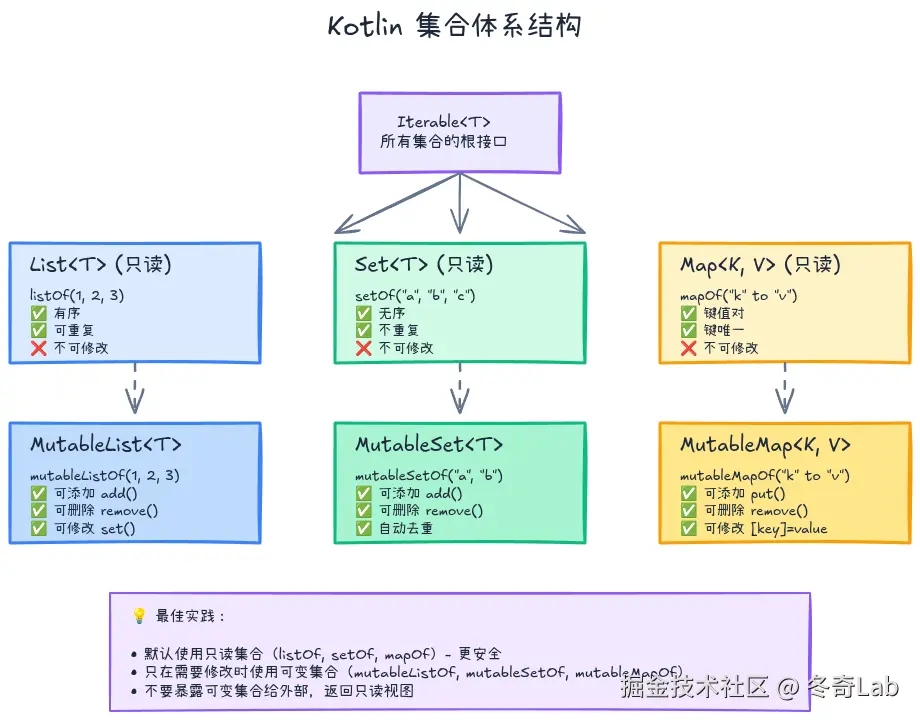
不可变集合 vs 可变集合
kotlin
// 不可变集合(只读)
val readOnlyList = listOf(1, 2, 3)
val readOnlySet = setOf("a", "b", "c")
val readOnlyMap = mapOf("key1" to "value1", "key2" to "value2")

// readOnlyList.add(4)  // ❌ 编译错误:没有add方法

// 可变集合
val mutableList = mutableListOf(1, 2, 3)
val mutableSet = mutableSetOf("a", "b", "c")
val mutableMap = mutableMapOf("key1" to "value1")

mutableList.add(4)  // ✅ OK
mutableSet.remove("a")  // ✅ OK
mutableMap["key3"] = "value3"  // ✅ OK
**最佳实践**:默认使用不可变集合(`listOf`、`setOf`、`mapOf`),只有在需要修改时才使用可变集合。这能避免意外修改,提高代码安全性。
集合的类型层级
| 接口 | 不可变实现 | 可变实现 | 特点 |
|---|---|---|---|
List |
listOf() |
mutableListOf() |
有序、可重复 |
Set |
setOf() |
mutableSetOf() |
无序、不重复 |
Map |
mapOf() |
mutableMapOf() |
键值对、键唯一 |
List:有序集合
创建List
kotlin
// 不可变List
val numbers = listOf(1, 2, 3, 4, 5)
val names = listOf("Alice", "Bob", "Charlie")

// 可变List
val mutableNumbers = mutableListOf(1, 2, 3)
val arrayList = ArrayList<Int>()  // Java的ArrayList

// 空List
val emptyList = emptyList<Int>()
val emptyList2 = listOf<Int>()

// 指定大小的List
val zeros = List(5) { 0 }  // [0, 0, 0, 0, 0]
val squares = List(5) { it * it }  // [0, 1, 4, 9, 16]
List常用操作
kotlin
val list = listOf(1, 2, 3, 4, 5)

// 访问元素
println(list[0])           // 1(使用下标)
println(list.first())      // 1
println(list.last())       // 5
println(list.get(2))       // 3

// 安全访问
println(list.getOrNull(10))     // null(越界返回null)
println(list.getOrElse(10) { 0 })  // 0(越界返回默认值)

// 查询
println(list.contains(3))   // true
println(3 in list)          // true(更简洁)
println(list.indexOf(3))    // 2
println(list.isEmpty())     // false
println(list.size)          // 5

// 子列表
println(list.subList(1, 4))  // [2, 3, 4](包含start,不包含end)
println(list.slice(1..3))    // [2, 3, 4]
println(list.take(3))        // [1, 2, 3](前3个)
println(list.takeLast(2))    // [4, 5](后2个)
println(list.drop(2))        // [3, 4, 5](跳过前2个)
可变List操作
kotlin
val list = mutableListOf(1, 2, 3)

// 添加
list.add(4)              // [1, 2, 3, 4]
list.add(0, 0)           // [0, 1, 2, 3, 4](在索引0处插入)
list.addAll(listOf(5, 6))  // [0, 1, 2, 3, 4, 5, 6]

// 删除
list.remove(0)           // [1, 2, 3, 4, 5, 6](删除值为0的元素)
list.removeAt(0)         // [2, 3, 4, 5, 6](删除索引0的元素)
list.removeAll { it % 2 == 0 }  // [3, 5](删除偶数)

// 修改
list[0] = 10             // [10, 5]
list.set(1, 20)          // [10, 20]

// 排序
list.sort()              // 原地排序
list.reverse()           // 原地翻转
Set:无重复集合
kotlin
// 创建Set
val set = setOf(1, 2, 3, 2, 1)  // 自动去重:{1, 2, 3}
val mutableSet = mutableSetOf("a", "b", "c")

// Set操作
println(set.contains(2))  // true
println(2 in set)         // true

// 可变Set操作
mutableSet.add("d")       // {a, b, c, d}
mutableSet.remove("a")    // {b, c, d}
mutableSet.addAll(listOf("e", "f"))  // {b, c, d, e, f}

// 集合运算
val set1 = setOf(1, 2, 3)
val set2 = setOf(3, 4, 5)

println(set1 union set2)       // {1, 2, 3, 4, 5}(并集)
println(set1 intersect set2)   // {3}(交集)
println(set1 subtract set2)    // {1, 2}(差集)
**使用场景**:当你需要确保元素唯一性时,使用Set。例如:去重、成员检查、集合运算。
Map:键值对集合
创建Map
kotlin
// 不可变Map
val map = mapOf(
    "name" to "Alice",
    "age" to 25,
    "city" to "Beijing"
)

// 可变Map
val mutableMap = mutableMapOf(
    1 to "one",
    2 to "two"
)

// 空Map
val emptyMap = emptyMap<String, Int>()
**to的秘密**:`to`是Kotlin的中缀函数,`"key" to "value"`实际上创建了一个`Pair("key", "value")`对象。
Map常用操作
kotlin
val map = mapOf(
    "name" to "Alice",
    "age" to 25,
    "city" to "Beijing"
)

// 访问元素
println(map["name"])         // "Alice"
println(map.get("name"))     // "Alice"
println(map["country"])      // null(键不存在)
println(map.getOrDefault("country", "Unknown"))  // "Unknown"
println(map.getValue("name"))  // "Alice"(键不存在会抛异常)

// 查询
println(map.containsKey("name"))    // true
println("name" in map)              // true
println(map.containsValue("Alice")) // true
println(map.isEmpty())              // false
println(map.size)                   // 3

// 遍历
for ((key, value) in map) {
    println("$key: $value")
}

map.forEach { (key, value) ->
    println("$key: $value")
}

// 获取键和值
println(map.keys)    // [name, age, city]
println(map.values)  // [Alice, 25, Beijing]
println(map.entries) // [name=Alice, age=25, city=Beijing]
可变Map操作
kotlin
val map = mutableMapOf(
    "name" to "Alice",
    "age" to 25
)

// 添加/修改
map["city"] = "Beijing"       // 添加新键值对
map["age"] = 26               // 修改已有键的值
map.put("email", "alice@example.com")
map.putAll(mapOf("country" to "China", "job" to "Engineer"))

// 删除
map.remove("email")           // 删除键为email的条目
map.remove("name", "Bob")     // 仅当键为name且值为Bob时删除(返回false)

// 条件操作
map.putIfAbsent("name", "Bob")  // name已存在,不会修改
集合操作符:函数式编程的精华
这是Kotlin集合最强大的部分!通过链式调用操作符,可以用极其简洁的代码完成复杂的数据处理。
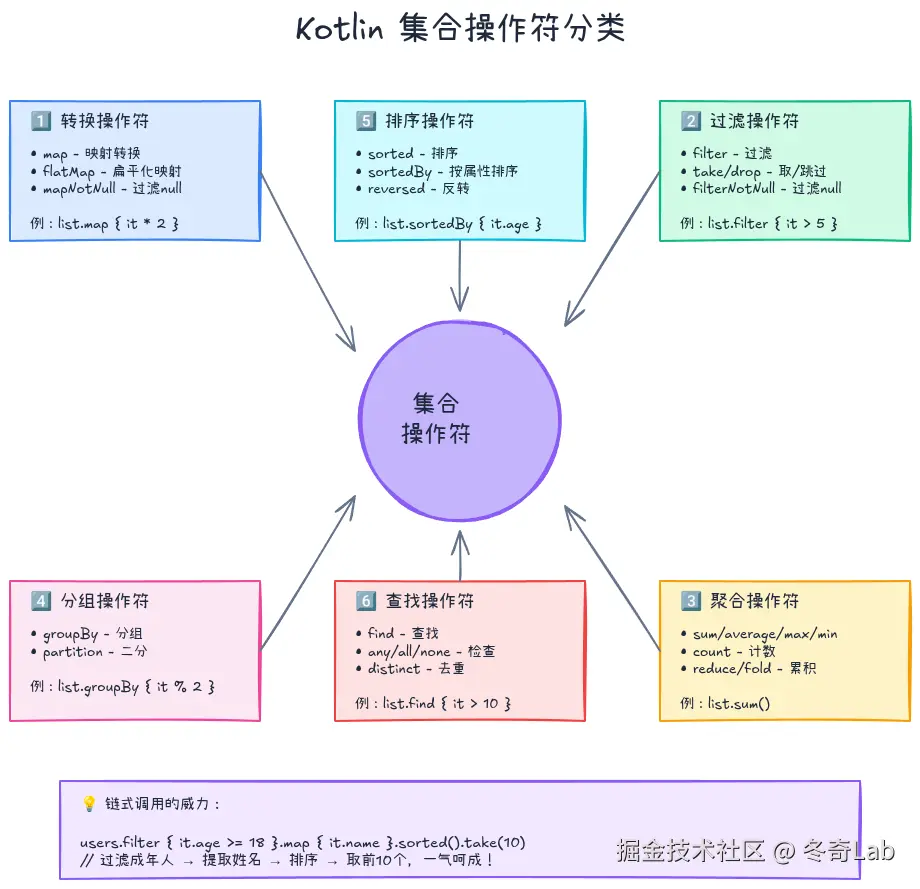
转换操作符
map - 映射转换
将集合中的每个元素转换为另一种形式。
kotlin
val numbers = listOf(1, 2, 3, 4, 5)

// 转换为平方
val squares = numbers.map { it * it }
println(squares)  // [1, 4, 9, 16, 25]

// 转换为字符串
val strings = numbers.map { "Number $it" }
println(strings)  // [Number 1, Number 2, Number 3, Number 4, Number 5]

// 实际应用:提取对象属性
data class User(val name: String, val age: Int)
val users = listOf(
    User("Alice", 25),
    User("Bob", 30),
    User("Charlie", 35)
)

val names = users.map { it.name }
println(names)  // [Alice, Bob, Charlie]
mapNotNull - 映射并过滤null
kotlin
val list = listOf("1", "2", "abc", "3")

val numbers = list.mapNotNull { it.toIntOrNull() }
println(numbers)  // [1, 2, 3]("abc"被过滤掉)
flatMap - 扁平化映射
将每个元素映射为一个集合,然后合并所有集合。
kotlin
val list = listOf(
    listOf(1, 2, 3),
    listOf(4, 5),
    listOf(6, 7, 8)
)

// map vs flatMap
val mapped = list.map { it.map { num -> num * 2 } }
println(mapped)  // [[2, 4, 6], [8, 10], [12, 14, 16]](嵌套列表)

val flatMapped = list.flatMap { it.map { num -> num * 2 } }
println(flatMapped)  // [2, 4, 6, 8, 10, 12, 14, 16](扁平列表)

// 实际应用:一对多关系
data class Department(val name: String, val employees: List<String>)
val departments = listOf(
    Department("IT", listOf("Alice", "Bob")),
    Department("HR", listOf("Charlie", "David"))
)

val allEmployees = departments.flatMap { it.employees }
println(allEmployees)  // [Alice, Bob, Charlie, David]
过滤操作符
filter - 过滤
保留符合条件的元素。
kotlin
val numbers = listOf(1, 2, 3, 4, 5, 6, 7, 8, 9, 10)

// 过滤偶数
val evens = numbers.filter { it % 2 == 0 }
println(evens)  // [2, 4, 6, 8, 10]

// 过滤奇数
val odds = numbers.filter { it % 2 != 0 }
println(odds)  // [1, 3, 5, 7, 9]

// 实际应用:过滤用户
val users = listOf(
    User("Alice", 25),
    User("Bob", 17),
    User("Charlie", 30)
)

val adults = users.filter { it.age >= 18 }
println(adults)  // [User(Alice, 25), User(Charlie, 30)]
filterNot - 反向过滤
kotlin
val numbers = listOf(1, 2, 3, 4, 5)
val notEvens = numbers.filterNot { it % 2 == 0 }
println(notEvens)  // [1, 3, 5]
filterNotNull - 过滤null
kotlin
val list = listOf(1, null, 2, null, 3)
val nonNulls = list.filterNotNull()
println(nonNulls)  // [1, 2, 3]
take / drop - 取/跳过元素
kotlin
val numbers = listOf(1, 2, 3, 4, 5, 6, 7, 8, 9, 10)

println(numbers.take(3))       // [1, 2, 3](前3个)
println(numbers.takeLast(3))   // [8, 9, 10](后3个)
println(numbers.drop(3))       // [4, 5, 6, 7, 8, 9, 10](跳过前3个)
println(numbers.dropLast(3))   // [1, 2, 3, 4, 5, 6, 7](跳过后3个)

// 条件take/drop
println(numbers.takeWhile { it < 5 })  // [1, 2, 3, 4]
println(numbers.dropWhile { it < 5 })  // [5, 6, 7, 8, 9, 10]
聚合操作符
sum / average / max / min
kotlin
val numbers = listOf(1, 2, 3, 4, 5)

println(numbers.sum())      // 15
println(numbers.average())  // 3.0
println(numbers.max())      // 5(Kotlin 1.4+已弃用,使用maxOrNull())
println(numbers.maxOrNull())  // 5
println(numbers.minOrNull())  // 1
count - 计数
kotlin
val numbers = listOf(1, 2, 3, 4, 5, 6, 7, 8, 9, 10)

println(numbers.count())  // 10(总数)
println(numbers.count { it % 2 == 0 })  // 5(偶数个数)
reduce / fold - 累积计算
kotlin
val numbers = listOf(1, 2, 3, 4, 5)

// reduce: 从第一个元素开始累积
val sum = numbers.reduce { acc, num -> acc + num }
println(sum)  // 15

// fold: 指定初始值
val sumWithInitial = numbers.fold(100) { acc, num -> acc + num }
println(sumWithInitial)  // 115(100 + 15)

// 实际应用:计算总价
data class Product(val name: String, val price: Double)
val cart = listOf(
    Product("Book", 29.9),
    Product("Pen", 5.5),
    Product("Notebook", 15.0)
)

val totalPrice = cart.fold(0.0) { total, product -> total + product.price }
println("Total: $$totalPrice")  // Total: $50.4
分组操作符
groupBy - 分组
按条件将集合分组。
kotlin
val numbers = listOf(1, 2, 3, 4, 5, 6, 7, 8, 9, 10)

// 按奇偶分组
val grouped = numbers.groupBy { it % 2 == 0 }
println(grouped)  // {false=[1, 3, 5, 7, 9], true=[2, 4, 6, 8, 10]}

// 实际应用:按年龄段分组
data class Person(val name: String, val age: Int)
val people = listOf(
    Person("Alice", 25),
    Person("Bob", 17),
    Person("Charlie", 30),
    Person("David", 16),
    Person("Eve", 28)
)

val ageGroups = people.groupBy {
    when {
        it.age < 18 -> "未成年"
        it.age < 30 -> "青年"
        else -> "成年"
    }
}
println(ageGroups)
// {未成年=[Person(Bob, 17), Person(David, 16)],
//  青年=[Person(Alice, 25), Person(Eve, 28)],
//  成年=[Person(Charlie, 30)]}
partition - 二分
将集合分为符合和不符合条件的两部分。
kotlin
val numbers = listOf(1, 2, 3, 4, 5, 6)

val (evens, odds) = numbers.partition { it % 2 == 0 }
println("偶数: $evens")  // 偶数: [2, 4, 6]
println("奇数: $odds")   // 奇数: [1, 3, 5]
排序操作符
kotlin
val numbers = listOf(3, 1, 4, 1, 5, 9, 2, 6)

// 升序排序
println(numbers.sorted())  // [1, 1, 2, 3, 4, 5, 6, 9]

// 降序排序
println(numbers.sortedDescending())  // [9, 6, 5, 4, 3, 2, 1, 1]

// 自定义排序
data class User(val name: String, val age: Int)
val users = listOf(
    User("Alice", 25),
    User("Bob", 30),
    User("Charlie", 20)
)

val sortedByAge = users.sortedBy { it.age }
println(sortedByAge)  // [Charlie(20), Alice(25), Bob(30)]

val sortedByName = users.sortedByDescending { it.name }
println(sortedByName)  // [Charlie, Bob, Alice]
查找操作符
kotlin
val numbers = listOf(1, 2, 3, 4, 5)

// 查找第一个符合条件的
println(numbers.find { it > 3 })      // 4
println(numbers.firstOrNull { it > 3 })  // 4(同find)

// 查找最后一个符合条件的
println(numbers.lastOrNull { it < 3 })  // 2

// 检查是否存在
println(numbers.any { it > 10 })      // false(是否有任意元素满足)
println(numbers.all { it > 0 })       // true(是否所有元素都满足)
println(numbers.none { it < 0 })      // true(是否没有元素满足)
去重操作符
kotlin
val numbers = listOf(1, 2, 2, 3, 3, 3, 4, 4, 4, 4)

// 去重
println(numbers.distinct())  // [1, 2, 3, 4]

// 按条件去重
data class User(val id: Int, val name: String)
val users = listOf(
    User(1, "Alice"),
    User(2, "Bob"),
    User(1, "Alice2")  // id重复
)

val distinctUsers = users.distinctBy { it.id }
println(distinctUsers)  // [User(1, Alice), User(2, Bob)]
链式操作:组合的威力
Kotlin集合操作符的真正威力在于链式组合:
kotlin
data class Student(val name: String, val age: Int, val scores: List<Int>)

val students = listOf(
    Student("Alice", 20, listOf(85, 90, 92)),
    Student("Bob", 19, listOf(78, 82, 80)),
    Student("Charlie", 21, listOf(92, 95, 98)),
    Student("David", 20, listOf(88, 85, 90))
)

// 需求:找出20岁以上、平均分大于90的学生名字,按平均分降序排列
val result = students
    .filter { it.age >= 20 }                    // 过滤年龄
    .map { it to it.scores.average() }          // 计算平均分
    .filter { (_, avg) -> avg > 90 }            // 过滤平均分
    .sortedByDescending { (_, avg) -> avg }     // 降序排序
    .map { (student, avg) -> "${student.name}: $avg" }  // 格式化输出

println(result)  // [Charlie: 95.0, Alice: 89.0]
**可读性提示**:链式调用很强大,但也要注意可读性。如果链条过长(超过5-6个操作),考虑: 1. 分解为多个步骤,使用中间变量 2. 添加注释说明每个步骤的目的 3. 提取复杂的Lambda为命名函数
Sequence:惰性求值的秘密武器
当处理大量数据时,普通集合操作会创建多个中间集合,影响性能。Sequence提供惰性求值,只在需要时才计算。
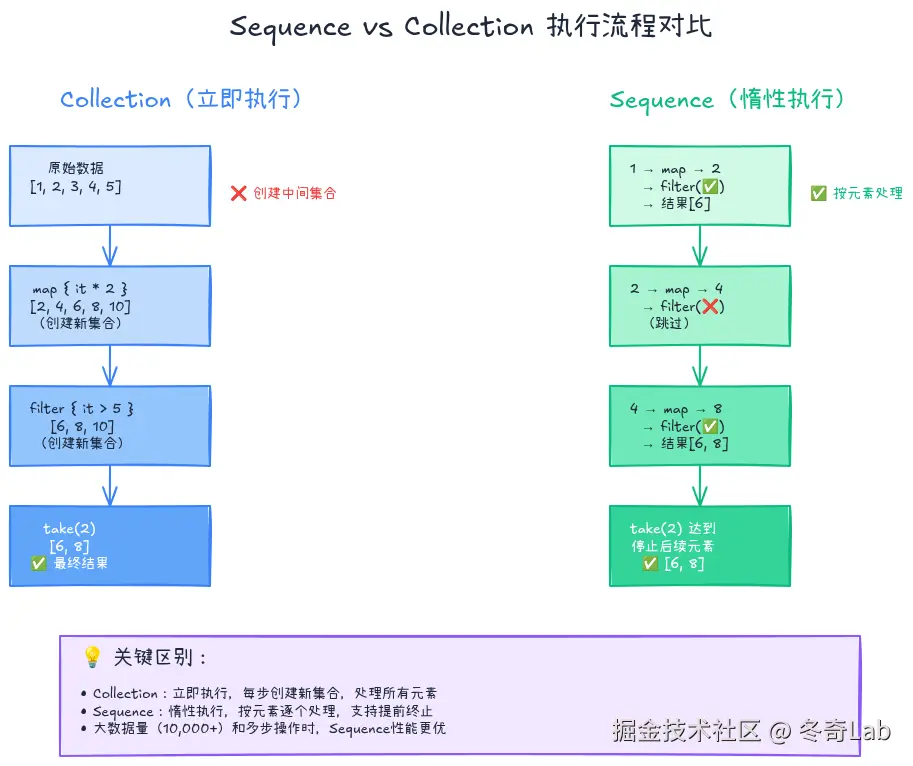
Collection vs Sequence
kotlin
val numbers = listOf(1, 2, 3, 4, 5, 6, 7, 8, 9, 10)

// Collection:立即执行,创建中间集合
val result1 = numbers
    .map {
        println("map: $it")
        it * 2
    }
    .filter {
        println("filter: $it")
        it > 10
    }
    .take(2)
// 输出:map 1, map 2, ... map 10, filter 2, filter 4, ... filter 20

// Sequence:惰性执行,不创建中间集合
val result2 = numbers.asSequence()
    .map {
        println("map: $it")
        it * 2
    }
    .filter {
        println("filter: $it")
        it > 10
    }
    .take(2)
    .toList()  // 终端操作,触发计算
// 输出:map 1, filter 2, map 2, filter 4, ... map 6, filter 12
// 找到2个后就停止
何时使用Sequence
kotlin
// ❌ 小集合不需要Sequence
val small = listOf(1, 2, 3).asSequence()  // 过度优化

// ✅ 大集合使用Sequence
val large = (1..1_000_000).asSequence()
    .map { it * 2 }
    .filter { it % 3 == 0 }
    .take(100)
    .toList()

// ✅ 多步操作使用Sequence
val result = someList.asSequence()
    .map { /* 步骤1 */ }
    .filter { /* 步骤2 */ }
    .flatMap { /* 步骤3 */ }
    .distinct()
    .sorted()
    .toList()

// ✅ 可能提前终止的操作
val firstMatch = largeList.asSequence()
    .map { expensiveOperation(it) }
    .find { it > 100 }  // 找到第一个就停止
**注意**:Sequence的惰性求值意味着: 1. 必须有终端操作(`toList()`、`toSet()`、`find()`等)才会执行 2. 不要在Sequence上执行有副作用的操作(如打印日志),因为执行顺序可能不符合预期 3. Sequence不是线程安全的
创建Sequence
kotlin
// 从集合转换
val seq1 = listOf(1, 2, 3).asSequence()

// 从生成器
val seq2 = generateSequence(1) { it + 1 }  // 无限序列:1, 2, 3, ...
val first10 = seq2.take(10).toList()

// 斐波那契数列
val fibonacci = generateSequence(Pair(0, 1)) { (a, b) -> Pair(b, a + b) }
    .map { it.first }
val first10Fib = fibonacci.take(10).toList()
println(first10Fib)  // [0, 1, 1, 2, 3, 5, 8, 13, 21, 34]

// 从文件读取行(自动惰性处理)
fun readLargeFile(path: String) {
    File(path).useLines { lines ->
        lines
            .filter { it.isNotEmpty() }
            .map { it.trim() }
            .take(100)
            .forEach { println(it) }
    }
}
实战:电商订单数据分析
让我们用一个完整的实战案例,综合运用所学的集合操作:
kotlin
// 数据模型
data class Product(val id: Int, val name: String, val category: String, val price: Double)
data class Order(val orderId: String, val userId: Int, val products: List<Product>, val date: String)
data class User(val userId: Int, val name: String, val city: String)

// 订单数据
val orders = listOf(
    Order("O001", 1, listOf(
        Product(101, "Laptop", "Electronics", 5999.0),
        Product(102, "Mouse", "Electronics", 99.0)
    ), "2024-01-15"),
    Order("O002", 2, listOf(
        Product(201, "Book", "Books", 49.9),
        Product(202, "Pen", "Stationery", 5.0)
    ), "2024-01-16"),
    Order("O003", 1, listOf(
        Product(103, "Keyboard", "Electronics", 299.0)
    ), "2024-01-17"),
    Order("O004", 3, listOf(
        Product(301, "Shirt", "Clothing", 199.0),
        Product(302, "Pants", "Clothing", 299.0)
    ), "2024-01-18")
)

val users = listOf(
    User(1, "Alice", "Beijing"),
    User(2, "Bob", "Shanghai"),
    User(3, "Charlie", "Beijing")
)

// 分析1:计算每个用户的总消费
fun analyzeUserSpending(): Map<String, Double> {
    return orders
        .groupBy { it.userId }
        .mapValues { (_, userOrders) ->
            userOrders.sumOf { order ->
                order.products.sumOf { it.price }
            }
        }
        .mapKeys { (userId, _) ->
            users.find { it.userId == userId }?.name ?: "Unknown"
        }
}

println("用户总消费:")
analyzeUserSpending().forEach { (name, total) ->
    println("  $name: ¥$total")
}
// 输出:
// Alice: ¥6397.0
// Bob: ¥54.9
// Charlie: ¥498.0

// 分析2:找出最受欢迎的商品类别
fun findPopularCategories(): List<Pair<String, Int>> {
    return orders
        .flatMap { it.products }
        .groupBy { it.category }
        .mapValues { (_, products) -> products.size }
        .toList()
        .sortedByDescending { (_, count) -> count }
}

println("\n商品类别销量排行:")
findPopularCategories().forEach { (category, count) ->
    println("  $category: $count 件")
}
// 输出:
// Electronics: 3 件
// Clothing: 2 件
// Books: 1 件
// Stationery: 1 件

// 分析3:计算每个城市的订单总额
fun analyzeCityRevenue(): Map<String, Double> {
    return orders
        .map { order ->
            val user = users.find { it.userId == order.userId }
            val total = order.products.sumOf { it.price }
            user?.city to total
        }
        .filterNotNull()
        .groupBy({ it.first!! }, { it.second })
        .mapValues { (_, totals) -> totals.sum() }
}

println("\n城市订单总额:")
analyzeCityRevenue().forEach { (city, total) ->
    println("  $city: ¥$total")
}
// 输出:
// Beijing: ¥6895.0
// Shanghai: ¥54.9

// 分析4:找出高价值订单(总额>500)的用户
fun findHighValueCustomers(): List<String> {
    return orders
        .filter { order ->
            order.products.sumOf { it.price } > 500
        }
        .map { it.userId }
        .distinct()
        .mapNotNull { userId ->
            users.find { it.userId == userId }?.name
        }
}

println("\n高价值客户:")
findHighValueCustomers().forEach { name ->
    println("  $name")
}
// 输出:
// Alice
常见问题
Q1: 什么时候用List、Set、Map?
选择指南:
| 需求 | 选择 | 原因 |
|---|---|---|
| 需要保持元素顺序 | List | 有序集合 |
| 需要通过索引访问 | List | 支持下标访问 |
| 需要去重 | Set | 自动去重 |
| 需要快速检查元素存在性 | Set | O(1)查找 |
| 需要键值对映射 | Map | 键值对存储 |
| 需要按键快速查找值 | Map | O(1)查找 |
kotlin
// 示例:记录用户访问历史
val visitHistory = mutableListOf<String>()  // ✅ 需要顺序

// 示例:记录访问过的页面(不重复)
val visitedPages = mutableSetOf<String>()  // ✅ 需要去重

// 示例:记录页面访问次数
val pageViews = mutableMapOf<String, Int>()  // ✅ 需要统计
Q2: filter和map的顺序有什么影响?
kotlin
val numbers = (1..1000).toList()

// 方案1:先过滤再映射(推荐)
val result1 = numbers
    .filter { it % 2 == 0 }  // 处理1000个元素,保留500个
    .map { it * it }         // 处理500个元素

// 方案2:先映射再过滤
val result2 = numbers
    .map { it * it }         // 处理1000个元素
    .filter { it % 2 == 0 }  // 处理1000个元素

// 方案1更高效:尽早减少数据量
原则 :先过滤再映射,尽早减少数据量。
Q3: 何时使用Sequence?
kotlin
// ❌ 不需要Sequence
listOf(1, 2, 3).asSequence().map { it * 2 }.toList()  // 小集合,overhead更大

// ✅ 需要Sequence
(1..1_000_000)
    .asSequence()          // 大集合
    .map { it * 2 }
    .filter { it > 100 }
    .take(10)              // 提前终止
.toList()使用Sequence的场景:
- 处理大集合(10,000+元素)
- 多步操作(3+个操作符)
- 可能提前终止(find、take等)
- 处理无限序列
Q4: 如何选择可变/不可变集合?
kotlin
// ✅ 默认使用不可变
val config = mapOf("host" to "localhost", "port" to 8080)

// ✅ 需要修改时使用可变
val cache = mutableMapOf<String, Any>()
cache["user"] = loadUser()

// ❌ 不要暴露可变集合
class UserManager {
    private val _users = mutableListOf<User>()
    val users: List<User> = _users  // ✅ 只读视图
}最佳实践:
- 默认使用不可变集合(
listOf、setOf、mapOf) - 只在必要时使用可变集合
- 不要暴露可变集合,返回只读视图
总结
本文深入探索了Kotlin强大的集合框架:
1. 集合体系
- List(有序可重复)、Set(无序不重复)、Map(键值对)
- 不可变集合 vs 可变集合
- 默认使用不可变,提高安全性
2. 集合操作符
- 转换:map、flatMap、mapNotNull
- 过滤:filter、filterNot、take、drop
- 聚合:sum、average、reduce、fold
- 分组:groupBy、partition
- 排序:sorted、sortedBy、sortedDescending
- 查找:find、any、all、none
- 去重:distinct、distinctBy
3. 函数式编程
- 链式调用,代码简洁优雅
- 无副作用,易于理解和测试
- 声明式而非命令式
4. Sequence惰性求值
- 不创建中间集合,节省内存
- 支持提前终止,提高效率
- 适合大数据和多步操作
5. 最佳实践
- 优先使用不可变集合
- 先过滤再映射
- 大数据使用Sequence
- 注意链式操作的可读性
下一篇文章我们将学习面向对象进阶:接口、抽象类与多态,深入探索Kotlin的OOP特性。
练习题
练习1:学生成绩管理系统
kotlin
data class Student(val id: Int, val name: String, val grades: Map<String, Int>)

val students = listOf(
    Student(1, "Alice", mapOf("Math" to 95, "English" to 88, "Physics" to 92)),
    Student(2, "Bob", mapOf("Math" to 78, "English" to 85, "Physics" to 80)),
    Student(3, "Charlie", mapOf("Math" to 92, "English" to 95, "Physics" to 98))
)

// TODO 1: 找出数学成绩大于90的学生名字

// TODO 2: 计算每个学生的平均分,返回Map<String, Double>

// TODO 3: 找出平均分最高的学生

// TODO 4: 统计每门课的平均分

// TODO 5: 找出所有科目都及格(>=60)的学生
练习2:日志分析系统
kotlin
data class LogEntry(val timestamp: String, val level: String, val message: String)

val logs = """
2024-01-15 10:23:45 INFO User login: alice
2024-01-15 10:24:12 ERROR Failed to connect to database
2024-01-15 10:25:30 WARN Memory usage: 85%
2024-01-15 10:26:15 INFO User logout: alice
2024-01-15 10:27:22 ERROR Null pointer exception
""".trimIndent().lines().filter { it.isNotEmpty() }

// TODO 1: 解析日志(提示:使用split)

// TODO 2: 统计各级别日志数量

// TODO 3: 找出所有ERROR级别的消息

// TODO 4: 按小时分组统计日志数量(提示:提取timestamp的小时部分)
练习3:使用Sequence优化性能
kotlin
// TODO: 重写以下代码,使用Sequence提高性能
fun findPrimeNumbers(max: Int): List<Int> {
    return (2..max)
        .filter { isPrime(it) }
        .take(100)
}

fun isPrime(n: Int): Boolean {
    if (n < 2) return false
    return (2..Math.sqrt(n.toDouble()).toInt()).none { n % it == 0 }
}

// TODO: 对比性能差异
系列文章导航:
如果这篇文章对你有帮助,欢迎点赞、收藏、分享!有任何问题或建议,欢迎在评论区留言讨论。让我们一起学习,一起成长!
也欢迎访问我的个人主页发现更多宝藏资源