**Day.js:**是一个极简的JavaScript库,可以为现代浏览器解析、验证、操作和显示日期和时间。
目录
[2、官方文档 - 中文网:安装 | Day.js中文网](#2、官方文档 - 中文网:安装 | Day.js中文网)
效果
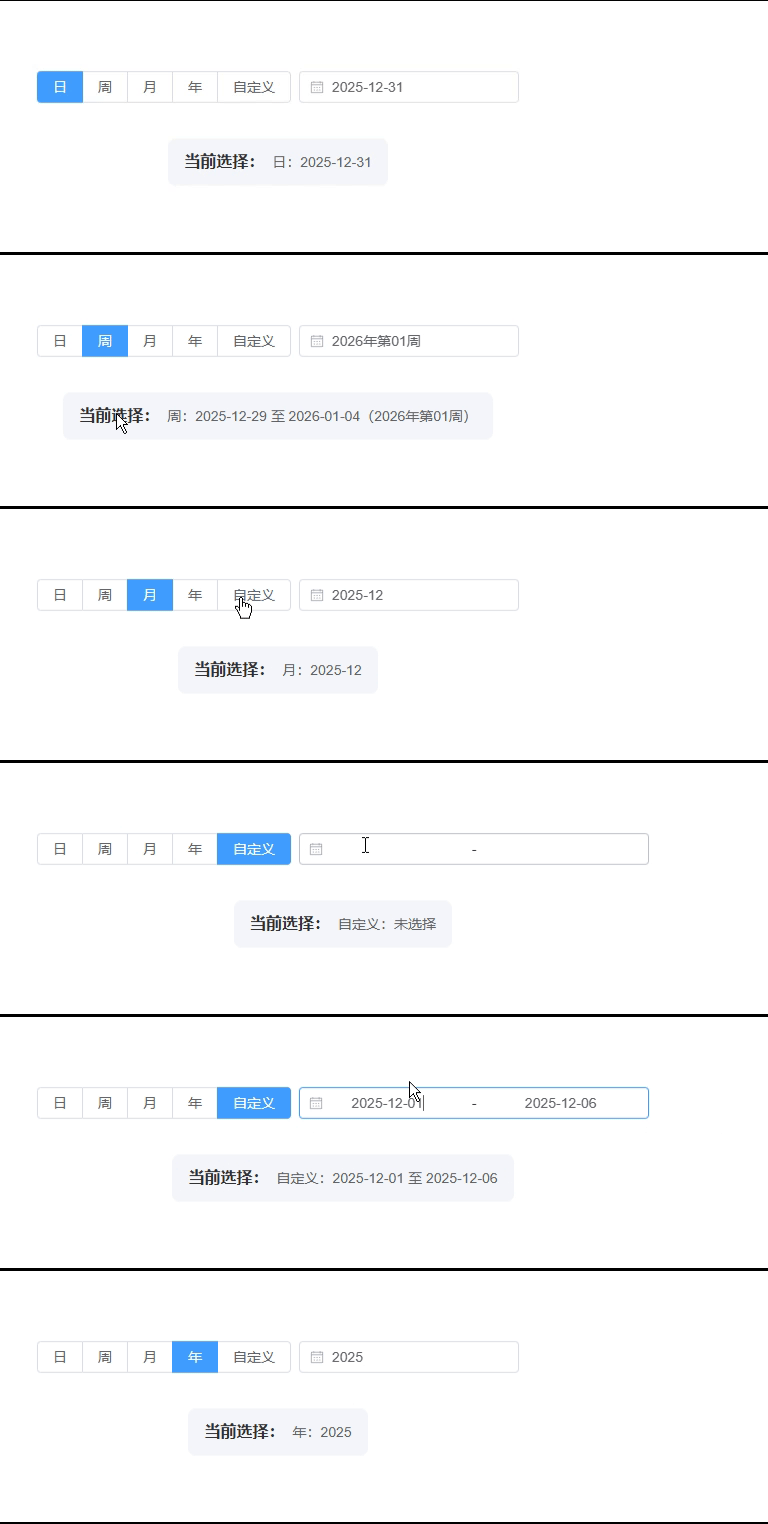
一、介绍
1、官网: Day.js中文网
Day.js中文网Day.js是一个极简的JavaScript库,可以为现代浏览器解析、验证、操作和显示日期和时间。https://dayjs.fenxianglu.cn/
2、官方文档 - 中文网:安装 | Day.js中文网
安装 | Day.js中文网Day.js是一个极简的JavaScript库,可以为现代浏览器解析、验证、操作和显示日期和时间。https://dayjs.fenxianglu.cn/category/
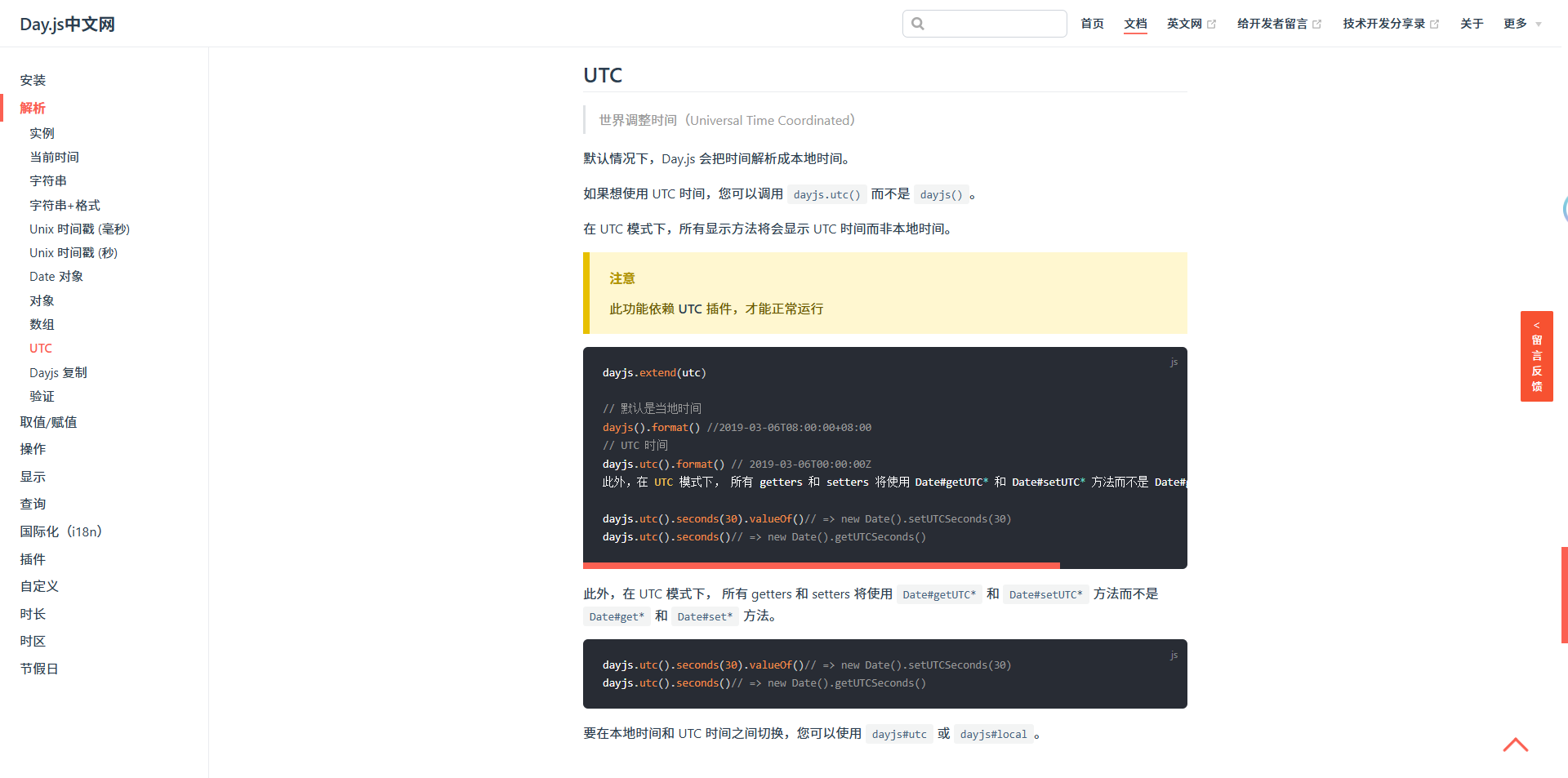
二、准备工作
1、安装依赖包
# 选择一个你喜欢的包管理器

# npm
$ npm install dayjs

# cnpm
$ cnpm install dayjs -S

# yarn
$ yarn add dayjs

# pnpm
$ pnpm install dayjs
注:也可以通过浏览器的 script 标签导入 CDN 文件使用
2、示例版本
"dayjs": "^1.11.19",三、使用步骤
1、在单页面引入 'dayjs'
import type { Dayjs } from 'dayjs'
import dayjs from 'dayjs'
import isoWeek from 'dayjs/plugin/isoWeek'
import utc from 'dayjs/plugin/utc'

// 扩展dayjs功能
dayjs.extend(isoWeek)
dayjs.extend(utc)
2、具体使用(以默认日选择器举例)
const dayStart = dayjs(selectDays.value).startOf('day')
const dayEnd = dayjs(selectDays.value).endOf('day')

......详见完整示例
四、完整示例
<template>
  <div class="container">
    <!-- 日期选择区域 -->
    <el-space direction="vertical" size="large">
      <el-space>
        <!-- 日期类型选择器 -->
        <el-radio-group v-model="dateType" @change="handleDateTypeChange">
          <el-radio-button label="日" />
          <el-radio-button label="周" />
          <el-radio-button label="月" />
          <el-radio-button label="年" />
          <el-radio-button label="自定义" />
        </el-radio-group>

        <!-- 日选择器 -->
        <el-date-picker
          v-if="dateType === '日'"
          v-model="selectDays"
          type="date"
          format="YYYY-MM-DD"
          placeholder="请选择日期"
          @change="dateChange"
          :disabled-date="disabledDate"
        />

        <!-- 周选择器-->
        <el-date-picker
          v-if="dateType === '周'"
          v-model="selectWeeks"
          type="week"
          format="GGGG年第ww周"
          value-format="YYYY-MM-DD"
          placeholder="请选择周"
          @change="dateChange"
          :disabled-date="disabledDate"
        />

        <!-- 月选择器 -->
        <el-date-picker
          v-if="dateType === '月'"
          v-model="selectMonths"
          type="month"
          format="YYYY-MM"
          value-format="YYYY-MM"
          placeholder="请选择月"
          @change="dateChange"
          :disabled-date="disabledDate"
        />

        <!-- 年选择器 -->
        <el-date-picker
          v-if="dateType === '年'"
          v-model="selectYears"
          type="year"
          format="YYYY"
          value-format="YYYY"
          placeholder="请选择年"
          @change="dateChange"
          :disabled-date="disabledDate"
        />

        <!-- 自定义日期范围选择器,默认空,限制≤7天 -->
        <el-date-picker
          v-if="dateType === '自定义'"
          v-model="selectRange"
          type="daterange"
          format="YYYY-MM-DD"
          value-format="YYYY-MM-DD"
          :placeholder="['请选择开始日期', '请选择结束日期']"
          @change="handleCustomDateChange"
          :disabled-date="disabledDate"
        />
      </el-space>

      <!-- 选择结果展示区域 -->
      <div class="selected-date-display">
        <div class="display-label">当前选择:</div>
        <div class="display-value">{{ selectedDateText }}</div>
      </div>
    </el-space>
  </div>
</template>

<script setup lang="ts" name="dateSelector">
import type { Dayjs } from 'dayjs'
import dayjs from 'dayjs'
import isoWeek from 'dayjs/plugin/isoWeek'
import utc from 'dayjs/plugin/utc'
import { ElMessage } from 'element-plus'
import { computed } from 'vue'

// 扩展dayjs功能
dayjs.extend(isoWeek)
dayjs.extend(utc)

// 日期选择相关
const dateType = ref<string>('日') // 默认日选择器
const selectDays = ref<Dayjs | null>(dayjs()) // 日选择器-默认当日
const selectWeeks = ref<string | null>(dayjs().startOf('isoWeek').format('YYYY-MM-DD')) // 周选择器-默认当周
const selectMonths = ref<string | null>(dayjs().format('YYYY-MM')) // 月选择器-默认当月
const selectYears = ref<string | null>(dayjs().format('YYYY')) // 年选择器-默认当年
const selectRange = ref<[string, string] | null>(null) // 自定义日期范围
const startTime = ref<string | null>(null) // 开始时间(UTC格式)
const endTime = ref<string | null>(null) // 结束时间(UTC格式)

// 禁用未来日期
const disabledDate = (time: Date) => {
  return time.getTime() > Date.now()
}

// 初始化时间范围
const initTimeRange = () => {
  switch (dateType.value) {
    case '日':
      if (selectDays.value) {
        const dayStart = dayjs(selectDays.value).startOf('day')
        const dayEnd = dayjs(selectDays.value).endOf('day')
        startTime.value = dayStart.utc().format('YYYY-MM-DDTHH:mm:ss[Z]')
        endTime.value = dayEnd.utc().format('YYYY-MM-DDTHH:mm:ss[Z]')
      } else {
        startTime.value = null
        endTime.value = null
      }
      break
    case '周':
      if (selectWeeks.value) {
        const weekStart = dayjs(selectWeeks.value).startOf('day')
        const weekEnd = dayjs(selectWeeks.value).endOf('isoWeek').endOf('day')
        startTime.value = weekStart.utc().format('YYYY-MM-DDTHH:mm:ss[Z]')
        endTime.value = weekEnd.utc().format('YYYY-MM-DDTHH:mm:ss[Z]')
      } else {
        const currentWeekStart = dayjs().startOf('isoWeek').startOf('day')
        const currentWeekEnd = dayjs().endOf('isoWeek').endOf('day')
        startTime.value = currentWeekStart.utc().format('YYYY-MM-DDTHH:mm:ss[Z]')
        endTime.value = currentWeekEnd.utc().format('YYYY-MM-DDTHH:mm:ss[Z]')
      }
      break
    case '月':
      if (selectMonths.value) {
        const monthStart = dayjs(selectMonths.value).startOf('month').startOf('day')
        const monthEnd = dayjs(selectMonths.value).endOf('month').endOf('day')
        startTime.value = monthStart.utc().format('YYYY-MM-DDTHH:mm:ss[Z]')
        endTime.value = monthEnd.utc().format('YYYY-MM-DDTHH:mm:ss[Z]')
      } else {
        const currentMonthStart = dayjs().startOf('month').startOf('day')
        const currentMonthEnd = dayjs().endOf('month').endOf('day')
        startTime.value = currentMonthStart.utc().format('YYYY-MM-DDTHH:mm:ss[Z]')
        endTime.value = currentMonthEnd.utc().format('YYYY-MM-DDTHH:mm:ss[Z]')
      }
      break
    case '年':
      if (selectYears.value) {
        const yearStart = dayjs(`${selectYears.value}-01-01`).startOf('day').utc()
        const yearEnd = dayjs(`${selectYears.value}-12-31`).endOf('day').utc()
        startTime.value = yearStart.format('YYYY-MM-DDTHH:mm:ss[Z]')
        endTime.value = yearEnd.format('YYYY-MM-DDTHH:mm:ss[Z]')
      } else {
        const currentYear = dayjs().format('YYYY')
        const yearStart = dayjs(`${currentYear}-01-01`).startOf('day').utc()
        const yearEnd = dayjs(`${currentYear}-12-31`).endOf('day').utc()
        startTime.value = yearStart.format('YYYY-MM-DDTHH:mm:ss[Z]')
        endTime.value = yearEnd.format('YYYY-MM-DDTHH:mm:ss[Z]')
      }
      break
    case '自定义':
      startTime.value = null
      endTime.value = null
      break
  }
}

// 自定义日期范围变化处理(限制≤7天)
const handleCustomDateChange = (date: [string, string] | null) => {
  if (!date) {
    startTime.value = null
    endTime.value = null
    selectRange.value = null
    return
  }

  const startDay = dayjs(date[0])
  const endDay = dayjs(date[1])
  const dayDiff = endDay.diff(startDay, 'day')

  if (dayDiff > 7) {
    ElMessage.error('自定义日期范围不能超过7天')
    selectRange.value = null
    dateChange(null)
  } else {
    dateChange(date)
  }
}

// 日期变化统一处理
const dateChange = (date: any) => {
  switch (dateType.value) {
    case '日':
      if (date) {
        const selectedDay = dayjs(date)
        startTime.value = selectedDay.startOf('day').utc().format('YYYY-MM-DDTHH:mm:ss[Z]')
        endTime.value = selectedDay.endOf('day').utc().format('YYYY-MM-DDTHH:mm:ss[Z]')
      } else {
        startTime.value = null
        endTime.value = null
      }
      break
    case '周':
      if (date) {
        const weekStart = dayjs(date).startOf('day')
        const weekEnd = dayjs(date).endOf('isoWeek').endOf('day')
        startTime.value = weekStart.utc().format('YYYY-MM-DDTHH:mm:ss[Z]')
        endTime.value = weekEnd.utc().format('YYYY-MM-DDTHH:mm:ss[Z]')
      } else {
        const currentWeekStart = dayjs().startOf('isoWeek').startOf('day')
        const currentWeekEnd = dayjs().endOf('isoWeek').endOf('day')
        startTime.value = currentWeekStart.utc().format('YYYY-MM-DDTHH:mm:ss[Z]')
        endTime.value = currentWeekEnd.utc().format('YYYY-MM-DDTHH:mm:ss[Z]')
      }
      break
    case '月':
      if (date) {
        const monthStart = dayjs(date).startOf('month').startOf('day')
        const monthEnd = dayjs(date).endOf('month').endOf('day')
        startTime.value = monthStart.utc().format('YYYY-MM-DDTHH:mm:ss[Z]')
        endTime.value = monthEnd.utc().format('YYYY-MM-DDTHH:mm:ss[Z]')
      } else {
        const currentMonthStart = dayjs().startOf('month').startOf('day')
        const currentMonthEnd = dayjs().endOf('month').endOf('day')
        startTime.value = currentMonthStart.utc().format('YYYY-MM-DDTHH:mm:ss[Z]')
        endTime.value = currentMonthEnd.utc().format('YYYY-MM-DDTHH:mm:ss[Z]')
      }
      break
    case '年':
      if (date) {
        const yearStart = dayjs(`${date}-01-01`).startOf('day').utc()
        const yearEnd = dayjs(`${date}-12-31`).endOf('day').utc()
        startTime.value = yearStart.format('YYYY-MM-DDTHH:mm:ss[Z]')
        endTime.value = yearEnd.format('YYYY-MM-DDTHH:mm:ss[Z]')
      } else {
        const currentYear = dayjs().format('YYYY')
        const yearStart = dayjs(`${currentYear}-01-01`).startOf('day').utc()
        const yearEnd = dayjs(`${currentYear}-12-31`).endOf('day').utc()
        startTime.value = yearStart.format('YYYY-MM-DDTHH:mm:ss[Z]')
        endTime.value = yearEnd.format('YYYY-MM-DDTHH:mm:ss[Z]')
      }
      break
    case '自定义':
      if (date && Array.isArray(date) && date.length === 2) {
        const startDate = dayjs(date[0])
        const endDate = dayjs(date[1])
        startTime.value = startDate.startOf('day').utc().format('YYYY-MM-DDTHH:mm:ss[Z]')
        endTime.value = endDate.endOf('day').utc().format('YYYY-MM-DDTHH:mm:ss[Z]')
      } else {
        startTime.value = null
        endTime.value = null
      }
      break
  }
}

// 日期类型切换处理
const handleDateTypeChange = (value: string) => {
  dateType.value = value

  switch (value) {
    case '日':
      selectDays.value = dayjs()
      selectWeeks.value = null
      selectMonths.value = null
      selectYears.value = null
      selectRange.value = null
      initTimeRange()
      break
    case '周':
      selectDays.value = null
      selectWeeks.value = dayjs().startOf('isoWeek').format('YYYY-MM-DD')
      selectMonths.value = null
      selectYears.value = null
      selectRange.value = null
      initTimeRange()
      break
    case '月':
      selectDays.value = null
      selectWeeks.value = null
      selectMonths.value = dayjs().format('YYYY-MM')
      selectYears.value = null
      selectRange.value = null
      initTimeRange()
      break
    case '年':
      selectDays.value = null
      selectWeeks.value = null
      selectMonths.value = null
      selectYears.value = dayjs().format('YYYY')
      selectRange.value = null
      initTimeRange()
      break
    case '自定义':
      selectDays.value = null
      selectWeeks.value = null
      selectMonths.value = null
      selectYears.value = null
      selectRange.value = null
      startTime.value = null
      endTime.value = null
      break
  }
}

// 计算当前选择的日期文本
const selectedDateText = computed(() => {
  switch (dateType.value) {
    case '日':
      return selectDays.value ? `日:${dayjs(selectDays.value).format('YYYY-MM-DD')}` : '日:未选择'
    case '周':
      if (selectWeeks.value) {
        const weekStart = dayjs(selectWeeks.value).format('YYYY-MM-DD')
        const weekEnd = dayjs(selectWeeks.value).endOf('isoWeek').format('YYYY-MM-DD')
        return `周:${weekStart} 至 ${weekEnd}(${dayjs(selectWeeks.value).format('GGGG年第ww周')})`
      }
      return '周:未选择'
    case '月':
      return selectMonths.value ? `月:${selectMonths.value}` : '月:未选择'
    case '年':
      return selectYears.value ? `年:${selectYears.value}` : '年:未选择'
    case '自定义':
      if (selectRange.value && selectRange.value.length === 2) {
        return `自定义:${selectRange.value[0]} 至 ${selectRange.value[1]}`
      }
      return '自定义:未选择'
    default:
      return '未选择'
  }
})

// 挂载时初始化
onMounted(() => {
  initTimeRange()
})
</script>

<style scoped>
.container {
  padding: 100px;
}

.selected-date-display {
  margin-top: 20px;
  padding: 12px 16px;
  background: #f5f7fa;
  border-radius: 8px;
  display: flex;
  align-items: center;
}

.display-label {
  font-weight: 600;
  color: #303133;
  margin-right: 8px;
}

.display-value {
  color: #606266;
  font-size: 14px;
}
</style>