效果图
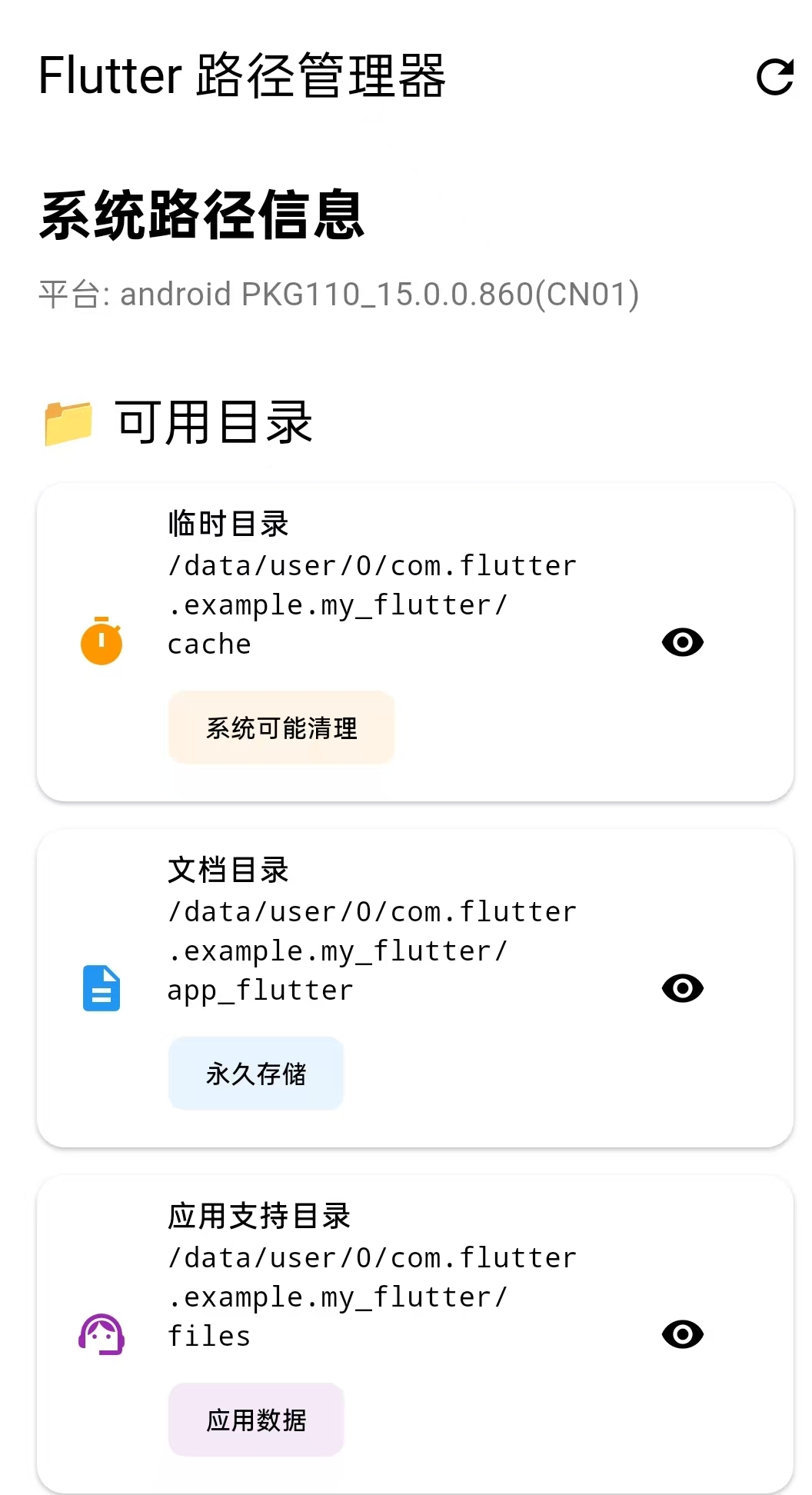
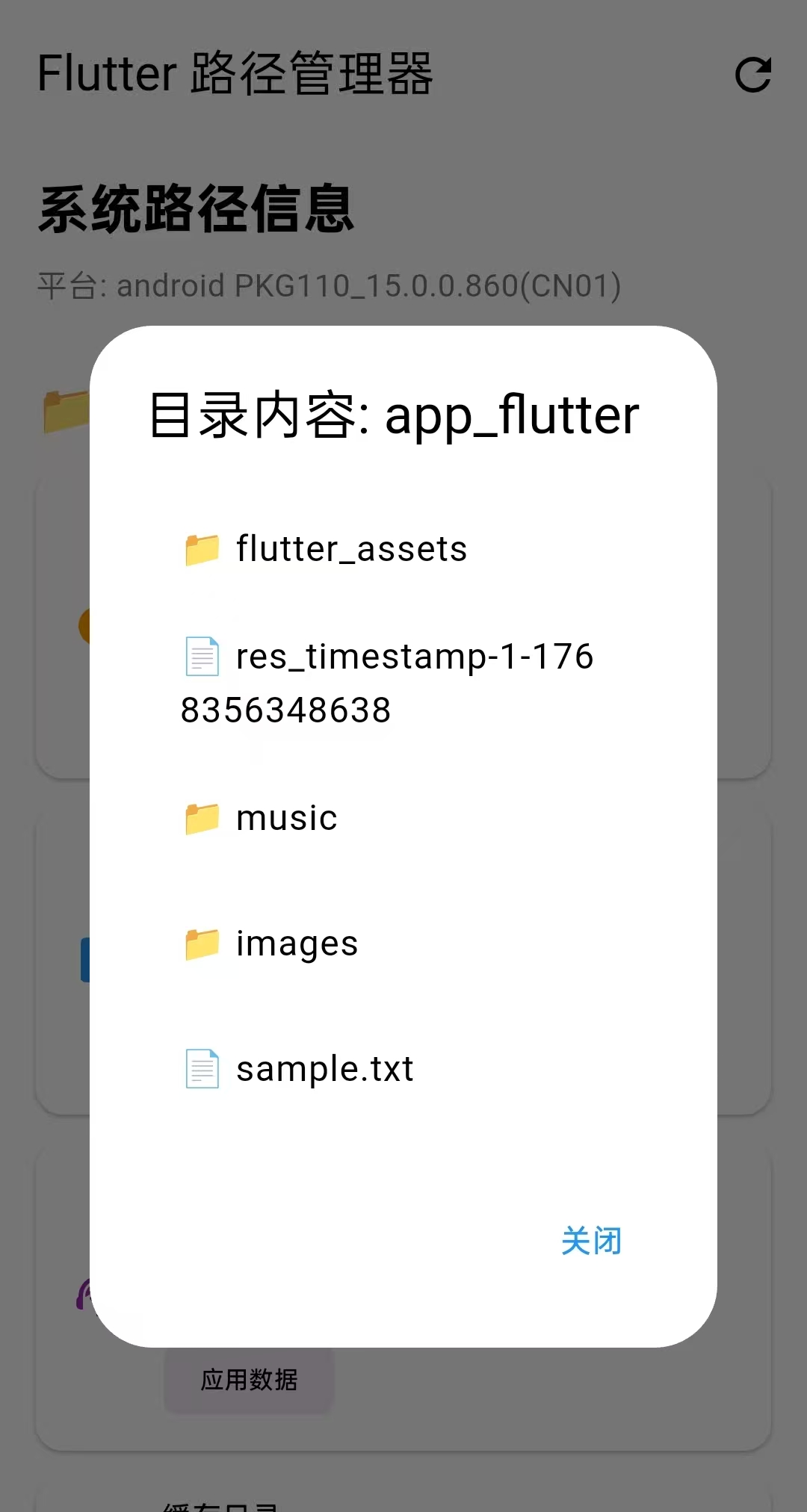
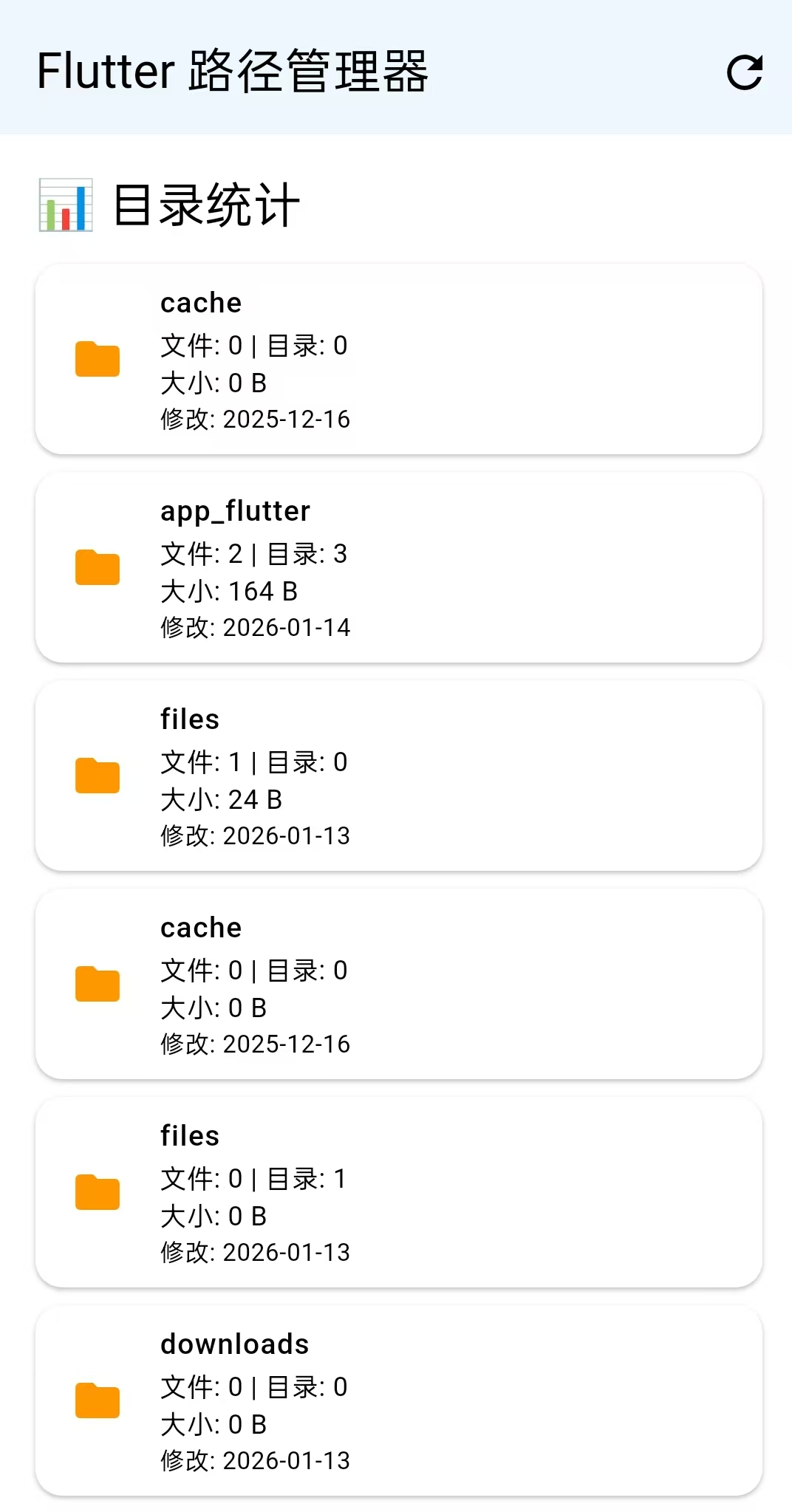
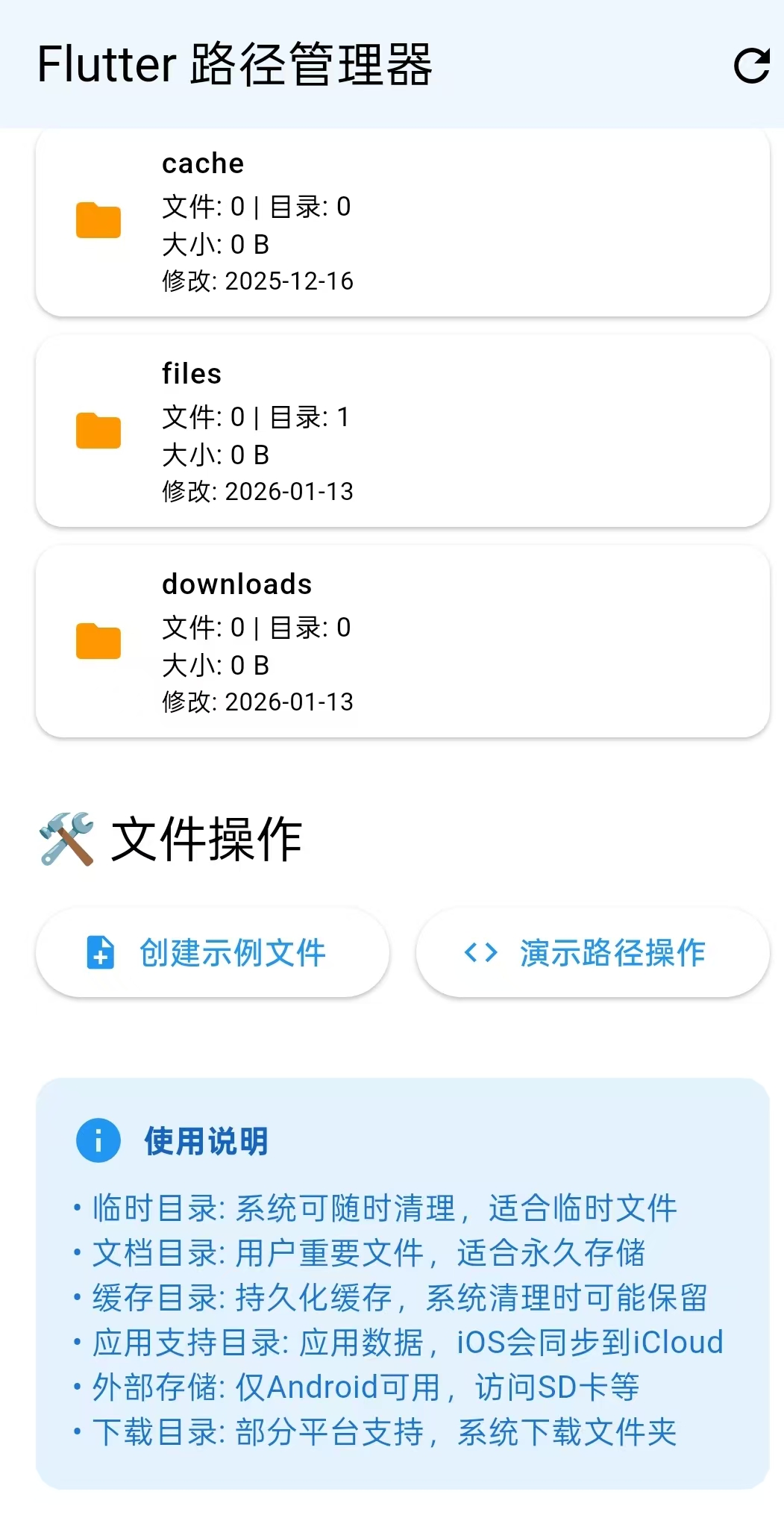
相应知识点
Dart
//获取APP目录

获取临时目录-getTemporaryDirectory()

获取应用文档目录-getApplicationDocumentsDirectory()

获取应用支持目录-getApplicationSupportDirectory()

获取缓存目录-getApplicationCacheDirectory()

获取外部存储目录-getExternalStorageDirectory()

获取下载目录-getDownloadsDirectory()

//获取部分路径

path.join(a,b,c);智能路径拼接a/b/c

path.dirname(路径):获取目录部分(最后一个/之前的所有内容)

path.basename(路径):获取文件名部分(最后一个/之后的内容)

path.basenameWithoutExtension(路径):获取无扩展名文件名

path.extension():获取扩展名


//文件读写操作

writeAsString()写入文件内容

readAsString()读取文本

readAsBytes()读取二进制

delete()删除文件


//创建和目录

File()创建文件对象,这里只是创建了"文件对象",有一个File对象,指向路径,硬盘上还没有实际文件

file.create()创建实际文件

Directory() 创建目录的代理对象

dir.exists() 目录是否存在

dir.stat() 获取目录状态信息,类型、大小、时间等

dir.list()目录遍历器:获取目录内所有文件和子目录

dir.list(recursive: false) 这里面的recursive参数代表是否进入子目录


//平台

Platform.operatingSystem:返回当前操作系统的名称字符串(android、IOS、Linux、Web等等)

Platform.operatingSystemVersion:返回操作系统的版本字符串
核心代码
Dart
1.
//dir.list()目录遍历器:获取目录内所有文件和子目录
await for (final entity in dir.list(recursive: false)) { //等待dir.list()给出第一个东西,拿到第一个东西,赋值给entity
          if (entity is File) {//使用is关键字进行类型检查
            fileCount++;//这是一个文件
            final fileStat = await entity.stat();//获取文件大小
            totalSize += fileStat.size;
          } else if (entity is Directory) {
            //这是一个目录
            dirCount++;
          }
        }
项目架构
Dart
┌─────────────────────────────────┐
│        UI层(展示层)           │  ← HomePage
│        用户界面和交互            │
├─────────────────────────────────┤
│       业务逻辑层(服务层)       │  ← PathManager
│        数据处理和业务逻辑        │
├─────────────────────────────────┤
│      数据访问层(基础设施层)    │
│    path_provider + dart:io      │
└─────────────────────────────────┘
UI组件结构
Dart
Scaffold
├── AppBar (标题栏 + 刷新按钮)
└── Body (SingleChildScrollView)
    ├── 系统信息区
    ├── 路径卡片区 (_buildPathCard)
    ├── 目录统计区 (_buildDirectoryInfoCard)
    ├── 操作按钮区
    ├── 文件内容显示区 (条件显示)
    └── 使用说明区
交互流程
交互流程1-页面加载
Dart
用户打开App
    ↓
initState() 执行
    ↓
_loadPaths() 调用
    ↓
显示加载动画 (_isLoading = true)
    ↓
PathManager.getAllPaths() 获取系统路径
    ↓
遍历每个路径,获取详细信息
    ↓
更新 _paths 和 _dirInfos
    ↓
隐藏加载动画,渲染UI
交互流程2-创建文件
Dart
用户点击"创建示例文件"
    ↓
显示加载动画
    ↓
PathManager.createSampleFile() 创建文件
    ↓
读取文件内容 (sampleFile.readAsString())
    ↓
获取文件信息 (sampleFile.stat())
    ↓
格式化文件大小显示
    ↓
更新 _fileContent,显示文件信息
    ↓
显示成功提示,隐藏加载动画
交互流程3-查看目录内容
Dart
用户点击路径卡片的"眼睛"图标
    ↓
_showDirectoryContents(路径) 调用
    ↓
创建Directory对象
    ↓
遍历目录内容 (dir.list())
    ↓
显示对话框展示文件列表
实现步骤
1.新建路径管理类PathManager,设置成单例模式
Dart
   // 单例模式
  static final PathManager _instance = PathManager._internal();
  factory PathManager() => _instance;
  PathManager._internal();
2.获取相应目录的方法
Dart
 // 1. 获取临时目录(系统可能清理)
  Future<String> getTempPath() async {
    final dir = await getTemporaryDirectory();
    return dir.path;
  }

  // 2. 获取应用文档目录(用户文件永久存储)
  Future<String> getDocumentsPath() async {
    final dir = await getApplicationDocumentsDirectory();
    return dir.path;
  }

  // 3. 获取应用支持目录(应用数据,iOS同步到iCloud)
  Future<String> getAppSupportPath() async {
    final dir = await getApplicationSupportDirectory();
    return dir.path;
  }

  // 4. 获取缓存目录(持久化缓存)
  Future<String> getCachePath() async {
    final dir = await getApplicationCacheDirectory();
    return dir.path;
  }

  // 5. 获取外部存储目录(Android特定)
  Future<String?> getExternalStoragePath() async {
    if (Platform.isAndroid) {
      final dir = await getExternalStorageDirectory();
      return dir?.path;
    }
    return null;
  }

  // 6. 获取下载目录(部分平台支持)
  Future<String?> getDownloadsPath() async {
    final dir = await getDownloadsDirectory();
    return dir?.path;
  }
3.获取所有路径信息并存入Map
Dart
  // 7. 获取所有路径信息
  Future<Map<String, String?>> getAllPaths() async {
    return {
      '临时目录': await getTempPath(),
      '文档目录': await getDocumentsPath(),
      '应用支持目录': await getAppSupportPath(),
      '缓存目录': await getCachePath(),
      '外部存储目录': await getExternalStoragePath(),
      '下载目录': await getDownloadsPath(),
    };
  }
4.演示路径操作的具体方法
Dart
  // 8. 演示路径操作的具体方法
  Future<void> demonstratePathOperations() async {
    //getDocumentsPath()获取应用文档目录
    //---/data/user/0/com.flutter.example.my_flutter/app_flutter
    final documentsPath = await getDocumentsPath();

    // 创建完整文件路径 ,path.join()智能路径拼接,在documentsPath的路径后面加上/my_folder/notes.txt
    //--data/user/0/com.flutter.example.my_flutter/app_flutter/my_folder/notes.txt
    final filePath = path.join(documentsPath, 'my_folder', 'notes.txt');
    print('完整文件路径: $filePath');

    // 获取目录名和文件名
    //path.dirname:获取目录部分(最后一个/之前的所有内容)--- /data/user/0/com.flutter.example.my_flutter/app_flutter/my_folder
    //path.basename():获取文件名部分(最后一个/之后的内容)---notes.txt
    //path.basenameWithoutExtension():获取无扩展名文件名---notes
    //path.extension():获取扩展名---.txt
    final dirName = path.dirname(filePath);
    final fileName = path.basename(filePath);
    final fileNameWithoutExt = path.basenameWithoutExtension(filePath);
    final fileExtension = path.extension(filePath);

    print('目录名: $dirName');
    print('文件名: $fileName');
    print('无扩展名文件名: $fileNameWithoutExt');
    print('扩展名: $fileExtension');
  }
5.创建示例文件的具体方法
Dart
  // 9. 创建示例文件的具体方法
  Future<File> createSampleFile() async {
    final documentsPath = await getDocumentsPath(); //获取应用文档目录

    //构建完整文件路径
    final sampleFile = File(path.join(documentsPath, 'sample.txt'));

    //writeAsString()写入文件内容
    //readAsString()读取文本
    //readAsBytes()读取二进制
    //delete()删除文件
    await sampleFile.writeAsString(
      '''
      这是示例文件内容
      创建时间: ${DateTime.now()}
      平台: ${Platform.operatingSystem}
      Flutter版本: ${Platform.version}
      '''
    );

    return sampleFile;
  }
6.获取目录信息的具体方法
Dart
  // 10. 获取目录信息
  Future<Map<String, dynamic>> getDirectoryInfo(String dirPath) async {

    //创建目录的代理对象
    final dir = Directory(dirPath);
    final info = <String, dynamic>{};

    //检查目录是否存在并获取基本信息
    if (await dir.exists()) {
      final stat = await dir.stat(); //dir.stat()获取目录状态信息
      info['路径'] = dirPath;
      info['存在'] = true;
      info['类型'] = stat.type.toString();
      info['修改时间'] = stat.modified;

      // 统计文件数量---初始化都为0
      int fileCount = 0;
      int dirCount = 0;
      int totalSize = 0;

      try {
        //dir.list()目录遍历器:获取目录内所有文件和子目录
        await for (final entity in dir.list(recursive: false)) { //等待dir.list()给出第一个东西,拿到第一个东西,赋值给entity
          if (entity is File) {//使用is关键字进行类型检查
            fileCount++;//这是一个文件
            final fileStat = await entity.stat();//获取文件大小
            totalSize += fileStat.size;
          } else if (entity is Directory) {
            //这是一个目录
            dirCount++;
          }
        }
      } catch (e) {
        print('访问目录出错: $e');
      }

      info['文件数量'] = fileCount;
      info['子目录数量'] = dirCount;
      info['总大小'] = formatFileSize(totalSize);
    } else {
      info['路径'] = dirPath;
      info['存在'] = false;
    }

    return info;
  }

  //格式化文件大小-把字节数转换成人类易读的格式
  String formatFileSize(int bytes) {
    if (bytes < 1024) return '$bytes B'; //如果小于1024字节,直接显示"B(字节)"
    if (bytes < 1024 * 1024) return '${(bytes / 1024).toStringAsFixed(1)} KB'; //如果小于1MB(1024×1024),显示"KB(千字节)"
    if (bytes < 1024 * 1024 * 1024) {
      return '${(bytes / (1024 * 1024)).toStringAsFixed(1)} MB'; //如果小于1GB,显示"MB(兆字节)"
    }
    return '${(bytes / (1024 * 1024 * 1024)).toStringAsFixed(1)} GB'; //如果大于等于1GB,显示"GB(吉字节)"
  }
这个方法返回了类似这样的数据
Dart
// 你的代码返回这样一个 Map
{
  '路径': '/storage/emulated/0/Music',
  '存在': true,
  '类型': 'directory',
  '修改时间': 2024-01-15 10:30:00.000,
  '文件数量': 25,
  '子目录数量': 3,
  '总大小': '125 MB'
}
7.UI层面 ,定义一些变量
Dart
  final PathManager _pathManager = PathManager(); //获取实例

  Map<String, String?> _paths = {}; //路径信息存储

  List<Map<String, dynamic>> _dirInfos = [];//目录详细信息列表

  bool _isLoading = false; //加载状态

  String _fileContent = ''; //文件内容字符串
8.初始化的方法
Dart
 @override
  void initState() {
    super.initState();
    _loadPaths();
  }

  //====================================刷新路径================================
  Future<void> _loadPaths() async {
    //设置加载状态
    setState(() => _isLoading = true);

    try {

      //获取路径数据
      _paths = await _pathManager.getAllPaths();

      //清空列表
      _dirInfos.clear();

      // 获取每个目录的信息
      //遍历_paths的所有键值对
      for (final pathEntry in _paths.entries) {

        if (pathEntry.value != null) { //值的非空判断
          final info = await _pathManager.getDirectoryInfo(pathEntry.value!); //获取目录信息
          _dirInfos.add(info); //将获取到的目录信息添加到列表中
        }
      }

    } catch (e) {
      print('加载路径失败: $e');
    } finally {
      setState(() => _isLoading = false);
    }
  }
9.UI的具体架构
Dart
 @override
  Widget build(BuildContext context) {
    return Scaffold(

      //1.标题栏
      appBar: AppBar(
        title: Text('Flutter 路径管理器'),
        actions: [
          IconButton(
            icon: Icon(Icons.refresh),
            onPressed: _isLoading ? null : _loadPaths,
            tooltip: '刷新路径',
          ),
        ],
      ),

      body: _isLoading
          ? Center(child: CircularProgressIndicator())
          : SingleChildScrollView(
        child: Padding(
          padding: const EdgeInsets.all(16.0),
          child: Column(
            crossAxisAlignment: CrossAxisAlignment.start,
            children: [

              // 2.标题信息
              Text(
                '系统路径信息',
                //Theme.of(context)获取当前上下文的主题数据;.textTheme从主题中获取文件主题;.headlineSmall获取定义的小标题样式
                style: Theme.of(context).textTheme.headlineSmall!.copyWith(
                  fontWeight: FontWeight.bold,
                ),
              ),
              SizedBox(height: 8),
              Text(
                //Platform.operatingSystem:返回当前操作系统的名称字符串(android、IOS、Linux、Web等等)
                //Platform.operatingSystemVersion:返回操作系统的版本字符串
                '平台: ${Platform.operatingSystem} ${Platform.operatingSystemVersion}',
                style: TextStyle(color: Colors.grey[600]),
              ),
              Divider(height: 32),

              //3.路径列表
              Text(
                '📁 可用目录',
                style: Theme.of(context).textTheme.titleLarge, //获取大标题文本样式
              ),
              SizedBox(height: 12),
              //_paths.entries 获取Map的键值对
              //.map() 把每个元素转换MapEntry(key,value)
              //... 展开操作符
              ..._paths.entries.map(
                      (entry) => _buildPathCard(entry)
              ),

              // 4.目录统计信息
              SizedBox(height: 24),
              Text(
                '📊 目录统计',
                style: Theme.of(context).textTheme.titleLarge,
              ),
              SizedBox(height: 12),

              //_dirInfos: 之前获取的目录信息列表
              //.map(): 将每个 info(Map)转换为MapEntry(key,value)
              ..._dirInfos.map((info) => _buildDirectoryInfoCard(info)),

              //5.文件操作区域
              SizedBox(height: 24),
              Text(
                '🛠️ 文件操作',
                style: Theme.of(context).textTheme.titleLarge,
              ),
              SizedBox(height: 12),
              Row(
                children: [
                  Expanded(
                    child: ElevatedButton.icon(
                      icon: Icon(Icons.note_add),
                      label: Text('创建示例文件'),
                      onPressed: _isLoading ? null : _createAndReadFile,
                    ),
                  ),
                  SizedBox(width: 12),
                  Expanded(
                    child: ElevatedButton.icon(
                      icon: Icon(Icons.code),
                      label: Text('演示路径操作'),
                      onPressed: _demonstratePathOperations,
                    ),
                  ),
                ],
              ),

              // 6.文件内容显示(条件显示)
              if (_fileContent.isNotEmpty) ...[
                SizedBox(height: 24),
                Text(
                  '📄 文件内容',
                  style: Theme.of(context).textTheme.titleLarge,
                ),
                SizedBox(height: 12),
                Container(
                  width: double.infinity,
                  padding: EdgeInsets.all(16),
                  decoration: BoxDecoration(
                    color: Colors.grey[50],
                    borderRadius: BorderRadius.circular(12),
                  ),
                  child: SelectableText(
                    _fileContent,
                    style: TextStyle(
                      fontFamily: Platform.isIOS ? 'Courier' : 'monospace',
                      fontSize: 12,
                    ),
                  ),
                ),
              ],

              //7.使用说明
              SizedBox(height: 32),
              Container(
                padding: EdgeInsets.all(16),
                decoration: BoxDecoration(
                  color: Colors.blue[50],
                  borderRadius: BorderRadius.circular(12),
                ),
                child: Column(
                  crossAxisAlignment: CrossAxisAlignment.start,
                  children: [
                    Row(
                      children: [
                        Icon(Icons.info, color: Colors.blue),
                        SizedBox(width: 8),
                        Text(
                          '使用说明',
                          style: TextStyle(
                            fontWeight: FontWeight.bold,
                            color: Colors.blue[800],
                          ),
                        ),
                      ],
                    ),
                    SizedBox(height: 8),
                    Text(
                      '• 临时目录: 系统可随时清理,适合临时文件\n'
                          '• 文档目录: 用户重要文件,适合永久存储\n'
                          '• 缓存目录: 持久化缓存,系统清理时可能保留\n'
                          '• 应用支持目录: 应用数据,iOS会同步到iCloud\n'
                          '• 外部存储: 仅Android可用,访问SD卡等\n'
                          '• 下载目录: 部分平台支持,系统下载文件夹',
                      style: TextStyle(color: Colors.blue[700]),
                    ),
                  ],
                ),
              ),
            ],
          ),
        ),
      ),
    );
  }
10.路径列表中,显示单个路径信息的卡片
Dart
 Widget _buildPathCard(MapEntry<String, String?> entry) {

    return Card(
      margin: EdgeInsets.only(bottom: 12),
      //ListTile列表项组件:leading-左侧标题,title-标题,subtitle-副标题,trailing-右侧操作按钮
      child: ListTile(

        leading: Icon(
          _getPathIcon(entry.key),//通过key返回Icon
          color: _getPathColor(entry.key),//通过key返回颜色
        ),

        title: Text(
          entry.key,
          style: TextStyle(fontWeight: FontWeight.w500),
        ),

        subtitle: entry.value != null
            ? Column(  //有路径的显示
          crossAxisAlignment: CrossAxisAlignment.start,
          children: [
            Text(
              entry.value!,
              style: TextStyle(
                  fontFamily: Platform.isIOS ? 'Courier' : 'monospace', //字体
                fontSize: 12,
              ),
              softWrap: true,
              maxLines: 4,
              overflow: TextOverflow.ellipsis,
            ),
            SizedBox(height: 4),
            //描述标签
            Chip(
              label: Text(
                _getPathDescription(entry.key), //获取目录描述
                style: TextStyle(fontSize: 11),
              ),
              backgroundColor: _getPathColor(entry.key)!.withOpacity(0.1),
            ),
          ],
        )
            : Text(  //无路径的显示
          '当前平台不支持',
          style: TextStyle(color: Colors.grey),
        ),


        trailing: entry.value != null
            ? IconButton(
          icon: Icon(Icons.visibility, size: 20),
          onPressed: () => _showDirectoryContents(entry.value!), //右侧图标点击事件
          tooltip: '查看目录内容',
        )
            : null,
        dense: true,
      ),
    );
  }
11.目录卡片的点击事件--获取目录下的详细内容
Dart
 //=======================获取目录下的详细内容(文件or文件夹)=======================
  Future<void> _showDirectoryContents(String dirPath) async {
    //创建目录对象
    final dir = Directory(dirPath);
    final contents = <String>[];//用于存储显示内容

    try {
      if (await dir.exists()) {
        //dir.list(recursive:false):获取目录内容,不递归子目录
        await for (final entity in dir.list(recursive: false)) {
          final name = entity.path.split('/').last; //分割路径,取最后一部分(文件名)
          final type = entity is File ? '📄' : '📁'; //判断是文件还是目录
          contents.add('$type $name');
        }
      }
    } catch (e) {
      contents.add('访问出错: $e');
    }

    if (!mounted) return;

    showDialog(
      context: context,
      builder: (context) => AlertDialog(
        title: Text('目录内容: ${dirPath.split('/').last}'), //分割路径,取最后一部分(文件名)
        content: Container(
          width: double.maxFinite,
          child: ListView.builder(
            shrinkWrap: true,
            itemCount: contents.length,
            itemBuilder: (context, index) => ListTile(
              title: Text(contents[index]),
            ),
          ),
        ),
        actions: [
          TextButton(
            onPressed: () => Navigator.pop(context),
            child: Text('关闭'),
          ),
        ],
      ),
    );
  }
12.目录统计的卡片
Dart
 //==============================目录统计的卡片===============================
  Widget _buildDirectoryInfoCard(Map<String, dynamic> info) {

    final exists = info['存在'] as bool; //提取存在状态

    return Card(
      margin: EdgeInsets.only(bottom: 8),
      color: exists ? null : Colors.grey[100], //null 使用默认颜色
      child: ListTile(

        //图标
        leading: Icon(
          exists ? Icons.folder : Icons.folder_off,
          color: exists ? Colors.orange : Colors.grey,
        ),

        //标题
        title: Text(
          info['路径'].toString().split('/').last,
          style: TextStyle(
            fontWeight: FontWeight.w500,
            color: exists ? null : Colors.grey,
          ),
        ),

        subtitle: exists
            ? Column(
          crossAxisAlignment: CrossAxisAlignment.start,
          children: [
            Text('文件: ${info['文件数量']} | 目录: ${info['子目录数量']}'),
            Text('大小: ${info['总大小']}'),
            if (info['修改时间'] != null)
              Text(
                '修改: ${info['修改时间'].toString().split(' ')[0]}',
                style: TextStyle(fontSize: 11),
              ),
          ],
        )
            : Text('目录不存在或无法访问'),
        dense: true,
      ),
    );
  }
13.创建实例文件方法
Dart
 //=============================创建示例文件=================================
  Future<void> _createAndReadFile() async {

    setState(() => _isLoading = true);

    try {

      // 创建示例文件
      final sampleFile = await _pathManager.createSampleFile();

      // 读取文件内容
      final content = await sampleFile.readAsString();

      // 获取文件信息
      final stat = await sampleFile.stat(); //sampleFile.stat():获取文件状态(大小、修改时间等)
      final fileSize = _pathManager.formatFileSize(stat.size); //把字节数格式化成"KB/MB"等易读格式

      //更新UI显示
      setState(() {
          _fileContent =
              '''
            📄 文件信息:
            路径: ${sampleFile.path}
            大小: $fileSize
            修改时间: ${stat.modified}

            📝 文件内容:
            $content
            ''';
      });

      // 显示成功消息
      ScaffoldMessenger.of(context).showSnackBar(
        SnackBar(
          content: Text('文件创建成功!'),
          backgroundColor: Colors.green,
        ),
      );
    } catch (e) {
      ScaffoldMessenger.of(context).showSnackBar(
        SnackBar(
          content: Text('操作失败: $e'),
          backgroundColor: Colors.red,
        ),
      );
    } finally {
      setState(() => _isLoading = false);
    }
  }
14.演示路径操作方法
Dart
//==========================演示路径操作方法=========================================
  Future<void> _demonstratePathOperations() async {

    await _pathManager.demonstratePathOperations();//执行路径操作演示

    //提示
    ScaffoldMessenger.of(context).showSnackBar(
      SnackBar(
        content: Text('路径操作示例已输出到控制台'),
      ),
    );
  }
15.一些工具方法
Dart
 //==========================通过key返回Icon=============================
  IconData _getPathIcon(String pathName) {
    switch (pathName) {
      case '临时目录':
        return Icons.timer;
      case '文档目录':
        return Icons.description;
      case '应用支持目录':
        return Icons.support_agent;
      case '缓存目录':
        return Icons.cached;
      case '外部存储目录':
        return Icons.sd_storage;
      case '下载目录':
        return Icons.download;
      default:
        return Icons.folder;
    }
  }

  //==========================通过key返回颜色=============================
  Color? _getPathColor(String pathName) {
    switch (pathName) {
      case '临时目录':
        return Colors.orange;
      case '文档目录':
        return Colors.blue;
      case '应用支持目录':
        return Colors.purple;
      case '缓存目录':
        return Colors.green;
      case '外部存储目录':
        return Colors.red;
      case '下载目录':
        return Colors.teal;
      default:
        return Colors.grey;
    }
  }

  //==========================通过key返回目录描述=============================
  String _getPathDescription(String pathName) {
    switch (pathName) {
      case '临时目录':
        return '系统可能清理';
      case '文档目录':
        return '永久存储';
      case '应用支持目录':
        return '应用数据';
      case '缓存目录':
        return '持久化缓存';
      case '外部存储目录':
        return 'Android专用';
      case '下载目录':
        return '系统下载';
      default:
        return '';
    }
  }
代码实例
home_page
Dart
import 'dart:async';
import 'dart:io';
import 'package:flutter/cupertino.dart';
import 'package:flutter/material.dart';
import 'package:my_flutter/path_manager.dart';

class HomePage extends StatefulWidget {
  const HomePage({super.key});

  @override
  State<StatefulWidget> createState() => _HomePageState();
}


class _HomePageState extends State<HomePage> with SingleTickerProviderStateMixin{

  final PathManager _pathManager = PathManager(); //获取实例

  Map<String, String?> _paths = {}; //路径信息存储

  List<Map<String, dynamic>> _dirInfos = [];//目录详细信息列表

  bool _isLoading = false; //加载状态

  String _fileContent = ''; //文件内容字符串

  @override
  void initState() {
    super.initState();
    _loadPaths();
  }

  //====================================刷新路径================================
  Future<void> _loadPaths() async {
    //设置加载状态
    setState(() => _isLoading = true);

    try {

      //获取路径数据
      _paths = await _pathManager.getAllPaths();

      //清空列表
      _dirInfos.clear();

      // 获取每个目录的信息
      //遍历_paths的所有键值对
      for (final pathEntry in _paths.entries) {

        if (pathEntry.value != null) { //值的非空判断
          final info = await _pathManager.getDirectoryInfo(pathEntry.value!); //获取目录信息
          _dirInfos.add(info); //将获取到的目录信息添加到列表中
        }
      }

    } catch (e) {
      print('加载路径失败: $e');
    } finally {
      setState(() => _isLoading = false);
    }
  }


  //=============================创建示例文件=================================
  Future<void> _createAndReadFile() async {

    setState(() => _isLoading = true);

    try {

      // 创建示例文件
      final sampleFile = await _pathManager.createSampleFile();

      // 读取文件内容
      final content = await sampleFile.readAsString();

      // 获取文件信息
      final stat = await sampleFile.stat(); //sampleFile.stat():获取文件状态(大小、修改时间等)
      final fileSize = _pathManager.formatFileSize(stat.size); //把字节数格式化成"KB/MB"等易读格式

      //更新UI显示
      setState(() {
          _fileContent =
              '''
            📄 文件信息:
            路径: ${sampleFile.path}
            大小: $fileSize
            修改时间: ${stat.modified}

            📝 文件内容:
            $content
            ''';
      });

      // 显示成功消息
      ScaffoldMessenger.of(context).showSnackBar(
        SnackBar(
          content: Text('文件创建成功!'),
          backgroundColor: Colors.green,
        ),
      );
    } catch (e) {
      ScaffoldMessenger.of(context).showSnackBar(
        SnackBar(
          content: Text('操作失败: $e'),
          backgroundColor: Colors.red,
        ),
      );
    } finally {
      setState(() => _isLoading = false);
    }
  }

  //==========================演示路径操作方法=========================================
  Future<void> _demonstratePathOperations() async {

    await _pathManager.demonstratePathOperations();//执行路径操作演示

    //提示
    ScaffoldMessenger.of(context).showSnackBar(
      SnackBar(
        content: Text('路径操作示例已输出到控制台'),
      ),
    );
  }

  //=======================获取目录下的详细内容(文件or文件夹)=======================
  Future<void> _showDirectoryContents(String dirPath) async {
    //创建目录对象
    final dir = Directory(dirPath);
    final contents = <String>[];//用于存储显示内容

    try {
      if (await dir.exists()) {
        //dir.list(recursive:false):获取目录内容,不递归子目录
        await for (final entity in dir.list(recursive: false)) {
          final name = entity.path.split('/').last; //分割路径,取最后一部分(文件名)
          final type = entity is File ? '📄' : '📁'; //判断是文件还是目录
          contents.add('$type $name');
        }
      }
    } catch (e) {
      contents.add('访问出错: $e');
    }

    if (!mounted) return;

    showDialog(
      context: context,
      builder: (context) => AlertDialog(
        title: Text('目录内容: ${dirPath.split('/').last}'), //分割路径,取最后一部分(文件名)
        content: Container(
          width: double.maxFinite,
          child: ListView.builder(
            shrinkWrap: true,
            itemCount: contents.length,
            itemBuilder: (context, index) => ListTile(
              title: Text(contents[index]),
            ),
          ),
        ),
        actions: [
          TextButton(
            onPressed: () => Navigator.pop(context),
            child: Text('关闭'),
          ),
        ],
      ),
    );
  }


  @override
  Widget build(BuildContext context) {
    return Scaffold(

      //1.标题栏
      appBar: AppBar(
        title: Text('Flutter 路径管理器'),
        actions: [
          IconButton(
            icon: Icon(Icons.refresh),
            onPressed: _isLoading ? null : _loadPaths,
            tooltip: '刷新路径',
          ),
        ],
      ),

      body: _isLoading
          ? Center(child: CircularProgressIndicator())
          : SingleChildScrollView(
        child: Padding(
          padding: const EdgeInsets.all(16.0),
          child: Column(
            crossAxisAlignment: CrossAxisAlignment.start,
            children: [

              // 2.标题信息
              Text(
                '系统路径信息',
                //Theme.of(context)获取当前上下文的主题数据;.textTheme从主题中获取文件主题;.headlineSmall获取定义的小标题样式
                style: Theme.of(context).textTheme.headlineSmall!.copyWith(
                  fontWeight: FontWeight.bold,
                ),
              ),
              SizedBox(height: 8),
              Text(
                //Platform.operatingSystem:返回当前操作系统的名称字符串(android、IOS、Linux、Web等等)
                //Platform.operatingSystemVersion:返回操作系统的版本字符串
                '平台: ${Platform.operatingSystem} ${Platform.operatingSystemVersion}',
                style: TextStyle(color: Colors.grey[600]),
              ),
              Divider(height: 32),

              //3.路径列表
              Text(
                '📁 可用目录',
                style: Theme.of(context).textTheme.titleLarge, //获取大标题文本样式
              ),
              SizedBox(height: 12),
              //_paths.entries 获取Map的键值对
              //.map() 把每个元素转换MapEntry(key,value)
              //... 展开操作符
              ..._paths.entries.map(
                      (entry) => _buildPathCard(entry)
              ),

              // 4.目录统计信息
              SizedBox(height: 24),
              Text(
                '📊 目录统计',
                style: Theme.of(context).textTheme.titleLarge,
              ),
              SizedBox(height: 12),

              //_dirInfos: 之前获取的目录信息列表
              //.map(): 将每个 info(Map)转换为MapEntry(key,value)
              ..._dirInfos.map((info) => _buildDirectoryInfoCard(info)),

              //5.文件操作区域
              SizedBox(height: 24),
              Text(
                '🛠️ 文件操作',
                style: Theme.of(context).textTheme.titleLarge,
              ),
              SizedBox(height: 12),
              Row(
                children: [
                  Expanded(
                    child: ElevatedButton.icon(
                      icon: Icon(Icons.note_add),
                      label: Text('创建示例文件'),
                      onPressed: _isLoading ? null : _createAndReadFile,
                    ),
                  ),
                  SizedBox(width: 12),
                  Expanded(
                    child: ElevatedButton.icon(
                      icon: Icon(Icons.code),
                      label: Text('演示路径操作'),
                      onPressed: _demonstratePathOperations,
                    ),
                  ),
                ],
              ),

              // 6.文件内容显示(条件显示)
              if (_fileContent.isNotEmpty) ...[
                SizedBox(height: 24),
                Text(
                  '📄 文件内容',
                  style: Theme.of(context).textTheme.titleLarge,
                ),
                SizedBox(height: 12),
                Container(
                  width: double.infinity,
                  padding: EdgeInsets.all(16),
                  decoration: BoxDecoration(
                    color: Colors.grey[50],
                    borderRadius: BorderRadius.circular(12),
                  ),
                  child: SelectableText(
                    _fileContent,
                    style: TextStyle(
                      fontFamily: Platform.isIOS ? 'Courier' : 'monospace',
                      fontSize: 12,
                    ),
                  ),
                ),
              ],

              //7.使用说明
              SizedBox(height: 32),
              Container(
                padding: EdgeInsets.all(16),
                decoration: BoxDecoration(
                  color: Colors.blue[50],
                  borderRadius: BorderRadius.circular(12),
                ),
                child: Column(
                  crossAxisAlignment: CrossAxisAlignment.start,
                  children: [
                    Row(
                      children: [
                        Icon(Icons.info, color: Colors.blue),
                        SizedBox(width: 8),
                        Text(
                          '使用说明',
                          style: TextStyle(
                            fontWeight: FontWeight.bold,
                            color: Colors.blue[800],
                          ),
                        ),
                      ],
                    ),
                    SizedBox(height: 8),
                    Text(
                      '• 临时目录: 系统可随时清理,适合临时文件\n'
                          '• 文档目录: 用户重要文件,适合永久存储\n'
                          '• 缓存目录: 持久化缓存,系统清理时可能保留\n'
                          '• 应用支持目录: 应用数据,iOS会同步到iCloud\n'
                          '• 外部存储: 仅Android可用,访问SD卡等\n'
                          '• 下载目录: 部分平台支持,系统下载文件夹',
                      style: TextStyle(color: Colors.blue[700]),
                    ),
                  ],
                ),
              ),
            ],
          ),
        ),
      ),
    );
  }

  //======================显示单个路径信息的卡片====================================
  Widget _buildPathCard(MapEntry<String, String?> entry) {

    return Card(
      margin: EdgeInsets.only(bottom: 12),
      //ListTile列表项组件:leading-左侧标题,title-标题,subtitle-副标题,trailing-右侧操作按钮
      child: ListTile(

        leading: Icon(
          _getPathIcon(entry.key),//通过key返回Icon
          color: _getPathColor(entry.key),//通过key返回颜色
        ),

        title: Text(
          entry.key,
          style: TextStyle(fontWeight: FontWeight.w500),
        ),

        subtitle: entry.value != null
            ? Column(  //有路径的显示
          crossAxisAlignment: CrossAxisAlignment.start,
          children: [
            Text(
              entry.value!,
              style: TextStyle(
                  fontFamily: Platform.isIOS ? 'Courier' : 'monospace', //字体
                fontSize: 12,
              ),
              softWrap: true,
              maxLines: 4,
              overflow: TextOverflow.ellipsis,
            ),
            SizedBox(height: 4),
            //描述标签
            Chip(
              label: Text(
                _getPathDescription(entry.key), //获取目录描述
                style: TextStyle(fontSize: 11),
              ),
              backgroundColor: _getPathColor(entry.key)!.withOpacity(0.1),
            ),
          ],
        )
            : Text(  //无路径的显示
          '当前平台不支持',
          style: TextStyle(color: Colors.grey),
        ),


        trailing: entry.value != null
            ? IconButton(
          icon: Icon(Icons.visibility, size: 20),
          onPressed: () => _showDirectoryContents(entry.value!), //右侧图标点击事件
          tooltip: '查看目录内容',
        )
            : null,
        dense: true,
      ),
    );
  }


  //==============================目录统计的卡片===============================
  Widget _buildDirectoryInfoCard(Map<String, dynamic> info) {

    final exists = info['存在'] as bool; //提取存在状态

    return Card(
      margin: EdgeInsets.only(bottom: 8),
      color: exists ? null : Colors.grey[100], //null 使用默认颜色
      child: ListTile(

        //图标
        leading: Icon(
          exists ? Icons.folder : Icons.folder_off,
          color: exists ? Colors.orange : Colors.grey,
        ),

        //标题
        title: Text(
          info['路径'].toString().split('/').last,
          style: TextStyle(
            fontWeight: FontWeight.w500,
            color: exists ? null : Colors.grey,
          ),
        ),

        subtitle: exists
            ? Column(
          crossAxisAlignment: CrossAxisAlignment.start,
          children: [
            Text('文件: ${info['文件数量']} | 目录: ${info['子目录数量']}'),
            Text('大小: ${info['总大小']}'),
            if (info['修改时间'] != null)
              Text(
                '修改: ${info['修改时间'].toString().split(' ')[0]}',
                style: TextStyle(fontSize: 11),
              ),
          ],
        )
            : Text('目录不存在或无法访问'),
        dense: true,
      ),
    );
  }

  //==========================通过key返回Icon=============================
  IconData _getPathIcon(String pathName) {
    switch (pathName) {
      case '临时目录':
        return Icons.timer;
      case '文档目录':
        return Icons.description;
      case '应用支持目录':
        return Icons.support_agent;
      case '缓存目录':
        return Icons.cached;
      case '外部存储目录':
        return Icons.sd_storage;
      case '下载目录':
        return Icons.download;
      default:
        return Icons.folder;
    }
  }

  //==========================通过key返回颜色=============================
  Color? _getPathColor(String pathName) {
    switch (pathName) {
      case '临时目录':
        return Colors.orange;
      case '文档目录':
        return Colors.blue;
      case '应用支持目录':
        return Colors.purple;
      case '缓存目录':
        return Colors.green;
      case '外部存储目录':
        return Colors.red;
      case '下载目录':
        return Colors.teal;
      default:
        return Colors.grey;
    }
  }

  //==========================通过key返回目录描述=============================
  String _getPathDescription(String pathName) {
    switch (pathName) {
      case '临时目录':
        return '系统可能清理';
      case '文档目录':
        return '永久存储';
      case '应用支持目录':
        return '应用数据';
      case '缓存目录':
        return '持久化缓存';
      case '外部存储目录':
        return 'Android专用';
      case '下载目录':
        return '系统下载';
      default:
        return '';
    }
  }

}
path_manager
Dart
import 'dart:io';
import 'package:path_provider/path_provider.dart';
import 'package:path/path.dart' as path;

class PathManager {

  // 单例模式
  static final PathManager _instance = PathManager._internal();
  factory PathManager() => _instance;
  PathManager._internal();

  // 1. 获取临时目录(系统可能清理)
  Future<String> getTempPath() async {
    final dir = await getTemporaryDirectory();
    return dir.path;
  }

  // 2. 获取应用文档目录(用户文件永久存储)
  Future<String> getDocumentsPath() async {
    final dir = await getApplicationDocumentsDirectory();
    return dir.path;
  }

  // 3. 获取应用支持目录(应用数据,iOS同步到iCloud)
  Future<String> getAppSupportPath() async {
    final dir = await getApplicationSupportDirectory();
    return dir.path;
  }

  // 4. 获取缓存目录(持久化缓存)
  Future<String> getCachePath() async {
    final dir = await getApplicationCacheDirectory();
    return dir.path;
  }

  // 5. 获取外部存储目录(Android特定)
  Future<String?> getExternalStoragePath() async {
    if (Platform.isAndroid) {
      final dir = await getExternalStorageDirectory();
      return dir?.path;
    }
    return null;
  }

  // 6. 获取下载目录(部分平台支持)
  Future<String?> getDownloadsPath() async {
    final dir = await getDownloadsDirectory();
    return dir?.path;
  }

  // 7. 获取所有路径信息
  Future<Map<String, String?>> getAllPaths() async {
    return {
      '临时目录': await getTempPath(),
      '文档目录': await getDocumentsPath(),
      '应用支持目录': await getAppSupportPath(),
      '缓存目录': await getCachePath(),
      '外部存储目录': await getExternalStoragePath(),
      '下载目录': await getDownloadsPath(),
    };
  }

  // 8. 演示路径操作的具体方法
  Future<void> demonstratePathOperations() async {
    //getDocumentsPath()获取应用文档目录
    //---/data/user/0/com.flutter.example.my_flutter/app_flutter
    final documentsPath = await getDocumentsPath();

    // 创建完整文件路径 ,path.join()智能路径拼接,在documentsPath的路径后面加上/my_folder/notes.txt
    //--data/user/0/com.flutter.example.my_flutter/app_flutter/my_folder/notes.txt
    final filePath = path.join(documentsPath, 'my_folder', 'notes.txt');
    print('完整文件路径: $filePath');

    // 获取目录名和文件名
    //path.dirname:获取目录部分(最后一个/之前的所有内容)--- /data/user/0/com.flutter.example.my_flutter/app_flutter/my_folder
    //path.basename():获取文件名部分(最后一个/之后的内容)---notes.txt
    //path.basenameWithoutExtension():获取无扩展名文件名---notes
    //path.extension():获取扩展名---.txt
    final dirName = path.dirname(filePath);
    final fileName = path.basename(filePath);
    final fileNameWithoutExt = path.basenameWithoutExtension(filePath);
    final fileExtension = path.extension(filePath);

    print('目录名: $dirName');
    print('文件名: $fileName');
    print('无扩展名文件名: $fileNameWithoutExt');
    print('扩展名: $fileExtension');
  }

  // 9. 创建示例文件的具体方法
  Future<File> createSampleFile() async {
    final documentsPath = await getDocumentsPath(); //获取应用文档目录

    //构建完整文件路径
    final sampleFile = File(path.join(documentsPath, 'sample.txt'));

    //writeAsString()写入文件内容
    //readAsString()读取文本
    //readAsBytes()读取二进制
    //delete()删除文件
    await sampleFile.writeAsString(
      '''
      这是示例文件内容
      创建时间: ${DateTime.now()}
      平台: ${Platform.operatingSystem}
      Flutter版本: ${Platform.version}
      '''
    );

    return sampleFile;
  }

  // 10. 获取目录信息
  Future<Map<String, dynamic>> getDirectoryInfo(String dirPath) async {

    //创建目录的代理对象
    final dir = Directory(dirPath);
    final info = <String, dynamic>{};

    //检查目录是否存在并获取基本信息
    if (await dir.exists()) {
      final stat = await dir.stat(); //dir.stat()获取目录状态信息
      info['路径'] = dirPath;
      info['存在'] = true;
      info['类型'] = stat.type.toString();
      info['修改时间'] = stat.modified;

      // 统计文件数量---初始化都为0
      int fileCount = 0;
      int dirCount = 0;
      int totalSize = 0;

      try {
        //dir.list()目录遍历器:获取目录内所有文件和子目录
        await for (final entity in dir.list(recursive: false)) { //等待dir.list()给出第一个东西,拿到第一个东西,赋值给entity
          if (entity is File) {//使用is关键字进行类型检查
            fileCount++;//这是一个文件
            final fileStat = await entity.stat();//获取文件大小
            totalSize += fileStat.size;
          } else if (entity is Directory) {
            //这是一个目录
            dirCount++;
          }
        }
      } catch (e) {
        print('访问目录出错: $e');
      }

      info['文件数量'] = fileCount;
      info['子目录数量'] = dirCount;
      info['总大小'] = formatFileSize(totalSize);
    } else {
      info['路径'] = dirPath;
      info['存在'] = false;
    }

    return info; //类型为Map<String, dynamic>
  }

  //格式化文件大小-把字节数转换成人类易读的格式
  String formatFileSize(int bytes) {
    if (bytes < 1024) return '$bytes B'; //如果小于1024字节,直接显示"B(字节)"
    if (bytes < 1024 * 1024) return '${(bytes / 1024).toStringAsFixed(1)} KB'; //如果小于1MB(1024×1024),显示"KB(千字节)"
    if (bytes < 1024 * 1024 * 1024) {
      return '${(bytes / (1024 * 1024)).toStringAsFixed(1)} MB'; //如果小于1GB,显示"MB(兆字节)"
    }
    return '${(bytes / (1024 * 1024 * 1024)).toStringAsFixed(1)} GB'; //如果大于等于1GB,显示"GB(吉字节)"
  }
}