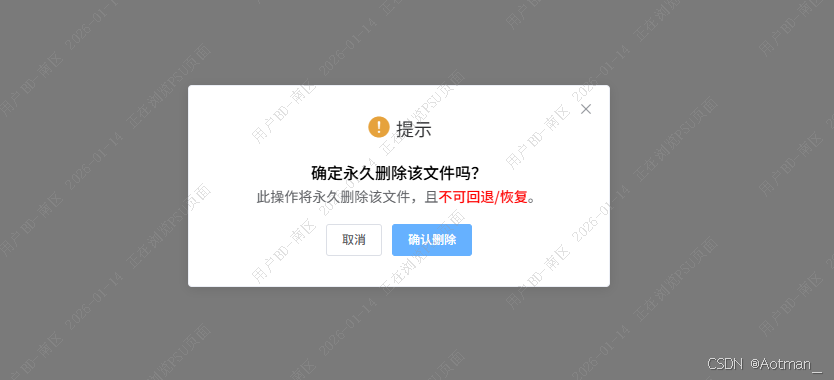
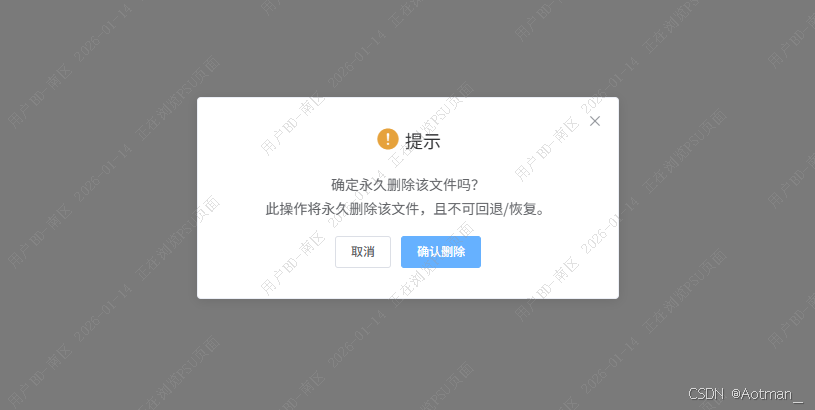
效果实现:
代码实现:
      const h = this.$createElement
      const confirmText = ['确定永久删除该文件吗?', '此操作将永久删除该文件,且不可回退/恢复。']
      const newDatas = confirmText.map(item => h('p', null, item))
      this.$confirm('提示', {
        title: '提示',
        message: h('div', null, newDatas),
        showCancelButton: true,
        confirmButtonText: '确认删除',
        cancelButtonText: '取消',
        type: 'warning',
        center: true
      })
      .then(() => {
        // todo.....

      })
      .catch(() => {})
或者:
      const h = this.$createElement
      const confirmText = ['确定永久删除该文件吗?', '此操作将永久删除该文件,且']
      const newDatas = []
      newDatas.push(h('p', { style: { fontSize: '16px', fontWeight: 500, color: '#000' } }, confirmText[0]))
      newDatas.push(h('p', null, [
        confirmText[1],
        h('span', { style: { fontWeight: 500, color: '#ff0000' } }, '不可回退/恢复'),
        h('span', null, '。')
      ]))
      this.$confirm('提示', {
        title: '提示',
        message: h('div', null, newDatas),
        showCancelButton: true,
        confirmButtonText: '确认删除',
        cancelButtonText: '取消',
        type: 'warning',
        center: true
      })
      .then(() => {
        // todo.....

      })
      .catch(() => {})
记录一下,开箱即用~