📋 项目概述
本文档详细介绍如何在 HarmonyOS 平台上使用 Flutter 框架集成 url_launcher 插件,实现网页、邮件、电话、短信、地图等多种链接类型的打开功能。通过实际开发案例,展示从插件配置到功能实现的完整流程,并记录开发过程中遇到的问题及解决方案。本项目构建了一个现代化的链接快速启动器应用,采用 Material Design 3 设计规范,提供了流畅的用户体验和丰富的交互功能。
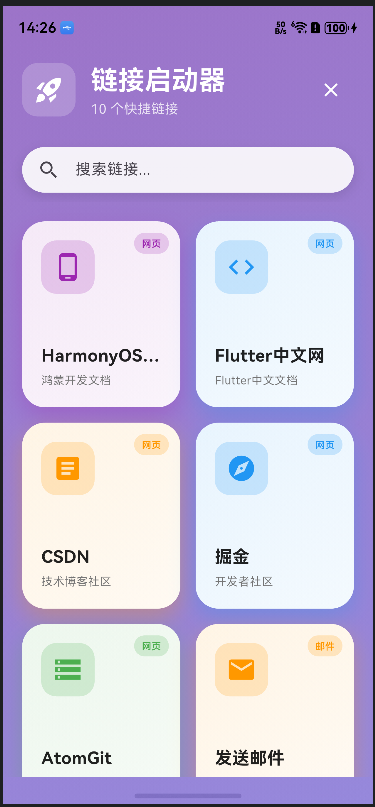
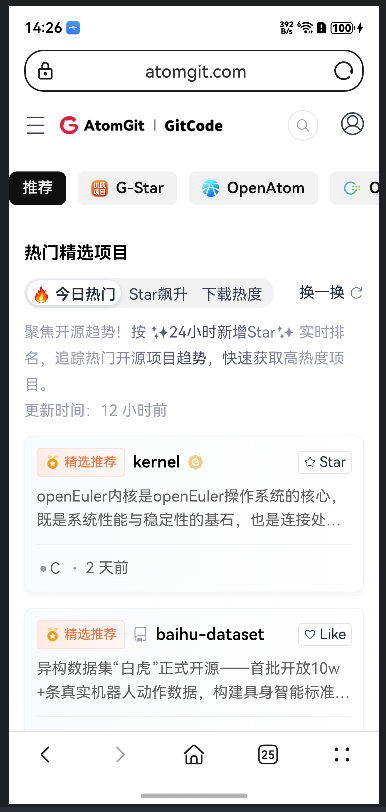
运行截图说明:本文档中的代码已在 HarmonyOS 设备上实际运行测试,功能正常运行。建议读者在阅读时结合实际操作,以获得更好的学习效果。
🎯 项目目标
- ✅ 在 HarmonyOS 平台上集成
url_launcher插件 - ✅ 实现网页链接打开功能
- ✅ 实现邮件链接打开功能
- ✅ 实现电话链接打开功能
- ✅ 实现短信链接打开功能
- ✅ 实现地图链接打开功能
- ✅ 构建美观的 Material Design 3 风格UI
- ✅ 实现搜索功能和流畅动画效果
- ✅ 处理平台兼容性和权限配置
🛠️ 技术栈
- 开发框架: Flutter 3.6.2+
- 三方库 : url_launcher (OpenHarmony TPC 适配版本)
- UI 框架: Material Design 3
- 目标平台: HarmonyOS (OpenHarmony)
- 开发工具: DevEco Studio / VS Code
📦 一、项目初始化
1.1 创建 Flutter 项目
bash
flutter create --platforms=ohos url_launcher_demo
cd url_launcher_demo
1.2 配置依赖
在 pubspec.yaml 中添加 url_launcher 依赖:
yaml
dependencies:
  flutter:
    sdk: flutter
  cupertino_icons: ^1.0.8
  url_launcher:
    git:
      url: https://atomgit.com/openharmony-tpc/flutter_packages.git
      path: packages/url_launcher/url_launcher
ref: br_url_launcher-v6.3.0_ohos重要说明:
- 必须使用 OpenHarmony TPC 提供的适配版本,pub.dev 上的官方版本不支持 HarmonyOS 平台
- 需要指定正确的分支引用
br_url_launcher-v6.3.0_ohos
1.3 安装依赖
bash
flutter pub get🔐 二、权限配置
2.1 添加网络权限
在 ohos/entry/src/main/module.json5 中添加权限配置:
json5
{
  "module": {
    "requestPermissions": [
      {
        "name": "ohos.permission.INTERNET",
        "reason": "$string:network_reason",
        "usedScene": {
          "abilities": ["EntryAbility"],
          "when": "inuse"
        }
      }
    ]
  }
}
2.2 添加权限说明
在 ohos/entry/src/main/resources/base/element/string.json 中添加权限说明:
json
{
  "string": [
    {
      "name": "network_reason",
      "value": "Network access for launching URLs"
    }
  ]
}
在 ohos/entry/src/main/resources/zh_CN/element/string.json 中添加中文说明:
json
{
  "string": [
    {
      "name": "network_reason",
      "value": "使用网络以打开链接"
    }
  ]
}
注意 :url_launcher 插件本身只需要网络权限即可。对于电话、短信等功能,HarmonyOS系统会自动处理,无需额外权限配置。
💻 三、核心功能实现
3.1 导入必要的包
dart
import 'package:flutter/material.dart';
import 'package:url_launcher/url_launcher.dart';
import 'dart:math' as math;
注意 :dart:math 包在动态渐变背景中会用到,如果不需要可以省略。
3.2 定义链接类型枚举
dart
enum LinkType {
  website,  // 网页
  email,    // 邮件
  phone,    // 电话
  sms,      // 短信
  map,      // 地图
}
3.3 创建链接数据模型
dart
class LinkItem {
  final String title;
  final String subtitle;
  final String url;
  final LinkType type;
  final IconData icon;
  final Color color;

  LinkItem({
    required this.title,
    required this.subtitle,
    required this.url,
    required this.type,
    required this.icon,
    required this.color,
  });
}
3.4 实现链接打开功能
核心的链接打开函数:
dart
Future<void> _launchURL(LinkItem item) async {
  final Uri uri = Uri.parse(item.url);
  try {
    // 检查是否可以打开该URL
    if (await canLaunchUrl(uri)) {
      // 打开URL,使用外部应用模式
      await launchUrl(
        uri,
        mode: LaunchMode.externalApplication,
      );

      // 显示成功提示
      if (mounted) {
        ScaffoldMessenger.of(context).showSnackBar(
          SnackBar(
            content: Row(
              children: [
                Icon(item.icon, color: Colors.white),
                const SizedBox(width: 8),
                Text('正在打开: ${item.title}'),
              ],
            ),
            backgroundColor: item.color,
            behavior: SnackBarBehavior.floating,
            duration: const Duration(seconds: 2),
          ),
        );
      }
    } else {
      throw '无法打开此链接';
    }
  } catch (e) {
    // 错误处理
    if (mounted) {
      ScaffoldMessenger.of(context).showSnackBar(
        SnackBar(
          content: Text('打开失败: $e'),
          backgroundColor: Colors.red,
          behavior: SnackBarBehavior.floating,
        ),
      );
    }
  }
}
完整示例 :这个函数应该在 State 类中定义,并且需要确保 context 可用。完整的类结构如下:
dart
class LinkLauncherPage extends StatefulWidget {
  const LinkLauncherPage({super.key});

  @override
  State<LinkLauncherPage> createState() => _LinkLauncherPageState();
}

class _LinkLauncherPageState extends State<LinkLauncherPage> {
  // ... 其他代码

  Future<void> _launchURL(LinkItem item) async {
    // ... 上面的代码
  }
}关键技术点:
canLaunchUrl():检查URL是否可以打开,避免不必要的错误launchUrl():打开URL的核心函数LaunchMode.externalApplication:使用外部应用打开,确保在浏览器或其他应用中打开
3.5 不同链接类型的URL格式
网页链接
dart
LinkItem(
  title: 'HarmonyOS开发者',
  subtitle: '鸿蒙开发文档',
  url: 'https://developer.harmonyos.com',
  type: LinkType.website,
  icon: Icons.phone_android,
  color: Colors.purple,
)

LinkItem(
  title: 'Flutter中文网',
  subtitle: 'Flutter中文文档',
  url: 'https://flutter.cn',
  type: LinkType.website,
  icon: Icons.code,
  color: Colors.blue,
)

LinkItem(
  title: 'CSDN',
  subtitle: '技术博客社区',
  url: 'https://www.csdn.net',
  type: LinkType.website,
  icon: Icons.article,
  color: Colors.orange,
)

LinkItem(
  title: '掘金',
  subtitle: '开发者社区',
  url: 'https://juejin.cn',
  type: LinkType.website,
  icon: Icons.explore,
  color: Colors.blue,
)
邮件链接
dart
LinkItem(
  title: '发送邮件',
  subtitle: '联系开发者',
  url: 'mailto:support@example.com?subject=Hello&body=Hi there!',
  type: LinkType.email,
  icon: Icons.email,
  color: Colors.orange,
)邮件URL参数说明:
mailto::邮件协议前缀support@example.com:收件人邮箱subject=Hello:邮件主题(可选)body=Hi there!:邮件正文(可选)
电话链接
dart
LinkItem(
  title: '拨打电话',
  subtitle: '客服热线',
  url: 'tel:+8613800138000',
  type: LinkType.phone,
  icon: Icons.phone,
  color: Colors.green,
)电话URL格式说明:
tel::电话协议前缀+8613800138000:电话号码(建议使用国际格式)
短信链接
dart
LinkItem(
  title: '发送短信',
  subtitle: '短信联系',
  url: 'sms:+8613800138000?body=Hello',
  type: LinkType.sms,
  icon: Icons.message,
  color: Colors.teal,
)短信URL参数说明:
sms::短信协议前缀+8613800138000:电话号码body=Hello:短信内容(可选)
地图链接
dart
LinkItem(
  title: '打开地图',
  subtitle: '查看位置',
  url: 'https://uri.amap.com/marker?position=116.397128,39.916527&name=北京',
  type: LinkType.map,
  icon: Icons.map,
  color: Colors.red,
)地图URL格式说明:
- 高德地图 (推荐):
https://uri.amap.com/marker?position=经度,纬度&name=位置名称 - 需要根据目标平台选择合适的地图服务
3.6 LaunchMode 模式说明
launchUrl() 函数支持多种打开模式:
dart
await launchUrl(
  uri,
  mode: LaunchMode.platformDefault,  // 平台默认模式
);

await launchUrl(
  uri,
  mode: LaunchMode.inAppWebView,     // 应用内WebView打开
);

await launchUrl(
  uri,
  mode: LaunchMode.externalApplication, // 外部应用打开(推荐)
);

await launchUrl(
  uri,
  mode: LaunchMode.externalNonBrowserApplication, // 外部非浏览器应用打开
);模式选择建议:
LaunchMode.externalApplication:推荐用于网页链接,在系统默认浏览器中打开LaunchMode.inAppWebView:适用于需要在应用内打开网页的场景LaunchMode.platformDefault:让系统决定打开方式
🎨 四、UI设计实现
4.1 动态渐变背景
使用 AnimationController 创建持续变化的渐变背景:
dart
class _LinkLauncherPageState extends State<LinkLauncherPage>
    with TickerProviderStateMixin {
  late AnimationController _backgroundController;

  @override
  void initState() {
    super.initState();
    _backgroundController = AnimationController(
      vsync: this,
      duration: const Duration(seconds: 20),
    )..repeat();
  }

  @override
  Widget build(BuildContext context) {
    return Scaffold(
      body: AnimatedBuilder(
        animation: _backgroundController,
        builder: (context, child) {
          return Container(
            decoration: BoxDecoration(
              gradient: LinearGradient(
                begin: Alignment.topLeft,
                end: Alignment.bottomRight,
                colors: [
                  Color.lerp(
                    Colors.deepPurple.shade300,
                    Colors.pink.shade300,
                    (_backgroundController.value * 2) % 1,
                  )!,
                  Color.lerp(
                    Colors.blue.shade300,
                    Colors.purple.shade300,
                    (_backgroundController.value * 2 + 0.5) % 1,
                  )!,
                ],
              ),
            ),
            child: child,
          );
        },
        child: SafeArea(
          child: Column(
            children: [
              // ... 其他内容
            ],
          ),
        ),
      ),
    );
  }

  @override
  void dispose() {
    _backgroundController.dispose();
    super.dispose();
  }
}
4.2 链接卡片设计
创建美观的链接卡片组件:
dart
class _LinkCard extends StatefulWidget {
  final LinkItem link;
  final VoidCallback onTap;

  const _LinkCard({
    required this.link,
    required this.onTap,
  });

  @override
  State<_LinkCard> createState() => _LinkCardState();
}

class _LinkCardState extends State<_LinkCard>
    with SingleTickerProviderStateMixin {
  late AnimationController _controller;

  @override
  void initState() {
    super.initState();
    _controller = AnimationController(
      vsync: this,
      duration: const Duration(milliseconds: 200),
    );
  }

  @override
  void dispose() {
    _controller.dispose();
    super.dispose();
  }

  @override
  Widget build(BuildContext context) {
    return GestureDetector(
      onTapDown: (_) => _controller.forward(),
      onTapUp: (_) {
        _controller.reverse();
        widget.onTap();
      },
      onTapCancel: () => _controller.reverse(),
      child: AnimatedBuilder(
        animation: _controller,
        builder: (context, child) {
          return Transform.scale(
            scale: 1.0 - (_controller.value * 0.05),
            child: Container(
              decoration: BoxDecoration(
                color: Colors.white,
                borderRadius: BorderRadius.circular(24),
                boxShadow: [
                  BoxShadow(
                    color: widget.link.color.withOpacity(0.3),
                    blurRadius: 20,
                    offset: const Offset(0, 10),
                  ),
                ],
              ),
              child: ClipRRect(
                borderRadius: BorderRadius.circular(24),
                child: Stack(
                  children: [
                    // 渐变背景
                    Positioned.fill(
                      child: Container(
                        decoration: BoxDecoration(
                          gradient: LinearGradient(
                            begin: Alignment.topLeft,
                            end: Alignment.bottomRight,
                            colors: [
                              widget.link.color.withOpacity(0.1),
                              widget.link.color.withOpacity(0.05),
                            ],
                          ),
                        ),
                      ),
                    ),
                    // 卡片内容
                    Padding(
                      padding: const EdgeInsets.all(20.0),
                      child: Column(
                        crossAxisAlignment: CrossAxisAlignment.start,
                        mainAxisAlignment: MainAxisAlignment.spaceBetween,
                        children: [
                          // 图标
                          Container(
                            padding: const EdgeInsets.all(12),
                            decoration: BoxDecoration(
                              color: widget.link.color.withOpacity(0.2),
                              borderRadius: BorderRadius.circular(16),
                            ),
                            child: Icon(
                              widget.link.icon,
                              color: widget.link.color,
                              size: 32,
                            ),
                          ),
                          // 文字信息
                          Column(
                            crossAxisAlignment: CrossAxisAlignment.start,
                            children: [
                              Text(
                                widget.link.title,
                                style: const TextStyle(
                                  fontSize: 18,
                                  fontWeight: FontWeight.bold,
                                  color: Colors.black87,
                                ),
                              ),
                              const SizedBox(height: 4),
                              Text(
                                widget.link.subtitle,
                                style: TextStyle(
                                  fontSize: 12,
                                  color: Colors.grey.shade600,
                                ),
                              ),
                            ],
                          ),
                        ],
                      ),
                    ),
                    // 类型标签
                    Positioned(
                      top: 12,
                      right: 12,
                      child: Container(
                        padding: const EdgeInsets.symmetric(
                          horizontal: 8,
                          vertical: 4,
                        ),
                        decoration: BoxDecoration(
                          color: widget.link.color.withOpacity(0.2),
                          borderRadius: BorderRadius.circular(12),
                        ),
                        child: Text(
                          _getTypeLabel(widget.link.type),
                          style: TextStyle(
                            fontSize: 10,
                            color: widget.link.color,
                            fontWeight: FontWeight.w600,
                          ),
                        ),
                      ),
                    ),
                  ],
                ),
              ),
            ),
          );
        },
      ),
    );
  }

  String _getTypeLabel(LinkType type) {
    switch (type) {
      case LinkType.website:
        return '网页';
      case LinkType.email:
        return '邮件';
      case LinkType.phone:
        return '电话';
      case LinkType.sms:
        return '短信';
      case LinkType.map:
        return '地图';
    }
  }
}
4.3 搜索功能实现
实现实时搜索过滤功能:
dart
class _LinkLauncherPageState extends State<LinkLauncherPage>
    with TickerProviderStateMixin {
  final TextEditingController _searchTextController = TextEditingController();
  final List<LinkItem> _allLinks = [];
  List<LinkItem> _filteredLinks = [];
  bool _isSearching = false;
  late AnimationController _searchController;

  @override
  void initState() {
    super.initState();
    _searchController = AnimationController(
      vsync: this,
      duration: const Duration(milliseconds: 300),
    );
    // 初始化链接列表
    _initializeLinks();
    _filteredLinks = _allLinks;
  }

  void _initializeLinks() {
    // 初始化链接列表的代码
    // ... 添加链接项
  }

  void _filterLinks(String query) {
    setState(() {
      if (query.isEmpty) {
        _filteredLinks = _allLinks;
      } else {
        _filteredLinks = _allLinks
            .where((link) =>
                link.title.toLowerCase().contains(query.toLowerCase()) ||
                link.subtitle.toLowerCase().contains(query.toLowerCase()))
            .toList();
      }
    });
  }

  void _toggleSearch() {
    setState(() {
      _isSearching = !_isSearching;
      if (_isSearching) {
        _searchController.forward();
        _searchTextController.clear();
        _filteredLinks = _allLinks;
      } else {
        _searchController.reverse();
        _searchTextController.clear();
        _filteredLinks = _allLinks;
      }
    });
  }

  Widget _buildSearchBar() {
    return AnimatedBuilder(
      animation: _searchController,
      builder: (context, child) {
        return SizeTransition(
          sizeFactor: _searchController,
          axis: Axis.vertical,
          child: Container(
            margin: const EdgeInsets.symmetric(horizontal: 20, vertical: 10),
            padding: const EdgeInsets.symmetric(horizontal: 16),
            decoration: BoxDecoration(
              color: Colors.white.withOpacity(0.9),
              borderRadius: BorderRadius.circular(24),
              boxShadow: [
                BoxShadow(
                  color: Colors.black.withOpacity(0.1),
                  blurRadius: 10,
                  offset: const Offset(0, 4),
                ),
              ],
            ),
            child: TextField(
              controller: _searchTextController,
              decoration: const InputDecoration(
                hintText: '搜索链接...',
                border: InputBorder.none,
                icon: Icon(Icons.search),
              ),
              onChanged: _filterLinks,
            ),
          ),
        );
      },
    );
  }

  @override
  void dispose() {
    _searchController.dispose();
    _searchTextController.dispose();
    super.dispose();
  }
}
⚠️ 五、常见问题与解决方案
5.1 链接无法打开
问题 :调用 launchUrl() 后链接无法打开
解决方案:
-
检查URL格式:确保URL格式正确
dart// 正确 'https://developer.harmonyos.com' 'https://flutter.cn' 'mailto:support@example.com' 'tel:+8613800138000' // 错误 'flutter.cn' // 缺少协议前缀 'support@example.com' // 缺少mailto:前缀 -
使用
canLaunchUrl()检查:dartif (await canLaunchUrl(uri)) { await launchUrl(uri); } else { // 处理无法打开的情况 } -
检查权限配置 :确保在
module.json5中配置了网络权限
5.2 邮件链接不工作
问题:点击邮件链接后没有反应
解决方案:
-
检查设备上是否安装邮件应用:HarmonyOS需要系统中有邮件应用才能打开mailto链接
-
使用正确的URL格式:
dart// 正确格式 'mailto:support@example.com?subject=Hello&body=Hi' // URL编码特殊字符 'mailto:support@example.com?subject=Hello%20World&body=Hi%20there'
5.3 电话和短信链接不工作
问题:电话和短信链接无法打开
解决方案:
-
使用正确的电话号码格式:
dart// 推荐使用国际格式 'tel:+8613800138000' 'sms:+8613800138000' // 也可以使用本地格式(但可能在某些地区不工作) 'tel:13800138000' -
检查设备功能:确保设备支持电话和短信功能(模拟器可能不支持)
5.4 网页在应用内打开而不是浏览器
问题:网页链接在应用内WebView打开,而不是系统浏览器
解决方案:
使用 LaunchMode.externalApplication 模式:
dart
await launchUrl(
  uri,
  mode: LaunchMode.externalApplication,  // 强制使用外部应用
);
5.5 权限被拒绝
问题:应用请求网络权限被用户拒绝
解决方案:
-
添加权限说明 :在
module.json5中添加reason字段说明权限用途 -
处理权限拒绝情况:
darttry { await launchUrl(uri); } catch (e) { // 显示友好的错误提示 ScaffoldMessenger.of(context).showSnackBar( SnackBar( content: Text('无法打开链接,请检查网络权限'), ), ); }
5.6 MissingPluginException 错误和模块导入问题
问题1 :运行时出现 MissingPluginException: No implementation found for method launchUrl on channel plugins.flutter.io/url_launcher
问题2 :编译时出现 Cannot find module 'url_launcher_ohos' or its corresponding type declarations
解决方案:
这是 HarmonyOS 平台上最常见的问题,原因是插件没有正确注册到原生平台。需要完成以下步骤:
-
在 pubspec.yaml 中添加 url_launcher_ohos 依赖:
由于
url_launcher主包的pubspec.yaml中没有声明ohos平台支持,需要显式添加url_launcher_ohos依赖:yamldependencies: flutter: sdk: flutter url_launcher: git: url: https://atomgit.com/openharmony-tpc/flutter_packages.git path: packages/url_launcher/url_launcher ref: br_url_launcher-v6.3.0_ohos # 必须显式添加 url_launcher_ohos 依赖 url_launcher_ohos: git: url: https://atomgit.com/openharmony-tpc/flutter_packages.git path: packages/url_launcher/url_launcher_ohos ref: br_url_launcher-v6.3.0_ohos -
修复插件注册文件(使用相对路径):
打开
ohos/entry/src/main/ets/plugins/GeneratedPluginRegistrant.ets,使用相对路径导入插件:typescriptimport { FlutterEngine, Log } from '@ohos/flutter_ohos'; // 注意:由于 ohpm install 会删除符号链接,这里使用相对路径导入插件 // 路径从 .flutter-plugins 文件中获取的实际路径计算得出 import UrlLauncherPlugin from '../../../../../../../../../.pub-cache/git/flutter_packages-6650f9f07d6d38dc7f2b088c637e47f75ceeb59b/packages/url_launcher/url_launcher_ohos/ohos/index'; const TAG = "GeneratedPluginRegistrant"; export class GeneratedPluginRegistrant { static registerWith(flutterEngine: FlutterEngine) { try { flutterEngine.getPlugins()?.add(new UrlLauncherPlugin()); } catch (e) { Log.e( TAG, "Tried to register plugins with FlutterEngine (" + flutterEngine + ") failed."); Log.e(TAG, "Received exception while registering", e); } } }重要 :相对路径中的 git hash (
6650f9f07d6d38dc7f2b088c637e47f75ceeb59b) 可能会变化。如果路径不正确,可以通过以下步骤获取:a. 获取插件实际路径:
bashcat .flutter-plugins | grep url_launcher_ohosb. 计算相对路径(使用 Python):
pythonimport os plugins_dir = 'ohos/entry/src/main/ets/plugins' # 替换为实际的插件路径 plugin_path = '/Users/你的用户名/.pub-cache/git/flutter_packages-xxx/packages/url_launcher/url_launcher_ohos/ohos' rel_path = os.path.relpath(os.path.abspath(plugin_path), os.path.abspath(plugins_dir)) print(rel_path) -
重新构建项目:
bashflutter clean flutter pub get cd ohos/entry && ohpm install -
验证配置:
检查
.flutter-plugins文件是否包含url_launcher_ohos:bashcat .flutter-plugins | grep url_launcher_ohos如果输出为空,说明依赖没有正确添加,需要重新执行步骤1。
重要提示:
GeneratedPluginRegistrant.ets文件虽然标记为自动生成,但在 HarmonyOS 平台上,如果插件没有自动注册,需要手动添加注册代码。- 由于
ohpm install会删除符号链接,使用相对路径导入是最可靠的方法。 - 如果 git hash 变化,需要更新相对路径。
- 相对路径中的
../../../../../../../../../是从plugins目录到项目根目录的相对路径。
5.7 "Launch in app" 功能不支持
问题:文档中提到 "The 'Launch in app' feature is not supported. Please use the modified feature through native application configuration."
说明:
这个提示表示 LaunchMode.inAppWebView 模式在 HarmonyOS 平台上不支持。这意味着:
-
不支持的模式:
LaunchMode.inAppWebView:无法在应用内使用 WebView 打开链接
-
支持的模式:
LaunchMode.externalApplication:在外部应用(如浏览器)中打开(推荐)LaunchMode.platformDefault:使用平台默认方式打开LaunchMode.externalNonBrowserApplication:在外部非浏览器应用中打开
-
推荐做法:
在 HarmonyOS 平台上,始终使用
LaunchMode.externalApplication:dartawait launchUrl( uri, mode: LaunchMode.externalApplication, // 推荐使用此模式 );这样可以确保链接在系统默认浏览器或其他应用中正确打开。
-
如果需要应用内打开网页:
如果确实需要在应用内打开网页,可以考虑:
- 使用
webview_flutter插件(如果支持 HarmonyOS) - 使用
flutter_inappwebview插件(如果支持 HarmonyOS) - 或者使用 HarmonyOS 原生的 WebView 组件
- 使用
📝 六、最佳实践总结
6.1 URL格式规范
- 网页链接:始终使用完整的URL,包含协议(http://或https://)
- 邮件链接 :使用
mailto:前缀,参数使用URL编码 - 电话链接:推荐使用国际格式(+国家代码+号码)
- 短信链接 :使用
sms:前缀,电话号码格式同电话链接
6.2 错误处理
- 始终检查URL是否可以打开 :使用
canLaunchUrl()检查 - 提供友好的错误提示:使用SnackBar显示错误信息
- 处理异常情况:使用try-catch捕获异常
6.3 用户体验优化
- 显示加载状态:打开链接时显示提示信息
- 提供视觉反馈:使用动画和颜色变化提供反馈
- 错误恢复:提供重试机制或替代方案
6.4 性能优化
- 避免频繁调用 :不要在循环中频繁调用
launchUrl() - 使用异步处理 :确保使用
await等待操作完成 - 内存管理:及时释放控制器和监听器
🔗 七、相关资源
🌐 社区支持
欢迎加入开源鸿蒙跨平台社区,与其他开发者交流学习,共同推进鸿蒙跨平台生态建设:
开源鸿蒙跨平台社区:https://openharmonycrossplatform.csdn.net
在这里你可以:
- 📚 获取最新的跨平台开发技术文档
- 💬 与其他开发者交流开发经验
- 🐛 反馈问题和建议
- 🎯 参与开源项目贡献
- 📖 学习更多跨平台开发最佳实践
📄 八、完整代码示例
以下是一个最小化的完整示例,可以直接复制使用:
dart
import 'package:flutter/material.dart';
import 'package:url_launcher/url_launcher.dart';

void main() {
  runApp(const MyApp());
}

class MyApp extends StatelessWidget {
  const MyApp({super.key});

  @override
  Widget build(BuildContext context) {
    return MaterialApp(
      title: 'URL Launcher Demo',
      theme: ThemeData(useMaterial3: true),
      home: const LinkLauncherPage(),
    );
  }
}

class LinkLauncherPage extends StatefulWidget {
  const LinkLauncherPage({super.key});

  @override
  State<LinkLauncherPage> createState() => _LinkLauncherPageState();
}

class _LinkLauncherPageState extends State<LinkLauncherPage> {
  Future<void> _launchURL(String url) async {
    final Uri uri = Uri.parse(url);
    try {
      if (await canLaunchUrl(uri)) {
        await launchUrl(
          uri,
          mode: LaunchMode.externalApplication,
        );
      } else {
        if (mounted) {
          ScaffoldMessenger.of(context).showSnackBar(
            const SnackBar(content: Text('无法打开此链接')),
          );
        }
      }
    } catch (e) {
      if (mounted) {
        ScaffoldMessenger.of(context).showSnackBar(
          SnackBar(content: Text('打开失败: $e')),
        );
      }
    }
  }

  @override
  Widget build(BuildContext context) {
    return Scaffold(
      appBar: AppBar(title: const Text('链接启动器')),
      body: ListView(
        padding: const EdgeInsets.all(16),
        children: [
          ListTile(
            leading: const Icon(Icons.language),
            title: const Text('打开网页'),
            subtitle: const Text('https://developer.harmonyos.com'),
            onTap: () => _launchURL('https://developer.harmonyos.com'),
          ),
          ListTile(
            leading: const Icon(Icons.email),
            title: const Text('发送邮件'),
            subtitle: const Text('mailto:example@example.com'),
            onTap: () => _launchURL('mailto:example@example.com'),
          ),
          ListTile(
            leading: const Icon(Icons.phone),
            title: const Text('拨打电话'),
            subtitle: const Text('tel:+8613800138000'),
            onTap: () => _launchURL('tel:+8613800138000'),
          ),
          ListTile(
            leading: const Icon(Icons.message),
            title: const Text('发送短信'),
            subtitle: const Text('sms:+8613800138000'),
            onTap: () => _launchURL('sms:+8613800138000'),
          ),
        ],
      ),
    );
  }
}使用说明:
- 将上述代码保存到
lib/main.dart文件中 - 确保
pubspec.yaml中已添加url_launcher依赖 - 运行
flutter pub get安装依赖 - 运行
flutter run启动应用
🌐 社区支持
欢迎加入开源鸿蒙跨平台社区,与其他开发者交流学习,共同推进鸿蒙跨平台生态建设:
开源鸿蒙跨平台社区 :https://openharmonycrossplatform.csdn.net
在这里你可以:
- 📚 获取最新的跨平台开发技术文档
- 💬 与其他开发者交流开发经验
- 🐛 反馈问题和建议
- 🎯 参与开源项目贡献
- 📖 学习更多跨平台开发最佳实践
享受你的链接启动开发之旅! 🚀✨