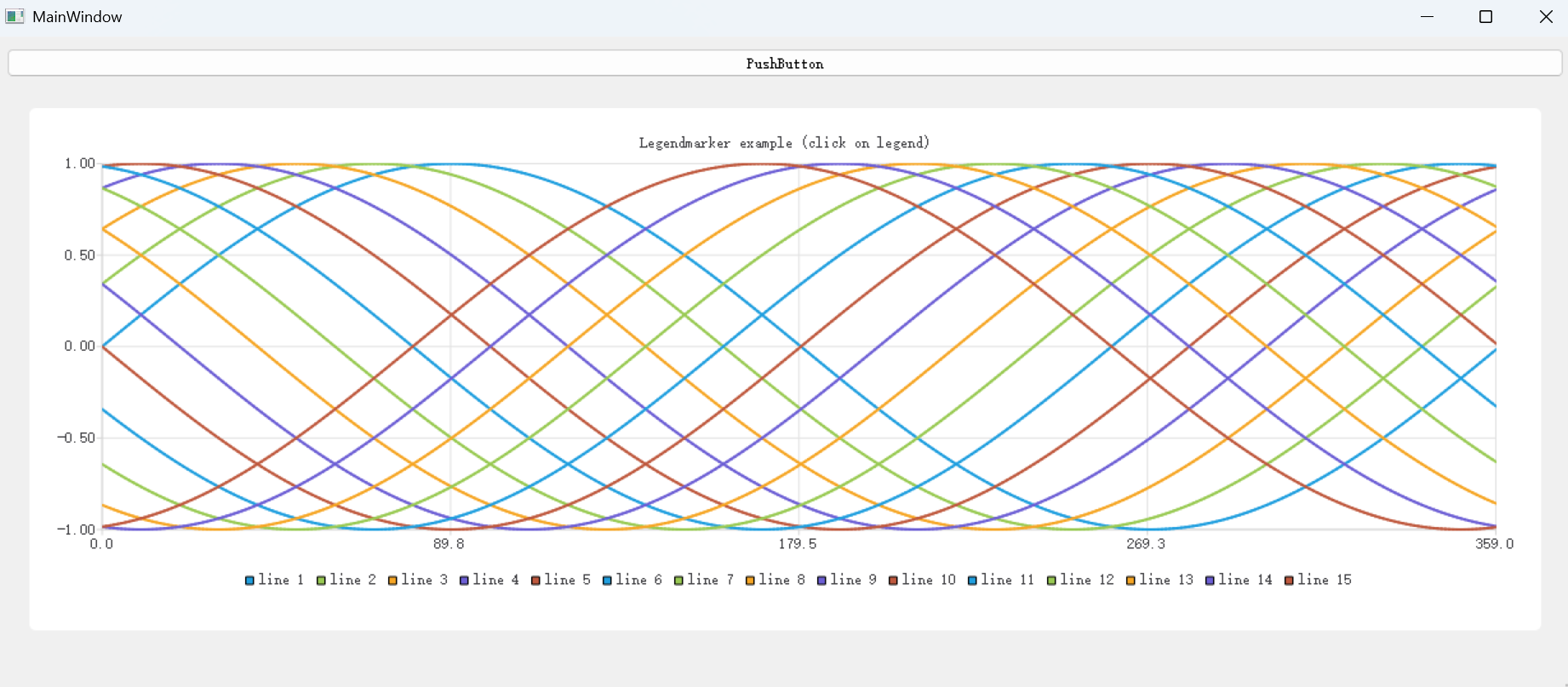
有时候任务是分不同人开发的,如何把结果汇总到一个界面呢?
或者有些好的类是自己封装后,可以无限复制使用,怎么挪到自己的主程序呢?
以下举个小例子记录一下,我也备份一下
说明:
我有一个派生类,继承于QWidget,功能是用来绘制折线图的(直接QT例子粘贴的)
还有一个主程序,MainWindow,里面有一个QWidget占位,用来绘制折线图
如何把折线图绘制的QWidget放置到主程序里面的QWidget呢?
继承类:
cpp
/****************************************************************************
**
** Copyright (C) 2016 The Qt Company Ltd.
** Contact: https://www.qt.io/licensing/
**
** This file is part of the Qt Charts module of the Qt Toolkit.
**
** $QT_BEGIN_LICENSE:GPL$
** Commercial License Usage
** Licensees holding valid commercial Qt licenses may use this file in
** accordance with the commercial license agreement provided with the
** Software or, alternatively, in accordance with the terms contained in
** a written agreement between you and The Qt Company. For licensing terms
** and conditions see https://www.qt.io/terms-conditions. For further
** information use the contact form at https://www.qt.io/contact-us.
**
** GNU General Public License Usage
** Alternatively, this file may be used under the terms of the GNU
** General Public License version 3 or (at your option) any later version
** approved by the KDE Free Qt Foundation. The licenses are as published by
** the Free Software Foundation and appearing in the file LICENSE.GPL3
** included in the packaging of this file. Please review the following
** information to ensure the GNU General Public License requirements will
** be met: https://www.gnu.org/licenses/gpl-3.0.html.
**
** $QT_END_LICENSE$
**
****************************************************************************/

#ifndef MAINWIDGET_H
#define MAINWIDGET_H

#include <QtCharts/QChartGlobal>
#include <QtCharts/QChart>
#include <QtCharts/QChartView>
#include <QtWidgets/QWidget>
#include <QtWidgets/QGraphicsWidget>
#include <QtWidgets/QGridLayout>
#include <QtWidgets/QGraphicsGridLayout>
#include <QtWidgets/QDoubleSpinBox>
#include <QtWidgets/QGroupBox>
#include <QtCharts/QLineSeries>

QT_CHARTS_USE_NAMESPACE

class MainWidget : public QWidget
{
    Q_OBJECT
public:
    explicit MainWidget(QWidget *parent = 0);

    void addSeries();
    void connectMarkers();
public slots:
    void removeSeries();

    void disconnectMarkers();

    void handleMarkerClicked();

private:

    QChart *m_chart;
    QList<QLineSeries *> m_series;

    QChartView *m_chartView;
    QGridLayout *m_mainLayout;
    QGridLayout *m_fontLayout;

};

#endif // MAINWIDGET_H
cpp
/****************************************************************************
**
** Copyright (C) 2016 The Qt Company Ltd.
** Contact: https://www.qt.io/licensing/
**
** This file is part of the Qt Charts module of the Qt Toolkit.
**
** $QT_BEGIN_LICENSE:GPL$
** Commercial License Usage
** Licensees holding valid commercial Qt licenses may use this file in
** accordance with the commercial license agreement provided with the
** Software or, alternatively, in accordance with the terms contained in
** a written agreement between you and The Qt Company. For licensing terms
** and conditions see https://www.qt.io/terms-conditions. For further
** information use the contact form at https://www.qt.io/contact-us.
**
** GNU General Public License Usage
** Alternatively, this file may be used under the terms of the GNU
** General Public License version 3 or (at your option) any later version
** approved by the KDE Free Qt Foundation. The licenses are as published by
** the Free Software Foundation and appearing in the file LICENSE.GPL3
** included in the packaging of this file. Please review the following
** information to ensure the GNU General Public License requirements will
** be met: https://www.gnu.org/licenses/gpl-3.0.html.
**
** $QT_END_LICENSE$
**
****************************************************************************/

#include "mainwidget.h"
#include <QtCharts/QChart>
#include <QtCharts/QChartView>
#include <QtWidgets/QPushButton>
#include <QtWidgets/QLabel>
#include <QtCore/QDebug>
#include <QtCharts/QLegend>
#include <QtWidgets/QFormLayout>
#include <QtCharts/QLegendMarker>
#include <QtCharts/QLineSeries>
#include <QtCharts/QXYLegendMarker>
#include <QtCore/QtMath>

QT_CHARTS_USE_NAMESPACE

MainWidget::MainWidget(QWidget *parent) :
    QWidget(parent)
{
    // Create chart view with the chart
    m_chart = new QChart();
    m_chartView = new QChartView(m_chart, this);

    // Create layout for grid and detached legend
    m_mainLayout = new QGridLayout();
    m_mainLayout->addWidget(m_chartView, 0, 1, 3, 1);
    setLayout(m_mainLayout);

    // Add few series
    addSeries();
    addSeries();
    addSeries();
    addSeries();

    connectMarkers();

    // Set the title and show legend
    m_chart->setTitle("Legendmarker example (click on legend)");
    m_chart->legend()->setVisible(true);
    m_chart->legend()->setAlignment(Qt::AlignBottom);

    m_chartView->setRenderHint(QPainter::Antialiasing);
}

void MainWidget::addSeries()
{
    QLineSeries *series = new QLineSeries();
    m_series.append(series);

    series->setName(QString("line " + QString::number(m_series.count())));

    // Make some sine wave for data
    QList<QPointF> data;
    int offset = m_chart->series().count();
    for (int i = 0; i < 360; i++) {
        qreal x = offset * 20 + i;
        data.append(QPointF(i, qSin(qDegreesToRadians(x))));
    }

    series->append(data);
    m_chart->addSeries(series);

    if (m_series.count() == 1)
        m_chart->createDefaultAxes();
}

void MainWidget::removeSeries()
{
    // Remove last series from chart
    if (m_series.count() > 0) {
        QLineSeries *series = m_series.last();
        m_chart->removeSeries(series);
        m_series.removeLast();
        delete series;
    }
}

void MainWidget::connectMarkers()
{
//![1]
    // Connect all markers to handler
    const auto markers = m_chart->legend()->markers();
    for (QLegendMarker *marker : markers)
    {
        // Disconnect possible existing connection to avoid multiple connections
        QObject::disconnect(marker, &QLegendMarker::clicked,
                            this, &MainWidget::handleMarkerClicked);
        QObject::connect(marker, &QLegendMarker::clicked, this, &MainWidget::handleMarkerClicked);
    }
//![1]
}

void MainWidget::disconnectMarkers()
{
//![2]
    const auto markers = m_chart->legend()->markers();
    for (QLegendMarker *marker : markers) {
        QObject::disconnect(marker, &QLegendMarker::clicked,
                            this, &MainWidget::handleMarkerClicked);
    }
//![2]
}

void MainWidget::handleMarkerClicked()
{
//![3]
    QLegendMarker* marker = qobject_cast<QLegendMarker*> (sender());
    Q_ASSERT(marker);
//![3]

//![4]
    switch (marker->type())
//![4]
    {
        case QLegendMarker::LegendMarkerTypeXY:
        {
//![5]
        // Toggle visibility of series
        marker->series()->setVisible(!marker->series()->isVisible());

        // Turn legend marker back to visible, since hiding series also hides the marker
        // and we don't want it to happen now.
        marker->setVisible(true);
//![5]

//![6]
        // Dim the marker, if series is not visible
        qreal alpha = 1.0;

        if (!marker->series()->isVisible())
            alpha = 0.5;

        QColor color;
        QBrush brush = marker->labelBrush();
        color = brush.color();
        color.setAlphaF(alpha);
        brush.setColor(color);
        marker->setLabelBrush(brush);

        brush = marker->brush();
        color = brush.color();
        color.setAlphaF(alpha);
        brush.setColor(color);
        marker->setBrush(brush);

        QPen pen = marker->pen();
        color = pen.color();
        color.setAlphaF(alpha);
        pen.setColor(color);
        marker->setPen(pen);

//![6]
        break;
        }
    default:
        {
        qDebug() << "Unknown marker type";
        break;
        }
    }
}
实现:
1.我原来不考虑主程序代码量、不考虑代码美观,我都是直接写到主程序里面了,但是这样代码太多了,不方便管理,所以要剥离出来,单独封装
2.在代码里面直接创建实例即可,这样的话,所有图标操作全部放到chart 实例中封装对应接口就行
cpp
    if (!ui->widget->layout()) {
        ui->widget->setLayout(new QVBoxLayout());
    }
    chart = new MainWidget(this);
    // 添加到布局
    ui->widget->layout()->addWidget(chart);
    // 可选:设置布局边距
    ui->widget->layout()->setContentsMargins(0, 0, 0, 0);

//调用的时候
   chart->addSeries();
   chart->connectMarkers();
3.或者更简单,在.ui中,找到占位的QWidget 控件,右键提升,写类名和头文件即可,后续调用就不需要代码了,只需要ui->widget占位的控件调用派生类的接口函数就行
cpp
    ui->widget->addSeries();
    ui->widget->connectMarkers();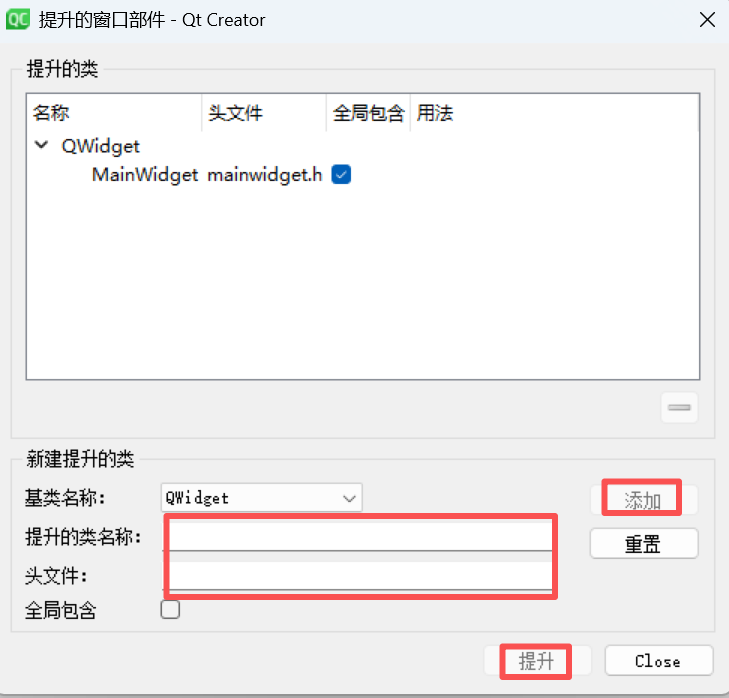
可以了