FastAPI 参数接收类型总结 --pd的后端笔记
文章目录
-
- [FastAPI 参数接收类型总结 --pd的后端笔记](#FastAPI 参数接收类型总结 --pd的后端笔记)
- 参数类型分类
-
- [路径参数(Path Parameters)](#路径参数(Path Parameters))
- [查询参数(Query Parameters)](#查询参数(Query Parameters))
- [请求体(Request Body)](#请求体(Request Body))
- [表单数据(Form Data)](#表单数据(Form Data))
- [文件上传(File Uploads)](#文件上传(File Uploads))
- 混合参数(混合使用)
参数类型分类
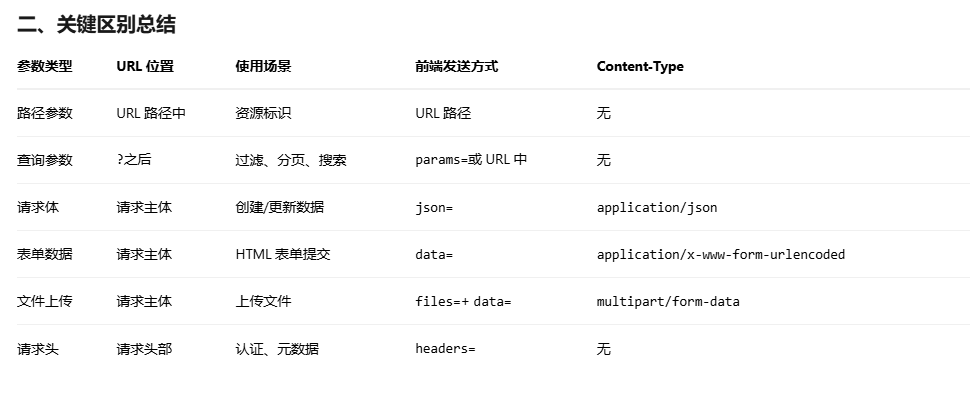
路径参数(Path Parameters)
定义:URL 路径中的变量
后端写法:
python
@app.get("/users/{user_id}")
async def get_user(user_id: int):
    return {"user_id": user_id}
前端请求:
python
# Python requests
response = requests.get("http://api.com/users/123")

# cURL
curl "http://api.com/users/123"
查询参数(Query Parameters)
定义:?后的键值对,用于过滤、分页等
后端写法:
python
@app.get("/items/")
async def read_items(
    skip: int = 0,
    limit: int = 10,
    q: Optional[str] = None
):
    return {"skip": skip, "limit": limit, "q": q}
前端请求:
python
# Python requests
params = {"skip": 0, "limit": 10, "q": "search"}
response = requests.get("http://api.com/items/", params=params)

# cURL
curl "http://api.com/items/?skip=0&limit=10&q=search"
请求体(Request Body)
定义:POST/PUT 请求中的数据主体
后端写法:
python
from pydantic import BaseModel

class Item(BaseModel):
    name: str
    price: float
    is_offer: bool = None

@app.post("/items/")
async def create_item(item: Item):
    return item
前端请求:
python
# Python requests
data = {"name": "Foo", "price": 50.5, "is_offer": True}
response = requests.post(
    "http://api.com/items/",
    json=data,  # 自动设置 Content-Type: application/json
    headers={"accept": "application/json"}
)

# cURL
curl -X POST "http://api.com/items/" \
  -H "Content-Type: application/json" \
  -d '{"name":"Foo","price":50.5}'
表单数据(Form Data)
定义:传统的 HTML 表单提交
后端写法:
python
from fastapi import Form

@app.post("/login/")
async def login(
    username: str = Form(...),
    password: str = Form(...)
):
    return {"username": username}
前端请求:
python
# Python requests
data = {"username": "user", "password": "secret"}
response = requests.post(
    "http://api.com/login/",
    data=data  # 注意是 data,不是 json
)

# cURL
curl -X POST "http://api.com/login/" \
  -d "username=user&password=secret"
文件上传(File Uploads)
后端写法:
python
from fastapi import File, UploadFile

@app.post("/upload/")
async def upload_file(
    file: UploadFile = File(...),
    description: str = Form(None)  # 可同时接收其他表单字段
):
    return {"filename": file.filename}
前端请求:
python
# Python requests
with open("test.txt", "rb") as f:
    files = {"file": ("test.txt", f, "text/plain")}
    data = {"description": "文件说明"}
    response = requests.post(
        "http://api.com/upload/",
        files=files,
        data=data
    )

# cURL
curl -X POST "http://api.com/upload/" \
  -F "file=@test.txt" \
  -F "description=文件说明"
混合参数(混合使用)
后端写法:
python
@app.post("/items/{item_id}")
async def update_item(
    item_id: int,  # 路径参数
    q: Optional[str] = Query(None),  # 查询参数
    item: Item = Body(...),  # 请求体
    x_token: str = Header(None)  # 请求头
):
    return {"item_id": item_id, "q": q, "item": item}
前端请求:
python
# Python requests
params = {"q": "search"}
headers = {"X-Token": "secret"}
data = {"name": "Foo", "price": 50.5}
response = requests.put(
    f"http://api.com/items/123",
    params=params,
    json=data,
    headers=headers
)