文章目录
- [什么是 Pinia](#什么是 Pinia)
- [集成 Pinia 到 Vue 项目](#集成 Pinia 到 Vue 项目)
- 基础使用
- [Getters 实现](#Getters 实现)
- [异步 Actions](#异步 Actions)
- [响应式解构 storeToRefs](#响应式解构 storeToRefs)
- Pinia调试
- [持久化插件 pinia-plugin-persistedstate](#持久化插件 pinia-plugin-persistedstate)
什么是 Pinia
Pinia 是 Vue 官方推荐的新一代状态管理工具,旨在替代 Vuex。其主要优势包括:
- 更简单的 API:移除了 mutation,逻辑更直观
- 组合式 API 风格:与 Vue 3 的 <script setup> 语法天然契合
- 无 modules 概念:每个 store 都是独立模块,结构更扁平
- TypeScript 友好:提供出色的类型推断支持
集成 Pinia 到 Vue 项目
- 使用 Vite 创建 Vue 3 项目:
bash
npm create vue@latest- 安装 Pinia:
bash
npm install pinia- 在 main.js 中注册:
js
import { createApp } from 'vue'
import { createPinia } from 'pinia'
import App from './App.vue'

const app = createApp(App)
const pinia = createPinia()
app.use(pinia)
app.mount('#app')
基础使用
计数器案例
- 定义 Store(stores/counter.js)
js
import { defineStore } from 'pinia'

export const useCounterStore = defineStore('counter', {
  // state
  state: () => ({
    count: 0
  }),
  // actions(同步或异步)
  actions: {
    increment() {
      this.count++
    }
  }
})- 在组件中使用
html
<script setup>
import { useCounterStore } from '@/stores/counter'
const counter = useCounterStore()
</script>

<template>
  <p>{{ counter.count }}</p>
  <button @click="counter.increment">+1</button>
</template>
Getters 实现
Pinia 中的 getters 等价于 Vue 的 computed
js
getters: {
  doubleCount: (state) => state.count * 2
}
异步 Actions
Action 支持直接编写异步逻辑,无需额外处理:
js
actions: {
  async fetchChannels() {
    const res = await fetch('http://geek.itheima.net/v1_0/channels')
    const data = await res.json()
    this.channels = data.data.channels
  }
}
在组件中调用:
js
onMounted(() => {
  store.fetchChannels()
})
响应式解构 storeToRefs
直接解构 store 会丢失响应性。使用 storeToRefs 保持响应式:
js
import { storeToRefs } from 'pinia'
import { useCounterStore } from '@/stores/counter'

const store = useCounterStore()
const { count } = storeToRefs(store) // 响应式
const { increment } = store // 方法无需 ref
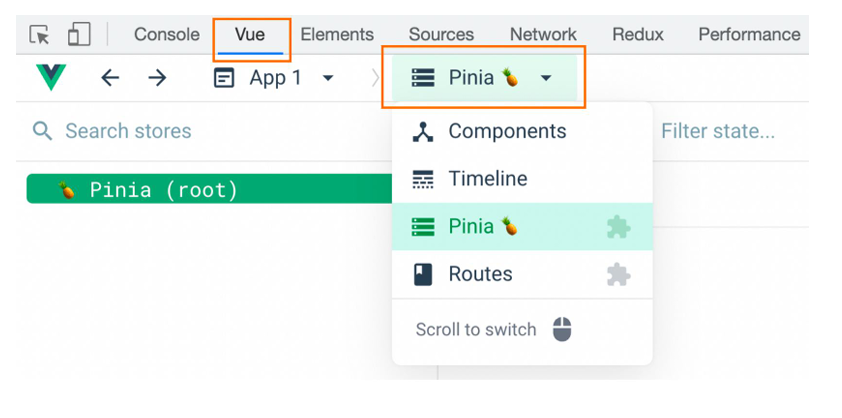
Pinia调试
Vue官方的 dev-tools 调试工具 对 Pinia直接支持,可以直接进行调试
持久化插件 pinia-plugin-persistedstate
官方文档:https://prazdevs.github.io/pinia-plugin-persistedstate/zh/
实现状态持久化(如保存到 localStorage):
- 安装插件:
bash
npm install pinia-plugin-persistedstate- 在 main.js 中启用:
js
import persist from 'pinia-plugin-persistedstate'
const pinia = createPinia()
pinia.use(persist)
app.use(pinia)- 在 store 中开启持久化:
js
export const useUserStore = defineStore('user', {
  state: () => ({ token: '' }),
  persist: true // 启用持久化
})
默认使用 localStorage,也可自定义存储方式(如 sessionStorage)