首先,我们先看一下实现的整体的一个逻辑。
核心流程:
- 引用文件→2.js全局挂载(index.html) → 3. 创建播放器实例 → 4. 请求数据传URL【player.play(url)】
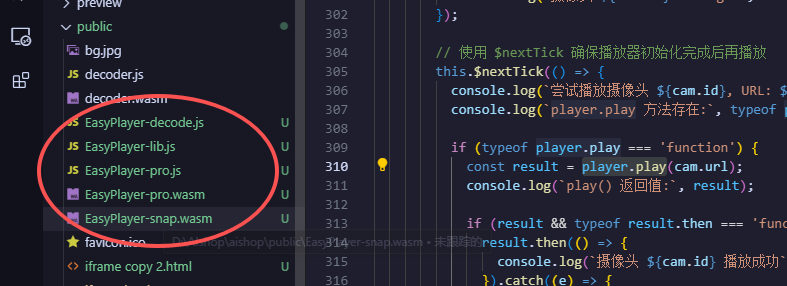
步骤1:文件所在位置
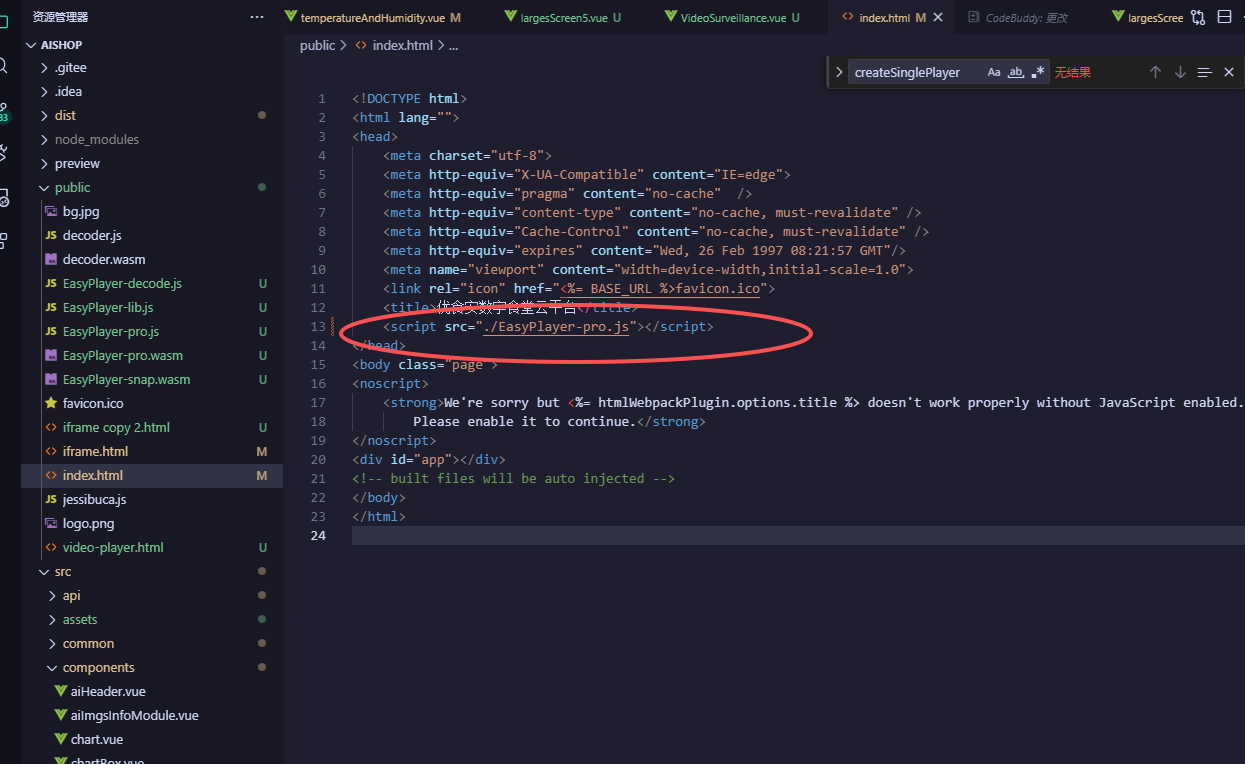
步骤2:全局挂载
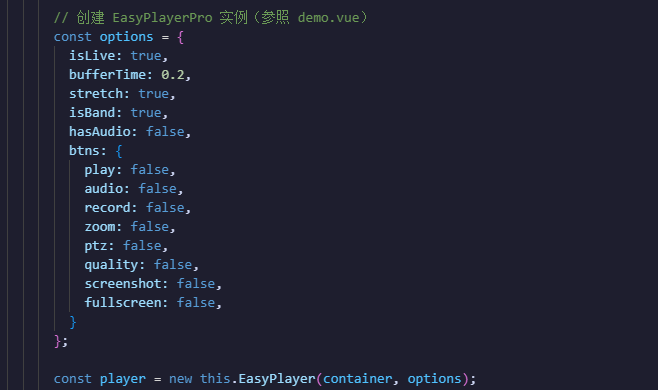
步骤3:配置项+创建实例
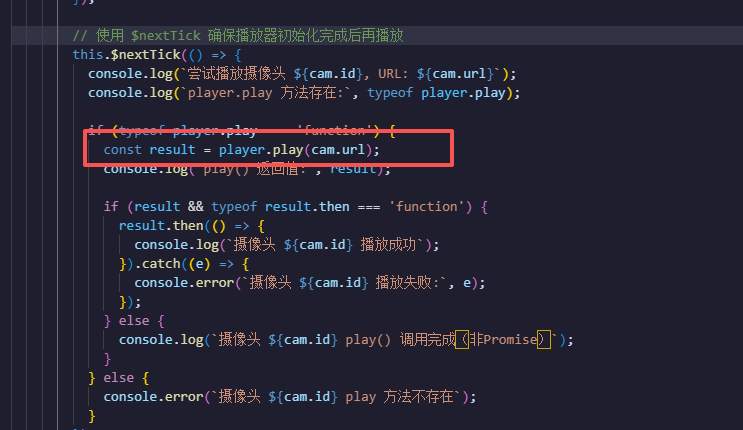
步骤4:请求数据传URL
demo.vue
html
<template>
  <div class="video-surveillance-container">
    <div class="corner top-left"></div>
    <div class="corner top-right"></div>
    <div class="corner bottom-left"></div>
    <div class="corner bottom-right"></div>

    <div class="panel-header video-header">
      <span class="panel-title-text">视频监控</span>
      <div class="title-box">
        <div class="center-top-title">
          <div class="Split">
            <div
              class="oneScreen"
              @click="changeLayout(1)"
              :class="{ currentBg: layoutMode === 1 }"
            ></div>
            <div
              class="fourScreen"
              :class="{ noCurrentBg: layoutMode === 1 }"
              @click="changeLayout(4)"
            >
              <i class="el-icon-menu"></i>
            </div>
          </div>
        </div>
      </div>
    </div>

    <div class="panel-body strict-video-container">
      <div class="camera-grid-dynamic" :class="'grid-' + layoutMode">
        <div
          class="camera-box"
          v-for="(cam, index) in currentViewCameras"
          :key="index"
        >
          <!-- EasyPlayerPro Web Component -->
          <div class="easyplayer-container">
            <div :id="`player-container-${index}`" style="width:100%;height:100%;"></div>
          </div>

          <div class="cam-overlay top">
            <span class="cam-id">CAM-0{{ cam.id }}</span>
            <span class="cam-loc">{{ cam.location }}</span>
          </div>
          <div class="cam-overlay bottom">
            <div class="rec-status"><span class="dot"></span> REC</div>
            <span class="cam-time">{{ currentTimeSmall }}</span>
          </div>
          <div class="cam-border"></div>
        </div>

        <div
          class="camera-box placeholder"
          v-for="n in layoutMode - currentViewCameras.length"
          :key="'ph-' + n"
        >
          <span class="no-signal">NO SIGNAL</span>
        </div>
      </div>
    </div>
  </div>
</template>

<script>
import { getAiBox } from "../api/api";

export default {
  name: "VideoSurveillance",
  data() {
    return {
      layoutMode: 4,
      currentPage: 0,
      cameraList: [],
      easyPlayers: [],
      currentTimeSmall: "",
      timer: null,
      EasyPlayer: null,
    };
  },
  computed: {
    totalCameras() {
      return this.cameraList.length;
    },
    totalPages() {
      return Math.ceil(this.totalCameras / this.layoutMode);
    },
    currentViewCameras() {
      const start = this.currentPage * this.layoutMode;
      const end = start + this.layoutMode;
      return this.cameraList.slice(start, end);
    },
  },
  mounted() {
    this.loadEasyPlayer();
  },
  beforeDestroy() {
    if (this.timer) clearInterval(this.timer);
    this.destroyVideoPlayers();
  },
  methods: {
    // 加载 EasyPlayerPro 库
    loadEasyPlayer() {
      // EasyPlayerPro 已在 index.html 中全局引入,直接使用
      this.EasyPlayer = window.EasyPlayerPro;

      if (!this.EasyPlayer) {
        console.error('无法找到 EasyPlayerPro 构造函数,请检查 index.html 中的引入');
        return;
      }

      this.loadCameraData();
      this.updateTime();
      this.timer = setInterval(this.updateTime, 1000);
    },

    // 获取摄像头数据
    async loadCameraData() {
      try {
        const res = await getAiBox();

        if (res.data && res.data.data && res.data.data.channel) {
          this.cameraList = res.data.data.channel.map((item, index) => ({
            id: index + 1,
            location: item.channel_address,
            url: item.flv_url,
            rawData: item,
          }));

          this.$nextTick(() => {
            this.initVideoPlayers();
          });
        } else {
          console.warn("摄像头数据为空,使用默认数据");
          this.loadDefaultCameraList();
        }
      } catch (error) {
        console.error("获取摄像头数据失败:", error);
        this.loadDefaultCameraList();
      }
    },

    // 加载默认摄像头数据
    loadDefaultCameraList() {
      this.cameraList = Array.from({ length: 16 }, (_, i) => ({
        id: i + 1,
        location:
          [
            "切配区",
            "烹饪区",
            "洗消区",
            "备餐区",
            "仓库通道",
            "卸货区",
            "留样间",
            "面点间",
          ][i % 8] +
          (Math.floor(i / 8) + 1) +
          "#",
        url: "ws://39.98.60.124:10081/ws/flv/live/stream_2.live.flv",
      }));

      // 测试 WebSocket 连接
      this.testWebSocketConnection();

      this.$nextTick(() => {
        this.initVideoPlayers();
      });
    },

    // 测试 WebSocket 连接
    testWebSocketConnection() {
      const testUrl = 'ws://192.168.31.249/ws/flv/live/stream_1.live.flv';
      console.log('测试 WebSocket 连接:', testUrl);

      const ws = new WebSocket(testUrl);

      ws.onopen = () => {
        console.log('✓ WebSocket 连接成功');
        ws.close();
      };

      ws.onerror = (e) => {
        console.error('✗ WebSocket 连接失败:', e);
        console.error('请检查:');
        console.error('1. 视频流服务是否运行在 ws://192.168.31.249');
        console.error('2. 端口是否正确(默认80端口)');
        console.error('3. 防火墙是否允许连接');
      };

      ws.onclose = () => {
        console.log('WebSocket 连接已关闭');
      };
    },

    // 初始化视频播放器
    initVideoPlayers() {
      if (!this.EasyPlayer) {
        console.error("EasyPlayerPro is not loaded yet.");
        return;
      }

      if (!this.currentViewCameras || this.currentViewCameras.length === 0) {
        console.warn("没有可用的摄像头数据");
        return;
      }

      // 销毁当前已存在的播放器
      this.destroyVideoPlayers();

      // 等待 Vue 完成 DOM 更新后再创建新的播放器
      this.$nextTick(() => {
        // 再增加一个 tick,确保 DOM 完全稳定
        setTimeout(() => {
          // 逐个延迟创建播放器,避免同时创建导致资源不足
          this.currentViewCameras.forEach((cam, index) => {
            if (cam.url) {
              // 每个播放器延迟 300ms 创建,避免资源冲突
              setTimeout(() => {
                this.createSinglePlayer(cam, index);
              }, index * 300);
            }
          });
        }, 100);
      });
    },

    // 创建单个播放器
    createSinglePlayer(cam, index) {
      try {
        const containerId = `player-container-${index}`;
        const container = document.getElementById(containerId);

        if (!container) {
          console.warn(`找不到播放器容器 ${containerId}`);
          return;
        }

        // 检查该容器是否已经有播放器实例(可能来自之前的布局)
        const existingPlayer = this.easyPlayers.find(p => p.containerId === containerId);
        if (existingPlayer) {
          console.log(`容器 ${containerId} 已存在播放器实例,先销毁`);
          try {
            existingPlayer.player.destroy();
          } catch (e) {
            console.error('销毁旧播放器失败:', e);
          }
          // 从数组中移除
          this.easyPlayers = this.easyPlayers.filter(p => p.containerId !== containerId);
        }

        console.log(`初始化摄像头 ${cam.id}, URL: ${cam.url}`);

        // 清空容器
        container.innerHTML = '';

        // 创建 EasyPlayerPro 实例(参照 demo.vue)
        const options = {
          isLive: true,
          bufferTime: 0.2,
          stretch: true,
          isBand: true,
          hasAudio: false,
          btns: {
            play: false,
            audio: false,
            record: false,
            zoom: false,
            ptz: false,
            quality: false,
            screenshot: false,
            fullscreen: false,
          }
        };

        const player = new this.EasyPlayer(container, options);
        console.log(`摄像头 ${cam.id} 播放器创建完成`, player);

        // 添加更多事件监听
        player.on('fullscreen', (flag) => {
          console.log(`摄像头 ${cam.id} fullscreen:`, flag);
        });

        player.on('play', () => {
          console.log(`摄像头 ${cam.id} 开始播放`);
        });

        player.on('pause', () => {
          console.log(`摄像头 ${cam.id} 暂停`);
        });

        player.on('ended', () => {
          console.log(`摄像头 ${cam.id} 播放结束`);
        });

        player.on('error', (error) => {
          console.error(`摄像头 ${cam.id} 播放错误:`, error);
        });

        player.on('message', (data) => {
          console.log(`摄像头 ${cam.id} message:`, data);
        });

        // 使用 $nextTick 确保播放器初始化完成后再播放
        this.$nextTick(() => {
          console.log(`尝试播放摄像头 ${cam.id}, URL: ${cam.url}`);
          console.log(`player.play 方法存在:`, typeof player.play);

          if (typeof player.play === 'function') {
            const result = player.play(cam.url);
            console.log(`play() 返回值:`, result);

            if (result && typeof result.then === 'function') {
              result.then(() => {
                console.log(`摄像头 ${cam.id} 播放成功`);
              }).catch((e) => {
                console.error(`摄像头 ${cam.id} 播放失败:`, e);
              });
            } else {
              console.log(`摄像头 ${cam.id} play() 调用完成(非Promise)`);
            }
          } else {
            console.error(`摄像头 ${cam.id} play 方法不存在`);
          }
        });

        this.easyPlayers.push({
          player,
          containerId,
          cameraId: cam.id,
        });
      } catch (error) {
        console.error(`创建摄像头 ${cam.id} 播放器失败:`, error);
      }
    },

    // 销毁视频播放器
    destroyVideoPlayers() {
      if (this.easyPlayers.length > 0) {
        this.easyPlayers.forEach(({ player }) => {
          try {
            if (player) {
              player.destroy();
            }
          } catch (e) {
            console.error('销毁播放器失败:', e);
          }
        });
        this.easyPlayers = [];
      }
      // 移除这里的 container.innerHTML 清空操作,让 Vue 自己处理 DOM
    },

    // 重新加载视频播放器
    reloadVideoPlayers() {
      this.destroyVideoPlayers();
      this.$nextTick(() => {
        this.initVideoPlayers();
      });
    },

    // 更新时间
    updateTime() {
      const now = new Date();
      this.currentTimeSmall = now.toLocaleTimeString("zh-CN", {
        hour12: false,
      });
    },

    // 处理视频错误
    handleVideoError(camId) {
      console.error(`摄像头 ${camId} 视频加载失败`);
    },

    // 切换布局
    changeLayout(mode) {
      this.layoutMode = mode;
      this.currentPage = 0;
      this.reloadVideoPlayers();
    },

    // 下一页
    nextPage() {
      if (this.currentPage < this.totalPages - 1) {
        this.currentPage++;
        this.reloadVideoPlayers();
      } else {
        this.currentPage = 0;
        this.reloadVideoPlayers();
      }
    },

    // 上一页
    prevPage() {
      if (this.currentPage > 0) {
        this.currentPage--;
        this.reloadVideoPlayers();
      } else {
        this.currentPage = this.totalPages - 1;
        this.reloadVideoPlayers();
      }
    },
  },
};
</script>

<style scoped>
/* === 视频监控模块样式 === */
.video-surveillance-container {
  width: 100%;
  height: 100%;
  display: flex;
  flex-direction: column;
  overflow: hidden;
  background: rgba(13, 22, 48, 0.8);
  border: 1px solid #102844;
  box-shadow: inset 0 0 20px rgba(0, 161, 255, 0.05);
  position: relative;
  border-radius: 4px;
}

.corner {
  position: absolute;
  width: 15px;
  height: 15px;
  border-style: solid;
  border-color: #378da0;
  pointer-events: none;
}

.top-left {
  top: -1px;
  left: -1px;
  border-width: 2px 0 0 2px;
}

.top-right {
  top: -1px;
  right: -1px;
  border-width: 2px 2px 0 0;
}

.bottom-left {
  bottom: -1px;
  left: -1px;
  border-width: 0 0 2px 2px;
}

.bottom-right {
  bottom: -1px;
  right: -1px;
  border-width: 0 2px 2px 0;
}

.panel-header {
  height: 40px;
  display: flex;
  align-items: center;
  padding-left: 25px;
  background: linear-gradient(
    90deg,
    rgba(0, 161, 255, 0.3) 0%,
    rgba(0, 78, 146, 0.1) 60%,
    rgba(0, 0, 0, 0) 100%
  );
  border-bottom: 1px solid rgba(0, 161, 255, 0.3);
  position: relative;
  flex-shrink: 0;
}

.panel-header::before {
  content: "";
  width: 4px;
  height: 16px;
  background: #00d2ff;
  margin-right: 10px;
  box-shadow: 0 0 8px #00d2ff;
}

.panel-title-text {
  font-size: 1.1rem;
  color: #fff;
  font-weight: bold;
  letter-spacing: 1px;
  text-shadow: 0 0 5px rgba(0, 161, 255, 0.5);
}

.video-header {
  display: flex;
  align-items: center;
  height: 40px;
  flex-shrink: 0;
}

.title-box {
  position: absolute;
  right: 10px;
  display: flex;
  align-items: center;
  justify-content: space-between;
}

.center-top-title {
  display: flex;
}

.text {
  color: white;
  font-size: 14px;
}

.Split {
  width: 52px;
  display: flex;
  align-items: center;
  justify-content: space-between;
}

.oneScreen {
  width: 16px;
  height: 16px;
  background: #fff;
}

.fourScreen {
  font-size: 22px;
  color: rgb(0, 228, 255);
}

img:active {
  background-color: rgb(0, 228, 255);
}

.currentBg {
  background: rgb(0, 228, 255) !important;
}

.noCurrentBg {
  color: white !important;
}

.panel-body {
  flex: 1;
  padding: 10px;
  overflow: hidden;
  position: relative;
}

/* 强制锁定视频容器高度 */
.strict-video-container {
  flex: 1;
  min-height: 0;
  display: flex;
  flex-direction: column;
  background: #000;
  padding: 5px;
  overflow: hidden;
}

.camera-grid-dynamic {
  display: grid;
  width: 100%;
  height: 100%;
  gap: 2px;
  transition: all 0.3s ease;
}

.grid-1 {
  grid-template-columns: 1fr;
  grid-template-rows: 1fr;
}

.grid-4 {
  grid-template-columns: repeat(2, 1fr);
  grid-template-rows: repeat(2, 1fr);
}

.grid-9 {
  grid-template-columns: repeat(3, 1fr);
  grid-template-rows: repeat(3, 1fr);
}

.grid-16 {
  grid-template-columns: repeat(4, 1fr);
  grid-template-rows: repeat(4, 1fr);
}

.camera-box {
  position: relative;
  background: #111;
  overflow: hidden;
  display: flex;
  align-items: center;
  justify-content: center;
  border: 1px solid #333;
}

.video-player {
  width: 100%;
  height: 100%;
  object-fit: cover;
}

.easyplayer-container {
  width: 100%;
  height: 100%;
  overflow: hidden;
}

/* EasyPlayerPro 内部样式覆盖 */
.easyplayer-container >>> video,
.easyplayer-container ::v-deep video,
.easyplayer-container >>> .easy-player {
  width: 100% !important;
  height: 100% !important;
  object-fit: cover !important;
}

.cam-overlay {
  position: absolute;
  padding: 2px 5px;
  background: rgba(0, 0, 0, 0.6);
  font-size: 0.7rem;
  color: #fff;
  z-index: 2;
  pointer-events: none;
}

.cam-overlay.top {
  top: 0;
  left: 0;
  width: 98%;
  display: flex;
  justify-content: space-between;
}

.cam-overlay.bottom {
  bottom: 0;
  left: 0;
  width: 98%;
  display: flex;
  justify-content: space-between;
  align-items: center;
}

.rec-status {
  color: red;
  display: flex;
  align-items: center;
  gap: 3px;
  font-weight: bold;
  font-size: 0.6rem;
}

.rec-status .dot {
  width: 6px;
  height: 6px;
  background: red;
  border-radius: 50%;
  animation: blink 1s infinite;
}

.cam-border {
  position: absolute;
  top: 0;
  left: 0;
  width: 100%;
  height: 100%;
  border: 1px solid transparent;
  transition: all 0.3s;
  z-index: 3;
  pointer-events: none;
}

.camera-box:hover .cam-border {
  border-color: #00d2ff;
  box-shadow: inset 0 0 10px #00d2ff;
}

.placeholder {
  color: #333;
  font-family: monospace;
  font-weight: bold;
}

@keyframes blink {
  0% {
    opacity: 1;
  }
  50% {
    opacity: 0;
  }
  100% {
    opacity: 1;
  }
}
</style>
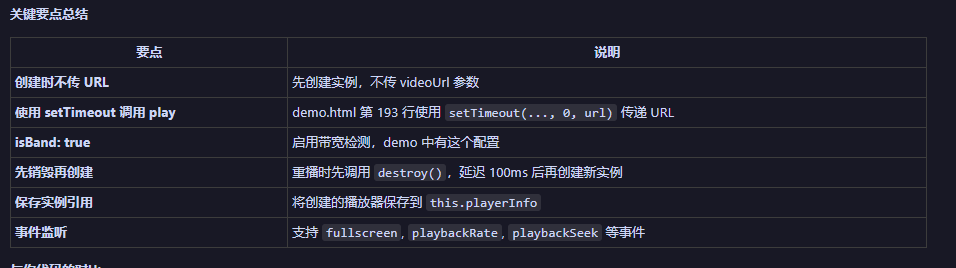
需要注意点,因为可能是多个视频来回切换,所以要先确保销毁实例再创建,具体方法可见Demo.vue。