Tcpdump使用
基础使用
bash
[root@server6 ~]# tcpdump
08:13:05.214859 IP 192.168.88.1.57083 > server6.ssh: Flags [.], ack 3412, win 511, length 0
08:13:05.274524 IP server6.ssh > 192.168.88.1.57083: Flags [P.], seq 3412:3648, ack 1, win 501, length 236
#时:分:秒:毫秒 网络协议IP 发送方.端口号 > 接收方.端口:数据包内容(flags标识符:seq号,ack号,win窗口,数据长度,[P.]表示PUSH标志位为1)
TCP协议报文头部
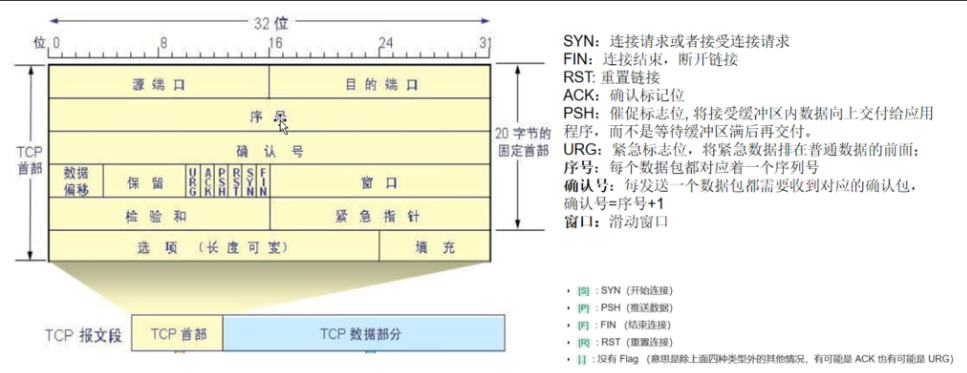
过滤方法:
基于IP地址进行过滤
host
bash
[root@server6 ~]# tcpdump host 192.168.88.35
08:47:39.031579 IP server6 > 192.168.88.35: ICMP echo request, id 1, seq 1, length 64
08:47:39.032269 IP 192.168.88.35 > server6: ICMP echo reply, id 1, seq 1, length 64
dst
bash
[root@server6 ~]# tcpdump dst 192.168.88.35
08:54:28.673482 IP server6 > 192.168.88.35: ICMP echo request, id 3, seq 1, length 64
08:54:29.697732 IP server6 > 192.168.88.35: ICMP echo request, id 3, seq 2, length 64
src
bash
[root@server6 ~]# tcpdump src 192.168.88.35
08:51:21.308272 IP 192.168.88.35 > server6: ICMP echo reply, id 2, seq 1, length 64
08:51:22.369594 IP 192.168.88.35 > server6: ICMP echo reply, id 2, seq 2, length 64
基于网段进行过滤
net
bash
[root@server6 ~]# tcpdump net 192.168.88.0/24
08:56:36.252126 IP 192.168.88.1.57083 > server6.ssh: Flags [.], ack 60, win 4098, length 0
08:56:36.252158 IP server6.ssh > 192.168.88.1.57083: Flags [P.], seq 60:256, ack 1, win 501, length 196
基于端口进行过滤
port
bash
[root@server5 ~]# tcpdump tcp port 8080
09:06:45.934110 IP 192.168.88.1.62663 > server5.webcache: Flags [.], ack 1, win 513, length 0
bash
[root@server5 ~]# tcpdump src port 8080
09:10:06.995767 IP server5.webcache > 192.168.88.1.55478: Flags [F.], seq 262, ack 467, win 501, length 0
port or port
bash
[root@server5 ~]# tcpdump port 80 or port 8080portrange
bash
[root@server5 ~]# tcpdump portrange 8000-8080基于协议进行过滤
bash
[root@server6 ~]# tcpdump icmp应用层的协议:http,dns,https,ssh等,不能直接写名字,用端口号/名字
bash
[root@server6 ~]# tcpdump port http
[root@server6 ~]# tcpdump port 53
Tcpdump的常用参数:
-h
#查看所有参数
bash
[root@server6 ~]# tcpdump -h
tcpdump version 4.99.0
libpcap version 1.10.0 (with TPACKET_V3)
OpenSSL 3.0.7 1 Nov 2022
Usage: tcpdump [-AbdDefhHIJKlLnNOpqStuUvxX#] [ -B size ] [ -c count ] [--count]
		[ -C file_size ] [ -E algo:secret ] [ -F file ] [ -G seconds ]
		[ -i interface ] [ --immediate-mode ] [ -j tstamptype ]
		[ -M secret ] [ --number ] [ --print ] [ -Q in|out|inout ]
		[ -r file ] [ -s snaplen ] [ -T type ] [ --version ]
		[ -V file ] [ -w file ] [ -W filecount ] [ -y datalinktype ]
		[ --time-stamp-precision precision ] [ --micro ] [ --nano ]
		[ -z postrotate-command ] [ -Z user ] [ expression ]
-i
#指定监听指定网卡
bash
[root@server6 ~]# tcpdump -i ens160
bash
[root@server6 ~]# tcpdump -i any-w
#将抓到的包保存到文件中(.cap或者.pcap结尾,可以直接用wireshark工具打开)
bash
[root@server6 ~]# tcpdump icmp -w icmp.cap-r
#在文件中读取数据
bash
[root@server6 ~]# tcpdump -r icmp.cap-n
#不把ip转换成域名,直接显示ip,避免执行DNS lookups的过程,提高速度
bash
[root@server6 ~]# tcmpdump -n icmp
09:43:58.329116 IP 192.168.88.35 > 192.168.88.36: ICMP echo request, id 4, seq 1, length 64
09:43:58.329147 IP 192.168.88.36 > 192.168.88.35: ICMP echo reply, id 4, seq 1, length 64
-nn
#把协议和服务直接显示成端口号
bash
[root@server6 ~]# tcpdump -nn
09:45:56.467934 IP 192.168.88.1.57083 > 192.168.88.36.22: Flags [.], ack 37052, win 4095, length 0
-t / -tttt
#不输出时间
bash
[root@server0 ~]# tcpdump -t
IP server0.ssh > 192.168.88.1.57435: Flags [P.], seq 144872260:144872320, ack 2570452919, win 501, length 60
#时间戳之前添加日期
bash
[root@server0 ~]# tcmpdump icmp -tttt
2026-01-16 08:18:05.851322 IP 192.168.88.31 > 193.168.88.30: ICMP echo request, id 1, seq 1, length 64
-v
#更详细的的输出,包括ttl,id标识,数据包长度,以及IP包的一些选项
bash
[root@server0 ~]# tcpdump -v
08:21:56.498679 IP (tos 0x48, ttl 64, id 56904, offset 0, flags [DF], proto TCP (6), length 164)
    server0.ssh > 192.168.88.1.57435: Flags [P.], cksum 0x3207 (incorrect -> 0xd7b0), seq 1:125, ack 0, win 501, length 124
-c
#指定收取数据包的次
bash
[root@server0 ~]# tcpdump -c 5 -r haha.cap
#从haha.cap文件中读取5个包
-C -W
#与 -w 配合使用,-C指定一个文件存储的大小(单位MB)
bash
[root@server0 ~]# tcpdump -C 1 -W 3 -w ttl #满了1MB就换文件,最多写3个文件,ttl0,ttl1,ttl2-Q in / out
#选择本机接收进来/发送出去的包 (数据包的方向)
过滤规则逻辑运算
and / &&
bash
[root@server0 ~]# tcpdump tcp port 53 and port 80or / ||
bash
[root@server0 ~]# tcpdump src 192.168.88.30 and port 80not / !
bash
[root@server0 ~]# tcpdump not tcp port 22