vim /bin/vmset.sh

[ "$4" = "noroute" ] && {
# 修正BUG2:改为覆盖写入 >
cat >  /etc/NetworkManager/system-connections/$1.nmconnection <<EOF
[connection]
id=$1
type=ethernet
interface-name=$1

[ipv4]
method=manual
address1=$2/24
EOF
}||{
cat >  /etc/NetworkManager/system-connections/$1.nmconnection <<EOF
[connection]
id=$1
type=ethernet
interface-name=$1

[ipv4]
method=manual
address1=$2/24,172.25.254.2
dns=8.8.8.8;
EOF
}

chmod 600 /etc/NetworkManager/system-connections/$1.nmconnection
nmcli connection reload
nmcli connection up $1
hostnamectl hostname $3

cat > /etc/hosts<< EOF
127.0.0.1   localhost localhost.localdomain localhost4 localhost4.localdomain4
::1         localhost localhost.localdomain localhost6 localhost6.localdomain6
$2     $3
EOF

ip a s $1
hostname
查看本机的网卡设备
nmcli connection show
使用脚本
/bin/mvset.sh eth0 172.25.254.129 node1查看配置文件
cd /etc/NetworkManager/system-connections/
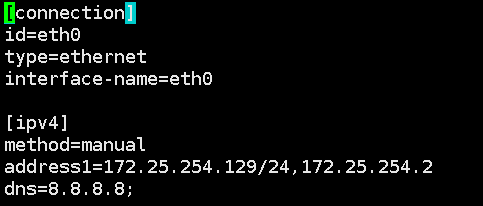
修改成功