摘要:
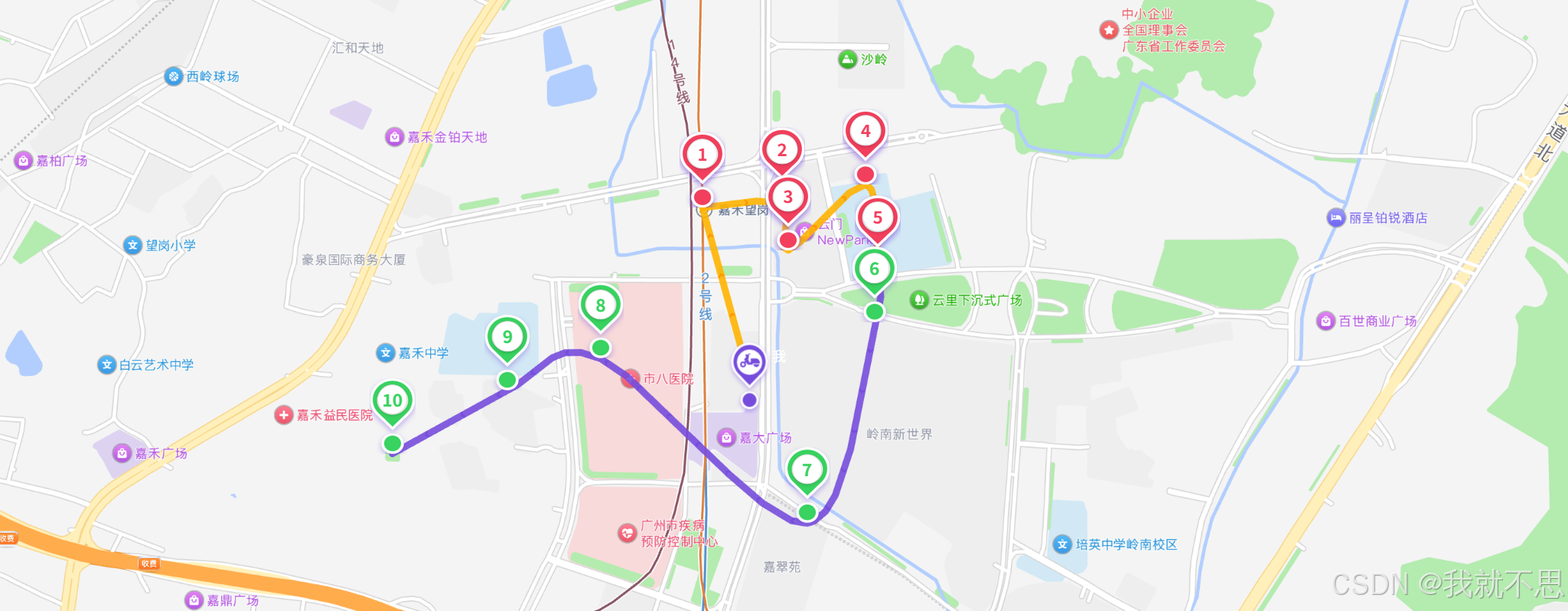
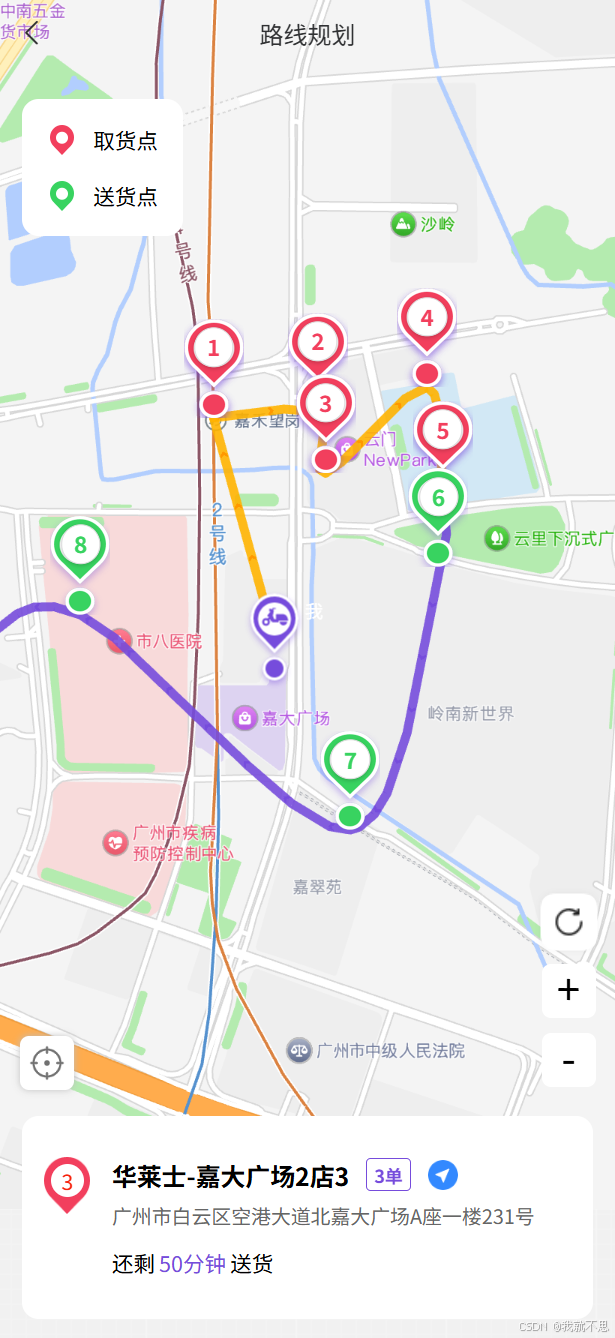
最近在兼职众包,看着美团的录下规划还不错,自己了撸了一个组件!
index.vue
bash
<template>
  <view class="hv100">
    <uv-navbar autoBack bgColor="transparent" title="路线规划"></uv-navbar>
    <MapPlann :width="'100%'" :height="'90%'" :customPath="customPath" :markers="markers"></MapPlann>
  </view>
</template>

<script setup>
import { onMounted, ref, nextTick, onUnmounted } from "vue";
import MapPlann from "../components/MapPlann.vue";

// 接收路由参数
const query = defineProps({
  id: String
});

let mapInstance = null;

// 【核心】自定义手绘路线坐标点(你的原始数据)
const customPath = [
  [113.289243, 23.237460],  // 取货点1(橙色)
  [113.291250, 23.237567],  // 取货点2(橙色)
  [113.291401, 23.236478],  // 取货点3(橙色)
  [113.293356, 23.238001],  // 送货点4(绿色)
  [113.293661, 23.236005],  // 送货点5(绿色)
  [113.293575, 23.234814],  // 取货点6(橙色)
  [113.291878, 23.230164],  // 取货点7(橙色)
  [113.286679, 23.233971],  // 送货点8(绿色)
  [113.284339, 23.233239],  // 送货点9(绿色)
  [113.281436, 23.231773]   // 送货点10(绿色)
];

// 标注点信息(修正type分类,确保图标正确)
const markers = [
  { index: 1, lng: 113.289243, lat: 23.237460, type: 'pickup', orderData:{name:"华莱士-嘉大广场2店1",address:"广州市白云区空港大道北嘉大广场A座一楼128号",num:3,time:30}},          // 橙色1
  { index: 2, lng: 113.291250, lat: 23.237567, type: 'pickup', orderData:{name:"华莱士-嘉大广场2店2",address:"广州市白云区空港大道北嘉大广场A座一楼125号",num:3,time:20} },          // 橙色2
  { index: 3, lng: 113.291401, lat: 23.236478, type: 'pickup', orderData:{name:"华莱士-嘉大广场2店3",address:"广州市白云区空港大道北嘉大广场A座一楼231号",num:3,time:50} },          // 橙色3
  { index: 4, lng: 113.293356, lat: 23.238001, type: 'pickup', orderData:{name:"华莱士-嘉大广场2店4",address:"广州市白云区空港大道北嘉大广场A座一楼321号",num:3,time:10} },  // 绿色4
  { index: 5, lng: 113.293661, lat: 23.236005, type: 'pickup', orderData:{name:"华莱士-嘉大广场2店5ssssssssssssssss",address:"广州市白云区空港大道北嘉大广场A座一楼321号",num:3,time:32} },  // 绿色5
  { index: 6, lng: 113.293575, lat: 23.234814, type: 'waypoint-green' , orderData:{name:"设计之都西塔3046",address:"广州市白云区空港大道北嘉大广场A座一楼564号",num:3,time:10}},          // 橙色6
  { index: 7, lng: 113.291878, lat: 23.230164, type: 'waypoint-green' , orderData:{name:"设计之都西塔3047",address:"广州市白云区空港大道北嘉大广场A座一楼543号",num:3,time:5}},          // 橙色7
  { index: 8, lng: 113.286679, lat: 23.233971, type: 'waypoint-green' , orderData:{name:"设计之都西塔3048",address:"广州市白云区空港大道北嘉大广场A座一楼1433号",num:3,time:5}},  // 绿色8
  { index: 9, lng: 113.284339, lat: 23.233239, type: 'waypoint-green' , orderData:{name:"设计之都西塔3049",address:"广州市白云区空港大道北嘉大广场A座一楼433号",num:3,time:8}},  // 绿色9
  { index: 10, lng: 113.281436, lat: 23.231773, type: 'waypoint-green' , orderData:{name:"设计之都西塔30410",address:"广州市白云区空港大道北嘉大广场A座一楼432号ssssssssssssss",num:3,time:12}}, // 绿色10
];

</script>

<style lang="scss" scoped>
.orderCentent {
  border-radius: 20rpx 20rpx 0 0;

  .border_l {
    position: relative;

    &::before {
      content: "";
      position: absolute;
      top: 50%;
      left: 4rpx;
      transform: translateY(-50%);
      width: 1px;
      height: 100%;
      background-color: rgba(153, 153, 153, 0.3);
    }
  }
}
</style>
MapPlann.vue
bash
<template>
  <view class="amap-container pr">
    <view class="pr" :style="{ width, height }" :props="props" id="amap-container"></view>
    <view class="bg-white pa potFlag p30 br20">
      <view class="d-c-c mb30">
        <uv-icon :name="iconPickup" size="20"></uv-icon>
        <text class="ml20 f26">取货点</text>
      </view>
      <view class="d-c-c">
        <uv-icon :name="iconDelivery" size="20"></uv-icon>
        <text class="ml20 f26">送货点</text>
      </view>
    </view>
    <view class="pf bottom0 ww100">
      <view class="d-f bg-white m30 pl20 pr20 pt50 pb50 br20">
        <view class="pr mr20">
          <uv-icon :name="orderItem.type == 'pickup' ? iconPickup : iconDelivery" size="38"></uv-icon>
          <text :class="orderItem.type == 'pickup' ? 'red' : 'green'"
            class="pa textIndex f26 d-c-c">{{ orderItem.index }}</text>
        </view>
        <view class="flex-1">
          <view class="d-c d-s-s">
            <view class="d-s-c fb f30">
              <text class="vertical">{{ orderItem.orderData.name }}</text>
              <uv-tags class="ml20 mr20" color="rgba(118, 76, 220, 1)" borderColor="rgba(118, 76, 220, 1)" :text="orderItem.orderData.num + '单'"
                plain size="mini" type="warning"></uv-tags>
              <uv-icon @click="toNavigation()" size="20" name="/static/rider/nav_icon.png"></uv-icon>
            </view>
            <view class="mt10 f24 gray6 vertical">{{ orderItem.orderData.address }}</view>
          </view>
          <view class="d-f f26 mt20">
            还剩 <text class="color-764cdc ml5 mr5">{{ orderItem.orderData.time }}分钟</text> 送货
          </view>
        </view>
      </view>
    </view>
  </view>
</template>

<script setup>
import { onMounted, ref, nextTick, onUnmounted } from "vue";
import AMapLoader from '@amap/amap-jsapi-loader';

import mapPickup from "@/static/rider/icon/map_pickup.png";
import iconPickup from "@/static/rider/icon/icon_pickup.png";
import iconDelivery from "@/static/rider/icon/icon_delivery.png";
import mapDdelivery from "@/static/rider/icon/map_delivery.png";
import mapRefresh from "@/static/rider/icon/refresh_icon.png";

const props = defineProps({
  width: {
    type: String,
    default: "100%"
  },
  height: {
    type: String,
    default: "400px"
  },
  customPath: {
    type: Array,
    default: () => []
  },
  markers: {
    type: Array,
    default: () => []
  },
});
console.log(props)

let mapInstance = null;

const syncProps = (props) => {
  // if (!props) {return}
  // this.pointsList = props.pointsList
  // this.markerList = props.markerList
  // if (this.mapInstance) {
  //   // this.clearMap(); // 清除现有内容
  //   this.initRoutePlanning(); // 重新绘制路线
  //   this.addMarkers(); // 重新添加标记
  // }
}

// Catmull-Rom 样条曲线平滑算法(生成正规弧形)
const smoothPath = (path, tension = 0.8) => {
  const size = path.length;
  const result = [];
  for (let i = 0; i < size - 1; i++) {
    const p0 = i > 0 ? path[i - 1] : path[0];
    const p1 = path[i];
    const p2 = path[i + 1];
    const p3 = i < size - 2 ? path[i + 2] : p2;

    for (let t = 0; t < 1; t += 0.05) {
      const tt = t * t;
      const ttt = tt * t;

      const x = 0.5 * (
        (2 * p1[0]) +
        (-p0[0] + p2[0]) * t +
        (2 * p0[0] - 5 * p1[0] + 4 * p2[0] - p3[0]) * tt +
        (-p0[0] + 3 * p1[0] - 3 * p2[0] + p3[0]) * ttt
      );
      const y = 0.5 * (
        (2 * p1[1]) +
        (-p0[1] + p2[1]) * t +
        (2 * p0[1] - 5 * p1[1] + 4 * p2[1] - p3[1]) * tt +
        (-p0[1] + 3 * p1[1] - 3 * p2[1] + p3[1]) * ttt
      );
      result.push([x, y]);
    }
  }
  result.push(path[size - 1]);
  return result;
};

// 骑手位置相关变量
const riderPosition = ref(null);
const riderMarker = ref(null);

onMounted(() => {
  nextTick(() => {
    initMap();

    // 默认选中第一个取货点
    const firstPickup = props.markers.find(m => m.type === 'pickup');
    if (firstPickup) {
      orderItem.value = firstPickup;
      console.log('默认选中取货点:', firstPickup.name);
    }
  });
});

onUnmounted(() => {
  if (mapInstance) mapInstance.destroy();
});

const initMap = async () => {
  try {
    const AMap = await AMapLoader.load({
      key: '',
      securityJsCode: '',
      version: '2.0',
      plugins: ['AMap.Marker', 'AMap.Polyline', 'AMap.LabelMarker', 'AMap.Geolocation', 'AMap.ToolBar', 'AMap.Control']

    });

    mapInstance = new AMap.Map('amap-container', {
      viewMode: '3D',
      center: [113.287418, 23.233518],
      zoom: 15,
      resizeEnable: true,
    });

    // 生成平滑路线// 添加骑手定位
    const smoothedPath = smoothPath(props.customPath, 0.8);
    drawCustomRoute(AMap, smoothedPath);
    addCustomMarkers(AMap);
    addRiderLocation(AMap);

    // 添加定位控件
    const geolocation = new AMap.Geolocation({
      position: 'LB',
      enableHighAccuracy: true,
      timeout: 10000,
      maximumAge: 0,
      convert: true,
      showButton: true,
      showMarker: false,
      showCircle: true,
      panToCenter: true,
      autoType: 'wgs84',
    });
    mapInstance.addControl(geolocation);
    nextTick(() => {
      const geolocationElement = document.querySelector('.amap-geolocation');
      if (geolocationElement) {
        geolocationElement.style.left = '15px';
        geolocationElement.style.bottom = '80px';
        // geolocationElement.style.backgroundImage = 'url(/static/rider/icon/posit_icon.png)';
        geolocationElement.style.borderRadius = '6px';
        geolocationElement.style.height = '36px';
        geolocationElement.style.width = '36px';
      }
    });

    // 添加缩放控件
    const toolBar = new AMap.ToolBar({
      position: 'RB',
      offset: new AMap.Pixel(20, 20),
      useNative: true
    });
    mapInstance.addControl(toolBar);
    nextTick(() => {
      const toolbarElement = document.querySelector('.amap-toolbar');
      if (toolbarElement) {
        toolbarElement.style.right = '15px';
        toolbarElement.style.bottom = '82px';
        toolbarElement.style.backgroundColor = 'transparent';
        toolbarElement.style.boxShadow = 'none';
        const zoomInButton = toolbarElement.querySelector('.amap-ctrl-zoomin');
        const zoomOutButton = toolbarElement.querySelector('.amap-ctrl-zoomout');

        // 创建一个刷新按钮
        const refreshBtn = document.createElement('div');
        refreshBtn.innerHTML = '<image src="../../static/rider/icon/refresh_icon.png"></image>';
        refreshBtn.style.cssText = `
      width: 36px;
      height: 36px;
      border-radius: 6px;
      background: white;
      display: flex;
      align-items: center;
      justify-content: center;
      cursor: pointer;
      margin-bottom: 10px;
    `;

        // 添加点击事件
        refreshBtn.addEventListener('click', () => {
          clearMap();
          initMap();
        });

        // 插入到工具栏中(放在最上方)
        toolbarElement.insertBefore(refreshBtn, toolbarElement.firstChild);
        if (zoomInButton) {
          zoomInButton.style.height = '36px';
          zoomInButton.style.width = '36px';
          zoomInButton.style.marginBottom = '10px';
          zoomInButton.style.backgroundColor = '#ffffff';
          zoomInButton.style.borderRadius = '6px';
        }
        if (zoomOutButton) {
          zoomOutButton.style.height = '36px';
          zoomOutButton.style.width = '36px';
          zoomOutButton.style.backgroundColor = '#ffffff';
          zoomOutButton.style.borderRadius = '6px';
        }
      }
    });

  } catch (error) {
    console.error('地图加载失败:', error);
  }
};

const clearMap = () => {
  if (!mapInstance) return;

  // 获取所有覆盖物
  const overlays = mapInstance.getAllOverlays();

  // 移除所有覆盖物
  overlays.forEach(overlay => {
    if (overlay.setMap) {
      overlay.setMap(null);
    }
  });

  // 可选:重置中心点或缩放级别
  mapInstance.setCenter([113.287418, 23.233518]);
  mapInstance.setZoom(15);
};

// 绘制连续弧形路线
const drawCustomRoute = (AMap, path) => {
  // 原始路径是从第一个取货点开始的,所以不需要再加起点
  const orangeEndIndex = 4 * 20;
  new AMap.Polyline({
    map: mapInstance,
    path: path.slice(0, orangeEndIndex),
    strokeColor: '#FFB300',
    strokeWeight: 6,
    strokeOpacity: 0.9,
    lineJoin: 'round',
    lineCap: 'round',
    showDir: true,
    dirColor: '#FF9800',
    dirArrowStyle: {
      size: 10,
      strokeColor: '#fff',
      strokeWeight: 2
    }
  });

  const greenSegment = path.slice(orangeEndIndex - 1);
  new AMap.Polyline({
    map: mapInstance,
    path: greenSegment,
    strokeColor: '#764cdc',
    strokeWeight: 6,
    strokeOpacity: 0.9,
    lineJoin: 'round',
    lineCap: 'round',
    showDir: true,
    dirColor: '#764cdc',
    dirArrowStyle: {
      size: 10,
      strokeColor: '#fff',
      strokeWeight: 2
    }
  });
};

// 添加自定义标注点
const addCustomMarkers = (AMap) => {
  props.markers.forEach(item => {
    const customIcon = new AMap.Icon({
      size: new AMap.Size(40, 66),
      image: item.type.includes('pickup') ? mapPickup : mapDdelivery,
      imageSize: new AMap.Size(40, 66),
      imageOffset: new AMap.Pixel(0, 0)
    });

    const marker = new AMap.Marker({
      map: mapInstance,
      position: [item.lng, item.lat],
      anchor: 'bottom-center',
      icon: customIcon,
      label: {
        content: `<view style="
          position: absolute;
          top: 50%;
          left: 50%;
          transform: translate(-50%, -50%);
          background-color: white;
          color: ${item.type.includes('pickup') ? '#f23f5d' : '#38d360'};
          border-radius: 50%;
          width: 25px;
          height: 25px;
          display: flex;
          align-items: center;
          justify-content: center;
          font-size: 15px;
          font-weight: bold;
          box-shadow: 0 1px 3px rgba(0,0,0,0.2);
          border: 1px solid #ddd;
        ">${item.index}</view>`,
        offset: new AMap.Pixel(-19.9, -14.1),
        style: {
          position: 'absolute',
          top: '50%',
          left: '50%',
          transform: 'translate(-50%, -50%)'
        }
      }
    });

    // 添加点击事件监听
    marker.on('click', () => {
      handInstance(item);
    });
  });
};

// 添加骑手定位
const addRiderLocation = (AMap) => {
  // const geolocation = new AMap.Geolocation({
  //   enableHighAccuracy: true,
  //   timeout: 10000,
  //   maximumAge: 0,
  //   convert: true,
  //   showButton: false,
  //   showMarker: false,
  //   showCircle: false,
  //   panToCenter: false,
  //   autoType: 'wgs84'
  // });

  riderPosition.value = [113.290281, 23.234000];
  updateRiderMarker(AMap, [113.290281, 23.234000]);
  const firstPickup = props.markers.find(m => m.type === 'pickup');
  if (!firstPickup) return;
  drawStartToFirstPickup(AMap, [113.290281, 23.234000], [firstPickup.lng, firstPickup.lat]);


  // geolocation.on('complete', (data) => {
  //   if (data.position) {
  //     console.log('定位成功:', data.position);
  //     riderPosition.value = data.position;

  //     // [113.334341,23.221254]
  //      // [113.290281,23.234000]

  //     // 创建送货人标记
  //     updateRiderMarker(AMap, data.position);

  //     // 获取第一个取货点
  //     const firstPickup = props.markers.find(m => m.type === 'pickup');
  //     if (!firstPickup) return;

  //     // 绘制从"我"到第一个取货点的橙色线路
  //     drawStartToFirstPickup(AMap, data.position, [firstPickup.lng, firstPickup.lat]);
  //   }
  // });

  // geolocation.on('error', (err) => {
  //   console.warn('定位失败:', err.message);
  // });

  // mapInstance.addControl(geolocation);
  // geolocation.getCurrentPosition();
};

// 绘制从骑手当前位置到第一个取货点的橙色线路
const drawStartToFirstPickup = (AMap, start, end) => {
  const path = [start, end];
  const polyline = new AMap.Polyline({
    map: mapInstance,
    path: path,
    strokeColor: '#FFB300',
    strokeWeight: 6,
    strokeOpacity: 0.9,
    lineJoin: 'round',
    lineCap: 'round',
    showDir: true,
    dirColor: '#FF9800',
    dirArrowStyle: {
      size: 10,
      strokeColor: '#fff',
      strokeWeight: 2
    }
  });

  // 可选:添加箭头动画
  polyline.setOptions({
    showDir: true
  });
};

const updateRiderMarker = (AMap, position) => {
  if (riderMarker.value) {
    riderMarker.value.setMap(null);
  }

  const riderIcon = new AMap.Icon({
    size: new AMap.Size(40, 66),
    image: '/static/rider/icon/map_rider_icon.png',
    imageSize: new AMap.Size(40, 66)
  });

  const marker = new AMap.Marker({
    map: mapInstance,
    position: position,
    icon: riderIcon,
    anchor: 'center-center',
    offset: new AMap.Pixel(-15, -15),
    label: {
      content: '<view style="color:#fff;font-size:12px;">我</view>',
      offset: new AMap.Pixel(0, -20),
      style: {
        fontSize: '12px',
        color: '#fff'
      }
    }
  });

  let opacity = 1;
  const blinkInterval = setInterval(() => {
    opacity = opacity === 0 ? 1 : 0;
    // marker.setOpacity(opacity);
  }, 500);

  riderMarker.value = marker;
};


const toNavigation = (t) => {
  uni.navigateTo({
    url: `/rider/navigation/index?id=123`,
  });
};
const orderItem = ref()
const handInstance = (item) => {
  orderItem.value = item;
  if (item.type.includes('pickup')) {
    console.log('点击了取货点:', item.name);
  } else if (item.type.includes('delivery')) {
    console.log('点击了送货点:', item.name);
  }
};
</script>

<style lang="scss" scoped>
.amap-container {
  width: 100%;
  height: 100%;
  position: relative;
}


.potFlag {
  top: 120rpx;
  left: 30rpx;
}

.textIndex {
  top: 8rpx;
  left: 15rpx;
  width: 40rpx;
  height: 40rpx;
  border-radius: 50%;
  background-color: #ffffff;
}

// 确保控件不被隐藏
::v-deep .amap-control {
  z-index: 1000 !important;
  opacity: 1 !important;
}

// 隐藏高德logo和版权信息
::v-deep .amap-logo,
::v-deep .amap-copyright {
  display: none !important;
}

::v-depp .custom_info_window {
  .info_window_icon {
    width: 40px;
    height: 62px;
  }
}

::v-deep .amap-geolocation-conver {
  left: 30rpx !important;
  bottom: 100rpx !important;
}

/* 刷新控件样式 */
  .amap-refresh-control {
    position: relative;
    z-index: 1000;
  }

  .amap-refresh-control button {
    width: 36px;
    height: 36px;
    border-radius: 6px;
    background: #ffffff;
    border: 1px solid #ccc;
    cursor: pointer;
    box-shadow: 0 2px 10px rgba(0,0,0,0.2);
    display: flex;
    align-items: center;
    justify-content: center;
    font-size: 18px;
    color: #333;
    border: none;
    outline: none;
  }

  ::v-deep .amap-toolbar span{
    font-size: 28px !important;
  }
</style>