框架:RuoYi-Vue-Plus
下载地址:
(1)后端代码 https://www.gitlink.org.cn/dromara-org/RuoYi-Vue-Plus/tree/5.X
或
https://gitee.com/dromara/RuoYi-Vue-Plus
或
https://gitee.com/dromara/RuoYi-Cloud-Plus
(2)前端代码 https://gitee.com/JavaLionLi/plus-ui
1.后台
1.1 开启websocket、sse
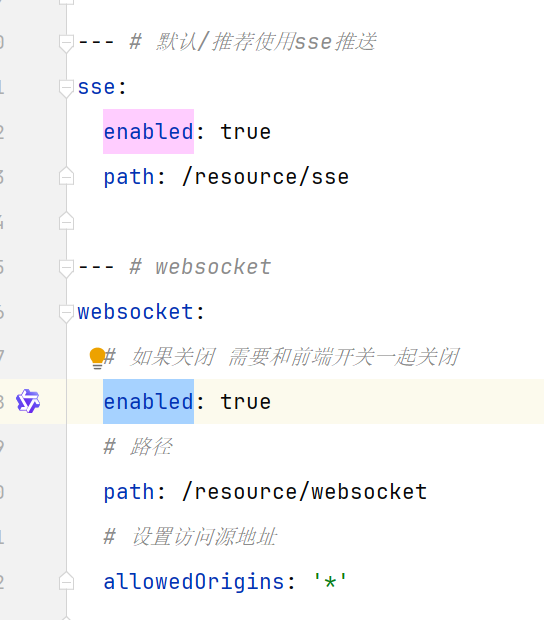
在 application.yml 中,找到 sse 及 websocket 的配置项,将 enabled 的值改为 true
1.2 业务模块引入 websocket 依赖
业务模块在 ruoyi-modules 下,如:ruoyi-xxx
XML
<dependency>
	<groupId>org.dromara</groupId>
	<artifactId>ruoyi-common-websocket</artifactId>
</dependency>
ruoyi-common-websocket 为若依框架自带的公共组件,位于 ruoyi-common 下。
1.3 websocket 配置类
java
import org.springframework.context.annotation.Bean;
import org.springframework.context.annotation.Configuration;
import org.springframework.web.socket.config.annotation.EnableWebSocket;
import org.springframework.web.socket.server.standard.ServerEndpointExporter;


@Configuration
@EnableWebSocket
public class HisWebSocketConfig {
    @Bean
    public ServerEndpointExporter serverEndpointExporter() {
        return new ServerEndpointExporter();
    }
}
1.4 websocket 消息接收、处理
java
import com.alibaba.fastjson.JSON;
import jakarta.annotation.Resource;
import jakarta.websocket.OnClose;
import jakarta.websocket.OnError;
import jakarta.websocket.OnMessage;
import jakarta.websocket.OnOpen;
import jakarta.websocket.Session;
import jakarta.websocket.server.ServerEndpoint;
import lombok.extern.slf4j.Slf4j;
import org.apache.commons.lang3.StringUtils;
import org.springframework.stereotype.Component;
import org.dromara.common.core.utils.SpringUtils;


@Slf4j
@Component
@ServerEndpoint("/websocket/message")
public class HisWebSocketServer {
    /** 自定义Service */
	@Resource
	private IWebsocketService websocketService;

	/**
	 * 连接建立成功调用的方法
	 */
	@OnOpen
	public void onOpen(Session session) {
		// log.info("Websocket连接建立成功");
	}

	@OnClose
	public void onClose(Session session) {
		// log.info("Websocket连接关闭");
	}

	/**
	 * 抛出异常时处理
	 */
	@OnError
	public void onError(Session session, Throwable exception) throws Exception {
		log.error("Websocket抛出异常时处理.", exception);
	}

	/**
	 * 服务器接收到客户端消息时调用的方法
	 */
	@OnMessage
	public void onMessage(String message, Session session) {
		log.info("Websocket接收到客户端消息.sessionId:{}, 消息:{}", session.getId(), message);

		if (StringUtils.isBlank(message)) {
			log.info("Websocket接收到的客户端消息为空,不做处理.sessionId:{}", session.getId());
			return;
		}
		try {
			// JSON格式
			String regex = "^(\\{.*\\}|\\[.*\\])$";

			if (!message.matches(regex)) {
				log.info("Websocket接收到的客户端消息不是JSON格式,不做处理.sessionId:{}, 消息:{}", session.getId(), message);
				return;
			}
            // 处理业务逻辑
            this.handleBizLogic(message, session);
			// session.getBasicRemote().sendText("服务器已收到消息");
		} catch (Exception e) {
			log.error("Websocket接收到客户端消息处理-异常:{}", e.getMessage(), e);
		}
	}

	/**
	 * 处理业务逻辑
	 *
	 * @date 2026-01-17
	 * @param message 客户端消息
	 * @param session 会话
	 * @since JDK 17
	 * @author
	 */
	private void handleBizLogic(String message, Session session) throws Exception {
        // 客户端请求参数
        HisWebSocketReqVo reqVo = JSON.parseObject(message.trim(), HisWebSocketReqVo.class);

		if (websocketService == null) {
            websocketService = SpringUtils.getBean(WebsocketServiceImpl.class);
        }

        // TODO 具体业务处理

		// 发送消息到客户端(前端),可以是JSON格式,也可以是其他格式,和前端定好就行
		session.getBasicRemote().sendText(JSON.toJSONString(处理结果));
	}
}
在 @Component 引入 @Resource,websocketService=null,所以需要SpringUtils 重新实例化。
具体的业务处理,包括 调用service、dao(mapper)等。
到这儿,后台的配置就完成了。
2.前端
2.1 启用websocket、sse
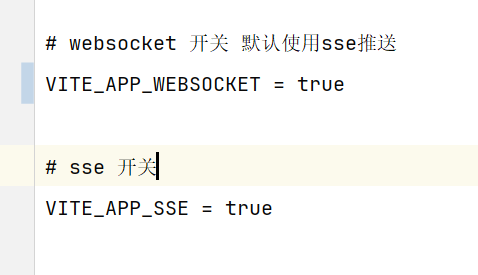
全局搜索 VITE_APP_WEBSOCKET、VITE_APP_SSE,将其值改为 true
这样才能调用到后台服务。
2.2 引入websocket依赖
在使用到websocket的页面,引入依赖。
javascript
import { initWebSocket } from '@/utils/websocket';2.3 具体代码
其中的 ws://127.0.0.1:18080/websocket/message 即为后台的websocket 链接。
(1)127.0.0.1:18080 为后台服务的IP、端口号
(2)/websocket/message 为后台代码 HisWebSocketServer 定义的。
TypeScript
// WebSocket连接
const baseClassListSocket = ref<any>(null);

// 初始化
onMounted(async () => {
  console.log('onMounted开始执行');

  // 创建WebSocket连接
  console.log('开始创建WebSocket连接');
  baseClassListSocket.value = createBaseClassListSocket();
});

// 组件销毁前重置isInitialized并关闭WebSocket连接
onBeforeUnmount(() => {

  // 关闭WebSocket连接
  if (baseClassListSocket.value) {
    baseClassListSocket.value.close();
    console.log('排班列表WebSocket连接已关闭');
  }
});

// 创建排班列表WebSocket连接
const createBaseClassListSocket = () => {
  // 使用后端提供的完整WebSocket地址
  const wsUrl = 'ws://127.0.0.1:18080/websocket/message';
  const connName = '排班列表WebSocket';
  console.log('创建排班列表WebSocket连接,URL:', wsUrl);
  return initWebSocket(wsUrl, {
    onConnected() {
      console.log(`${connName}已经连接`);
    },
    onDisconnected() {
      console.log(`${connName}已经断开`);
    },
    onMessage: (e) => {
      console.log(`${connName}收到原始消息:`, e.data);
      if (!e.data || e.data.indexOf('ping') > 0) {
        return;
      }
      try {
        const message = JSON.parse(e.data);
        console.log(`${connName}收到解析后消息:`, message);

        // 处理排班列表消息
        if (message.code === 200 && Array.isArray(message.data)) {
          handleBaseClassListMessage(message.data);
        }
      } catch (error) {
        console.error(`${connName}消息解析错误:`, error);
      }
    }
  });
};

// 处理排班列表WebSocket消息
const handleBaseClassListMessage = (data: any[]) => {
  // 合并结果,构建映射表
  const newMap: Record<string, any> = {};

  // 处理所有排班数据(包括医生和咨询师)
  data.forEach((userTypeGroup) => {
    if (userTypeGroup?.list) {
      userTypeGroup.list.forEach((user) => {
        if (user?.userId && user?.baseWorkClassList) {
          const userId = user.userId.toString();
          const duty = user.duty?.toString() || '';

          // 根据duty区分医生(1)和咨询师(11)
          if (duty === '1') {
            newMap[`doctor_${userId}`] = user.baseWorkClassList;
          } else if (duty === '11') {
            newMap[`consultant_${userId}`] = user.baseWorkClassList;
          }
        }
      });
    }
  });

  userBaseClassMap.value = newMap;
};

// 加载排班信息
const loadUserBaseClassList = async () => {
  try {
    isLoading.value = true;
    let startDateStr, endDateStr;
    if (boardViewMode.value === '日') {
      startDateStr = dayjs(dayInfoList.value[0].date).format('YYYY-MM-DD');
      endDateStr = startDateStr;
    } else {
      startDateStr = dayjs(dayInfoList.value[0].date).format('YYYY-MM-DD');
      endDateStr = dayjs(dayInfoList.value[6].date).format('YYYY-MM-DD');
    }

    // 通过WebSocket发送请求
    if (baseClassListSocket.value?.send) {
      const requestData = {
        startDate: startDateStr,
        endDate: endDateStr,
        duty: '' // 空字符串表示获取所有岗位
      };

      baseClassListSocket.value.send(JSON.stringify(requestData));
      console.log('排班列表WebSocket请求已发送:', requestData);
    } else {
      console.error('排班列表WebSocket连接未建立');
    }
  } catch (error) {
    console.error('加载排班信息失败', error);
  } finally {
    isLoading.value = false;
  }
};