引言
在社交应用中,位置分享功能是增强用户互动的核心要素。随着OpenHarmony生态的快速发展,使用Flutter直接开发鸿蒙应用成为跨平台开发的高效选择。本文将详细分享如何在Flutter框架下实现位置分享组件,同时确保组件在Flutter和OpenHarmony平台上的无缝兼容。
一、核心数据模型设计
首先,定义位置数据模型,这是整个组件的基础:
dart
class LocationInfo {
  final double latitude;
  final double longitude;
  final String name;
  final String address;

  LocationInfo({
    required this.latitude,
    required this.longitude,
    required this.name,
    required this.address,
  });
}
设计说明 :LocationInfo包含经纬度坐标、地点名称和详细地址。这些信息是地图展示和导航功能的核心数据,确保在不同平台间传递一致。
二、位置卡片组件实现
Flutter实现
dart
class LocationCard extends StatelessWidget {
  final LocationInfo location;
  final VoidCallback? onTap;
  final VoidCallback? onNavigate;

  const LocationCard({
    Key? key,
    required this.location,
    this.onTap,
    this.onNavigate,
  }) : super(key: key);

  @override
  Widget build(BuildContext context) {
    return GestureDetector(
      onTap: onTap,
      child: Container(
        decoration: BoxDecoration(
          color: Colors.white,
          borderRadius: BorderRadius.circular(12),
          boxShadow: [
            BoxShadow(
              color: Colors.black.withOpacity(0.1),
              blurRadius: 8,
              offset: Offset(0, 2),
            ),
          ],
        ),
        child: Column(
          crossAxisAlignment: CrossAxisAlignment.start,
          children: [
            ClipRRect(
              borderRadius: BorderRadius.vertical(top: Radius.circular(12)),
              child: Container(
                height: 120,
                width: double.infinity,
                color: Colors.grey[200],
                child: Stack(
                  children: [
                    Center(
                      child: Icon(
                        Icons.location_on,
                        size: 40,
                        color: Colors.red,
                      ),
                    ),
                    Positioned(
                      right: 8,
                      bottom: 8,
                      child: Container(
                        padding: EdgeInsets.symmetric(horizontal: 8, vertical: 4),
                        decoration: BoxDecoration(
                          color: Colors.black54,
                          borderRadius: BorderRadius.circular(4),
                        ),
                        child: Text(
                          '查看地图',
                          style: TextStyle(color: Colors.white, fontSize: 12),
                        ),
                      ),
                    ),
                  ],
                ),
              ),
            ),
            Padding(
              padding: EdgeInsets.all(12),
              child: Column(
                crossAxisAlignment: CrossAxisAlignment.start,
                children: [
                  Text(
                    location.name,
                    style: TextStyle(fontSize: 16, fontWeight: FontWeight.w600),
                    maxLines: 1,
                    overflow: TextOverflow.ellipsis,
                  ),
                  SizedBox(height: 4),
                  Text(
                    location.address,
                    style: TextStyle(fontSize: 13, color: Colors.grey[600]),
                    maxLines: 2,
                    overflow: TextOverflow.ellipsis,
                  ),
                  SizedBox(height: 12),
                  Row(
                    children: [
                      Expanded(
                        child: OutlinedButton.icon(
                          onPressed: onNavigate,
                          icon: Icon(Icons.navigation, size: 16),
                          label: Text('导航'),
                        ),
                      ),
                    ],
                  )
                ],
              ),
            )
          ],
        ),
      ),
    );
  }
}关键点解析:
- 使用
ClipRRect实现顶部圆角,确保UI一致性 Stack布局实现图标和"查看地图"标签的叠加OutlinedButton提供标准导航按钮样式maxLines和overflow处理长文本截断,提升用户体验
OpenHarmony实现
typescript
@Component
struct LocationCard {
  @Prop location: LocationInfo
  onTap: () => void = () => {}
  onNavigate: () => void = () => {}

  build() {
    Column() {
      Stack() {
        Column()
          .width('100%')
          .height(120)
          .backgroundColor('#F5F5F5')
          .child(Image($r('app.media.ic_location'))
            .width(40)
            .height(40)
            .fillColor(Color.Red))
          .child(Text('查看地图')
            .fontSize(12)
            .fontColor(Color.White)
            .backgroundColor('#00000088')
            .borderRadius(4)
            .padding({left: 8, right: 8, top: 4, bottom: 4})
            .position({x: '85%', y: '80%'}))
      }
      .width('100%')
      .height(120)
      .borderRadius({topLeft: 12, topRight: 12})
      .clip(true)

      Column() {
        Text(this.location.name)
          .fontSize(16)
          .fontWeight(FontWeight.Medium)
          .maxLines(1)
          .textOverflow({overflow: TextOverflow.Ellipsis})
          .width('100%')
        Text(this.location.address)
          .fontSize(13)
          .fontColor('#8E8E93')
          .maxLines(2)
          .textOverflow({overflow: TextOverflow.Ellipsis})
          .width('100%')
          .margin({top: 4})
        Button('导航')
          .width('100%')
          .height(36)
          .fontSize(14)
          .margin({top: 12})
          .onClick(() => this.onNavigate())
      }
      .padding(12)
      .alignItems(HorizontalAlign.Start)
    }
    .backgroundColor(Color.White)
    .borderRadius(12)
    .shadow({radius: 8, color: '#0000001A', offsetY: 2})
    .onClick(() => this.onTap())
  }
}鸿蒙实现要点:
- 使用
@Component定义ArkTS组件 Stack和position实现类似Flutter的布局shadow属性实现卡片阴影效果clip(true)确保圆角裁剪
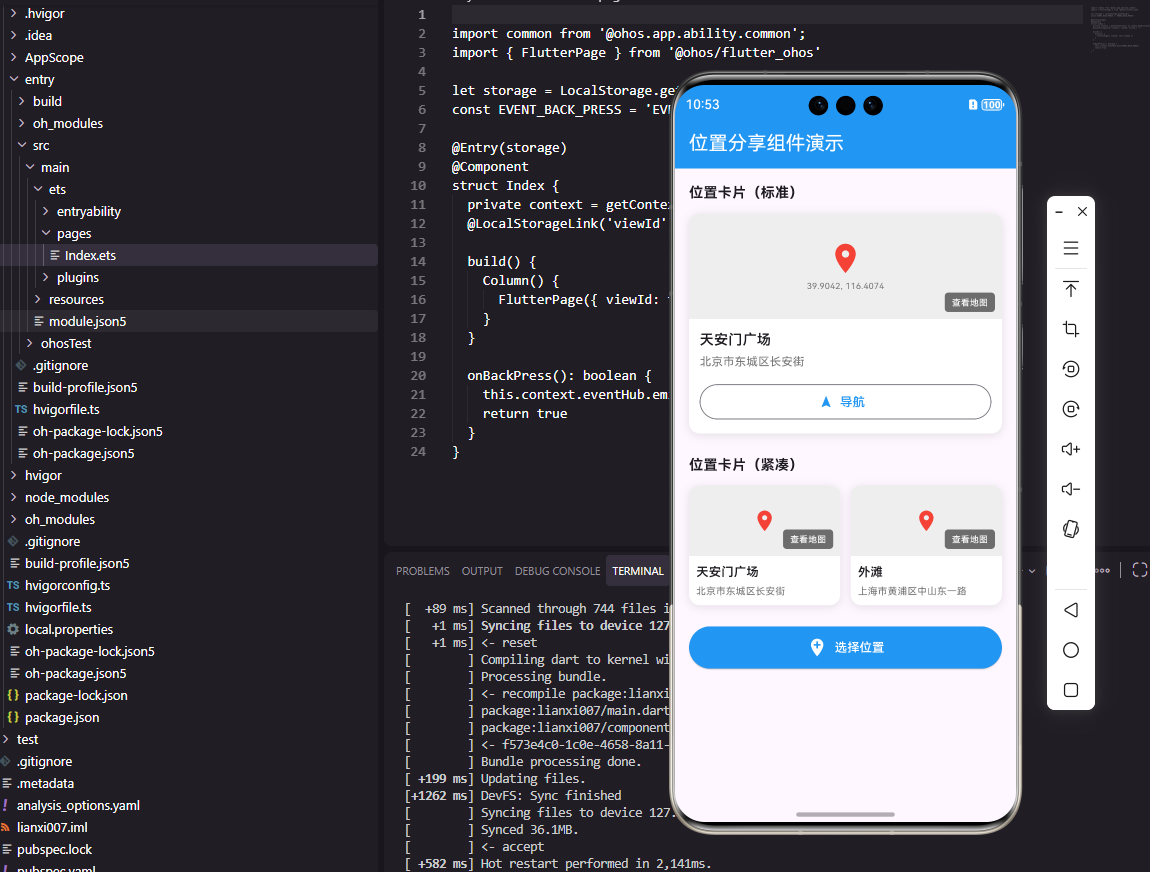
三、跨平台兼容性处理
在Flutter开发鸿蒙应用时,关键挑战在于确保组件在两个平台上的行为一致。以下是我们的处理方案:
1. 布局差异处理
Flutter使用BoxDecoration和BoxShadow实现卡片效果,而鸿蒙使用shadow属性。我们通过统一的组件设计,将平台特定的样式封装在组件内部,使外部调用保持一致。
dart
// Flutter中统一的卡片样式
BoxDecoration(
  color: Colors.white,
  borderRadius: BorderRadius.circular(12),
  boxShadow: [BoxShadow(color: Colors.black.withOpacity(0.1), blurRadius: 8, offset: Offset(0, 2))]
)

// OpenHarmony中统一的卡片样式
.shadow({radius: 8, color: '#0000001A', offsetY: 2})
2. 事件处理一致性
Flutter使用GestureDetector,鸿蒙使用onClick。我们通过统一的回调接口onTap和onNavigate,确保事件处理逻辑在两个平台保持一致。
四、架构集成图
下面的架构图展示了Flutter与OpenHarmony的集成方式:
通过Flutter插件
调用原生API
通过Platform Channels
调用
返回数据
返回
使用
渲染
Flutter应用
鸿蒙平台
鸿蒙系统能力
鸿蒙平台通道
鸿蒙原生服务
Flutter UI组件
鸿蒙设备
五、实践问题与解决方案
在实际开发中,我们遇到了以下问题:
问题1:地图API的兼容性
- 现象:Flutter中使用的高德地图SDK在鸿蒙上无法直接使用
- 解决方案 :使用鸿蒙原生地图服务,通过
PlatformChannel封装API,确保Flutter层调用一致
问题2:布局差异导致的显示问题
- 现象 :Flutter中的
EdgeInsets在鸿蒙上需要调整 - 解决方案 :创建统一的
PlatformEdgeInsets工具类,根据平台自动适配
六、总结
通过上述实践,我们成功实现了位置分享组件在Flutter和OpenHarmony平台上的跨平台兼容。关键在于:
- 统一的数据模型设计
- 封装平台特定的UI实现
- 通过回调接口保持外部调用一致性
Flutter开发鸿蒙应用的前景广阔,随着鸿蒙生态的完善,这种开发模式将为开发者提供更高效的跨平台解决方案。我们建议在项目初期就考虑跨平台架构设计,避免后期大量重构。
欢迎大家加入开源鸿蒙跨平台开发者社区,一起探索更多鸿蒙跨平台开发技术!