Flutter诗词鉴赏应用开发教程
项目简介
诗词鉴赏是一款专注于中国古典诗词学习与欣赏的移动应用。应用收录了从先秦到清代的经典诗词作品,为每首诗词提供详细的注释和赏析,帮助用户深入理解古典诗词的意境与文化内涵。
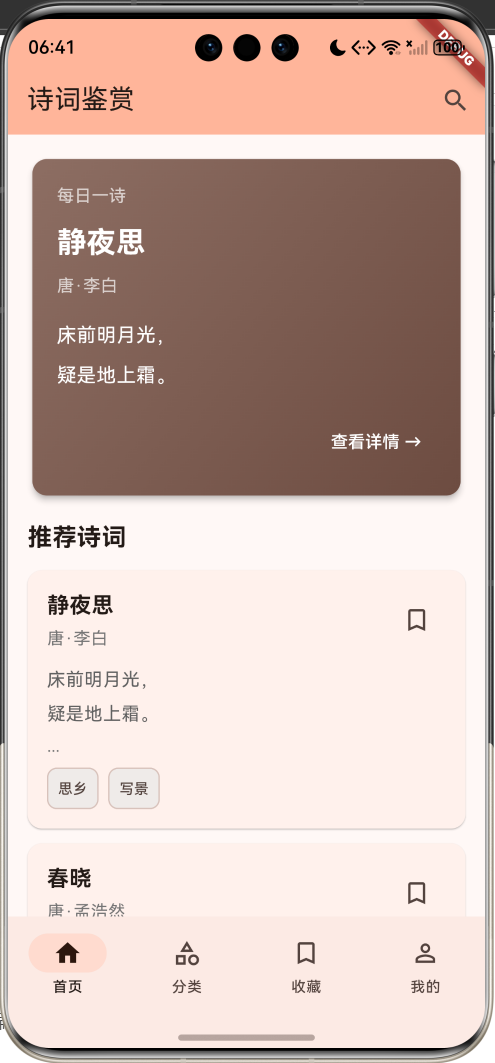
运行效果图
核心特性
- 每日一诗:首页展示精选诗词,每日推荐经典作品
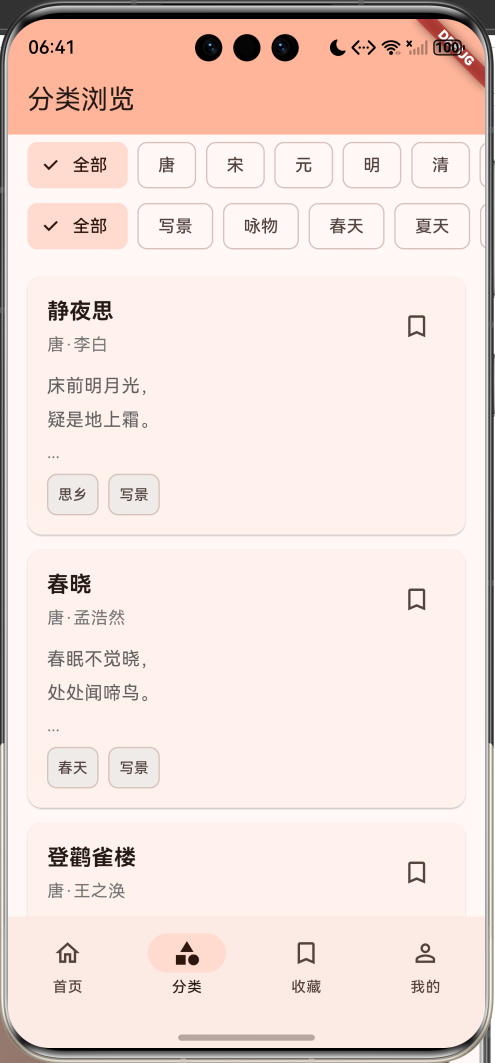
- 分类浏览:按朝代和主题标签筛选诗词
- 详细注释:提供字词注释,帮助理解诗词含义
- 深度赏析:专业的文学赏析,解读诗词意境
- 收藏功能:收藏喜爱的诗词,方便随时回顾
- 智能搜索:支持按标题和作者快速查找
- 数据持久化:本地保存收藏状态
技术栈
- Flutter 3.x
- Material Design 3
- SharedPreferences(数据持久化)
- Dart异步编程
数据模型设计
诗词模型(Poetry)
dart
class Poetry {
  final String id;              // 唯一标识
  final String title;           // 诗词标题
  final String author;          // 作者
  final String dynasty;         // 朝代
  final List<String> content;   // 诗词内容(按行分割)
  final String? annotation;     // 注释
  final String? appreciation;   // 赏析
  final List<String> tags;      // 标签(主题分类)
  bool isCollected;             // 是否已收藏
}
诗人模型(Poet)
dart
class Poet {
  final String id;              // 唯一标识
  final String name;            // 诗人姓名
  final String dynasty;         // 所属朝代
  final String? biography;      // 生平简介
  final String? avatar;         // 头像图片
}
数据序列化
诗词模型实现了JSON序列化,支持数据持久化存储:
dart
Map<String, dynamic> toJson() {
  return {
    'id': id,
    'title': title,
    'author': author,
    'dynasty': dynasty,
    'content': content,
    'annotation': annotation,
    'appreciation': appreciation,
    'tags': tags,
    'isCollected': isCollected,
  };
}

factory Poetry.fromJson(Map<String, dynamic> json) {
  return Poetry(
    id: json['id'],
    title: json['title'],
    author: json['author'],
    dynasty: json['dynasty'],
    content: List<String>.from(json['content']),
    annotation: json['annotation'],
    appreciation: json['appreciation'],
    tags: List<String>.from(json['tags']),
    isCollected: json['isCollected'] ?? false,
  );
}
诗词分类系统
朝代分类
应用支持10个朝代的筛选:
| 朝代 | 时期 | 代表诗人 |
|---|---|---|
| 先秦 | 公元前21世纪-前221年 | 屈原 |
| 两汉 | 前202年-220年 | 刘邦、曹操 |
| 魏晋 | 220年-420年 | 陶渊明、曹植 |
| 南北朝 | 420年-589年 | 谢灵运 |
| 唐 | 618年-907年 | 李白、杜甫、白居易 |
| 宋 | 960年-1279年 | 苏轼、李清照、辛弃疾 |
| 元 | 1271年-1368年 | 马致远、关汉卿 |
| 明 | 1368年-1644年 | 唐寅、文征明 |
| 清 | 1644年-1912年 | 纳兰性德、龚自珍 |
主题标签
应用提供13种主题标签分类:
诗词主题
自然景物
写景
咏物
四季时令
春天
夏天
秋天
冬天
情感主题
离别
思乡
爱情
友情
人生哲理
励志
哲理
核心功能实现
1. 数据持久化
使用SharedPreferences实现本地数据存储:
dart
Future<void> _loadData() async {
  final prefs = await SharedPreferences.getInstance();
  final poetriesData = prefs.getStringList('poetries') ?? [];
  setState(() {
    poetries = poetriesData
        .map((json) => Poetry.fromJson(jsonDecode(json)))
        .toList();
  });
}

Future<void> _saveData() async {
  final prefs = await SharedPreferences.getInstance();
  final poetriesData = poetries.map((p) => jsonEncode(p.toJson())).toList();
  await prefs.setStringList('poetries', poetriesData);
}
2. 收藏功能
实现诗词收藏的切换逻辑:
dart
void _toggleCollect(String id) {
  setState(() {
    final poetry = poetries.firstWhere((p) => p.id == id);
    poetry.isCollected = !poetry.isCollected;
  });
  _saveData();
}
3. 搜索功能
支持按标题和作者进行模糊搜索:
dart
void _performSearch(String query) {
  if (query.isEmpty) return;

  final results = poetries.where((p) {
    return p.title.contains(query) || p.author.contains(query);
  }).toList();

  Navigator.push(
    context,
    MaterialPageRoute(
      builder: (context) => SearchResultPage(
        query: query,
        results: results,
        onToggleCollect: _toggleCollect,
      ),
    ),
  );
}
4. 筛选功能
支持朝代和标签的组合筛选:
dart
Widget _buildFilteredList() {
  var filtered = poetries;

  if (selectedDynasty != '全部') {
    filtered = filtered.where((p) => p.dynasty == selectedDynasty).toList();
  }

  if (selectedTag != '全部') {
    filtered = filtered.where((p) => p.tags.contains(selectedTag)).toList();
  }

  return ListView.builder(
    padding: const EdgeInsets.all(16),
    itemCount: filtered.length,
    itemBuilder: (context, index) {
      return _buildPoetryCard(filtered[index]);
    },
  );
}
UI组件设计
1. 每日一诗卡片
使用渐变背景突出展示精选诗词:
dart
Widget _buildDailyPoetry() {
  final poetry = poetries.first;

  return Card(
    elevation: 4,
    child: Container(
      padding: const EdgeInsets.all(20),
      decoration: BoxDecoration(
        gradient: LinearGradient(
          colors: [Colors.brown.shade400, Colors.brown.shade600],
          begin: Alignment.topLeft,
          end: Alignment.bottomRight,
        ),
        borderRadius: BorderRadius.circular(12),
      ),
      child: Column(
        crossAxisAlignment: CrossAxisAlignment.start,
        children: [
          const Text('每日一诗', style: TextStyle(color: Colors.white70)),
          Text(poetry.title, style: TextStyle(fontSize: 24, color: Colors.white)),
          Text('${poetry.dynasty}·${poetry.author}'),
          ...poetry.content.take(2).map((line) => Text(line)),
        ],
      ),
    ),
  );
}
2. 诗词卡片组件
展示诗词基本信息和收藏状态:
dart
Widget _buildPoetryCard(Poetry poetry) {
  return Card(
    child: InkWell(
      onTap: () => _navigateToDetail(poetry),
      child: Padding(
        padding: const EdgeInsets.all(16),
        child: Column(
          crossAxisAlignment: CrossAxisAlignment.start,
          children: [
            Row(
              children: [
                Expanded(
                  child: Column(
                    crossAxisAlignment: CrossAxisAlignment.start,
                    children: [
                      Text(poetry.title, style: TextStyle(fontSize: 18, fontWeight: FontWeight.bold)),
                      Text('${poetry.dynasty}·${poetry.author}'),
                    ],
                  ),
                ),
                IconButton(
                  icon: Icon(poetry.isCollected ? Icons.bookmark : Icons.bookmark_outline),
                  onPressed: () => _toggleCollect(poetry.id),
                ),
              ],
            ),
            ...poetry.content.take(2).map((line) => Text(line)),
            Wrap(
              spacing: 8,
              children: poetry.tags.map((tag) => Chip(label: Text(tag))).toList(),
            ),
          ],
        ),
      ),
    ),
  );
}
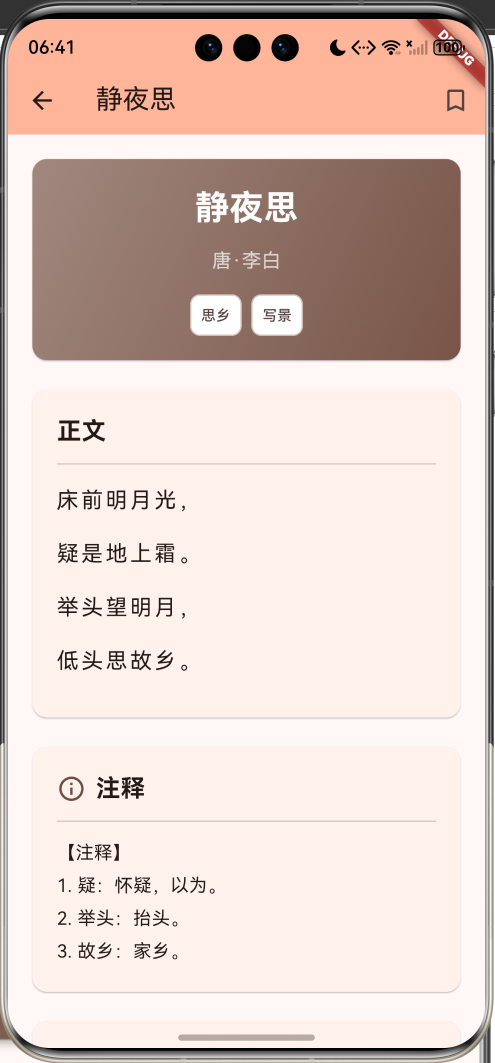
3. 诗词详情页
详情页分为四个主要部分:
诗词详情页
标题卡片
正文展示
注释部分
赏析部分
诗词标题
作者朝代
主题标签
诗词原文
居中排版
增大行距
字词解释
典故说明
创作背景
艺术手法
思想内涵
标题卡片实现
dart
Card(
  child: Container(
    padding: const EdgeInsets.all(20),
    decoration: BoxDecoration(
      gradient: LinearGradient(
        colors: [Colors.brown.shade300, Colors.brown.shade500],
      ),
    ),
    child: Column(
      children: [
        Text(poetry.title, style: TextStyle(fontSize: 28, color: Colors.white)),
        Text('${poetry.dynasty}·${poetry.author}'),
        Wrap(
          spacing: 8,
          children: poetry.tags.map((tag) => Chip(label: Text(tag))).toList(),
        ),
      ],
    ),
  ),
)
正文展示
dart
Card(
  child: Padding(
    padding: const EdgeInsets.all(20),
    child: Column(
      children: [
        const Text('正文', style: TextStyle(fontSize: 20, fontWeight: FontWeight.bold)),
        const Divider(height: 24),
        ...poetry.content.map((line) {
          return Text(
            line,
            style: const TextStyle(fontSize: 18, height: 2.0, letterSpacing: 2),
            textAlign: TextAlign.center,
          );
        }),
      ],
    ),
  ),
)
注释和赏析
dart
if (poetry.annotation != null)
  Card(
    child: Padding(
      padding: const EdgeInsets.all(20),
      child: Column(
        children: [
          Row(
            children: [
              Icon(Icons.info_outline, color: Colors.brown.shade600),
              const SizedBox(width: 8),
              const Text('注释', style: TextStyle(fontSize: 20, fontWeight: FontWeight.bold)),
            ],
          ),
          const Divider(height: 24),
          Text(poetry.annotation!, style: TextStyle(fontSize: 15, height: 1.8)),
        ],
      ),
    ),
  ),

if (poetry.appreciation != null)
  Card(
    child: Padding(
      padding: const EdgeInsets.all(20),
      child: Column(
        children: [
          Row(
            children: [
              Icon(Icons.auto_stories, color: Colors.brown.shade600),
              const Text('赏析', style: TextStyle(fontSize: 20, fontWeight: FontWeight.bold)),
            ],
          ),
          Text(poetry.appreciation!, style: TextStyle(fontSize: 15, height: 1.8)),
        ],
      ),
    ),
  ),
4. 筛选器组件
使用FilterChip实现朝代和标签筛选:
dart
Widget _buildDynastyFilter() {
  return SizedBox(
    height: 50,
    child: ListView.builder(
      scrollDirection: Axis.horizontal,
      itemCount: dynasties.length,
      itemBuilder: (context, index) {
        final dynasty = dynasties[index];
        final isSelected = dynasty == selectedDynasty;
        return FilterChip(
          label: Text(dynasty),
          selected: isSelected,
          onSelected: (selected) {
            setState(() {
              selectedDynasty = dynasty;
            });
          },
        );
      },
    ),
  );
}
应用架构
页面结构
PoetryHomePage
主页面
首页
HomePage
分类
CategoryPage
收藏
CollectionPage
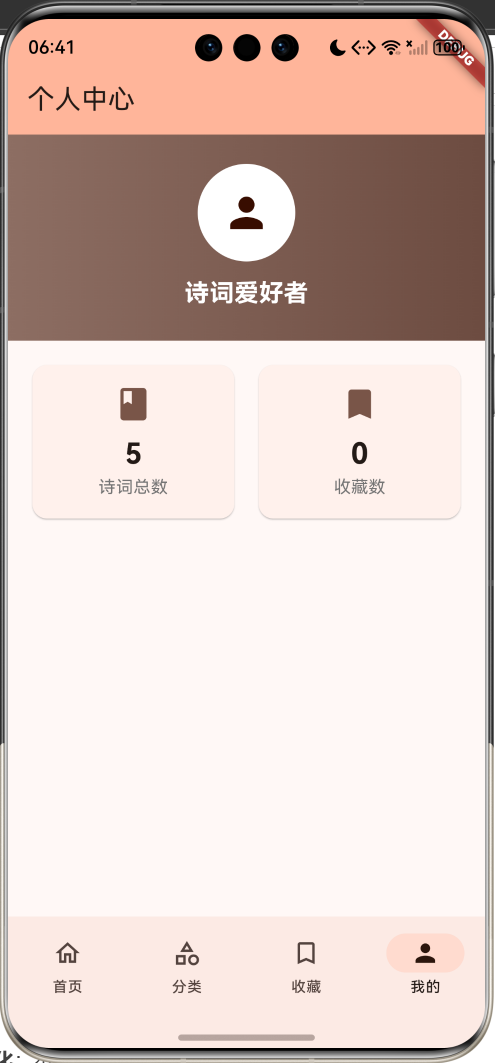
我的
ProfilePage
每日一诗
推荐诗词列表
朝代筛选器
标签筛选器
筛选结果列表
收藏诗词列表
统计信息
PoetryDetailPage
详情页
SearchResultPage
搜索结果页
底部导航栏
使用Material 3的NavigationBar组件:
dart
NavigationBar(
  selectedIndex: _selectedIndex,
  onDestinationSelected: (index) {
    setState(() {
      _selectedIndex = index;
    });
  },
  destinations: const [
    NavigationDestination(
      icon: Icon(Icons.home_outlined),
      selectedIcon: Icon(Icons.home),
      label: '首页',
    ),
    NavigationDestination(
      icon: Icon(Icons.category_outlined),
      selectedIcon: Icon(Icons.category),
      label: '分类',
    ),
    NavigationDestination(
      icon: Icon(Icons.bookmark_outline),
      selectedIcon: Icon(Icons.bookmark),
      label: '收藏',
    ),
    NavigationDestination(
      icon: Icon(Icons.person_outline),
      selectedIcon: Icon(Icons.person),
      label: '我的',
    ),
  ],
)
IndexedStack页面切换
使用IndexedStack保持页面状态:
dart
body: IndexedStack(
  index: _selectedIndex,
  children: [
    _buildHomePage(),
    _buildCategoryPage(),
    _buildCollectionPage(),
    _buildProfilePage(),
  ],
)
示例数据
应用内置了5首经典诗词作为示例:
1. 静夜思(李白)
床前明月光,
疑是地上霜。
举头望明月,
低头思故乡。标签:思乡、写景
2. 春晓(孟浩然)
春眠不觉晓,
处处闻啼鸟。
夜来风雨声,
花落知多少。标签:春天、写景
3. 登鹳雀楼(王之涣)
白日依山尽,
黄河入海流。
欲穷千里目,
更上一层楼。标签:写景、哲理、励志
4. 相思(王维)
红豆生南国,
春来发几枝。
愿君多采撷,
此物最相思。标签:爱情、咏物
5. 水调歌头·明月几时有(苏轼)
明月几时有?把酒问青天。
不知天上宫阙,今夕是何年。
我欲乘风归去,又恐琼楼玉宇,高处不胜寒。
起舞弄清影,何似在人间。

转朱阁,低绮户,照无眠。
不应有恨,何事长向别时圆?
人有悲欢离合,月有阴晴圆缺,此事古难全。
但愿人长久,千里共婵娟。标签:思乡、哲理、离别
功能扩展建议
1. 诗词朗读
集成语音合成功能,支持诗词朗读:
dart
// 使用 flutter_tts 包
import 'package:flutter_tts/flutter_tts.dart';

class PoetryReader {
  final FlutterTts tts = FlutterTts();

  Future<void> readPoetry(Poetry poetry) async {
    await tts.setLanguage('zh-CN');
    await tts.setSpeechRate(0.4);

    // 朗读标题
    await tts.speak(poetry.title);
    await Future.delayed(Duration(seconds: 1));

    // 朗读内容
    for (var line in poetry.content) {
      await tts.speak(line);
      await Future.delayed(Duration(milliseconds: 500));
    }
  }
}
2. 书法展示
为诗词添加书法字体展示:
dart
// 使用自定义字体
Text(
  line,
  style: TextStyle(
    fontFamily: 'KaiTi',  // 楷体
    fontSize: 24,
    height: 2.5,
  ),
)在pubspec.yaml中配置字体:
yaml
flutter:
  fonts:
    - family: KaiTi
      fonts:
        - asset: fonts/KaiTi.ttf
3. 诗人传记
添加诗人详情页,展示生平事迹:
dart
class PoetDetailPage extends StatelessWidget {
  final Poet poet;

  @override
  Widget build(BuildContext context) {
    return Scaffold(
      appBar: AppBar(title: Text(poet.name)),
      body: ListView(
        children: [
          // 诗人头像
          CircleAvatar(
            radius: 60,
            backgroundImage: AssetImage(poet.avatar ?? 'assets/default_poet.png'),
          ),
          // 基本信息
          ListTile(
            title: Text('朝代'),
            subtitle: Text(poet.dynasty),
          ),
          // 生平简介
          Card(
            child: Padding(
              padding: EdgeInsets.all(16),
              child: Text(poet.biography ?? '暂无简介'),
            ),
          ),
          // 代表作品
          _buildPoetryList(poet.id),
        ],
      ),
    );
  }
}
4. 诗词接龙
实现诗词接龙游戏功能:
dart
class PoetryChainGame extends StatefulWidget {
  @override
  State<PoetryChainGame> createState() => _PoetryChainGameState();
}

class _PoetryChainGameState extends State<PoetryChainGame> {
  List<String> chain = [];
  String lastChar = '';

  void addToChain(String line) {
    if (chain.isEmpty || line.startsWith(lastChar)) {
      setState(() {
        chain.add(line);
        lastChar = line[line.length - 2]; // 倒数第二个字(去掉标点)
      });
    }
  }

  @override
  Widget build(BuildContext context) {
    return Scaffold(
      appBar: AppBar(title: Text('诗词接龙')),
      body: Column(
        children: [
          Expanded(
            child: ListView.builder(
              itemCount: chain.length,
              itemBuilder: (context, index) {
                return ListTile(
                  leading: CircleAvatar(child: Text('${index + 1}')),
                  title: Text(chain[index]),
                );
              },
            ),
          ),
          if (lastChar.isNotEmpty)
            Padding(
              padding: EdgeInsets.all(16),
              child: Text('请接:$lastChar', style: TextStyle(fontSize: 20)),
            ),
        ],
      ),
    );
  }
}
5. 背诵模式
添加诗词背诵练习功能:
dart
class RecitationMode extends StatefulWidget {
  final Poetry poetry;

  @override
  State<RecitationMode> createState() => _RecitationModeState();
}

class _RecitationModeState extends State<RecitationMode> {
  int visibleLines = 1;
  bool showAll = false;

  @override
  Widget build(BuildContext context) {
    return Scaffold(
      appBar: AppBar(title: Text('背诵模式')),
      body: Column(
        children: [
          Expanded(
            child: Center(
              child: Column(
                mainAxisAlignment: MainAxisAlignment.center,
                children: [
                  Text(widget.poetry.title, style: TextStyle(fontSize: 24)),
                  SizedBox(height: 20),
                  ...widget.poetry.content.asMap().entries.map((entry) {
                    int index = entry.key;
                    String line = entry.value;

                    if (showAll || index < visibleLines) {
                      return Text(line, style: TextStyle(fontSize: 18));
                    } else {
                      return Text('___________', style: TextStyle(fontSize: 18));
                    }
                  }),
                ],
              ),
            ),
          ),
          Row(
            mainAxisAlignment: MainAxisAlignment.spaceEvenly,
            children: [
              ElevatedButton(
                onPressed: () {
                  setState(() {
                    if (visibleLines < widget.poetry.content.length) {
                      visibleLines++;
                    }
                  });
                },
                child: Text('提示下一句'),
              ),
              ElevatedButton(
                onPressed: () {
                  setState(() {
                    showAll = !showAll;
                  });
                },
                child: Text(showAll ? '隐藏' : '显示全部'),
              ),
            ],
          ),
          SizedBox(height: 20),
        ],
      ),
    );
  }
}
6. 诗词分享
实现诗词卡片分享功能:
dart
// 使用 share_plus 包
import 'package:share_plus/share_plus.dart';

void sharePoetry(Poetry poetry) {
  final text = '''
${poetry.title}
${poetry.dynasty}·${poetry.author}

${poetry.content.join('\n')}
''';

  Share.share(text, subject: poetry.title);
}
7. 诗词配图
为诗词添加意境配图:
dart
class PoetryWithImage extends StatelessWidget {
  final Poetry poetry;

  @override
  Widget build(BuildContext context) {
    return Stack(
      children: [
        // 背景图片
        Image.asset(
          'assets/images/${poetry.id}.jpg',
          fit: BoxFit.cover,
          width: double.infinity,
          height: double.infinity,
        ),
        // 半透明遮罩
        Container(
          color: Colors.black.withOpacity(0.3),
        ),
        // 诗词内容
        Center(
          child: Column(
            mainAxisAlignment: MainAxisAlignment.center,
            children: [
              Text(
                poetry.title,
                style: TextStyle(
                  color: Colors.white,
                  fontSize: 32,
                  fontWeight: FontWeight.bold,
                ),
              ),
              SizedBox(height: 20),
              ...poetry.content.map((line) {
                return Text(
                  line,
                  style: TextStyle(
                    color: Colors.white,
                    fontSize: 20,
                    height: 2.0,
                  ),
                );
              }),
            ],
          ),
        ),
      ],
    );
  }
}
8. 学习统计
添加学习进度统计功能:
dart
class StudyStatistics {
  int totalRead = 0;        // 已阅读诗词数
  int totalCollected = 0;   // 收藏数
  int totalRecited = 0;     // 已背诵数
  int studyDays = 0;        // 学习天数
  DateTime? lastStudyDate;  // 最后学习日期

  Map<String, int> dynastyCount = {};  // 各朝代阅读统计
  Map<String, int> tagCount = {};      // 各主题阅读统计

  void recordRead(Poetry poetry) {
    totalRead++;
    dynastyCount[poetry.dynasty] = (dynastyCount[poetry.dynasty] ?? 0) + 1;
    for (var tag in poetry.tags) {
      tagCount[tag] = (tagCount[tag] ?? 0) + 1;
    }
    updateStudyDays();
  }

  void updateStudyDays() {
    final today = DateTime.now();
    if (lastStudyDate == null ||
        !isSameDay(lastStudyDate!, today)) {
      studyDays++;
      lastStudyDate = today;
    }
  }

  bool isSameDay(DateTime date1, DateTime date2) {
    return date1.year == date2.year &&
           date1.month == date2.month &&
           date1.day == date2.day;
  }
}

// 统计页面展示
Widget _buildStatisticsPage() {
  return ListView(
    padding: EdgeInsets.all(16),
    children: [
      _buildStatCard('已阅读', '${stats.totalRead}首', Icons.book),
      _buildStatCard('已收藏', '${stats.totalCollected}首', Icons.bookmark),
      _buildStatCard('已背诵', '${stats.totalRecited}首', Icons.check_circle),
      _buildStatCard('学习天数', '${stats.studyDays}天', Icons.calendar_today),

      // 朝代分布图表
      Card(
        child: Padding(
          padding: EdgeInsets.all(16),
          child: Column(
            crossAxisAlignment: CrossAxisAlignment.start,
            children: [
              Text('朝代分布', style: TextStyle(fontSize: 18, fontWeight: FontWeight.bold)),
              SizedBox(height: 12),
              ...stats.dynastyCount.entries.map((entry) {
                return ListTile(
                  title: Text(entry.key),
                  trailing: Text('${entry.value}首'),
                );
              }),
            ],
          ),
        ),
      ),
    ],
  );
}
9. 诗词测验
添加诗词知识测验功能:
dart
class PoetryQuiz extends StatefulWidget {
  @override
  State<PoetryQuiz> createState() => _PoetryQuizState();
}

class _PoetryQuizState extends State<PoetryQuiz> {
  int currentQuestion = 0;
  int score = 0;

  List<QuizQuestion> questions = [
    QuizQuestion(
      question: '《静夜思》的作者是谁?',
      options: ['李白', '杜甫', '白居易', '王维'],
      correctAnswer: 0,
    ),
    QuizQuestion(
      question: '"欲穷千里目"的下一句是?',
      options: ['更上一层楼', '举头望明月', '低头思故乡', '春来发几枝'],
      correctAnswer: 0,
    ),
  ];

  void checkAnswer(int selectedIndex) {
    if (selectedIndex == questions[currentQuestion].correctAnswer) {
      score++;
    }

    if (currentQuestion < questions.length - 1) {
      setState(() {
        currentQuestion++;
      });
    } else {
      showResultDialog();
    }
  }

  void showResultDialog() {
    showDialog(
      context: context,
      builder: (context) => AlertDialog(
        title: Text('测验完成'),
        content: Text('你的得分:$score / ${questions.length}'),
        actions: [
          TextButton(
            onPressed: () {
              Navigator.pop(context);
              setState(() {
                currentQuestion = 0;
                score = 0;
              });
            },
            child: Text('重新开始'),
          ),
        ],
      ),
    );
  }

  @override
  Widget build(BuildContext context) {
    final question = questions[currentQuestion];

    return Scaffold(
      appBar: AppBar(
        title: Text('诗词测验'),
        actions: [
          Center(
            child: Padding(
              padding: EdgeInsets.only(right: 16),
              child: Text('${currentQuestion + 1}/${questions.length}'),
            ),
          ),
        ],
      ),
      body: Padding(
        padding: EdgeInsets.all(16),
        child: Column(
          crossAxisAlignment: CrossAxisAlignment.stretch,
          children: [
            Card(
              child: Padding(
                padding: EdgeInsets.all(20),
                child: Text(
                  question.question,
                  style: TextStyle(fontSize: 20),
                ),
              ),
            ),
            SizedBox(height: 20),
            ...question.options.asMap().entries.map((entry) {
              int index = entry.key;
              String option = entry.value;

              return Padding(
                padding: EdgeInsets.only(bottom: 12),
                child: ElevatedButton(
                  onPressed: () => checkAnswer(index),
                  style: ElevatedButton.styleFrom(
                    padding: EdgeInsets.all(16),
                  ),
                  child: Text(option, style: TextStyle(fontSize: 16)),
                ),
              );
            }),
          ],
        ),
      ),
    );
  }
}

class QuizQuestion {
  final String question;
  final List<String> options;
  final int correctAnswer;

  QuizQuestion({
    required this.question,
    required this.options,
    required this.correctAnswer,
  });
}
10. 诗词日历
创建诗词日历,每日推荐不同诗词:
dart
class PoetryCalendar {
  static Poetry getDailyPoetry(List<Poetry> poetries) {
    final today = DateTime.now();
    final dayOfYear = today.difference(DateTime(today.year, 1, 1)).inDays;
    final index = dayOfYear % poetries.length;
    return poetries[index];
  }

  static List<Poetry> getMonthlyPoetries(List<Poetry> poetries, int year, int month) {
    final daysInMonth = DateTime(year, month + 1, 0).day;
    final result = <Poetry>[];

    for (int day = 1; day <= daysInMonth; day++) {
      final date = DateTime(year, month, day);
      final dayOfYear = date.difference(DateTime(year, 1, 1)).inDays;
      final index = dayOfYear % poetries.length;
      result.add(poetries[index]);
    }

    return result;
  }
}

// 日历页面
class PoetryCalendarPage extends StatefulWidget {
  @override
  State<PoetryCalendarPage> createState() => _PoetryCalendarPageState();
}

class _PoetryCalendarPageState extends State<PoetryCalendarPage> {
  DateTime selectedDate = DateTime.now();

  @override
  Widget build(BuildContext context) {
    return Scaffold(
      appBar: AppBar(title: Text('诗词日历')),
      body: Column(
        children: [
          // 月份选择器
          Row(
            mainAxisAlignment: MainAxisAlignment.center,
            children: [
              IconButton(
                icon: Icon(Icons.chevron_left),
                onPressed: () {
                  setState(() {
                    selectedDate = DateTime(
                      selectedDate.year,
                      selectedDate.month - 1,
                    );
                  });
                },
              ),
              Text(
                '${selectedDate.year}年${selectedDate.month}月',
                style: TextStyle(fontSize: 20),
              ),
              IconButton(
                icon: Icon(Icons.chevron_right),
                onPressed: () {
                  setState(() {
                    selectedDate = DateTime(
                      selectedDate.year,
                      selectedDate.month + 1,
                    );
                  });
                },
              ),
            ],
          ),
          // 日历网格
          Expanded(
            child: GridView.builder(
              padding: EdgeInsets.all(16),
              gridDelegate: SliverGridDelegateWithFixedCrossAxisCount(
                crossAxisCount: 7,
                childAspectRatio: 0.8,
              ),
              itemCount: DateTime(selectedDate.year, selectedDate.month + 1, 0).day,
              itemBuilder: (context, index) {
                final day = index + 1;
                final date = DateTime(selectedDate.year, selectedDate.month, day);
                final isToday = isSameDay(date, DateTime.now());

                return Card(
                  color: isToday ? Colors.brown.shade100 : null,
                  child: InkWell(
                    onTap: () {
                      // 显示当日诗词
                    },
                    child: Center(
                      child: Text('$day'),
                    ),
                  ),
                );
              },
            ),
          ),
        ],
      ),
    );
  }

  bool isSameDay(DateTime date1, DateTime date2) {
    return date1.year == date2.year &&
           date1.month == date2.month &&
           date1.day == date2.day;
  }
}
性能优化建议
1. 图片懒加载
对于大量诗词配图,使用懒加载策略:
dart
ListView.builder(
  itemCount: poetries.length,
  itemBuilder: (context, index) {
    return FadeInImage.assetNetwork(
      placeholder: 'assets/loading.gif',
      image: poetries[index].imageUrl,
      fadeInDuration: Duration(milliseconds: 300),
    );
  },
)
2. 列表优化
使用ListView.builder而非ListView:
dart
// 好的做法
ListView.builder(
  itemCount: poetries.length,
  itemBuilder: (context, index) {
    return _buildPoetryCard(poetries[index]);
  },
)

// 避免
ListView(
  children: poetries.map((p) => _buildPoetryCard(p)).toList(),
)
3. 状态管理优化
对于大型应用,考虑使用Provider或Riverpod:
dart
// 使用 Provider
class PoetryProvider extends ChangeNotifier {
  List<Poetry> _poetries = [];

  List<Poetry> get poetries => _poetries;

  void toggleCollect(String id) {
    final poetry = _poetries.firstWhere((p) => p.id == id);
    poetry.isCollected = !poetry.isCollected;
    notifyListeners();
    _saveData();
  }
}

// 在main.dart中使用
void main() {
  runApp(
    ChangeNotifierProvider(
      create: (context) => PoetryProvider(),
      child: MyApp(),
    ),
  );
}
4. 数据库优化
对于大量诗词数据,使用SQLite数据库:
dart
// 使用 sqflite 包
import 'package:sqflite/sqflite.dart';

class PoetryDatabase {
  static Database? _database;

  Future<Database> get database async {
    if (_database != null) return _database!;
    _database = await initDatabase();
    return _database!;
  }

  Future<Database> initDatabase() async {
    final path = await getDatabasesPath();
    return await openDatabase(
      '$path/poetry.db',
      version: 1,
      onCreate: (db, version) async {
        await db.execute('''
          CREATE TABLE poetries (
            id TEXT PRIMARY KEY,
            title TEXT,
            author TEXT,
            dynasty TEXT,
            content TEXT,
            annotation TEXT,
            appreciation TEXT,
            tags TEXT,
            is_collected INTEGER
          )
        ''');
      },
    );
  }

  Future<List<Poetry>> getPoetries() async {
    final db = await database;
    final maps = await db.query('poetries');
    return maps.map((map) => Poetry.fromJson(map)).toList();
  }

  Future<void> insertPoetry(Poetry poetry) async {
    final db = await database;
    await db.insert('poetries', poetry.toJson());
  }

  Future<void> updatePoetry(Poetry poetry) async {
    final db = await database;
    await db.update(
      'poetries',
      poetry.toJson(),
      where: 'id = ?',
      whereArgs: [poetry.id],
    );
  }
}
数据来源建议
1. 公开API
可以使用以下公开的诗词API:
- 今日诗词API:https://www.jinrishici.com/
- 古诗文网API:https://www.gushiwen.cn/
- 诗词名句网:https://www.shicimingju.com/
2. 本地数据文件
将诗词数据存储为JSON文件:
json
{
  "poetries": [
    {
      "id": "1",
      "title": "静夜思",
      "author": "李白",
      "dynasty": "唐",
      "content": [
        "床前明月光,",
        "疑是地上霜。",
        "举头望明月,",
        "低头思故乡。"
      ],
      "annotation": "...",
      "appreciation": "...",
      "tags": ["思乡", "写景"]
    }
  ]
}
加载本地JSON文件:
dart
import 'package:flutter/services.dart' show rootBundle;

Future<List<Poetry>> loadPoetries() async {
  final jsonString = await rootBundle.loadString('assets/data/poetries.json');
  final jsonData = jsonDecode(jsonString);
  return (jsonData['poetries'] as List)
      .map((json) => Poetry.fromJson(json))
      .toList();
}
3. 爬虫采集
使用Python爬虫采集诗词数据:
python
import requests
from bs4 import BeautifulSoup
import json

def crawl_poetry(url):
    response = requests.get(url)
    soup = BeautifulSoup(response.text, 'html.parser')

    poetry = {
        'title': soup.find('h1').text,
        'author': soup.find('p', class_='author').text,
        'dynasty': soup.find('p', class_='dynasty').text,
        'content': [line.text for line in soup.find_all('div', class_='line')],
        'annotation': soup.find('div', class_='annotation').text,
        'appreciation': soup.find('div', class_='appreciation').text,
    }

    return poetry

# 批量采集
poetries = []
for i in range(1, 1001):
    url = f'https://example.com/poetry/{i}'
    poetry = crawl_poetry(url)
    poetries.append(poetry)

# 保存为JSON
with open('poetries.json', 'w', encoding='utf-8') as f:
    json.dump({'poetries': poetries}, f, ensure_ascii=False, indent=2)
用户体验优化
1. 夜间模式
添加深色主题支持:
dart
class MyApp extends StatelessWidget {
  @override
  Widget build(BuildContext context) {
    return MaterialApp(
      title: '诗词鉴赏',
      theme: ThemeData(
        colorScheme: ColorScheme.fromSeed(
          seedColor: Colors.brown,
          brightness: Brightness.light,
        ),
        useMaterial3: true,
      ),
      darkTheme: ThemeData(
        colorScheme: ColorScheme.fromSeed(
          seedColor: Colors.brown,
          brightness: Brightness.dark,
        ),
        useMaterial3: true,
      ),
      themeMode: ThemeMode.system,
      home: PoetryHomePage(),
    );
  }
}
2. 字体大小调节
允许用户调整阅读字体大小:
dart
class FontSizeSettings extends StatefulWidget {
  @override
  State<FontSizeSettings> createState() => _FontSizeSettingsState();
}

class _FontSizeSettingsState extends State<FontSizeSettings> {
  double fontSize = 16.0;

  @override
  Widget build(BuildContext context) {
    return Column(
      children: [
        Text('字体大小', style: TextStyle(fontSize: 18)),
        Slider(
          value: fontSize,
          min: 12.0,
          max: 24.0,
          divisions: 12,
          label: fontSize.round().toString(),
          onChanged: (value) {
            setState(() {
              fontSize = value;
            });
          },
        ),
        Text(
          '示例文字',
          style: TextStyle(fontSize: fontSize),
        ),
      ],
    );
  }
}
3. 动画效果
添加页面切换动画:
dart
Navigator.push(
  context,
  PageRouteBuilder(
    pageBuilder: (context, animation, secondaryAnimation) => PoetryDetailPage(poetry: poetry),
    transitionsBuilder: (context, animation, secondaryAnimation, child) {
      const begin = Offset(1.0, 0.0);
      const end = Offset.zero;
      const curve = Curves.easeInOut;

      var tween = Tween(begin: begin, end: end).chain(CurveTween(curve: curve));
      var offsetAnimation = animation.drive(tween);

      return SlideTransition(
        position: offsetAnimation,
        child: child,
      );
    },
  ),
);
4. 加载状态
显示数据加载状态:
dart
class PoetryListPage extends StatefulWidget {
  @override
  State<PoetryListPage> createState() => _PoetryListPageState();
}

class _PoetryListPageState extends State<PoetryListPage> {
  bool isLoading = true;
  List<Poetry> poetries = [];

  @override
  void initState() {
    super.initState();
    loadData();
  }

  Future<void> loadData() async {
    setState(() {
      isLoading = true;
    });

    // 模拟网络请求
    await Future.delayed(Duration(seconds: 2));
    poetries = await fetchPoetries();

    setState(() {
      isLoading = false;
    });
  }

  @override
  Widget build(BuildContext context) {
    if (isLoading) {
      return Center(
        child: Column(
          mainAxisAlignment: MainAxisAlignment.center,
          children: [
            CircularProgressIndicator(),
            SizedBox(height: 16),
            Text('加载中...'),
          ],
        ),
      );
    }

    return ListView.builder(
      itemCount: poetries.length,
      itemBuilder: (context, index) {
        return _buildPoetryCard(poetries[index]);
      },
    );
  }
}
测试建议
1. 单元测试
测试数据模型和业务逻辑:
dart
import 'package:flutter_test/flutter_test.dart';

void main() {
  group('Poetry Model Tests', () {
    test('Poetry toJson and fromJson', () {
      final poetry = Poetry(
        id: '1',
        title: '静夜思',
        author: '李白',
        dynasty: '唐',
        content: ['床前明月光,', '疑是地上霜。'],
        tags: ['思乡', '写景'],
      );

      final json = poetry.toJson();
      final restored = Poetry.fromJson(json);

      expect(restored.id, poetry.id);
      expect(restored.title, poetry.title);
      expect(restored.author, poetry.author);
      expect(restored.content, poetry.content);
    });

    test('Toggle collect', () {
      final poetry = Poetry(
        id: '1',
        title: '静夜思',
        author: '李白',
        dynasty: '唐',
        content: [],
        tags: [],
        isCollected: false,
      );

      expect(poetry.isCollected, false);
      poetry.isCollected = !poetry.isCollected;
      expect(poetry.isCollected, true);
    });
  });

  group('Search Tests', () {
    test('Search by title', () {
      final poetries = [
        Poetry(id: '1', title: '静夜思', author: '李白', dynasty: '唐', content: [], tags: []),
        Poetry(id: '2', title: '春晓', author: '孟浩然', dynasty: '唐', content: [], tags: []),
      ];

      final results = poetries.where((p) => p.title.contains('静')).toList();
      expect(results.length, 1);
      expect(results.first.title, '静夜思');
    });

    test('Search by author', () {
      final poetries = [
        Poetry(id: '1', title: '静夜思', author: '李白', dynasty: '唐', content: [], tags: []),
        Poetry(id: '2', title: '春晓', author: '孟浩然', dynasty: '唐', content: [], tags: []),
      ];

      final results = poetries.where((p) => p.author.contains('李')).toList();
      expect(results.length, 1);
      expect(results.first.author, '李白');
    });
  });

  group('Filter Tests', () {
    test('Filter by dynasty', () {
      final poetries = [
        Poetry(id: '1', title: '静夜思', author: '李白', dynasty: '唐', content: [], tags: []),
        Poetry(id: '2', title: '水调歌头', author: '苏轼', dynasty: '宋', content: [], tags: []),
      ];

      final results = poetries.where((p) => p.dynasty == '唐').toList();
      expect(results.length, 1);
      expect(results.first.dynasty, '唐');
    });

    test('Filter by tag', () {
      final poetries = [
        Poetry(id: '1', title: '静夜思', author: '李白', dynasty: '唐', content: [], tags: ['思乡']),
        Poetry(id: '2', title: '春晓', author: '孟浩然', dynasty: '唐', content: [], tags: ['春天']),
      ];

      final results = poetries.where((p) => p.tags.contains('思乡')).toList();
      expect(results.length, 1);
      expect(results.first.title, '静夜思');
    });
  });
}
2. Widget测试
测试UI组件:
dart
import 'package:flutter_test/flutter_test.dart';
import 'package:flutter/material.dart';

void main() {
  testWidgets('Poetry card displays correctly', (WidgetTester tester) async {
    final poetry = Poetry(
      id: '1',
      title: '静夜思',
      author: '李白',
      dynasty: '唐',
      content: ['床前明月光,', '疑是地上霜。'],
      tags: ['思乡'],
    );

    await tester.pumpWidget(
      MaterialApp(
        home: Scaffold(
          body: PoetryCard(poetry: poetry),
        ),
      ),
    );

    expect(find.text('静夜思'), findsOneWidget);
    expect(find.text('唐·李白'), findsOneWidget);
    expect(find.text('床前明月光,'), findsOneWidget);
    expect(find.text('思乡'), findsOneWidget);
  });

  testWidgets('Collect button toggles', (WidgetTester tester) async {
    bool isCollected = false;

    await tester.pumpWidget(
      MaterialApp(
        home: Scaffold(
          body: StatefulBuilder(
            builder: (context, setState) {
              return IconButton(
                icon: Icon(
                  isCollected ? Icons.bookmark : Icons.bookmark_outline,
                ),
                onPressed: () {
                  setState(() {
                    isCollected = !isCollected;
                  });
                },
              );
            },
          ),
        ),
      ),
    );

    expect(find.byIcon(Icons.bookmark_outline), findsOneWidget);

    await tester.tap(find.byType(IconButton));
    await tester.pump();

    expect(find.byIcon(Icons.bookmark), findsOneWidget);
  });
}
部署发布
1. Android打包
bash
# 生成签名密钥
keytool -genkey -v -keystore ~/poetry-key.jks -keyalg RSA -keysize 2048 -validity 10000 -alias poetry

# 配置 android/key.properties
storePassword=your_password
keyPassword=your_password
keyAlias=poetry
storeFile=/path/to/poetry-key.jks

# 打包APK
flutter build apk --release

# 打包App Bundle
flutter build appbundle --release
2. iOS打包
bash
# 安装依赖
cd ios
pod install

# 打包
flutter build ios --release

# 使用Xcode Archive
open ios/Runner.xcworkspace
3. 版本管理
在pubspec.yaml中管理版本号:
yaml
version: 1.0.0+1
# 格式:主版本号.次版本号.修订号+构建号
项目总结
核心技术点
- Flutter基础:StatefulWidget、ListView、Card等组件
- 状态管理:setState实现简单状态管理
- 数据持久化:SharedPreferences存储收藏状态
- 导航路由:Navigator实现页面跳转
- Material Design 3:现代化UI设计
学习收获
通过开发这个诗词鉴赏应用,你将掌握:
- Flutter应用的完整开发流程
- 数据模型设计与序列化
- 列表展示与筛选功能实现
- 本地数据持久化方案
- Material Design设计规范
- 用户交互与体验优化
扩展方向
- 内容扩展:增加更多诗词、诗人、朝代
- 功能增强:朗读、背诵、测验、分享
- 社交功能:用户评论、诗词创作、社区交流
- AI集成:诗词推荐、智能问答、创作辅助
- 多平台:Web版、桌面版、鸿蒙版
技术栈升级
- 使用Provider/Riverpod进行状态管理
- 使用SQLite存储大量诗词数据
- 集成网络API获取在线内容
- 添加图片、音频等多媒体资源
- 实现离线缓存和同步机制
常见问题
Q1: 如何添加更多诗词?
在_initSampleData()方法中添加更多Poetry对象,或从JSON文件加载。
Q2: 如何实现诗词分享?
使用share_plus包:
dart
dependencies:
  share_plus: ^7.2.2
Q3: 如何添加诗词朗读?
使用flutter_tts包实现文字转语音功能。
Q4: 数据如何持久化?
当前使用SharedPreferences,大量数据建议使用SQLite数据库。
Q5: 如何优化性能?
- 使用ListView.builder懒加载
- 图片使用缓存
- 大数据使用数据库
- 合理使用const构造函数
参考资源
- Flutter官方文档:https://flutter.dev/docs
- Material Design 3:https://m3.material.io/
- 古诗文网:https://www.gushiwen.cn/
- 今日诗词API:https://www.jinrishici.com/
通过本教程,你已经完成了一个功能完整的诗词鉴赏应用。这个应用不仅展示了Flutter的核心技术,还融入了中国传统文化元素。继续探索和扩展,让更多人通过你的应用感受古典诗词之美!
欢迎加入开源鸿蒙跨平台社区:https://openharmonycrossplatform.csdn.net