文章目录
- [3. 分支管理](#3. 分支管理)
-
- [3.1 查看当前本地分支](#3.1 查看当前本地分支)
- [3.2 创建分支--`git branch 分支名`](#3.2 创建分支--
git branch 分支名) - [3.3 切换分支--`git checkout 已有的分支名`](#3.3 切换分支--
git checkout 已有的分支名) - [3.4 合并分支--`git merge 要合并的分支名`](#3.4 合并分支--
git merge 要合并的分支名) - [3.5 删除分支--`git branch -d 分支名`](#3.5 删除分支--
git branch -d 分支名) - [3.6 分支合并冲突(手动解决并提交)](#3.6 分支合并冲突(手动解决并提交))
-
- [查看图示的提交日志--`git log --graph --abbrev-commit`](#查看图示的提交日志--
git log --graph --abbrev-commit)
- [查看图示的提交日志--`git log --graph --abbrev-commit`](#查看图示的提交日志--
- [3.7 合并模式](#3.7 合并模式)
-
- [3.7.1 Fast-forword模式](#3.7.1 Fast-forword模式)
- [3.7.2 No-fast-forword模式(推荐使用)](#3.7.2 No-fast-forword模式(推荐使用))
- [3.8 分支策略](#3.8 分支策略)
- [3.9 bug分支](#3.9 bug分支)
- [3.10 强制删除分支](#3.10 强制删除分支)
更多Git相关知识: Git专栏
3. 分支管理
3.1 查看当前本地分支
bash
root@VM-0-3-ubuntu:~/gitcode# git branch
* master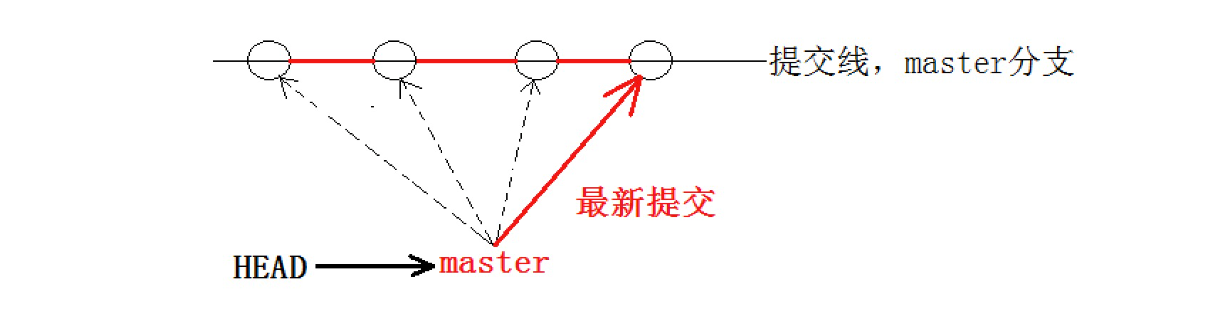
被HEAD指向的分支,才是当前的工作分支。
3.2 创建分支--git branch 分支名
bash
root@VM-0-3-ubuntu:~/gitcode# git branch dev

root@VM-0-3-ubuntu:~/gitcode# git branch
  dev
* master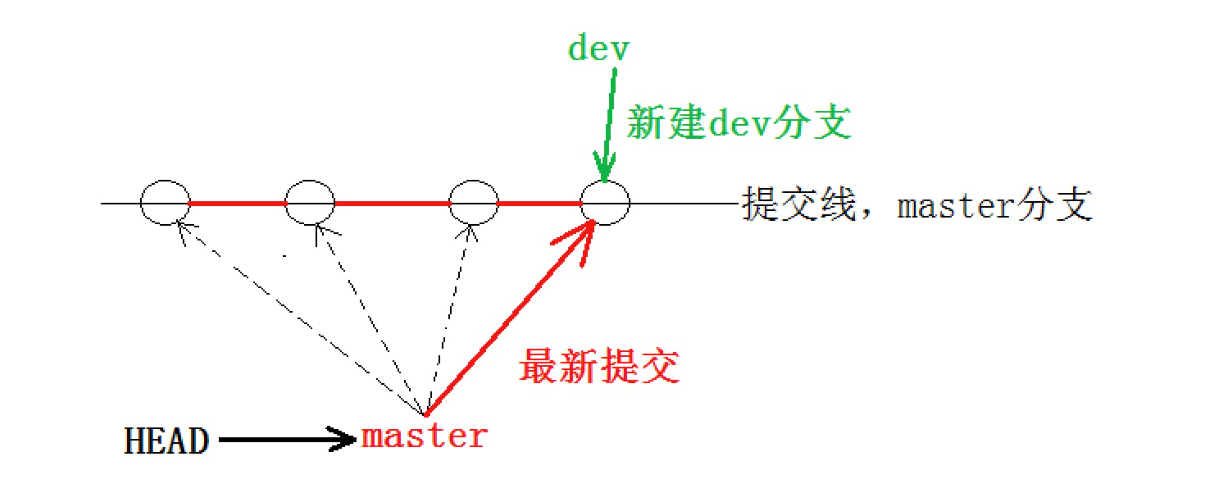
3.3 切换分支--git checkout 已有的分支名
bash
root@VM-0-3-ubuntu:~/gitcode# git checkout dev
Switched to branch 'dev'

root@VM-0-3-ubuntu:~/gitcode# git branch
* dev
  master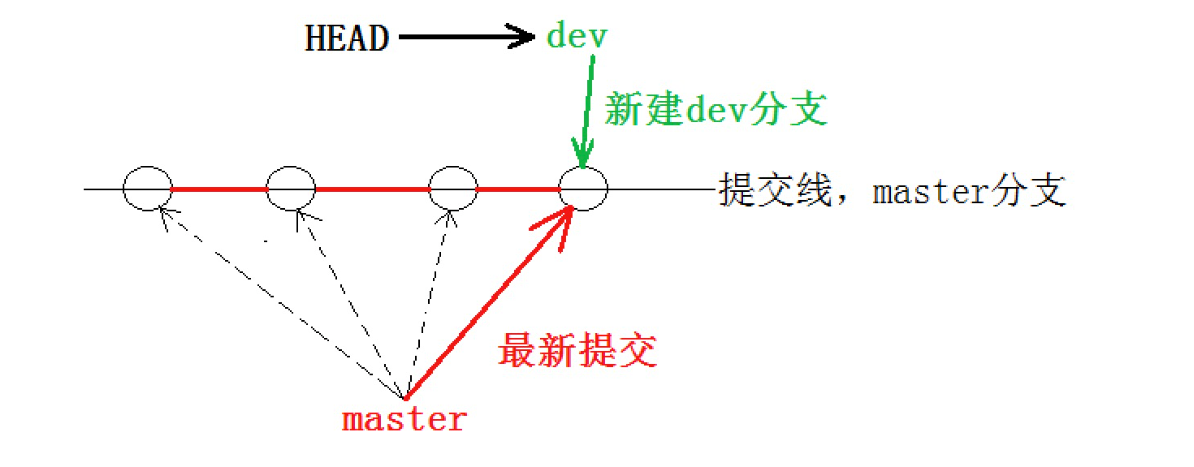
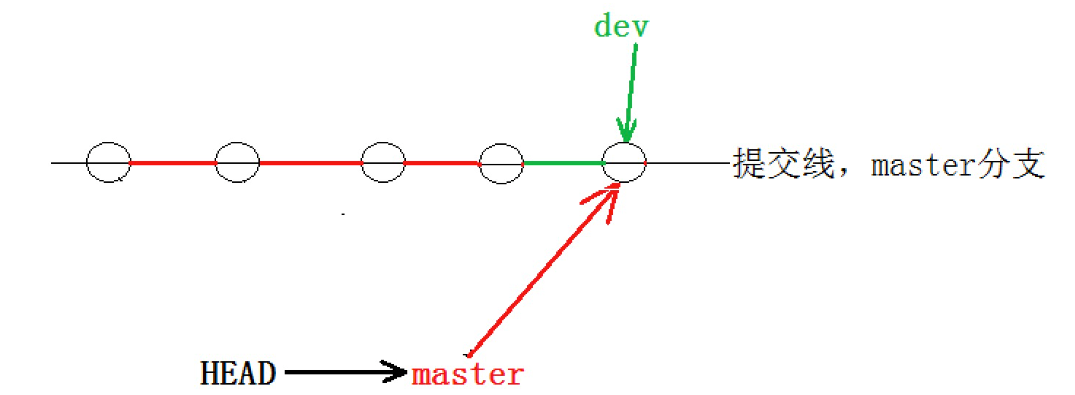
3.4 合并分支--git merge 要合并的分支名
- 创建dev分支,并在切换到dev分支上并修改dev分支上的内容,将该内容提交到版本库中。
- 切换到master分支,发现在dev分支上修改的内容,在master分支上看不到。
- 合并dev分支。
bash
root@VM-0-3-ubuntu:~/gitcode# git branch dev

root@VM-0-3-ubuntu:~/gitcode# git branch
  dev
* master

root@VM-0-3-ubuntu:~/gitcode# git checkout dev
Switched to branch 'dev'

root@VM-0-3-ubuntu:~/gitcode# git branch
* dev
  master

root@VM-0-3-ubuntu:~/gitcode# vim ReadMe

root@VM-0-3-ubuntu:~/gitcode# cat ReadMe
hello git
hello world
dev

root@VM-0-3-ubuntu:~/gitcode# git add ReadMe

root@VM-0-3-ubuntu:~/gitcode# git commit -m "modify ReadMe"
[dev 0602a1f] modify ReadMe
 1 file changed, 1 insertion(+)

root@VM-0-3-ubuntu:~/gitcode# git checkout master
Switched to branch 'master'

root@VM-0-3-ubuntu:~/gitcode# git branch
  dev
* master


root@VM-0-3-ubuntu:~/gitcode# cat ReadMe
hello git
hello world

root@VM-0-3-ubuntu:~/gitcode# git merge dev
Updating 5a01a0a..0602a1f
Fast-forward
 ReadMe | 1 +
 1 file changed, 1 insertion(+)

root@VM-0-3-ubuntu:~/gitcode# cat ReadMe
hello git
hello world
dev
合并分支前:
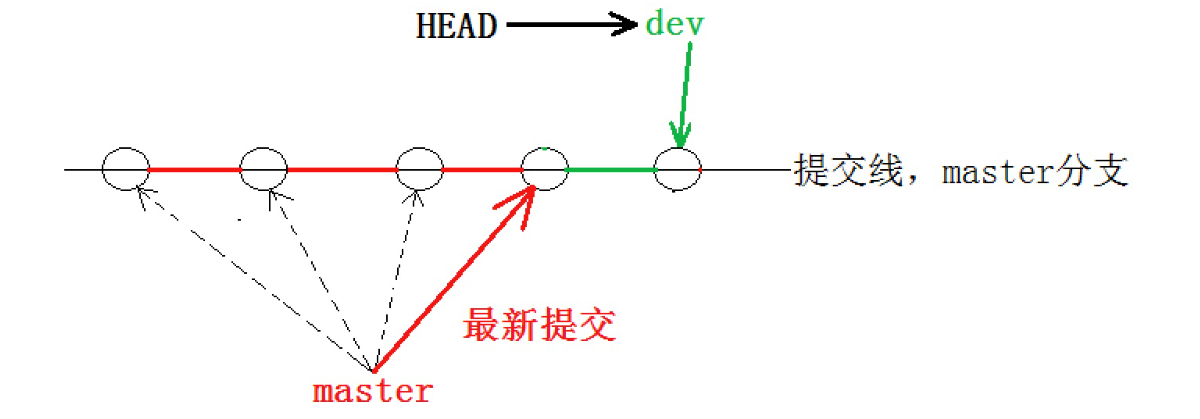
合并分支后:
3.5 删除分支--git branch -d 分支名
删除分支时,需要先切换到其他分支上。
bash
root@VM-0-3-ubuntu:~/gitcode# git branch
  dev
* master

root@VM-0-3-ubuntu:~/gitcode# git branch -d dev
Deleted branch dev (was 0602a1f).

root@VM-0-3-ubuntu:~/gitcode# git branch
* master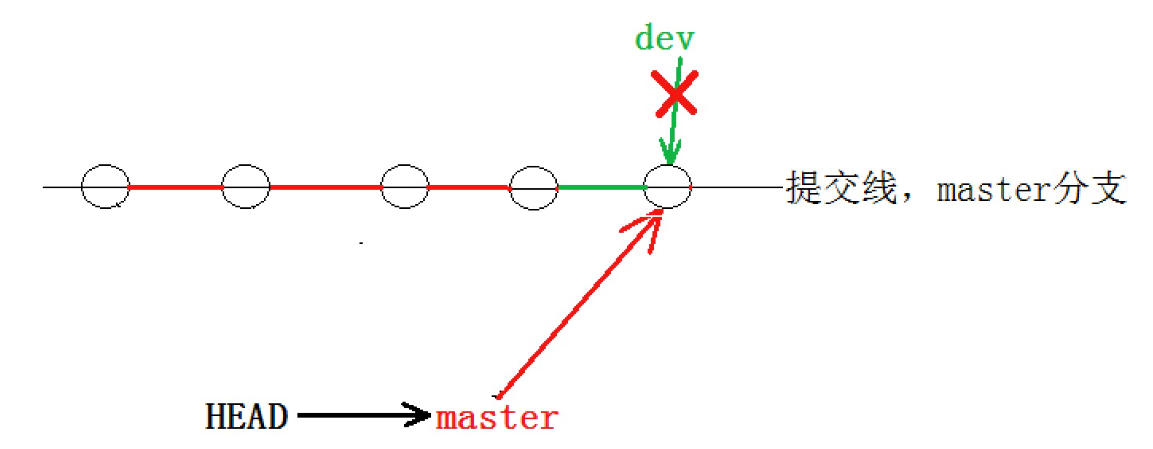
3.6 分支合并冲突(手动解决并提交)
两个分支都有了各自的提交:
bash
root@VM-0-3-ubuntu:~/gitcode# git branch
* master
*
root@VM-0-3-ubuntu:~/gitcode# git branch dev

root@VM-0-3-ubuntu:~/gitcode# git branch
  dev
* master
*
root@VM-0-3-ubuntu:~/gitcode# git checkout dev
Switched to branch 'dev'

root@VM-0-3-ubuntu:~/gitcode# vim ReadMe

root@VM-0-3-ubuntu:~/gitcode# cat ReadMe
hello git
hello world
devdevdevdevdev

root@VM-0-3-ubuntu:~/gitcode# git add ReadMe

root@VM-0-3-ubuntu:~/gitcode# git commit -m "modify ReadMe"
[dev 8a80b7e] modify ReadMe
 1 file changed, 1 insertion(+), 1 deletion(-)

root@VM-0-3-ubuntu:~/gitcode# git checkout master
Switched to branch 'master'

root@VM-0-3-ubuntu:~/gitcode# git branch
  dev
* master
*
root@VM-0-3-ubuntu:~/gitcode# cat ReadMe
hello git
hello world
dev

root@VM-0-3-ubuntu:~/gitcode# vim ReadMe

root@VM-0-3-ubuntu:~/gitcode# cat ReadMe
hello git
hello world
master

root@VM-0-3-ubuntu:~/gitcode# git add ReadMe

root@VM-0-3-ubuntu:~/gitcode# git commit -m "modify ReadMe on master"
[master 87aee56] modify ReadMe on master
 1 file changed, 1 insertion(+), 1 deletion(-)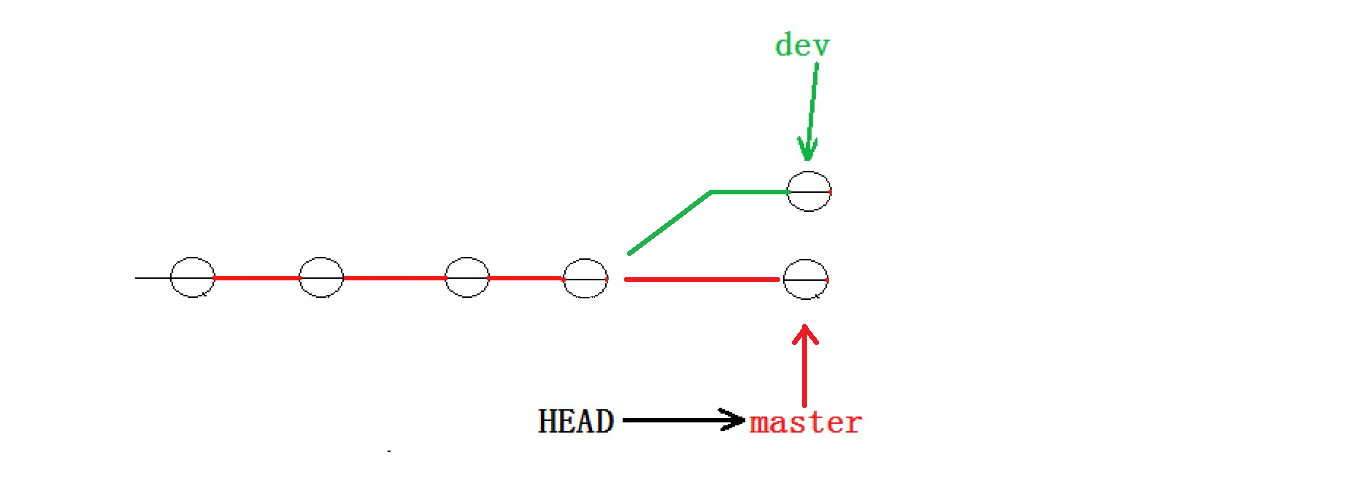
合并冲突解决:
bash
root@VM-0-3-ubuntu:~/gitcode# git branch
  dev
* master

root@VM-0-3-ubuntu:~/gitcode# git merge dev
Auto-merging ReadMe
CONFLICT (content): Merge conflict in ReadMe
Automatic merge failed; fix conflicts and then commit the result.

root@VM-0-3-ubuntu:~/gitcode# cat ReadMe
hello git
hello world
<<<<<<< HEAD
master
=======
devdevdevdevdev
>>>>>>> dev
>
root@VM-0-3-ubuntu:~/gitcode# vim ReadMe

root@VM-0-3-ubuntu:~/gitcode# git status
On branch master
You have unmerged paths.
  (fix conflicts and run "git commit")
  (use "git merge --abort" to abort the merge)

Unmerged paths:
  (use "git add <file>..." to mark resolution)
	both modified:   ReadMe
no changes added to commit (use "git add" and/or "git commit -a")

root@VM-0-3-ubuntu:~/gitcode# git add .

root@VM-0-3-ubuntu:~/gitcode# git commit -m "modify ReadMe"
[master f603a52] modify ReadMe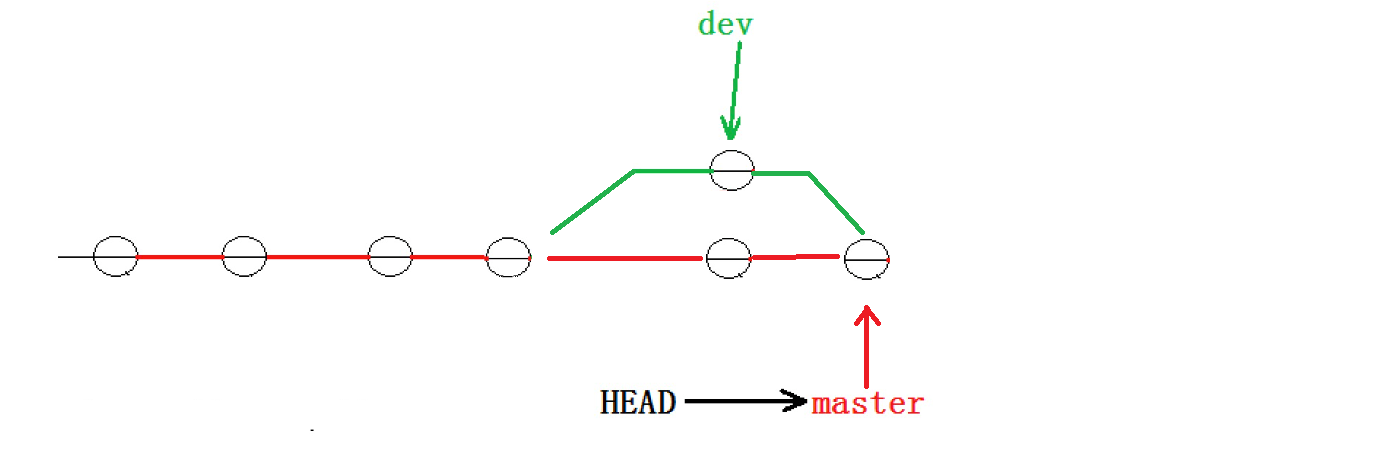
建议合并分支之后,把多余的分支删除掉:
bash
root@VM-0-3-ubuntu:~/gitcode# git branch
  dev
* master

root@VM-0-3-ubuntu:~/gitcode# git branch -d dev
Deleted branch dev (was 8a80b7e).

root@VM-0-3-ubuntu:~/gitcode# git branch
* master查看图示的提交日志--git log --graph --abbrev-commit
bash
root@VM-0-3-ubuntu:~/gitcode# git log --graph --abbrev-commit*   commit f603a52 (HEAD -> master)
|\  Merge: 87aee56 8a80b7e
| | Author: cuckoo <buxinyu163@163.com>
| | Date:   Sun Jan 11 18:02:38 2026 +0800
| |
| |     modify ReadMe
| |
| * commit 8a80b7e
| | Author: cuckoo <buxinyu163@163.com>
| | Date:   Sun Jan 11 17:56:22 2026 +0800
| |
| |     modify ReadMe
| |
* | commit 87aee56
|/  Author: cuckoo <buxinyu163@163.com>
|   Date:   Sun Jan 11 17:57:31 2026 +0800
|
|       modify ReadMe on master
|
* commit 0602a1f
| Author: cuckoo <buxinyu163@163.com>
| Date:   Sun Jan 11 17:38:28 2026 +0800
|
|     modify ReadMe
|
* commit 5a01a0a
| Author: cuckoo <buxinyu163@163.com>
| Date:   Sat Jan 10 22:05:53 2026 +0800
3.7 合并模式
3.7.1 Fast-forword模式
Fast-forword 这种模式的提交,我们并不能分辨出本次提交是在 master 分支上提交的,还是通过 merge 命令其他分支合并进来的。
3.7.2 No-fast-forword模式(推荐使用)
No-fast-forword 模式可以分辨出本次提交是在 master 分支上提交的,还是通过 merge 命令在其他分支上提交的。
bash
git merge --no-ff -m "提交" dev3.8 分支策略
master 分支是非常稳定的分支,是仅用来发布新版本的,平时不能在 master 分支上进行开发。
每个人在自己的 dev 分支上进行开发,开发完成之后再往 master 分支上进行合并。
3.9 bug分支
如果在master主分支上出现了代码bug,需要创建一个bug分支,在bug分支上进行修改bug。
场景:
- 我们在的dev2分支上正在开发代码,但是还并未进行提交。此时,发现master主分支上的代码有bug.
bash
root@VM-0-3-ubuntu:~/gitcode# git checkout dev2
Switched to branch 'dev2'
root@VM-0-3-ubuntu:~/gitcode# vim ReadMe
root@VM-0-3-ubuntu:~/gitcode# cat ReadMe
hello git
hello world
I am coding.......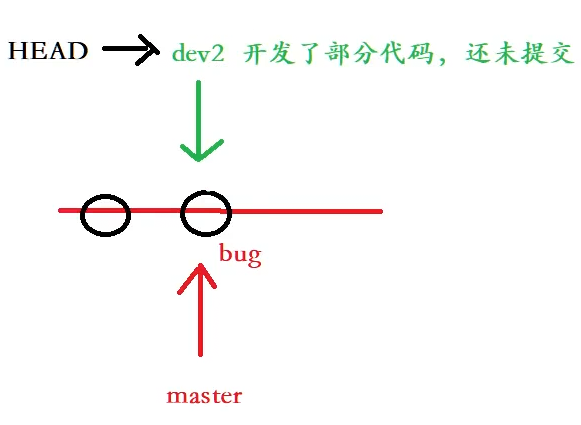
- 先储存在dev2分支上已经开发的代码(工作区),确保在dev2分支上修改的代码不会影响到master主分支上的代码。
需要注意的是:stash只会储存已经被git追踪管理的文件
bash
root@VM-0-3-ubuntu:~/gitcode# git stash
Saved working directory and index state WIP on dev2: f5b1dfb modify ReadMe on dev2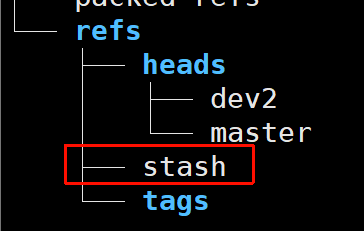
- 切换到master主分支上,基于master分支再创建一个新的bug分支,用来专门解决bug。
bash
root@VM-0-3-ubuntu:~/gitcode# git checkout master
Switched to branch 'master'

root@VM-0-3-ubuntu:~/gitcode# cat ReadMe
hello git
hello world

root@VM-0-3-ubuntu:~/gitcode# git checkout -b fix_bug
Switched to a new branch 'fix_bug'

root@VM-0-3-ubuntu:~/gitcode# vim ReadMe

root@VM-0-3-ubuntu:~/gitcode# cat ReadMe
hello git
hello world
fix_bug

root@VM-0-3-ubuntu:~/gitcode# git add .

root@VM-0-3-ubuntu:~/gitcode# git commit -m "fix bug"
[fix_bug a6aebf1] fix bug
1 file changed, 1 insertion(+)- 在主分支上合并fix_bug分支。
bash
root@VM-0-3-ubuntu:~/gitcode# git checkout master
Switched to branch 'master'

root@VM-0-3-ubuntu:~/gitcode# git branch
  dev2
  fix_bug
* master

root@VM-0-3-ubuntu:~/gitcode# git merge --no-ff -m "merge fix_bug" fix_bug
Merge made by the 'ort' strategy.
 ReadMe | 1 +
 1 file changed, 1 insertion(+)

root@VM-0-3-ubuntu:~/gitcode# cat ReadMe
hello git
hello world
fix_bug- 切换到dev2分支上继续开发代码,在重新开发代码前,需要再次使用
git stash pop命令,将先前存储的代码恢复。
查看当前stash中存储了哪些东西:
bash
root@VM-0-3-ubuntu:~/gitcode# git stash list
stash@{0}: WIP on dev2: f5b1dfb modify ReadMe on dev2
恢复:
bash
root@VM-0-3-ubuntu:~/gitcode# git stash pop
On branch dev2
Changes not staged for commit:
  (use "git add <file>..." to update what will be committed)
  (use "git restore <file>..." to discard changes in working directory)
	modified:   ReadMe
no changes added to commit (use "git add" and/or "git commit -a")
Dropped refs/stash@{0} (3f6127de045485233e586538630343c44cb581f0)

root@VM-0-3-ubuntu:~/gitcode# cat ReadMe
hello git
hello world
I am coding.......
再次开发,并在dev2分支上进行提交:
bash
root@VM-0-3-ubuntu:~/gitcode# vim ReadMe
root@VM-0-3-ubuntu:~/gitcode# cat ReadMe
hello git
hello world
I am coding......  Done!!!
root@VM-0-3-ubuntu:~/gitcode# git add .
root@VM-0-3-ubuntu:~/gitcode# git commit -m "modify ReadMe: Done!!!"
git commit -m "modify ReadMe: Donegit add .!"
[dev2 1dedef2] modify ReadMe: Donegit add .!
 1 file changed, 1 insertion(+), 1 deletion(-)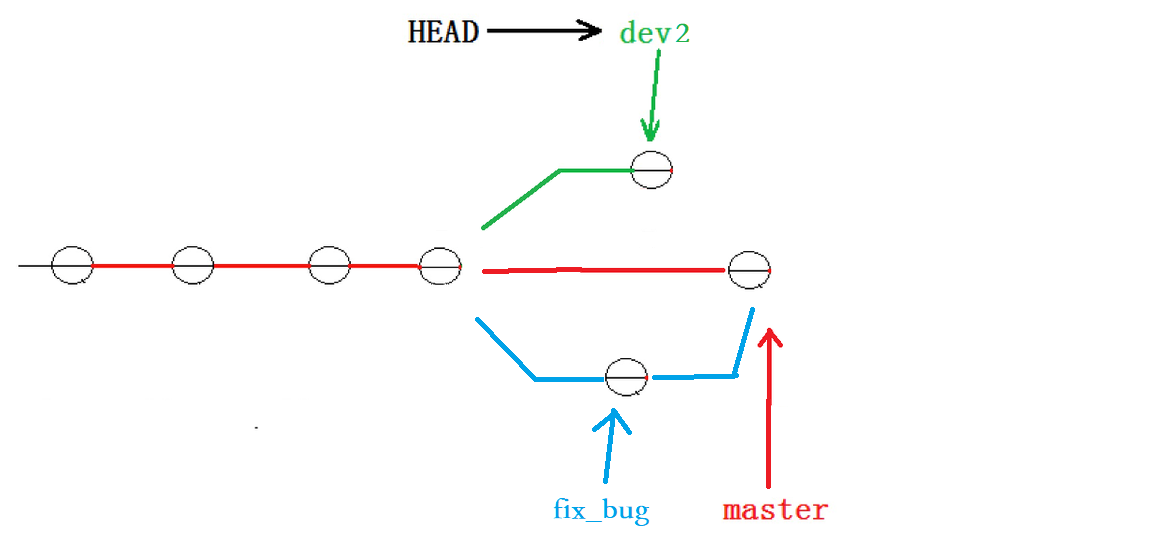
- 合并dev2分支。
如果此时直接切换到master主分支上,将dev2分支合并,可能会出现合并冲突,导致mater主分支上的代码不稳定。
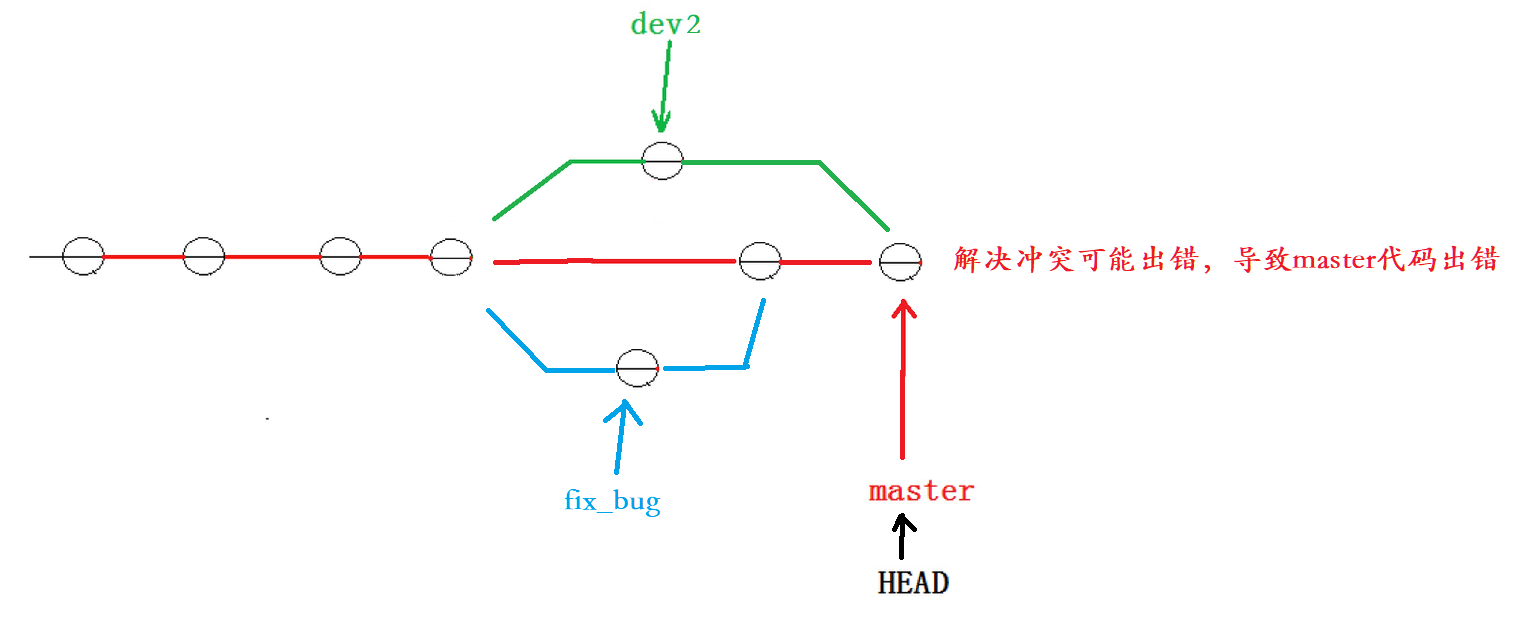
更安全可靠的做法:在dev分支上合并master分支上的代码,合并之后如果出现了冲突,也不会影响到master主分支。
bash
root@VM-0-3-ubuntu:~/gitcode# git branch
* dev2
  fix_bug
  master

root@VM-0-3-ubuntu:~/gitcode# git merge --no-ff -m "merge master" master
Auto-merging ReadMe
CONFLICT (content): Merge conflict in ReadMe
Automatic merge failed; fix conflicts and then commit the result.

root@VM-0-3-ubuntu:~/gitcode# cat ReadMe
hello git
hello world
<<<<<<< HEAD
I am coding......  Done!!!
=======
fix_bug
>>>>>>> master
>
root@VM-0-3-ubuntu:~/gitcode# vim ReadMe

root@VM-0-3-ubuntu:~/gitcode# cat ReadMe
hello git
hello world
fix_bug
I am coding......  Done!!!

root@VM-0-3-ubuntu:~/gitcode# git add .

root@VM-0-3-ubuntu:~/gitcode# git commit -m "merge master fix"
[dev2 cfe8e40] merge master fix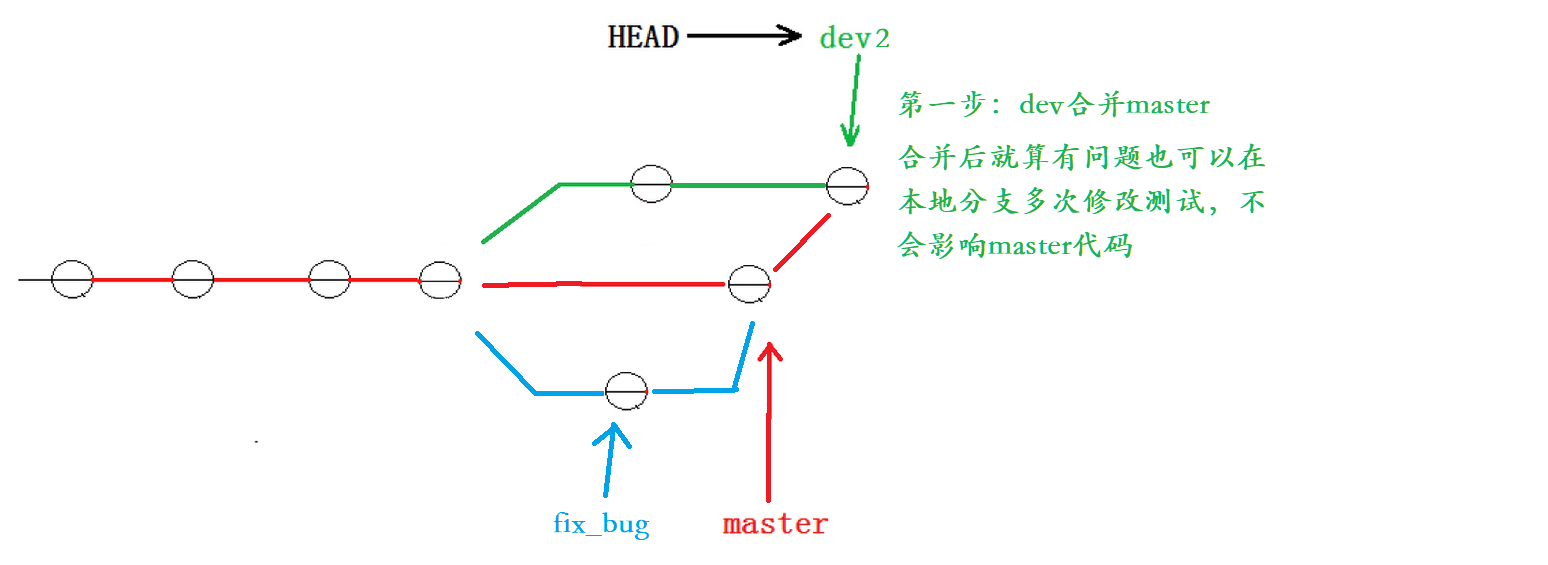
在dev2分支上合并完成之后,再切换到master主分支上,合并dev2分支。
bash
root@VM-0-3-ubuntu:~/gitcode# git checkout master
Switched to branch 'master'

root@VM-0-3-ubuntu:~/gitcode# git status
On branch master
nothing to commit, working tree clean

root@VM-0-3-ubuntu:~/gitcode# git merge --no-ff -m "merge dev2" dev2
Merge made by the 'ort' strategy.
 ReadMe | 1 +
 1 file changed, 1 insertion(+)

root@VM-0-3-ubuntu:~/gitcode# cat ReadMe
hello git
hello world
fix_bug
I am coding......  Done!!!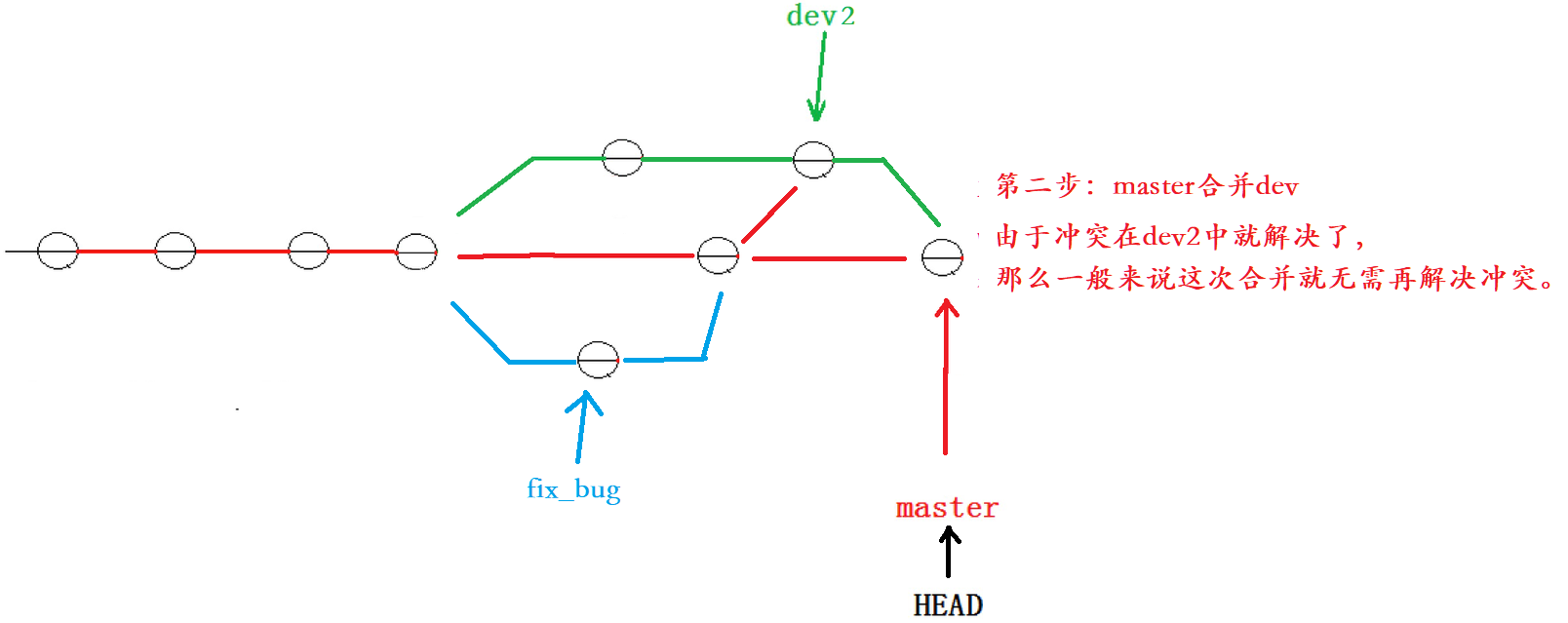
删除其他分支
bash
root@VM-0-3-ubuntu:~/gitcode# git branch -d fix_bug
Deleted branch fix_bug (was a6aebf1).

root@VM-0-3-ubuntu:~/gitcode# git branch -d dev2
Deleted branch dev2 (was cfe8e40).

root@VM-0-3-ubuntu:~/gitcode# git branch
* master
3.10 强制删除分支
如果我们已经在一个分支上进行了一些开发,并且已经在该分支上有一些提交,但是没有merge到主分支上,使用git branch -d删除分支会失败。
使用git branch -D命令可以强制删除。