Flutter框架跨平台鸿蒙开发------合成大西瓜游戏的实现
🚀运行效果展示
前言
随着移动互联网的快速发展,跨平台开发技术已成为移动应用开发的重要趋势。Flutter作为Google推出的跨平台UI框架,凭借其高性能、热重载、丰富的组件库等优势,在开发者社区中广受欢迎。同时,鸿蒙操作系统作为华为自主研发的分布式操作系统,正逐步构建起完整的生态体系。本文将介绍如何结合Flutter与鸿蒙,实现一款经典的合成大西瓜游戏,展示跨平台开发的优势和实践方法。
技术栈选择
- Flutter 3.6:用于构建跨平台UI,实现一次开发、多端运行
- Dart 3.6:Flutter的开发语言,提供现代化的语法特性
- 鸿蒙操作系统:作为应用的运行环境,提供底层硬件访问和系统服务
- 自定义物理引擎:实现重力、碰撞检测和合成逻辑
游戏介绍
游戏概述
合成大西瓜是一款休闲益智类游戏,玩家通过拖动手指左右移动水果,点击屏幕让水果下落,相同等级的水果碰撞后会合成更高等级的水果,最终目标是合成大西瓜。
游戏规则
- 玩家可以拖动手指左右移动当前水果
- 点击屏幕让水果开始下落
- 水果受重力影响自然下落
- 相同等级的水果碰撞后会合成更高等级的水果
- 水果堆积到顶部时游戏结束
- 根据合成的水果等级计算分数
游戏特点
- 简单易上手的操作方式
- 流畅的物理效果和碰撞检测
- 10种不同等级的水果,从樱桃到大西瓜
- 清晰的分数系统
- 支持暂停、继续和重新开始功能
- 跨平台支持,可在鸿蒙、Android、iOS等平台运行
核心功能实现
1. 游戏架构设计
游戏采用面向对象设计,遵循清晰的分层架构:
用户界面层
游戏逻辑层
物理系统层
状态管理层
碰撞检测
重力系统
水果管理
合成逻辑
2. 核心类和数据结构
2.1 游戏状态枚举
dart
/// 游戏状态枚举
enum GameStatus {
  ready,  // 准备开始
  playing,  // 游戏中
  paused,  // 暂停
  gameOver,  // 游戏结束
}
2.2 水果类型枚举
dart
/// 水果类型枚举
enum FruitType {
  cherry,     // 樱桃
  grape,      // 葡萄
  orange,     // 橘子
  lemon,      // 柠檬
  pear,       // 梨
  apple,      // 苹果
  peach,      // 桃子
  pineapple,  // 菠萝
  melon,      // 甜瓜
  watermelon, // 西瓜
}
2.3 水果类
dart
/// 水果类
class Fruit {
  final FruitType type;
  final double radius;
  final Color color;
  final String name;
  final int level;

  // 物理属性
  double x;
  double y;
  double vx;
  double vy;
  bool isStatic;

  // 构造函数
  Fruit({
    required this.type,
    required this.radius,
    required this.color,
    required this.name,
    required this.level,
    this.x = 0,
    this.y = 0,
    this.vx = 0,
    this.vy = 0,
    this.isStatic = false,
  });

  // 工厂构造函数:根据等级创建水果
  factory Fruit.fromLevel(int level, {double x = 0, double y = 0}) {
    final fruitData = _fruitData[level % _fruitData.length];
    return Fruit(
      type: fruitData['type'] as FruitType,
      radius: fruitData['radius'] as double,
      color: fruitData['color'] as Color,
      name: fruitData['name'] as String,
      level: level,
      x: x,
      y: y,
    );
  }

  // 水果数据
  static final List<Map<String, dynamic>> _fruitData = [
    {
      'type': FruitType.cherry,
      'radius': 15.0,
      'color': Colors.red,
      'name': '樱桃',
    },
    // ... 其他水果数据
  ];

  // 检查两个水果是否可以合成
  bool canMergeWith(Fruit other) {
    return level == other.level;
  }

  // 合成更高等级的水果
  Fruit merge() {
    return Fruit.fromLevel(level + 1, x: x, y: y);
  }
}
3. 物理系统实现
3.1 游戏配置
dart
/// 游戏配置类
class GameConfig {
  static const double gravity = 0.5;
  static const double bounce = 0.3;
  static const double friction = 0.98;
  static const double gameWidth = 300.0;
  static const double gameHeight = 600.0;
  static const double initialSpeed = 2.0;
  static const double spawnHeight = 50.0;
  static const int maxFruitLevel = 10;
}
3.2 重力系统
dart
/// 更新游戏状态
void _updateGame() {
  // 更新所有水果
  for (final fruit in fruits) {
    if (!fruit.isStatic) {
      // 应用重力
      fruit.vy += GameConfig.gravity;

      // 更新位置
      fruit.x += fruit.vx;
      fruit.y += fruit.vy;

      // 应用摩擦力
      fruit.vx *= GameConfig.friction;
      fruit.vy *= GameConfig.friction;

      // 边界碰撞处理
      _handleBoundaryCollision(fruit);
    }
  }
}

/// 处理边界碰撞
void _handleBoundaryCollision(Fruit fruit) {
  if (fruit.x - fruit.radius <= 0) {
    fruit.x = fruit.radius;
    fruit.vx *= -GameConfig.bounce;
  } else if (fruit.x + fruit.radius >= GameConfig.gameWidth) {
    fruit.x = GameConfig.gameWidth - fruit.radius;
    fruit.vx *= -GameConfig.bounce;
  }

  if (fruit.y + fruit.radius >= GameConfig.gameHeight) {
    fruit.y = GameConfig.gameHeight - fruit.radius;
    fruit.vy *= -GameConfig.bounce;

    // 如果速度很小,标记为静态
    if (fruit.vy.abs() < 0.1 && fruit.vx.abs() < 0.1) {
      fruit.isStatic = true;
    }
  }
}
4. 碰撞检测和合成逻辑
4.1 碰撞检测算法
dart
/// 检查碰撞
void _checkCollisions() {
  // 检查所有水果之间的碰撞
  for (int i = 0; i < fruits.length; i++) {
    for (int j = i + 1; j < fruits.length; j++) {
      final fruit1 = fruits[i];
      final fruit2 = fruits[j];

      // 计算距离
      final dx = fruit2.x - fruit1.x;
      final dy = fruit2.y - fruit1.y;
      final distance = sqrt(dx * dx + dy * dy);
      final minDistance = fruit1.radius + fruit2.radius;

      // 碰撞检测
      if (distance < minDistance) {
        // 处理碰撞响应
        _handleCollision(fruit1, fruit2);

        // 检查是否可以合成
        if (fruit1.canMergeWith(fruit2)) {
          _mergeFruits(i, j);
          return; // 一次只合成一个
        }
      }
    }
  }
}
4.2 碰撞响应处理
dart
/// 处理碰撞响应
void _handleCollision(Fruit fruit1, Fruit fruit2) {
  // 计算碰撞向量
  final dx = fruit2.x - fruit1.x;
  final dy = fruit2.y - fruit1.y;
  final distance = sqrt(dx * dx + dy * dy);

  // 归一化碰撞向量
  final nx = dx / distance;
  final ny = dy / distance;

  // 分离水果
  final overlap = (fruit1.radius + fruit2.radius) - distance;
  fruit1.x -= overlap * nx / 2;
  fruit1.y -= overlap * ny / 2;
  fruit2.x += overlap * nx / 2;
  fruit2.y += overlap * ny / 2;

  // 计算相对速度
  final dvx = fruit2.vx - fruit1.vx;
  final dvy = fruit2.vy - fruit1.vy;

  // 计算相对速度在碰撞法线上的分量
  final dvn = dvx * nx + dvy * ny;

  // 如果水果正在分离,不需要处理
  if (dvn > 0) return;

  // 计算冲量
  final impulse = 2 * dvn / (fruit1.radius + fruit2.radius);

  // 更新速度
  fruit1.vx += impulse * fruit2.radius * nx * GameConfig.bounce;
  fruit1.vy += impulse * fruit2.radius * ny * GameConfig.bounce;
  fruit2.vx -= impulse * fruit1.radius * nx * GameConfig.bounce;
  fruit2.vy -= impulse * fruit1.radius * ny * GameConfig.bounce;

  // 标记为非静态
  fruit1.isStatic = false;
  fruit2.isStatic = false;
}
4.3 水果合成逻辑
dart
/// 合成水果
void _mergeFruits(int index1, int index2) {
  final fruit1 = fruits[index1];
  final fruit2 = fruits[index2];

  // 创建新水果
  final newFruit = fruit1.merge();

  // 计算新水果位置
  newFruit.x = (fruit1.x + fruit2.x) / 2;
  newFruit.y = (fruit1.y + fruit2.y) / 2;

  // 移除旧水果
  fruits.removeAt(max(index1, index2));
  fruits.removeAt(min(index1, index2));

  // 添加新水果
  fruits.add(newFruit);

  // 更新分数
  score += newFruit.level * 10;
}
5. 用户交互实现
5.1 手势控制
dart
/// 处理手势移动
void _onHorizontalDragUpdate(DragUpdateDetails details) {
  if (_gameStatus == GameStatus.playing || _gameStatus == GameStatus.ready) {
    currentX += details.delta.dx;

    // 限制在游戏区域内
    currentX = max(
      currentFruit?.radius ?? 0,
      min(currentX, GameConfig.gameWidth - (currentFruit?.radius ?? 0)),
    );
  }
}

/// 处理点击事件,让水果下落
void _onTapDown(TapDownDetails details) {
  _dropFruit();
}

/// 让水果开始下落
void _dropFruit() {
  if (_gameStatus == GameStatus.ready) {
    _gameStatus = GameStatus.playing;
  }

  if (currentFruit != null && _gameStatus == GameStatus.playing) {
    // 给水果一个初始垂直速度,让它开始下落
    currentFruit!.vy = GameConfig.initialSpeed;
  }
}
6. 游戏状态管理
6.1 游戏状态流程
点击开始游戏/点击屏幕
点击暂停按钮
点击继续按钮
水果堆积到顶部
水果堆积到顶部
点击重新开始
点击重新开始
点击重新开始
ready
playing
paused
gameOver
6.2 状态管理实现
dart
/// 游戏状态枚举
enum GameStatus {
  ready,  // 准备开始
  playing,  // 游戏中
  paused,  // 暂停
  gameOver,  // 游戏结束
}

/// 游戏主页面
class WatermelonGameHomePage extends StatefulWidget {
  // ...
}

class _WatermelonGameHomePageState extends State<WatermelonGameHomePage> {
  // 游戏状态
  GameStatus _gameStatus = GameStatus.ready;
  List<Fruit> fruits = [];
  Fruit? currentFruit;
  double currentX = GameConfig.gameWidth / 2;
  int score = 0;

  // 开始游戏
  void _startGame() {
    setState(() {
      _gameStatus = GameStatus.playing;
    });
  }

  // 暂停/继续游戏
  void _togglePause() {
    setState(() {
      if (_gameStatus == GameStatus.playing) {
        _gameStatus = GameStatus.paused;
      } else if (_gameStatus == GameStatus.paused) {
        _gameStatus = GameStatus.playing;
      }
    });
  }

  // 重新开始游戏
  void _restartGame() {
    setState(() {
      fruits.clear();
      currentX = GameConfig.gameWidth / 2;
      score = 0;
      _gameStatus = GameStatus.ready;
      _spawnFruit();
    });
  }

  // 检查游戏结束
  void _checkGameOver() {
    if (_gameStatus == GameStatus.gameOver) return;

    // 检查是否有水果超过顶部
    for (final fruit in fruits) {
      if (fruit.y - fruit.radius <= 0) {
        _gameStatus = GameStatus.gameOver;
        break;
      }
    }
  }
}
7. 游戏主循环
dart
/// 开始游戏循环
void _startGameLoop() {
  _gameTimer = Timer.periodic(const Duration(milliseconds: 16), (timer) {
    if (_gameStatus == GameStatus.playing) {
      _updateGame();
      _checkCollisions();
      _checkGameOver();
      setState(() {});
    }
  });
}
游戏构建与运行
1. 项目配置
在pubspec.yaml中添加必要的依赖:
yaml
dependencies:
  flutter:
    sdk: flutter
  cupertino_icons: ^1.0.8
2. 构建命令
bash
# 获取依赖
flutter pub get

# 构建鸿蒙应用
flutter run
3. 运行效果
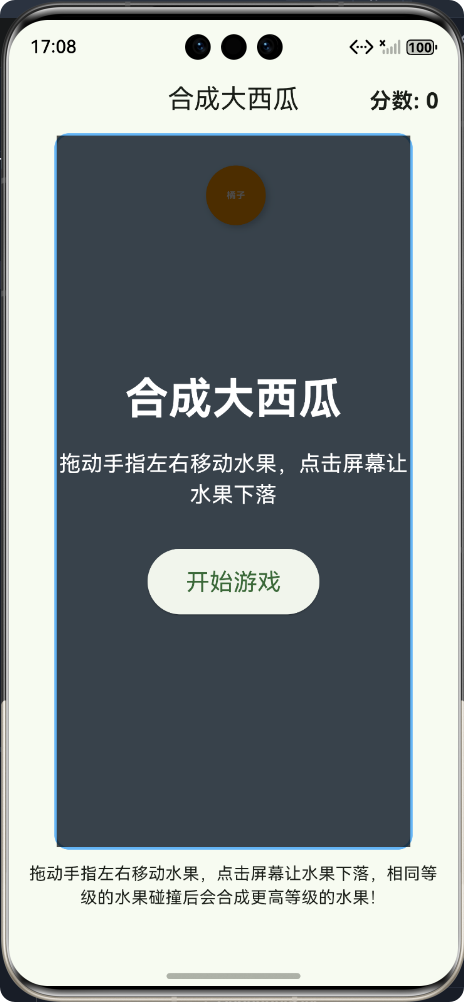
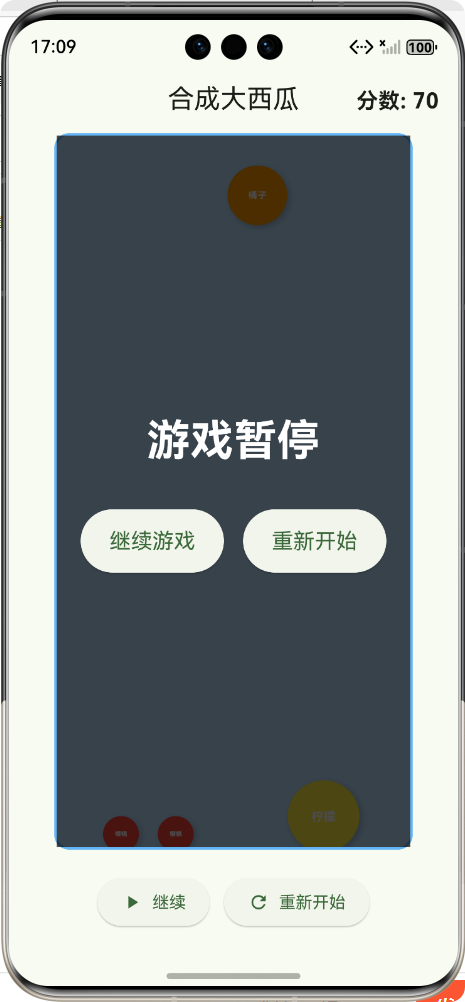
游戏成功运行后,用户可以看到以下界面:
- 准备界面:显示游戏标题、操作说明和开始游戏按钮
- 游戏界面:显示当前水果、已落下的水果、分数和控制按钮
- 暂停界面:显示暂停提示和继续/重新开始按钮
- 游戏结束界面:显示游戏结束提示、最终分数和重新开始按钮
总结
本文成功实现了基于Flutter+鸿蒙的跨平台合成大西瓜游戏,具有以下特点:
- 完整的游戏功能:包括水果生成、物理运动、碰撞检测、合成逻辑、分数系统等
- 流畅的用户体验:响应式的手势控制、平滑的动画效果
- 完善的游戏流程:从准备开始到游戏结束,包含完整的状态管理
- 跨平台支持:基于Flutter框架,可轻松适配鸿蒙、Android、iOS等多个平台
- 良好的代码结构:采用面向对象设计,代码可读性和可维护性高
遇到的问题与解决方案
- 底部溢出问题 :通过使用
SingleChildScrollView和优化布局结构解决 - 状态管理复杂性:通过使用枚举和清晰的状态转换逻辑解决
- 碰撞检测性能:通过优化算法和减少碰撞检测次数解决
- UI适配问题:通过使用相对单位和响应式布局解决
未来展望
- 功能扩展:添加更多游戏模式、道具系统、排行榜等功能
- 性能优化:进一步优化物理引擎和碰撞检测算法
- 网络功能:添加在线对战、好友排行榜等网络功能
- 3D效果:实现3D版本的合成大西瓜游戏
- 鸿蒙特性集成:集成鸿蒙的分布式能力,实现多设备协同游戏
结语
通过本文的介绍,我们展示了如何使用Flutter框架开发跨平台鸿蒙应用,实现了一款功能完整、体验流畅的合成大西瓜游戏。Flutter与鸿蒙的结合,充分发挥了跨平台开发的优势,同时利用了鸿蒙操作系统的特性。随着Flutter和鸿蒙生态的不断发展,跨平台开发技术将在移动应用开发中扮演更加重要的角色。希望本文能为开发者提供参考,共同推动跨平台开发技术的发展。
通过Flutter+鸿蒙的技术组合,我们可以实现高效开发、多端运行的目标,为用户提供优质的应用体验。在未来的移动开发领域,跨平台技术将继续演进,为开发者带来更多可能性。
欢迎加入开源鸿蒙跨平台社区:https://openharmonycrossplatform.csdn.net