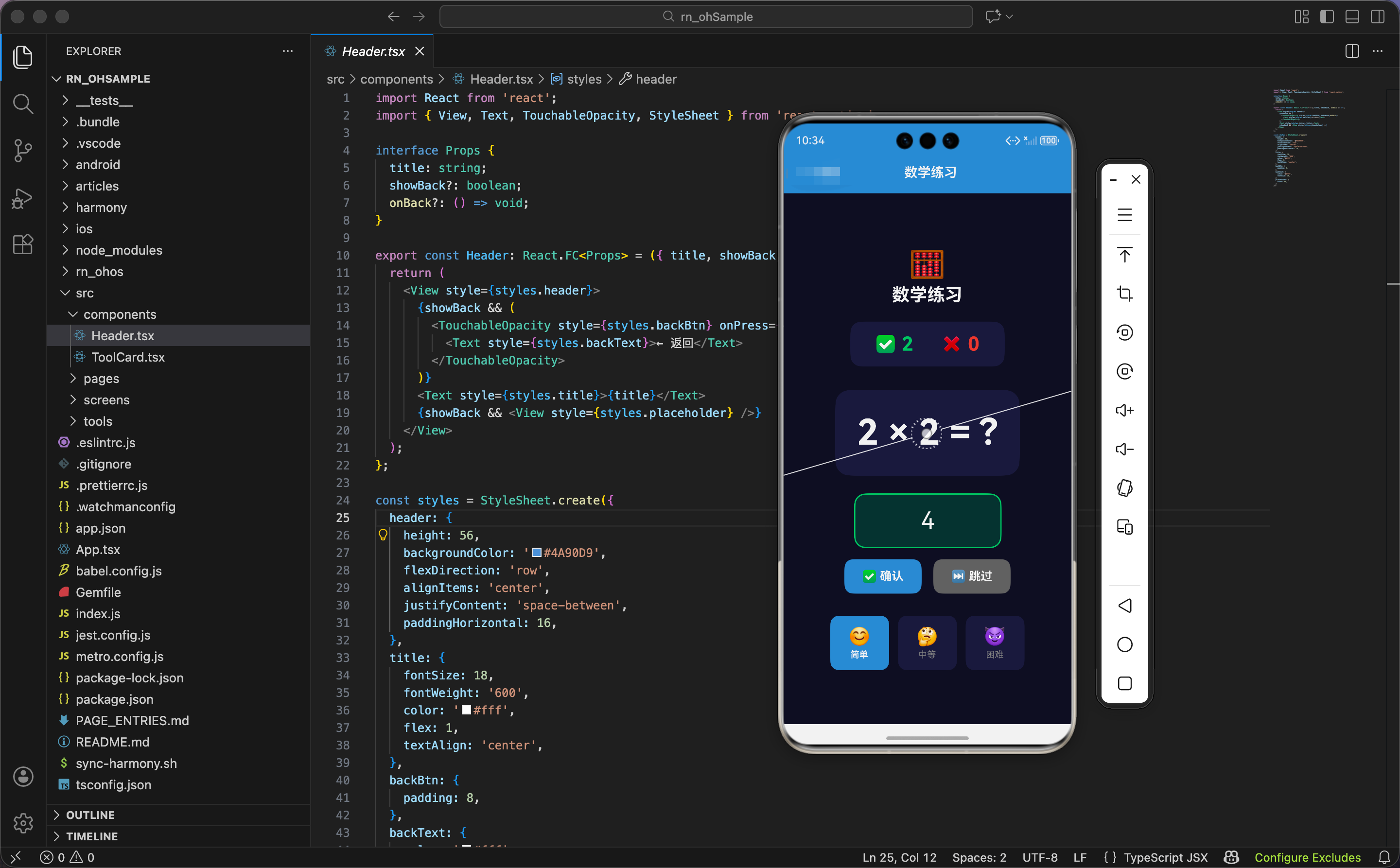
今天我们用 React Native 实现一个数学练习工具,支持加减乘除四则运算,三种难度。
状态设计
tsx
import React, { useState, useEffect, useRef } from 'react';
import { View, Text, TextInput, TouchableOpacity, StyleSheet, Animated } from 'react-native';

type Operation = '+' | '-' | '×' | '÷';

export const MathPractice: React.FC = () => {
  const [num1, setNum1] = useState(0);
  const [num2, setNum2] = useState(0);
  const [operation, setOperation] = useState<Operation>('+');
  const [answer, setAnswer] = useState('');
  const [result, setResult] = useState<'correct' | 'wrong' | null>(null);
  const [score, setScore] = useState({ correct: 0, wrong: 0 });
  const [difficulty, setDifficulty] = useState<'easy' | 'medium' | 'hard'>('easy');

  const questionAnim = useRef(new Animated.Value(1)).current;
  const inputAnim = useRef(new Animated.Value(1)).current;
  const scoreAnim = useRef(new Animated.Value(1)).current;
  const shakeAnim = useRef(new Animated.Value(0)).current;
状态设计包含题目、答案、结果、计分、难度。
题目状态:
num1、num2:两个操作数operation:运算符,类型是'+' | '-' | '×' | '÷'
答案和结果:
answer:用户输入的答案,字符串类型result:判断结果,'correct'(正确)、'wrong'(错误)或null(未判断)
计分 :score 对象包含正确次数和错误次数。
难度 :difficulty 有三种:'easy'(简单)、'medium'(中等)、'hard'(困难)。
四个动画值:
questionAnim:题目的缩放和淡入动画inputAnim:输入框的缩放动画(代码中定义但未使用)scoreAnim:计分板的缩放动画shakeAnim:题目的摇晃动画
为什么用字面量类型定义运算符和难度 ?因为 TypeScript 的字面量类型让代码更安全。operation 只能是这 4 个运算符之一,difficulty 只能是这 3 种难度之一。如果写错,TypeScript 会报错。
动画函数
tsx
  const animateQuestion = () => {
    questionAnim.setValue(0);
    Animated.spring(questionAnim, { toValue: 1, friction: 5, useNativeDriver: true }).start();
  };

  const animateCorrect = () => {
    Animated.sequence([
      Animated.timing(scoreAnim, { toValue: 1.2, duration: 150, useNativeDriver: true }),
      Animated.spring(scoreAnim, { toValue: 1, friction: 3, useNativeDriver: true }),
    ]).start();
  };

  const animateWrong = () => {
    Animated.sequence([
      Animated.timing(shakeAnim, { toValue: 1, duration: 50, useNativeDriver: true }),
      Animated.timing(shakeAnim, { toValue: -1, duration: 50, useNativeDriver: true }),
      Animated.timing(shakeAnim, { toValue: 1, duration: 50, useNativeDriver: true }),
      Animated.timing(shakeAnim, { toValue: 0, duration: 50, useNativeDriver: true }),
    ]).start();
  };
三个动画函数:题目动画、正确动画、错误动画。
题目动画 :重置动画值为 0,然后弹簧动画到 1。friction: 5 让弹簧有明显的回弹效果,题目从无到有、从小到大地出现。
正确动画 :序列动画,计分板放大到 120%(150ms),再弹回到 100%。friction: 3 让弹簧有明显的回弹效果,庆祝答对。
错误动画:序列动画,题目左右摇晃。从 0 到 1(向右)、到 -1(向左)、到 1(向右)、回到 0,总共 200ms。摇晃 3 次,提示答错。
为什么正确动画放大计分板,错误动画摇晃题目?因为正确时,用户关注的是分数增加,放大计分板强调这个变化。错误时,用户关注的是题目,摇晃题目提示"这道题答错了"。
生成题目
tsx
  const generateQuestion = () => {
    animateQuestion();
    const ops: Operation[] = ['+', '-', '×', '÷'];
    const op = ops[Math.floor(Math.random() * ops.length)];
    let n1, n2;
    const max = difficulty === 'easy' ? 10 : difficulty === 'medium' ? 50 : 100;

    if (op === '÷') {
      n2 = Math.floor(Math.random() * (max / 2)) + 1;
      n1 = n2 * (Math.floor(Math.random() * 10) + 1);
    } else if (op === '×') {
      n1 = Math.floor(Math.random() * Math.sqrt(max)) + 1;
      n2 = Math.floor(Math.random() * Math.sqrt(max)) + 1;
    } else {
      n1 = Math.floor(Math.random() * max) + 1;
      n2 = Math.floor(Math.random() * max) + 1;
      if (op === '-' && n1 < n2) [n1, n2] = [n2, n1];
    }

    setNum1(n1);
    setNum2(n2);
    setOperation(op);
    setAnswer('');
    setResult(null);
  };

  useEffect(() => { generateQuestion(); }, [difficulty]);
生成题目函数根据难度和运算符生成合适的数字。
触发动画:先触发题目动画,让新题目有出现效果。
随机运算符:从 4 个运算符中随机选择一个。
难度对应的最大值:
- 简单:10
- 中等:50
- 困难:100
除法特殊处理:
n2 = Math.floor(Math.random() * (max / 2)) + 1:除数是 1 到 max/2 的随机数n1 = n2 * (Math.floor(Math.random() * 10) + 1):被除数是除数的倍数- 这样保证结果是整数,不会出现小数
为什么除法要保证整数结果?因为小数除法对小学生太难,而且输入小数不方便。整数除法更适合练习。
乘法特殊处理:
Math.floor(Math.random() * Math.sqrt(max)) + 1:两个数都是 1 到 √max 的随机数- 这样保证乘积不超过 max
为什么乘法用平方根?因为如果两个数都是 1 到 max,乘积可能很大(比如 100 × 100 = 10000)。用平方根限制,乘积最大是 max(比如 10 × 10 = 100)。
减法特殊处理:
- 如果
n1 < n2,交换两个数 - 这样保证结果是正数,不会出现负数
为什么减法要保证正数?因为负数对小学生太难。正数减法更适合练习。
重置状态:清空答案,清除结果。
难度变化时重新生成 :useEffect(() => { generateQuestion(); }, [difficulty]) 监听难度变化,切换难度时自动生成新题目。
计算正确答案
tsx
  const getCorrectAnswer = () => {
    switch (operation) {
      case '+': return num1 + num2;
      case '-': return num1 - num2;
      case '×': return num1 * num2;
      case '÷': return num1 / num2;
    }
  };
根据运算符计算正确答案。用 switch 语句处理 4 种运算。
检查答案
tsx
  const checkAnswer = () => {
    const correct = getCorrectAnswer();
    const userAnswer = parseFloat(answer);
    if (userAnswer === correct) {
      setResult('correct');
      setScore({ ...score, correct: score.correct + 1 });
      animateCorrect();
      setTimeout(generateQuestion, 1000);
    } else {
      setResult('wrong');
      setScore({ ...score, wrong: score.wrong + 1 });
      animateWrong();
    }
  };
检查答案函数比较用户答案和正确答案。
获取正确答案 :调用 getCorrectAnswer() 计算正确答案。
解析用户答案 :parseFloat(answer) 把字符串转成数字。
答对:
- 结果设为
'correct' - 正确次数加 1
- 触发正确动画
- 1 秒后自动生成新题目
答错:
- 结果设为
'wrong' - 错误次数加 1
- 触发错误动画
- 不自动生成新题目,让用户看到正确答案
为什么答对后自动生成新题目,答错后不自动生成?因为答对说明用户掌握了,可以继续下一题。答错说明用户不会,需要看正确答案学习,不应该立即跳到下一题。
摇晃插值
tsx
const shake = shakeAnim.interpolate({ inputRange: [-1, 0, 1], outputRange: ['-5deg', '0deg', '5deg'] });插值把动画值 -1 到 1 映射到旋转角度 -5 度到 5 度。题目左右旋转,营造"摇晃"效果。
界面渲染:头部和计分板
tsx
  return (
    <View style={styles.container}>
      <View style={styles.header}>
        <Text style={styles.headerIcon}>🧮</Text>
        <Text style={styles.headerTitle}>数学练习</Text>
      </View>

      <Animated.View style={[styles.scoreBoard, { transform: [{ scale: scoreAnim }] }]}>
        <View style={styles.scoreItem}>
          <Text style={styles.scoreEmoji}>✅</Text>
          <Text style={styles.scoreCorrect}>{score.correct}</Text>
        </View>
        <View style={styles.scoreItem}>
          <Text style={styles.scoreEmoji}>❌</Text>
          <Text style={styles.scoreWrong}>{score.wrong}</Text>
        </View>
      </Animated.View>
头部显示标题,计分板显示正确和错误次数。
计分板:应用缩放动画,答对时放大再缩回。
两个计分项:
- 正确:✅ 对勾 + 绿色数字
- 错误:❌ 叉号 + 红色数字
为什么用绿色和红色?因为绿色代表"对",红色代表"错",全世界通用。用户看到颜色就知道是正确还是错误。
题目和输入框
tsx
      <Animated.View style={[styles.question, {
        transform: [{ scale: questionAnim }, { rotate: shake }],
        opacity: questionAnim,
      }]}>
        <Text style={styles.questionText}>{num1} {operation} {num2} = ?</Text>
      </Animated.View>

      <Animated.View style={[styles.inputWrapper, { transform: [{ scale: inputAnim }] }]}>
        <TextInput
          style={[styles.input, result === 'correct' && styles.inputCorrect, result === 'wrong' && styles.inputWrong]}
          value={answer}
          onChangeText={setAnswer}
          keyboardType="numeric"
          placeholder="答案"
          placeholderTextColor="#666"
        />
      </Animated.View>

{result === 'wrong' && <Text style={styles.correctAnswer}>正确答案: {getCorrectAnswer()}</Text>}题目:
- 应用缩放、旋转、透明度动画
- 显示"num1 operation num2 = ?"
输入框:
keyboardType="numeric":弹出数字键盘- 根据结果应用不同样式:
- 正确:绿色背景和边框
- 错误:红色背景和边框
正确答案:只在答错时显示,红色文字。
为什么输入框用不同颜色?因为颜色能快速传达结果。绿色表示"对",红色表示"错",用户看到颜色就知道答案是否正确。
按钮和难度选择
tsx
      <View style={styles.btnRow}>
        <TouchableOpacity style={styles.btn} onPress={checkAnswer} activeOpacity={0.8}>
          <Text style={styles.btnText}>✅ 确认</Text>
        </TouchableOpacity>
        <TouchableOpacity style={[styles.btn, styles.btnSecondary]} onPress={generateQuestion} activeOpacity={0.8}>
          <Text style={styles.btnText}>⏭️ 跳过</Text>
        </TouchableOpacity>
      </View>

      <View style={styles.difficulty}>
        {([
          { key: 'easy', label: '简单', icon: '😊' },
          { key: 'medium', label: '中等', icon: '🤔' },
          { key: 'hard', label: '困难', icon: '😈' },
        ] as const).map(d => (
          <TouchableOpacity
            key={d.key}
            style={[styles.diffBtn, difficulty === d.key && styles.diffBtnActive]}
            onPress={() => setDifficulty(d.key)}
            activeOpacity={0.7}
          >
            <Text style={styles.diffIcon}>{d.icon}</Text>
            <Text style={[styles.diffText, difficulty === d.key && styles.diffTextActive]}>{d.label}</Text>
          </TouchableOpacity>
        ))}
      </View>
    </View>
  );
};两个按钮:
- 确认:蓝色背景,点击检查答案
- 跳过:灰色背景,点击生成新题目
为什么需要跳过按钮?因为用户可能遇到不会的题目,想跳过。跳过按钮让用户有选择权,不会卡在一道题上。
难度选择:三个按钮,点击切换难度。
难度数组 :用 as const 断言为常量,让 TypeScript 推断出精确的类型。
激活状态:当前难度的按钮用蓝色背景,白色文字。
为什么用不同的 emoji?因为 emoji 能传达难度的"感觉"。😊 笑脸表示"轻松",🤔 思考表示"需要动脑",😈 恶魔表示"很难"。
鸿蒙 ArkTS 对比:题目生成
typescript
@State num1: number = 0
@State num2: number = 0
@State operation: string = '+'
@State answer: string = ''
@State result: string | null = null
@State score: { correct: number, wrong: number } = { correct: 0, wrong: 0 }
@State difficulty: string = 'easy'

generateQuestion() {
  const ops = ['+', '-', '×', '÷']
  const op = ops[Math.floor(Math.random() * ops.length)]
  let n1, n2
  const max = this.difficulty === 'easy' ? 10 : this.difficulty === 'medium' ? 50 : 100

  if (op === '÷') {
    n2 = Math.floor(Math.random() * (max / 2)) + 1
    n1 = n2 * (Math.floor(Math.random() * 10) + 1)
  } else if (op === '×') {
    n1 = Math.floor(Math.random() * Math.sqrt(max)) + 1
    n2 = Math.floor(Math.random() * Math.sqrt(max)) + 1
  } else {
    n1 = Math.floor(Math.random() * max) + 1
    n2 = Math.floor(Math.random() * max) + 1
    if (op === '-' && n1 < n2) [n1, n2] = [n2, n1]
  }

  this.num1 = n1
  this.num2 = n2
  this.operation = op
  this.answer = ''
  this.result = null
}

checkAnswer() {
  const correct = this.getCorrectAnswer()
  const userAnswer = parseFloat(this.answer)
  if (userAnswer === correct) {
    this.result = 'correct'
    this.score.correct += 1
    setTimeout(() => this.generateQuestion(), 1000)
  } else {
    this.result = 'wrong'
    this.score.wrong += 1
  }
}
ArkTS 中的题目生成和检查逻辑完全一样,核心是随机数生成、特殊处理、答案比较。Math.random()、Math.sqrt()、parseFloat() 都是标准 JavaScript API,跨平台通用。
样式定义
tsx
const styles = StyleSheet.create({
  container: { flex: 1, backgroundColor: '#0f0f23', padding: 20, alignItems: 'center', justifyContent: 'center' },
  header: { alignItems: 'center', marginBottom: 20 },
  headerIcon: { fontSize: 40, marginBottom: 4 },
  headerTitle: { fontSize: 24, fontWeight: '700', color: '#fff' },
  scoreBoard: { flexDirection: 'row', marginBottom: 30, backgroundColor: '#1a1a3e', borderRadius: 16, padding: 16 },
  scoreItem: { flexDirection: 'row', alignItems: 'center', marginHorizontal: 20 },
  scoreEmoji: { fontSize: 24, marginRight: 8 },
  scoreCorrect: { color: '#2ecc71', fontSize: 28, fontWeight: '700' },
  scoreWrong: { color: '#e74c3c', fontSize: 28, fontWeight: '700' },
  question: { marginBottom: 24, backgroundColor: '#1a1a3e', borderRadius: 20, padding: 30 },
  questionText: { color: '#fff', fontSize: 48, fontWeight: '700' },
  inputWrapper: { marginBottom: 16 },
  input: { backgroundColor: '#1a1a3e', color: '#fff', fontSize: 32, padding: 16, borderRadius: 16, width: 200, textAlign: 'center', borderWidth: 2, borderColor: '#3a3a6a' },
  inputCorrect: { backgroundColor: 'rgba(46, 204, 113, 0.2)', borderColor: '#2ecc71' },
  inputWrong: { backgroundColor: 'rgba(231, 76, 60, 0.2)', borderColor: '#e74c3c' },
  correctAnswer: { color: '#e74c3c', marginBottom: 16, fontSize: 16 },
  btnRow: { flexDirection: 'row', marginBottom: 30 },
  btn: { backgroundColor: '#4A90D9', paddingVertical: 14, paddingHorizontal: 24, borderRadius: 12, marginHorizontal: 8 },
  btnSecondary: { backgroundColor: '#666' },
  btnText: { color: '#fff', fontSize: 16, fontWeight: '700' },
  difficulty: { flexDirection: 'row' },
  diffBtn: { padding: 14, marginHorizontal: 6, backgroundColor: '#1a1a3e', borderRadius: 12, alignItems: 'center', minWidth: 80 },
  diffBtnActive: { backgroundColor: '#4A90D9' },
  diffIcon: { fontSize: 24, marginBottom: 4 },
  diffText: { color: '#888', fontSize: 12 },
  diffTextActive: { color: '#fff', fontWeight: '600' },
});
容器用深蓝黑色背景,居中对齐。题目字号 48,很大,醒目。输入框字号 32,居中对齐,宽度 200。正确输入框用半透明绿色背景和绿色边框,错误输入框用半透明红色背景和红色边框。
小结
这个数学练习工具展示了题目生成和答案检查的实现。根据运算符特殊处理数字生成,除法保证整数结果,乘法用平方根限制,减法保证正数。三种难度控制数字范围,答对自动下一题,答错显示正确答案。
欢迎加入开源鸿蒙跨平台社区:https://openharmonycrossplatform.csdn.net