场景
- 在开发
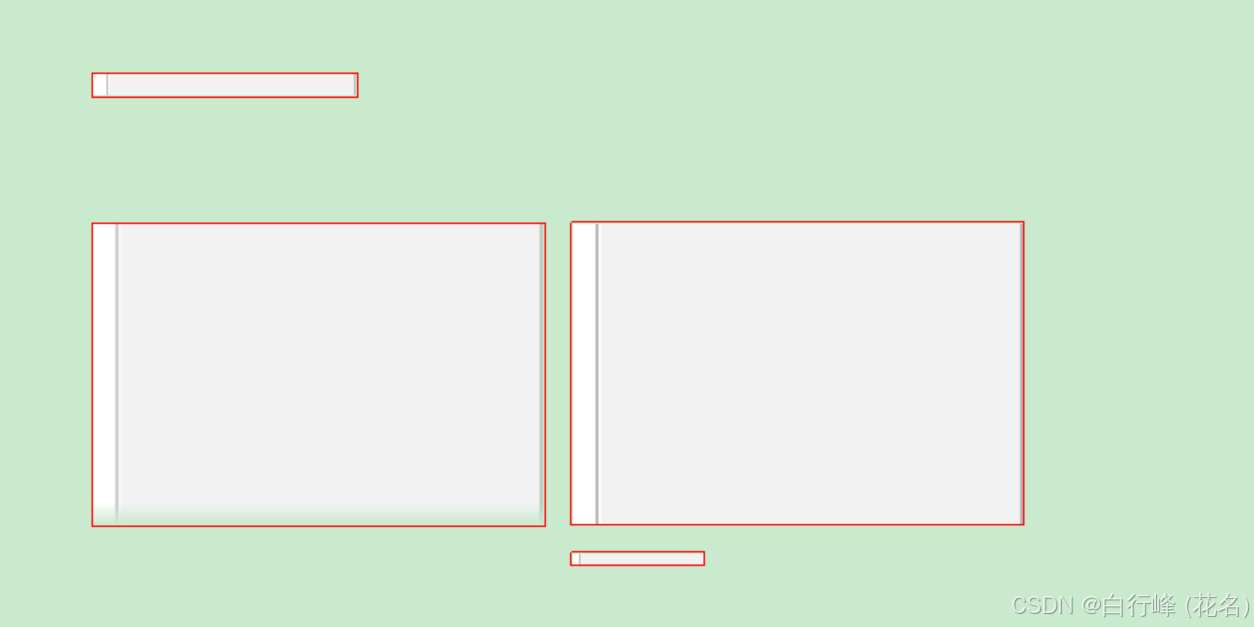
WTL/Win32程序时,有时候需要绘制短信里的气泡背景。气泡的高度不是固定的,那么需要原图进行Y轴方向的拉伸。默认模式的Gdiplus::Graphics绘制拉伸的图片,气泡底部出现模糊或者空白,并没有完整的绘制指定的目标区域,怎么回事?
说明
-
Gdiplus默认算法在拉伸图像时,会自动柔化边缘,使得图像看起来更平滑,但这也造成了边缘(尤其是底部)模糊。 -
对于拉伸放大的图片,需要设置插值模式为
InterpolationModeNearestNeighbor(最近邻插值)和像素采样偏移模式PixelOffsetModeHalf才会对原图做比较精确的拉伸而不丢失颜色。
-
最近邻插值的特点是简单快速,并且不会引入新的颜色值,因此在放大图像时能保留清晰的边缘,但可能会出现明显的锯齿。当把一张小图放大时,新图像的每一个像素点,都直接取原图中距离它最近的那个像素的值,不进行任何加权平均或融合。 它会采用一种源像素和目标像素关系的算法 x = f(x1) 和 y = f(y1)算法来获取目标像素的颜色值。
-
像素采样偏移半像素模式(PixelOffsetModeHalf)是为了回避像素采样在像素边界
[0,0]导致颜色混合和边缘模糊的情况。它会在源图的像素居中位置[0.5,0.5]开始采样,采样更准确,而不是在边缘的无颜色或混合颜色的采样不确定的颜色。默认的采样还受到Gdiplus的绘图长宽是浮点值的影响造成采样结果偏移和颜色抗锯齿造成模糊情况。
cpp
graphics.SetInterpolationMode(Gdiplus::InterpolationModeNearestNeighbor);
graphics.SetPixelOffsetMode(Gdiplus::PixelOffsetModeHalf);
例子
LRESULT CView::OnPaint(UINT uMsg, WPARAM wParam, LPARAM lParam, BOOL& bHandled)
{
	CPaintDC dc(m_hWnd);

	auto imageWidth = imageCenter_->GetWidth();
	auto imageHeight = imageCenter_->GetHeight();

	// 方式1: 不缩放;不需要设置选项;
	Gdiplus::Graphics graphics(dc);
	Gdiplus::Rect rectBorder(100,100, imageWidth, imageHeight);
	rectBorder.Inflate(1, 1);
	graphics.DrawImage(imageCenter_, Gdiplus::Rect(100, 100,imageWidth,imageHeight));

	Gdiplus::Pen pen(Gdiplus::Color::Red,1);
	graphics.DrawRectangle(&pen, rectBorder);

	// 方法2:缩放,默认的插入模式和PixelOffsetModeNone模式;
	Gdiplus::Rect rect_2(100, 200, 300, 200);
	graphics.DrawImage(imageCenter_, rect_2,
		0, 0, imageWidth, imageHeight, Gdiplus::UnitPixel);
	rectBorder = rect_2;
	rectBorder.Inflate(1, 1);
	graphics.DrawRectangle(&pen, rectBorder);

	// 方法3:放大,设置近邻插入模式和采样原点在像素里居中模式
	graphics.SetInterpolationMode(Gdiplus::InterpolationModeNearestNeighbor);
	graphics.SetPixelOffsetMode(Gdiplus::PixelOffsetModeHalf);

	Gdiplus::Rect rect_3 = rect_2;
	rect_3.X = rect_2.GetRight() + 20;
	graphics.DrawImage(imageCenter_, rect_3,
		0, 0, imageWidth, imageHeight, Gdiplus::UnitPixel);
	rectBorder = rect_3;
	rectBorder.Inflate(1, 1);
	graphics.DrawRectangle(&pen, rectBorder);

	Gdiplus::Rect rect_4;
	rect_4.X = rect_3.X;
	rect_4.Y = rect_3.GetBottom() + 20;
	rect_4.Width = imageWidth / 2;
	rect_4.Height = imageHeight / 2;
	graphics.DrawImage(imageCenter_, rect_4,
		0, 0, imageWidth, imageHeight, Gdiplus::UnitPixel);
	rectBorder = rect_4;
	rectBorder.Inflate(1, 1);
	graphics.DrawRectangle(&pen, rectBorder);


	return 0;
}
图示