Flutter数独求解器开发教程
项目简介
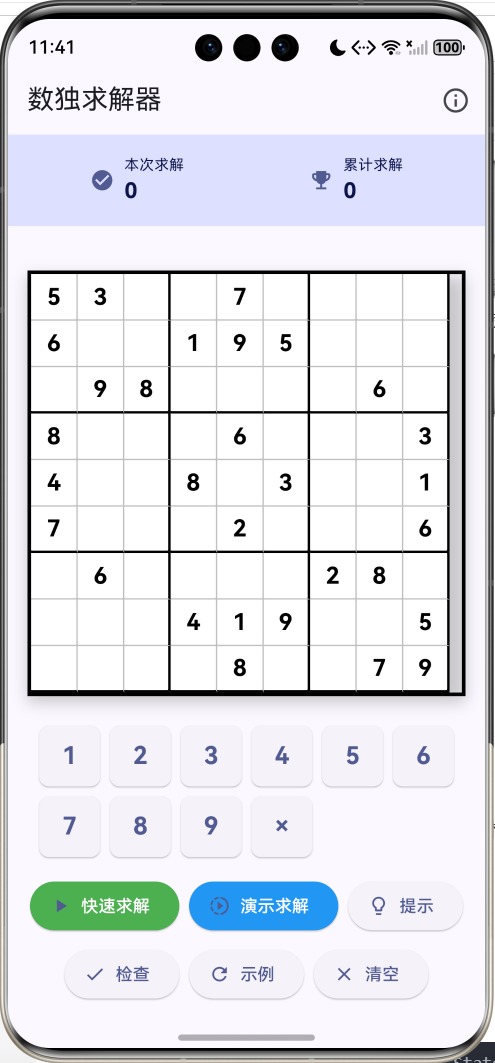
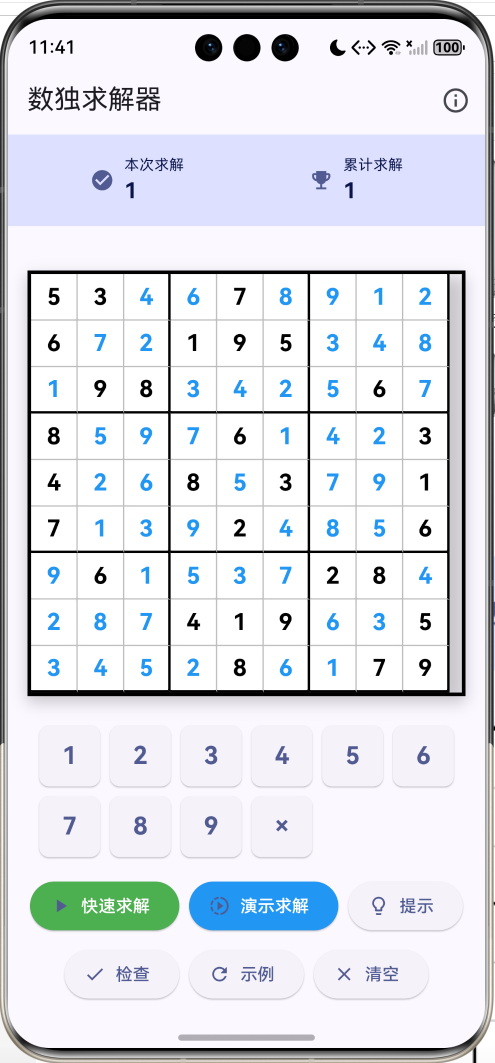
数独求解器是一款智能数独辅助工具,能够自动求解任意有效的数独题目。本项目使用Flutter实现了完整的数独求解算法,包含回溯算法、动画演示、智能提示等功能。
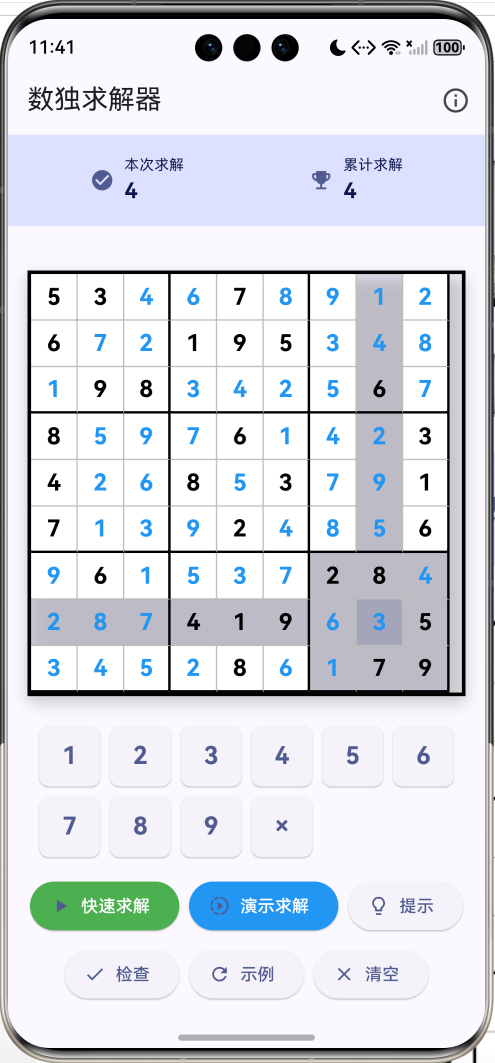
运行效果图
核心特性
- 自动求解:使用回溯算法自动求解数独
- 快速模式:瞬间显示最终答案
- 演示模式:动画展示求解过程
- 智能提示:显示当前格可填数字
- 输入验证:实时检查输入是否有效
- 答案检查:验证当前解答是否正确
- 示例题目:内置经典数独题目
- 数据统计:记录求解次数
- 视觉高亮:选中单元格时高亮相关行列宫格
- 精美UI:Material Design 3风格
技术架构
数据结构设计
dart
class _SudokuSolverPageState extends State<SudokuSolverPage> {
  // 数独网格 (9x9)
  List<List<int>> grid = List.generate(9, (_) => List.filled(9, 0));

  // 初始网格标记(区分题目和答案)
  List<List<bool>> isInitial = List.generate(9, (_) => List.filled(9, false));

  // 选中的单元格
  int? selectedRow;
  int? selectedCol;

  // 求解状态
  bool isSolving = false;      // 是否正在求解
  bool isSolved = false;       // 是否已求解
  int solvedCount = 0;         // 本次求解数
  int totalSolved = 0;         // 累计求解数

  // 求解步骤(用于动画演示)
  List<SolveStep> steps = [];
  int currentStep = 0;
  bool showingSteps = false;
}
求解步骤模型
dart
enum StepType { fill, backtrack }

class SolveStep {
  final int row;        // 行坐标
  final int col;        // 列坐标
  final int value;      // 填入的值
  final StepType type;  // 步骤类型(填入/回溯)

  SolveStep({
    required this.row,
    required this.col,
    required this.value,
    required this.type,
  });
}步骤类型说明:
- fill:尝试填入数字
- backtrack:回溯,清除数字
核心算法详解
1. 数独验证算法
dart
bool _isValid(List<List<int>> board, int row, int col, int num) {
  // 检查行
  for (int x = 0; x < 9; x++) {
    if (board[row][x] == num) return false;
  }

  // 检查列
  for (int x = 0; x < 9; x++) {
    if (board[x][col] == num) return false;
  }

  // 检查3x3宫格
  int startRow = row - row % 3;
  int startCol = col - col % 3;
  for (int i = 0; i < 3; i++) {
    for (int j = 0; j < 3; j++) {
      if (board[i + startRow][j + startCol] == num) return false;
    }
  }

  return true;
}验证规则:
- 行唯一性:同一行不能有重复数字
- 列唯一性:同一列不能有重复数字
- 宫格唯一性:同一3×3宫格不能有重复数字
宫格起始位置计算:
dart
startRow = row - row % 3
startCol = col - col % 3示例:
- 位置(4, 5)所在宫格起始位置:(3, 3)
- 位置(7, 2)所在宫格起始位置:(6, 0)
2. 回溯算法求解
dart
bool _solveSudoku(List<List<int>> board, {bool recordSteps = false}) {
  // 遍历所有单元格
  for (int row = 0; row < 9; row++) {
    for (int col = 0; col < 9; col++) {
      // 找到空格
      if (board[row][col] == 0) {
        // 尝试1-9的数字
        for (int num = 1; num <= 9; num++) {
          if (_isValid(board, row, col, num)) {
            // 填入数字
            board[row][col] = num;

            if (recordSteps) {
              steps.add(SolveStep(
                row: row,
                col: col,
                value: num,
                type: StepType.fill,
              ));
            }

            // 递归求解
            if (_solveSudoku(board, recordSteps: recordSteps)) {
              return true;
            }

            // 回溯
            board[row][col] = 0;

            if (recordSteps) {
              steps.add(SolveStep(
                row: row,
                col: col,
                value: 0,
                type: StepType.backtrack,
              ));
            }
          }
        }
        return false;  // 无解
      }
    }
  }
  return true;  // 求解成功
}算法流程:
否
是
否
是
是
否
是
否
开始求解
遍历所有单元格
找到空格?
求解成功
尝试数字1-9
数字有效?
尝试下一个数字
填入数字
递归求解
求解成功?
回溯:清除数字
所有数字都试过?
无解
算法特点:
- 深度优先搜索:逐个尝试可能的数字
- 剪枝优化:只尝试有效的数字
- 回溯机制:遇到死路自动回退
- 递归实现:代码简洁优雅
时间复杂度:
- 最坏情况:O(9^(n×n)),n为空格数
- 实际情况:由于剪枝优化,远小于理论值
- 典型数独:几毫秒到几秒
3. 动画演示算法
dart
Future<void> _animateSolution() async {
  for (int i = 0; i < steps.length; i++) {
    if (!showingSteps) break;  // 支持中途停止

    final step = steps[i];
    setState(() {
      grid[step.row][step.col] = step.value;
      currentStep = i;
    });

    // 延迟50ms,产生动画效果
    await Future.delayed(const Duration(milliseconds: 50));
  }

  setState(() {
    isSolved = true;
    showingSteps = false;
    solvedCount++;
    totalSolved++;
  });
  _saveStats();
}动画实现:
- 记录求解过程中的每一步
- 按顺序重放步骤
- 每步延迟50ms
- 支持中途停止
步骤记录:
- 填入数字:记录位置和值
- 回溯操作:记录清除操作
- 完整过程:展示算法思路
4. 智能提示算法
dart
List<int> _getPossibleNumbers(int row, int col) {
  if (grid[row][col] != 0) return [];  // 已填数字

  List<int> possible = [];
  for (int num = 1; num <= 9; num++) {
    if (_isValid(grid, row, col, num)) {
      possible.add(num);
    }
  }
  return possible;
}

void _showHint() {
  if (selectedRow != null && selectedCol != null) {
    if (grid[selectedRow!][selectedCol!] == 0) {
      final possible = _getPossibleNumbers(selectedRow!, selectedCol!);
      if (possible.isEmpty) {
        _showMessage('此位置无可用数字');
      } else {
        _showMessage('可能的数字: ${possible.join(", ")}');
      }
    }
  } else {
    _showMessage('请先选择一个空格');
  }
}提示功能:
- 分析当前格的约束条件
- 列出所有可能的数字
- 帮助用户手动求解
5. 输入验证算法
dart
bool _validateInput() {
  for (int row = 0; row < 9; row++) {
    for (int col = 0; col < 9; col++) {
      if (grid[row][col] != 0) {
        // 临时移除当前数字
        int temp = grid[row][col];
        grid[row][col] = 0;

        // 检查是否有效
        if (!_isValid(grid, row, col, temp)) {
          grid[row][col] = temp;
          return false;
        }

        // 恢复数字
        grid[row][col] = temp;
      }
    }
  }
  return true;
}验证策略:
- 遍历所有已填数字
- 临时移除该数字
- 检查该数字是否符合规则
- 恢复数字
- 发现冲突立即返回false
6. 答案检查算法
dart
void _checkSolution() {
  // 检查是否有冲突
  if (!_validateInput()) {
    _showMessage('当前输入有冲突!');
    return;
  }

  // 检查是否完成
  bool isComplete = true;
  for (int i = 0; i < 9; i++) {
    for (int j = 0; j < 9; j++) {
      if (grid[i][j] == 0) {
        isComplete = false;
        break;
      }
    }
    if (!isComplete) break;
  }

  if (isComplete) {
    _showMessage('恭喜!数独已正确完成!');
  } else {
    _showMessage('还有空格未填写。');
  }
}检查流程:
- 验证输入有效性
- 检查是否填满
- 给出相应提示
UI组件设计
1. 数独网格
dart
Widget _buildSudokuGrid() {
  return Container(
    decoration: BoxDecoration(
      border: Border.all(color: Colors.black, width: 3),
      boxShadow: [
        BoxShadow(
          color: Colors.black.withOpacity(0.2),
          blurRadius: 10,
          offset: const Offset(0, 5),
        ),
      ],
    ),
    child: Column(
      children: List.generate(9, (row) {
        return Row(
          children: List.generate(9, (col) {
            return _buildCell(row, col);
          }),
        );
      }),
    ),
  );
}设计特点:
- 9×9网格布局
- 粗边框突出整体
- 阴影增加立体感
- 响应式单元格
2. 单元格渲染
dart
Widget _buildCell(int row, int col) {
  final isSelected = selectedRow == row && selectedCol == col;
  final value = grid[row][col];
  final isFixed = isInitial[row][col];
  final isInSameRow = selectedRow == row;
  final isInSameCol = selectedCol == col;
  final isInSameBox = selectedRow != null &&
      selectedCol != null &&
      (row ~/ 3) == (selectedRow! ~/ 3) &&
      (col ~/ 3) == (selectedCol! ~/ 3);

  Color bgColor;
  if (isSelected) {
    bgColor = Theme.of(context).colorScheme.primary.withOpacity(0.3);
  } else if (isInSameRow || isInSameCol || isInSameBox) {
    bgColor = Theme.of(context).colorScheme.primary.withOpacity(0.1);
  } else {
    bgColor = Colors.white;
  }

  return GestureDetector(
    onTap: () => _selectCell(row, col),
    child: Container(
      width: 40,
      height: 40,
      decoration: BoxDecoration(
        color: bgColor,
        border: Border(
          right: BorderSide(
            color: (col + 1) % 3 == 0 ? Colors.black : Colors.grey.shade400,
            width: (col + 1) % 3 == 0 ? 2 : 1,
          ),
          bottom: BorderSide(
            color: (row + 1) % 3 == 0 ? Colors.black : Colors.grey.shade400,
            width: (row + 1) % 3 == 0 ? 2 : 1,
          ),
        ),
      ),
      child: Center(
        child: value != 0
            ? Text(
                value.toString(),
                style: TextStyle(
                  fontSize: 20,
                  fontWeight: FontWeight.bold,
                  color: isFixed ? Colors.black : Colors.blue,
                ),
              )
            : null,
      ),
    ),
  );
}视觉反馈:
- 选中单元格:深色高亮
- 相关行列宫格:浅色高亮
- 题目数字:黑色显示
- 答案数字:蓝色显示
- 3×3宫格:粗边框分隔
边框规则:
- 每3列:粗黑色边框
- 每3行:粗黑色边框
- 其他:细灰色边框
3. 数字键盘
dart
Widget _buildNumberPad() {
  return Wrap(
    spacing: 8,
    runSpacing: 8,
    children: List.generate(10, (index) {
      final number = index == 9 ? 0 : index + 1;
      return SizedBox(
        width: 50,
        height: 50,
        child: ElevatedButton(
          onPressed: () => _inputNumber(number),
          style: ElevatedButton.styleFrom(
            padding: EdgeInsets.zero,
            shape: RoundedRectangleBorder(
              borderRadius: BorderRadius.circular(8),
            ),
          ),
          child: Text(
            number == 0 ? '×' : number.toString(),
            style: const TextStyle(
              fontSize: 20,
              fontWeight: FontWeight.bold,
            ),
          ),
        ),
      );
    }),
  );
}键盘布局:
- 1-9数字键
- ×清除键(对应0)
- 5×2网格排列
- 圆角按钮设计
4. 功能按钮
dart
Widget _buildActionButtons() {
  return Wrap(
    spacing: 8,
    runSpacing: 8,
    alignment: WrapAlignment.center,
    children: [
      ElevatedButton.icon(
        onPressed: isSolving ? null : () => _solve(),
        icon: const Icon(Icons.play_arrow),
        label: const Text('快速求解'),
        style: ElevatedButton.styleFrom(
          backgroundColor: Colors.green,
          foregroundColor: Colors.white,
        ),
      ),
      ElevatedButton.icon(
        onPressed: isSolving || showingSteps
            ? null
            : () => _solve(withAnimation: true),
        icon: const Icon(Icons.slow_motion_video),
        label: const Text('演示求解'),
        style: ElevatedButton.styleFrom(
          backgroundColor: Colors.blue,
          foregroundColor: Colors.white,
        ),
      ),
      // 其他按钮...
    ],
  );
}按钮功能:
- 快速求解:绿色,立即显示答案
- 演示求解:蓝色,动画展示过程
- 停止:红色,停止动画
- 提示:显示可填数字
- 检查:验证答案
- 示例:加载示例题目
- 清空:清空网格
5. 统计栏
dart
Widget _buildStatsBar() {
  return Container(
    padding: const EdgeInsets.all(16),
    decoration: BoxDecoration(
      color: Theme.of(context).colorScheme.primaryContainer,
    ),
    child: Row(
      mainAxisAlignment: MainAxisAlignment.spaceAround,
      children: [
        _buildStatItem('本次求解', solvedCount.toString(),
            Icons.check_circle),
        _buildStatItem('累计求解', totalSolved.toString(),
            Icons.emoji_events),
        if (showingSteps)
          _buildStatItem('步骤', '${currentStep + 1}/${steps.length}',
              Icons.timeline),
      ],
    ),
  );
}统计信息:
- 本次求解数
- 累计求解数
- 当前步骤(演示模式)
数据持久化
dart
Future<void> _loadStats() async {
  final prefs = await SharedPreferences.getInstance();
  setState(() {
    totalSolved = prefs.getInt('sudoku_total_solved') ?? 0;
  });
}

Future<void> _saveStats() async {
  final prefs = await SharedPreferences.getInstance();
  await prefs.setInt('sudoku_total_solved', totalSolved);
}存储内容:
sudoku_total_solved:累计求解数独题目数量
算法优化
1. 剪枝优化
dart
// 只尝试有效的数字
for (int num = 1; num <= 9; num++) {
  if (_isValid(board, row, col, num)) {
    // 填入并递归
  }
}优化效果:
- 减少无效尝试
- 提升求解速度
- 降低递归深度
2. 最少候选数优化
dart
// 找到候选数最少的空格
int minCandidates = 10;
int bestRow = -1, bestCol = -1;

for (int row = 0; row < 9; row++) {
  for (int col = 0; col < 9; col++) {
    if (board[row][col] == 0) {
      int candidates = _countCandidates(board, row, col);
      if (candidates < minCandidates) {
        minCandidates = candidates;
        bestRow = row;
        bestCol = col;
      }
    }
  }
}

// 优先处理候选数最少的格子优化原理:
- 候选数少的格子更容易确定
- 减少回溯次数
- 提升求解效率
3. 唯一候选数优化
dart
bool _fillObviousCells(List<List<int>> board) {
  bool changed = false;

  for (int row = 0; row < 9; row++) {
    for (int col = 0; col < 9; col++) {
      if (board[row][col] == 0) {
        List<int> candidates = _getPossibleNumbers(row, col);

        // 只有一个候选数,直接填入
        if (candidates.length == 1) {
          board[row][col] = candidates[0];
          changed = true;
        }
      }
    }
  }

  return changed;
}优化策略:
- 先填入确定的数字
- 减少搜索空间
- 加速求解过程
功能扩展建议
1. 难度生成器
dart
class SudokuGenerator {
  List<List<int>> generate(Difficulty difficulty) {
    // 生成完整数独
    List<List<int>> board = _generateComplete();

    // 根据难度挖空
    int holes;
    switch (difficulty) {
      case Difficulty.easy:
        holes = 30;
        break;
      case Difficulty.medium:
        holes = 40;
        break;
      case Difficulty.hard:
        holes = 50;
        break;
      case Difficulty.expert:
        holes = 60;
        break;
    }

    _removeNumbers(board, holes);
    return board;
  }

  List<List<int>> _generateComplete() {
    List<List<int>> board = List.generate(9, (_) => List.filled(9, 0));
    _solveSudoku(board);
    return board;
  }

  void _removeNumbers(List<List<int>> board, int count) {
    Random random = Random();
    int removed = 0;

    while (removed < count) {
      int row = random.nextInt(9);
      int col = random.nextInt(9);

      if (board[row][col] != 0) {
        int temp = board[row][col];
        board[row][col] = 0;

        // 确保唯一解
        if (_hasUniqueSolution(board)) {
          removed++;
        } else {
          board[row][col] = temp;
        }
      }
    }
  }
}
2. 多种求解算法
dart
enum SolveMethod {
  backtracking,    // 回溯法
  dancingLinks,    // 舞蹈链
  constraintProp,  // 约束传播
}

class SudokuSolver {
  bool solve(List<List<int>> board, SolveMethod method) {
    switch (method) {
      case SolveMethod.backtracking:
        return _solveBacktracking(board);
      case SolveMethod.dancingLinks:
        return _solveDancingLinks(board);
      case SolveMethod.constraintProp:
        return _solveConstraintPropagation(board);
    }
  }
}
3. 步骤详解
dart
class DetailedStep {
  int row, col, value;
  String reason;
  List<int> eliminated;

  DetailedStep({
    required this.row,
    required this.col,
    required this.value,
    required this.reason,
    required this.eliminated,
  });
}

void _explainStep(DetailedStep step) {
  showDialog(
    context: context,
    builder: (context) => AlertDialog(
      title: Text('步骤详解'),
      content: Column(
        mainAxisSize: MainAxisSize.min,
        crossAxisAlignment: CrossAxisAlignment.start,
        children: [
          Text('位置: (${step.row + 1}, ${step.col + 1})'),
          Text('填入: ${step.value}'),
          Text('原因: ${step.reason}'),
          Text('排除: ${step.eliminated.join(", ")}'),
        ],
      ),
    ),
  );
}
4. 题库系统
dart
class PuzzleLibrary {
  static final puzzles = {
    'easy': [
      // 简单题目列表
    ],
    'medium': [
      // 中等题目列表
    ],
    'hard': [
      // 困难题目列表
    ],
  };

  List<List<int>> getRandomPuzzle(String difficulty) {
    final list = puzzles[difficulty]!;
    return list[Random().nextInt(list.length)];
  }
}
5. 对战模式
dart
class MultiplayerMode {
  List<Player> players;
  List<List<int>> puzzle;

  void start() {
    // 所有玩家解同一题目
    for (var player in players) {
      player.puzzle = List.from(puzzle);
      player.startTime = DateTime.now();
    }
  }

  void checkWinner() {
    for (var player in players) {
      if (player.isComplete && player.isCorrect) {
        _announceWinner(player);
        break;
      }
    }
  }
}
6. 成就系统
dart
class Achievement {
  String id;
  String title;
  String description;
  bool unlocked;

  static final achievements = [
    Achievement(
      id: 'first_solve',
      title: '初次求解',
      description: '完成第一个数独',
    ),
    Achievement(
      id: 'speed_demon',
      title: '速度恶魔',
      description: '30秒内完成简单数独',
    ),
    Achievement(
      id: 'expert_solver',
      title: '专家求解',
      description: '完成困难数独',
    ),
    Achievement(
      id: 'no_hints',
      title: '独立完成',
      description: '不使用提示完成数独',
    ),
  ];
}
7. 导入导出
dart
class SudokuIO {
  // 导出为字符串
  String export(List<List<int>> grid) {
    return grid.map((row) => row.join('')).join('\n');
  }

  // 从字符串导入
  List<List<int>> import(String data) {
    return data.split('\n').map((line) {
      return line.split('').map((c) => int.parse(c)).toList();
    }).toList();
  }

  // 导出为图片
  Future<void> exportImage(List<List<int>> grid) async {
    // 使用CustomPainter绘制数独
    // 保存为图片
  }

  // 从图片识别(OCR)
  Future<List<List<int>>> importFromImage(File image) async {
    // 使用OCR识别数独
  }
}
性能优化
1. 位运算优化
dart
class BitSudokuSolver {
  // 使用位掩码表示候选数
  List<List<int>> candidates = List.generate(9, (_) => List.filled(9, 0x1FF));

  void eliminate(int row, int col, int num) {
    int mask = ~(1 << (num - 1));

    // 消除行
    for (int c = 0; c < 9; c++) {
      candidates[row][c] &= mask;
    }

    // 消除列
    for (int r = 0; r < 9; r++) {
      candidates[r][col] &= mask;
    }

    // 消除宫格
    int boxRow = (row ~/ 3) * 3;
    int boxCol = (col ~/ 3) * 3;
    for (int r = 0; r < 3; r++) {
      for (int c = 0; c < 3; c++) {
        candidates[boxRow + r][boxCol + c] &= mask;
      }
    }
  }

  int countCandidates(int mask) {
    int count = 0;
    while (mask > 0) {
      count += mask & 1;
      mask >>= 1;
    }
    return count;
  }
}
2. 缓存优化
dart
class CachedSolver {
  Map<String, bool> cache = {};

  bool solve(List<List<int>> board) {
    String key = _boardToString(board);

    if (cache.containsKey(key)) {
      return cache[key]!;
    }

    bool result = _solveSudoku(board);
    cache[key] = result;

    return result;
  }

  String _boardToString(List<List<int>> board) {
    return board.map((row) => row.join('')).join('');
  }
}
测试用例
dart
void main() {
  group('Sudoku Validation Tests', () {
    test('Should validate row correctly', () {
      final board = List.generate(9, (_) => List.filled(9, 0));
      board[0][0] = 5;

      expect(_isValid(board, 0, 1, 5), false);
      expect(_isValid(board, 0, 1, 3), true);
    });

    test('Should validate column correctly', () {
      final board = List.generate(9, (_) => List.filled(9, 0));
      board[0][0] = 5;

      expect(_isValid(board, 1, 0, 5), false);
      expect(_isValid(board, 1, 0, 3), true);
    });

    test('Should validate box correctly', () {
      final board = List.generate(9, (_) => List.filled(9, 0));
      board[0][0] = 5;

      expect(_isValid(board, 1, 1, 5), false);
      expect(_isValid(board, 3, 3, 5), true);
    });
  });

  group('Sudoku Solver Tests', () {
    test('Should solve easy sudoku', () {
      final board = [
        [5, 3, 0, 0, 7, 0, 0, 0, 0],
        [6, 0, 0, 1, 9, 5, 0, 0, 0],
        // ...
      ];

      expect(_solveSudoku(board), true);
      expect(board[0][2], isNot(0));
    });

    test('Should detect unsolvable sudoku', () {
      final board = [
        [5, 5, 0, 0, 0, 0, 0, 0, 0],
        // 无效的数独
      ];

      expect(_solveSudoku(board), false);
    });
  });
}
常见问题解决
1. 求解速度慢
问题 :复杂数独求解时间过长
原因 :回溯次数过多
解决:
dart
// 使用约束传播预处理
void _preprocessBoard(List<List<int>> board) {
  bool changed = true;
  while (changed) {
    changed = _fillObviousCells(board);
  }
}
2. 动画卡顿
问题 :演示模式动画不流畅
原因 :setState调用过于频繁
解决:
dart
// 批量更新
List<SolveStep> batch = [];
for (int i = 0; i < 10 && currentStep < steps.length; i++) {
  batch.add(steps[currentStep++]);
}
setState(() {
  for (var step in batch) {
    grid[step.row][step.col] = step.value;
  }
});
3. 内存占用高
问题 :记录步骤占用大量内存
原因 :步骤列表过长
解决:
dart
// 限制步骤数量
if (steps.length > 10000) {
  recordSteps = false;
}
项目结构
lib/
├── main.dart
├── models/
│   ├── sudoku_grid.dart
│   ├── solve_step.dart
│   └── puzzle.dart
├── screens/
│   ├── solver_page.dart
│   ├── generator_page.dart
│   └── library_page.dart
├── widgets/
│   ├── sudoku_grid_widget.dart
│   ├── cell_widget.dart
│   └── number_pad_widget.dart
├── services/
│   ├── sudoku_solver.dart
│   ├── sudoku_generator.dart
│   └── storage_service.dart
└── utils/
    ├── constants.dart
    └── validators.dart
依赖包
yaml
dependencies:
  flutter:
    sdk: flutter
  shared_preferences: ^2.2.2  # 数据存储
总结
本项目实现了一个功能完整的数独求解器,涵盖以下核心技术:
- 回溯算法:经典的深度优先搜索
- 约束验证:行列宫格唯一性检查
- 动画演示:可视化求解过程
- 智能提示:候选数分析
- UI设计:Material Design 3风格
通过本教程,你可以学习到:
- 回溯算法的实现和优化
- 数独规则的程序化表达
- Flutter动画和状态管理
- 算法可视化技巧
- 性能优化方法
这个项目可以作为学习算法和Flutter开发的优秀案例,通过扩展功能可以打造更加强大的数独工具。
欢迎加入开源鸿蒙跨平台社区:https://openharmonycrossplatform.csdn.net