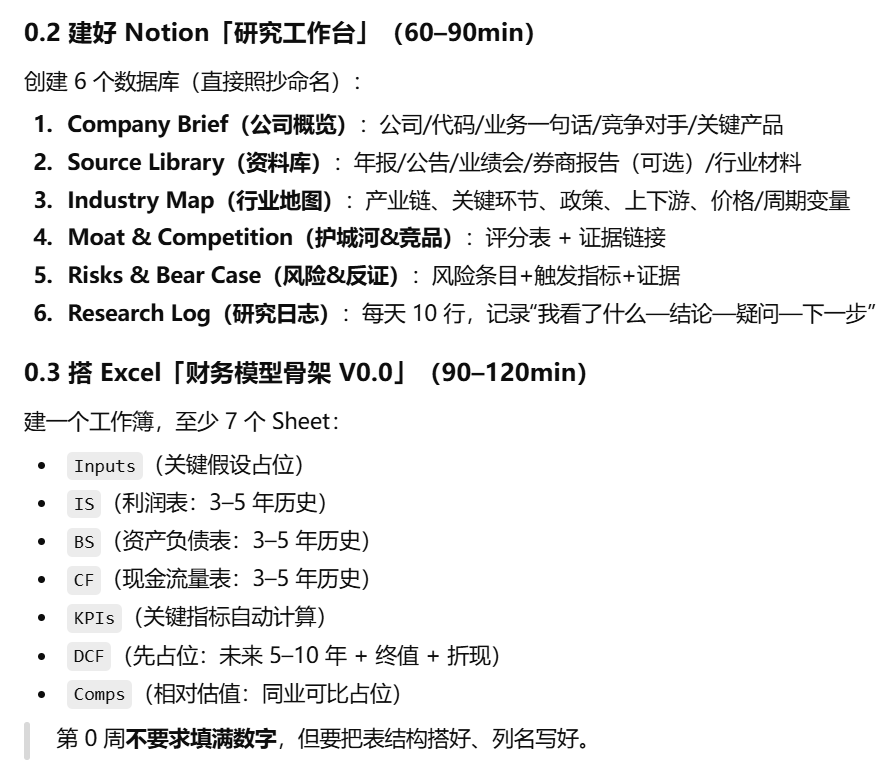
notion
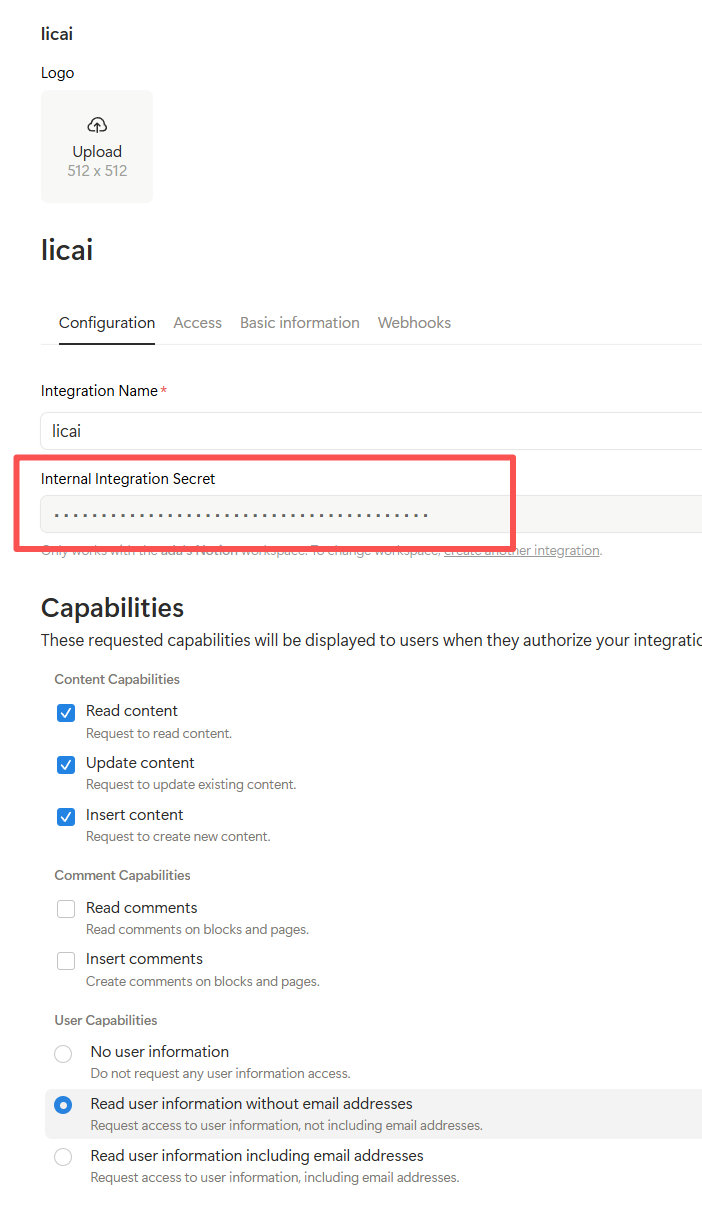
难点-创建 Notion 集成
-
访问 Notion Developers 页面。
-
创建一个新的集成,并获得 API 密钥(integration token)。
-
将集成添加到你要操作的工作区,并获取相关权限。
代码解释:
-
NOTION_API_URL : 用于访问 Notion API 的 URL。这个不要动!官方的。
-
NOTION_TOKEN: 你的 Notion API token(集成密钥)。
-
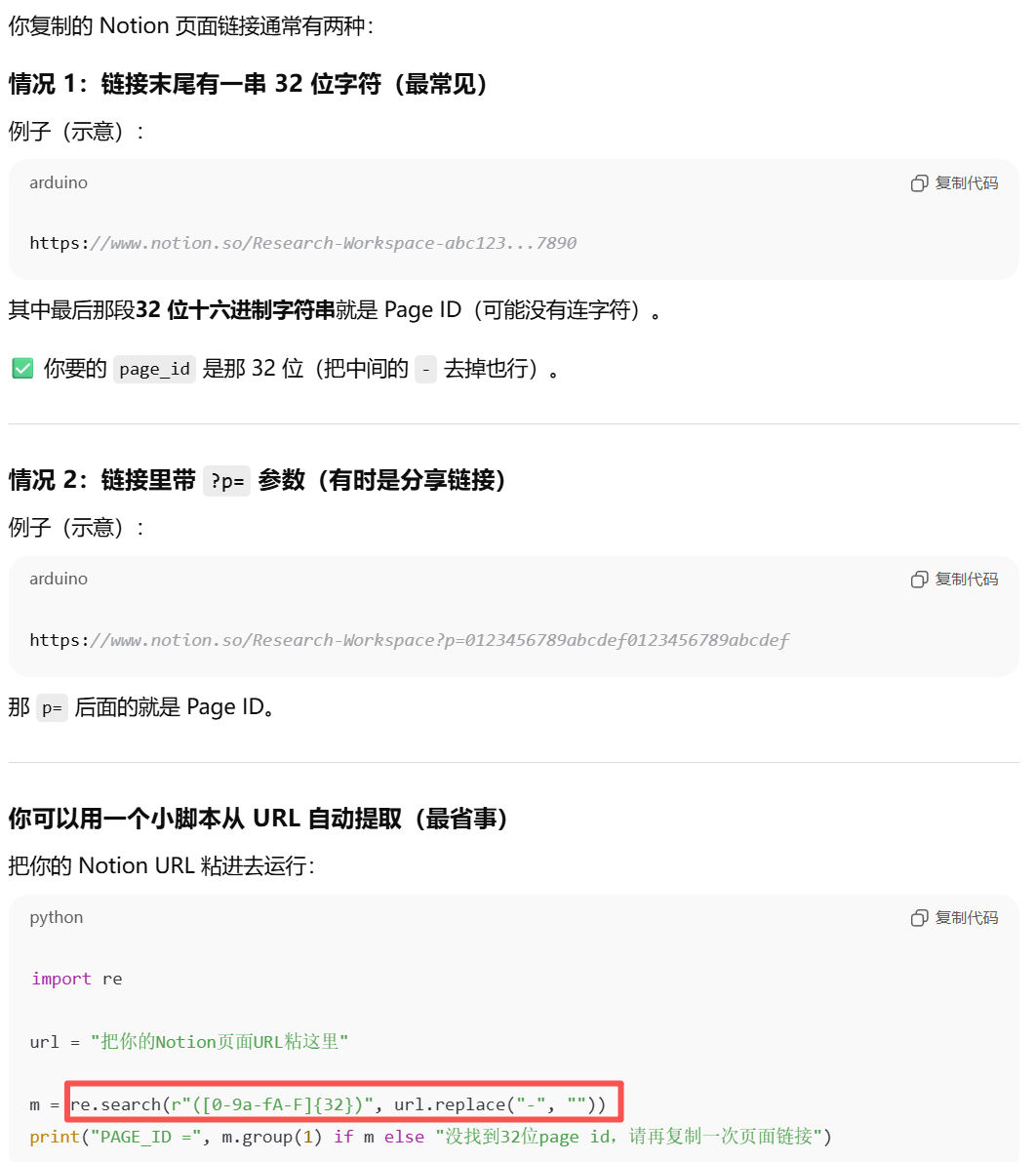
DATABASE_PARENT_PAGE_ID: 你想要将这些数据库放入的页面 ID。可以在 Notion 中右键页面并选择"复制链接",然后从链接中提取 ID。
-
create_database : 创建数据库的函数,接收数据库名称和属性作为参数,使用
requests.post()发送 API 请求。 -
databases: 定义了每个数据库的名称和属性(表头列名)。每个数据库会有不同的列,根据你的要求设置了列类型(例如文本、日期、URL等)。
-
循环创建数据库 : 遍历
databases字典,为每个数据库调用create_database函数,并打印响应。
运行代码:
-
你需要在 Notion 中创建一个集成,并获取 API 密钥。
-
用你的 API 密钥替换代码中的
NOTION_TOKEN,并将你想要添加数据库的页面 ID 填入DATABASE_PARENT_PAGE_ID。 -
运行代码,它会为你创建 6 个数据库,并按要求配置列。
注意事项:
- 小编悲伤地发现,一开始没理解意思,自己按照
python
import requests
import json

# 定义 Notion API 访问的 URL 和 token
NOTION_API_URL = "https://api.notion.com/v1/databases"
NOTION_TOKEN = "your_notion_api_token_here"  # 将此替换为你的API密钥
DATABASE_PARENT_PAGE_ID = "your_parent_page_id_here"  # 填写你的父页面 ID

# 请求头
headers = {
    "Authorization": f"Bearer {NOTION_TOKEN}",
    "Content-Type": "application/json",
    "Notion-Version": "2022-06-28",  # 确保使用适当的版本
}

# 创建数据库的函数
def create_database(database_name, properties):
    data = {
        "parent": {"type": "page_id", "page_id": DATABASE_PARENT_PAGE_ID},
        "title": [{"type": "text", "text": {"content": database_name}}],
        "properties": properties
    }
    response = requests.post(NOTION_API_URL, headers=headers, json=data)
    return response.json()

# 配置每个数据库的结构和列
# 确保每个数据库至少有一个 `title` 属性
databases = {
    "Company Brief": {
        "Title": {"title": {}},  # 这里是必填字段
        "Company": {"rich_text": {}},
        "Code": {"rich_text": {}},
        "Business": {"rich_text": {}},
        "Competitors": {"rich_text": {}},
        "Key Products": {"rich_text": {}}
    },
    "Source Library": {
        "Title": {"title": {}},  # 这里是必填字段
        "Annual Report": {"rich_text": {}},
        "Announcements": {"rich_text": {}},
        "Earnings Call": {"rich_text": {}},
        "Broker Reports": {"rich_text": {}},
        "Industry Materials": {"rich_text": {}}
    },
    "Industry Map": {
        "Title": {"title": {}},  # 这里是必填字段
        "Industry Chain": {"rich_text": {}},
        "Key Links": {"rich_text": {}},
        "Policy": {"rich_text": {}},
        "Upstream/Downstream": {"rich_text": {}},
        "Price/Cycle Variables": {"rich_text": {}}
    },
    "Moat & Competition": {
        "Title": {"title": {}},  # 这里是必填字段
        "Scorecard": {"rich_text": {}},
        "Evidence Link": {"url": {}}
    },
    "Risks & Bear Case": {
        "Title": {"title": {}},  # 这里是必填字段
        "Risk Item": {"rich_text": {}},
        "Trigger Indicator": {"rich_text": {}},
        "Evidence": {"rich_text": {}}
    },
    "Research Log": {
        "Title": {"title": {}},  # 这里是必填字段
        "Date": {"date": {}},
        "Content": {"rich_text": {}},
        "Conclusion": {"rich_text": {}},
        "Questions": {"rich_text": {}},
        "Next Steps": {"rich_text": {}}
    }
}


# 创建所有数据库
for database_name, properties in databases.items():
    response = create_database(database_name, properties)
    print(f"Created database: {database_name} | Response: {response}")
Excel 工作簿,自动添加
代码解释:
-
数据结构创建:
-
每个表的数据使用 Python 字典表示,列名作为键,数据作为值。
-
使用
pandas.DataFrame()将这些字典转换为 DataFrame 对象。
-
-
Excel 写入:
-
使用
pd.ExcelWriter()配合openpyxl引擎将 DataFrame 写入 Excel 文件中。 -
每个表格都会被写入一个单独的工作表,工作表的名称会根据你的需求设置为 "Inputs"、"IS"、"BS"、"CF" 等。
-
-
输出文件 :最终生成的 Excel 文件将保存为
financial_model.xlsx
python
import pandas as pd
from openpyxl import Workbook

# 创建一个新的 Excel 工作簿
wb = Workbook()

# 创建 Inputs 工作表
inputs_data = {
    "假设名称": ["增长率", "折现率", "税率", "长期增长率"],
    "当前值": ["", "", "", ""],  # 初始值可以是空的,后期填充
    "备注": ["", "", "", ""]
}
inputs_df = pd.DataFrame(inputs_data)

# 创建 IS(利润表)工作表
is_data = {
    "年份": ["2022", "2023", "2024", "2025", "2026"],
    "收入": ["", "", "", "", ""],
    "成本": ["", "", "", "", ""],
    "毛利": ["", "", "", "", ""],
    "运营费用": ["", "", "", "", ""],
    "EBIT": ["", "", "", "", ""],
    "利息": ["", "", "", "", ""],
    "税前利润": ["", "", "", "", ""],
    "税后利润": ["", "", "", "", ""],
    "净利润": ["", "", "", "", ""]
}
is_df = pd.DataFrame(is_data)

# 创建 BS(资产负债表)工作表
bs_data = {
    "年份": ["2022", "2023", "2024", "2025", "2026"],
    "资产": ["", "", "", "", ""],
    "负债": ["", "", "", "", ""],
    "股东权益": ["", "", "", "", ""],
    "流动资产": ["", "", "", "", ""],
    "非流动资产": ["", "", "", "", ""],
    "流动负债": ["", "", "", "", ""],
    "非流动负债": ["", "", "", "", ""]
}
bs_df = pd.DataFrame(bs_data)

# 创建 CF(现金流量表)工作表
cf_data = {
    "年份": ["2022", "2023", "2024", "2025", "2026"],
    "经营活动现金流": ["", "", "", "", ""],
    "投资活动现金流": ["", "", "", "", ""],
    "融资活动现金流": ["", "", "", "", ""],
    "净现金流": ["", "", "", "", ""]
}
cf_df = pd.DataFrame(cf_data)

# 创建 KPIs(关键指标自动计算)工作表
kpis_data = {
    "指标名称": ["毛利率", "净利率", "ROE"],
    "计算公式": ["毛利/收入", "净利润/收入", "净利润/股东权益"],
    "当前值": ["", "", ""],
    "历史值": ["", "", ""]
}
kpis_df = pd.DataFrame(kpis_data)

# 创建 DCF(折现现金流)工作表
dcf_data = {
    "年份": ["2022", "2023", "2024", "2025", "2026"],
    "自由现金流": ["", "", "", "", ""],
    "终值": ["", "", "", "", ""],
    "折现率": ["", "", "", "", ""],
    "折现因子": ["", "", "", "", ""],
    "折现后现金流": ["", "", "", "", ""]
}
dcf_df = pd.DataFrame(dcf_data)

# 创建 Comps(同业可比)工作表
comps_data = {
    "公司": ["公司A", "公司B", "公司C"],
    "P/E": ["", "", ""],
    "EV/EBITDA": ["", "", ""],
    "P/B": ["", "", ""],
    "其他估值倍数": ["", "", ""],
    "估值区间": ["", "", ""]
}
comps_df = pd.DataFrame(comps_data)

# 写入工作表
with pd.ExcelWriter('financial_model.xlsx', engine='openpyxl') as writer:
    inputs_df.to_excel(writer, sheet_name="Inputs", index=False)
    is_df.to_excel(writer, sheet_name="IS", index=False)
    bs_df.to_excel(writer, sheet_name="BS", index=False)
    cf_df.to_excel(writer, sheet_name="CF", index=False)
    kpis_df.to_excel(writer, sheet_name="KPIs", index=False)
    dcf_df.to_excel(writer, sheet_name="DCF", index=False)
    comps_df.to_excel(writer, sheet_name="Comps", index=False)

print("Excel 文件已创建并保存为 'financial_model.xlsx'")目前没心思静下来研究功能!mark
Notion MCP + Claude Code 完美结合教程 - 让大模型自动管理你的知识库_notion claude code-CSDN博客
广告打得飞起,文章写得垃圾,但是mark一下,Notion MCP + Claude Code看上去很好的模式