1、文件大小 1M 前置检查:在解析 Hex 阶段就进行大小判断,防止超大字符串导致浏览器卡死。
2、UI 体验:增加 400px 滚动高度,并确保任务"全部完事"后才提示手动关闭。
3、我是国际化 可以自己修改代码
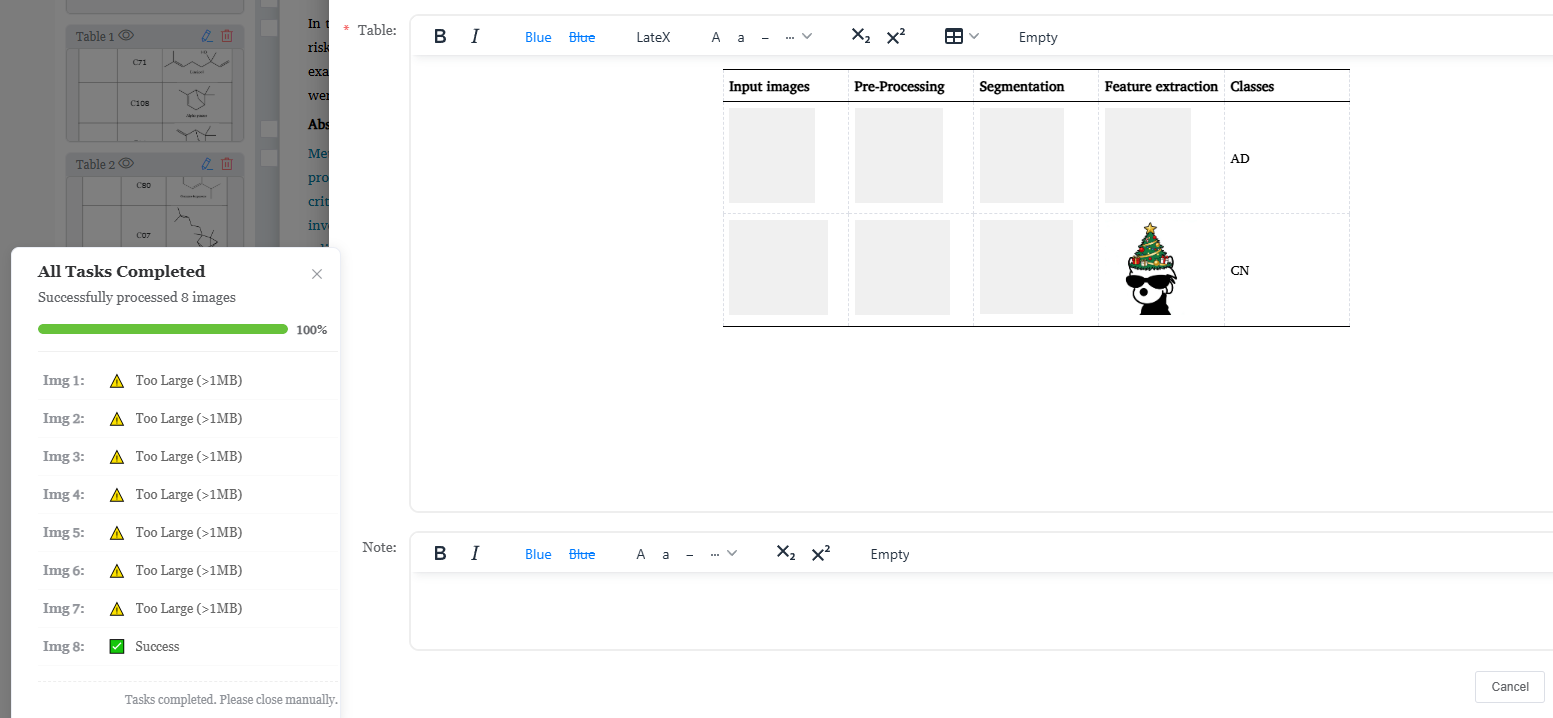
javascript
data:{
	uploadNotifications: {},
	totalUploadImages: 0,
	uploadedImageCount: 0,
	uploadNotificationInstance: null, // 全局通知实例
}
mounted 添加样式
javascript
       const style = document.createElement('style');
        style.innerHTML = `
    @keyframes spin { from { transform: rotate(0deg); } to { transform: rotate(360deg); } }
    @keyframes slideIn { from { opacity: 0; transform: translateY(10px); } to { opacity: 1; transform: translateY(0); } }
    .status-spinning { display: inline-block; animation: spin 1s linear infinite; }
    .upload-item-animate { animation: slideIn 0.3s ease-out forwards; }
    .el-progress-bar__inner { transition: width 0.4s ease-in-out !important; }
`;
        document.head.appendChild(style);
tinymce paste 方法改造
javascript
 ed.on('paste', async (event) => {
                        const rtf = event.clipboardData.getData('text/rtf');
                        if (rtf && rtf.includes('\\pict')) {
                            const extracted = extractHexImagesFromRTF(rtf);
                            _this.totalUploadImages = extracted.length; // 设置总数
                            _this.uploadedImageCount = 0; // 重置已上传数

                            if (_this.totalUploadImages === 0) return;

                            // 初始化主通知框
                            _this.updateUploadProgressNotification(0, 'init'); // 这里的参数只是为了触发通知框的创建

                            const uploadPromises = extracted.map(async (img, i) => {
                                const isTooLarge = img.hex.length > 2 * 1024 * 1024; // 1MB 限制

                                _this.updateUploadProgressNotification(i, 'processing'); // 更新单张图片状态

                                if (isTooLarge) {
                                    _this.updateUploadProgressNotification(i, 'tooLarge');
                                    return; // 跳过此图片
                                }

                                try {
                                    const base64 = _this.hexToBase64Sync(img.hex, img.mimeType);
                                    _this.updateUploadProgressNotification(i, 'uploading'); // 更新为上传中
                                    await _this.uploadSingleImage(base64, i);
                                    _this.updateUploadProgressNotification(i, 'success'); // 上传成功
                                } catch (err) {
                                    console.error('Upload failed:', err);
                                    _this.updateUploadProgressNotification(i, 'fail', err.message || 'Network error'); // 上传失败
                                }
                            });

                            await Promise.all(uploadPromises);
                            // Promise.all 完成后, updateUploadProgressNotification 会自动计算 totalCount === uploadedCount 并关闭
                        }
                    });
javascript
updateUploadProgressNotification(imgIndex, status = 'processing', message = '') {
            // 快捷调用 $t
            const t = (key, params) => this.$t(`imageTask.${key}`, params);

            if (!this.uploadNotificationInstance) {
                this.uploadNotificationInstance = this.$notify({
                    title: t('title'),
                    dangerouslyUseHTMLString: true,
                    message: `
                <div id="image-upload-container" style="width: 300px;">
                    <p id="total-status-text" style="margin: 0 0 12px 0; font-size: 14px; color: #606266; font-weight: 500;">
                        ${t('preparing', { total: this.totalUploadImages })}
                    </p>

                    <div class="el-progress el-progress--line" style="margin-bottom: 15px;">
                        <div class="el-progress-bar">
                            <div class="el-progress-bar__outer" style="height: 10px; background: #ebeef5; border-radius: 5px;">
                                <div class="el-progress-bar__inner" style="width: 0%; background: #409EFF; transition: width 0.4s ease-out;"></div>
                            </div>
                        </div>
                        <div class="el-progress__text" style="font-size: 12px; font-weight: bold; margin-top: 2px;">0%</div>
                    </div>

                    <ul id="image-individual-status" style="max-height: 400px; overflow-y: auto; padding: 0; margin: 0; list-style: none; border-top: 1px solid #f0f0f0; padding-top: 10px;"></ul>

                    <p id="manual-close-tip" style="display:none; margin-top:15px; font-size:12px; color:#909399; text-align:right; border-top: 1px dashed #eee; padding-top: 8px;">
                        ${t('manualClose')}
                    </p>
                </div>`,
                    duration: 0,
                    position: 'bottom-left',
                    onClose: () => {
                        this.uploadNotificationInstance = null;
                        this.uploadedImageCount = 0;
                        this.totalUploadImages = 0;
                    }
                });
            }

            const listContainer = document.getElementById('image-individual-status');
            if (!listContainer) return;

            let itemEl = document.getElementById(`img-status-${imgIndex}`);
            if (!itemEl) {
                itemEl = document.createElement('li');
                itemEl.id = `img-status-${imgIndex}`;
                itemEl.className = 'upload-item-animate';
                itemEl.style.cssText =
                    'font-size: 13px; padding: 8px 5px; display: flex; align-items: center; border-bottom: 1px solid #fafafa;';
                itemEl.innerHTML = `
            <span style="width: 55px; color: #909399; font-weight: bold;">${t('imgLabel')} ${imgIndex + 1}:</span>
            <span class="status-icon" style="margin: 0 10px;"></span>
            <span class="status-text" style="flex: 1; white-space: nowrap; overflow: hidden; text-overflow: ellipsis; color: #666;">...</span>
        `;
                listContainer.appendChild(itemEl);
                listContainer.scrollTop = listContainer.scrollHeight;
            }

            const statusIcon = itemEl.querySelector('.status-icon');
            const statusText = itemEl.querySelector('.status-text');

            let isFinished = false;
            if (statusIcon && statusText) {
                switch (status) {
                    case 'processing':
                        statusIcon.innerHTML = '<span class="status-spinning">🔄</span>';
                        statusText.innerText = t('parsing');
                        break;
                    case 'uploading':
                        statusIcon.innerHTML = '<span class="status-spinning">⬆️</span>';
                        statusText.innerText = t('uploading');
                        break;
                    case 'tooLarge':
                        statusIcon.innerHTML = '⚠️';
                        statusText.innerText = t('tooLarge');
                        itemEl.style.color = '#E6A23C';
                        isFinished = true;
                        break;
                    case 'success':
                        statusIcon.innerHTML = '✅';
                        statusText.innerText = t('success');
                        itemEl.style.color = '#67C23A';
                        isFinished = true;
                        break;
                    case 'fail':
                        statusIcon.innerHTML = '❌';
                        statusText.innerText = t('error', { msg: message });
                        itemEl.style.color = '#F56C6C';
                        isFinished = true;
                        break;
                }
            }

            if (isFinished) {
                this.uploadedImageCount++;

                const progressPercent = Math.min(100, Math.round((this.uploadedImageCount / this.totalUploadImages) * 100));
                const barInner = this.uploadNotificationInstance.$el.querySelector('.el-progress-bar__inner');
                const barText = this.uploadNotificationInstance.$el.querySelector('.el-progress__text');
                const statusTotalText = document.getElementById('total-status-text');

                if (barInner) barInner.style.width = `${progressPercent}%`;
                if (barText) barText.innerText = `${progressPercent}%`;
                if (statusTotalText) {
                    statusTotalText.innerText = t('progress', { current: this.uploadedImageCount, total: this.totalUploadImages });
                }

                if (this.uploadedImageCount >= this.totalUploadImages) {
                    // 更新标题为完成状态
                    const titleEl = this.uploadNotificationInstance.$el.querySelector('.el-notification__title');
                    if (titleEl) titleEl.innerText = t('completed');

                    if (barInner) barInner.style.background = '#67C23A';

                    const tipEl = document.getElementById('manual-close-tip');
                    if (tipEl) tipEl.style.display = 'block';

                    if (statusTotalText) {
                        statusTotalText.innerText = t('allDone', { total: this.totalUploadImages });
                    }
                }
            }
        },