Flutter成语词典 - 完整开发教程
项目简介
这是一个使用Flutter开发的成语词典应用,提供成语查询、分类浏览、成语接龙游戏和收藏管理等功能。应用采用模拟数据的方式,无需额外API,适合学习Flutter列表展示和游戏逻辑开发。
运行效果图
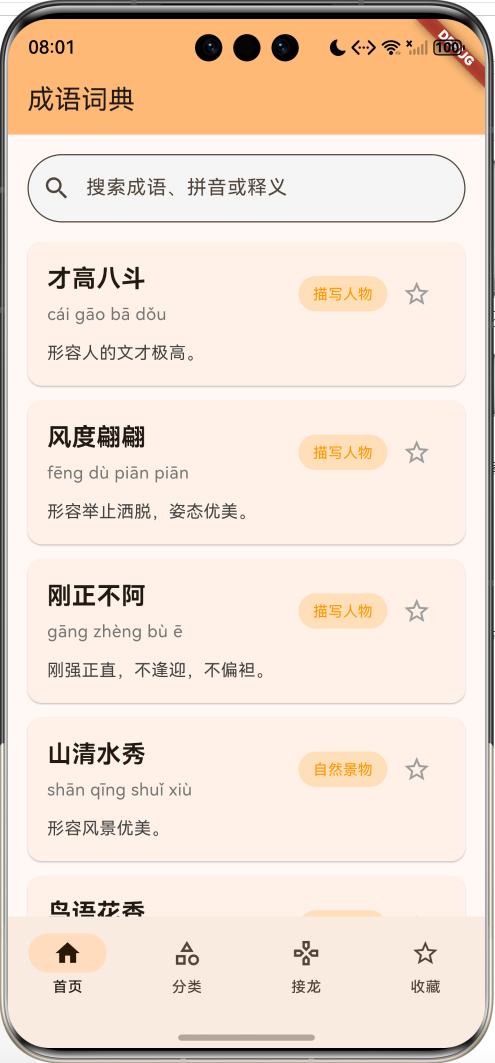
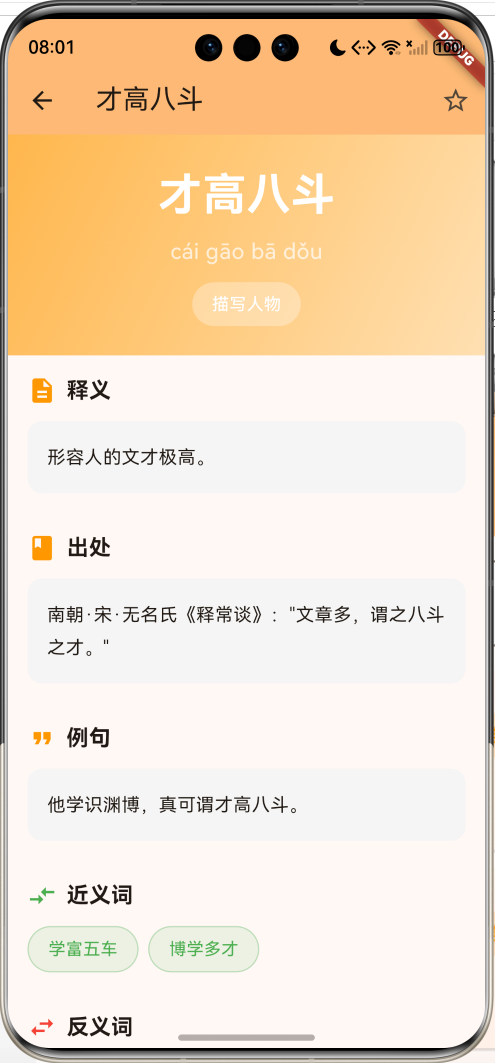
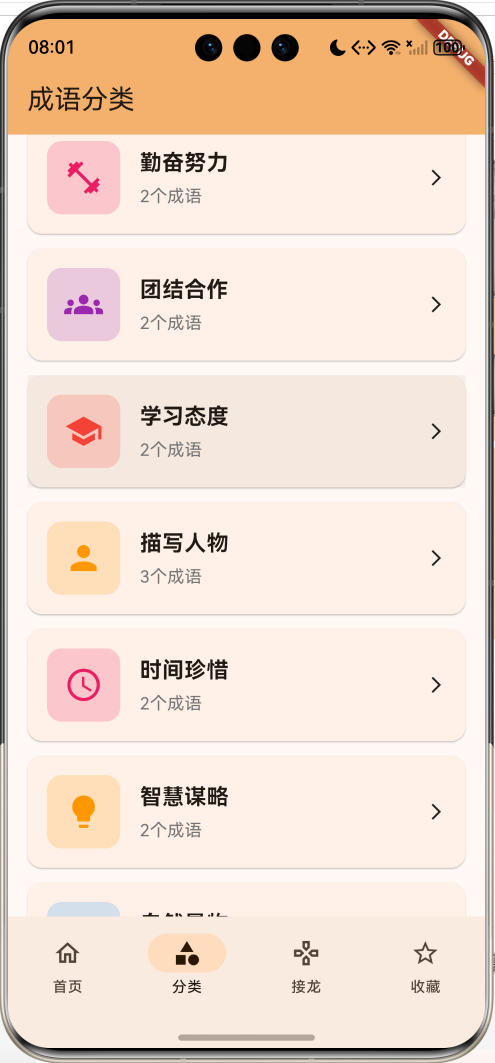
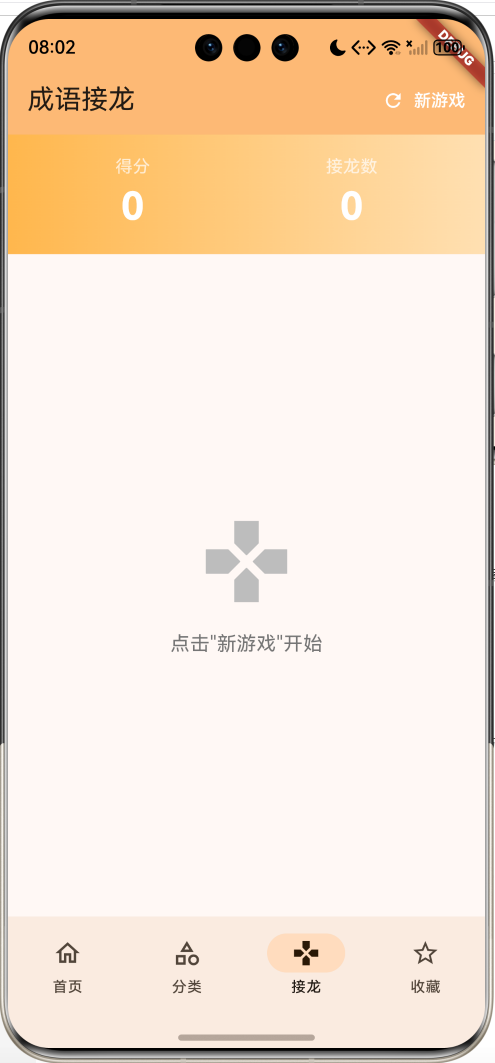
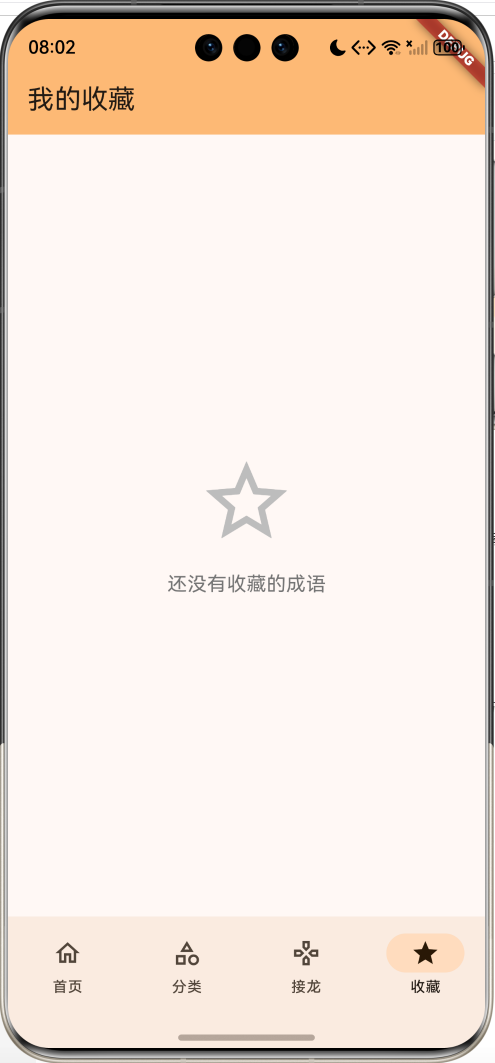
核心特性
- 📖 成语查询:支持成语、拼音、释义搜索
- 🏷️ 分类浏览:按主题分类浏览成语
- 🎮 成语接龙:人机对战接龙游戏
- ⭐ 收藏管理:收藏喜欢的成语
- 📝 详细释义:包含拼音、释义、出处、例句
- 🔄 近反义词:展示近义词和反义词
- 🎨 精美UI:渐变效果、卡片设计
- 💾 数据持久化:使用SharedPreferences
技术栈
- Flutter 3.6+
- Dart 3.0+
- shared_preferences: 数据持久化
- Material Design 3
项目架构
成语词典
首页
搜索功能
成语列表
成语详情
分类
分类列表
分类详情
成语展示
接龙游戏
游戏规则
人机对战
得分统计
收藏
收藏列表
快速访问
数据模型设计
Idiom - 成语模型
dart
class Idiom {
  final String id;              // 唯一标识
  final String word;            // 成语
  final String pinyin;          // 拼音
  final String explanation;     // 释义
  final String source;          // 出处
  final String example;         // 例句
  final List<String> synonyms;  // 近义词
  final List<String> antonyms;  // 反义词
  final String category;        // 分类
  bool isFavorite;              // 是否收藏

  Idiom({
    required this.id,
    required this.word,
    required this.pinyin,
    required this.explanation,
    required this.source,
    required this.example,
    required this.synonyms,
    required this.antonyms,
    required this.category,
    this.isFavorite = false,
  });

  // JSON序列化
  Map<String, dynamic> toJson() {
    return {
      'id': id,
      'word': word,
      'pinyin': pinyin,
      'explanation': explanation,
      'source': source,
      'example': example,
      'synonyms': synonyms,
      'antonyms': antonyms,
      'category': category,
      'isFavorite': isFavorite,
    };
  }

  // JSON反序列化
  factory Idiom.fromJson(Map<String, dynamic> json) {
    return Idiom(
      id: json['id'],
      word: json['word'],
      pinyin: json['pinyin'],
      explanation: json['explanation'],
      source: json['source'],
      example: json['example'],
      synonyms: List<String>.from(json['synonyms']),
      antonyms: List<String>.from(json['antonyms']),
      category: json['category'],
      isFavorite: json['isFavorite'] ?? false,
    );
  }
}模型特点:
- 完整的成语信息
- 支持JSON序列化
- 包含近反义词
- 收藏状态管理
核心功能实现
1. 搜索功能
支持成语、拼音、释义的模糊搜索:
dart
List<Idiom> _getFilteredIdioms() {
  if (_searchController.text.isEmpty) {
    return allIdioms;
  }
  final query = _searchController.text.toLowerCase();
  return allIdioms.where((idiom) {
    return idiom.word.toLowerCase().contains(query) ||
        idiom.pinyin.toLowerCase().contains(query) ||
        idiom.explanation.toLowerCase().contains(query);
  }).toList();
}

// 搜索框UI
TextField(
  controller: _searchController,
  decoration: InputDecoration(
    hintText: '搜索成语、拼音或释义',
    prefixIcon: const Icon(Icons.search),
    suffixIcon: _searchController.text.isNotEmpty
        ? IconButton(
            icon: const Icon(Icons.clear),
            onPressed: () {
              setState(() {
                _searchController.clear();
              });
            },
          )
        : null,
    border: OutlineInputBorder(
      borderRadius: BorderRadius.circular(30),
    ),
    filled: true,
    fillColor: Colors.grey.shade100,
  ),
  onChanged: (value) {
    setState(() {});
  },
)搜索特点:
- 实时搜索
- 多字段匹配
- 清除按钮
- 圆角设计
2. 成语卡片设计
创建信息丰富的成语卡片:
dart
Widget _buildIdiomCard(Idiom idiom) {
  return Card(
    margin: const EdgeInsets.only(bottom: 12),
    child: InkWell(
      onTap: () => _openDetail(idiom),
      child: Padding(
        padding: const EdgeInsets.all(16),
        child: Column(
          crossAxisAlignment: CrossAxisAlignment.start,
          children: [
            Row(
              children: [
                Expanded(
                  child: Column(
                    crossAxisAlignment: CrossAxisAlignment.start,
                    children: [
                      Text(
                        idiom.word,
                        style: TextStyle(
                          fontSize: 20,
                          fontWeight: FontWeight.bold,
                        ),
                      ),
                      SizedBox(height: 4),
                      Text(
                        idiom.pinyin,
                        style: TextStyle(
                          fontSize: 14,
                          color: Colors.grey.shade600,
                        ),
                      ),
                    ],
                  ),
                ),
                // 分类标签
                Container(
                  padding: EdgeInsets.symmetric(horizontal: 12, vertical: 6),
                  decoration: BoxDecoration(
                    color: Colors.orange.withValues(alpha: 0.2),
                    borderRadius: BorderRadius.circular(16),
                  ),
                  child: Text(
                    idiom.category,
                    style: TextStyle(fontSize: 12, color: Colors.orange),
                  ),
                ),
                // 收藏按钮
                IconButton(
                  icon: Icon(
                    idiom.isFavorite ? Icons.star : Icons.star_border,
                    color: idiom.isFavorite ? Colors.amber : Colors.grey,
                  ),
                  onPressed: () => _toggleFavorite(idiom),
                ),
              ],
            ),
            SizedBox(height: 12),
            Text(
              idiom.explanation,
              style: TextStyle(
                fontSize: 14,
                color: Colors.grey.shade800,
                height: 1.5,
              ),
              maxLines: 2,
              overflow: TextOverflow.ellipsis,
            ),
          ],
        ),
      ),
    ),
  );
}
3. 分类浏览功能
动态提取分类并展示:
dart
Widget _buildCategoryPage() {
  // 提取所有分类
  final categories = <String>{};
  for (var idiom in allIdioms) {
    categories.add(idiom.category);
  }
  final categoryList = categories.toList()..sort();

  return ListView.builder(
    padding: const EdgeInsets.all(16),
    itemCount: categoryList.length,
    itemBuilder: (context, index) {
      final category = categoryList[index];
      final count = allIdioms.where((i) => i.category == category).length;
      return _buildCategoryCard(category, count);
    },
  );
}

// 分类卡片
Widget _buildCategoryCard(String category, int count) {
  final colors = [
    Colors.blue, Colors.green, Colors.orange, Colors.purple,
    Colors.red, Colors.teal, Colors.indigo, Colors.pink,
  ];
  final color = colors[category.hashCode % colors.length];

  return Card(
    child: InkWell(
      onTap: () => _openCategory(category),
      child: Padding(
        padding: const EdgeInsets.all(16),
        child: Row(
          children: [
            Container(
              width: 60,
              height: 60,
              decoration: BoxDecoration(
                color: color.withValues(alpha: 0.2),
                borderRadius: BorderRadius.circular(12),
              ),
              child: Icon(_getCategoryIcon(category), color: color, size: 32),
            ),
            SizedBox(width: 16),
            Expanded(
              child: Column(
                crossAxisAlignment: CrossAxisAlignment.start,
                children: [
                  Text(category, style: TextStyle(fontSize: 18, fontWeight: FontWeight.bold)),
                  Text('$count个成语', style: TextStyle(color: Colors.grey.shade600)),
                ],
              ),
            ),
            Icon(Icons.arrow_forward_ios, size: 16),
          ],
        ),
      ),
    ),
  );
}

// 分类图标映射
IconData _getCategoryIcon(String category) {
  switch (category) {
    case '描写人物': return Icons.person;
    case '自然景物': return Icons.landscape;
    case '学习态度': return Icons.school;
    case '团结合作': return Icons.groups;
    case '时间珍惜': return Icons.access_time;
    case '勤奋努力': return Icons.fitness_center;
    case '智慧谋略': return Icons.lightbulb;
    default: return Icons.category;
  }
}分类特点:
- 自动提取分类
- 动态颜色分配
- 图标映射
- 成语数量统计
4. 成语详情页
展示完整的成语信息:
dart
Widget build(BuildContext context) {
  return Scaffold(
    appBar: AppBar(
      title: Text(idiom.word),
      actions: [
        IconButton(
          icon: Icon(idiom.isFavorite ? Icons.star : Icons.star_border),
          onPressed: () => onToggleFavorite(idiom),
        ),
      ],
    ),
    body: SingleChildScrollView(
      child: Column(
        children: [
          // 成语标题(渐变背景)
          Container(
            width: double.infinity,
            padding: const EdgeInsets.all(24),
            decoration: BoxDecoration(
              gradient: LinearGradient(
                colors: [Colors.orange.shade300, Colors.orange.shade100],
                begin: Alignment.topLeft,
                end: Alignment.bottomRight,
              ),
            ),
            child: Column(
              children: [
                Text(
                  idiom.word,
                  style: TextStyle(
                    fontSize: 36,
                    fontWeight: FontWeight.bold,
                    color: Colors.white,
                  ),
                ),
                SizedBox(height: 8),
                Text(idiom.pinyin, style: TextStyle(fontSize: 18, color: Colors.white70)),
                SizedBox(height: 12),
                Container(
                  padding: EdgeInsets.symmetric(horizontal: 16, vertical: 8),
                  decoration: BoxDecoration(
                    color: Colors.white.withValues(alpha: 0.3),
                    borderRadius: BorderRadius.circular(20),
                  ),
                  child: Text(idiom.category, style: TextStyle(color: Colors.white)),
                ),
              ],
            ),
          ),

          // 释义
          _buildSection('释义', Icons.description, idiom.explanation),

          // 出处
          _buildSection('出处', Icons.book, idiom.source),

          // 例句
          _buildSection('例句', Icons.format_quote, idiom.example),

          // 近义词
          if (idiom.synonyms.isNotEmpty)
            _buildWordList('近义词', Icons.compare_arrows, idiom.synonyms, Colors.green),

          // 反义词
          if (idiom.antonyms.isNotEmpty)
            _buildWordList('反义词', Icons.swap_horiz, idiom.antonyms, Colors.red),
        ],
      ),
    ),
  );
}

// 信息区块
Widget _buildSection(String title, IconData icon, String content) {
  return Padding(
    padding: const EdgeInsets.all(16),
    child: Column(
      crossAxisAlignment: CrossAxisAlignment.start,
      children: [
        Row(
          children: [
            Icon(icon, color: Colors.orange),
            SizedBox(width: 8),
            Text(title, style: TextStyle(fontSize: 18, fontWeight: FontWeight.bold)),
          ],
        ),
        SizedBox(height: 12),
        Container(
          width: double.infinity,
          padding: const EdgeInsets.all(16),
          decoration: BoxDecoration(
            color: Colors.grey.shade100,
            borderRadius: BorderRadius.circular(12),
          ),
          child: Text(content, style: TextStyle(fontSize: 15, height: 1.8)),
        ),
      ],
    ),
  );
}

// 近反义词列表
Widget _buildWordList(String title, IconData icon, List<String> words, Color color) {
  return Padding(
    padding: const EdgeInsets.all(16),
    child: Column(
      crossAxisAlignment: CrossAxisAlignment.start,
      children: [
        Row(
          children: [
            Icon(icon, color: color),
            SizedBox(width: 8),
            Text(title, style: TextStyle(fontSize: 18, fontWeight: FontWeight.bold)),
          ],
        ),
        SizedBox(height: 12),
        Wrap(
          spacing: 8,
          runSpacing: 8,
          children: words.map((word) {
            return Container(
              padding: EdgeInsets.symmetric(horizontal: 16, vertical: 8),
              decoration: BoxDecoration(
                color: color.withValues(alpha: 0.1),
                borderRadius: BorderRadius.circular(20),
                border: Border.all(color: color.withValues(alpha: 0.3)),
              ),
              child: Text(word, style: TextStyle(fontSize: 14, color: color)),
            );
          }).toList(),
        ),
      ],
    ),
  );
}详情页特点:
- 渐变标题背景
- 分区块展示信息
- 近反义词标签
- 滚动浏览
5. 成语接龙游戏
实现人机对战的成语接龙:
dart
class _IdiomGamePageState extends State<IdiomGamePage> {
  final List<String> _chain = [];
  final TextEditingController _inputController = TextEditingController();
  String _message = '';
  int _score = 0;

  // 成语库(按首字索引)
  final Map<String, List<String>> _idiomsByFirstChar = {
    '一': ['一马当先', '一鸣惊人', '一帆风顺', '一心一意'],
    '先': ['先见之明', '先入为主', '先声夺人'],
    '明': ['明察秋毫', '明目张胆', '明哲保身'],
    // ... 更多成语
  };

  // 开始新游戏
  void _startNewGame() {
    setState(() {
      _chain.clear();
      _chain.add('一马当先');
      _message = '游戏开始!请接"先"字开头的成语';
      _score = 0;
      _inputController.clear();
    });
  }

  // 提交成语
  void _submitIdiom() {
    final input = _inputController.text.trim();

    // 验证输入
    if (input.isEmpty) {
      setState(() { _message = '请输入成语'; });
      return;
    }

    if (input.length != 4) {
      setState(() { _message = '请输入四字成语'; });
      return;
    }

    if (_chain.contains(input)) {
      setState(() { _message = '该成语已经使用过了'; });
      return;
    }

    // 验证接龙规则
    final lastIdiom = _chain.last;
    final lastChar = lastIdiom[lastIdiom.length - 1];
    final firstChar = input[0];

    if (lastChar != firstChar) {
      setState(() { _message = '请接"$lastChar"字开头的成语'; });
      return;
    }

    // 验证成语有效性
    final validIdioms = _idiomsByFirstChar[firstChar] ?? [];
    if (!validIdioms.contains(input)) {
      setState(() { _message = '未找到该成语,请输入其他成语'; });
      return;
    }

    // 接龙成功
    setState(() {
      _chain.add(input);
      _score += 10;
      final nextChar = input[input.length - 1];
      _message = '正确!请接"$nextChar"字开头的成语';
      _inputController.clear();
    });

    // 电脑回应
    Future.delayed(const Duration(milliseconds: 500), () {
      _computerResponse();
    });
  }

  // 电脑回应
  void _computerResponse() {
    final lastIdiom = _chain.last;
    final lastChar = lastIdiom[lastIdiom.length - 1];
    final candidates = _idiomsByFirstChar[lastChar] ?? [];

    if (candidates.isEmpty) {
      setState(() { _message = '恭喜你赢了!电脑无法接龙'; });
      return;
    }

    // 选择未使用的成语
    String? computerIdiom;
    for (var idiom in candidates) {
      if (!_chain.contains(idiom)) {
        computerIdiom = idiom;
        break;
      }
    }

    if (computerIdiom == null) {
      setState(() { _message = '恭喜你赢了!电脑无法接龙'; });
      return;
    }

    setState(() {
      _chain.add(computerIdiom!);
      final nextChar = computerIdiom[computerIdiom.length - 1];
      _message = '电脑:$computerIdiom\n请接"$nextChar"字开头的成语';
    });
  }
}游戏特点:
- 接龙规则验证
- 重复检测
- 人机对战
- 得分统计
- 延迟回应增加真实感
6. 游戏UI设计
创建聊天式的接龙界面:
dart
// 接龙链展示
ListView.builder(
  padding: const EdgeInsets.all(16),
  itemCount: _chain.length,
  itemBuilder: (context, index) {
    final isUser = index % 2 == 1;  // 奇数索引为用户
    return Padding(
      padding: const EdgeInsets.only(bottom: 12),
      child: Row(
        mainAxisAlignment: isUser
            ? MainAxisAlignment.end
            : MainAxisAlignment.start,
        children: [
          // 电脑头像
          if (!isUser)
            Container(
              width: 40,
              height: 40,
              decoration: BoxDecoration(
                color: Colors.grey.shade300,
                shape: BoxShape.circle,
              ),
              child: Icon(Icons.computer, size: 24),
            ),
          SizedBox(width: 8),
          // 成语气泡
          Container(
            padding: EdgeInsets.symmetric(horizontal: 16, vertical: 12),
            decoration: BoxDecoration(
              color: isUser
                  ? Colors.blue.shade100
                  : Colors.grey.shade200,
              borderRadius: BorderRadius.circular(20),
            ),
            child: Text(
              _chain[index],
              style: TextStyle(fontSize: 16, fontWeight: FontWeight.bold),
            ),
          ),
          SizedBox(width: 8),
          // 用户头像
          if (isUser)
            Container(
              width: 40,
              height: 40,
              decoration: BoxDecoration(
                color: Colors.blue.shade300,
                shape: BoxShape.circle,
              ),
              child: Icon(Icons.person, size: 24, color: Colors.white),
            ),
        ],
      ),
    );
  },
)

// 输入框
Container(
  padding: const EdgeInsets.all(16),
  child: Row(
    children: [
      Expanded(
        child: TextField(
          controller: _inputController,
          decoration: InputDecoration(
            hintText: '输入成语',
            border: OutlineInputBorder(
              borderRadius: BorderRadius.circular(30),
            ),
            filled: true,
            fillColor: Colors.grey.shade100,
          ),
          onSubmitted: (_) => _submitIdiom(),
        ),
      ),
      SizedBox(width: 12),
      FloatingActionButton(
        onPressed: _submitIdiom,
        child: Icon(Icons.send),
      ),
    ],
  ),
)UI特点:
- 聊天式布局
- 左右对齐区分
- 圆形头像
- 气泡样式
- 发送按钮
7. 收藏功能
使用SharedPreferences持久化收藏:
dart
void _toggleFavorite(Idiom idiom) {
  setState(() {
    idiom.isFavorite = !idiom.isFavorite;
    if (idiom.isFavorite) {
      if (!favoriteIdioms.any((i) => i.id == idiom.id)) {
        favoriteIdioms.insert(0, idiom);
      }
    } else {
      favoriteIdioms.removeWhere((i) => i.id == idiom.id);
    }
  });
  _saveData();
}

Future<void> _saveData() async {
  final prefs = await SharedPreferences.getInstance();

  // 保存所有成语
  final idiomsData = allIdioms.map((i) => jsonEncode(i.toJson())).toList();
  await prefs.setStringList('idioms', idiomsData);

  // 保存收藏
  final favData = favoriteIdioms.map((i) => jsonEncode(i.toJson())).toList();
  await prefs.setStringList('favorite_idioms', favData);
}

Future<void> _loadData() async {
  final prefs = await SharedPreferences.getInstance();

  // 加载成语
  final idiomsData = prefs.getStringList('idioms') ?? [];
  if (idiomsData.isNotEmpty) {
    setState(() {
      allIdioms = idiomsData
          .map((json) => Idiom.fromJson(jsonDecode(json)))
          .toList();
    });
  }

  // 加载收藏
  final favData = prefs.getStringList('favorite_idioms') ?? [];
  setState(() {
    favoriteIdioms = favData
        .map((json) => Idiom.fromJson(jsonDecode(json)))
        .toList();
  });
}
UI组件设计
1. 底部导航栏
使用NavigationBar实现Material 3风格:
dart
NavigationBar(
  selectedIndex: _selectedIndex,
  onDestinationSelected: (index) {
    setState(() {
      _selectedIndex = index;
    });
  },
  destinations: const [
    NavigationDestination(
      icon: Icon(Icons.home_outlined),
      selectedIcon: Icon(Icons.home),
      label: '首页',
    ),
    NavigationDestination(
      icon: Icon(Icons.category_outlined),
      selectedIcon: Icon(Icons.category),
      label: '分类',
    ),
    NavigationDestination(
      icon: Icon(Icons.games_outlined),
      selectedIcon: Icon(Icons.games),
      label: '接龙',
    ),
    NavigationDestination(
      icon: Icon(Icons.star_outline),
      selectedIcon: Icon(Icons.star),
      label: '收藏',
    ),
  ],
)
2. 搜索框设计
圆角搜索框with清除按钮:
dart
TextField(
  controller: _searchController,
  decoration: InputDecoration(
    hintText: '搜索成语、拼音或释义',
    prefixIcon: const Icon(Icons.search),
    suffixIcon: _searchController.text.isNotEmpty
        ? IconButton(
            icon: const Icon(Icons.clear),
            onPressed: () {
              setState(() {
                _searchController.clear();
              });
            },
          )
        : null,
    border: OutlineInputBorder(
      borderRadius: BorderRadius.circular(30),
    ),
    filled: true,
    fillColor: Colors.grey.shade100,
  ),
  onChanged: (value) {
    setState(() {});
  },
)
3. 渐变标题
使用LinearGradient创建渐变效果:
dart
Container(
  width: double.infinity,
  padding: const EdgeInsets.all(24),
  decoration: BoxDecoration(
    gradient: LinearGradient(
      colors: [
        Colors.orange.shade300,
        Colors.orange.shade100,
      ],
      begin: Alignment.topLeft,
      end: Alignment.bottomRight,
    ),
  ),
  child: Column(
    children: [
      Text(
        idiom.word,
        style: TextStyle(
          fontSize: 36,
          fontWeight: FontWeight.bold,
          color: Colors.white,
        ),
      ),
      // ... 更多内容
    ],
  ),
)
4. 标签设计
圆角标签with边框:
dart
Container(
  padding: EdgeInsets.symmetric(horizontal: 16, vertical: 8),
  decoration: BoxDecoration(
    color: color.withValues(alpha: 0.1),
    borderRadius: BorderRadius.circular(20),
    border: Border.all(color: color.withValues(alpha: 0.3)),
  ),
  child: Text(
    word,
    style: TextStyle(fontSize: 14, color: color),
  ),
)
功能扩展建议
1. 真实成语数据库
集成完整的成语数据库:
dart
import 'package:sqflite/sqflite.dart';

class IdiomDatabase {
  static Database? _database;

  Future<Database> get database async {
    if (_database != null) return _database!;
    _database = await _initDatabase();
    return _database!;
  }

  Future<Database> _initDatabase() async {
    String path = join(await getDatabasesPath(), 'idioms.db');
    return await openDatabase(
      path,
      version: 1,
      onCreate: (db, version) async {
        await db.execute('''
          CREATE TABLE idioms(
            id TEXT PRIMARY KEY,
            word TEXT,
            pinyin TEXT,
            explanation TEXT,
            source TEXT,
            example TEXT,
            synonyms TEXT,
            antonyms TEXT,
            category TEXT,
            isFavorite INTEGER
          )
        ''');
      },
    );
  }

  // 插入成语
  Future<void> insertIdiom(Idiom idiom) async {
    final db = await database;
    await db.insert('idioms', {
      'id': idiom.id,
      'word': idiom.word,
      'pinyin': idiom.pinyin,
      'explanation': idiom.explanation,
      'source': idiom.source,
      'example': idiom.example,
      'synonyms': jsonEncode(idiom.synonyms),
      'antonyms': jsonEncode(idiom.antonyms),
      'category': idiom.category,
      'isFavorite': idiom.isFavorite ? 1 : 0,
    });
  }

  // 查询成语
  Future<List<Idiom>> searchIdioms(String query) async {
    final db = await database;
    final List<Map<String, dynamic>> maps = await db.query(
      'idioms',
      where: 'word LIKE ? OR pinyin LIKE ? OR explanation LIKE ?',
      whereArgs: ['%$query%', '%$query%', '%$query%'],
    );
    return List.generate(maps.length, (i) => Idiom.fromMap(maps[i]));
  }
}
2. 语音朗读功能
使用flutter_tts实现语音朗读:
dart
import 'package:flutter_tts/flutter_tts.dart';

class IdiomTTS {
  final FlutterTts _tts = FlutterTts();

  Future<void> init() async {
    await _tts.setLanguage('zh-CN');
    await _tts.setSpeechRate(0.5);
    await _tts.setVolume(1.0);
    await _tts.setPitch(1.0);
  }

  Future<void> speak(Idiom idiom) async {
    String text = '''
      ${idiom.word},
      拼音:${idiom.pinyin},
      释义:${idiom.explanation}
    ''';
    await _tts.speak(text);
  }

  Future<void> stop() async {
    await _tts.stop();
  }
}

// 在详情页添加朗读按钮
IconButton(
  icon: Icon(Icons.volume_up),
  onPressed: () async {
    final tts = IdiomTTS();
    await tts.init();
    await tts.speak(idiom);
  },
)
3. 成语故事
添加成语故事功能:
dart
class IdiomStory {
  final String idiomId;
  final String title;
  final String content;
  final List<String> images;

  IdiomStory({
    required this.idiomId,
    required this.title,
    required this.content,
    required this.images,
  });
}

Widget _buildStorySection(IdiomStory story) {
  return Padding(
    padding: const EdgeInsets.all(16),
    child: Column(
      crossAxisAlignment: CrossAxisAlignment.start,
      children: [
        Row(
          children: [
            Icon(Icons.auto_stories, color: Colors.purple),
            SizedBox(width: 8),
            Text(
              '成语故事',
              style: TextStyle(fontSize: 18, fontWeight: FontWeight.bold),
            ),
          ],
        ),
        SizedBox(height: 12),
        Text(
          story.title,
          style: TextStyle(fontSize: 16, fontWeight: FontWeight.bold),
        ),
        SizedBox(height: 8),
        Text(
          story.content,
          style: TextStyle(fontSize: 14, height: 1.8),
        ),
      ],
    ),
  );
}
4. 每日一成语
推送每日成语学习:
dart
import 'package:flutter_local_notifications/flutter_local_notifications.dart';

class DailyIdiomService {
  final FlutterLocalNotificationsPlugin _notifications =
      FlutterLocalNotificationsPlugin();

  Future<void> scheduleDailyIdiom() async {
    await _notifications.zonedSchedule(
      0,
      '每日一成语',
      '今天的成语是:${_getRandomIdiom().word}',
      _nextInstanceOfTime(8, 0),  // 每天早上8点
      const NotificationDetails(
        android: AndroidNotificationDetails(
          'daily_idiom',
          '每日成语',
          importance: Importance.high,
        ),
      ),
      androidAllowWhileIdle: true,
      uiLocalNotificationDateInterpretation:
          UILocalNotificationDateInterpretation.absoluteTime,
      matchDateTimeComponents: DateTimeComponents.time,
    );
  }

  tz.TZDateTime _nextInstanceOfTime(int hour, int minute) {
    final tz.TZDateTime now = tz.TZDateTime.now(tz.local);
    tz.TZDateTime scheduledDate = tz.TZDateTime(
      tz.local,
      now.year,
      now.month,
      now.day,
      hour,
      minute,
    );
    if (scheduledDate.isBefore(now)) {
      scheduledDate = scheduledDate.add(const Duration(days: 1));
    }
    return scheduledDate;
  }
}
5. 成语测验
添加成语知识测验:
dart
class IdiomQuiz {
  final String question;
  final List<String> options;
  final int correctIndex;
  final String explanation;

  IdiomQuiz({
    required this.question,
    required this.options,
    required this.correctIndex,
    required this.explanation,
  });
}

class IdiomQuizPage extends StatefulWidget {
  @override
  State<IdiomQuizPage> createState() => _IdiomQuizPageState();
}

class _IdiomQuizPageState extends State<IdiomQuizPage> {
  List<IdiomQuiz> _quizzes = [];
  int _currentIndex = 0;
  int _score = 0;
  int? _selectedOption;

  void _generateQuizzes() {
    // 生成测验题目
    _quizzes = [
      IdiomQuiz(
        question: '"才高八斗"形容什么?',
        options: ['文才极高', '身材高大', '喝酒很多', '年龄很大'],
        correctIndex: 0,
        explanation: '才高八斗形容人的文才极高。',
      ),
      // ... 更多题目
    ];
  }

  void _submitAnswer() {
    if (_selectedOption == null) return;

    final quiz = _quizzes[_currentIndex];
    if (_selectedOption == quiz.correctIndex) {
      _score += 10;
      _showDialog('回答正确!', quiz.explanation, true);
    } else {
      _showDialog('回答错误', quiz.explanation, false);
    }
  }

  Widget _buildQuizCard(IdiomQuiz quiz) {
    return Card(
      child: Padding(
        padding: const EdgeInsets.all(16),
        child: Column(
          crossAxisAlignment: CrossAxisAlignment.start,
          children: [
            Text(
              quiz.question,
              style: TextStyle(fontSize: 18, fontWeight: FontWeight.bold),
            ),
            SizedBox(height: 16),
            ...List.generate(quiz.options.length, (index) {
              return RadioListTile<int>(
                title: Text(quiz.options[index]),
                value: index,
                groupValue: _selectedOption,
                onChanged: (value) {
                  setState(() {
                    _selectedOption = value;
                  });
                },
              );
            }),
          ],
        ),
      ),
    );
  }
}
6. 成语书签
添加学习进度书签:
dart
class IdiomBookmark {
  final String idiomId;
  final DateTime timestamp;
  final String note;

  IdiomBookmark({
    required this.idiomId,
    required this.timestamp,
    required this.note,
  });
}

class BookmarkService {
  Future<void> addBookmark(String idiomId, String note) async {
    final prefs = await SharedPreferences.getInstance();
    final bookmarks = prefs.getStringList('bookmarks') ?? [];

    final bookmark = IdiomBookmark(
      idiomId: idiomId,
      timestamp: DateTime.now(),
      note: note,
    );

    bookmarks.add(jsonEncode(bookmark.toJson()));
    await prefs.setStringList('bookmarks', bookmarks);
  }

  Future<List<IdiomBookmark>> getBookmarks() async {
    final prefs = await SharedPreferences.getInstance();
    final bookmarks = prefs.getStringList('bookmarks') ?? [];
    return bookmarks
        .map((json) => IdiomBookmark.fromJson(jsonDecode(json)))
        .toList();
  }
}
7. 成语分享
分享成语到社交媒体:
dart
import 'package:share_plus/share_plus.dart';

class IdiomShareService {
  Future<void> shareIdiom(Idiom idiom) async {
    final text = '''
【${idiom.word}】
拼音:${idiom.pinyin}
释义:${idiom.explanation}
出处:${idiom.source}
例句:${idiom.example}

来自成语词典App
    ''';

    await Share.share(text);
  }

  Future<void> shareImage(Idiom idiom) async {
    // 生成成语卡片图片
    final image = await _generateIdiomCard(idiom);
    await Share.shareXFiles([XFile(image.path)]);
  }
}
8. 成语收藏夹分组
支持多个收藏夹:
dart
class IdiomFolder {
  final String id;
  final String name;
  final String icon;
  final List<String> idiomIds;

  IdiomFolder({
    required this.id,
    required this.name,
    required this.icon,
    required this.idiomIds,
  });
}

class FolderManager {
  List<IdiomFolder> folders = [];

  void createFolder(String name, String icon) {
    folders.add(IdiomFolder(
      id: DateTime.now().millisecondsSinceEpoch.toString(),
      name: name,
      icon: icon,
      idiomIds: [],
    ));
  }

  void addToFolder(String folderId, String idiomId) {
    final folder = folders.firstWhere((f) => f.id == folderId);
    if (!folder.idiomIds.contains(idiomId)) {
      folder.idiomIds.add(idiomId);
    }
  }
}
9. 成语学习统计
记录学习数据和统计:
dart
class LearningStats {
  int totalLearned;
  int todayLearned;
  int consecutiveDays;
  Map<String, int> categoryProgress;

  LearningStats({
    required this.totalLearned,
    required this.todayLearned,
    required this.consecutiveDays,
    required this.categoryProgress,
  });
}

class StatsService {
  Future<void> recordLearning(String idiomId, String category) async {
    final prefs = await SharedPreferences.getInstance();

    // 更新总学习数
    final total = prefs.getInt('total_learned') ?? 0;
    await prefs.setInt('total_learned', total + 1);

    // 更新今日学习数
    final today = DateTime.now().toString().substring(0, 10);
    final lastDate = prefs.getString('last_learn_date') ?? '';
    if (today != lastDate) {
      await prefs.setInt('today_learned', 1);
      await prefs.setString('last_learn_date', today);

      // 更新连续天数
      if (_isConsecutive(lastDate, today)) {
        final days = prefs.getInt('consecutive_days') ?? 0;
        await prefs.setInt('consecutive_days', days + 1);
      } else {
        await prefs.setInt('consecutive_days', 1);
      }
    } else {
      final todayCount = prefs.getInt('today_learned') ?? 0;
      await prefs.setInt('today_learned', todayCount + 1);
    }

    // 更新分类进度
    final categoryKey = 'category_$category';
    final categoryCount = prefs.getInt(categoryKey) ?? 0;
    await prefs.setInt(categoryKey, categoryCount + 1);
  }

  Widget _buildStatsCard(LearningStats stats) {
    return Card(
      child: Padding(
        padding: const EdgeInsets.all(16),
        child: Column(
          children: [
            Row(
              mainAxisAlignment: MainAxisAlignment.spaceAround,
              children: [
                _buildStatItem('总学习', '${stats.totalLearned}', Icons.book),
                _buildStatItem('今日', '${stats.todayLearned}', Icons.today),
                _buildStatItem('连续', '${stats.consecutiveDays}天', Icons.local_fire_department),
              ],
            ),
            SizedBox(height: 16),
            Text('分类进度', style: TextStyle(fontWeight: FontWeight.bold)),
            ...stats.categoryProgress.entries.map((entry) {
              return ListTile(
                title: Text(entry.key),
                trailing: Text('${entry.value}个'),
              );
            }),
          ],
        ),
      ),
    );
  }
}
10. 成语词典离线包
支持离线数据包下载:
dart
import 'package:dio/dio.dart';

class OfflinePackageService {
  final Dio _dio = Dio();

  Future<void> downloadPackage(String packageUrl) async {
    final savePath = await _getLocalPath('idioms_package.zip');

    await _dio.download(
      packageUrl,
      savePath,
      onReceiveProgress: (received, total) {
        if (total != -1) {
          final progress = (received / total * 100).toStringAsFixed(0);
          print('下载进度: $progress%');
        }
      },
    );

    // 解压数据包
    await _extractPackage(savePath);

    // 导入数据库
    await _importToDatabase();
  }

  Future<void> _extractPackage(String zipPath) async {
    // 解压逻辑
  }

  Future<void> _importToDatabase() async {
    // 导入数据库逻辑
  }
}
性能优化建议
1. 列表优化
使用ListView.builder实现懒加载:
dart
// 好的做法
ListView.builder(
  itemCount: idioms.length,
  itemBuilder: (context, index) {
    return _buildIdiomCard(idioms[index]);
  },
)

// 避免
ListView(
  children: idioms.map((idiom) => _buildIdiomCard(idiom)).toList(),
)
2. 搜索优化
使用防抖减少搜索频率:
dart
import 'dart:async';

class SearchDebouncer {
  final Duration delay;
  Timer? _timer;

  SearchDebouncer({this.delay = const Duration(milliseconds: 500)});

  void run(VoidCallback action) {
    _timer?.cancel();
    _timer = Timer(delay, action);
  }

  void dispose() {
    _timer?.cancel();
  }
}

// 使用
final _debouncer = SearchDebouncer();

TextField(
  onChanged: (value) {
    _debouncer.run(() {
      setState(() {
        // 执行搜索
      });
    });
  },
)
3. 图片缓存
缓存成语相关图片:
dart
import 'package:cached_network_image/cached_network_image.dart';

Widget _buildIdiomImage(String imageUrl) {
  return CachedNetworkImage(
    imageUrl: imageUrl,
    placeholder: (context, url) => CircularProgressIndicator(),
    errorWidget: (context, url, error) => Icon(Icons.error),
    memCacheWidth: 300,
    memCacheHeight: 300,
  );
}
4. 数据预加载
预加载常用数据:
dart
class DataPreloader {
  Future<void> preloadData() async {
    // 预加载热门成语
    final hotIdioms = await _loadHotIdioms();

    // 预加载分类数据
    final categories = await _loadCategories();

    // 缓存到内存
    _cacheData(hotIdioms, categories);
  }
}
测试建议
1. 单元测试
测试成语模型和业务逻辑:
dart
import 'package:flutter_test/flutter_test.dart';

void main() {
  group('Idiom Tests', () {
    test('Idiom toJson and fromJson', () {
      final idiom = Idiom(
        id: '1',
        word: '才高八斗',
        pinyin: 'cái gāo bā dǒu',
        explanation: '形容人的文才极高。',
        source: '南朝·宋·无名氏《释常谈》',
        example: '他学识渊博,真可谓才高八斗。',
        synonyms: ['学富五车', '博学多才'],
        antonyms: ['才疏学浅', '胸无点墨'],
        category: '描写人物',
      );

      final json = idiom.toJson();
      final newIdiom = Idiom.fromJson(json);

      expect(newIdiom.word, idiom.word);
      expect(newIdiom.pinyin, idiom.pinyin);
      expect(newIdiom.synonyms.length, 2);
    });
  });

  group('Search Tests', () {
    test('Search by word', () {
      final idioms = [
        Idiom(id: '1', word: '才高八斗', /* ... */),
        Idiom(id: '2', word: '学富五车', /* ... */),
      ];

      final results = idioms.where((i) => i.word.contains('才')).toList();
      expect(results.length, 1);
      expect(results[0].word, '才高八斗');
    });
  });
}
2. Widget测试
测试UI组件:
dart
void main() {
  testWidgets('IdiomCard displays correctly', (WidgetTester tester) async {
    final idiom = Idiom(
      id: '1',
      word: '才高八斗',
      pinyin: 'cái gāo bā dǒu',
      explanation: '形容人的文才极高。',
      source: '南朝·宋·无名氏《释常谈》',
      example: '他学识渊博,真可谓才高八斗。',
      synonyms: ['学富五车'],
      antonyms: ['才疏学浅'],
      category: '描写人物',
    );

    await tester.pumpWidget(
      MaterialApp(
        home: Scaffold(
          body: _buildIdiomCard(idiom),
        ),
      ),
    );

    expect(find.text('才高八斗'), findsOneWidget);
    expect(find.text('cái gāo bā dǒu'), findsOneWidget);
    expect(find.byIcon(Icons.star_border), findsOneWidget);
  });
}
部署发布
1. Android打包
bash
# 生成签名密钥
keytool -genkey -v -keystore ~/idiom-key.jks -keyalg RSA -keysize 2048 -validity 10000 -alias idiom

# 构建APK
flutter build apk --release

# 构建App Bundle
flutter build appbundle --release
2. iOS打包
bash
# 构建IPA
flutter build ipa --release
3. 应用图标
yaml
dev_dependencies:
  flutter_launcher_icons: ^0.13.1

flutter_launcher_icons:
  android: true
  ios: true
  image_path: "assets/icon/app_icon.png"
项目总结
技术亮点
- 完整的数据模型:包含成语全部信息
- 多维度搜索:支持成语、拼音、释义搜索
- 分类浏览:动态提取分类,图标映射
- 成语接龙:人机对战,规则验证
- 精美UI:渐变效果、标签设计、聊天式布局
- 数据持久化:SharedPreferences保存收藏
- 游戏化学习:接龙游戏增加趣味性
学习收获
通过本项目,你将掌握:
- Flutter列表展示和搜索
- 数据模型设计和JSON序列化
- 分类动态提取和展示
- 游戏逻辑实现
- 聊天式UI布局
- 渐变和标签设计
- SharedPreferences数据持久化
- 状态管理基础
应用场景
本应用适用于:
- 成语学习和查询
- 语文教学辅助
- 文化知识普及
- 成语游戏娱乐
后续优化方向
- 接入完整成语数据库(3万+)
- 添加语音朗读功能
- 实现成语故事展示
- 添加每日一成语推送
- 开发成语测验功能
- 支持成语分享
- 添加学习统计
- 支持离线数据包
这个成语词典应用展示了Flutter在教育类应用开发中的强大能力。通过丰富的功能和精美的UI设计,为用户提供了优质的成语学习体验。
欢迎加入开源鸿蒙跨平台社区:https://openharmonycrossplatform.csdn.net