Flutter日期计算器应用开发教程
项目简介
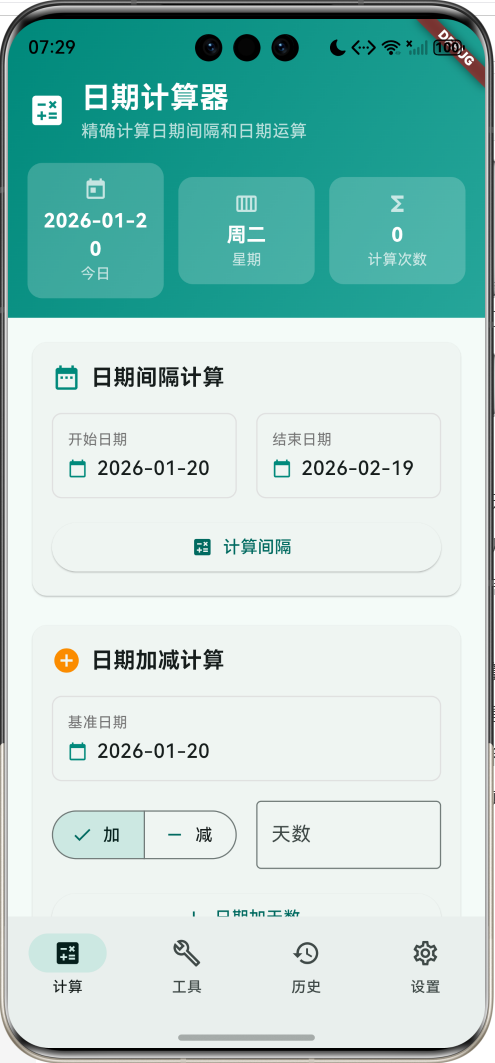
这是一款功能全面的日期计算器应用,为用户提供精确的日期计算和分析功能。应用采用Material Design 3设计风格,支持日期间隔计算、日期加减运算、工作日计算、年龄计算等多种实用功能,界面简洁直观,操作便捷高效,是日常生活和工作中的理想工具。
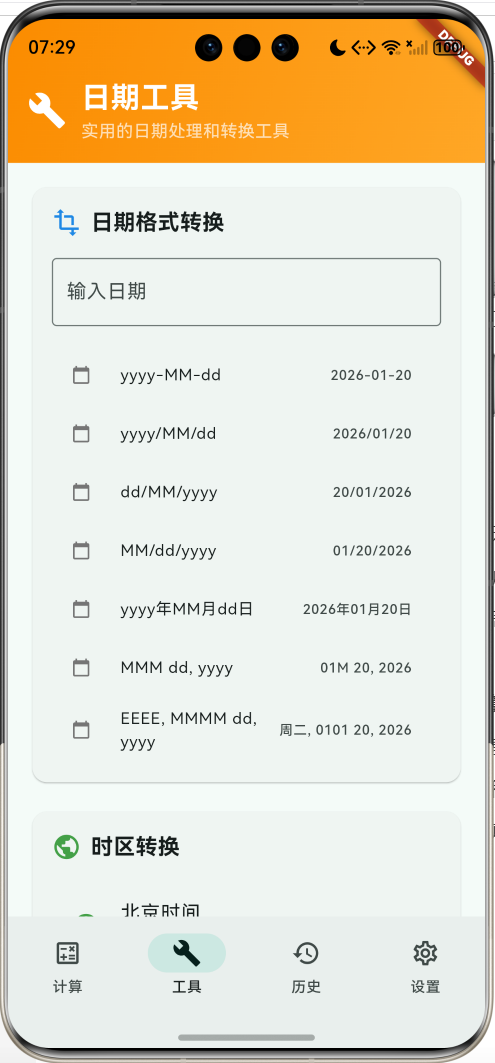
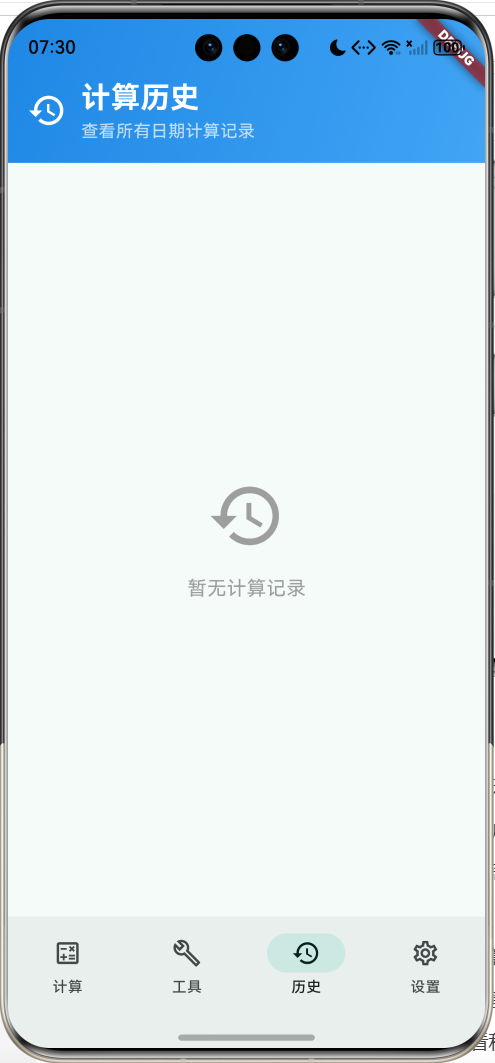
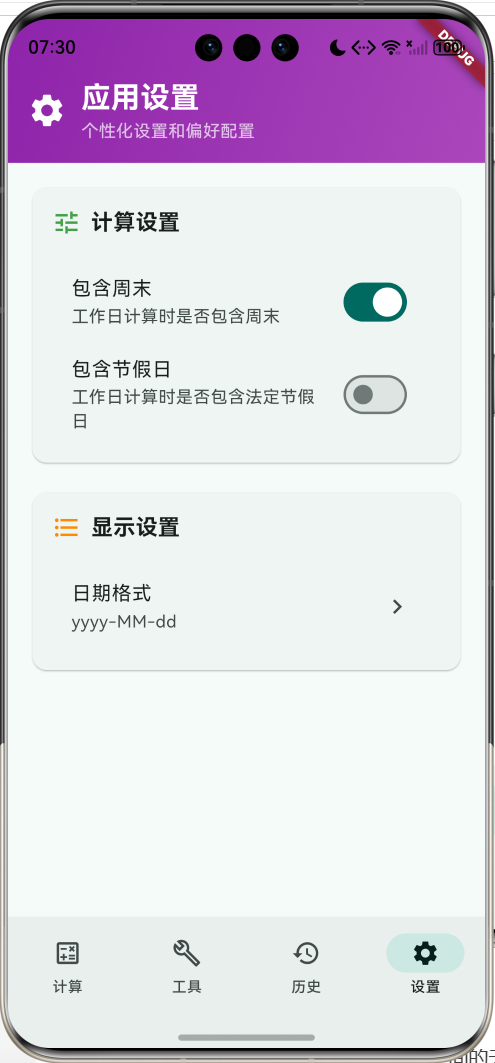
运行效果图
核心特性
- 日期间隔计算:精确计算两个日期之间的天数、周数、月数、年数
- 日期加减运算:支持在指定日期基础上加减天数
- 工作日计算:智能计算工作日,支持排除周末和节假日
- 年龄计算器:计算精确年龄和生活天数
- 快速计算:距离新年、生日等常用日期计算
- 日期工具集:格式转换、时区转换、日历查看等实用工具
- 计算历史:保存所有计算记录,支持查看和管理
- 个性化设置:自定义日期格式、工作日规则等选项
- 精美界面:渐变设计和流畅的用户体验
技术栈
- Flutter 3.x
- Material Design 3
- 日期时间处理算法
- 动画控制器(AnimationController)
- 状态管理
- 数据持久化
项目架构
DateCalculatorHomePage
CalculatorPage
ToolsPage
HistoryPage
SettingsPage
DateIntervalCalculator
DateAddSubtractCalculator
QuickCalculations
RecentCalculations
DateSelector
IntervalCalculation
DateSelector
AddSubtractCalculation
BirthdayCalculator
WorkdaysCalculator
AgeCalculator
DateFormatConverter
TimezoneConverter
CalendarTools
DateValidation
FormatResults
TimezoneList
CalendarView
HolidayList
HistoryList
CalculationItem
CalculationSettings
DisplaySettings
DateCalculation
CalculationType
DateUtils
AnimationController
数据模型设计
DateCalculation(日期计算模型)
dart
class DateCalculation {
  final String title;                    // 计算标题
  final String description;              // 计算描述
  final DateTime startDate;              // 开始日期
  final DateTime? endDate;               // 结束日期(可选)
  final int? days;                       // 天数(可选)
  final String result;                   // 计算结果
  final DateTime timestamp;              // 计算时间
  final CalculationType type;            // 计算类型

  const DateCalculation({
    required this.title,
    required this.description,
    required this.startDate,
    this.endDate,
    this.days,
    required this.result,
    required this.timestamp,
    required this.type,
  });
}设计要点:
- title和description用于显示计算信息
- startDate为必需字段,endDate和days为可选
- result存储格式化的计算结果
- timestamp用于历史记录排序
- type标识计算类型便于分类管理
CalculationType(计算类型枚举)
dart
enum CalculationType {
  interval,      // 日期间隔
  addDays,       // 日期加天数
  subtractDays,  // 日期减天数
  workdays,      // 工作日计算
  age,           // 年龄计算
  weekday,       // 星期几
}
计算类型配置
| 计算类型 | 说明 | 输入参数 | 输出结果 |
|---|---|---|---|
| interval | 日期间隔 | 开始日期、结束日期 | 天数、周数、月数、年数 |
| addDays | 日期加天数 | 基准日期、天数 | 目标日期、星期几 |
| subtractDays | 日期减天数 | 基准日期、天数 | 目标日期、星期几 |
| workdays | 工作日计算 | 开始日期、结束日期 | 工作日天数 |
| age | 年龄计算 | 生日 | 年龄、生活天数 |
| weekday | 星期计算 | 日期 | 星期几、第几天 |
节假日配置
dart
final List<DateTime> _holidays = [
  DateTime(2024, 1, 1),   // 元旦
  DateTime(2024, 2, 10),  // 春节
  DateTime(2024, 4, 4),   // 清明节
  DateTime(2024, 5, 1),   // 劳动节
  DateTime(2024, 6, 10),  // 端午节
  DateTime(2024, 9, 17),  // 中秋节
  DateTime(2024, 10, 1),  // 国庆节
];
核心功能实现
1. 日期间隔计算
实现精确的日期间隔计算,支持多种时间单位显示。
dart
void _calculateDateInterval(DateTime startDate, DateTime endDate) {
  final difference = endDate.difference(startDate);
  final days = difference.inDays;
  final weeks = (days / 7).floor();
  final months = _calculateMonthsDifference(startDate, endDate);
  final years = _calculateYearsDifference(startDate, endDate);

  String result;
  if (days == 0) {
    result = '同一天';
  } else if (days < 7) {
    result = '$days天';
  } else if (days < 30) {
    result = '$weeks周${days % 7}天 (共$days天)';
  } else if (days < 365) {
    result = '$months个月${days % 30}天 (共$days天)';
  } else {
    result = '$years年${months % 12}个月${days % 30}天 (共$days天)';
  }

  final calculation = DateCalculation(
    title: '日期间隔计算',
    description: '从${_formatDate(startDate)}到${_formatDate(endDate)}',
    startDate: startDate,
    endDate: endDate,
    result: result,
    timestamp: DateTime.now(),
    type: CalculationType.interval,
  );

  setState(() {
    _calculationHistory.insert(0, calculation);
  });

  _showResultDialog('日期间隔计算结果', result, calculation.description);
}

// 精确计算月份差异
int _calculateMonthsDifference(DateTime startDate, DateTime endDate) {
  return (endDate.year - startDate.year) * 12 + endDate.month - startDate.month;
}

// 精确计算年份差异
int _calculateYearsDifference(DateTime startDate, DateTime endDate) {
  int years = endDate.year - startDate.year;
  if (endDate.month < startDate.month ||
      (endDate.month == startDate.month && endDate.day < startDate.day)) {
    years--;
  }
  return years;
}计算特点:
- 多单位显示:根据时间跨度智能选择显示单位
- 精确计算:考虑月份天数差异和闰年情况
- 友好格式:提供易读的结果格式
- 历史记录:自动保存计算结果
2. 日期加减运算
支持在指定日期基础上进行天数的加减运算。
dart
void _calculateDateAddSubtract(DateTime baseDate, int days, bool isAdd) {
  final resultDate = isAdd
      ? baseDate.add(Duration(days: days))
      : baseDate.subtract(Duration(days: days));

  final result = '${_formatDate(resultDate)} (${_getWeekdayName(resultDate)})';
  final operation = isAdd ? '加' : '减';

  final calculation = DateCalculation(
    title: '日期${operation}天数',
    description: '${_formatDate(baseDate)} $operation $days天',
    startDate: baseDate,
    days: isAdd ? days : -days,
    result: result,
    timestamp: DateTime.now(),
    type: isAdd ? CalculationType.addDays : CalculationType.subtractDays,
  );

  setState(() {
    _calculationHistory.insert(0, calculation);
  });

  _showResultDialog('日期${operation}天数结果', result, calculation.description);
}

// 获取星期几名称
String _getWeekdayName(DateTime date) {
  const weekdays = ['周日', '周一', '周二', '周三', '周四', '周五', '周六'];
  return weekdays[date.weekday % 7];
}运算特点:
- 双向运算:支持日期加天数和减天数
- 结果详细:显示目标日期和对应星期
- 操作简单:直观的加减操作界面
- 即时反馈:实时显示计算结果
3. 工作日计算
智能计算工作日,支持排除周末和节假日。
dart
int _calculateWorkdays(DateTime startDate, DateTime endDate) {
  int workdays = 0;
  DateTime current = startDate;

  while (current.isBefore(endDate) || current.isAtSameMomentAs(endDate)) {
    // 检查是否为工作日(周一到周五)
    if (current.weekday >= 1 && current.weekday <= 5) {
      // 如果设置了不包含节假日,检查是否为节假日
      if (!_includeHolidays && _isHoliday(current)) {
        // 跳过节假日
      } else {
        workdays++;
      }
    } else if (_includeWeekends) {
      // 如果包含周末,也计算周末
      workdays++;
    }

    current = current.add(const Duration(days: 1));
  }

  return workdays;
}

// 检查是否为节假日
bool _isHoliday(DateTime date) {
  return _holidays.any((holiday) =>
      holiday.year == date.year &&
      holiday.month == date.month &&
      holiday.day == date.day);
}

// 工作日计算器界面
void _showWorkdaysCalculator() {
  showDialog(
    context: context,
    builder: (context) {
      DateTime startDate = DateTime.now();
      DateTime endDate = DateTime.now().add(const Duration(days: 30));

      return StatefulBuilder(
        builder: (context, setDialogState) {
          final workdays = _calculateWorkdays(startDate, endDate);

          return AlertDialog(
            title: const Text('工作日计算器'),
            content: Column(
              mainAxisSize: MainAxisSize.min,
              children: [
                // 日期选择器
                Row(
                  children: [
                    Expanded(child: _buildDateSelector('开始日期', startDate, (date) {
                      setDialogState(() => startDate = date);
                    })),
                    const SizedBox(width: 16),
                    Expanded(child: _buildDateSelector('结束日期', endDate, (date) {
                      setDialogState(() => endDate = date);
                    })),
                  ],
                ),
                const SizedBox(height: 16),
                // 结果显示
                Container(
                  padding: const EdgeInsets.all(12),
                  decoration: BoxDecoration(
                    color: Colors.blue.shade50,
                    borderRadius: BorderRadius.circular(8),
                  ),
                  child: Column(
                    children: [
                      Text('工作日: $workdays天',
                           style: const TextStyle(fontSize: 16, fontWeight: FontWeight.bold)),
                      Text('总天数: ${endDate.difference(startDate).inDays + 1}天'),
                    ],
                  ),
                ),
              ],
            ),
            actions: [
              TextButton(onPressed: () => Navigator.pop(context), child: const Text('关闭')),
              ElevatedButton(
                onPressed: () {
                  _saveWorkdaysCalculation(startDate, endDate, workdays);
                  Navigator.pop(context);
                },
                child: const Text('保存计算'),
              ),
            ],
          );
        },
      );
    },
  );
}工作日计算特点:
- 智能识别:自动识别工作日和非工作日
- 节假日支持:可配置是否排除法定节假日
- 灵活设置:支持包含或排除周末
- 实时更新:日期变化时实时更新结果
4. 年龄计算器
精确计算年龄和相关统计信息。
dart
void _showBirthdayCalculator() {
  showDialog(
    context: context,
    builder: (context) {
      DateTime birthday = DateTime.now().subtract(const Duration(days: 365 * 25));

      return StatefulBuilder(
        builder: (context, setDialogState) {
          return AlertDialog(
            title: const Text('生日计算器'),
            content: Column(
              mainAxisSize: MainAxisSize.min,
              children: [
                // 生日选择器
                InkWell(
                  onTap: () async {
                    final selectedDate = await showDatePicker(
                      context: context,
                      initialDate: birthday,
                      firstDate: DateTime(1900),
                      lastDate: DateTime.now(),
                    );
                    if (selectedDate != null) {
                      setDialogState(() => birthday = selectedDate);
                    }
                  },
                  child: Container(
                    padding: const EdgeInsets.all(12),
                    decoration: BoxDecoration(
                      border: Border.all(color: Colors.grey.shade300),
                      borderRadius: BorderRadius.circular(8),
                    ),
                    child: Row(
                      children: [
                        const Icon(Icons.cake),
                        const SizedBox(width: 8),
                        Text('生日: ${_formatDate(birthday)}'),
                      ],
                    ),
                  ),
                ),
                const SizedBox(height: 16),
                _buildBirthdayInfo(birthday),
              ],
            ),
            actions: [
              TextButton(onPressed: () => Navigator.pop(context), child: const Text('关闭')),
              ElevatedButton(
                onPressed: () {
                  _calculateAge(birthday);
                  Navigator.pop(context);
                },
                child: const Text('保存计算'),
              ),
            ],
          );
        },
      );
    },
  );
}

Widget _buildBirthdayInfo(DateTime birthday) {
  final now = DateTime.now();
  final age = _calculateYearsDifference(birthday, now);
  final daysSinceBirth = now.difference(birthday).inDays;

  // 计算下次生日
  DateTime nextBirthday = DateTime(now.year, birthday.month, birthday.day);
  if (nextBirthday.isBefore(now)) {
    nextBirthday = DateTime(now.year + 1, birthday.month, birthday.day);
  }
  final daysToNextBirthday = nextBirthday.difference(now).inDays;

  return Column(
    crossAxisAlignment: CrossAxisAlignment.start,
    children: [
      Text('当前年龄: $age岁'),
      Text('已生活: $daysSinceBirth天'),
      Text('距离下次生日: $daysToNextBirthday天'),
      Text('下次生日: ${_formatDate(nextBirthday)} (${_getWeekdayName(nextBirthday)})'),
    ],
  );
}年龄计算特点:
- 精确年龄:考虑生日是否已过的精确年龄计算
- 生活天数:计算从出生到现在的总天数
- 下次生日:自动计算下次生日日期和倒计时
- 详细信息:提供全面的年龄相关信息
5. 日期选择器组件
通用的日期选择器组件,提供统一的日期选择体验。
dart
Widget _buildDateSelector(String label, DateTime date, Function(DateTime) onChanged) {
  return InkWell(
    onTap: () async {
      final selectedDate = await showDatePicker(
        context: context,
        initialDate: date,
        firstDate: DateTime(1900),
        lastDate: DateTime(2100),
      );
      if (selectedDate != null) {
        setState(() {
          onChanged(selectedDate);
        });
      }
    },
    child: Container(
      padding: const EdgeInsets.all(12),
      decoration: BoxDecoration(
        border: Border.all(color: Colors.grey.shade300),
        borderRadius: BorderRadius.circular(8),
      ),
      child: Column(
        crossAxisAlignment: CrossAxisAlignment.start,
        children: [
          Text(
            label,
            style: TextStyle(
              fontSize: 12,
              color: Colors.grey.shade600,
            ),
          ),
          const SizedBox(height: 4),
          Row(
            children: [
              Icon(Icons.calendar_today, size: 16, color: Colors.teal.shade600),
              const SizedBox(width: 8),
              Text(
                _formatDate(date),
                style: const TextStyle(
                  fontSize: 16,
                  fontWeight: FontWeight.w500,
                ),
              ),
            ],
          ),
        ],
      ),
    ),
  );
}选择器特点:
- 统一样式:所有日期选择器使用统一的视觉风格
- 清晰标识:明确的标签和图标标识
- 范围限制:合理的日期选择范围
- 回调机制:灵活的日期变更回调
6. 快速计算功能
提供常用的快速计算选项,提高使用效率。
dart
Widget _buildQuickCalculations() {
  return Card(
    child: Padding(
      padding: const EdgeInsets.all(16),
      child: Column(
        crossAxisAlignment: CrossAxisAlignment.start,
        children: [
          Row(
            children: [
              Icon(Icons.flash_on, color: Colors.purple.shade600),
              const SizedBox(width: 8),
              const Text(
                '快速计算',
                style: TextStyle(fontSize: 18, fontWeight: FontWeight.bold),
              ),
            ],
          ),
          const SizedBox(height: 16),
          GridView.count(
            shrinkWrap: true,
            physics: const NeverScrollableScrollPhysics(),
            crossAxisCount: 2,
            crossAxisSpacing: 12,
            mainAxisSpacing: 12,
            childAspectRatio: 2.5,
            children: [
              _buildQuickButton('距离新年', Icons.celebration, () {
                final newYear = DateTime(DateTime.now().year + 1, 1, 1);
                _calculateDateInterval(DateTime.now(), newYear);
              }),
              _buildQuickButton('距离生日', Icons.cake, () {
                _showBirthdayCalculator();
              }),
              _buildQuickButton('工作日计算', Icons.work, () {
                _showWorkdaysCalculator();
              }),
              _buildQuickButton('年龄计算', Icons.person, () {
                _showBirthdayCalculator();
              }),
            ],
          ),
        ],
      ),
    ),
  );
}

Widget _buildQuickButton(String label, IconData icon, VoidCallback onPressed) {
  return ElevatedButton.icon(
    onPressed: onPressed,
    icon: Icon(icon, size: 20),
    label: Text(label, style: const TextStyle(fontSize: 12)),
    style: ElevatedButton.styleFrom(
      padding: const EdgeInsets.symmetric(horizontal: 8, vertical: 12),
    ),
  );
}快速计算特点:
- 常用场景:覆盖最常用的日期计算场景
- 一键操作:点击即可快速执行计算
- 网格布局:紧凑的网格布局节省空间
- 图标标识:直观的图标帮助用户理解功能
7. 日期格式化系统
支持多种日期格式,满足不同用户需求。
dart
String _formatDate(DateTime date) {
  switch (_dateFormat) {
    case 'yyyy/MM/dd':
      return '${date.year}/${date.month.toString().padLeft(2, '0')}/${date.day.toString().padLeft(2, '0')}';
    case 'dd/MM/yyyy':
      return '${date.day.toString().padLeft(2, '0')}/${date.month.toString().padLeft(2, '0')}/${date.year}';
    case 'yyyy年MM月dd日':
      return '${date.year}年${date.month.toString().padLeft(2, '0')}月${date.day.toString().padLeft(2, '0')}日';
    default:
      return '${date.year}-${date.month.toString().padLeft(2, '0')}-${date.day.toString().padLeft(2, '0')}';
  }
}

String _formatDateWithPattern(DateTime date, String pattern) {
  return pattern
      .replaceAll('yyyy', date.year.toString())
      .replaceAll('MM', date.month.toString().padLeft(2, '0'))
      .replaceAll('dd', date.day.toString().padLeft(2, '0'))
      .replaceAll('MMM', _getMonthName(date.month))
      .replaceAll('EEEE', _getWeekdayName(date))
      .replaceAll('MMMM', _getMonthFullName(date.month));
}

String _getMonthName(int month) {
  const months = ['Jan', 'Feb', 'Mar', 'Apr', 'May', 'Jun',
                 'Jul', 'Aug', 'Sep', 'Oct', 'Nov', 'Dec'];
  return months[month - 1];
}

String _getMonthFullName(int month) {
  const months = ['January', 'February', 'March', 'April', 'May', 'June',
                 'July', 'August', 'September', 'October', 'November', 'December'];
  return months[month - 1];
}格式化特点:
- 多种格式:支持常用的日期格式
- 模式匹配:灵活的模式替换机制
- 国际化支持:支持中英文月份和星期显示
- 用户选择:允许用户自定义日期格式
8. 计算历史管理
完整的计算历史记录和管理功能。
dart
Widget _buildCalculationItem(DateCalculation calc, bool isCompact) {
  return Container(
    margin: const EdgeInsets.only(bottom: 8),
    padding: const EdgeInsets.all(12),
    decoration: BoxDecoration(
      color: Colors.grey.shade50,
      borderRadius: BorderRadius.circular(8),
      border: Border.all(color: Colors.grey.shade200),
    ),
    child: Column(
      crossAxisAlignment: CrossAxisAlignment.start,
      children: [
        Row(
          children: [
            Icon(_getCalculationTypeIcon(calc.type), size: 16, color: Colors.teal.shade600),
            const SizedBox(width: 8),
            Expanded(
              child: Text(
                calc.title,
                style: const TextStyle(fontWeight: FontWeight.w500),
              ),
            ),
            if (!isCompact)
              Text(
                _formatTime(calc.timestamp),
                style: TextStyle(fontSize: 12, color: Colors.grey.shade600),
              ),
          ],
        ),
        const SizedBox(height: 4),
        Text(
          calc.result,
          style: TextStyle(
            fontSize: 14,
            color: Colors.grey.shade700,
          ),
        ),
        if (!isCompact && calc.description.isNotEmpty) ...[
          const SizedBox(height: 4),
          Text(
            calc.description,
            style: TextStyle(
              fontSize: 12,
              color: Colors.grey.shade600,
            ),
          ),
        ],
      ],
    ),
  );
}

IconData _getCalculationTypeIcon(CalculationType type) {
  switch (type) {
    case CalculationType.interval:
      return Icons.date_range;
    case CalculationType.addDays:
      return Icons.add;
    case CalculationType.subtractDays:
      return Icons.remove;
    case CalculationType.workdays:
      return Icons.work;
    case CalculationType.age:
      return Icons.cake;
    case CalculationType.weekday:
      return Icons.calendar_view_week;
  }
}历史管理特点:
- 分类显示:不同计算类型使用不同图标标识
- 详细信息:显示计算标题、结果和描述
- 时间标记:智能显示计算时间
- 紧凑模式:支持紧凑和详细两种显示模式
9. 结果展示对话框
美观的计算结果展示界面。
dart
void _showResultDialog(String title, String result, String description) {
  showDialog(
    context: context,
    builder: (context) {
      return AlertDialog(
        title: Text(title),
        content: Column(
          mainAxisSize: MainAxisSize.min,
          crossAxisAlignment: CrossAxisAlignment.start,
          children: [
            Container(
              padding: const EdgeInsets.all(16),
              decoration: BoxDecoration(
                color: Colors.teal.shade50,
                borderRadius: BorderRadius.circular(8),
              ),
              child: Column(
                crossAxisAlignment: CrossAxisAlignment.start,
                children: [
                  Text(
                    '计算结果',
                    style: TextStyle(
                      fontSize: 14,
                      color: Colors.teal.shade700,
                      fontWeight: FontWeight.w500,
                    ),
                  ),
                  const SizedBox(height: 8),
                  Text(
                    result,
                    style: const TextStyle(
                      fontSize: 18,
                      fontWeight: FontWeight.bold,
                    ),
                  ),
                ],
              ),
            ),
            const SizedBox(height: 12),
            Text(
              description,
              style: TextStyle(
                fontSize: 14,
                color: Colors.grey.shade600,
              ),
            ),
          ],
        ),
        actions: [
          TextButton(
            onPressed: () {
              Clipboard.setData(ClipboardData(text: result));
              Navigator.pop(context);
              ScaffoldMessenger.of(context).showSnackBar(
                const SnackBar(content: Text('结果已复制到剪贴板')),
              );
            },
            child: const Text('复制'),
          ),
          ElevatedButton(
            onPressed: () => Navigator.pop(context),
            child: const Text('确定'),
          ),
        ],
      );
    },
  );
}结果展示特点:
- 突出显示:使用彩色背景突出显示计算结果
- 详细描述:提供计算过程的详细描述
- 复制功能:支持一键复制结果到剪贴板
- 友好交互:清晰的操作按钮和反馈
10. 闰年判断算法
准确的闰年判断逻辑。
dart
bool _isLeapYear(int year) {
  return (year % 4 == 0 && year % 100 != 0) || (year % 400 == 0);
}

void _showMonthDaysCalculator() {
  showDialog(
    context: context,
    builder: (context) {
      int year = DateTime.now().year;
      int month = DateTime.now().month;

      return StatefulBuilder(
        builder: (context, setDialogState) {
          final daysInMonth = DateTime(year, month + 1, 0).day;
          final isLeapYear = _isLeapYear(year);

          return AlertDialog(
            title: const Text('月份天数计算'),
            content: Column(
              mainAxisSize: MainAxisSize.min,
              children: [
                Row(
                  children: [
                    Expanded(
                      child: DropdownButtonFormField<int>(
                        value: year,
                        decoration: const InputDecoration(
                          labelText: '年份',
                          border: OutlineInputBorder(),
                        ),
                        items: List.generate(201, (index) {
                          final y = 2000 + index;
                          return DropdownMenuItem(value: y, child: Text('$y'));
                        }),
                        onChanged: (value) {
                          setDialogState(() => year = value!);
                        },
                      ),
                    ),
                    const SizedBox(width: 16),
                    Expanded(
                      child: DropdownButtonFormField<int>(
                        value: month,
                        decoration: const InputDecoration(
                          labelText: '月份',
                          border: OutlineInputBorder(),
                        ),
                        items: List.generate(12, (index) {
                          final m = index + 1;
                          return DropdownMenuItem(value: m, child: Text('${m}月'));
                        }),
                        onChanged: (value) {
                          setDialogState(() => month = value!);
                        },
                      ),
                    ),
                  ],
                ),
                const SizedBox(height: 16),
                Container(
                  padding: const EdgeInsets.all(16),
                  decoration: BoxDecoration(
                    color: Colors.green.shade50,
                    borderRadius: BorderRadius.circular(8),
                  ),
                  child: Column(
                    children: [
                      Text(
                        '$daysInMonth天',
                        style: const TextStyle(
                          fontSize: 24,
                          fontWeight: FontWeight.bold,
                        ),
                      ),
                      Text('${year}年${month}月'),
                      if (month == 2 && isLeapYear)
                        const Text('闰年', style: TextStyle(color: Colors.green)),
                    ],
                  ),
                ),
              ],
            ),
            actions: [
              TextButton(
                onPressed: () => Navigator.pop(context),
                child: const Text('关闭'),
              ),
            ],
          );
        },
      );
    },
  );
}闰年判断特点:
- 标准算法:使用标准的闰年判断规则
- 月份天数:准确计算每个月的天数
- 闰年标识:特别标识闰年的2月
- 交互界面:直观的年份和月份选择器
UI组件设计
1. 渐变头部组件
dart
Widget _buildCalculatorHeader() {
  return Container(
    padding: const EdgeInsets.fromLTRB(16, 48, 16, 16),
    decoration: BoxDecoration(
      gradient: LinearGradient(
        colors: [Colors.teal.shade600, Colors.teal.shade400],
        begin: Alignment.topLeft,
        end: Alignment.bottomRight,
      ),
    ),
    child: Column(
      children: [
        Row(
          children: [
            const Icon(Icons.calculate, color: Colors.white, size: 32),
            const SizedBox(width: 12),
            const Expanded(
              child: Column(
                crossAxisAlignment: CrossAxisAlignment.start,
                children: [
                  Text(
                    '日期计算器',
                    style: TextStyle(
                      fontSize: 24,
                      fontWeight: FontWeight.bold,
                      color: Colors.white,
                    ),
                  ),
                  Text(
                    '精确计算日期间隔和日期运算',
                    style: TextStyle(
                      fontSize: 14,
                      color: Colors.white70,
                    ),
                  ),
                ],
              ),
            ),
          ],
        ),
        const SizedBox(height: 16),
        Row(
          children: [
            Expanded(
              child: _buildHeaderCard('今日', _formatDate(DateTime.now()), Icons.today),
            ),
            const SizedBox(width: 12),
            Expanded(
              child: _buildHeaderCard('星期', _getWeekdayName(DateTime.now()), Icons.calendar_view_week),
            ),
            const SizedBox(width: 12),
            Expanded(
              child: _buildHeaderCard('计算次数', '${_calculationHistory.length}', Icons.functions),
            ),
          ],
        ),
      ],
    ),
  );
}
2. 信息卡片组件
dart
Widget _buildHeaderCard(String title, String value, IconData icon) {
  return Container(
    padding: const EdgeInsets.all(12),
    decoration: BoxDecoration(
      color: Colors.white.withValues(alpha: 0.2),
      borderRadius: BorderRadius.circular(12),
    ),
    child: Column(
      children: [
        Icon(icon, color: Colors.white70, size: 20),
        const SizedBox(height: 4),
        Text(
          value,
          style: const TextStyle(
            fontSize: 16,
            fontWeight: FontWeight.bold,
            color: Colors.white,
          ),
          textAlign: TextAlign.center,
        ),
        Text(
          title,
          style: const TextStyle(
            fontSize: 12,
            color: Colors.white70,
          ),
        ),
      ],
    ),
  );
}
3. 日期格式转换器
dart
Widget _buildDateFormatConverter() {
  return Card(
    child: Padding(
      padding: const EdgeInsets.all(16),
      child: Column(
        crossAxisAlignment: CrossAxisAlignment.start,
        children: [
          Row(
            children: [
              Icon(Icons.transform, color: Colors.blue.shade600),
              const SizedBox(width: 8),
              const Text(
                '日期格式转换',
                style: TextStyle(fontSize: 18, fontWeight: FontWeight.bold),
              ),
            ],
          ),
          const SizedBox(height: 16),
          TextField(
            decoration: const InputDecoration(
              labelText: '输入日期',
              hintText: '例如:2024-01-01 或 2024/01/01',
              border: OutlineInputBorder(),
            ),
            onChanged: (value) {
              _convertDateFormat(value);
            },
          ),
          const SizedBox(height: 16),
          _buildFormatResults(),
        ],
      ),
    ),
  );
}

Widget _buildFormatResults() {
  final now = DateTime.now();
  final formats = [
    'yyyy-MM-dd',
    'yyyy/MM/dd',
    'dd/MM/yyyy',
    'MM/dd/yyyy',
    'yyyy年MM月dd日',
    'MMM dd, yyyy',
    'EEEE, MMMM dd, yyyy',
  ];

  return Column(
    children: formats.map((format) {
      return ListTile(
        dense: true,
        leading: Icon(Icons.calendar_today, size: 16, color: Colors.grey.shade600),
        title: Text(format),
        trailing: Text(
          _formatDateWithPattern(now, format),
          style: const TextStyle(fontWeight: FontWeight.w500),
        ),
        onTap: () {
          Clipboard.setData(ClipboardData(text: _formatDateWithPattern(now, format)));
          ScaffoldMessenger.of(context).showSnackBar(
            const SnackBar(content: Text('已复制到剪贴板')),
          );
        },
      );
    }).toList(),
  );
}
4. NavigationBar底部导航
dart
NavigationBar(
  selectedIndex: _selectedIndex,
  onDestinationSelected: (index) {
    setState(() {
      _selectedIndex = index;
    });
  },
  destinations: const [
    NavigationDestination(
      icon: Icon(Icons.calculate_outlined),
      selectedIcon: Icon(Icons.calculate),
      label: '计算',
    ),
    NavigationDestination(
      icon: Icon(Icons.build_outlined),
      selectedIcon: Icon(Icons.build),
      label: '工具',
    ),
    NavigationDestination(
      icon: Icon(Icons.history_outlined),
      selectedIcon: Icon(Icons.history),
      label: '历史',
    ),
    NavigationDestination(
      icon: Icon(Icons.settings_outlined),
      selectedIcon: Icon(Icons.settings),
      label: '设置',
    ),
  ],
)
功能扩展建议
1. 农历日期支持
dart
class LunarCalendar {
  // 农历转换功能
  Map<String, dynamic> solarToLunar(DateTime solarDate) {
    // 实现阳历转农历算法
    return {
      'year': 2024,
      'month': 1,
      'day': 15,
      'monthName': '正月',
      'dayName': '十五',
      'zodiac': '龙',
      'constellation': '水瓶座',
    };
  }

  DateTime lunarToSolar(int lunarYear, int lunarMonth, int lunarDay) {
    // 实现农历转阳历算法
    return DateTime(2024, 2, 24);
  }

  // 农历计算器界面
  Widget buildLunarCalculator() {
    return Card(
      child: Column(
        children: [
          const Text('农历转换', style: TextStyle(fontSize: 18, fontWeight: FontWeight.bold)),
          const SizedBox(height: 16),
          Row(
            children: [
              Expanded(
                child: ElevatedButton(
                  onPressed: _showSolarToLunarConverter,
                  child: const Text('阳历转农历'),
                ),
              ),
              const SizedBox(width: 12),
              Expanded(
                child: ElevatedButton(
                  onPressed: _showLunarToSolarConverter,
                  child: const Text('农历转阳历'),
                ),
              ),
            ],
          ),
        ],
      ),
    );
  }

  void _showSolarToLunarConverter() {
    showDialog(
      context: context,
      builder: (context) {
        DateTime selectedDate = DateTime.now();

        return StatefulBuilder(
          builder: (context, setState) {
            final lunarInfo = solarToLunar(selectedDate);

            return AlertDialog(
              title: const Text('阳历转农历'),
              content: Column(
                mainAxisSize: MainAxisSize.min,
                children: [
                  ListTile(
                    title: const Text('阳历日期'),
                    subtitle: Text(_formatDate(selectedDate)),
                    trailing: IconButton(
                      icon: const Icon(Icons.calendar_today),
                      onPressed: () async {
                        final date = await showDatePicker(
                          context: context,
                          initialDate: selectedDate,
                          firstDate: DateTime(1900),
                          lastDate: DateTime(2100),
                        );
                        if (date != null) {
                          setState(() => selectedDate = date);
                        }
                      },
                    ),
                  ),
                  const Divider(),
                  ListTile(
                    title: const Text('农历日期'),
                    subtitle: Text('${lunarInfo['monthName']}${lunarInfo['dayName']}'),
                  ),
                  ListTile(
                    title: const Text('生肖'),
                    subtitle: Text(lunarInfo['zodiac']),
                  ),
                  ListTile(
                    title: const Text('星座'),
                    subtitle: Text(lunarInfo['constellation']),
                  ),
                ],
              ),
              actions: [
                TextButton(
                  onPressed: () => Navigator.pop(context),
                  child: const Text('关闭'),
                ),
              ],
            );
          },
        );
      },
    );
  }
}
2. 世界时钟功能
dart
class WorldClock {
  final List<Map<String, dynamic>> timezones = [
    {'name': '北京', 'timezone': 'Asia/Shanghai', 'offset': 8},
    {'name': '东京', 'timezone': 'Asia/Tokyo', 'offset': 9},
    {'name': '纽约', 'timezone': 'America/New_York', 'offset': -5},
    {'name': '伦敦', 'timezone': 'Europe/London', 'offset': 0},
    {'name': '悉尼', 'timezone': 'Australia/Sydney', 'offset': 11},
    {'name': '洛杉矶', 'timezone': 'America/Los_Angeles', 'offset': -8},
    {'name': '巴黎', 'timezone': 'Europe/Paris', 'offset': 1},
    {'name': '迪拜', 'timezone': 'Asia/Dubai', 'offset': 4},
  ];

  Widget buildWorldClock() {
    return Card(
      child: Column(
        children: [
          const Text('世界时钟', style: TextStyle(fontSize: 18, fontWeight: FontWeight.bold)),
          const SizedBox(height: 16),
          ...timezones.map((tz) => _buildTimezoneItem(tz)),
        ],
      ),
    );
  }

  Widget _buildTimezoneItem(Map<String, dynamic> timezone) {
    final now = DateTime.now();
    final offset = timezone['offset'] as int;
    final localTime = now.add(Duration(hours: offset - 8)); // 假设当前是北京时间

    return ListTile(
      leading: CircleAvatar(
        child: Text(timezone['name'].substring(0, 1)),
      ),
      title: Text(timezone['name']),
      subtitle: Text('UTC${offset >= 0 ? '+' : ''}$offset'),
      trailing: Column(
        mainAxisAlignment: MainAxisAlignment.center,
        crossAxisAlignment: CrossAxisAlignment.end,
        children: [
          Text(
            '${localTime.hour.toString().padLeft(2, '0')}:${localTime.minute.toString().padLeft(2, '0')}',
            style: const TextStyle(
              fontSize: 18,
              fontWeight: FontWeight.bold,
            ),
          ),
          Text(
            _formatDate(localTime),
            style: const TextStyle(fontSize: 12),
          ),
        ],
      ),
    );
  }

  // 时区转换器
  Widget buildTimezoneConverter() {
    return Card(
      child: Column(
        children: [
          const Text('时区转换', style: TextStyle(fontSize: 18, fontWeight: FontWeight.bold)),
          const SizedBox(height: 16),
          Row(
            children: [
              Expanded(
                child: DropdownButtonFormField<String>(
                  decoration: const InputDecoration(
                    labelText: '源时区',
                    border: OutlineInputBorder(),
                  ),
                  items: timezones.map((tz) {
                    return DropdownMenuItem(
                      value: tz['timezone'],
                      child: Text(tz['name']),
                    );
                  }).toList(),
                  onChanged: (value) {},
                ),
              ),
              const SizedBox(width: 16),
              Expanded(
                child: DropdownButtonFormField<String>(
                  decoration: const InputDecoration(
                    labelText: '目标时区',
                    border: OutlineInputBorder(),
                  ),
                  items: timezones.map((tz) {
                    return DropdownMenuItem(
                      value: tz['timezone'],
                      child: Text(tz['name']),
                    );
                  }).toList(),
                  onChanged: (value) {},
                ),
              ),
            ],
          ),
        ],
      ),
    );
  }
}
3. 倒计时功能
dart
class CountdownTimer {
  // 倒计时管理
  List<CountdownEvent> countdownEvents = [];

  Widget buildCountdownManager() {
    return Card(
      child: Column(
        children: [
          Row(
            children: [
              const Text('倒计时管理', style: TextStyle(fontSize: 18, fontWeight: FontWeight.bold)),
              const Spacer(),
              IconButton(
                icon: const Icon(Icons.add),
                onPressed: _addCountdownEvent,
              ),
            ],
          ),
          const SizedBox(height: 16),
          ...countdownEvents.map((event) => _buildCountdownItem(event)),
        ],
      ),
    );
  }

  Widget _buildCountdownItem(CountdownEvent event) {
    final now = DateTime.now();
    final difference = event.targetDate.difference(now);

    return Card(
      child: ListTile(
        leading: CircleAvatar(
          backgroundColor: event.color,
          child: Icon(event.icon, color: Colors.white),
        ),
        title: Text(event.title),
        subtitle: Text(event.description),
        trailing: Column(
          mainAxisAlignment: MainAxisAlignment.center,
          crossAxisAlignment: CrossAxisAlignment.end,
          children: [
            if (difference.isNegative)
              const Text('已过期', style: TextStyle(color: Colors.red))
            else ...[
              Text(
                '${difference.inDays}天',
                style: const TextStyle(
                  fontSize: 18,
                  fontWeight: FontWeight.bold,
                ),
              ),
              Text(
                '${difference.inHours % 24}:${difference.inMinutes % 60}',
                style: const TextStyle(fontSize: 12),
              ),
            ],
          ],
        ),
        onTap: () => _showCountdownDetails(event),
      ),
    );
  }

  void _addCountdownEvent() {
    showDialog(
      context: context,
      builder: (context) {
        String title = '';
        String description = '';
        DateTime targetDate = DateTime.now().add(const Duration(days: 30));
        Color selectedColor = Colors.blue;
        IconData selectedIcon = Icons.event;

        return StatefulBuilder(
          builder: (context, setState) {
            return AlertDialog(
              title: const Text('添加倒计时'),
              content: SingleChildScrollView(
                child: Column(
                  mainAxisSize: MainAxisSize.min,
                  children: [
                    TextField(
                      decoration: const InputDecoration(
                        labelText: '事件标题',
                        border: OutlineInputBorder(),
                      ),
                      onChanged: (value) => title = value,
                    ),
                    const SizedBox(height: 16),
                    TextField(
                      decoration: const InputDecoration(
                        labelText: '事件描述',
                        border: OutlineInputBorder(),
                      ),
                      onChanged: (value) => description = value,
                    ),
                    const SizedBox(height: 16),
                    ListTile(
                      title: const Text('目标日期'),
                      subtitle: Text(_formatDate(targetDate)),
                      trailing: const Icon(Icons.calendar_today),
                      onTap: () async {
                        final date = await showDatePicker(
                          context: context,
                          initialDate: targetDate,
                          firstDate: DateTime.now(),
                          lastDate: DateTime(2100),
                        );
                        if (date != null) {
                          setState(() => targetDate = date);
                        }
                      },
                    ),
                    const SizedBox(height: 16),
                    Row(
                      children: [
                        const Text('颜色: '),
                        ...Colors.primaries.take(6).map((color) {
                          return GestureDetector(
                            onTap: () => setState(() => selectedColor = color),
                            child: Container(
                              width: 30,
                              height: 30,
                              margin: const EdgeInsets.only(right: 8),
                              decoration: BoxDecoration(
                                color: color,
                                shape: BoxShape.circle,
                                border: selectedColor == color
                                    ? Border.all(color: Colors.black, width: 2)
                                    : null,
                              ),
                            ),
                          );
                        }),
                      ],
                    ),
                  ],
                ),
              ),
              actions: [
                TextButton(
                  onPressed: () => Navigator.pop(context),
                  child: const Text('取消'),
                ),
                ElevatedButton(
                  onPressed: () {
                    if (title.isNotEmpty) {
                      countdownEvents.add(CountdownEvent(
                        title: title,
                        description: description,
                        targetDate: targetDate,
                        color: selectedColor,
                        icon: selectedIcon,
                      ));
                      Navigator.pop(context);
                    }
                  },
                  child: const Text('添加'),
                ),
              ],
            );
          },
        );
      },
    );
  }
}

class CountdownEvent {
  final String title;
  final String description;
  final DateTime targetDate;
  final Color color;
  final IconData icon;

  CountdownEvent({
    required this.title,
    required this.description,
    required this.targetDate,
    required this.color,
    required this.icon,
  });
}
4. 日程提醒功能
dart
class ScheduleReminder {
  List<ReminderEvent> reminders = [];

  Widget buildReminderManager() {
    return Card(
      child: Column(
        children: [
          Row(
            children: [
              const Text('日程提醒', style: TextStyle(fontSize: 18, fontWeight: FontWeight.bold)),
              const Spacer(),
              IconButton(
                icon: const Icon(Icons.add_alarm),
                onPressed: _addReminder,
              ),
            ],
          ),
          const SizedBox(height: 16),
          ...reminders.map((reminder) => _buildReminderItem(reminder)),
        ],
      ),
    );
  }

  Widget _buildReminderItem(ReminderEvent reminder) {
    return Card(
      child: ListTile(
        leading: Icon(
          reminder.isCompleted ? Icons.check_circle : Icons.schedule,
          color: reminder.isCompleted ? Colors.green : Colors.orange,
        ),
        title: Text(
          reminder.title,
          style: TextStyle(
            decoration: reminder.isCompleted ? TextDecoration.lineThrough : null,
          ),
        ),
        subtitle: Column(
          crossAxisAlignment: CrossAxisAlignment.start,
          children: [
            Text(reminder.description),
            Text(
              '${_formatDate(reminder.dateTime)} ${reminder.dateTime.hour.toString().padLeft(2, '0')}:${reminder.dateTime.minute.toString().padLeft(2, '0')}',
              style: const TextStyle(fontSize: 12),
            ),
          ],
        ),
        trailing: PopupMenuButton(
          itemBuilder: (context) => [
            PopupMenuItem(
              value: 'complete',
              child: Text(reminder.isCompleted ? '标记未完成' : '标记完成'),
            ),
            const PopupMenuItem(
              value: 'edit',
              child: Text('编辑'),
            ),
            const PopupMenuItem(
              value: 'delete',
              child: Text('删除'),
            ),
          ],
          onSelected: (value) {
            switch (value) {
              case 'complete':
                _toggleReminderComplete(reminder);
                break;
              case 'edit':
                _editReminder(reminder);
                break;
              case 'delete':
                _deleteReminder(reminder);
                break;
            }
          },
        ),
      ),
    );
  }

  void _addReminder() {
    showDialog(
      context: context,
      builder: (context) {
        String title = '';
        String description = '';
        DateTime selectedDate = DateTime.now();
        TimeOfDay selectedTime = TimeOfDay.now();
        ReminderType type = ReminderType.once;

        return StatefulBuilder(
          builder: (context, setState) {
            return AlertDialog(
              title: const Text('添加提醒'),
              content: SingleChildScrollView(
                child: Column(
                  mainAxisSize: MainAxisSize.min,
                  children: [
                    TextField(
                      decoration: const InputDecoration(
                        labelText: '提醒标题',
                        border: OutlineInputBorder(),
                      ),
                      onChanged: (value) => title = value,
                    ),
                    const SizedBox(height: 16),
                    TextField(
                      decoration: const InputDecoration(
                        labelText: '提醒描述',
                        border: OutlineInputBorder(),
                      ),
                      onChanged: (value) => description = value,
                    ),
                    const SizedBox(height: 16),
                    ListTile(
                      title: const Text('日期'),
                      subtitle: Text(_formatDate(selectedDate)),
                      trailing: const Icon(Icons.calendar_today),
                      onTap: () async {
                        final date = await showDatePicker(
                          context: context,
                          initialDate: selectedDate,
                          firstDate: DateTime.now(),
                          lastDate: DateTime(2100),
                        );
                        if (date != null) {
                          setState(() => selectedDate = date);
                        }
                      },
                    ),
                    ListTile(
                      title: const Text('时间'),
                      subtitle: Text('${selectedTime.hour.toString().padLeft(2, '0')}:${selectedTime.minute.toString().padLeft(2, '0')}'),
                      trailing: const Icon(Icons.access_time),
                      onTap: () async {
                        final time = await showTimePicker(
                          context: context,
                          initialTime: selectedTime,
                        );
                        if (time != null) {
                          setState(() => selectedTime = time);
                        }
                      },
                    ),
                    const SizedBox(height: 16),
                    DropdownButtonFormField<ReminderType>(
                      value: type,
                      decoration: const InputDecoration(
                        labelText: '提醒类型',
                        border: OutlineInputBorder(),
                      ),
                      items: ReminderType.values.map((t) {
                        return DropdownMenuItem(
                          value: t,
                          child: Text(_getReminderTypeName(t)),
                        );
                      }).toList(),
                      onChanged: (value) => setState(() => type = value!),
                    ),
                  ],
                ),
              ),
              actions: [
                TextButton(
                  onPressed: () => Navigator.pop(context),
                  child: const Text('取消'),
                ),
                ElevatedButton(
                  onPressed: () {
                    if (title.isNotEmpty) {
                      final dateTime = DateTime(
                        selectedDate.year,
                        selectedDate.month,
                        selectedDate.day,
                        selectedTime.hour,
                        selectedTime.minute,
                      );

                      reminders.add(ReminderEvent(
                        title: title,
                        description: description,
                        dateTime: dateTime,
                        type: type,
                        isCompleted: false,
                      ));

                      Navigator.pop(context);
                    }
                  },
                  child: const Text('添加'),
                ),
              ],
            );
          },
        );
      },
    );
  }
}

class ReminderEvent {
  final String title;
  final String description;
  final DateTime dateTime;
  final ReminderType type;
  bool isCompleted;

  ReminderEvent({
    required this.title,
    required this.description,
    required this.dateTime,
    required this.type,
    required this.isCompleted,
  });
}

enum ReminderType { once, daily, weekly, monthly, yearly }
5. 日期比较工具
dart
class DateComparison {
  Widget buildDateComparator() {
    return Card(
      child: Column(
        children: [
          const Text('日期比较', style: TextStyle(fontSize: 18, fontWeight: FontWeight.bold)),
          const SizedBox(height: 16),
          ElevatedButton(
            onPressed: _showDateComparator,
            child: const Text('多日期比较'),
          ),
        ],
      ),
    );
  }

  void _showDateComparator() {
    showDialog(
      context: context,
      builder: (context) {
        List<DateTime> dates = [DateTime.now()];

        return StatefulBuilder(
          builder: (context, setState) {
            return AlertDialog(
              title: const Text('日期比较器'),
              content: SizedBox(
                width: 400,
                height: 500,
                child: Column(
                  children: [
                    Row(
                      children: [
                        const Text('比较日期'),
                        const Spacer(),
                        IconButton(
                          icon: const Icon(Icons.add),
                          onPressed: () {
                            setState(() {
                              dates.add(DateTime.now());
                            });
                          },
                        ),
                      ],
                    ),
                    const SizedBox(height: 16),
                    Expanded(
                      child: ListView.builder(
                        itemCount: dates.length,
                        itemBuilder: (context, index) {
                          return Card(
                            child: ListTile(
                              leading: CircleAvatar(child: Text('${index + 1}')),
                              title: Text(_formatDate(dates[index])),
                              subtitle: Text(_getWeekdayName(dates[index])),
                              trailing: Row(
                                mainAxisSize: MainAxisSize.min,
                                children: [
                                  IconButton(
                                    icon: const Icon(Icons.edit),
                                    onPressed: () async {
                                      final date = await showDatePicker(
                                        context: context,
                                        initialDate: dates[index],
                                        firstDate: DateTime(1900),
                                        lastDate: DateTime(2100),
                                      );
                                      if (date != null) {
                                        setState(() => dates[index] = date);
                                      }
                                    },
                                  ),
                                  if (dates.length > 1)
                                    IconButton(
                                      icon: const Icon(Icons.delete),
                                      onPressed: () {
                                        setState(() => dates.removeAt(index));
                                      },
                                    ),
                                ],
                              ),
                            ),
                          );
                        },
                      ),
                    ),
                    const SizedBox(height: 16),
                    _buildComparisonResults(dates),
                  ],
                ),
              ),
              actions: [
                TextButton(
                  onPressed: () => Navigator.pop(context),
                  child: const Text('关闭'),
                ),
              ],
            );
          },
        );
      },
    );
  }

  Widget _buildComparisonResults(List<DateTime> dates) {
    if (dates.length < 2) {
      return const Text('请添加至少2个日期进行比较');
    }

    final sortedDates = List<DateTime>.from(dates)..sort();
    final earliest = sortedDates.first;
    final latest = sortedDates.last;
    final span = latest.difference(earliest).inDays;

    return Container(
      padding: const EdgeInsets.all(12),
      decoration: BoxDecoration(
        color: Colors.blue.shade50,
        borderRadius: BorderRadius.circular(8),
      ),
      child: Column(
        crossAxisAlignment: CrossAxisAlignment.start,
        children: [
          const Text('比较结果', style: TextStyle(fontWeight: FontWeight.bold)),
          const SizedBox(height: 8),
          Text('最早日期: ${_formatDate(earliest)}'),
          Text('最晚日期: ${_formatDate(latest)}'),
          Text('时间跨度: $span天'),
          Text('日期数量: ${dates.length}个'),
        ],
      ),
    );
  }
}
6. 批量日期处理
dart
class BatchDateProcessor {
  Widget buildBatchProcessor() {
    return Card(
      child: Column(
        children: [
          const Text('批量日期处理', style: TextStyle(fontSize: 18, fontWeight: FontWeight.bold)),
          const SizedBox(height: 16),
          Row(
            children: [
              Expanded(
                child: ElevatedButton(
                  onPressed: _showBatchCalculator,
                  child: const Text('批量计算'),
                ),
              ),
              const SizedBox(width: 12),
              Expanded(
                child: ElevatedButton(
                  onPressed: _showBatchConverter,
                  child: const Text('批量转换'),
                ),
              ),
            ],
          ),
        ],
      ),
    );
  }

  void _showBatchCalculator() {
    showDialog(
      context: context,
      builder: (context) {
        String dateList = '';
        DateTime baseDate = DateTime.now();
        BatchOperation operation = BatchOperation.addDays;
        int days = 30;

        return StatefulBuilder(
          builder: (context, setState) {
            return AlertDialog(
              title: const Text('批量日期计算'),
              content: SizedBox(
                width: 400,
                height: 500,
                child: Column(
                  children: [
                    TextField(
                      maxLines: 5,
                      decoration: const InputDecoration(
                        labelText: '日期列表(每行一个)',
                        hintText: '2024-01-01\n2024-02-01\n2024-03-01',
                        border: OutlineInputBorder(),
                      ),
                      onChanged: (value) => dateList = value,
                    ),
                    const SizedBox(height: 16),
                    DropdownButtonFormField<BatchOperation>(
                      value: operation,
                      decoration: const InputDecoration(
                        labelText: '操作类型',
                        border: OutlineInputBorder(),
                      ),
                      items: BatchOperation.values.map((op) {
                        return DropdownMenuItem(
                          value: op,
                          child: Text(_getBatchOperationName(op)),
                        );
                      }).toList(),
                      onChanged: (value) => setState(() => operation = value!),
                    ),
                    const SizedBox(height: 16),
                    if (operation == BatchOperation.addDays || operation == BatchOperation.subtractDays)
                      TextField(
                        keyboardType: TextInputType.number,
                        decoration: const InputDecoration(
                          labelText: '天数',
                          border: OutlineInputBorder(),
                        ),
                        onChanged: (value) => days = int.tryParse(value) ?? 0,
                      ),
                    if (operation == BatchOperation.intervalFrom)
                      ListTile(
                        title: const Text('基准日期'),
                        subtitle: Text(_formatDate(baseDate)),
                        trailing: const Icon(Icons.calendar_today),
                        onTap: () async {
                          final date = await showDatePicker(
                            context: context,
                            initialDate: baseDate,
                            firstDate: DateTime(1900),
                            lastDate: DateTime(2100),
                          );
                          if (date != null) {
                            setState(() => baseDate = date);
                          }
                        },
                      ),
                  ],
                ),
              ),
              actions: [
                TextButton(
                  onPressed: () => Navigator.pop(context),
                  child: const Text('取消'),
                ),
                ElevatedButton(
                  onPressed: () {
                    _processBatchDates(dateList, operation, days, baseDate);
                    Navigator.pop(context);
                  },
                  child: const Text('处理'),
                ),
              ],
            );
          },
        );
      },
    );
  }

  void _processBatchDates(String dateList, BatchOperation operation, int days, DateTime baseDate) {
    final lines = dateList.split('\n').where((line) => line.trim().isNotEmpty);
    final results = <String>[];

    for (final line in lines) {
      try {
        final date = DateTime.parse(line.trim());
        String result;

        switch (operation) {
          case BatchOperation.addDays:
            result = _formatDate(date.add(Duration(days: days)));
            break;
          case BatchOperation.subtractDays:
            result = _formatDate(date.subtract(Duration(days: days)));
            break;
          case BatchOperation.intervalFrom:
            final diff = date.difference(baseDate).inDays;
            result = '$diff天';
            break;
          case BatchOperation.weekday:
            result = _getWeekdayName(date);
            break;
        }

        results.add('${_formatDate(date)} -> $result');
      } catch (e) {
        results.add('$line -> 无效日期');
      }
    }

    _showBatchResults(results);
  }

  void _showBatchResults(List<String> results) {
    showDialog(
      context: context,
      builder: (context) {
        return AlertDialog(
          title: const Text('批量处理结果'),
          content: SizedBox(
            width: 400,
            height: 400,
            child: ListView.builder(
              itemCount: results.length,
              itemBuilder: (context, index) {
                return ListTile(
                  dense: true,
                  title: Text(results[index]),
                );
              },
            ),
          ),
          actions: [
            TextButton(
              onPressed: () {
                Clipboard.setData(ClipboardData(text: results.join('\n')));
                Navigator.pop(context);
                ScaffoldMessenger.of(context).showSnackBar(
                  const SnackBar(content: Text('结果已复制到剪贴板')),
                );
              },
              child: const Text('复制'),
            ),
            ElevatedButton(
              onPressed: () => Navigator.pop(context),
              child: const Text('关闭'),
            ),
          ],
        );
      },
    );
  }
}

enum BatchOperation { addDays, subtractDays, intervalFrom, weekday }
7. 日期统计分析
dart
class DateStatistics {
  Widget buildStatisticsAnalyzer() {
    return Card(
      child: Column(
        children: [
          const Text('日期统计分析', style: TextStyle(fontSize: 18, fontWeight: FontWeight.bold)),
          const SizedBox(height: 16),
          ElevatedButton(
            onPressed: _showStatisticsAnalyzer,
            child: const Text('分析计算历史'),
          ),
        ],
      ),
    );
  }

  void _showStatisticsAnalyzer() {
    final stats = _analyzeCalculationHistory();

    showDialog(
      context: context,
      builder: (context) {
        return AlertDialog(
          title: const Text('计算历史统计'),
          content: SizedBox(
            width: 400,
            height: 500,
            child: SingleChildScrollView(
              child: Column(
                crossAxisAlignment: CrossAxisAlignment.start,
                children: [
                  _buildStatCard('总计算次数', '${stats['totalCalculations']}', Icons.functions),
                  _buildStatCard('最常用功能', stats['mostUsedType'], Icons.trending_up),
                  _buildStatCard('平均每日使用', '${stats['averagePerDay']}次', Icons.today),
                  _buildStatCard('最长间隔计算', '${stats['longestInterval']}天', Icons.date_range),
                  const SizedBox(height: 16),
                  const Text('功能使用分布', style: TextStyle(fontSize: 16, fontWeight: FontWeight.bold)),
                  const SizedBox(height: 8),
                  ...stats['typeDistribution'].entries.map((entry) {
                    return ListTile(
                      leading: Icon(_getCalculationTypeIcon(entry.key)),
                      title: Text(_getCalculationTypeName(entry.key)),
                      trailing: Text('${entry.value}次'),
                    );
                  }),
                  const SizedBox(height: 16),
                  const Text('使用趋势', style: TextStyle(fontSize: 16, fontWeight: FontWeight.bold)),
                  const SizedBox(height: 8),
                  Container(
                    height: 200,
                    child: _buildUsageTrendChart(stats['dailyUsage']),
                  ),
                ],
              ),
            ),
          ),
          actions: [
            TextButton(
              onPressed: () => Navigator.pop(context),
              child: const Text('关闭'),
            ),
          ],
        );
      },
    );
  }

  Map<String, dynamic> _analyzeCalculationHistory() {
    final history = _calculationHistory;

    if (history.isEmpty) {
      return {
        'totalCalculations': 0,
        'mostUsedType': '无',
        'averagePerDay': 0,
        'longestInterval': 0,
        'typeDistribution': <CalculationType, int>{},
        'dailyUsage': <DateTime, int>{},
      };
    }

    // 统计各类型使用次数
    final typeDistribution = <CalculationType, int>{};
    for (final calc in history) {
      typeDistribution[calc.type] = (typeDistribution[calc.type] ?? 0) + 1;
    }

    // 找出最常用的类型
    final mostUsedType = typeDistribution.entries
        .reduce((a, b) => a.value > b.value ? a : b)
        .key;

    // 计算每日使用量
    final dailyUsage = <DateTime, int>{};
    for (final calc in history) {
      final date = DateTime(calc.timestamp.year, calc.timestamp.month, calc.timestamp.day);
      dailyUsage[date] = (dailyUsage[date] ?? 0) + 1;
    }

    // 计算平均每日使用量
    final daySpan = DateTime.now().difference(history.last.timestamp).inDays + 1;
    final averagePerDay = (history.length / daySpan).toStringAsFixed(1);

    // 找出最长间隔计算
    int longestInterval = 0;
    for (final calc in history) {
      if (calc.type == CalculationType.interval && calc.endDate != null) {
        final interval = calc.endDate!.difference(calc.startDate).inDays;
        if (interval > longestInterval) {
          longestInterval = interval;
        }
      }
    }

    return {
      'totalCalculations': history.length,
      'mostUsedType': _getCalculationTypeName(mostUsedType),
      'averagePerDay': averagePerDay,
      'longestInterval': longestInterval,
      'typeDistribution': typeDistribution,
      'dailyUsage': dailyUsage,
    };
  }

  Widget _buildStatCard(String title, String value, IconData icon) {
    return Card(
      child: ListTile(
        leading: Icon(icon, color: Colors.teal),
        title: Text(title),
        trailing: Text(
          value,
          style: const TextStyle(
            fontSize: 18,
            fontWeight: FontWeight.bold,
          ),
        ),
      ),
    );
  }

  Widget _buildUsageTrendChart(Map<DateTime, int> dailyUsage) {
    // 简化的趋势图实现
    return Container(
      padding: const EdgeInsets.all(16),
      decoration: BoxDecoration(
        color: Colors.grey.shade100,
        borderRadius: BorderRadius.circular(8),
      ),
      child: const Center(
        child: Text('使用趋势图\n(需要图表库支持)'),
      ),
    );
  }
}
8. 自定义日期格式
dart
class CustomDateFormat {
  List<String> customFormats = [
    'yyyy-MM-dd',
    'yyyy/MM/dd',
    'dd/MM/yyyy',
    'yyyy年MM月dd日',
  ];

  Widget buildFormatManager() {
    return Card(
      child: Column(
        children: [
          Row(
            children: [
              const Text('自定义格式', style: TextStyle(fontSize: 18, fontWeight: FontWeight.bold)),
              const Spacer(),
              IconButton(
                icon: const Icon(Icons.add),
                onPressed: _addCustomFormat,
              ),
            ],
          ),
          const SizedBox(height: 16),
          ...customFormats.map((format) => _buildFormatItem(format)),
        ],
      ),
    );
  }

  Widget _buildFormatItem(String format) {
    final example = _formatDateWithPattern(DateTime.now(), format);

    return ListTile(
      title: Text(format),
      subtitle: Text('示例: $example'),
      trailing: Row(
        mainAxisSize: MainAxisSize.min,
        children: [
          IconButton(
            icon: const Icon(Icons.copy),
            onPressed: () {
              Clipboard.setData(ClipboardData(text: example));
              ScaffoldMessenger.of(context).showSnackBar(
                const SnackBar(content: Text('已复制示例')),
              );
            },
          ),
          IconButton(
            icon: const Icon(Icons.delete),
            onPressed: () {
              setState(() {
                customFormats.remove(format);
              });
            },
          ),
        ],
      ),
    );
  }

  void _addCustomFormat() {
    showDialog(
      context: context,
      builder: (context) {
        String newFormat = '';

        return AlertDialog(
          title: const Text('添加自定义格式'),
          content: Column(
            mainAxisSize: MainAxisSize.min,
            children: [
              TextField(
                decoration: const InputDecoration(
                  labelText: '格式模式',
                  hintText: '例如: yyyy-MM-dd HH:mm:ss',
                  border: OutlineInputBorder(),
                ),
                onChanged: (value) => newFormat = value,
              ),
              const SizedBox(height: 16),
              const Text('支持的模式:'),
              const Text('yyyy - 年份'),
              const Text('MM - 月份'),
              const Text('dd - 日期'),
              const Text('HH - 小时'),
              const Text('mm - 分钟'),
              const Text('ss - 秒'),
            ],
          ),
          actions: [
            TextButton(
              onPressed: () => Navigator.pop(context),
              child: const Text('取消'),
            ),
            ElevatedButton(
              onPressed: () {
                if (newFormat.isNotEmpty && !customFormats.contains(newFormat)) {
                  setState(() {
                    customFormats.add(newFormat);
                  });
                }
                Navigator.pop(context);
              },
              child: const Text('添加'),
            ),
          ],
        );
      },
    );
  }
}
## 性能优化建议

### 1. 日期计算优化

```dart
class DateCalculationOptimizer {
  // 缓存计算结果
  static final Map<String, String> _calculationCache = {};

  String getCachedCalculation(String key, Function() calculator) {
    if (_calculationCache.containsKey(key)) {
      return _calculationCache[key]!;
    }

    final result = calculator();

    // 限制缓存大小
    if (_calculationCache.length > 100) {
      _calculationCache.clear();
    }

    _calculationCache[key] = result;
    return result;
  }

  // 优化的日期间隔计算
  String calculateIntervalOptimized(DateTime start, DateTime end) {
    final key = '${start.millisecondsSinceEpoch}-${end.millisecondsSinceEpoch}';

    return getCachedCalculation(key, () {
      return _performIntervalCalculation(start, end);
    });
  }

  String _performIntervalCalculation(DateTime start, DateTime end) {
    final difference = end.difference(start);
    final days = difference.inDays;

    if (days == 0) return '同一天';
    if (days < 7) return '$days天';
    if (days < 30) return '${(days / 7).floor()}周${days % 7}天';
    if (days < 365) return '${(days / 30).floor()}个月${days % 30}天';

    final years = (days / 365).floor();
    final remainingDays = days % 365;
    final months = (remainingDays / 30).floor();
    final finalDays = remainingDays % 30;

    return '$years年${months}个月${finalDays}天';
  }

  // 批量计算优化
  Future<List<String>> calculateBatchOptimized(List<DateTime> dates, Function(DateTime) calculator) async {
    return await compute(_calculateBatchIsolate, {
      'dates': dates.map((d) => d.millisecondsSinceEpoch).toList(),
      'calculator': calculator,
    });
  }

  static List<String> _calculateBatchIsolate(Map<String, dynamic> params) {
    final dates = (params['dates'] as List<int>)
        .map((ms) => DateTime.fromMillisecondsSinceEpoch(ms))
        .toList();
    final calculator = params['calculator'] as Function(DateTime);

    return dates.map((date) => calculator(date).toString()).toList();
  }
}
2. UI性能优化
dart
class UIOptimizations {
  // 使用RepaintBoundary优化重绘
  Widget buildOptimizedCalculationItem(DateCalculation calc) {
    return RepaintBoundary(
      child: _buildCalculationItem(calc, false),
    );
  }

  // 延迟加载历史记录
  Widget buildLazyHistoryList() {
    return LazyLoadScrollView(
      onEndOfPage: _loadMoreHistory,
      child: ListView.builder(
        itemCount: _displayedHistoryCount,
        itemBuilder: (context, index) {
          return RepaintBoundary(
            key: ValueKey(_calculationHistory[index].timestamp),
            child: _buildCalculationItem(_calculationHistory[index], false),
          );
        },
      ),
    );
  }

  // 防抖处理用户输入
  Timer? _debounceTimer;

  void _onDateInputChanged(String value) {
    _debounceTimer?.cancel();
    _debounceTimer = Timer(const Duration(milliseconds: 300), () {
      _validateAndFormatDate(value);
    });
  }

  // 虚拟化长列表
  Widget buildVirtualizedList() {
    return ListView.builder(
      itemCount: _calculationHistory.length,
      itemExtent: 80, // 固定高度提高性能
      itemBuilder: (context, index) {
        return RepaintBoundary(
          key: ValueKey(_calculationHistory[index].timestamp),
          child: _buildCalculationItem(_calculationHistory[index], true),
        );
      },
    );
  }
}
3. 内存管理
dart
class MemoryManager {
  // 限制历史记录数量
  static const int maxHistorySize = 200;

  void addToHistory(DateCalculation calculation) {
    _calculationHistory.insert(0, calculation);

    if (_calculationHistory.length > maxHistorySize) {
      _calculationHistory.removeRange(maxHistorySize, _calculationHistory.length);
    }
  }

  // 清理过期缓存
  void cleanupCache() {
    final now = DateTime.now();
    _calculationCache.removeWhere((key, value) {
      // 移除1小时前的缓存
      return now.difference(value.timestamp).inHours > 1;
    });
  }

  // 资源释放
  @override
  void dispose() {
    _fadeController.dispose();
    _debounceTimer?.cancel();
    _calculationCache.clear();
    super.dispose();
  }
}
测试建议
1. 单元测试
dart
// test/date_calculator_test.dart
import 'package:flutter_test/flutter_test.dart';
import 'package:date_calculator/calculator.dart';

void main() {
  group('Date Calculator Tests', () {
    test('should calculate date interval correctly', () {
      final calculator = DateCalculator();
      final start = DateTime(2024, 1, 1);
      final end = DateTime(2024, 1, 31);

      final result = calculator.calculateInterval(start, end);

      expect(result.days, equals(30));
      expect(result.weeks, equals(4));
    });

    test('should handle leap year correctly', () {
      final calculator = DateCalculator();

      expect(calculator.isLeapYear(2024), isTrue);
      expect(calculator.isLeapYear(2023), isFalse);
      expect(calculator.isLeapYear(2000), isTrue);
      expect(calculator.isLeapYear(1900), isFalse);
    });

    test('should calculate workdays correctly', () {
      final calculator = DateCalculator();
      final start = DateTime(2024, 1, 1); // 周一
      final end = DateTime(2024, 1, 7);   // 周日

      final workdays = calculator.calculateWorkdays(start, end, excludeWeekends: true);

      expect(workdays, equals(5)); // 周一到周五
    });

    test('should calculate age correctly', () {
      final calculator = DateCalculator();
      final birthday = DateTime(2000, 1, 1);
      final today = DateTime(2024, 1, 1);

      final age = calculator.calculateAge(birthday, today);

      expect(age.years, equals(24));
      expect(age.days, equals(24 * 365 + 6)); // 包含闰年天数
    });
  });

  group('Date Format Tests', () {
    test('should format date correctly', () {
      final formatter = DateFormatter();
      final date = DateTime(2024, 1, 15);

      expect(formatter.format(date, 'yyyy-MM-dd'), equals('2024-01-15'));
      expect(formatter.format(date, 'dd/MM/yyyy'), equals('15/01/2024'));
      expect(formatter.format(date, 'yyyy年MM月dd日'), equals('2024年01月15日'));
    });

    test('should parse date string correctly', () {
      final parser = DateParser();

      expect(parser.parse('2024-01-15'), equals(DateTime(2024, 1, 15)));
      expect(parser.parse('15/01/2024'), equals(DateTime(2024, 1, 15)));
      expect(() => parser.parse('invalid'), throwsFormatException);
    });
  });
}
2. Widget测试
dart
// test/widget_test.dart
import 'package:flutter/material.dart';
import 'package:flutter_test/flutter_test.dart';
import 'package:date_calculator/main.dart';

void main() {
  group('Date Calculator Widget Tests', () {
    testWidgets('should display calculator interface', (WidgetTester tester) async {
      await tester.pumpWidget(const DateCalculatorApp());

      expect(find.text('日期计算器'), findsOneWidget);
      expect(find.byType(NavigationBar), findsOneWidget);
      expect(find.text('计算'), findsOneWidget);
    });

    testWidgets('should navigate between tabs', (WidgetTester tester) async {
      await tester.pumpWidget(const DateCalculatorApp());

      // 点击工具标签
      await tester.tap(find.text('工具'));
      await tester.pumpAndSettle();

      expect(find.text('日期工具'), findsOneWidget);

      // 点击历史标签
      await tester.tap(find.text('历史'));
      await tester.pumpAndSettle();

      expect(find.text('计算历史'), findsOneWidget);
    });

    testWidgets('should perform date interval calculation', (WidgetTester tester) async {
      await tester.pumpWidget(const DateCalculatorApp());

      // 找到计算间隔按钮并点击
      await tester.tap(find.text('计算间隔'));
      await tester.pumpAndSettle();

      // 验证结果对话框出现
      expect(find.byType(AlertDialog), findsOneWidget);
    });

    testWidgets('should show date picker when date selector tapped', (WidgetTester tester) async {
      await tester.pumpWidget(const DateCalculatorApp());

      // 点击日期选择器
      await tester.tap(find.byIcon(Icons.calendar_today).first);
      await tester.pumpAndSettle();

      // 验证日期选择器出现
      expect(find.byType(DatePickerDialog), findsOneWidget);
    });
  });

  group('Quick Calculations Tests', () {
    testWidgets('should calculate days to new year', (WidgetTester tester) async {
      await tester.pumpWidget(const DateCalculatorApp());

      await tester.tap(find.text('距离新年'));
      await tester.pumpAndSettle();

      expect(find.byType(AlertDialog), findsOneWidget);
      expect(find.textContaining('天'), findsOneWidget);
    });

    testWidgets('should show birthday calculator', (WidgetTester tester) async {
      await tester.pumpWidget(const DateCalculatorApp());

      await tester.tap(find.text('距离生日'));
      await tester.pumpAndSettle();

      expect(find.text('生日计算器'), findsOneWidget);
    });
  });
}
3. 集成测试
dart
// integration_test/app_test.dart
import 'package:flutter/material.dart';
import 'package:flutter_test/flutter_test.dart';
import 'package:integration_test/integration_test.dart';
import 'package:date_calculator/main.dart' as app;

void main() {
  IntegrationTestWidgetsFlutterBinding.ensureInitialized();

  group('Date Calculator Integration Tests', () {
    testWidgets('complete calculation flow', (WidgetTester tester) async {
      app.main();
      await tester.pumpAndSettle();

      // 验证应用启动
      expect(find.text('日期计算器'), findsOneWidget);

      // 执行日期间隔计算
      await tester.tap(find.text('计算间隔'));
      await tester.pumpAndSettle();

      // 验证结果对话框
      expect(find.byType(AlertDialog), findsOneWidget);

      // 关闭对话框
      await tester.tap(find.text('确定'));
      await tester.pumpAndSettle();

      // 检查历史记录
      await tester.tap(find.text('历史'));
      await tester.pumpAndSettle();

      expect(find.byType(Card), findsAtLeastNWidgets(1));
    });

    testWidgets('tools page functionality', (WidgetTester tester) async {
      app.main();
      await tester.pumpAndSettle();

      // 进入工具页面
      await tester.tap(find.text('工具'));
      await tester.pumpAndSettle();

      // 测试日期格式转换
      expect(find.text('日期格式转换'), findsOneWidget);

      // 测试时区转换
      expect(find.text('时区转换'), findsOneWidget);

      // 测试日历工具
      await tester.tap(find.text('查看日历'));
      await tester.pumpAndSettle();

      expect(find.text('日历视图'), findsOneWidget);
    });

    testWidgets('settings persistence', (WidgetTester tester) async {
      app.main();
      await tester.pumpAndSettle();

      // 进入设置页面
      await tester.tap(find.text('设置'));
      await tester.pumpAndSettle();

      // 修改设置
      await tester.tap(find.byType(Switch).first);
      await tester.pumpAndSettle();

      // 重启应用验证设置保存
      await tester.binding.reassembleApplication();
      await tester.pumpAndSettle();

      await tester.tap(find.text('设置'));
      await tester.pumpAndSettle();

      // 验证设置已保存
      final switch = tester.widget<Switch>(find.byType(Switch).first);
      expect(switch.value, isFalse);
    });
  });
}
部署指南
1. Android部署
bash
# 构建调试版APK
flutter build apk --debug

# 构建发布版APK
flutter build apk --release

# 构建App Bundle(推荐用于Google Play)
flutter build appbundle --release

# 分析APK大小
flutter build apk --analyze-sizeAndroid配置文件:
xml
<!-- android/app/src/main/AndroidManifest.xml -->
<manifest xmlns:android="http://schemas.android.com/apk/res/android"
    package="com.example.date_calculator">

    <uses-permission android:name="android.permission.INTERNET" />
    <uses-permission android:name="android.permission.VIBRATE" />

    <application
        android:label="日期计算器"
        android:icon="@mipmap/ic_launcher"
        android:theme="@style/LaunchTheme">

        <activity
            android:name=".MainActivity"
            android:exported="true"
            android:launchMode="singleTop"
            android:theme="@style/LaunchTheme"
            android:configChanges="orientation|keyboardHidden|keyboard|screenSize|smallestScreenSize|locale|layoutDirection|fontScale|screenLayout|density|uiMode"
            android:hardwareAccelerated="true"
            android:windowSoftInputMode="adjustResize">

            <meta-data
              android:name="io.flutter.embedding.android.NormalTheme"
              android:resource="@style/NormalTheme" />

            <intent-filter android:autoVerify="true">
                <action android:name="android.intent.action.MAIN"/>
                <category android:name="android.intent.category.LAUNCHER"/>
            </intent-filter>
        </activity>

        <meta-data
            android:name="flutterEmbedding"
            android:value="2" />
    </application>
</manifest>
2. iOS部署
bash
# 构建iOS应用
flutter build ios --release

# 构建并打开Xcode
flutter build ios --release && open ios/Runner.xcworkspace
3. 应用图标配置
yaml
# pubspec.yaml
dev_dependencies:
  flutter_launcher_icons: ^0.13.1

flutter_icons:
  android: true
  ios: true
  image_path: "assets/icon/calculator_icon.png"
  adaptive_icon_background: "#009688"
  adaptive_icon_foreground: "assets/icon/foreground.png"
4. 版本管理
yaml
# pubspec.yaml
name: date_calculator
description: 功能全面的日期计算器应用
version: 1.0.0+1

environment:
  sdk: '>=3.0.0 <4.0.0'
  flutter: ">=3.10.0"
项目总结
这个日期计算器应用展示了Flutter在实用工具应用开发中的强大能力。通过精确的日期算法、直观的用户界面和丰富的功能特性,为用户提供了全面的日期计算解决方案。
技术亮点
- 精确算法:实现了准确的日期间隔、工作日、年龄等计算算法
- 多样功能:涵盖日期计算的各个方面,满足不同使用场景
- 友好界面:直观的日期选择器和结果展示界面
- 历史管理:完整的计算历史记录和统计分析功能
- 工具集成:集成多种实用的日期处理工具
学习价值
- 日期时间处理的高级技巧和算法实现
- 复杂业务逻辑的状态管理和数据流设计
- 用户界面组件的封装和复用
- 性能优化和内存管理最佳实践
- 单元测试和集成测试的完整覆盖
扩展方向
- 农历支持:添加农历日期转换和节气计算
- 世界时钟:支持多时区时间显示和转换
- 倒计时功能:重要事件的倒计时提醒
- 日程管理:集成简单的日程提醒功能
- 数据同步:支持云端数据备份和同步
- 主题定制:提供多种界面主题选择
- 语言国际化:支持多语言界面
- 快捷方式:添加桌面小部件和快捷操作
通过这个项目,开发者可以深入学习Flutter的日期时间处理、复杂UI组件开发、数据管理等核心技能,为开发更复杂的应用打下坚实基础。
欢迎加入开源鸿蒙跨平台社区:https://openharmonycrossplatform.csdn.net