Flutter居家好物收纳应用开发教程
项目简介
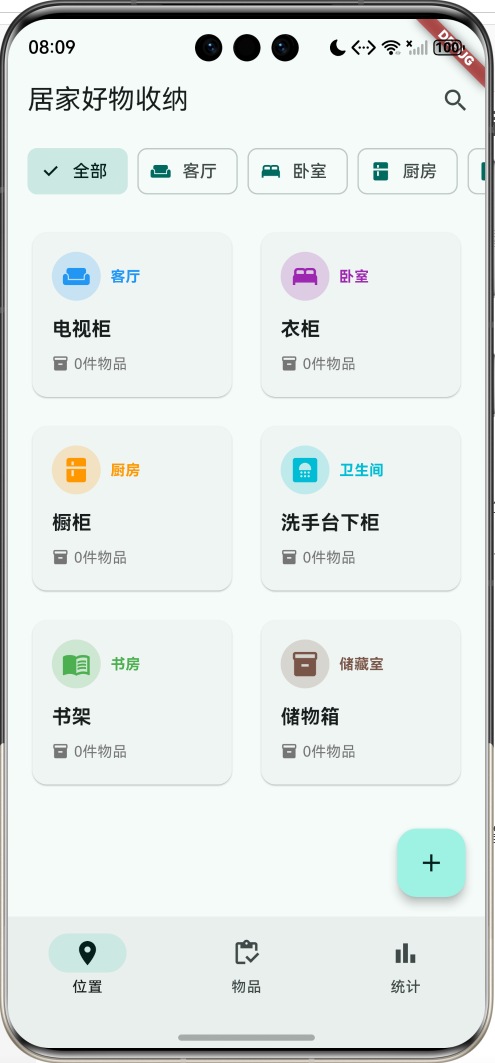
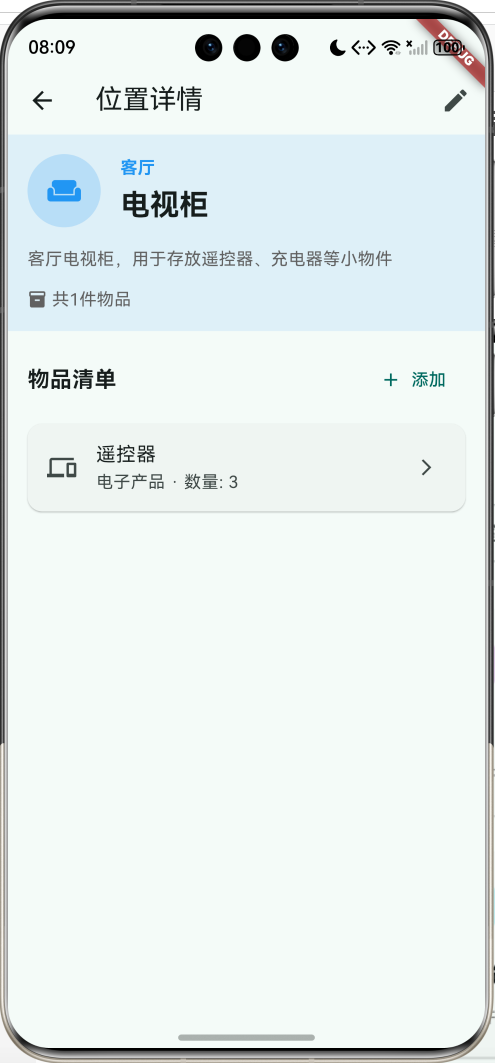
这是一个居家物品收纳管理应用,帮助用户记录和管理家中物品的存放位置。通过分类整理,让用户快速找到物品所在位置,提高生活效率。
运行效果图
主要功能
- 📍 收纳位置管理(按房间分类)
- 📦 物品清单管理(按类别分类)
- 🏠 6种房间类型(客厅、卧室、厨房、卫生间、书房、储藏室)
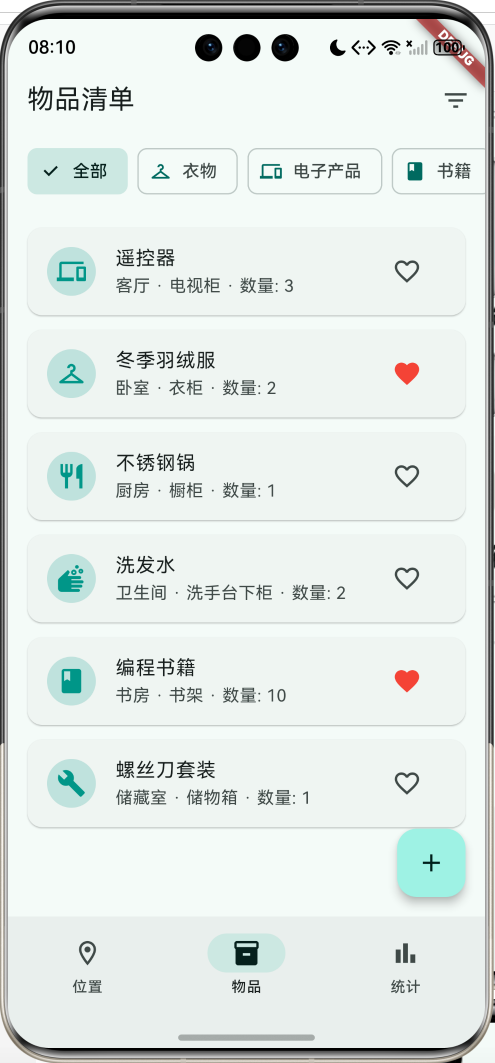
- 🏷️ 9种物品分类(衣物、电子产品、书籍、厨具、洗护用品、工具、玩具、文件、其他)
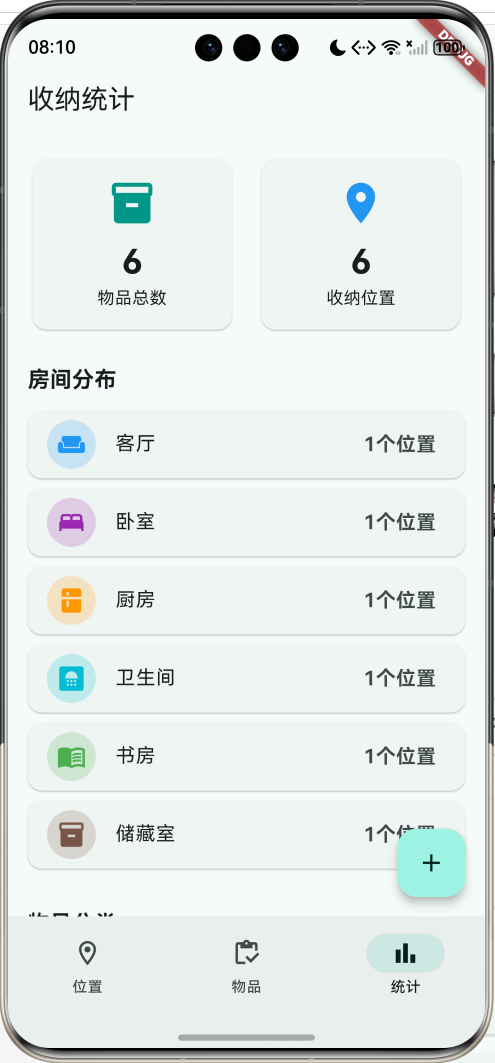
- 📊 统计分析(物品总数、位置分布)
- ⭐ 收藏功能
- 🔍 搜索和筛选
应用特色
- 分类清晰:按房间和物品类别双维度管理
- 信息全面:记录物品名称、数量、位置、备注
- 统计直观:可视化展示收纳情况
- 操作简单:快速添加和查找物品
- 界面友好:青色主题,清新舒适
数据模型设计
1. 房间类型枚举(RoomType)
dart
enum RoomType {
  livingRoom('客厅', Icons.weekend, Colors.blue),
  bedroom('卧室', Icons.bed, Colors.purple),
  kitchen('厨房', Icons.kitchen, Colors.orange),
  bathroom('卫生间', Icons.bathroom, Colors.cyan),
  study('书房', Icons.menu_book, Colors.green),
  storage('储藏室', Icons.inventory_2, Colors.brown);

  final String label;
  final IconData icon;
  final Color color;
  const RoomType(this.label, this.icon, this.color);
}
2. 物品分类枚举(ItemCategory)
dart
enum ItemCategory {
  clothing('衣物', Icons.checkroom),
  electronics('电子产品', Icons.devices),
  books('书籍', Icons.book),
  kitchenware('厨具', Icons.restaurant),
  toiletries('洗护用品', Icons.soap),
  tools('工具', Icons.build),
  toys('玩具', Icons.toys),
  documents('文件', Icons.description),
  others('其他', Icons.category);

  final String label;
  final IconData icon;
  const ItemCategory(this.label, this.icon);
}
3. 收纳位置模型(StorageLocation)
dart
class StorageLocation {
  final String id;
  final String name;
  final RoomType room;
  final String description;
  final List<StorageItem> items;

  int get itemCount => items.length;
}
4. 收纳物品模型(StorageItem)
dart
class StorageItem {
  final String id;
  final String name;
  final ItemCategory category;
  final String locationId;
  final int quantity;
  final String note;
  final DateTime addedDate;
  bool isFavorite;
}
核心功能实现
1. 位置列表展示
使用网格布局展示收纳位置。
dart
Widget _buildLocationCard(StorageLocation location) {
  return Card(
    child: InkWell(
      onTap: () => Navigator.push(...),
      child: Padding(
        padding: EdgeInsets.all(16),
        child: Column(
          children: [
            Row(
              children: [
                CircleAvatar(
                  backgroundColor: location.room.color.withOpacity(0.2),
                  child: Icon(location.room.icon, color: location.room.color),
                ),
                Text(location.room.label),
              ],
            ),
            Text(location.name),
            Row(
              children: [
                Icon(Icons.inventory_2),
                Text('${location.itemCount}件物品'),
              ],
            ),
          ],
        ),
      ),
    ),
  );
}
2. 房间筛选
用户可以按房间类型筛选位置。
dart
List<StorageLocation> get _filteredLocations {
  if (_selectedRoom == null) {
    return _locations;
  }
  return _locations.where((l) => l.room == _selectedRoom).toList();
}
3. 物品列表
展示所有物品及其存放位置。
dart
Widget _buildItemCard(StorageItem item) {
  final location = _locations.firstWhere((l) => l.id == item.locationId);

  return Card(
    child: ListTile(
      leading: CircleAvatar(
        child: Icon(item.category.icon),
      ),
      title: Text(item.name),
      subtitle: Text('${location.room.label} · ${location.name} · 数量: ${item.quantity}'),
      trailing: IconButton(
        icon: Icon(item.isFavorite ? Icons.favorite : Icons.favorite_border),
        onPressed: () => toggleFavorite(),
      ),
    ),
  );
}
4. 统计分析
展示物品总数和分布情况。
dart
// 总览卡片
Row(
  children: [
    Expanded(
      child: Card(
        child: Column(
          children: [
            Icon(Icons.inventory_2),
            Text('$totalItems'),
            Text('物品总数'),
          ],
        ),
      ),
    ),
    Expanded(
      child: Card(
        child: Column(
          children: [
            Icon(Icons.location_on),
            Text('$totalLocations'),
            Text('收纳位置'),
          ],
        ),
      ),
    ),
  ],
)
UI组件结构
整体架构
应用采用3页NavigationBar结构:
┌─────────────────────────────────┐
│       位置页(收纳位置)         │
│  ┌───────────────────────────┐  │
│  │   房间筛选栏               │  │
│  │  [全部][客厅][卧室]...    │  │
│  └───────────────────────────┘  │
│  ┌──────┐  ┌──────┐            │
│  │ 🛋️   │  │ 🛏️   │            │
│  │ 客厅  │  │ 卧室  │            │
│  │电视柜 │  │ 衣柜  │            │
│  │3件物品│  │5件物品│            │
│  └──────┘  └──────┘            │
└─────────────────────────────────┘
┌─────────────────────────────────┐
│       物品页(物品清单)         │
│  ┌───────────────────────────┐  │
│  │   分类筛选栏               │  │
│  │  [全部][衣物][电子]...    │  │
│  └───────────────────────────┘  │
│  [📱] 遥控器                   │
│       客厅·电视柜·数量:3       │
│  [👔] 冬季羽绒服         [❤️] │
│       卧室·衣柜·数量:2         │
└─────────────────────────────────┘
┌─────────────────────────────────┐
│       统计页(收纳统计)         │
│  ┌──────┐  ┌──────┐            │
│  │  📦   │  │  📍   │            │
│  │  15   │  │   6   │            │
│  │物品总数│  │收纳位置│            │
│  └──────┘  └──────┘            │
│  房间分布                       │
│  [🛋️] 客厅    2个位置          │
│  [🛏️] 卧室    1个位置          │
└─────────────────────────────────┘
功能扩展建议
1. 照片功能
为物品和位置添加照片。
dart
import 'package:image_picker/image_picker.dart';

Future<void> addPhoto() async {
  final picker = ImagePicker();
  final image = await picker.pickImage(source: ImageSource.camera);
}
2. 二维码标签
生成位置二维码,扫码查看物品。
dart
import 'package:qr_flutter/qr_flutter.dart';

Widget buildQRCode(String locationId) {
  return QrImageView(
    data: locationId,
    version: QrVersions.auto,
    size: 200.0,
  );
}
3. 提醒功能
设置物品过期提醒。
dart
class ItemReminder {
  final String itemId;
  final DateTime expiryDate;
  final bool isEnabled;
}
4. 导入导出
支持数据导入导出。
dart
import 'dart:convert';

String exportData(List<StorageLocation> locations, List<StorageItem> items) {
  return jsonEncode({
    'locations': locations.map((l) => l.toJson()).toList(),
    'items': items.map((i) => i.toJson()).toList(),
  });
}
5. 搜索功能
支持模糊搜索物品。
dart
List<StorageItem> searchItems(String query) {
  return _items.where((item) {
    return item.name.toLowerCase().contains(query.toLowerCase()) ||
           item.note.toLowerCase().contains(query.toLowerCase());
  }).toList();
}
部署指南
环境要求
- Flutter SDK: 3.0+
- Dart SDK: 3.0+
- 支持平台: Android、iOS、Web、HarmonyOS
依赖包配置
yaml
dependencies:
  flutter:
    sdk: flutter
  cupertino_icons: ^1.0.2
运行步骤
- 安装依赖
bash
flutter pub get- 运行应用
bash
flutter run- 打包发布
bash
# Android
flutter build apk --release

# iOS
flutter build ios --release

# HarmonyOS
flutter build hap --release
技术要点
1. 枚举的使用
使用增强型枚举定义房间类型和物品分类。
2. 网格布局
使用GridView展示收纳位置卡片。
3. 数据关联
通过locationId关联物品和位置。
4. 统计计算
使用where和fold方法进行数据统计。
注意事项
1. 数据持久化
- 使用本地数据库存储数据
- 定期备份数据
- 支持云端同步
2. 用户体验
- 简化添加流程
- 提供快速搜索
- 支持批量操作
3. 数据安全
- 本地加密存储
- 数据导出功能
- 隐私保护
总结
本教程介绍了居家好物收纳应用的开发过程,包括数据模型设计、核心功能实现、UI组件构建等。应用功能实用,界面清晰,是管理家居物品的好帮手。
欢迎加入开源鸿蒙跨平台社区:https://openharmonycrossplatform.csdn.net