HarmonyOS6 - 鸿蒙双向滚动课程表案例
开发环境为:
开发工具:DevEco Studio 6.0.1 Release
API版本是:API21
本文所有代码都已使用模拟器测试成功!
1. 效果
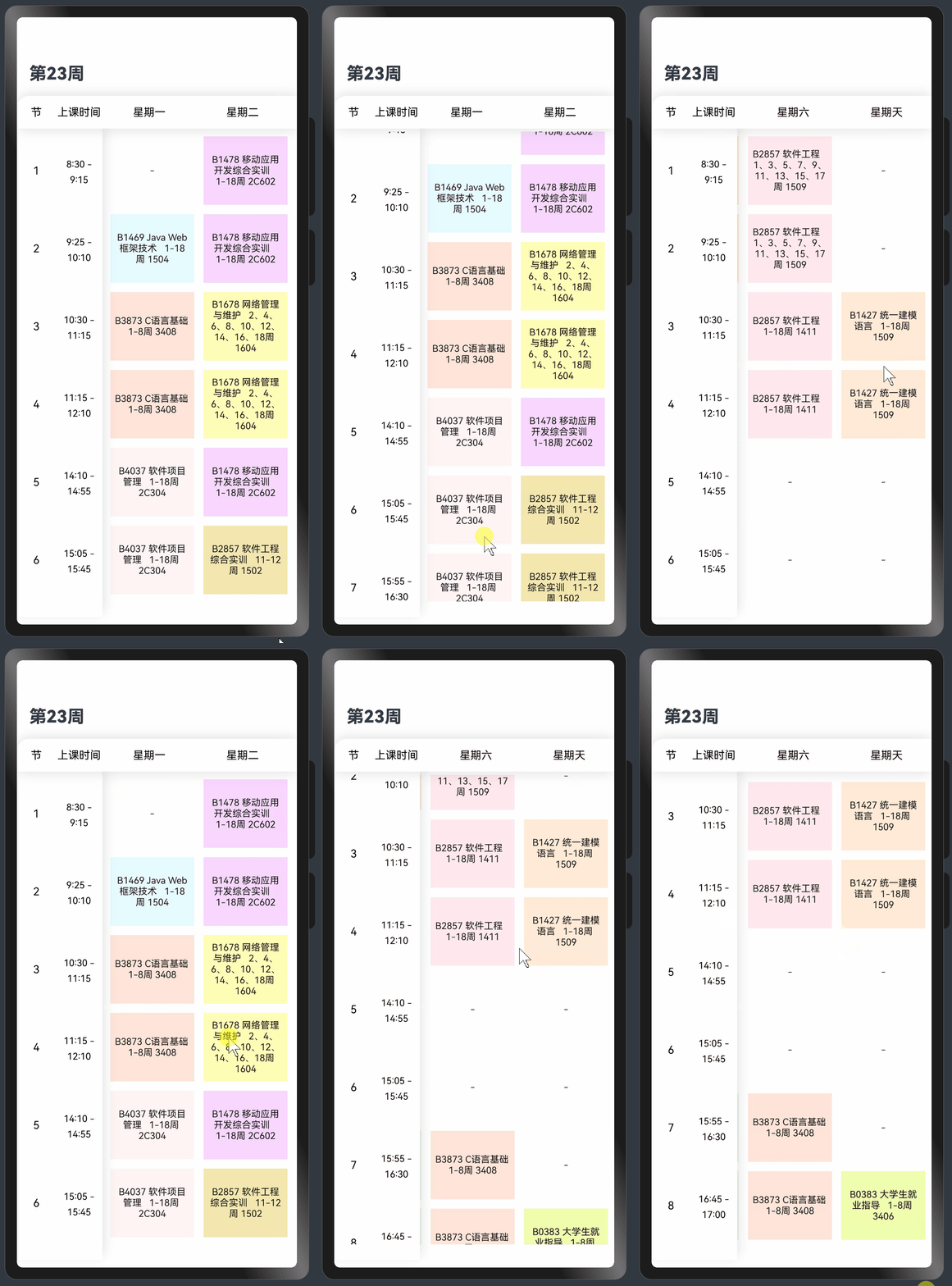
2. 分析
开发思路如下:
- 页面分为两部分,左侧展示课程表节数和上课时间,右侧展示星期数和课程数据列表。
- 右侧的课程数据使用双层
Scroll来实现数据的左右滑动。 - 为了达到滑动左侧课程表时间部分和上部星期数,对应的数据也同步滑动的效果,在
onScrollFrameBegin回调中设置列表的垂直滚动控制器和水平滚动控制器;反之同理。 - 在
onAppear函数中进行初始设置,使Scroller定位到当前星期数
3. 开发
基于以上开发思路,编码如下;
js
import { CommonModifier } from '@kit.ArkUI';

export class Course {
  public name: ResourceStr = '-'
  public backColor: ResourceColor = '#EDC7FF'

  constructor(name: ResourceStr, backgroundColor: ResourceColor) {
    this.name = name;
    this.backColor = backgroundColor;
  }
}

export const COURSE_MODEL: Course[] = [new Course('-', Color.White),
  new Course('B1478 移动应用开发综合实训   1-18周 2C602', '#EDC7FF'),
  new Course('B2857 软件工程   1、3、5、7、9、11、13、15、17周 1509', '#FFE1E8'),
  new Course('B1469 Java Web框架技术   1-18周 1504', '#E1F9FF'),
  new Course('B4037 软件项目管理   1、3、5、7、9、11、13、15、17周 2C304', '#E5F0E1'),
  new Course('B3873 C语言基础   1-8周 3408', '#FFDACC'), new Course('B0383 大学生就业指导   1-8周 3406', '#ECFC9A'),
  new Course('B2857 软件工程   1-18周 1411', '#FFE1E8'),
  new Course('B1678 网络管理与维护   2、4、6、8、10、12、14、16、18周 1604', '#FFFCA3'),
  new Course('B1678 Python入门与实践   1-18周 1510', '#FBF0FF'),
  new Course('B1427 统一建模语言   1-18周 1509', '#FFE4C7'),
  new Course('B4037 软件项目管理   1-18周 2C304', '#FFF0F0'),
  new Course('B2857 软件工程综合实训   11-12周 1502', '#ECDC96')]

let preResourceId = 0;

@Entry
@Component
struct CourseTablePage {
  @State classIndex: Array<string> = ['1', '2', '3', '4', '5', '6', '7', '8']
  @State classTime: Array<string> = ['8:30-9:15', '9:25-10:10', '10:30-11:15', '11:15-12:10',
    '14:10-14:55', '15:05-15:45', '15:55-16:30', '16:45-17:00']
  weekDay: number = new Date().getDay()
  classScroller = new Scroller();
  timeScroller = new Scroller();
  weekdaysScroller = new Scroller();
  horizontalScroller = new Scroller();
  verticalScroller = new Scroller();
  data: Course[][] = [
    [COURSE_MODEL[0], COURSE_MODEL[1], COURSE_MODEL[4], COURSE_MODEL[1],
      COURSE_MODEL[10], COURSE_MODEL[2], COURSE_MODEL[0]],
    [COURSE_MODEL[3], COURSE_MODEL[1], COURSE_MODEL[4], COURSE_MODEL[1],
      COURSE_MODEL[10], COURSE_MODEL[2], COURSE_MODEL[0]],
    [COURSE_MODEL[5], COURSE_MODEL[8], COURSE_MODEL[9], COURSE_MODEL[0],
      COURSE_MODEL[0], COURSE_MODEL[7], COURSE_MODEL[10]],
    [COURSE_MODEL[5], COURSE_MODEL[8], COURSE_MODEL[9], COURSE_MODEL[0],
      COURSE_MODEL[0], COURSE_MODEL[7], COURSE_MODEL[10]],
    [COURSE_MODEL[11], COURSE_MODEL[1], COURSE_MODEL[2], COURSE_MODEL[0],
      COURSE_MODEL[0], COURSE_MODEL[0], COURSE_MODEL[0]],
    [COURSE_MODEL[11], COURSE_MODEL[12], COURSE_MODEL[2], COURSE_MODEL[12],
      COURSE_MODEL[0], COURSE_MODEL[0], COURSE_MODEL[0]],
    [COURSE_MODEL[11], COURSE_MODEL[12], COURSE_MODEL[2], COURSE_MODEL[12],
      COURSE_MODEL[4], COURSE_MODEL[5], COURSE_MODEL[0]],
    [COURSE_MODEL[0], COURSE_MODEL[0], COURSE_MODEL[6], COURSE_MODEL[1],
      COURSE_MODEL[4], COURSE_MODEL[5], COURSE_MODEL[6]]
  ]
  arr: number[] = []
  classificationNames: Array<ResourceStr> = [
    '星期一',
    '星期二',
    '星期三',
    '星期四',
    '星期五',
    '星期六',
    '星期天']
  @State currentIndex: number = 2;
  @State tabBarModifier: CommonModifier = new CommonModifier();

  aboutToAppear() {
    for (let index = 0; index < this.classIndex.length; index++) {
      this.arr.push(index)
    }
    this.tabBarModifier.alignRules({})
  }

  @Builder
  itemBuilder(msg: ResourceStr, curHeight: Length = 100, curWidth: Length = 120,
    curBackgroundColor: ResourceColor = Color.White, curFontColor: ResourceColor = Color.Black) {
    Row() {
      Column() {
        Stack() {
          Column() {
          }
          .backgroundColor(curBackgroundColor)
          .width('100%')
          .height('100%')
          .opacity(0.7)

          Text(msg)
            .fontSize(12)
            .fontWeight(400)
            .textAlign(TextAlign.Center)
            .fontColor(curFontColor)
            .opacity(0.9)
            .width('100%')
            .height('100%')
            .padding(6)
        }
      }
      .padding(6)
      .justifyContent(FlexAlign.Center)
      .width(curWidth)
      .height(curHeight)
      .backgroundColor(Color.White)
    }
  }

  @Builder
  tabBuilder(title: string, targetIndex: number, selectedImg: Resource, normalImg: Resource) {
    Column() {
      Image(this.currentIndex === targetIndex ? selectedImg : normalImg)
        .size({ width: 25, height: 25 })
      Text(title)
        .fontColor(this.currentIndex === targetIndex ? '#0A59F7' : '#60000000')
        .fontSize(10)
        .fontWeight(500)
        .margin({ top: 4 })
    }
    .height('100%')
    .margin({ top: 8 })
    .width('auto')
    .alignItems(HorizontalAlign.Center)
  }

  build() {
    Column() {
      Column() {
        Row() {
          Text('第23周')
            .fontSize(22)
            .fontWeight(800)
            .lineHeight(27)
        }
        .margin({ left: 32, bottom: 8, top: 12 })
        .height(42)
        .width('100%')
        .justifyContent(FlexAlign.Start)

        Column() {
          Row() {
            Column() {
              Text('节')
                .fontSize(14)
                .fontWeight(400)
                .textAlign(TextAlign.Center)
                .fontColor(Color.Black)
                .width('100%')
                .height('100%')
            }
            .justifyContent(FlexAlign.Center)
            .width(50)
            .height(42)

            Column() {
              Text('上课时间')
                .fontSize(14)
                .fontWeight(400)
                .textAlign(TextAlign.Center)
                .fontColor(Color.Black)
                .width('100%')
                .height('100%')
            }
            .justifyContent(FlexAlign.Center)
            .width(60)
            .height(42)

            Column() {
              Scroll(this.weekdaysScroller) {
                List() {
                  ForEach(this.classificationNames, (item: Resource, index: number) => {
                    ListItem() {
                      Row() {
                        Column() {
                          Text(item)
                            .fontSize(14)
                            .fontWeight(400)
                            .textAlign(TextAlign.Center)
                            .fontColor(Color.Black)
                            .width('100%')
                        }
                        .padding(4)
                        .justifyContent(FlexAlign.Center)
                        .width(120)
                        .height(42)
                        .backgroundColor(Color.White)
                      }
                    }
                  }, (item: string) => item + new Date().toString())
                }
                .listDirection(Axis.Horizontal)
                .edgeEffect(EdgeEffect.None)
              }
              .scrollable(ScrollDirection.Horizontal)
              .scrollBar(BarState.Off)
              .height(42)
              .onScrollFrameBegin((offset: number) => {
                this.horizontalScroller.scrollBy(offset, 0);
                return { offsetRemain: offset };
              })
            }
            .width('70%')
          }
          .width('100%')
          .position({ x: 0, y: 0 })
          .backgroundColor(Color.White)
          .borderRadius({ topLeft: 16 })
          .shadow({ radius: 50, color: '#25000000' })
          .zIndex(10)


          Row() {
            Column() {
              Scroll(this.classScroller) {
                Column() {
                  List({ space: 0, initialIndex: 0 }) {
                    ForEach(this.classIndex, (item: string, index: number) => {
                      ListItem() {
                        Row() {
                          Column() {
                            Text(item)
                              .fontSize(14)
                              .fontWeight(400)
                              .textAlign(TextAlign.Center)
                              .fontColor(Color.Black)
                              .width('100%')
                          }
                          .padding(4)
                          .justifyContent(FlexAlign.Center)
                          .width(50)
                          .height(100)
                          .backgroundColor(Color.White)
                        }
                      }
                    }, (item: string) => JSON.stringify(item))
                  }
                  .listDirection(Axis.Vertical)
                  .edgeEffect(EdgeEffect.None) // 滑动到边缘无效果
                }
              }
              .position({ x: 0, y: 0 })
              .width(50)
              .backgroundColor('#F8F8FF')
              .scrollBar(BarState.Off)
              .onScrollFrameBegin((offset: number) => {
                this.verticalScroller.scrollBy(0, offset);
                this.timeScroller.scrollBy(0, offset);
                return { offsetRemain: offset };
              })

              Scroll(this.timeScroller) {
                Column() {
                  List({ space: 0, initialIndex: 0 }) {
                    ForEach(this.classTime, (item: string, index: number) => {
                      ListItem() {
                        Row() {
                          Column() {
                            Text(item.split('-')[0] + ' -')
                              .fontSize(12)
                              .textAlign(TextAlign.Center)
                              .fontColor(Color.Black)
                              .width('100%')
                              .height('50%')
                              .align(Alignment.Bottom)
                              .lineHeight(20)
                            Text(item.split('-')[1])
                              .fontSize(12)
                              .textAlign(TextAlign.Center)
                              .fontColor(Color.Black)
                              .width('100%')
                              .height('50%')
                              .align(Alignment.Top)
                              .lineHeight(20)
                          }
                          .padding(4)
                          .justifyContent(FlexAlign.Center)
                          .width(60)
                          .height(100)
                          .backgroundColor(Color.White)
                        }
                      }
                    }, (item: string) => JSON.stringify(item))
                  }
                  .listDirection(Axis.Vertical)
                  .edgeEffect(EdgeEffect.None)
                }
              }
              .position({ x: 50, y: 0 })
              .width(60)
              .backgroundColor('#F8F8FF')
              .scrollBar(BarState.Off)
              .onScrollFrameBegin((offset: number) => {
                this.verticalScroller.scrollBy(0, offset);
                this.classScroller.scrollBy(0, offset);
                return { offsetRemain: offset };
              })
            }
            .width(110)
            .height('100%')
            .backgroundColor(Color.White)
            .shadow({ radius: 45, color: '#25000000', offsetY: -15 })
            .padding({ top: 4, bottom: 20 })

            Column() {
              Scroll(this.horizontalScroller) {
                Scroll(this.verticalScroller) {
                  Column() {
                    ForEach(this.arr, (_temp: number, index: number) => {
                      Row() {
                        ForEach(this.data[this.arr[_temp]], (item: Course) => {
                          this.itemBuilder(item.name, 100, 120, item.backColor, Color.Black)
                        }, (item: Course) => getResourceID().toString())
                      }
                    }, (_temp: number) => _temp + new Date().toString())
                  }
                }
                .scrollBar(BarState.Off)
                .scrollable(ScrollDirection.Vertical)
                .height('100%')
                .width(this.classificationNames.length * 120)
                .onScrollFrameBegin((offset: number) => {
                  this.classScroller.scrollBy(0, offset);
                  this.timeScroller.scrollBy(0, offset)
                  return { offsetRemain: offset };
                })
              }
              .padding({
                top: 4,
                left: 4,
                right: 4,
                bottom: 20
              })
              .scrollBar(BarState.Off)
              .scrollable(ScrollDirection.Horizontal)
              .onScrollFrameBegin((offset: number) => {
                this.weekdaysScroller.scrollBy(offset, 0);
                return { offsetRemain: offset };
              })
            }
            .zIndex(-100)
            .width('70%')
          }
          .position({ x: 0, y: 42 })
          .width('100%')
          .height('100%')
          .backgroundColor(Color.White)
        }
        .height('88%')
        .onAppear(() => {
          if (this.weekDay > 1) {
            this.weekdaysScroller.scrollTo({ xOffset: (this.weekDay - 1) * 120, yOffset: 0 })
            this.horizontalScroller.scrollTo({ xOffset: (this.weekDay - 1) * 120, yOffset: 0 })
          }
        })
        .width('100%')

      }
      .height('100%')
    }
    .width('100%')
    .height('100%')
  }
}

function getResourceID(): string {
  preResourceId++;
  return preResourceId.toString()
}
页面拷贝过去直接可以使用预览器观看效果
最后
- 希望本文对你有所帮助!
- 本人如有任何错误或不当之处,请留言指出,谢谢!