1、引入css样式
2、把你要想实现的文本框或者其他地方加上onMouseOver="showtitle('merchantname',5,',')"
onMouseOut="hidetitle('merchantname')"
3最后加上js实现方式就能实现鼠标悬浮提示了
html
<style>
		.search-item-title-box {
			width: 62px;
		}
		/* 新增工具提示样式 - 这是关键修复 */
		.custom-tooltip {
			position: fixed;
			background: #333;
			color: white;
			padding: 8px 12px;
			border-radius: 4px;
			font-size: 12px;
			z-index: 9999;
			max-width: 300px;
			word-wrap: break-word;
			box-shadow: 0 2px 10px rgba(0,0,0,0.2);
		}
	</style>
html
<!--文本框-->
	<span class="group"> <label>[[#{merchant.name}]]:</label>
			<input type="hidden" id="eliminate" name="eliminate" th:value="1" /
			<input type="text" id="merchantname" readonly="readonly"  class="form-control" 			onMouseOver="showtitle('merchantname',5,',')"
onMouseOut="hidetitle('merchantname')">
			<input type="hidden" id="merchantno"  name="merchantids" >
			<input type="hidden" id="merchantnos"  name="merchantnos" readonly="readonly"  class="form-control"/>
	</span>
html
<script>
	// 显示工具提示的函数
	function showtitle(elementId, maxLength, separator) {
		const element = document.getElementById(elementId);
		const text = element.value;

		if (text && text.length > maxLength) {
			// 清除可能存在的旧提示框
			hidetitle(elementId);

			// 创建悬浮提示框
			const tooltip = document.createElement('div');
			tooltip.id = 'tooltip_' + elementId;
			tooltip.className = 'custom-tooltip';
			tooltip.innerHTML = text;

			// 获取元素位置
			const rect = element.getBoundingClientRect();
			const scrollTop = window.pageYOffset || document.documentElement.scrollTop;
			const scrollLeft = window.pageXOffset || document.documentElement.scrollLeft;

			// 设置提示框位置
			tooltip.style.left = (rect.left + scrollLeft) + 'px';
			tooltip.style.top = (rect.bottom + scrollTop + 5) + 'px';

			// 添加到页面
			document.body.appendChild(tooltip);
		}
	}

	// 隐藏工具提示的函数
	function hidetitle(elementId) {
		const tooltip = document.getElementById('tooltip_' + elementId);
		if (tooltip) {
			tooltip.parentNode.removeChild(tooltip);
		}
	}
</script>
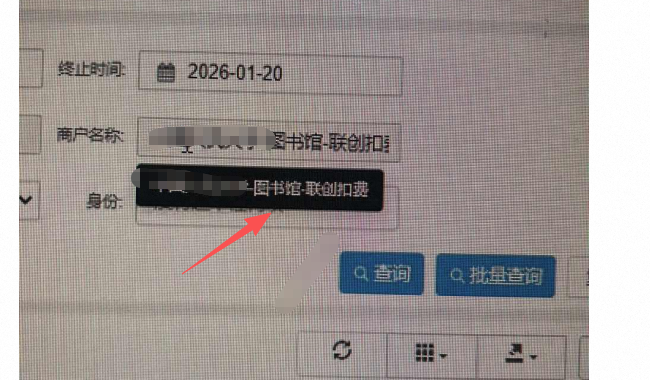
实现效果