wikijs,号称最强大的可扩展开源Wiki软件!
官网:Wiki.js
源码:requarks/wiki: Wiki.js | A modern and powerful wiki app built on Node.js
已经自己用wikijs架设wiki网站,参见:https://skywalk.blog.csdn.net/article/details/156799379 现在来导入数据。
咨询一下AI
想直接启动一个"有内容"的 Wiki.js 网站,可以怎么做?
你可以在下面几条里选一条或组合使用:
- 用第三方 Demo/现有实例,导出数据库,自己还原;
- 使用 MediaWiki Dump +
mw2wikijs迁移工具,把现有 Wiki 内容批量导入 Wiki.js; - 写一个简单脚本,调用 Wiki.js 的 GraphQL API,按你设计好的目录结构自动生成一套初始页面,然后备份这份数据库,后续当模板反复使用。
如果你想一上来就有大量真实百科类内容,可以走这条路:
-
拿到 MediaWiki 的 Dump
- 比如维基百科的公开 Dump(XML 格式),在 Wikimedia Dumps 站点可以下载各种语言版本(
*-pages-articles*.xml.bz2)。
- 比如维基百科的公开 Dump(XML 格式),在 Wikimedia Dumps 站点可以下载各种语言版本(
-
用迁移工具导入到 Wiki.js
- 有一个社区工具:mw2wikijs,专门干这件事:把 MediaWiki 的 XML Dump 转成 Wiki.js 的页面并通过 GraphQL API 导入。2
- 典型用法(简化描述):
- 准备好 MediaWiki 的 XML Dump;
- 配好 Wiki.js 的 GraphQL URL + API Token;
- 跑 Docker 命令,把 Dump 里的条目批量创建成 Wiki.js 的页面。
-
效果
- 迁移完成后,你的 Wiki.js 里会立刻出现大量页面(条目、文件等),内容是真实的百科条目;
- 对于"我想一上来就有很多内容"的需求,这个方案最接近你问的「现成数据库」。
尝试
登录这个网址Kiwix Library,下载。搜索wiki,发现有好多啊,选择了一个中文全但不带图片的库,1.6G左右。又选了一个134M的计算机相关库。
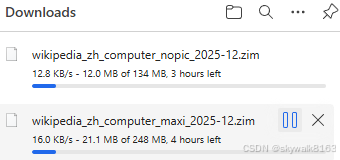
- ZIM 是 Kiwix 专用的压缩文件格式,包含完整的数据库内容
- 文件大小从几 GB 到几十 GB 不等,取决于版本
下载速度很慢,为了下载,安装了bitcomet
BitComet电脑版下载官方2026最新版_BitComet电脑版官方免费下载_华军软件园
先下这三个试试:

解压zim
安装zip
sudo apt update
sudo apt install libzim-dev zim-tools
解压
zimdump dump --dir=wiki_phy wikipedia_zh_physics_mini_2025-12.zim导入
wikijs支持git导入,即将wiki网站先git push上去,然后再wikijs的控制台中,选存储-git,然后设定好git相关信息,进行导入。
设置git全局变量
git config --global user.name "skywalk163"
git config --global user.email "793475801@qq.com"
推送现有文件
cd wiki_phy
git init
git remote add origin https://gitcode.com/skywalk163/wiki_phy.git
git add .
git commit -m "Initial commit"
git branch -m main
git push -u origin main
将wiki放入git
- 登录 Wiki.js 后台 → 左侧菜单 Storage(存储) → 勾选 Git。
- 进入 Git 标签页,按官方说明填写配置项:1
- Authentication Type:
ssh - Repository URI:你的 Git 仓库 SSH 地址
- Branch:
main(或你实际用的分支) - SSH Private Key Path:Wiki.js 服务器上保存的私钥路径
- Local Repository Path:默认
./data/repo即可 - Sync Direction:Bi-directional
- Authentication Type:
- 保存,等状态栏变成绿色(表示本地已成功克隆远程仓库)。
我们来一步步实践一下
重构导入
先创建一个wikijs的repo,clone官方的:
bash
# 先在gitcode创建一个空项目,叫wikijs,然后clone下来
git clone https://gitcode.com/skywalk163/wikijs
# 下载官方的wiki源代码,比如下载到~/github/wiki目录
git clone https://github.com/Requarks/wiki
# 然后cp到~/work/wikijs/目录
cd ~/github/wiki
cp -rf * ~/work/wikijs/

# 第一次push
git add .
git commit -m "first"
git push gitcode main
git remote add gitcode https://gitcode.com/skywalk163/wikijs
git branch -m main
git push gitcode main

# 把下载wiki 物理学相关文档下载下来,用zim解压到~/download/zim/wiki_phy 目录
# 然后cp到wikijs目录下
cp -rf ~/download/zim/wiki_phy  ~/work/wikijs/.

# 第二次push
git add .
git commit -m "add wiki_phy"
git push gitcode main
yarn安装和启动
bash
yarn修改配置
bash
cp config.sample.yml config.ymltype: sqlite
storage: database.sqlite
database.sqlite
启动
启动前cp个文件,因为前面cp的时候没有把.开头的文件cp过来。
bash
cp ~/github/wiki/.babelrc .
bash
CHOKIDAR_USEPOLLING=1 yarn dev现在wiki并没有进去。
看来还是需要改成html格式才行
修改成html格式
咨询:我的源文件是zim格式的wiki数据文件,想让wikijs导入,是不是先要wikidump成html,然后转为md文件,最后让wifijs导入?
**服务端工具(高级用户)**
如果您需要在服务器上提供 Kiwix 内容,可以使用以下工具:
- kiwix-tools:命令行工具集,包含 kiwix-serve 和 kiwix-manage(C++ 开发,758 星,126 分支)
- libkiwix:所有 Kiwix 端口的通用代码库(C++ 开发,170 星,76 分支)
windows工具源码:kiwix/kiwix-desktop: Kiwix for Windows and GNU/Linux desktops
Linux下更简单,Ubuntu里有kiwix的apt包,直接安装即可,安装和假设kiwix 的wiki网站参见:
https://skywalk.blog.csdn.net/article/details/156838127
最核心的就是这条命令:
kiwix-serve --port=8080 wikipedia_zh_physics_mini_2025-12.zim总结
目前还没有导入成功,怎是先用这个救急:https://skywalk.blog.csdn.net/article/details/156838127
调试
在导入存储的时候wiki.js报错退出:
--- Gracefully stopping server...
--- Purging node modules cache...
--- Unregistering process listeners...
node:fs:440
return binding.readFileUtf8(path, stringToFlags(options.flag));
^
Error: ENOENT: no such file or directory, open '/home/skywalk/work/wiki/server/index.js'
at Object.readFileSync (node:fs:440:20)
at defaultLoadImpl (node:internal/modules/cjs/loader:1139:17)
at loadSource (node:internal/modules/cjs/loader:1788:20)
at Object..js (node:internal/modules/cjs/loader:1886:44)
at Module.load (node:internal/modules/cjs/loader:1481:32)
at Module._load (node:internal/modules/cjs/loader:1300:12)
at TracingChannel.traceSync (node:diagnostics_channel:328:14)
at wrapModuleLoad (node:internal/modules/cjs/loader:245:24)
at Module.require (node:internal/modules/cjs/loader:1504:12)
at require (node:internal/modules/helpers:152:16)
at Object.reload (/home/skywalk/work/wiki/dev/index.js:84:5) {
errno: -2,
code: 'ENOENT',
syscall: 'open',
path: '/home/skywalk/work/wiki/server/index.js'
}
Node.js v24.12.0
error Command failed with exit code 1.
info Visit https://yarnpkg.com/en/docs/cli/run for documentation about this command.
ls看一下,确实没有 '/home/skywalk/work/wiki/server/index.js'
ls -la /home/skywalk/work/wiki/server/原来需要项目最终的编译,项目修改完毕,进行编译
yarn build但是报错了
yarn build报错
CHOKIDAR_USEPOLLING=1 yarn run build
yarn run v1.22.22
error Command "build" not found.
info Visit https://yarnpkg.com/en/docs/cli/run for documentation about this command.
我有点明白了,应该是因为我网站还在运行的缘故。
也不是,刷新一下网页,发现网站挂了,应该是没在启动中。
惨了,发现yarn run dev启动也失败了
看到有这个提示:
yarn
yarn install v1.22.22
warning package-lock.json found. Your project contains lock files generated by tools other than Yarn. It is advised not to mix package managers in order to avoid resolution inconsistencies caused by unsynchronized lock files. To clear this warning, remove package-lock.json.
1/4 Resolving packages...
success Already up-to-date.
Done in 0.24s.
是不是有lock问价你的缘故?
我明白了,是git把内容冲了!
怪不得要双向!你看,git的时候它报错了:
~/work/wiki$ git pull
warning: redirecting to https://gitcode.com/skywalk163/wiki_phy.git/
You are not currently on a branch.
Please specify which branch you want to merge with.
See git-pull(1) for details.
git pull <remote> <branch>
我的天啊,看着好复杂啊
git pull https://github.com/Requarks/wiki main
From https://github.com/Requarks/wiki
 * branch              main       -> FETCH_HEAD
hint: You have divergent branches and need to specify how to reconcile them.
hint: You can do so by running one of the following commands sometime before
hint: your next pull:
hint:
hint:   git config pull.rebase false  # merge (the default strategy)
hint:   git config pull.rebase true   # rebase
hint:   git config pull.ff only       # fast-forward only
hint:
hint: You can replace "git config" with "git config --global" to set a default
hint: preference for all repositories. You can also pass --rebase, --no-rebase,
hint: or --ff-only on the command line to override the configured default per
hint: invocation.
fatal: Need to specify how to reconcile divergent branches.
要重新考虑gitcode里面的代码目录了。
cp ~/github/wiki/.babelrc .