一、需求背景
在日常数据处理中,经常会遇到如下场景:
- CSV 文件被 打包在 ZIP 压缩包中
- ZIP 可能 设置了密码
- CSV 文件 编码不统一(UTF-8 / GBK / GB2312)
- 希望 批量转换为 Excel(.xlsx)
- 给普通用户使用,最好有 图形界面 + 进度条
本文将使用 Python + Tkinter 实现一个 桌面工具,完成:
✅ 选择 ZIP 文件
✅ 支持输入 ZIP 密码
✅ 自动识别 CSV 编码
✅ CSV 转 Excel(全部转为文本格式)
✅ 显示转换进度条
二、功能说明
程序主要包含以下模块:
| 模块 | 功能 |
|---|---|
| tkinter | 图形界面 |
| zipfile | 解压 ZIP |
| chardet | CSV 编码识别 |
| pandas | CSV 解析 |
| openpyxl | Excel 处理 |
| ttk.Progressbar | 进度条 |
三、完整代码实现
📌 直接复制即可运行(Python ≥ 3.8)
python
import csv
import tkinter as tk
from tkinter.ttk import Progressbar
from tqdm import tqdm
import pandas as pd
import io
import chardet
import openpyxl
import zipfile
from tkinter import simpledialog, filedialog, messagebox
import threading
import tempfile

def has_password(zip_file_path):
    try:
        with zipfile.ZipFile(zip_file_path, 'r') as zip_ref:

            for file_name in zip_ref.namelist():
               if zip_ref.getinfo(file_name).flag_bits & 0x1:  # 判断是否需要密码
                  return True
               else:
                   return False
    except RuntimeError:
        return False
def check_password(zip_path, password):
    with zipfile.ZipFile(zip_path, 'r') as zip_ref:
        try:
            zip_ref.setpassword(password.encode('utf-8'))
            return zip_ref.testzip() is None
        except RuntimeError:
            return False
def read_csv_from_zip(zip_path, password):
    output_file = filedialog.asksaveasfilename(filetypes=[('Excel文件', '*.xlsx')])
    xlsx_file_path = output_file+".xlsx"
    process_button.config(state="disabled")
    process_button.config(text="正在处理中...")
    with zipfile.ZipFile(zip_path, 'r') as zip_ref:
        zip_ref.setpassword(password.encode('utf-8'))
        file_list = zip_ref.namelist()
        for file_name in file_list:
            if zip_ref.getinfo(file_name).flag_bits & 0x1:  # 判断是否需要密码
                if not password:
                    messagebox.showerror("错误", "压缩文件需要密码,请输入密码")
                    return
            with zip_ref.open(file_name, 'r') as file:
                content = file.read()

                # 使用 chardet 自动检测文件编码方式
                detected_encoding = chardet.detect(content)['encoding'].lower()
                if detected_encoding == "gb2312":
                    detected_encoding = "gbk"
                else:
                    detected_encoding = detected_encoding

                csvreader = io.TextIOWrapper(io.BytesIO(content), encoding=detected_encoding)
                total_rows = sum(1 for row in csvreader)
                #print(total_rows)
                csvreader.seek(0)  # Reset the file pointer to the beginning
                progress_bar.pack()
                progress_label.pack()
                progress_bar["maximum"] = total_rows  # Set the maximum value for progress bar
                #workbook = openpyxl.Workbook()
                #sheet = workbook.active
                data = []  # To store CSV data
                for i, row in enumerate(csvreader):
                    # Replace this with your actual processing logic
                    # For demonstration purposes, we'll just print the rows
                    data.append(row)
                    progress_bar["value"] = i + 1  # Update the progress bar
                    progress_label.config(text=f"Progress: {i+1}/{total_rows}")  # Update progress label
                    root.update_idletasks()  # Force the GUI to update
                    #text_row = [str(cell) for cell in row]
                    #print(text_row)
                    #sheet.append(text_row)
                #workbook.save(xlsx_file_path)
                df = pd.DataFrame(data, dtype='str')
                output_file = output_file+".xlsx"
                df.to_excel(output_file, index=False)
                #progress_label.pack_forget()
                #progress_bar.pack_forget()
                #root.update_idletasks()
                process_button.config(text=f"保存成功")
                #root.update_idletasks()
                process_button.config(state="normal",text="开始处理")
                messagebox.showinfo("保存成功", f"CVS修复成功:{output_file}")
                #progress_label.pack_forget()
                #progress_bar.pack_forget()
                root.update_idletasks()
def browse_zip_file():
    global zip_file_path_entry, password_entry

    file_path = filedialog.askopenfilename(filetypes=[("Zip文件", "*.zip")])
    if file_path:
        zip_file_path_entry.delete(0, tk.END)
        zip_file_path_entry.insert(tk.END, file_path)
def process_files():
    zip_path = zip_file_path_entry.get()
    password = password_entry.get()
    if password and not check_password(zip_path, password):
        messagebox.showerror("错误", "压缩文件密码不正确")
        return  False
    root.update_idletasks()
    try:
        def process_zip():
            try:
                read_csv_from_zip(zip_path, password)
                messagebox.showinfo("Success", "处理完成")
            except Exception as e:
                messagebox.showerror("Error", f"处理失败: {e}")
        thread = threading.Thread(target=process_zip)
        thread.start()
    except Exception as e:
        status_label.config(text=str(e))
# Create the main application window
root = tk.Tk()
root.title("CSV修复工具")
root.geometry("650x430")

# Create a button to select the CSV file

# Create the progress bar in determinate mode


# 创建主窗口

# 设置图标文件路径
# icon_file = "logo.ico"  # 替换为你的图标文件路径
# # 更改窗口图标
# root.iconbitmap(icon_file)
# 添加 Logo
logo_image = tk.PhotoImage(file="logo.png")
logo_label = tk.Label(root, image=logo_image)
logo_label.pack(pady=10)
# 创建控件
frame1 = tk.Frame(root)
frame1.pack(pady=10)

zip_file_path_label = tk.Label(frame1, text="文件路径:",font=("微软雅黑", 12))
zip_file_path_label.grid(row=0, column=0)

zip_file_path_entry = tk.Entry(frame1, width=24,font=("微软雅黑", 12))
zip_file_path_entry.grid(row=0, column=1)

zip_file_path_button = tk.Button(frame1, text="浏 览", command=browse_zip_file,font=("微软雅黑", 12))
zip_file_path_button.grid(row=0, column=2)

frame2 = tk.Frame(root)
frame2.pack()
password_label = tk.Label(frame2, text="解压密码:",font=("微软雅黑", 12))
password_label.grid(row=0, column=0)

password_entry = tk.Entry(frame2, width=30, show='*',font=("微软雅黑", 12))
password_entry.grid(row=0, column=1)
process_button = tk.Button(root, text="开始处理", command=process_files,font=("微软雅黑", 12))
process_button.pack(pady=10)
progress_bar = Progressbar(root, orient="horizontal", length=300, mode="determinate")
progress_bar.pack(pady=10)
progress_bar.pack_forget()
# Create a label to show progress information
progress_label = tk.Label(root, text="Progress: 0/0",font=("微软雅黑", 12))
progress_label.pack(pady=5)
progress_label.pack_forget()
status_label = tk.Label(root, text="", fg="red")
status_label.pack()
author_name = "michah"
author_phone = "180xxxxxxxxx"
author_department = "xxxx部门"
#author_info_label = tk.Label(root, text=f"开发者姓名:{author_name}\n\n联系方式:{author_phone}\n\n所属部门:{author_department}", font=("Helvetica", 12), justify="left")
#author_info_label.pack(side="bottom", padx=10, pady=10)
copyright_label = tk.Label(root, text="© 2023 michah  All rights reserved.", font=("微软雅黑", 10))
copyright_label.pack(side="bottom", padx=15, pady=5)
development_date_label = tk.Label(root, text="开发者:michah 手机号码:180xxxxxxxxx 所属部门:xxxx部门 版本号:v0.1 开发日期:2023年8月6日", font=("微软雅黑", 10))
development_date_label.pack(side="bottom", padx=10, pady=5)
# 运行主循环
root.mainloop()
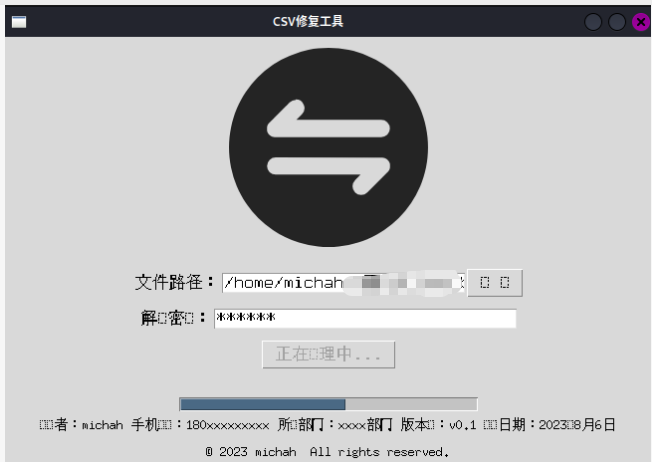
linux字体不全 界面估参考 (windows正常)
四、关键代码解析
1️⃣ ZIP 加密文件判断
python
zip_ref.getinfo(file_name).flag_bits & 0x1flag_bits的 最低位为 1 表示加密文件- 没输入密码直接抛异常,避免读取失败
2️⃣ CSV 编码自动识别
python
detected_encoding = chardet.detect(content)['encoding']并对常见问题做兼容处理:
python
if detected_encoding == "gb2312":
    detected_encoding = "gbk"
避免 pandas 读取失败。
3️⃣ CSV → Excel(全部转文本)
python
new_sheet.append([str(cell) if cell is not None else "" for cell in row])✔ 防止 Excel 自动科学计数
✔ 保证身份证 / 银行卡号不丢失
4️⃣ 进度条更新逻辑
python
progress = int(processed_files / total_files * 100)
progress_var.set(progress)- 按 文件数 计算进度
- 简单直观,适合 GUI 场景
五、运行效果
程序界面包含:
- ZIP 密码输入框
- 文件选择按钮
- 实时更新的进度条
非常适合 内部工具 / 运维 / 财务 / 数据人员 使用。