深度详解Spring Context
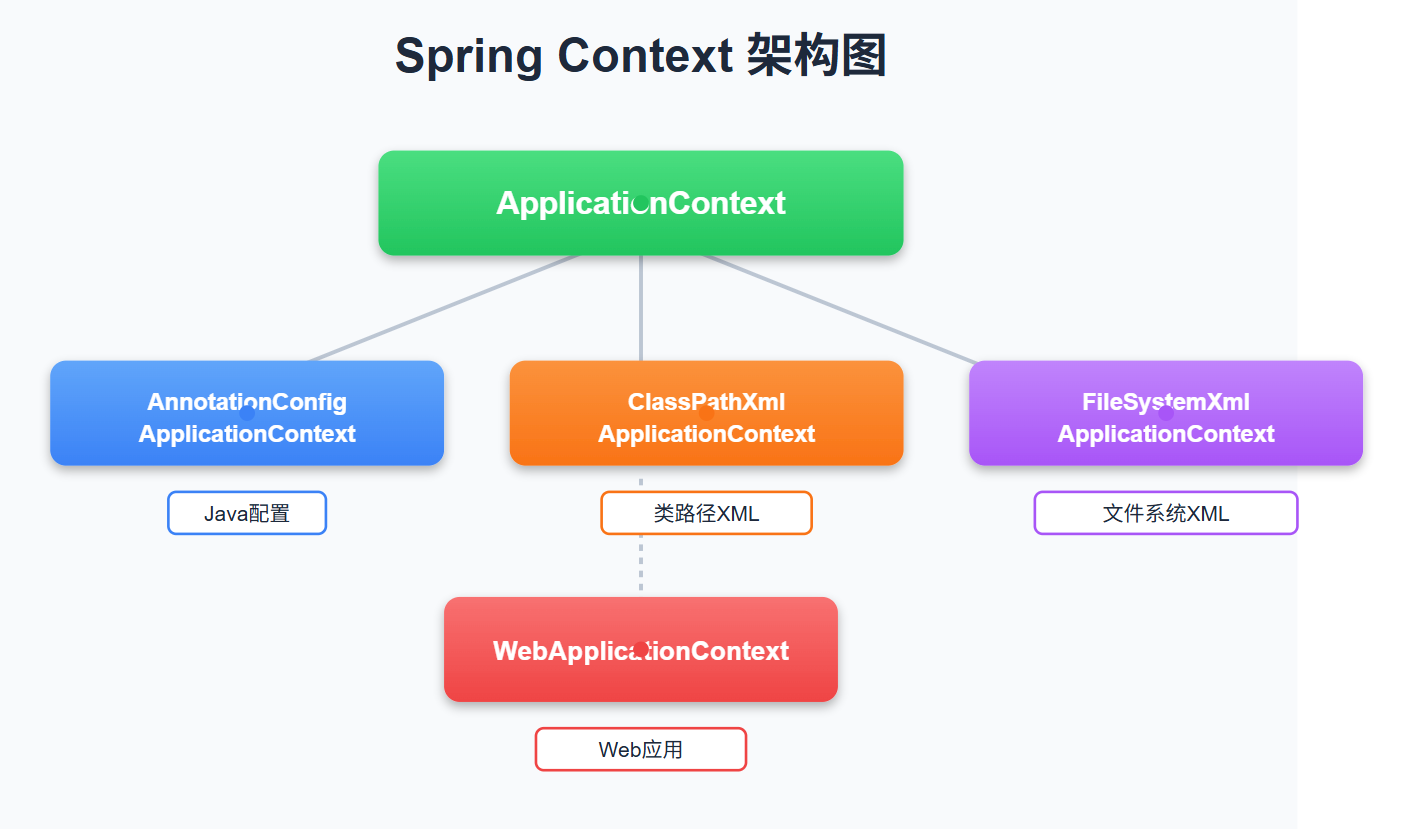
每个Spring开发者都离不开Context,但你真的了解它吗?
引言:Spring Context 的核心地位
Spring Context作为Spring框架的核心组件,是IoC容器的具体实现。它就像一个巨大的工厂,负责管理所有的Bean对象,控制它们的生命周期,并解决它们之间的依赖关系。
什么是Spring Context?
Spring Context是Spring框架的核心容器,它继承自BeanFactory接口,但在其基础上增加了企业级应用所需的功能:
- 国际化支持
- 事件传播机制
- 资源加载
- AOP集成
- 事务管理
四大ApplicationContext全解析
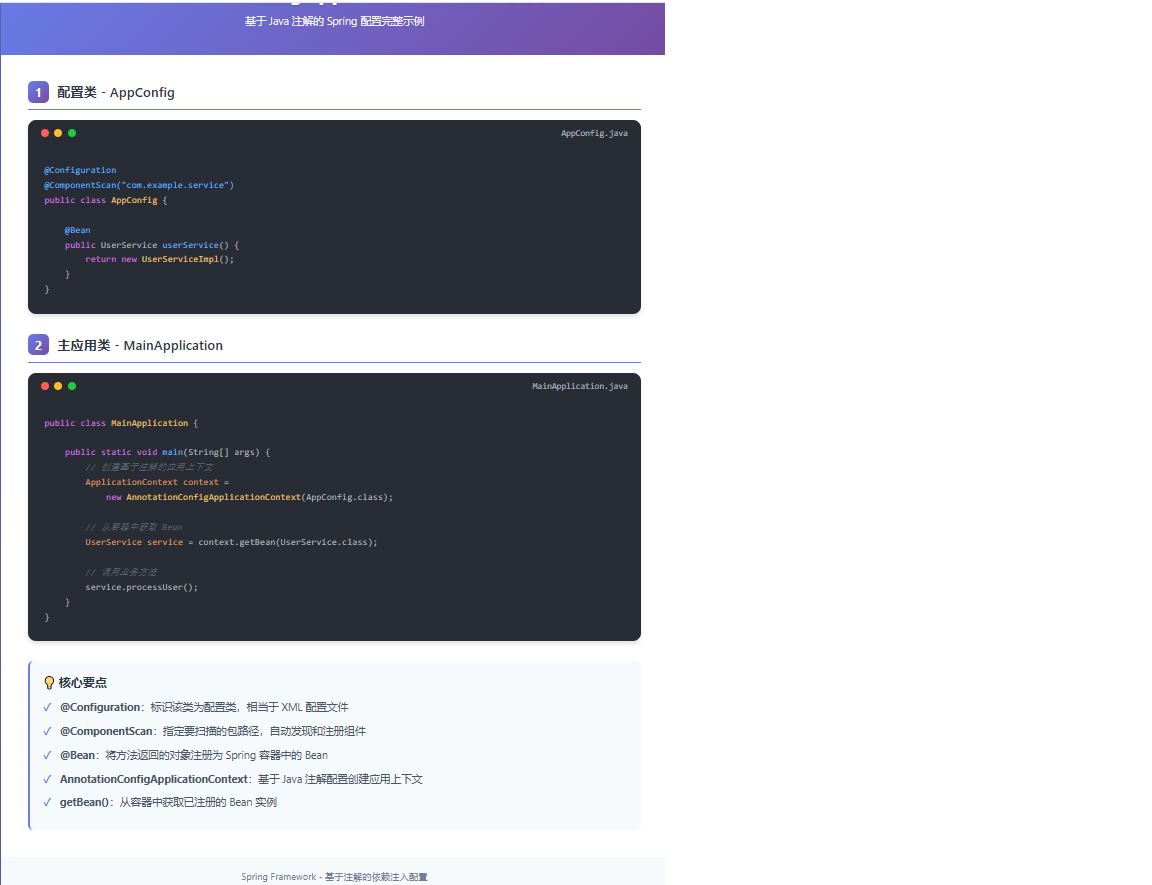
1️⃣ AnnotationConfigApplicationContext - Java配置的王者
适用场景:
- 现代Spring Boot应用
- 纯Java配置的项目
- 需要类型安全的配置
核心特点:
- 完全基于注解的配置方式
- 支持Java 8的Lambda表达式
- 与Spring Boot无缝集成
实战代码示例:
@Configuration
@ComponentScan("com.example.service")
@PropertySource("classpath:application.properties")
public class AppConfig {

    @Value("${app.name}")
    private String appName;

    @Bean
    @Scope(ConfigurableBeanFactory.SCOPE_PROTOTYPE)
    public UserService userService() {
        return new UserServiceImpl();
    }

    @Bean
    public DataSource dataSource() {
        HikariDataSource dataSource = new HikariDataSource();
        dataSource.setJdbcUrl("jdbc:mysql://localhost:3306/mydb");
        dataSource.setUsername("root");
        dataSource.setPassword("password");
        return dataSource;
    }
}

public class MainApplication {
    public static void main(String[] args) {
        // 创建上下文
        ApplicationContext context =
            new AnnotationConfigApplicationContext(AppConfig.class);

        // 获取Bean
        UserService userService = context.getBean(UserService.class);
        DataSource dataSource = context.getBean(DataSource.class);

        // 使用服务
        userService.processUser();
    }
}
生产环境应用: 在Spring Boot项目中,我们通常通过@SpringBootApplication注解自动创建AnnotationConfigApplicationContext:
@SpringBootApplication
public class MyApplication {
    public static void main(String[] args) {
        SpringApplication.run(MyApplication.class, args);
    }
}
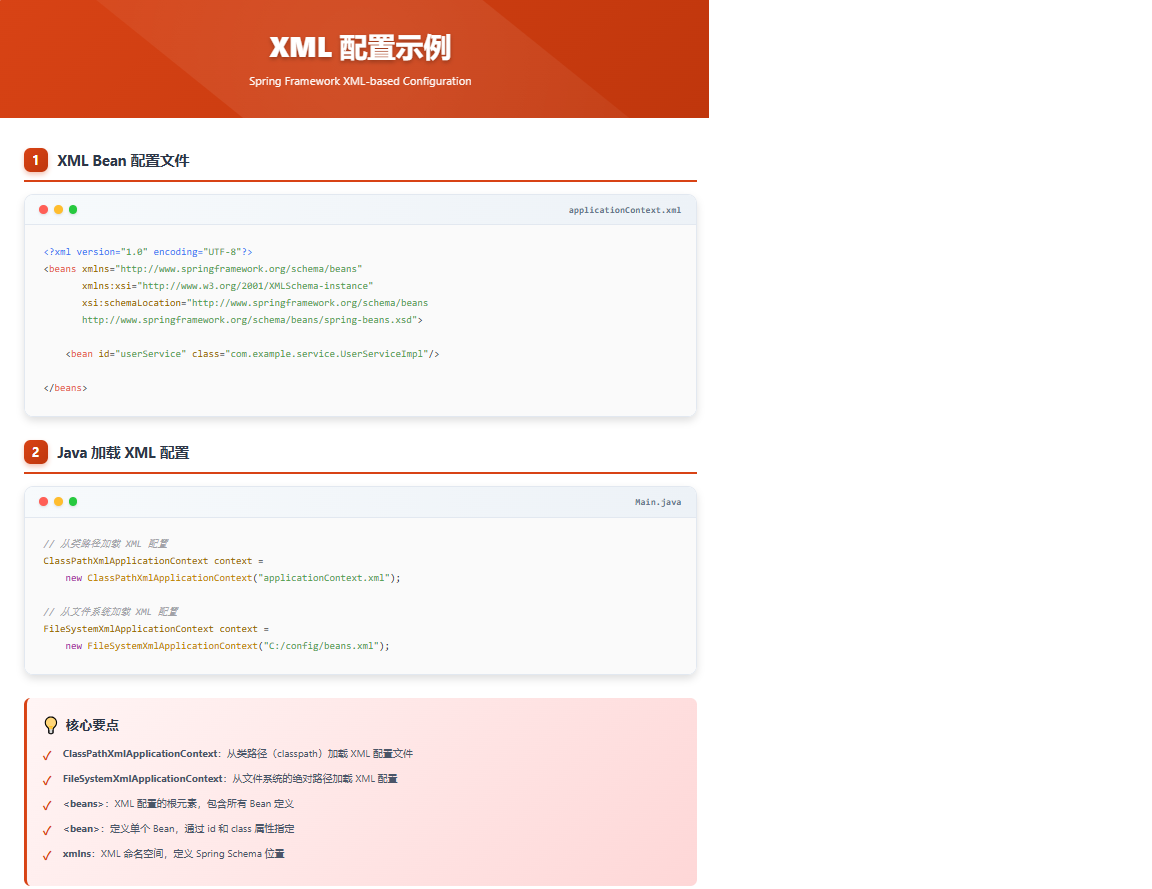
2️⃣ ClassPathXmlApplicationContext - 类路径XML配置
适用场景:
- 传统Spring应用
- 需要与XML配置兼容
- 类路径资源管理
核心特点:
- 从类路径加载XML配置文件
- 支持通配符配置
- 兼容性好
实战代码示例:
public class XmlConfigApp {
    public static void main(String[] args) {
        // 1. 基础用法
        ApplicationContext context =
            new ClassPathXmlApplicationContext("applicationContext.xml");

        // 2. 多配置文件
        String[] configLocations = {
            "spring-datasource.xml",
            "spring-service.xml",
            "spring-mvc.xml"
        };
        ApplicationContext context2 =
            new ClassPathXmlApplicationContext(configLocations);

        // 3. 使用通配符
        ApplicationContext context3 =
            new ClassPathXmlApplicationContext("classpath*:spring/*.xml");

        // 获取Bean
        UserService userService = context.getBean(UserService.class);
    }
}
XML配置文件示例:
<!-- applicationContext.xml -->
<?xml version="1.0" encoding="UTF-8"?>
<beans xmlns="http://www.springframework.org/schema/beans"
       xmlns:xsi="http://www.w3.org/2001/XMLSchema-instance"
       xmlns:context="http://www.springframework.org/schema/context"
       xmlns:tx="http://www.springframework.org/schema/tx"
       xsi:schemaLocation="
           http://www.springframework.org/schema/beans
           http://www.springframework.org/schema/beans/spring-beans.xsd
           http://www.springframework.org/schema/context
           http://www.springframework.org/schema/context/spring-context.xsd
           http://www.springframework.org/schema/tx
           http://www.springframework.org/schema/tx/spring-tx.xsd">

    <!-- 组件扫描 -->
    <context:component-scan base-package="com.example"/>

    <!-- 属性文件 -->
    <context:property-placeholder location="classpath:application.properties"/>

    <!-- 数据源配置 -->
    <bean id="dataSource" class="com.zaxxer.hikari.HikariDataSource">
        <property name="driverClassName" value="${db.driver}"/>
        <property name="jdbcUrl" value="${db.url}"/>
        <property name="username" value="${db.username}"/>
        <property name="password" value="${db.password}"/>
    </bean>

    <!-- JPA配置 -->
    <bean id="entityManagerFactory"
          class="org.springframework.orm.jpa.LocalContainerEntityManagerFactoryBean">
        <property name="dataSource" ref="dataSource"/>
        <property name="packagesToScan" value="com.example.entity"/>
        <property name="jpaVendorAdapter">
            <bean class="org.springframework.orm.jpa.vendor.HibernateJpaVendorAdapter"/>
        </property>
        <property name="jpaProperties">
            <props>
                <prop key="hibernate.dialect">org.hibernate.dialect.MySQLDialect</prop>
                <prop key="hibernate.show_sql">true</prop>
                <prop key="hibernate.hbm2ddl.auto">update</prop>
            </props>
        </property>
    </bean>

    <!-- 事务管理器 -->
    <bean id="transactionManager"
          class="org.springframework.orm.jpa.JpaTransactionManager">
        <property name="entityManagerFactory" ref="entityManagerFactory"/>
    </bean>

    <!-- 启用事务注解 -->
    <tx:annotation-driven transaction-manager="transactionManager"/>
</beans>
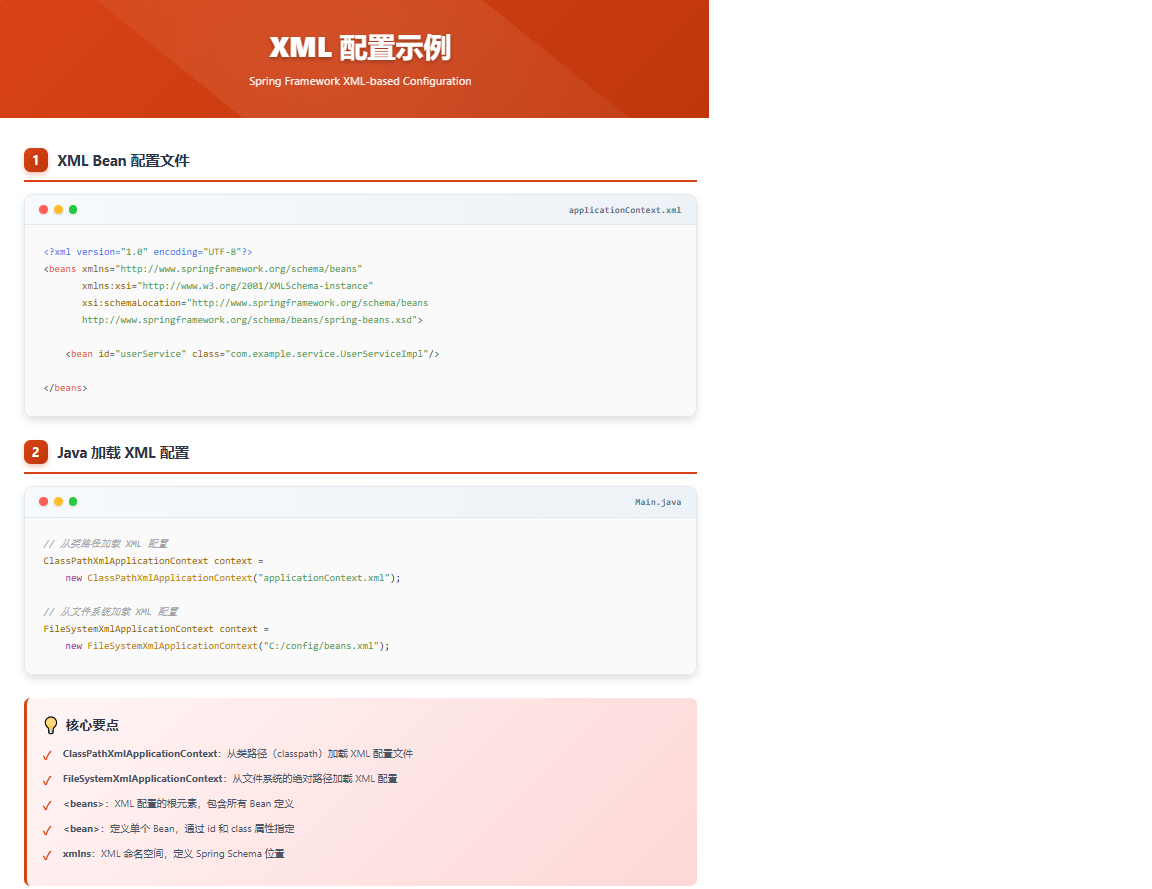
3️⃣ FileSystemXmlApplicationContext - 文件系统XML配置
适用场景:
- 外部配置文件管理
- 开发环境快速配置
- 多环境部署
核心特点:
- 从文件系统加载配置文件
- 支持绝对路径
- 便于外部配置管理
实战代码示例:
public class FileSystemConfigApp {
    public static void main(String[] args) {
        // 1. 使用绝对路径
        ApplicationContext context1 =
            new FileSystemXmlApplicationContext(
                "C:/config/spring/applicationContext.xml");

        // 2. 使用多个配置文件
        String[] configPaths = {
            "/opt/spring/config/datasource.xml",
            "/opt/spring/config/service.xml"
        };
        ApplicationContext context2 =
            new FileSystemXmlApplicationContext(configPaths);

        // 3. 相对路径(不推荐,路径不明确)
        ApplicationContext context3 =
            new FileSystemXmlApplicationContext("config/spring.xml");

        // 使用上下文
        UserService userService = context1.getBean(UserService.class);
    }
}
最佳实践:
public class ConfigManager {
    private static final String CONFIG_DIR = System.getProperty("user.dir") + "/config";

    public static ApplicationContext createApplicationContext(String profile) {
        String configPath = CONFIG_DIR + "/application-" + profile + ".xml";
        return new FileSystemXmlApplicationContext(configPath);
    }

    public static void main(String[] args) {
        // 根据环境创建不同的上下文
        String env = System.getProperty("spring.profiles.active", "dev");
        ApplicationContext context = createApplicationContext(env);
    }
}
4️⃣ WebApplicationContext - Web应用的守护神
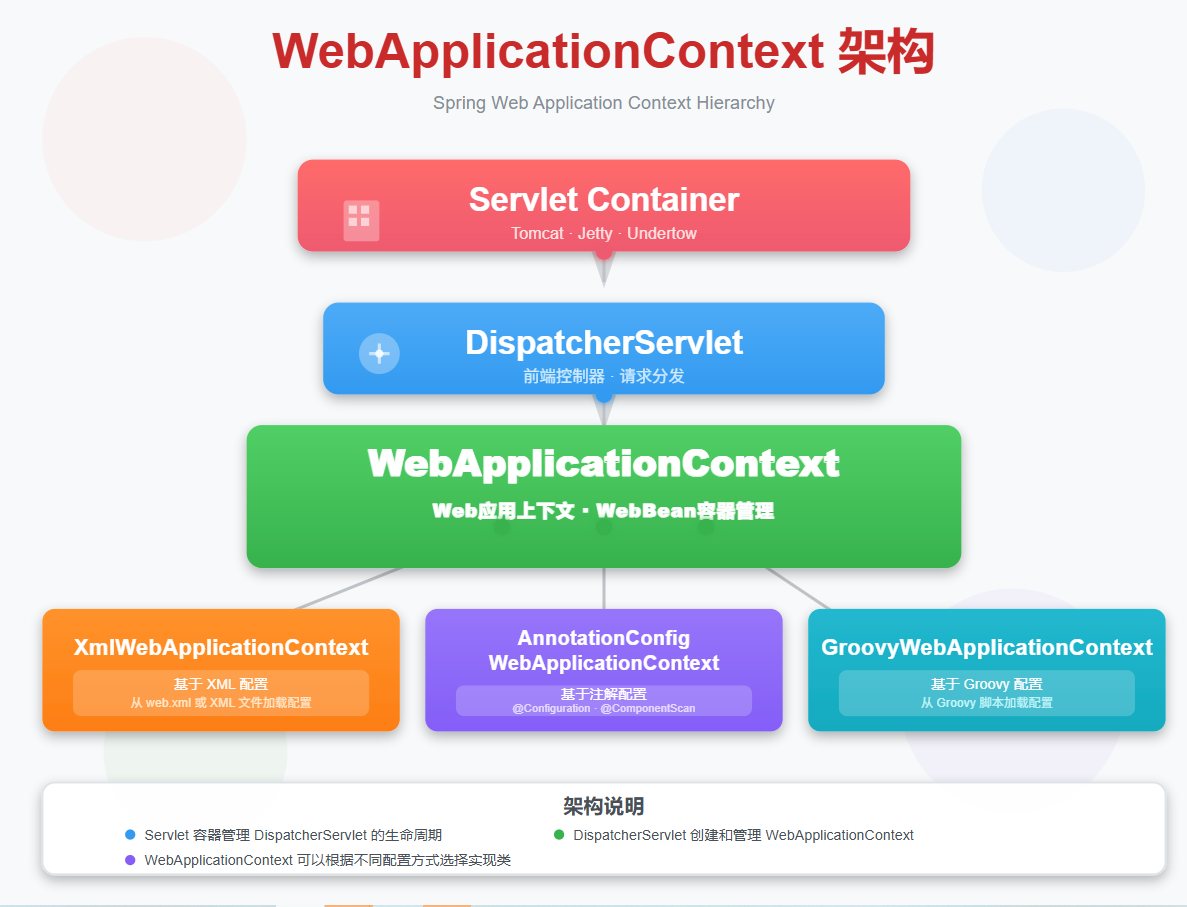
适用场景:
- Web应用开发
- Spring MVC应用
- Servlet容器集成
核心特点:
- 继承自ApplicationContext
- 提供Web特有的功能
- 支持Servlet生命周期集成
Web.xml配置示例:
<!-- web.xml -->
<web-app xmlns="http://xmlns.jcp.org/xml/ns/javaee"
         xmlns:xsi="http://www.w3.org/2001/XMLSchema-instance"
         xsi:schemaLocation="http://xmlns.jcp.org/xml/ns/javaee
         http://xmlns.jcp.org/xml/ns/javaee/web-app_4_0.xsd"
         version="4.0">

    <!-- Spring Context配置 -->
    <context-param>
        <param-name>contextConfigLocation</param-name>
        <param-value>
            /WEB-INF/spring/root-context.xml
            /WEB-INF/spring/app-config.xml
        </param-value>
    </context-param>

    <!-- 监听器 -->
    <listener>
        <listener-class>org.springframework.web.context.ContextLoaderListener</listener-class>
    </listener>

    <!-- Spring MVC配置 -->
    <servlet>
        <servlet-name>dispatcher</servlet-name>
        <servlet-class>org.springframework.web.servlet.DispatcherServlet</servlet-class>
        <init-param>
            <param-name>contextConfigLocation</param-name>
            <param-value>/WEB-INF/spring/servlet-context.xml</param-value>
        </init-param>
        <load-on-startup>1</load-on-startup>
    </servlet>

    <servlet-mapping>
        <servlet-name>dispatcher</servlet-name>
        <url-pattern>/</url-pattern>
    </servlet-mapping>
</web.xml>
Servlet集成示例:
// 自定义Servlet
@WebServlet("/api/users")
public class UserServlet extends HttpServlet {

    @Autowired
    private UserService userService;

    @Override
    public void init() throws ServletException {
        // 获取WebApplicationContext
        WebApplicationContext context =
            WebApplicationContextUtils.getWebApplicationContext(
                getServletContext());

        // 手动注入(不推荐,应该使用注解)
        if (userService == null) {
            userService = context.getBean(UserService.class);
        }
    }

    protected void doGet(HttpServletRequest request,
                        HttpServletResponse response) {
        List<User> users = userService.getAllUsers();
        // 返回JSON响应
    }
}

// 使用注解的控制器
@Controller
@RequestMapping("/api")
public class ApiController {

    @Autowired
    private UserService userService;

    @GetMapping("/users")
    @ResponseBody
    public List<User> getUsers() {
        return userService.getAllUsers();
    }
}
生产环境实战:微服务架构中的Spring Context
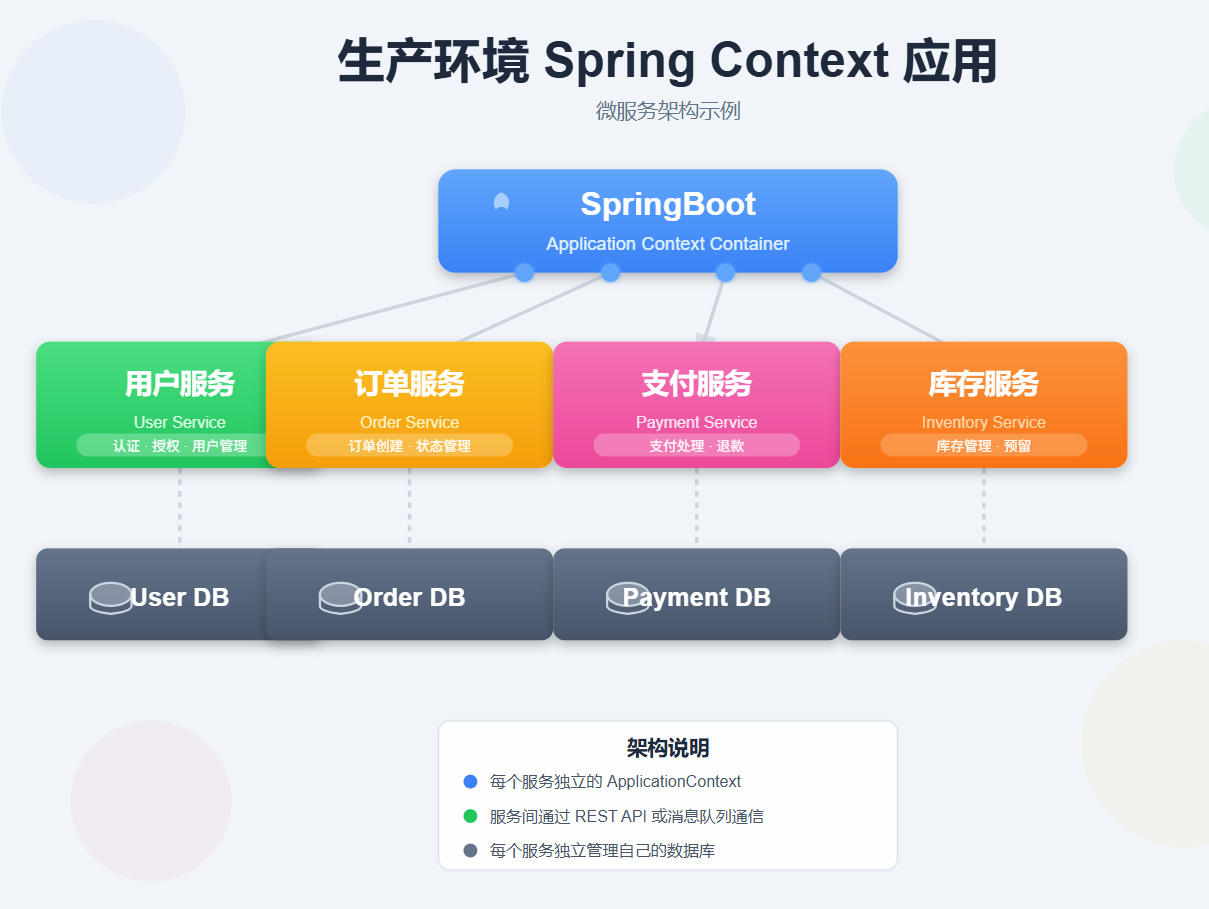
微服务集成示例
// 用户服务
@Configuration
@EnableEurekaClient
@ComponentScan("com.example.user")
public class UserServiceProvider {
    public static void main(String[] args) {
        SpringApplication.run(UserServiceProvider.class, args);
    }
}

// 订单服务
@Configuration
@EnableEurekaClient
@ComponentScan("com.example.order")
public class OrderServiceProvider {
    public static void main(String[] args) {
        SpringApplication.run(OrderServiceProvider.class, args);
    }
}

// 公共配置
@Configuration
@PropertySource("classpath:application-common.properties")
public class CommonConfig {

    @Bean
    @LoadBalanced
    public RestTemplate restTemplate() {
        return new RestTemplate();
    }

    @Bean
    public RedisConnectionFactory redisConnectionFactory() {
        return LettuceConnectionFactory.builder()
            .host("redis-server")
            .port(6379)
            .build();
    }
}
Spring Boot与Spring Cloud整合
@SpringBootApplication
@EnableDiscoveryClient
@EnableCircuitBreaker
public class MicroserviceApplication {

    public static void main(String[] args) {
        SpringApplication.run(MicroserviceApplication.class, args);
    }

    @Bean
    public WebApplicationContext webApplicationContext() {
        return new AnnotationConfigWebApplicationContext();
    }
}

// 服务实现类
@Service
public class OrderServiceImpl implements OrderService {

    @Autowired
    private UserClient userClient;

    @Autowired
    private PaymentClient paymentClient;

    @Autowired
    private InventoryClient inventoryClient;

    @HystrixCommand(fallbackMethod = "createOrderFallback")
    @Override
    public Order createOrder(OrderDTO orderDTO) {
        // 1. 检查用户
        User user = userClient.getUser(orderDTO.getUserId());

        // 2. 检查库存
        inventoryClient.checkInventory(orderDTO.getItems());

        // 3. 创建订单
        Order order = new Order();
        // ... 设置订单信息

        // 4. 处理支付
        PaymentResult payment = paymentClient.processPayment(order);

        return orderRepository.save(order);
    }

    public Order createOrderFallback(OrderDTO orderDTO) {
        // 降级处理
        Order order = new Order();
        order.setStatus("FAILED");
        return order;
    }
}
性能优化与最佳实践
1. 上下文加载优化
// 延迟加载
@Configuration
public class OptimizedConfig {

    @Lazy
    @Bean
    public HeavyService heavyService() {
        return new HeavyService();
    }

    @Bean
    @Primary
    @Scope(value = ConfigurableBeanFactory.SCOPE_SINGLETON,
           proxyMode = ScopedProxyMode.TARGET_CLASS)
    public ExpensiveService expensiveService() {
        return new ExpensiveService();
    }
}
2. 内存管理
// 配置JVM参数
// 在启动脚本中添加:
// -XX:+UseG1GC -Xms512m -Xmx1024m -XX:MaxMetaspaceSize=256m

// 配置Bean生命周期
@Configuration
public class LifecycleConfig {

    @Bean(destroyMethod = "cleanup")
    public ResourceCleanup resourceCleanup() {
        return new ResourceCleanup();
    }

    @Bean
    @DependsOn("resourceCleanup")
    public MainService mainService() {
        return new MainService();
    }
}
3. 多环境配置
// application-dev.properties
spring.datasource.url=jdbc:mysql://dev-db:3306/mydb
spring.datasource.username=dev_user
spring.datasource.password=dev_pass

// application-prod.properties
spring.datasource.url=jdbc:mysql://prod-db:3306/mydb
spring.datasource.username=prod_user
spring.datasource.password=${PROD_DB_PASSWORD}

// application-test.properties
spring.datasource.url=jdbc:mysql://test-db:3306/mydb
spring.datasource.username=test_user
spring.datasource.password=test_pass

// 激活不同环境
java -jar app.jar --spring.profiles.active=prod
总结
四种ApplicationContext各有其适用场景:
- AnnotationConfigApplicationContext - 现代Java配置的首选
- ClassPathXmlApplicationContext - 传统XML配置的可靠选择
- FileSystemXmlApplicationContext - 外部配置管理的灵活方案
- WebApplicationContext - Web应用的专用容器
在实际开发中,推荐根据项目需求和技术栈选择合适的ApplicationContext实现方式,并注意性能优化和最佳实践的应用。
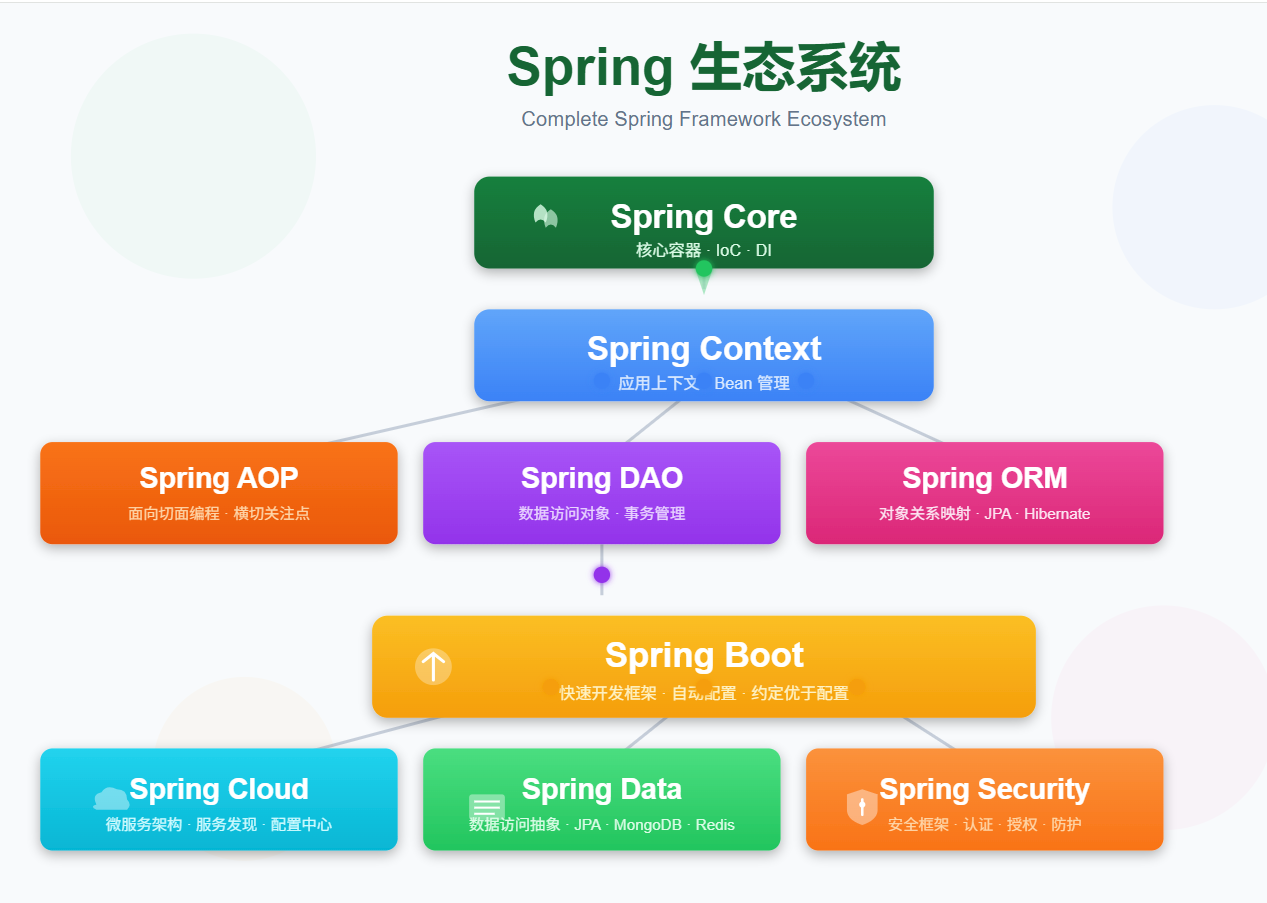
记住,Spring Context是Spring框架的核心,掌握它的使用将让你在Spring开发的道路上更加游刃有余!