✔零知开源(零知IDE)是一个专为电子初学者/电子兴趣爱好者设计的开源软硬件平台,在硬件上提供超高性价比STM32系列开发板、物联网控制板。取消了Bootloader程序烧录,让开发重心从 "配置环境" 转移到 "创意实现",极大降低了技术门槛。零知IDE编程软件,内置上千个覆盖多场景的示例代码,支持项目源码一键下载,项目文章在线浏览。零知开源(零知IDE)平台通过软硬件协同创新,让你的创意快速转化为实物,来动手试试吧!
✔访问零知实验室,获取更多实战项目和教程资源吧!
目录
[1.1 硬件清单](#1.1 硬件清单)
[1.2 接线方案表](#1.2 接线方案表)
[1.3 具体接线图](#1.3 具体接线图)
[1.4 接线实物图](#1.4 接线实物图)
[3.1 ESP-NOW初始化](#3.1 ESP-NOW初始化)
[3.2 设备发现与列表更新](#3.2 设备发现与列表更新)
[3.3 人体感应算法](#3.3 人体感应算法)
[3.4 Web 服务器核心](#3.4 Web 服务器核心)
[3.5 主函数接口](#3.5 主函数接口)
[4.1 操作流程](#4.1 操作流程)
[4.2 视频演示](#4.2 视频演示)
[5.1 ESP-NOW协议解析](#5.1 ESP-NOW协议解析)
[5.2 ESP-MESH组网技术](#5.2 ESP-MESH组网技术)
项目概述
本项目基于零知ESP32 主控板,实现了一个去中心化的智能家居MESH 组网系统。系统采用ESP-NOW协议作为通信基础,无需路由器即可建立设备间直接通信,支持智能灯控、人体感应、温湿度监测等多种设备类型。每个节点既是终端设备又是中继节点,形成自组织、自修复的Mesh网络拓扑结构
项目难点及解决方案
问题描述:ESP32在STA模式连接WiFi时,ESP-NOW通信不稳定
**解决方案:**采用WiFi信道固定策略,所有设备工作在相同信道(信道1),避免信道切换导致的通信中断
一、系统接线部分
1.1 硬件清单
| 组件 | 型号 | 数量 | 备注 |
|---|---|---|---|
| 主控板 | 零知ESP32 | 3 | 核心处理器 |
| 人体感应模块 | HC-SR501 | 1 | 运动检测 |
| 温湿度传感器 | DHT11 | 1 | 环境监测 |
| LED | 任意 | 1 | 灯光控制 |
| 杜邦线 | 公对公 | 若干 | 连接线 |
| USB数据线 | Type-A | 3 | 供电/串口调试 |
1.2 接线方案表
根据代码中引脚定义配置:
| 功能模块 | ESP32 GPIO | 外设引脚 | 说明 |
|---|---|---|---|
| 灯光控制 | GPIO27 | LED+ | 输出高电平控制 |
| 人体感应 | GPIO5 | HC-SR501 OUT | 高电平触发模式 |
| 温湿度传感器 | GPIO18 | DHT11 OUT | 单总线通信 |
| 电源 | 3.3V/5V | 外设VCC | 根据外设需求 |
| 地线 | GND | 外设GND | 共地连接 |
1.3 具体接线图
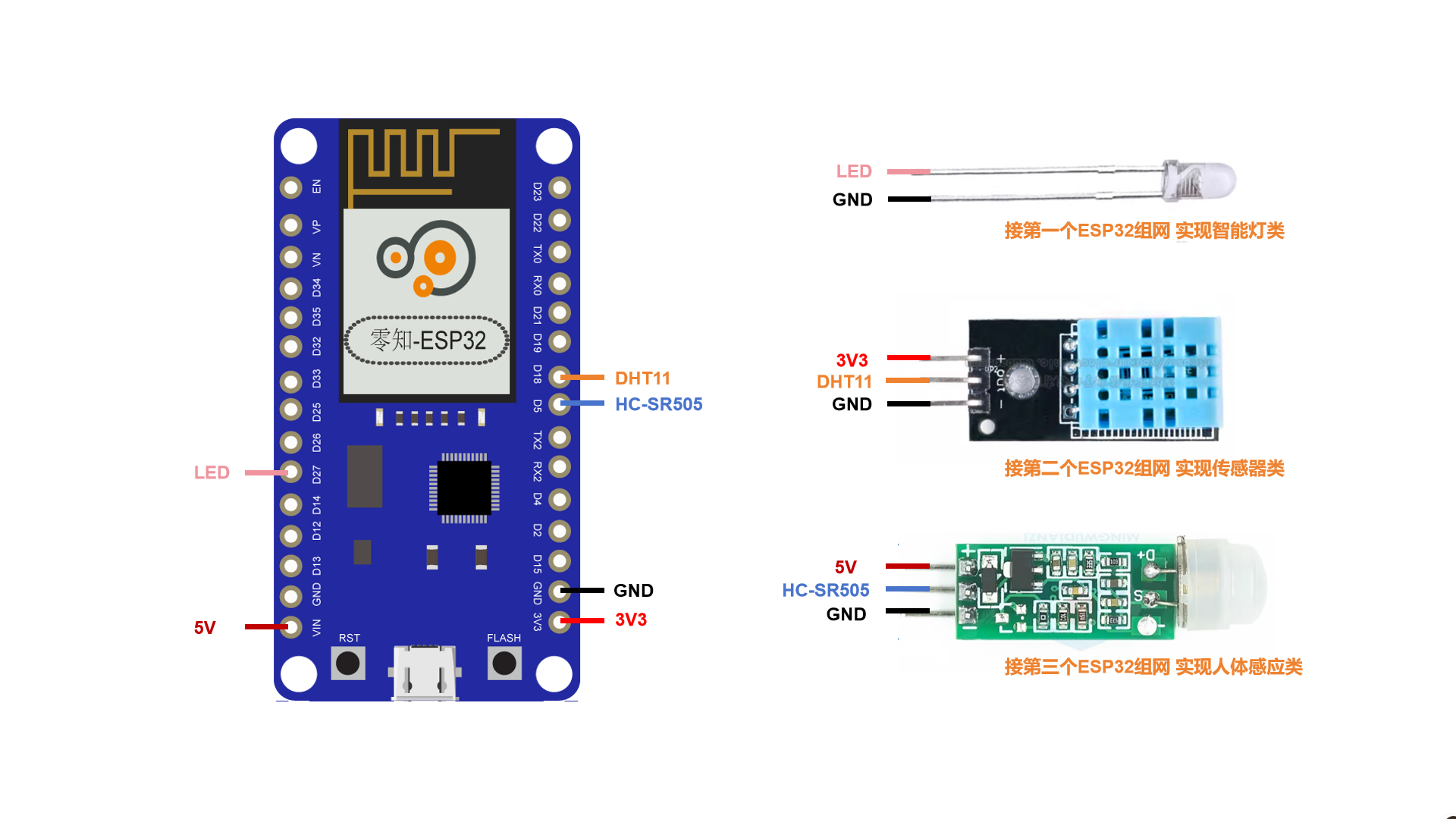
HC-SR501人体感应模块接+5V供电,确保工作条件稳定
1.4 接线实物图
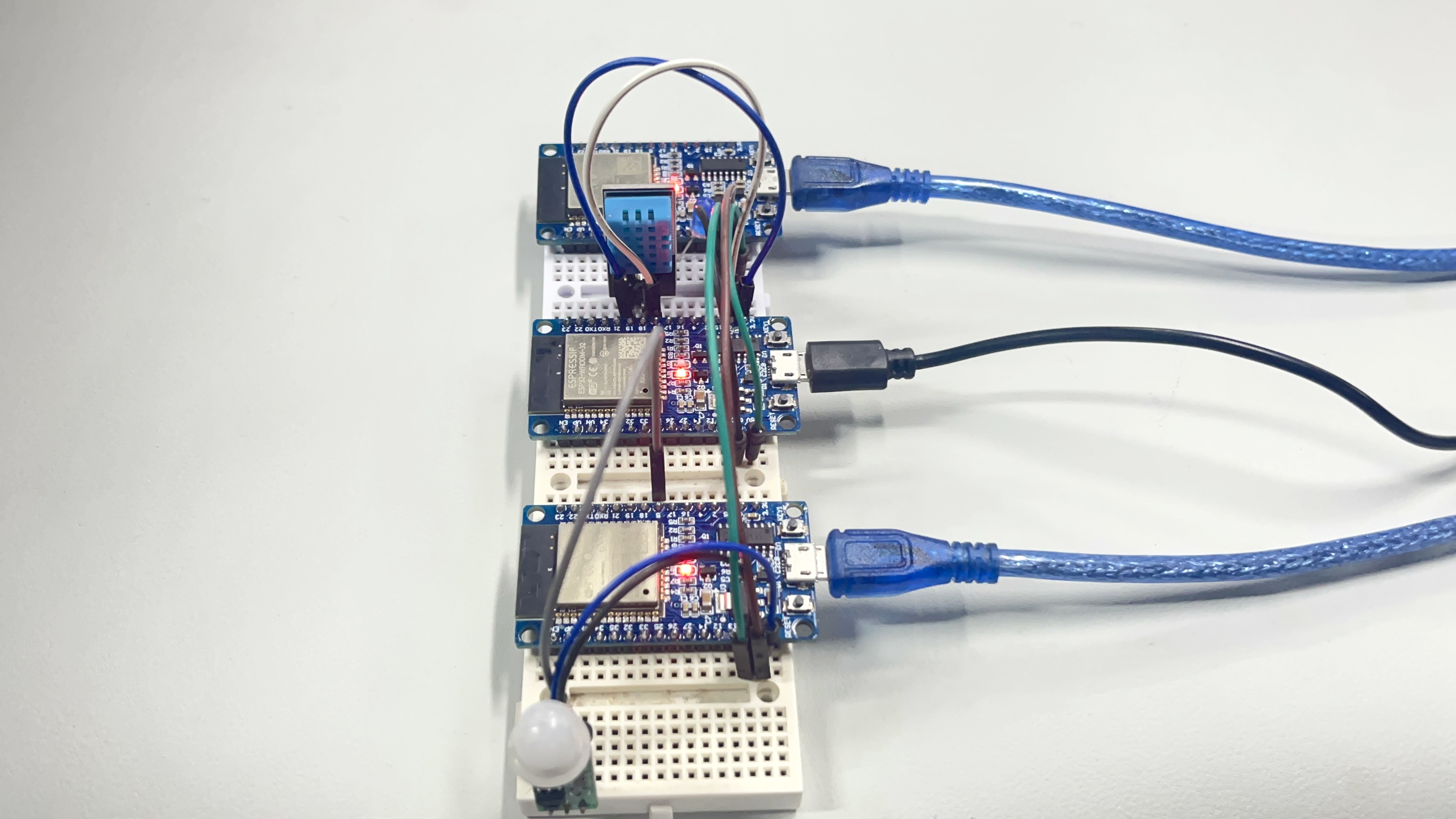
二、安装与使用部分
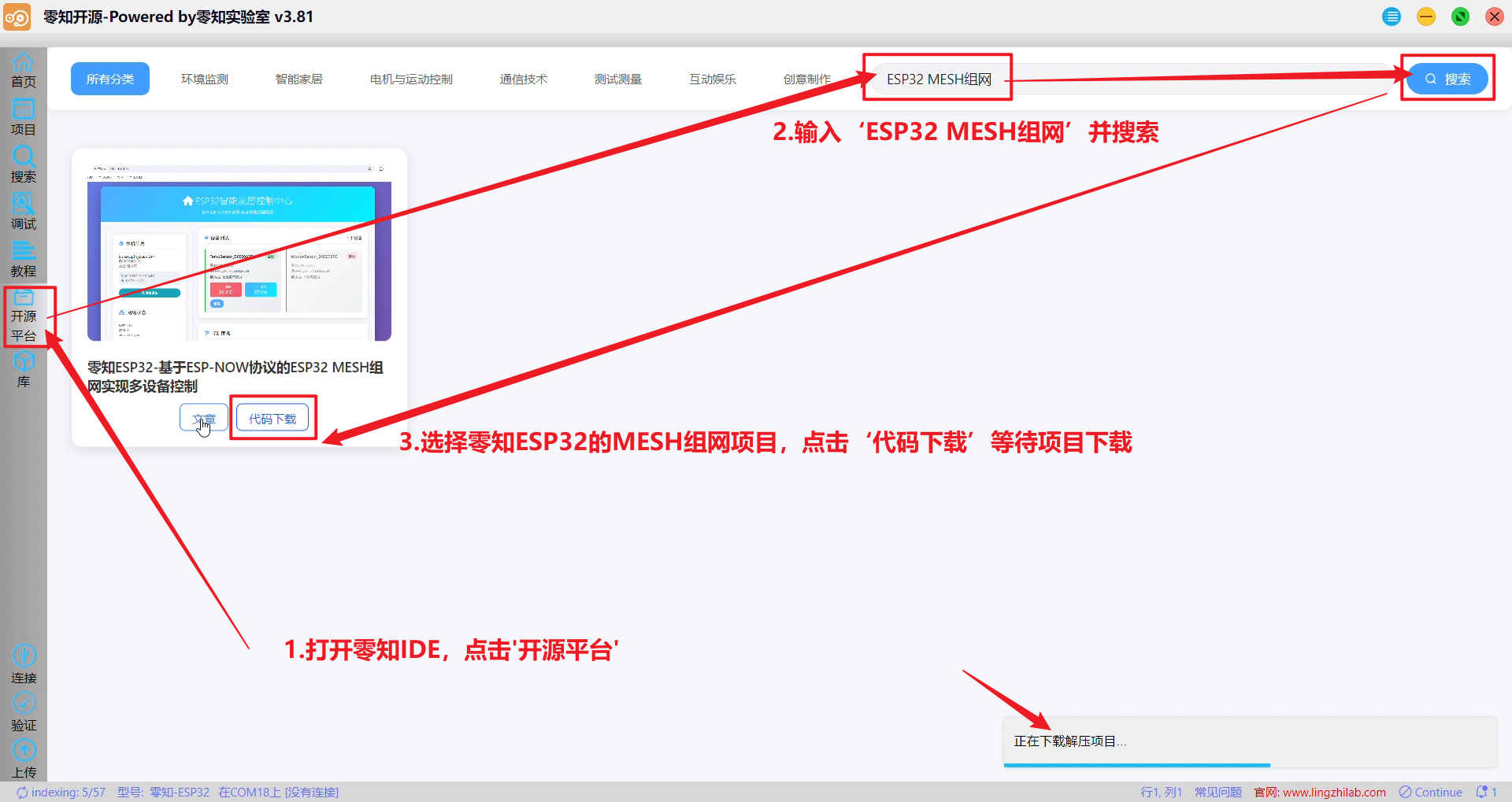
2.1 开源平台-输入"ESP32 MESH组网"并搜索-代码下载自动打开
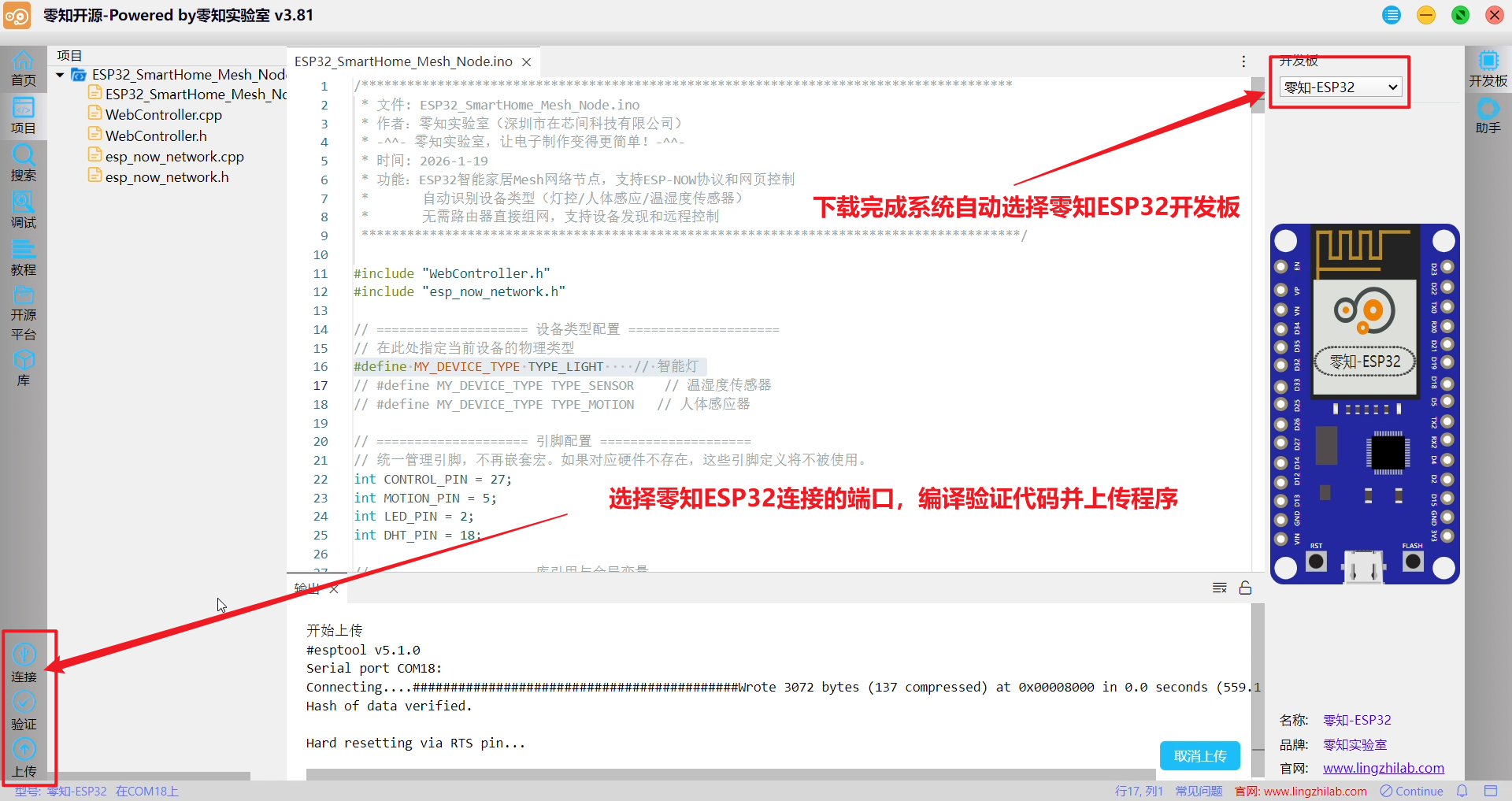
2.2 连接-验证-上传
2.3 调试-串口监视器
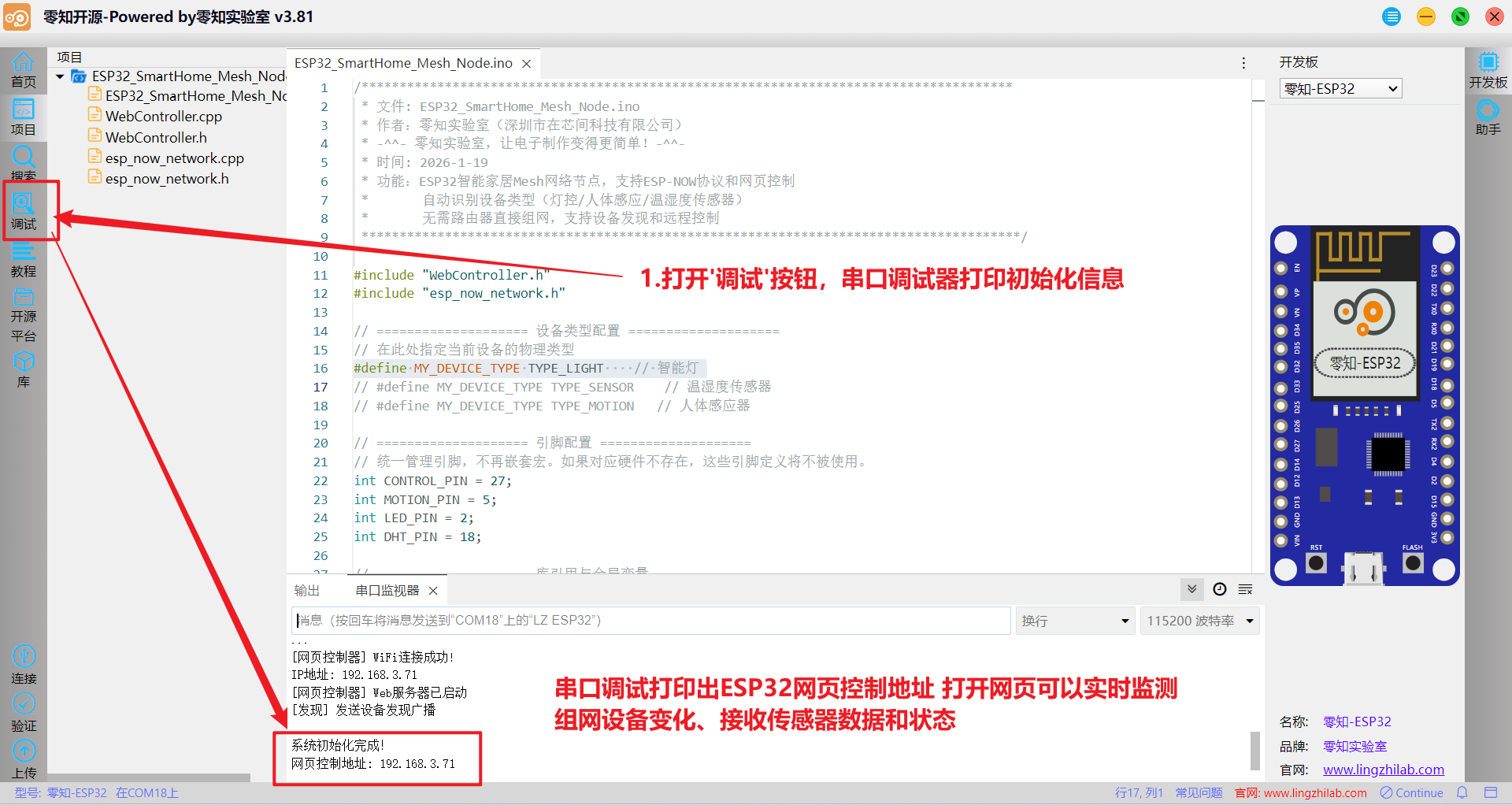
三、核心代码解析
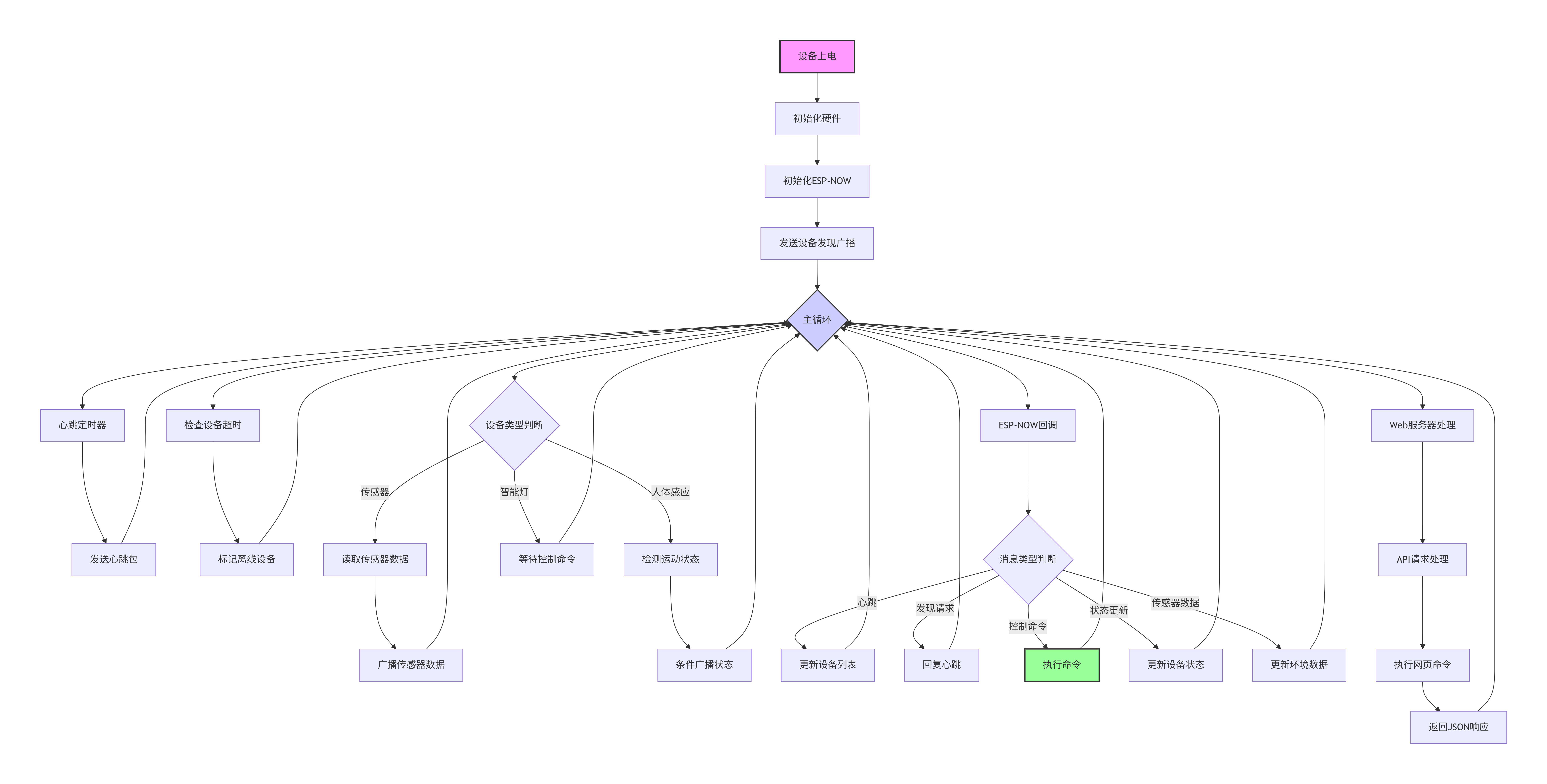
代码核心逻辑聚焦MESH 初始化、ESP-NOW 配置、数据发送回调、心跳包检测四大函数
3.1 ESP-NOW初始化
cpp
// esp_now_network.cpp - initESPNow()
void initESPNow() {
    // 设置WiFi模式为STA,但不断开连接
    WiFi.mode(WIFI_STA);
    WiFi.disconnect();

    // 关键:固定WiFi信道,确保所有设备在同一信道
    esp_wifi_set_channel(WIFI_CHANNEL, WIFI_SECOND_CHAN_NONE);

    // 初始化ESP-NOW协议栈
    if (esp_now_init() != ESP_OK) {
        Serial.println("[错误] ESP-NOW初始化失败");
        return;
    }

    // 注册数据接收回调函数
    esp_now_register_recv_cb(onDataReceived);

    // 添加广播地址对等体
    esp_now_peer_info_t peerInfo = {};
    memcpy(peerInfo.peer_addr, broadcastAddress, 6);
    peerInfo.channel = WIFI_CHANNEL;
    peerInfo.encrypt = false;

    if (esp_now_add_peer(&peerInfo) != ESP_OK) {
        Serial.println("[错误] 添加广播地址失败");
    }
}
WIFI_CHANNEL固定为信道1,确保所有设备信道一致;broadcastAddress广播地址{0xFF,0xFF,0xFF,0xFF,0xFF,0xFF}
3.2 设备发现与列表更新
cpp
void updateDeviceList(const uint8_t *mac, Message *msg) {
    int index = findDevice(msg->deviceId);

    if (index == -1) {
        // 新设备
        if (deviceCount < MAX_DEVICES) {
            index = deviceCount++;
            memcpy(deviceList[index].mac, mac, 6);
            deviceList[index].deviceId = msg->deviceId;
            deviceList[index].deviceType = msg->deviceType;
            strncpy(deviceList[index].name, msg->deviceName, 31);
            deviceList[index].name[31] = '\0';
            deviceList[index].online = true;
            deviceList[index].lastSeen = millis();

            switch(msg->deviceType) {
                case TYPE_LIGHT:
                    deviceList[index].state.light.lightState = false;
                    break;
                case TYPE_SENSOR:
                    deviceList[index].state.sensor.temperature = 0.0f;
                    deviceList[index].state.sensor.humidity = 0.0f;
                    break;
                case TYPE_MOTION:
                    deviceList[index].state.motion.motionDetected = false;
                    deviceList[index].state.motion.lastMotionTime = 0;
                    break;
            }

            const char* typeStr;
            switch(msg->deviceType) {
                case TYPE_LIGHT: typeStr = "智能灯"; break;
                case TYPE_MOTION: typeStr = "人体感应器"; break;
                case TYPE_SENSOR: typeStr = "传感器"; break;
                default: typeStr = "未知";
            }

            Serial.printf("[新设备] %s (ID:%08X, MAC:%s, 类型:%s)\n",
                          deviceList[index].name,
                          deviceList[index].deviceId,
                          macToString(mac).c_str(),
                          typeStr);

            // 添加到对等体列表(避免重复添加)
            if (!esp_now_is_peer_exist(mac)) {
                esp_now_peer_info_t peerInfo = {};
                memcpy(peerInfo.peer_addr, mac, 6);
                peerInfo.channel = WIFI_CHANNEL;
                peerInfo.encrypt = false;

                esp_err_t result = esp_now_add_peer(&peerInfo);
                if (result != ESP_OK) {
                    Serial.printf("[警告] 添加对等体失败: %d\n", result);
                }
            }
        } else {
            Serial.println("[警告] 设备列表已满,无法添加新设备");
            return;
        }
    }

    // 更新设备信息
    deviceList[index].online = true;
    deviceList[index].lastSeen = millis();
}
通过心跳包或发现请求识别新设备、维护统一的设备状态表、自动管理ESP-NOW通信对等体
3.3 人体感应算法
cpp
void checkMotionSensorOptimized() {
  static unsigned long lastMotionTime = 0;
  static unsigned long lastReportTime = 0;
  static bool stableMotionState = false;

  // HC-SR501检测到人体时输出高电平
  bool currentReading = digitalRead(MOTION_PIN);  // HIGH = 检测到人体
  unsigned long now = millis();

  // 更新LED指示(高电平时点亮)
  digitalWrite(LED_PIN, currentReading ? HIGH : LOW);

  // 简单的防抖处理:状态改变后等待MOTION_DEBOUNCE_MS确认
  if (currentReading != lastMotionState) {
    lastMotionState = currentReading;
    lastMotionTime = now;

  }

  // 防抖确认:状态稳定超过MOTION_DEBOUNCE_MS后才认为有效
  if ((now - lastMotionTime) >= MOTION_DEBOUNCE_MS) {
    if (currentReading != stableMotionState) {
      stableMotionState = currentReading;

      if (stableMotionState) {
        Serial.println("[运动] 检测到人体运动!");

        motionDetected = true;

        // 限制广播频率:至少间隔2秒
        if ((now - lastReportTime) >= 2000) {
          Message msg = {0};
          msg.msgType = MSG_STATUS;
          snprintf(msg.payload, sizeof(msg.payload),
                   "{\"motion\":true,\"time\":%lu}", now);
          sendBroadcast(&msg);
          lastReportTime = now;
        }

      } else {
        // *** 运动停止 ***
        Serial.println("[运动] ✗ 运动停止,恢复静止状态");
        motionDetected = false;

        // 广播运动停止
        Message msg = {0};
        msg.msgType = MSG_STATUS;
        strcpy(msg.payload, "{\"motion\":false}");
        sendBroadcast(&msg);
        lastReportTime = now;
      }
    }
  }
}
2秒最小间隔,减少网络拥堵;记录稳定状态,避免频繁切换;板载LED实时反映传感器状态
3.4 Web 服务器核心
cpp
void WebController::handleControlBody(AsyncWebServerRequest *request, uint8_t *data, size_t len) {
    if (len > 256) {
        request->send(400, "application/json", "{\"error\":\"请求体过大\"}");
        return;
    }

    String body = "";
    for (size_t i = 0; i < len; i++) {
        body += (char)data[i];
    }

    Serial.printf("[网页控制] 收到请求: %s\n", body.c_str());

    DynamicJsonDocument doc(256);
    DeserializationError error = deserializeJson(doc, body);

    if (error) {
        Serial.printf("[错误] JSON解析失败: %s\n", error.c_str());
        request->send(400, "application/json", "{\"error\":\"JSON解析失败\"}");
        return;
    }

    String deviceIdStr = doc["deviceId"].as<String>();
    String action = doc["action"].as<String>();

    if (deviceIdStr.length() == 0 || action.length() == 0) {
        request->send(400, "application/json", "{\"error\":\"缺少参数\"}");
        return;
    }

    uint32_t deviceId = strtoul(deviceIdStr.c_str(), NULL, 16);

    // *** 关键修改:判断是否控制本机 ***
    if (myDevice && deviceId == myDevice->deviceId) {
        Serial.printf("[网页控制] 本地控制: %s\n", action.c_str());
        executeLocalCommand(action.c_str());
        request->send(200, "application/json", "{\"success\":true,\"message\":\"本地命令执行成功\"}");
    } else {
        Serial.printf("[网页控制] 远程控制设备 0x%08X: %s\n", deviceId, action.c_str());
        sendCommand(deviceId, action.c_str(), "");
        request->send(200, "application/json", "{\"success\":true,\"message\":\"远程命令发送成功\"}");
    }
}

void WebController::handleAPIBody(AsyncWebServerRequest *request, uint8_t *data, size_t len) {
    if (len > 128) {
        request->send(400, "application/json", "{\"error\":\"请求体过大\"}");
        return;
    }

    // 将数据转换为字符串
    String body = "";
    for (size_t i = 0; i < len; i++) {
        body += (char)data[i];
    }

    Serial.printf("[API] 收到请求: %s\n", body.c_str());

    DynamicJsonDocument doc(128);
    DeserializationError error = deserializeJson(doc, body);

    if (error) {
        Serial.printf("[错误] JSON解析失败: %s\n", error.c_str());
        request->send(400, "application/json", "{\"error\":\"JSON解析失败\"}");
        return;
    }

    String action = doc["action"].as<String>();

    Serial.printf("[API] 执行操作: %s\n", action.c_str());

    if (action == "discover") {
        sendDiscovery();
        request->send(200, "application/json", "{\"success\":true,\"message\":\"设备发现已触发\"}");
    } else if (action == "heartbeat") {
        sendHeartbeat();
        request->send(200, "application/json", "{\"success\":true,\"message\":\"心跳已发送\"}");
    } else {
        request->send(400, "application/json", "{\"error\":\"未知命令\"}");
    }
}
处理 设备控制类请求支持 "本地设备控制" 和 "远程设备控制"、通过 JSON 请求体指定目标设备 ID 和控制指令
3.5 主函数接口
cpp
/**************************************************************************************
 * 文件: ESP32_SmartHome_Mesh_Node.ino
 * 作者:零知实验室(深圳市在芯间科技有限公司)
 * -^^- 零知实验室,让电子制作变得更简单!-^^-
 * 时间: 2026-1-19
 * 功能:ESP32智能家居Mesh网络节点,支持ESP-NOW协议和网页控制
 *       自动识别设备类型(灯控/人体感应/温湿度传感器)
 *       无需路由器直接组网,支持设备发现和远程控制
 ***************************************************************************************/

#include "WebController.h"
#include "esp_now_network.h"

// ==================== 设备类型配置 ====================
// 在此处指定当前设备的物理类型
// #define MY_DEVICE_TYPE TYPE_LIGHT    // 智能灯
// #define MY_DEVICE_TYPE TYPE_SENSOR    // 温湿度传感器
#define MY_DEVICE_TYPE TYPE_MOTION   // 人体感应器

// ==================== 引脚配置 ====================
// 统一管理引脚,不再嵌套宏。如果对应硬件不存在,这些引脚定义将不被使用。
int CONTROL_PIN = 27;
int MOTION_PIN = 5;
int LED_PIN = 2;
int DHT_PIN = 18;

// ==================== 库引用与全局变量 ====================
#include "DHT.h"
DHT dht(DHT_PIN, DHT11);

// 全局变量全定义,增加代码通用性
bool ledState = false;
bool motionDetected = false;
bool lastMotionState = false;
unsigned long motionLastTime = 0;
const unsigned long MOTION_DEBOUNCE_MS = 3000;  // 1秒去抖时间
unsigned long lastActionTime = 0;
float temperature = 0;
float humidity = 0;

// WiFi配置
const char* WIFI_SSID = "zaixinjian";
const char* WIFI_PASSWORD = "2020zaixinjian";

// ==================== 灯光控制函数 ====================
void handleLightControl(const char* action) {
    if (strcmp(action, "on") == 0) {
        Serial.println("[执行] 开灯");
        digitalWrite(CONTROL_PIN, HIGH);
        ledState = true;

        // 发送状态回复
        Message reply = {0};
        reply.msgType = MSG_STATUS;
        strcpy(reply.payload, "{\"state\":\"on\"}");
        sendBroadcast(&reply);

    } else if (strcmp(action, "off") == 0) {
        Serial.println("[执行] 关灯");
        digitalWrite(CONTROL_PIN, LOW);
        ledState = false;

        // 发送状态回复
        Message reply = {0};
        reply.msgType = MSG_STATUS;
        strcpy(reply.payload, "{\"state\":\"off\"}");
        sendBroadcast(&reply);

    } else if (strcmp(action, "toggle") == 0) {
        Serial.println("[执行] 切换灯状态");
        ledState = !ledState;
        digitalWrite(CONTROL_PIN, ledState ? HIGH : LOW);
        Serial.printf("[状态] LED已%s\n", ledState ? "打开" : "关闭");

        // 发送状态回复
        Message reply = {0};
        reply.msgType = MSG_STATUS;
        snprintf(reply.payload, sizeof(reply.payload),
                "{\"state\":\"%s\"}", ledState ? "on" : "off");
        sendBroadcast(&reply);
    }
}

// ==================== 本地控制接口(供Web调用)====================
void executeLocalCommand(const char* action) {
    Serial.printf("[本地控制] 执行命令: %s\n", action);

    #if MY_DEVICE_TYPE == TYPE_LIGHT
        handleLightControl(action);
    #elif MY_DEVICE_TYPE == TYPE_SENSOR
        if (strcmp(action, "read") == 0) {
            Serial.println("[本地控制] 立即读取传感器");
            readSensorData();
        }
    #elif MY_DEVICE_TYPE == TYPE_MOTION
        if (strcmp(action, "status") == 0) {
            Serial.printf("[本地控制] 当前运动状态: %s\n",
                         motionDetected ? "检测到运动" : "无运动");
        }
    #endif
}

// ==================== 获取本地设备状态JSON ====================
String getLocalDeviceState() {
    String state = "{";

    #if MY_DEVICE_TYPE == TYPE_LIGHT
        state += "\"state\":\"";
        state += ledState ? "on" : "off";
        state += "\",\"hasLight\":true";
    #elif MY_DEVICE_TYPE == TYPE_SENSOR
        state += "\"temperature\":";
        state += String(temperature, 2);
        state += ",\"humidity\":";
        state += String(humidity, 2);
        state += ",\"hasSensor\":true";
    #elif MY_DEVICE_TYPE == TYPE_MOTION
        state += "\"motion\":";
        state += motionDetected ? "true" : "false";
        state += ",\"hasMotion\":true";
    #endif

    state += "}";
    return state;
}

// ==================== 初始化硬件 ====================
void initHardware() {
  Serial.println("\n[硬件] 初始化硬件...");

  pinMode(CONTROL_PIN, OUTPUT);
  digitalWrite(CONTROL_PIN, LOW);
  ledState = false;
  Serial.println("[硬件] 智能灯已初始化,控制引脚: GPIO" + String(CONTROL_PIN));

  pinMode(MOTION_PIN, INPUT);  // 不使用上拉电阻
  pinMode(LED_PIN, OUTPUT);
  digitalWrite(LED_PIN, LOW);
  motionDetected = false;
  lastMotionState = false;
  Serial.println("[硬件] 人体感应器已初始化");
  Serial.println("[硬件] HC-SR501模式: 低电平触发,输入引脚: GPIO" + String(MOTION_PIN));

  dht.begin();
  Serial.println("[硬件] DHT11传感器已初始化,数据引脚: GPIO" + String(DHT_PIN));
  delay(2000);  // 等待传感器稳定
}

// ==================== 人体检测优化函数 ====================
void checkMotionSensorOptimized() {
  static unsigned long lastMotionTime = 0;
  static unsigned long lastReportTime = 0;
  static bool stableMotionState = false;

  // HC-SR501检测到人体时输出高电平
  bool currentReading = digitalRead(MOTION_PIN);  // HIGH = 检测到人体
  unsigned long now = millis();

  // 更新LED指示(高电平时点亮)
  digitalWrite(LED_PIN, currentReading ? HIGH : LOW);

  // 简单的防抖处理:状态改变后等待MOTION_DEBOUNCE_MS确认
  if (currentReading != lastMotionState) {
    lastMotionState = currentReading;
    lastMotionTime = now;

  }

  // 防抖确认:状态稳定超过MOTION_DEBOUNCE_MS后才认为有效
  if ((now - lastMotionTime) >= MOTION_DEBOUNCE_MS) {
    if (currentReading != stableMotionState) {
      stableMotionState = currentReading;

      if (stableMotionState) {
        Serial.println("[运动] 检测到人体运动!");

        motionDetected = true;

        // 限制广播频率:至少间隔2秒
        if ((now - lastReportTime) >= 2000) {
          Message msg = {0};
          msg.msgType = MSG_STATUS;
          snprintf(msg.payload, sizeof(msg.payload),
                   "{\"motion\":true,\"time\":%lu}", now);
          sendBroadcast(&msg);
          lastReportTime = now;
        }

      } else {
        // *** 运动停止 ***
        Serial.println("[运动] ✗ 运动停止,恢复静止状态");
        motionDetected = false;

        // 广播运动停止
        Message msg = {0};
        msg.msgType = MSG_STATUS;
        strcpy(msg.payload, "{\"motion\":false}");
        sendBroadcast(&msg);
        lastReportTime = now;
      }
    }
  }
}

// ==================== SETUP ====================
void setup() {
  Serial.begin(115200);
  delay(1000);

  Serial.println("\n==========================================");
  Serial.println("   ESP32智能家居Mesh网络节点");
  Serial.println("==========================================\n");

  // 初始化硬件
  initHardware();

   // 添加:初始化传感器数据
  #if MY_DEVICE_TYPE == TYPE_SENSOR
    delay(2000); // 等待DHT11稳定
    float t = dht.readTemperature();
    float h = dht.readHumidity();
    if (!isnan(t) && !isnan(h)) {
      temperature = t;
      humidity = h;
      Serial.printf("[传感器] 初始值 - 温度: %.2f°C, 湿度: %.2f%%\n", temperature, humidity);
    }
  #endif

  // 初始化ESP-NOW网络
  initESPNow();

  // 初始化本设备信息
  initMyDevice(MY_DEVICE_TYPE);

  // 初始化网页控制器(STA模式)
  Serial.println("[网页] 初始化网页控制器...");
  webController.begin(WIFI_SSID, WIFI_PASSWORD);
  webController.setDeviceData(&myDevice, deviceList, &deviceCount);

  // 发送设备发现广播
  sendDiscovery();

  Serial.println("\n系统初始化完成!");
  Serial.println("网页控制地址: " + WiFi.localIP().toString());
}

// ==================== LOOP ====================
void loop() {
  unsigned long now = millis();

  // 定时发送心跳
  static unsigned long lastHeartbeat = 0;
  if (now - lastHeartbeat >= HEARTBEAT_INTERVAL) {
    lastHeartbeat = now;
    sendHeartbeat();
  }

  // 设备特定操作
  if (MY_DEVICE_TYPE == TYPE_SENSOR) {
    static unsigned long lastSensorRead = 0;
    if (now - lastSensorRead >= SENSOR_READ_INTERVAL) {
      lastSensorRead = now;
      readSensorData();
    }
  }else if(MY_DEVICE_TYPE == TYPE_MOTION) {
    checkMotionSensorOptimized();
  }

  // 检查设备超时
  checkDeviceTimeout();

  // 处理串口命令(测试用)
  if (Serial.available()) {
    String cmd = Serial.readStringUntil('\n');
    cmd.trim();

    if (cmd == "list") {
      printDeviceList();
    } else if (cmd == "discover") {
      sendDiscovery();
    } else if (cmd == "help") {
      Serial.println("\n可用命令:");
      Serial.println("  list - 显示设备列表");
      Serial.println("  discover - 重新发现设备");
      Serial.println("  web - 显示网页控制信息");
      Serial.println("  test <deviceId> <action> - 发送测试命令");
      Serial.println("  on/off/toggle - 本地灯光控制");
    } else if (cmd == "web") {
      Serial.println("网页控制地址: " + WiFi.localIP().toString());
    } else if ((cmd == "on" || cmd == "off" || cmd == "toggle") && MY_DEVICE_TYPE == TYPE_LIGHT) {
      handleLightControl(cmd.c_str());
    } else if (cmd == "state") {
      #if MY_DEVICE_TYPE == TYPE_LIGHT
        Serial.printf("LED状态: %s\n", ledState ? "ON" : "OFF");
      #elif MY_DEVICE_TYPE == TYPE_MOTION
        Serial.printf("运动状态: %s\n", motionDetected ? "检测到运动" : "无运动");
      #elif MY_DEVICE_TYPE == TYPE_SENSOR
        Serial.printf("温度: %.2f°C, 湿度: %.2f%%\n", temperature, humidity);
      #endif
    }else if (cmd.startsWith("test ")) {
      // 解析命令: test <deviceId> <action>
      int firstSpace = cmd.indexOf(' ');
      int secondSpace = cmd.indexOf(' ', firstSpace + 1);

      if (secondSpace > 0) {
        String deviceIdStr = cmd.substring(firstSpace + 1, secondSpace);
        String action = cmd.substring(secondSpace + 1);

        uint32_t targetId = strtoul(deviceIdStr.c_str(), NULL, 16);
        Serial.printf("发送命令到设备 %08X: %s\n", targetId, action.c_str());
        sendCommand(targetId, action.c_str(), "");
      } else {
        Serial.println("命令格式错误,应为: test <deviceId> <action>");
        Serial.println("示例: test 12345678 on");
      }
    }
  }
  delay(10);
}

// ==================== 传感器数据读取 ====================
void readSensorData() {
  float newTemp = dht.readTemperature();
  float newHum = dht.readHumidity();

  if (!isnan(newTemp) && !isnan(newHum)) {
    temperature = newTemp;
    humidity = newHum;

    Serial.printf("[传感器] 温度: %.2f°C, 湿度: %.2f%%\n", temperature, humidity);

    // 广播传感器数据
    Message msg = {0};
    msg.msgType = MSG_SENSOR_DATA;

    char payload[100];
    snprintf(payload, sizeof(payload),
             "{\"temperature\":%.2f,\"humidity\":%.2f,\"unit\":\"C\"}",
             temperature, humidity);
    strcpy(msg.payload, payload);

    sendBroadcast(&msg);
  } else {
    Serial.println("[传感器] 读取失败,检查连接");
  }
}

/******************************************************************************
 * 深圳市在芯间科技有限公司
 * 淘宝店铺:在芯间科技零知板
 * 店铺网址:https://shop533070398.taobao.com
 * 版权说明:
 *  1.本代码的版权归【深圳市在芯间科技有限公司】所有,仅限个人非商业性学习使用。
 *  2.严禁将本代码或其衍生版本用于任何商业用途(包括但不限于产品开发、付费服务、企业内部使用等)。
 *  3.任何商业用途均需事先获得【深圳市在芯间科技有限公司】的书面授权,未经授权的商业使用行为将被视为侵权。
******************************************************************************/
系统流程图
四、项目结果演示
不同ESP32组网按照接线表连接各模块,修改主函数
MY_DEVICE_TYPE定义设备类型烧录到对应功能的ESP32模组
4.1 操作流程
①网络建立
主设备上电,创建WiFi热点、其他设备上电时,自动加入Mesh网络、所有设备指示灯正常闪烁
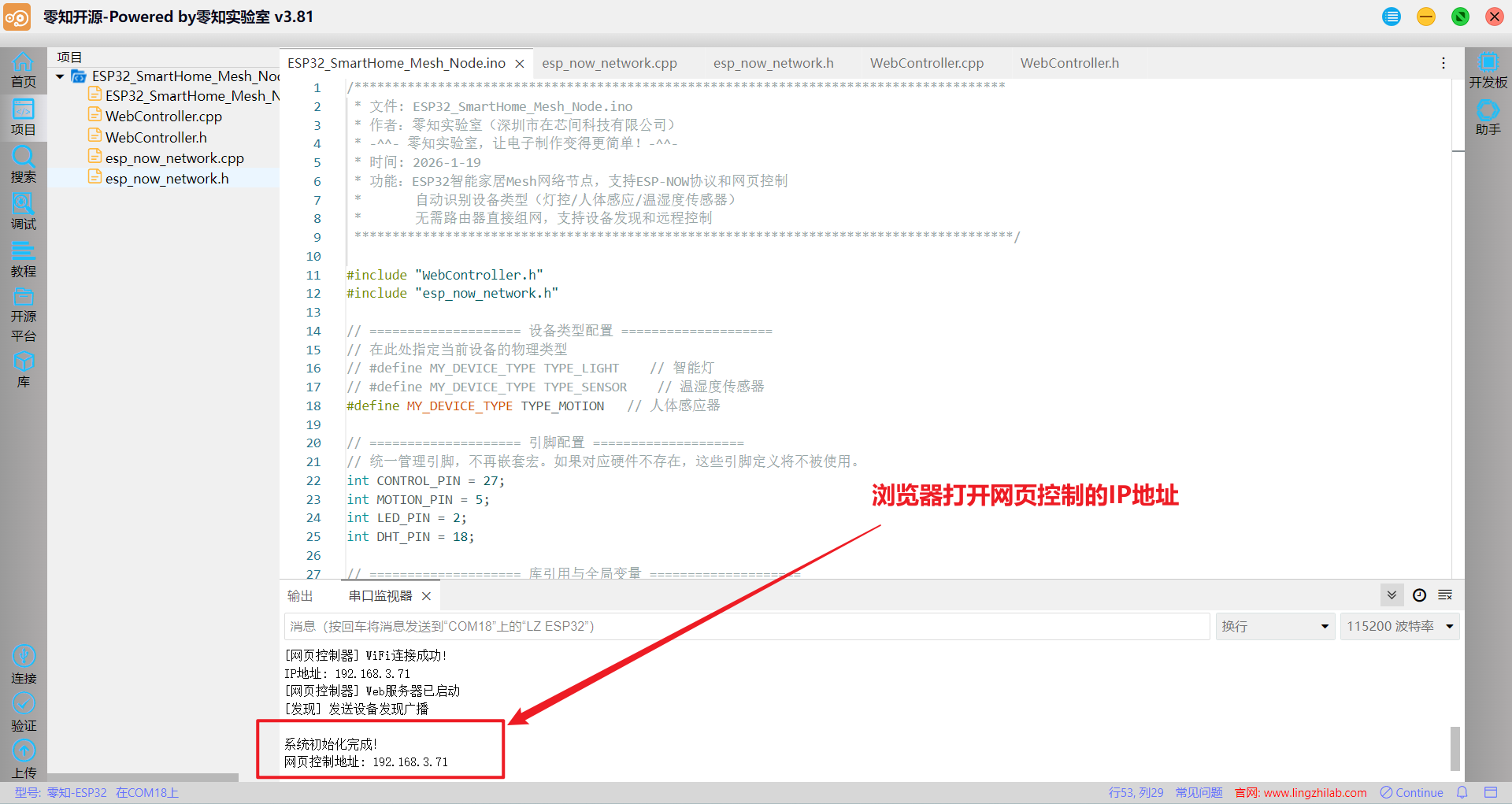
②网页访问
ESP32连接局域网WIFI,浏览器打印串口调试器的IP地址、查看设备列表,进行控制操作
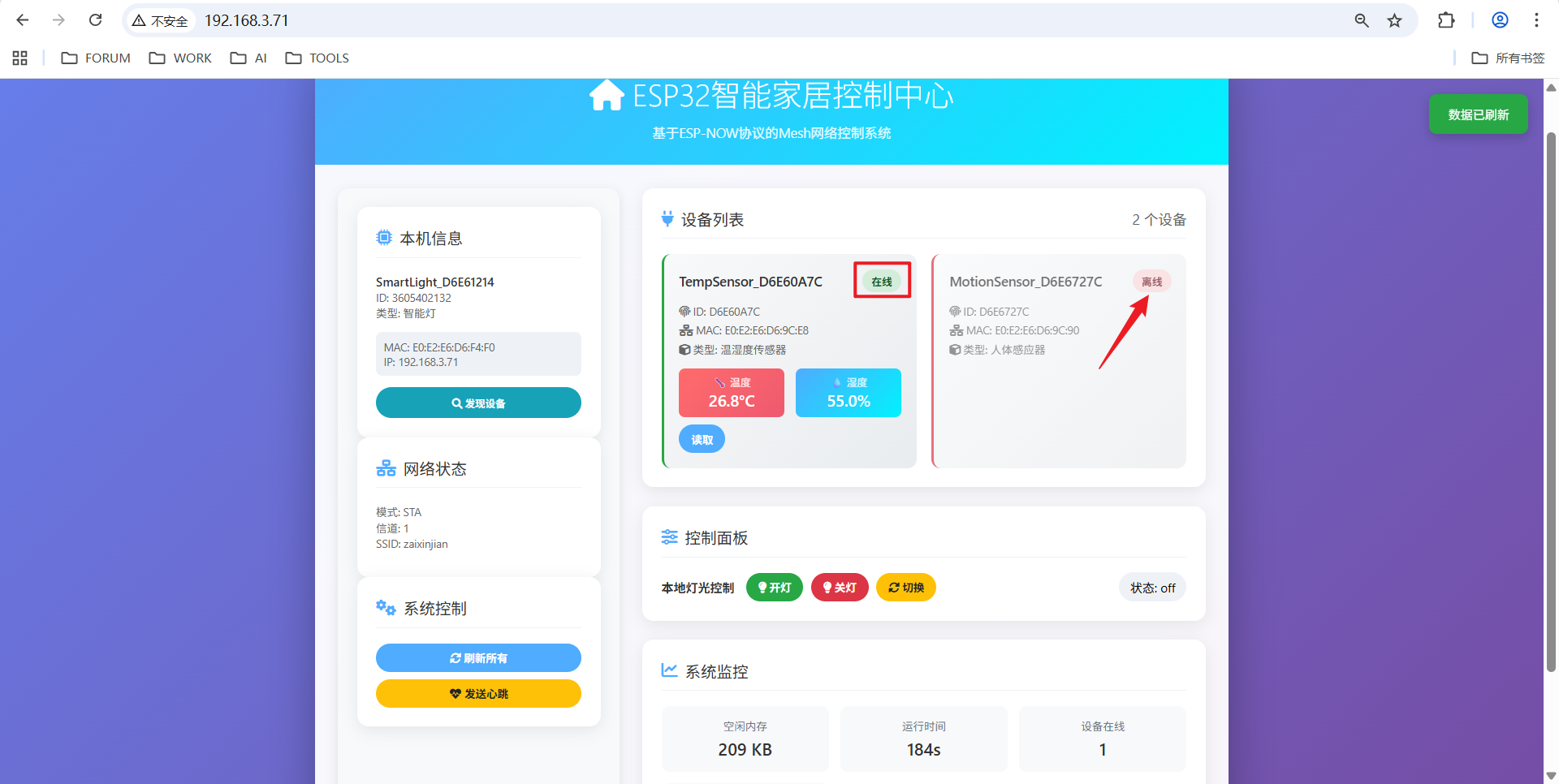
③功能测试
点击网页按钮控制灯光开关、在传感器前移动测试人体感应、查看温湿度数据实时更新
4.2 视频演示
零知ESP32 Mesh智能家居组网实战演示
展示基于ESP-NOW协议的ESP32 Mesh智能家居系统的完整工作流程,硬件连接与设备上电,Mesh网络自动建立与网页控制界面操作演示,多设备联动效果展示,网络稳定性与响应速度测试
五、ESP32组网技术讲解
ESP-MESH 允许分布在大范围区域内的大量设备节点 在同一个 WLAN(无线局域网)中相互连接,MESH 网络可以自主地构建和维护
ESP-MESH 网络架构示意图
网络中的节点不需要连接到中心节点,可以与相邻节点连接;无需受限于距离中心节点的位置,所有节点仍可互连
5.1 ESP-NOW协议解析
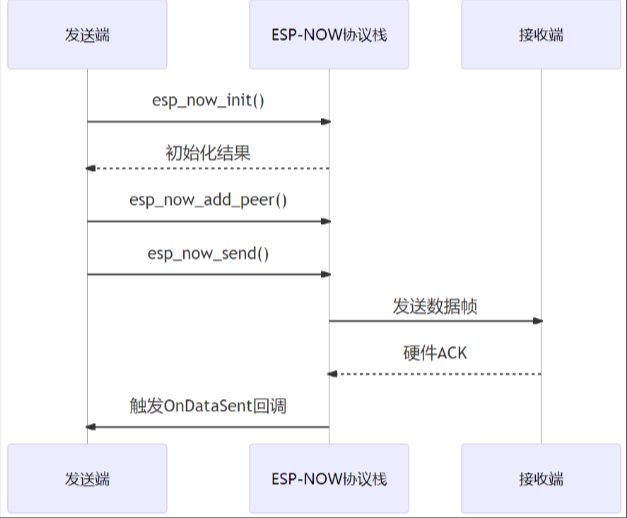
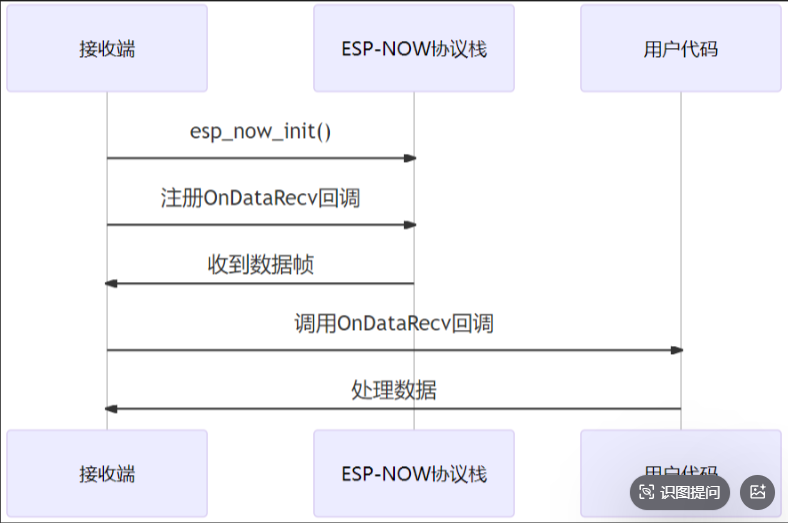
ESP-NOW 基于数据链路层的无线通信协议,可与 Wi-Fi 和 Bluetooth LE 共存,既能实现稳定的设备连接和控制
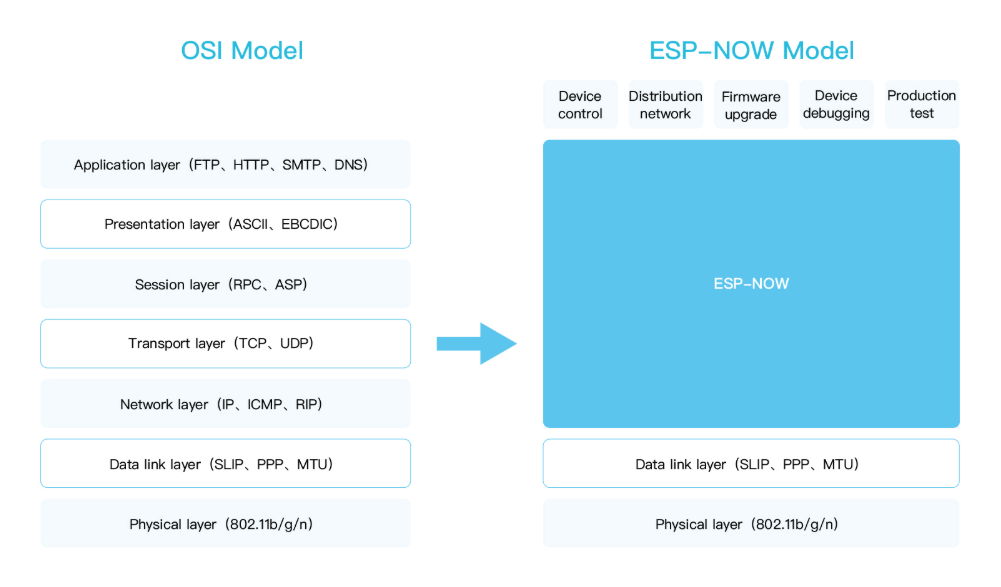
技术特性
无连接通信,无需握手过程直接发送数据;低延迟3-10ms典型,适合实时控制;支持广播和单播模式
发送端流程
接收端流程
5.2 ESP-MESH组网技术
ESP-MESH是基于ESP-NOW的自组织、自修复网络协议,构建多层树状拓扑
ESP-MESH 树型拓扑
设备发现
通过广播实现自动邻居发现,广播功能允许将单个 ESP-MESH 数据包同时发送给网络中的所有节点
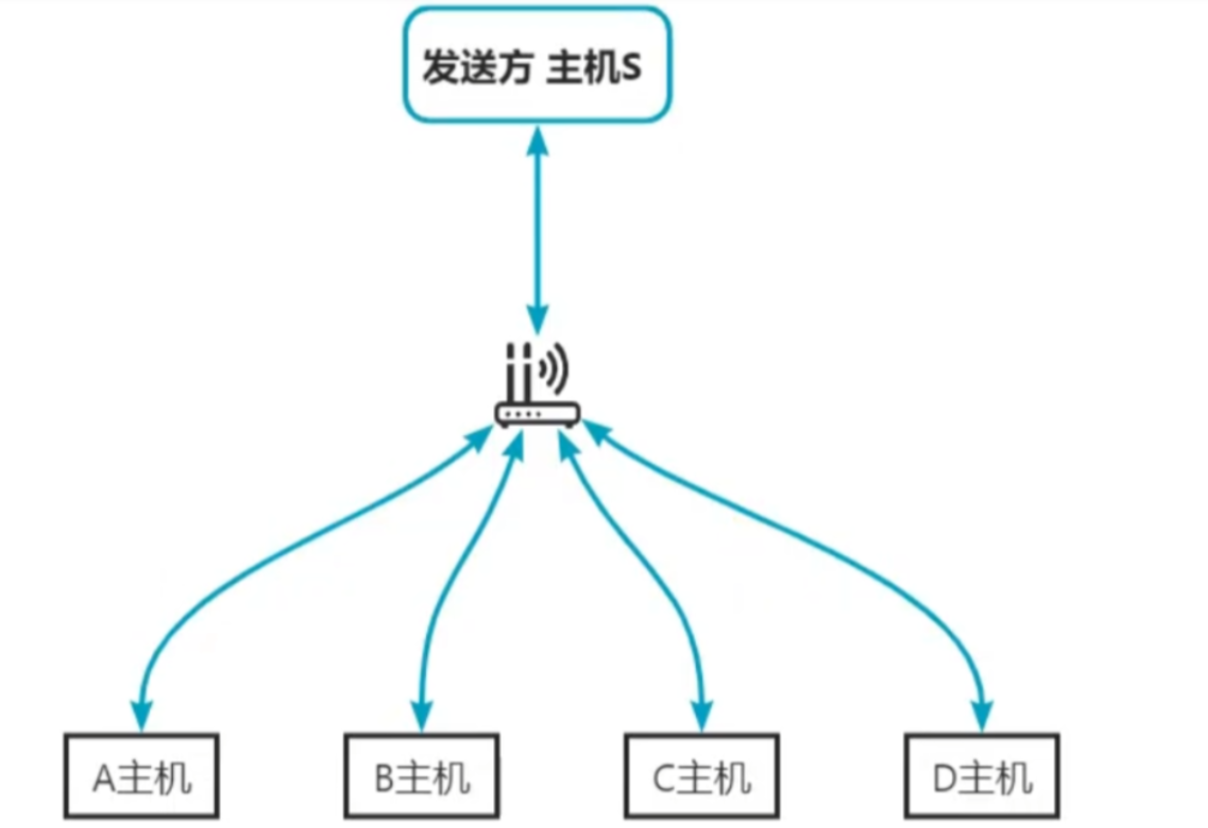
每个节点可以将一个广播包转发至其所有上行和下行连接,使得数据包尽可能快地在整个网络中传播
关键技术对比
| 特性 | ESP-NOW | 传统WiFi | 蓝牙Mesh |
|---|---|---|---|
| 连接方式 | 无连接 | 需要连接 | 需要配对 |
| 功耗 | 极低 | 高 | 低 |
| 传输距离 | 中等 | 远 | 近 |
| 最大节点数 | 20+ | 有限 | 32+ |
| 数据传输 | 点对点 | 通过AP | 广播/中继 |
| 适用场景 | 传感器网络 | 互联网接入 | 个人区域网 |
六、常见问题解答(FAQ)
Q1:设备无法相互通信?
*A:可能原因:*确保所有设备WIFI_CHANNEL设置相同、检查广播地址是否正确、ESP-NOW必须在WiFi初始化后调用
Q2:状态数据未返回到网页?
*A:可能原因:*IP地址错误,连接到稳定的WIFI网络、减少MAX_DEVICES或DynamicJsonDocument大小避免内存不足
项目资源整合
ESP-MESH组网文档: ESP-MESH
异步Web服务器: ESP32Async ESPAsyncWebServer
JSON数据处理: bblanchon ArduinoJson
DHT11传感器驱动: adafruit DHT-sensor-library