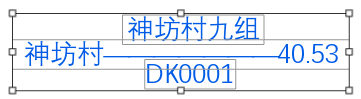
利用几何对象GeometryBag创建多行注记,选择编辑效果如下图
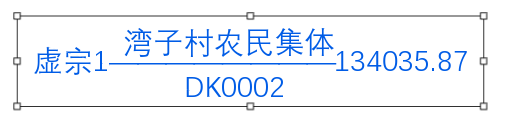
如果采用点放置,效果如下
利用几何对象GeometryBag创建多行注记实现代码:
'''zg:字高
'''zk:字宽
'''zt:字体名称
'''ys:字体重
'''selectedColor:颜色
'''PP MapPoint点
'''AnnoLayer 写入 AnnotationLayer  注记类图层
Dim AnnoLayer As AnnotationLayer
Dim annoFCDef As AnnotationFeatureClassDefinition
Dim txtSymbol As CIMTextSymbol
Dim PsymbolRef As CIMSymbolReference
Dim PCIMTextGraphic As CIMTextGraphic
Dim PannoFeat As AnnotationFeature
Dim selectedColor As CIMColor
Dim pp As MapPoint
Dim dx As Double, dy As Double
Dim zj_text As String
Dim PannoFeat As AnnotationFeature
Dim pFeature As Feature
Await QueuedTask.Run(Sub()
                         pAnnoFeatureClass = AnnoLayer.GetFeatureClass
                         dx = PP.X
                         dy = PP.Y
                         txtSymbol = SymbolFactory.Instance.ConstructTextSymbol(selectedColor)
                         rowBuffer = pAnnoFeatureClass.CreateRowBuffer()
                         pFeature = pAnnoFeatureClass.CreateRow(rowBuffer)
                         PannoFeat = pFeature
                         PannoFeat.SetStatus(AnnotationStatus.Placed)
                         PannoFeat.SetAnnotationClassID(1)
                         PCIMTextGraphic = New CIMTextGraphic()
                         zj_text = "神坊村九组" & vbLf & "神坊村<CHR spacing='-15'>---------------------------------------</CHR>40.53" & vbLf & "DK0001"
                         PCIMTextGraphic.Text = zj_text
                         Dim pGeometryBagBuilder As GeometryBagBuilderEx = New GeometryBagBuilderEx(RF1)
                         Dim builder As ArcGIS.Core.Geometry.GeometryBag
                         Dim builline As ArcGIS.Core.Geometry.Polyline
                         Dim newPoints1 As New List(Of Coordinate2D)()
                         For i As Integer = 0 To 2
                             newPoints1 = New List(Of Coordinate2D)()
                             If i = 0 Then
                                 newPoints1.Add(New Coordinate2D(dx, dy + zg * zjhj * DQBLC / 1000))
                                 newPoints1.Add(New Coordinate2D(dx + zg * 3 * DQBLC / 1000, dy + zg * zjhj * DQBLC / 1000))
                             End If
                             If i = 1 Then
                                 newPoints1.Add(New Coordinate2D(dx, dy))
                                 newPoints1.Add(New Coordinate2D(dx + zg * 3 * DQBLC / 1000, dy))
                             End If
                             If i = 2 Then
                                 newPoints1.Add(New Coordinate2D(dx, dy - zg * zjhj * DQBLC / 1000))
                                 newPoints1.Add(New Coordinate2D(dx + zg * 3 * DQBLC / 1000, dy - zg * zjhj * DQBLC / 1000))
                             End If
                             builline = New PolylineBuilderEx(newPoints1).ToGeometry
                             pGeometryBagBuilder.AddGeometry(builline)
                         Next
                         builder = pGeometryBagBuilder.ToGeometry
                         PCIMTextGraphic.Shape = builder
                         txtSymbol.Angle = dAngle     '获取或设置应用于文本符号的旋转量 (以度为单位),以几何图形为单位。
                         txtSymbol.SetColor(selectedColor)
                         txtSymbol.HorizontalAlignment =                                                   ArcGIS.Core.CIM.HorizontalAlignment.Left
                         txtSymbol.VerticalAlignment = ArcGIS.Core.CIM.VerticalAlignment.Center
                         txtSymbol.SetSize(zg)
                         txtSymbol.FontStyleName = ys
                         txtSymbol.FontFamilyName = zt    '字体家庭名称
                         txtSymbol.Height = zg
                         txtSymbol.LetterWidth = zk / zg * 100%
                         PsymbolRef = New CIMSymbolReference()
                         PsymbolRef.Symbol = txtSymbol
                         PCIMTextGraphic.Symbol = PsymbolRef
                         PannoFeat.SetGraphic(PCIMTextGraphic)
                         pFeature.Store()
                     End Sub)