生命周期相关
这里还是以多任务中启动自由窗口为例,对比与桌面侧直接启动应用的生命周期
桌面侧直接启动应用的生命周期
java
1181  1181 I wm_on_top_resumed_lost_called: [235136609,com.android.launcher3.uioverrides.QuickstepLauncher,topStateChangedWhenResumed]
1181  1181 I wm_on_paused_called: [235136609,com.android.launcher3.uioverrides.QuickstepLauncher,performPause,0]
2765  2765 I wm_on_create_called: [227340519,com.android.messaging.ui.conversationlist.ConversationListActivity,performCreate,129]
2765  2765 I wm_on_start_called: [227340519,com.android.messaging.ui.conversationlist.ConversationListActivity,handleStartActivity,1]
2765  2765 I wm_on_resume_called: [227340519,com.android.messaging.ui.conversationlist.ConversationListActivity,RESUME_ACTIVITY,17]
2765  2765 I wm_on_top_resumed_gained_called: [227340519,com.android.messaging.ui.conversationlist.ConversationListActivity,topStateChangedWhenResumed]
1181  1181 I wm_on_stop_called: [235136609,com.android.launcher3.uioverrides.QuickstepLauncher,STOP_ACTIVITY_ITEM,6]
从多任务启动自由窗口生命周期
java
//进入多任务
1181  1181 I wm_on_restart_called: [235136609,com.android.launcher3.uioverrides.QuickstepLauncher,performRestart,0]
1181  1181 I wm_on_start_called: [235136609,com.android.launcher3.uioverrides.QuickstepLauncher,handleStartActivity,10]
1181  1181 I wm_on_resume_called: [235136609,com.android.launcher3.uioverrides.QuickstepLauncher,RESUME_ACTIVITY,11]
1181  1181 I wm_on_top_resumed_gained_called: [235136609,com.android.launcher3.uioverrides.QuickstepLauncher,topStateChangedWhenResumed]

//启动自由窗口
2073  2073 I wm_on_paused_called: [162074025,com.android.messaging.ui.conversationlist.ConversationListActivity,performPause,1]
1181  1181 I wm_on_top_resumed_lost_called: [235136609,com.android.launcher3.uioverrides.QuickstepLauncher,topStateChangedWhenResumed]
2073  2073 I wm_on_stop_called: [162074025,com.android.messaging.ui.conversationlist.ConversationListActivity,handleRelaunchActivity,0]
2073  2073 I wm_on_destroy_called: [162074025,com.android.messaging.ui.conversationlist.ConversationListActivity,performDestroy,0]
2073  2073 I wm_on_create_called: [162074025,com.android.messaging.ui.conversationlist.ConversationListActivity,performCreate,34]
2073  2073 I wm_on_start_called: [162074025,com.android.messaging.ui.conversationlist.ConversationListActivity,handleStartActivity,1]
2073  2073 I wm_on_resume_called: [162074025,com.android.messaging.ui.conversationlist.ConversationListActivity,RESUME_ACTIVITY,28]
2073 2073 I wm_on_top_resumed_gained_called: [162074025,com.android.messaging.ui.conversationlist.ConversationListActivity,topStateChangedWhenResumed]对比直接从桌面侧启动应用时的生命周期流程存在差异,即启动自由窗口时底层activity(launcher3)没有进行pause。
一般来说当一个应用启动,那么当前应用就会走pause流程,我们这里launcher3为什么没有走pause呢?
其实自由窗口的启动本质上来说就是启动一个具有特殊属性activity,因此我们需要回顾activity的启动流程中桌面的pause是如何确定的。
resumeTopActivity中pause流程分析
代码路径:frameworks/base/services/core/java/com/android/server/wm/TaskFragment.java
java
    final boolean resumeTopActivity(ActivityRecord prev, ActivityOptions options,
            boolean deferPause) {
            ......
            boolean pausing = !deferPause && taskDisplayArea.pauseBackTasks(next);
先看这个resume流程,这会去判断是否需要pause。
这里deferPause的值是通过Task.resumeTopActivityUncheckedLocked方法中传递过来的,其值为false,因此!deferPause为true。
next指的是要启动的activity(我们这里是ConversationListActivity)。
代码路径:frameworks/base/services/core/java/com/android/server/wm/TaskDisplayArea.java
java
    /**
     * Pause all activities in either all of the root tasks or just the back root tasks. This is
     * done before resuming a new activity and to make sure that previously active activities are
     * paused in root tasks that are no longer visible or in pinned windowing mode. This does not
     * pause activities in visible root tasks, so if an activity is launched within the same root
     * task, hen we should explicitly pause that root task's top activity.
     *
     * @param resuming    The resuming activity.
     * @return {@code true} if any activity was paused as a result of this call.
     */
    boolean pauseBackTasks(ActivityRecord resuming) {
        final int[] someActivityPaused = {0};
        forAllLeafTasks(leafTask -> {
            // Check if the direct child resumed activity in the leaf task needed to be paused if
            // the leaf task is not a leaf task fragment.
            //task fragment场景,暂不关注
            if (!leafTask.isLeafTaskFragment()) {
                final ActivityRecord top = topRunningActivity();
                final ActivityRecord resumedActivity = leafTask.getResumedActivity();
                if (resumedActivity != null && top.getTaskFragment() != leafTask) {
                    // Pausing the resumed activity because it is occluded by other task fragment.
                    if (leafTask.startPausing(false /* uiSleeping*/, resuming, "pauseBackTasks")) {
                        someActivityPaused[0]++;
                    }
                }
            }

            //遍历所有leafTask节点,即最底端Task节点
            leafTask.forAllLeafTaskFragments((taskFrag) -> {
                final ActivityRecord resumedActivity = taskFrag.getResumedActivity();
                //判断当前taskFrag是否有存在resumed的Activity,并且即将启动的Activity不能resumed
                if (resumedActivity != null && !taskFrag.canBeResumed(resuming)) {
                     //暂停当前存在resumed的Activity
                    if (taskFrag.startPausing(false /* uiSleeping*/, resuming, "pauseBackTasks")) {
                        //记录暂停的Activity
                        someActivityPaused[0]++;
                    }
                }
            }, true /* traverseTopToBottom */);
        }, true /* traverseTopToBottom */);
        return someActivityPaused[0] > 0;
    }
这个方法会遍历TaskDisplayArea下的所有leafTask节点,即最底端Task节点
- 判断当前Task的Activity是否存在resumed状态,且即将启动的Activity不能被resumed
- 暂停当前存在resumed的Activity,若暂停成功,给参数
someActivityPaused计数
如下图圈的task节点是会遍历的task节点。
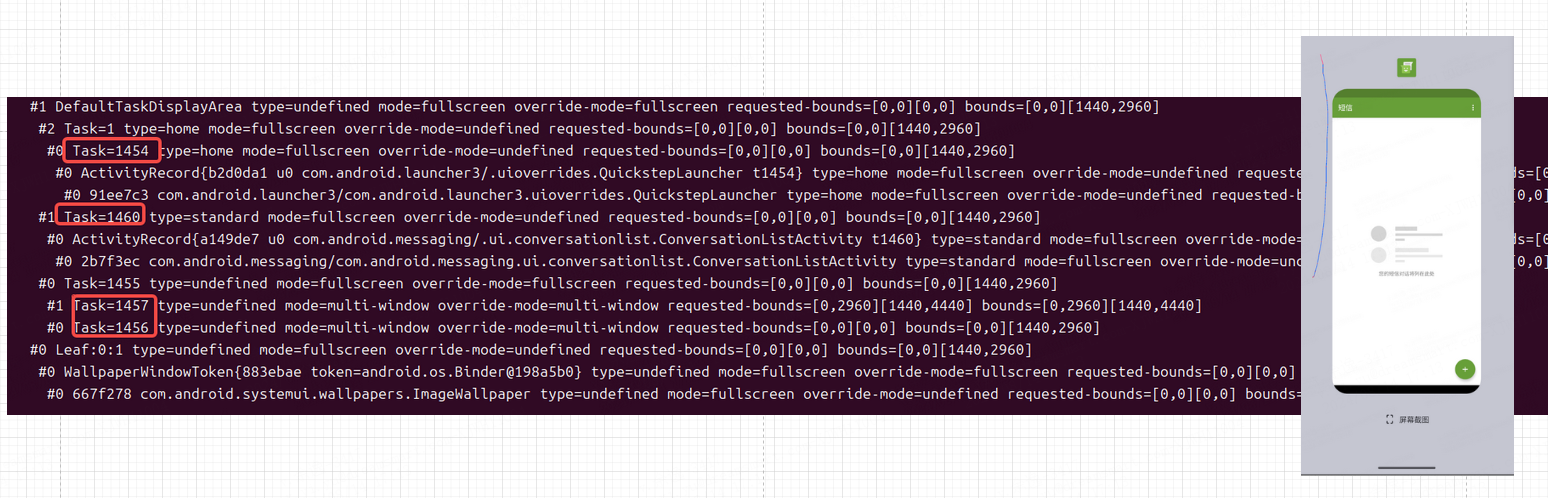
在该界面当我们点击启动自由窗口后开始条件判断resumedActivity != null && !taskFrag.canBeResumed(resuming)。
taskFrag.getResumedActivity()获取此时是resumed状态的task,当遍历到桌面Task时,由于我们要从多任务进入到自由窗口,而此时多任务界面为resumed状态,存在resumed状态的Activity,因此参数resumedActivity不为空。
这里resumedActivity != null为true,再来看看!taskFrag.canBeResumed(resuming)其中参数resuming指的是即将启动的Activity(ConversationListActivity)。
canBeResumed
代码路径:frameworks/base/services/core/java/com/android/server/wm/TaskFragment.java
java
    /**
     * Returns {@code true} is the activity in this TaskFragment can be resumed.
     *
     * @param starting The currently starting activity or {@code null} if there is none.
     */
    boolean canBeResumed(@Nullable ActivityRecord starting) {
        // No need to resume activity in TaskFragment that is not visible.
        return isTopActivityFocusable()
                && getVisibility(starting) == TASK_FRAGMENT_VISIBILITY_VISIBLE;
}isTopActivityFocusable()判断顶部Activity是否可聚焦,一般为true,这里主要关注getVisibility(starting)方法,通样传递starting即将启动的的Activity (ConversationListActivity)。
java
    /**
     * Returns the visibility state of this TaskFragment.
     *
     * @param starting The currently starting activity or null if there is none.
     */
    @TaskFragmentVisibility
    int getVisibility(ActivityRecord starting) {
        ......
        //根据上述代码流程,这里this指的是桌面task,因此此时getParent获取的是桌面task的task
        final WindowContainer<?> parent = getParent();
        ......
        // This TaskFragment is only considered visible if all its parent TaskFragments are
        // considered visible, so check the visibility of all ancestor TaskFragment first.

        //判断parent是否是task或者TaskFragment
        if (parent.asTaskFragment() != null) {
            //递归调用getVisibility,直到parent为TaskDisplayArea(不是task)为止。
            //其目的是为了能够遍历到TaskDisplayArea下所有task节点
            final int parentVisibility = parent.asTaskFragment().getVisibility(starting);
            if (parentVisibility == TASK_FRAGMENT_VISIBILITY_INVISIBLE) {
                // Can't be visible if parent isn't visible
                return TASK_FRAGMENT_VISIBILITY_INVISIBLE;
            } else if (parentVisibility == TASK_FRAGMENT_VISIBILITY_VISIBLE_BEHIND_TRANSLUCENT) {
                // Parent is behind a translucent container so the highest visibility this container
                // can get is that.
                gotTranslucentFullscreen = true;
            }
        }

        final List<TaskFragment> adjacentTaskFragments = new ArrayList<>();
        //逆序遍历parent下的task,即优先最前台,从大到小遍历
        for (int i = parent.getChildCount() - 1; i >= 0; --i) {
            final WindowContainer other = parent.getChildAt(i);
            if (other == null) continue;

            //判断other是否是运行中的Activity
            final boolean hasRunningActivities = hasRunningActivity(other);
            //other和this相同则中断循环,做后续处理
            if (other == this) {
                ......
                // Should be visible if there is no other fragment occluding it, unless it doesn't
                // have any running activities, not starting one and not home stack.
                shouldBeVisible = hasRunningActivities
                        || (starting != null && starting.isDescendantOf(this))
                        || isActivityTypeHome();
                break;
            }

            if (!hasRunningActivities) {
                continue;
            }

            //根据other的WindowingMode判断返回值
            final int otherWindowingMode = other.getWindowingMode();
            if (otherWindowingMode == WINDOWING_MODE_FULLSCREEN) {
                if (isTranslucent(other, starting)) {
                    // Can be visible behind a translucent fullscreen TaskFragment.
                    gotTranslucentFullscreen = true;
                    continue;
                }
                return TASK_FRAGMENT_VISIBILITY_INVISIBLE;
            } else if (otherWindowingMode == WINDOWING_MODE_MULTI_WINDOW
                    && other.matchParentBounds()) {
                if (isTranslucent(other, starting)) {
                    // Can be visible behind a translucent TaskFragment.
                    gotTranslucentFullscreen = true;
                    continue;
                }
                // Multi-window TaskFragment that matches parent bounds would occlude other children
                return TASK_FRAGMENT_VISIBILITY_INVISIBLE;
            }

            ......

        }

        if (!shouldBeVisible) {
            return TASK_FRAGMENT_VISIBILITY_INVISIBLE;
        }

        // Lastly - check if there is a translucent fullscreen TaskFragment on top.
        return gotTranslucentFullscreen
                ? TASK_FRAGMENT_VISIBILITY_VISIBLE_BEHIND_TRANSLUCENT
                : TASK_FRAGMENT_VISIBILITY_VISIBLE;
}简单来说这个方法就是判断当前启动之后的activity的WindowingMode如果不是 WINDOWING_MODE_FULLSCREEN或者WINDOWING_MODE_MULTI_WINDOW那么就返回TASK_FRAGMENT_VISIBILITY_VISIBLE,使后台应用可见,不进入到pause流程。
因此启动自由窗口时底层activity(launcher3)不会进行pause。
保持顶部显示方法
当我们启动了一个自由窗口后,即使启动了其他的应用也希望这个窗口一直保持在顶部。
回顾自由窗口启动流程中桌面侧会设置相应的ActivityOptions给需要启动为自由窗口activity。
activityOptions在Launcher侧设置
代码路径:packages/apps/Launcher3/quickstep/src/com/android/quickstep/TaskShortcutFactory.java
java
    class FreeformSystemShortcut extends SystemShortcut<BaseDraggingActivity> {
        ......
        private ActivityOptions makeLaunchOptions(Activity activity) {
            ActivityOptions activityOptions = ActivityOptions.makeBasic();
            activityOptions.setLaunchWindowingMode(WINDOWING_MODE_FREEFORM);
            // Arbitrary bounds only because freeform is in dev mode right now
            final View decorView = activity.getWindow().getDecorView();
            final WindowInsets insets = decorView.getRootWindowInsets();
            final Rect r = new Rect(0, 0, decorView.getWidth() / 2, decorView.getHeight() / 2);
            r.offsetTo(insets.getSystemWindowInsetLeft() + 50,
                    insets.getSystemWindowInsetTop() + 50);
            activityOptions.setLaunchBounds(r);
            /* 添加保持在顶部的options start */
            activityOptions.setTaskAlwaysOnTop(true);
            /* end */
            return activityOptions;
        }
}修改后发现进入到自由窗口之后,启动其他应用仍然会被覆盖,因此我们需要确认activityOptions.setTaskAlwaysOnTop(true);在桌面侧设置的参数是否在system_server端生效。
activityOptions在system_server侧的设置
回顾TaskDisplayArea.getOrCreateRootTask方法
java
    /**
     * When two level tasks are required for given windowing mode and activity type, returns an
     * existing compatible root task or creates a new one.
     * For one level task, the candidate task would be reused to also be the root task or create
     * a new root task if no candidate task.
     *
     * @param windowingMode The windowing mode the root task should be created in.
     * @param activityType  The activityType the root task should be created in.
     * @param onTop         If true the root task will be created at the top of the display,
     *                      else at the bottom.
     * @param candidateTask The possible task the activity might be launched in. Can be null.
     * @param sourceTask    The task requesting to start activity. Used to determine which of the
     *                      adjacent roots should be launch root of the new task. Can be null.
     * @param options       The activity options used to the launch. Can be null.
     * @param launchFlags   The launch flags for this launch.
     * @return The root task to use for the launch.
     * @see #getRootTask(int, int)
     */
    Task getOrCreateRootTask(int windowingMode, int activityType, boolean onTop,
            @Nullable Task candidateTask, @Nullable Task sourceTask,
            @Nullable ActivityOptions options, int launchFlags) {
        //我们这里windowingMode传递的是WINDOWING_MODE_FREEFORM,
        //因此resolvedWindowingMode为WINDOWING_MODE_FREEFORM
        final int resolvedWindowingMode =
                windowingMode == WINDOWING_MODE_UNDEFINED ? getWindowingMode() : windowingMode;
        // Need to pass in a determined windowing mode to see if a new root task should be created,
        // so use its parent's windowing mode if it is undefined.
        //我们这里resolvedWindowingMode是WINDOWING_MODE_FREEFORM
        //activityType是ACTIVITY_TYPE_STANDARD,因此alwaysCreateRootTask为true
        //这取反为false,因此不进入该逻辑
        if (!alwaysCreateRootTask(resolvedWindowingMode, activityType)) {
            Task rootTask = getRootTask(resolvedWindowingMode, activityType);
            if (rootTask != null) {
                return rootTask;
            }
        } else if (candidateTask != null) {
            final int position = onTop ? POSITION_TOP : POSITION_BOTTOM;
            //这里getLaunchRootTask是同options获取,我们这里options没有设置过mLaunchRootTask,因此为null
            final Task launchParentTask = getLaunchRootTask(resolvedWindowingMode, activityType,
                    options, sourceTask, launchFlags, candidateTask);
            //launchParentTask为null不进入该流程
            if (launchParentTask != null) {
                if (candidateTask.getParent() == null) {
                    launchParentTask.addChild(candidateTask, position);
                } else if (candidateTask.getParent() != launchParentTask) {
                    candidateTask.reparent(launchParentTask, position);
                }
            //candidateTask.getDisplayArea()和this都是默认的TaskDisplayArea,即DefaultTaskDisplayArea
            //两者相同,即candidateTask.getDisplayArea() != this 为false,因此不进入该流程
            } else if (candidateTask.getDisplayArea() != this
                    || candidateTask.getRootTask().mReparentLeafTaskIfRelaunch) {
                if (candidateTask.getParent() == null) {
                    addChild(candidateTask, position);
                } else {
                    candidateTask.reparent(this, onTop);
                }
            }
            // Update windowing mode if necessary, e.g. launch into a different windowing mode.
            //windowingMode传递的是WINDOWING_MODE_FREEFORM
            //candidateTask自身就是rootTask
            //candidateTask前后windowingMode有发生变化
            if (windowingMode != WINDOWING_MODE_UNDEFINED && candidateTask.isRootTask()
                    && candidateTask.getWindowingMode() != windowingMode) {
                //ShellTransitions调用collect处理
                candidateTask.mTransitionController.collect(candidateTask);
                //设置task窗口模式
                candidateTask.setWindowingMode(windowingMode);
            }
            //返回candidateTask的rootTask
            return candidateTask.getRootTask();
        }
        return new Task.Builder(mAtmService)
                .setWindowingMode(windowingMode)
                .setActivityType(activityType)
                .setOnTop(onTop)
                .setParent(this)
                .setSourceTask(sourceTask)
                .setActivityOptions(options)
                .setLaunchFlags(launchFlags)
                .build();
    }
在自由窗口启动流程中,我们讲到,其最主要的操作在该流程中进行。
java
            if (windowingMode != WINDOWING_MODE_UNDEFINED && candidateTask.isRootTask()
                    && candidateTask.getWindowingMode() != windowingMode) {
                candidateTask.mTransitionController.collect(candidateTask);
                candidateTask.setWindowingMode(windowingMode);
            }
            return candidateTask.getRootTask();
但是从代码中我们可以看到,这里并没有进行给task设置AlwaysOnTop,所以不会在最顶端显示。
修改
方案一:直接在上述代码中添加设置AlwaysOnTop
java
            if (windowingMode != WINDOWING_MODE_UNDEFINED && candidateTask.isRootTask()
                    && candidateTask.getWindowingMode() != windowingMode) {
                candidateTask.mTransitionController.collect(candidateTask);
                candidateTask.setWindowingMode(windowingMode);
                /* 添加保持在顶部的options start */
                candidateTask.setTaskAlwaysOnTop(true);
                /* end */
            }
            return candidateTask.getRootTask();
这种改法可以把桌面端设置TaskAlwaysOnTop给去掉,但是比较局限,不太推荐
方案二:在最开始调用anyTaskForId方法获取task的位置修改
java
    int startActivityFromRecents(int callingPid, int callingUid, int taskId,
            SafeActivityOptions options) {
        ......
        synchronized (mService.mGlobalLock) {
            ......
            try {
                task = mRootWindowContainer.anyTaskForId(taskId,
                        MATCH_ATTACHED_TASK_OR_RECENT_TASKS_AND_RESTORE, activityOptions, ON_TOP);
                /* 添加保持在顶部的options start */
                //判断task是否是自由窗口模式
                if(task.inFreeformWindowingMode()){
                    //获取桌面侧设置的TaskAlwaysOnTop状态
                    task.setAlwaysOnTop(activityOptions.getTaskAlwaysOnTop());
                }
                /* end */

                if (task == null) {
                    mWindowManager.executeAppTransition();
                    throw new IllegalArgumentException(
                            "startActivityFromRecents: Task " + taskId + " not found.");
                }

                if (moveHomeTaskForward) {
                    // We always want to return to the home activity instead of the recents
                    // activity from whatever is started from the recents activity, so move
                    // the home root task forward.
                    // TODO (b/115289124): Multi-display supports for recents.
                    mRootWindowContainer.getDefaultTaskDisplayArea().moveHomeRootTaskToFront(
                            "startActivityFromRecents");
                }
                ......
这个改法比较推荐,在anyTaskForId整个流程完成之后再进行判断设置,比较稳健。