一、Container组件简介
Container是Flutter中最常用的布局容器组件之一,它提供了丰富的属性来控制子组件的布局、装饰和变换。Container就像一个多功能容器,可以添加边距、填充、边框、圆角、阴影等效果。
Container组件的重要性
Container组件
布局控制
样式装饰
尺寸约束
变换效果
margin外边距
padding内边距
alignment对齐
color背景色
decoration装饰
foregound前景装饰
width宽度
height高度
constraints约束
transform变换
clip裁剪
Container在实际开发中应用极为广泛,从简单的背景色设置到复杂的多层装饰,都能通过Container轻松实现。
二、Container属性详解
核心属性对比
| 属性名 | 类型 | 默认值 | 说明 | 使用场景 |
|---|---|---|---|---|
| padding | EdgeInsetsGeometry | null | 内边距 | 子元素与容器边缘的间距 |
| margin | EdgeInsetsGeometry | null | 外边距 | 容器与外部元素的间距 |
| color | Color | null | 背景颜色 | 简单的背景色 |
| decoration | BoxDecoration | null | 装饰效果 | 复杂的装饰(边框、渐变等) |
| width | double | null | 宽度 | 指定容器宽度 |
| height | double | null | 高度 | 指定容器高度 |
| constraints | BoxConstraints | null | 尺寸约束 | 限制容器的最小/最大尺寸 |
| alignment | AlignmentGeometry | null | 对齐方式 | 子元素在容器中的对齐 |
| transform | Matrix4 | null | 变换矩阵 | 旋转、缩放等变换 |
color与decoration互斥
需要注意的是,color和decoration属性不能同时使用:
dart
// ✅ 正确 - 使用color
Container(
  color: Colors.blue,
  child: Text('背景色'),
)

// ✅ 正确 - 使用decoration
Container(
  decoration: BoxDecoration(
    color: Colors.blue,
  ),
  child: Text('装饰背景'),
)

// ❌ 错误 - 同时使用
Container(
  color: Colors.blue,
  decoration: BoxDecoration(...), // 错误
  child: Text('错误示例'),
)
三、基础用法
最简单的Container
dart
Container(
  color: Colors.blue,
  child: Text('这是一个Container'),
)
指定宽高
dart
Container(
  width: 200,
  height: 100,
  color: Colors.green,
  child: Center(child: Text('200x100')),
)
内边距和外边距
margin
Container边界
padding
子元素
外部空间
容器区域
内部空间
内容
dart
Container(
  margin: EdgeInsets.all(16),
  padding: EdgeInsets.all(24),
  color: Colors.orange,
  child: Text('外边距16,内边距24'),
)
四、装饰效果
圆角边框
使用BoxDecoration创建复杂的装饰效果:
dart
Container(
  padding: EdgeInsets.all(16),
  decoration: BoxDecoration(
    color: Colors.blue.shade100,
    borderRadius: BorderRadius.circular(12),
    border: Border.all(
      color: Colors.blue,
      width: 2,
    ),
  ),
  child: Text('圆角边框'),
)
渐变背景
dart
Container(
  width: 200,
  height: 100,
  decoration: BoxDecoration(
    gradient: LinearGradient(
      colors: [Colors.blue, Colors.purple],
      begin: Alignment.topLeft,
      end: Alignment.bottomRight,
    ),
  ),
  child: Center(
    child: Text('渐变背景', style: TextStyle(color: Colors.white)),
  ),
)
阴影效果
dart
Container(
  padding: EdgeInsets.all(16),
  decoration: BoxDecoration(
    color: Colors.white,
    borderRadius: BorderRadius.circular(8),
    boxShadow: [
      BoxShadow(
        color: Colors.black.withOpacity(0.2),
        blurRadius: 8,
        offset: Offset(0, 4),
      ),
    ],
  ),
  child: Text('带阴影的容器'),
)
五、尺寸约束
使用constraints
dart
Container(
  constraints: BoxConstraints(
    minWidth: 100,
    maxWidth: 300,
    minHeight: 50,
    maxHeight: 150,
  ),
  color: Colors.teal,
  child: Text('尺寸约束'),
)
尺寸约束示例
| 约束类型 | 效果 | 使用场景 |
|---|---|---|
| minWidth | 最小宽度 | 确保内容不被压缩 |
| maxWidth | 最大宽度 | 限制内容扩展 |
| minHeight | 最小高度 | 确保可点击区域 |
| maxHeight | 最大高度 | 限制内容溢出 |
六、对齐方式
alignment属性
使用alignment控制子元素在容器中的位置:
Alignment
topLeft 左上
topCenter 上中
topRight 右上
centerLeft 左中
center 居中
centerRight 右中
bottomLeft 左下
bottomCenter 下中
bottomRight 右下
dart
Container(
  width: 200,
  height: 100,
  color: Colors.purple.shade100,
  alignment: Alignment.center,
  child: Text('居中对齐'),
)
七、变换效果
transform属性
使用transform实现旋转、缩放等变换:
dart
Container(
  width: 100,
  height: 100,
  color: Colors.red,
  transform: Matrix4.rotationZ(0.5), // 旋转30度
  child: Center(child: Text('旋转')),
)
缩放变换
dart
Container(
  width: 100,
  height: 100,
  color: Colors.green,
  transform: Matrix4.diagonal3(1.5, 1.5, 1), // 放大1.5倍
  child: Center(child: Text('缩放')),
)
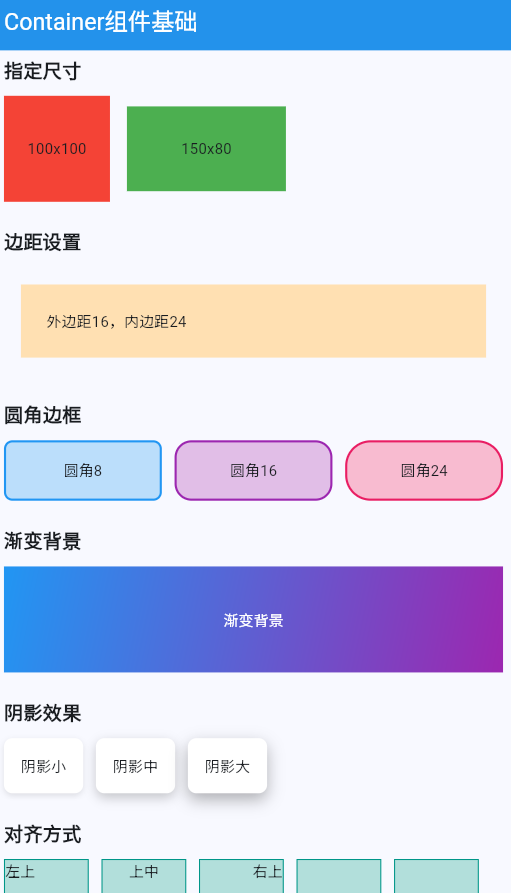
八、完整示例
dart
class ContainerBasicsExample extends StatelessWidget {
  const ContainerBasicsExample({super.key});

  @override
  Widget build(BuildContext context) {
    return Scaffold(
      appBar: AppBar(title: const Text('Container组件基础')),
      body: ListView(
        padding: const EdgeInsets.all(16),
        children: [
          // 基础Container
          const Text(
            '基础Container',
            style: TextStyle(fontSize: 18, fontWeight: FontWeight.bold),
          ),
          const SizedBox(height: 12),
          Container(
            padding: const EdgeInsets.all(16),
            color: Colors.blue.shade100,
            child: const Text('最简单的Container示例'),
          ),
          const SizedBox(height: 24),

          // 指定尺寸
          const Text(
            '指定尺寸',
            style: TextStyle(fontSize: 18, fontWeight: FontWeight.bold),
          ),
          const SizedBox(height: 12),
          Row(
            children: [
              Container(
                width: 100,
                height: 100,
                color: Colors.red,
                child: const Center(child: Text('100x100')),
              ),
              const SizedBox(width: 16),
              Container(
                width: 150,
                height: 80,
                color: Colors.green,
                child: const Center(child: Text('150x80')),
              ),
            ],
          ),
          const SizedBox(height: 24),

          // 边距设置
          const Text(
            '边距设置',
            style: TextStyle(fontSize: 18, fontWeight: FontWeight.bold),
          ),
          const SizedBox(height: 12),
          Container(
            margin: const EdgeInsets.all(16),
            padding: const EdgeInsets.all(24),
            color: Colors.orange.shade100,
            child: const Text('外边距16,内边距24'),
          ),
          const SizedBox(height: 24),

          // 圆角边框
          const Text(
            '圆角边框',
            style: TextStyle(fontSize: 18, fontWeight: FontWeight.bold),
          ),
          const SizedBox(height: 12),
          Row(
            children: [
              Expanded(
                child: Container(
                  padding: const EdgeInsets.all(16),
                  decoration: BoxDecoration(
                    color: Colors.blue.shade100,
                    borderRadius: BorderRadius.circular(8),
                    border: Border.all(color: Colors.blue, width: 2),
                  ),
                  child: const Center(child: Text('圆角8')),
                ),
              ),
              const SizedBox(width: 12),
              Expanded(
                child: Container(
                  padding: const EdgeInsets.all(16),
                  decoration: BoxDecoration(
                    color: Colors.purple.shade100,
                    borderRadius: BorderRadius.circular(16),
                    border: Border.all(color: Colors.purple, width: 2),
                  ),
                  child: const Center(child: Text('圆角16')),
                ),
              ),
              const SizedBox(width: 12),
              Expanded(
                child: Container(
                  padding: const EdgeInsets.all(16),
                  decoration: BoxDecoration(
                    color: Colors.pink.shade100,
                    borderRadius: BorderRadius.circular(24),
                    border: Border.all(color: Colors.pink, width: 2),
                  ),
                  child: const Center(child: Text('圆角24')),
                ),
              ),
            ],
          ),
          const SizedBox(height: 24),

          // 渐变背景
          const Text(
            '渐变背景',
            style: TextStyle(fontSize: 18, fontWeight: FontWeight.bold),
          ),
          const SizedBox(height: 12),
          Container(
            height: 100,
            decoration: const BoxDecoration(
              gradient: LinearGradient(
                colors: [Colors.blue, Colors.purple],
                begin: Alignment.topLeft,
                end: Alignment.bottomRight,
              ),
            ),
            child: const Center(
              child: Text('渐变背景', style: TextStyle(color: Colors.white)),
            ),
          ),
          const SizedBox(height: 24),

          // 阴影效果
          const Text(
            '阴影效果',
            style: TextStyle(fontSize: 18, fontWeight: FontWeight.bold),
          ),
          const SizedBox(height: 12),
          Row(
            children: [
              Container(
                padding: const EdgeInsets.all(16),
                decoration: BoxDecoration(
                  color: Colors.white,
                  borderRadius: BorderRadius.circular(8),
                  boxShadow: [
                    BoxShadow(
                      color: Colors.black.withOpacity(0.1),
                      blurRadius: 4,
                      offset: const Offset(0, 2),
                    ),
                  ],
                ),
                child: const Center(child: Text('阴影小')),
              ),
              const SizedBox(width: 12),
              Container(
                padding: const EdgeInsets.all(16),
                decoration: BoxDecoration(
                  color: Colors.white,
                  borderRadius: BorderRadius.circular(8),
                  boxShadow: [
                    BoxShadow(
                      color: Colors.black.withOpacity(0.2),
                      blurRadius: 8,
                      offset: const Offset(0, 4),
                    ),
                  ],
                ),
                child: const Center(child: Text('阴影中')),
              ),
              const SizedBox(width: 12),
              Container(
                padding: const EdgeInsets.all(16),
                decoration: BoxDecoration(
                  color: Colors.white,
                  borderRadius: BorderRadius.circular(8),
                  boxShadow: [
                    BoxShadow(
                      color: Colors.black.withOpacity(0.3),
                      blurRadius: 12,
                      offset: const Offset(0, 6),
                    ),
                  ],
                ),
                child: const Center(child: Text('阴影大')),
              ),
            ],
          ),
          const SizedBox(height: 24),

          // 对齐方式
          const Text(
            '对齐方式',
            style: TextStyle(fontSize: 18, fontWeight: FontWeight.bold),
          ),
          const SizedBox(height: 12),
          Wrap(
            spacing: 12,
            runSpacing: 12,
            children: [
              _buildAlignmentBox(Alignment.topLeft, '左上'),
              _buildAlignmentBox(Alignment.topCenter, '上中'),
              _buildAlignmentBox(Alignment.topRight, '右上'),
              _buildAlignmentBox(Alignment.centerLeft, '左中'),
              _buildAlignmentBox(Alignment.center, '居中'),
              _buildAlignmentBox(Alignment.centerRight, '右中'),
              _buildAlignmentBox(Alignment.bottomLeft, '左下'),
              _buildAlignmentBox(Alignment.bottomCenter, '下中'),
              _buildAlignmentBox(Alignment.bottomRight, '右下'),
            ],
          ),
        ],
      ),
    );
  }

  Widget _buildAlignmentBox(Alignment alignment, String label) {
    return Container(
      width: 80,
      height: 80,
      decoration: BoxDecoration(
        color: Colors.teal.shade100,
        border: Border.all(color: Colors.teal),
      ),
      alignment: alignment,
      child: Text(label),
    );
  }
}欢迎加入开源鸿蒙跨平台社区:https://openharmonycrossplatform.csdn.net