可用于订单预约时间段选择、服务时间段选择、
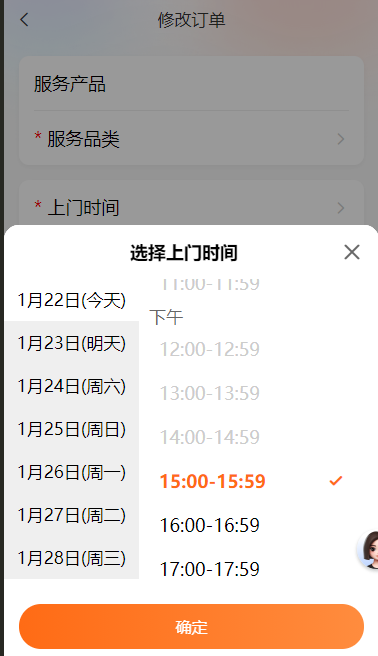
uv-picker标签报错可自行删除,以及其他倒入文件和接口请求
<template>
	<view class="container">
	<!-- 	<uni-nav-bar @clickLeft="blackfack()" backgroundColor="hsla(0, 0%, 0%, 0)"
		:style="'padding-top:'+paddingTop+'px;'" :border="false" fixed
		left-icon="left" title="修改订单" /> -->
		<uni-nav-bar :backgroundColor="rgba" :statusBar="true" :border="false" fixed left-icon="left" title="修改订单" @clickLeft="blackfack"/>


		<view class="beijing"></view>
		<view class="sdign">
			<view class="faultPhenomenon fontSize36">
				<view class="fault_item" style="padding-bottom: 30rpx;border-bottom: 1px solid #eeeeee;">
					<view class="">
						服务产品
					</view>
					<!-- @click="openPicker_fwcp()" -->
					<view class="" >
						{{orderInfoNew.productName}}
						<!-- <uni-icons color="#cccccc" type="right"></uni-icons> -->
					</view>
				</view>
				<view class="fault_item" style="padding-top: 30rpx;">
					<view class="xinghao">
						服务品类
					</view>
					<view class="" @click="openPicker_fwpl()">
						{{orderInfoNew.categoryName}}
						<uni-icons color="#cccccc" type="right"></uni-icons>
					</view>
				</view>

			</view>

			<view class="faultPhenomenon fontSize36">
				<!-- <view class="fault_item" style="padding-bottom: 30rpx;border-bottom: 1px solid #eeeeee;">
					<view class="">
						联系电话
					</view>
					<view class="">
						{{orderInfoNew.contactPhone?orderInfoNew.contactPhone:orderInfoNew.customerPhone}}
					</view>
				</view> -->
				<view @click="toggle('bottom')" class="fault_item" style="padding-bottom: 30rpx;border-bottom: 1px solid #eeeeee;">
					<view class="xinghao">
						上门时间
					</view>
					<view class="" style="flex: 1;text-align: right;">
						{{dateEcho?dateEcho:orderInfoNew.appointmentDate}} {{orderInfoNew.appointmentTimeRange?orderInfoNew.appointmentTimeRange:""}}
						<uni-icons color="#cccccc" type="right"></uni-icons>
					</view>
				</view>
				<view class="fault_item" style="text-align: left;padding-top: 30rpx;flex-direction: column;justify-content: flex-start;">
					<view class="xinghao">
						服务地址
					</view>
					<view class="address_v" style="flex: 1;display: flex;">
						<view class="color666 fontSize34" style="flex: 1;min-height: 60px;">{{orderInfoNew.fullAddress?orderInfoNew.fullAddress:"请点击定位选择客户地址"}}</view>
						<view class="colorYellow" @click="goAddress()">
							<uni-icons color="#FF6B15" size="18" type="location-filled"></uni-icons>定位
						</view>
					</view>
				</view>
				<view class="fault_item" style="text-align: left;padding-top: 30rpx;flex-direction: column;justify-content: flex-start;">
					<view class="">
						门牌地址
					</view>
					<view class="address_v" style="flex: 1;display: flex;">
						<textarea name="" class="color666 fontSize34" style="height: 60px;" id="" v-model="orderInfoNew.detailedAddress" placeholder="门牌地址"></textarea>
					</view>
				</view>
			</view>
		</view>
		<!-- 服务产品弹窗 -->
		<uv-picker ref="picker_fwcp" round="15" title="服务产品" confirmColor="#FF6B15" :columns="cancelList_fwcp" keyName="text" @confirm="confirm_fwcp"></uv-picker>
		<!-- 服务品类弹窗 -->
		<uv-picker ref="picker_fwpl" round="15" title="服务品类" confirmColor="#FF6B15" :columns="cancelList_fwpl" keyName="name" @confirm="confirm_fwpl"></uv-picker>
		<!-- 选择上门普通弹窗 -->
		<uni-popup borderRadius="15px 15px 0px 0px" style="width: 100%;" :mask-click="false" ref="popup" background-color="#fff">
			<view class="popup-content" :class="{ 'popup-height': toggleType === 'left' || toggleType === 'right' }">
				<view class="fontSize36 textAlignCenter fontBold">选择上门时间</view>
				<uni-icons @click="close" class="closeempty" size="24" color="#666666" type="closeempty"></uni-icons>

				<view class="smView">
					<!-- 左侧日期 -->
					<view class="smView_left" >
						<view v-for="(item, index) in time.leftDay" :key="index"
						 class="smView_left_day fontSize34 "
						 @click="leftdaySe(item.date, index, item.dataymd)"
						 :class="{'smView_left_day_select':dayLeftSe_index == index}">
							{{item.date}}({{item.weekDay}})
						</view>
					</view>
					<!-- 右侧时间 -->
					<view class="smView_right_f" style="height: 100%;overflow-y: scroll;flex: 1;">
						<view class="smView_right fontSize34" ref="contentRef">
							<view class="smView_rightA" v-for="(item, index) in time.list" :key="index">
								<view class="color666">{{item.name}}</view>
								<view class="smView_rightB">
									<view v-for="(itemB, indexB) in item.itemList" :key="indexB"
									 class="fontSize36 smView_right_time "
									 :style="{ color: timeDuanif(itemB.text) ? '' : '#ccc' }"
									 :class="{'smView_right_time_select':timeRightSe_value == itemB.value, 'smView_rightC':timeDuanif(itemB.text)}"
									 @click="timeDuanif(itemB.text)?timeRightSe(itemB.text, itemB.value, index, indexB):''">
										{{itemB.text}}
										<uni-icons v-if="timeRightSe_value == itemB.value" class="checkmarkempty" type="checkmarkempty" color="#FF6B15"></uni-icons>
									</view>
								</view>
							</view>
						</view>
					</view>

				</view>

				<button class="popup-login-btn " @click="timeSave">确定</button>
			</view>
		</uni-popup>

		<!-- :style="'padding-bottom:'+safeBottom" -->
		<view class="flexBottom" >
			<button @click="save()" class="login-btn">确定修改</button>
		</view>
	</view>
</template>


<script setup>
	import {
		reactive,
		ref,
		getCurrentInstance,
	} from "vue";
	import {
		onLoad,onPageScroll,onUnload
	} from '@dcloudio/uni-app'
	import utils from "@/common/utils.js"

	const globalProperties = getCurrentInstance().appContext.config.globalProperties; // 获取全局挂载
	const paddingTop = ref(44)

	const rgba= ref('rgba(0,0,0,0)')
	const safeBottom = ref(0)

	const picker_fwcp = ref(false)
	const picker_fwpl = ref(false)
	const toggleType = ref("")
	const popup = ref(false)//故障现象弹窗
	//服务产品数据
	const cancelList_fwcp = ref([[{
		text:"取消订单原因1",
		id:1
	},{
		text:"取消订单原因2",
		id:2
	},{
		text:"取消订单原因3",
		id:3
	}]])
	//服务品类数据
	const cancelList_fwpl = ref([])
	const tab = reactive({
		tabList: [{
			name: "维修服务"
		}, {
			name: "配件材料"
		}, {
			name: "增值服务"
		}],
	})
	//确定选择的上门时间
	const itemSe_text = ref("")
	//上门时间左侧日期选择的index
	const dayLeftSe_index = ref(0)
	//上门时间右侧选择的value
	const timeRightSe_value = ref(null)
	//上门时间左侧日期选择的text
	const dayLeftSe_text = ref("")
	//上门时间右侧选择的text
	const timeRightSe_text = ref("")
	//上门时间右侧
	const time = reactive({
		leftDay: [],
		list: [{
			name: "上午",
			itemList: [{
				text: "04:00-04:59",
				start: "04:00:00",
				end: "04:59:59",
				value: "5"
			}, {
				text: "05:00-05:59",
				start: "05:00:00",
				end: "05:59:59",
				value: "6"
			}, {
				text: "06:00-06:59",
				start: "06:00:00",
				end: "06:59:59",
				value: "7"
			}, {
				text: "07:00-07:59",
				start: "07:00:00",
				end: "07:59:59",
				value: "8"
			}, {
				text: "08:00-08:59",
				start: "08:00:00",
				end: "08:59:59",
				value: "9"
			}, {
				text: "09:00-09:59",
				start: "09:00:00",
				end: "09:59:59",
				value: "10"
			}, {
				text: "10:00-10:59",
				start: "10:00:00",
				end: "10:59:59",
				value: "11"
			}, {
				text: "11:00-11:59",
				start: "11:00:00",
				end: "11:59:59",
				value: "12"
			}]
		}, {
			name: "下午",
			itemList: [{
				text: "12:00-12:59",
				start: "12:00:00",
				end: "12:59:59",
				value: "13"
			}, {
				text: "13:00-13:59",
				start: "13:00:00",
				end: "13:59:59",
				value: "14"
			}, {
				text: "14:00-14:59",
				start: "14:00:00",
				end: "14:59:59",
				value: "15"
			}, {
				text: "15:00-15:59",
				start: "15:00:00",
				end: "15:59:59",
				value: "16"
			}, {
				text: "16:00-16:59",
				start: "16:00:00",
				end: "16:59:59",
				value: "17"
			}, {
				text: "17:00-17:59",
				start: "17:00:00",
				end: "17:59:59",
				value: "18"
			}]
		}, {
			name: "夜间",
			itemList: [{
				text: "18:00-18:59",
				start: "18:00:00",
				end: "18:59:59",
				value: "19"
			}, {
				text: "19:00-19:59",
				start: "19:00:00",
				end: "19:59:59",
				value: "20"
			}, {
				text: "20:00-20:59",
				start: "20:00:00",
				end: "20:59:59",
				value: "21"
			},{
				text: "21:00-21:59",
				start: "21:00:00",
				end: "21:59:59",
				value: "22"
			}, {
				text: "22:00-22:59",
				start: "22:00:00",
				end: "22:59:59",
				value: "23"
			}, {
				text: "23:00-23:59",
				start: "23:00:00",
				end: "23:59:59",
				value: "24"
			}]
		}],
	})
	const dataymd = ref("")
	const timeRightSe_index = ref()
	const timeRightSe_indexB = ref()
	const fullAddress = ref("")//服务地址
	const address_mp = ref("")//门牌地址
	const longitude = ref("")
	const latitude = ref("")
	const orderInfo = ref({})
	const orderInfoNew = ref({})
	const offDataymd = ref(false)//true上门时间有改动,false无改动
	const dateEcho = ref("")//只用于页面显示 处理2025-04-16 06:00-:06:59
	const regeoInfo = ref("")
	const positionInfo = ref(null)
	const contentRef = ref(null)

	onUnload(() => {
	    // 页面卸载时移除监听
	    uni.$off('dataEventSQ_edit_orders');
	})
	onLoad(() => {
		let gewin = uni.getWindowInfo();//获取窗口信息
		paddingTop.value = gewin.statusBarHeight + 2;
		//设置ios 底部安全距离
		safeBottom.value = gewin.safeAreaInsets.bottom>0?gewin.safeAreaInsets.bottom+"px":"30rpx";
		//获取左侧日期并整合
		time.leftDay = getFormattedDates();
		dataymd.value = time.leftDay[0].dataymd;
		//编辑接受数据
		uni.$once('dataEventSQ_edit_orders', (data) => {
			orderInfo.value = JSON.parse(JSON.stringify(data.orderInfo));
			orderInfoNew.value = JSON.parse(JSON.stringify(data.orderInfo));
			regeoInfo.value={
				addressComponent:{
					adcode: orderInfo.value.districtId && orderInfo.value.districtId != '0' ? orderInfo.value.districtId : "",
					township: orderInfo.value.streetName ? orderInfo.value.streetName : "",
					provinceId: orderInfo.value.provinceId ? orderInfo.value.provinceId : "",
					cityId: orderInfo.value.cityId ? orderInfo.value.cityId : "",
				}
			}
			let arrs = orderInfo.value.appointmentDate.split("-");
			let newdate = `${parseInt(arrs[1])}月${parseInt(arrs[2])}日`;
			dateEcho.value = newdate
			categoryPullDown()
		});

	})
	//监听页面滚动
	onPageScroll((e) => {
	    handleScroll(e.scrollTop)
	})
	//设置导航栏背景样式
	const handleScroll= (top) => {
		// 获取当前的滚动距离 top
	    if (top > 5) {
			let opacity = top / 300
			opacity = opacity > 1 ? 1 : opacity

			// 根据滚动距离设置导航栏背景色
			let alpha = Math.min(top / 100, 1); // 控制透明度的变化,200为阈值
			rgba.value =`rgba(255, 255, 255, ${alpha})`

			//rgba.value = `rgba(255, 255, 255, 1)`;
	    } else {
			rgba.value = 'rgba(0,0,0,0)'
	    }
	}
	// 获取元素位置的方法  H5有效app无效
	const getElementPosition = () => {
		try {
			uni.createSelectorQuery()
			  .select('.smView_right_f .smView_right .smView_rightA .smView_rightB .smView_rightC')
			  .boundingClientRect(rect => {
			    if (rect) {
			      positionInfo.value = {
			        left: rect.left,
			        right: rect.right,
			        top: rect.top,
			        bottom: rect.bottom,
			        width: rect.width,
			        height: rect.height
			      };
			      console.log('元素位置信息:', rect.top);
						// // 获取内容区域的DOM节点
						const contentEl = contentRef.value.$el || contentRef.value;
						const systemInfo = uni.getSystemInfoSync();
						const pixelRatio = systemInfo.pixelRatio;//获取设备像素比
						// 向上滚动100px
						contentEl.scrollTop = positionInfo.value.top / pixelRatio;
			    } else {
			      console.log('未找到匹配的元素');
			      positionInfo.value = null;
			    }
			  })
			  .exec();
		} catch (error) {
			//TODO handle the exception
		}
	}
	//查询数据字典 服务品类
	const getListByType= () => {
		globalProperties.$api.getListByType({
			types: ["engineer_reason_for_order_cancellation"]
		}).then(response => {
			let arr = response.data.dictionaryList.engineer_reason_for_order_cancellation;
			cancelList.value = arr?[arr]:[]
		}).catch(error => {

		});
	}

	//查询服务品类下拉数据
	const categoryPullDown= () => {
		globalProperties.$api.categoryPullDown({
			id: orderInfo.value.productId
		}).then(response => {
			console.log(response.data)
			cancelList_fwpl.value = [response.data] || []
		}).catch(error => {

		});
	}
	//上门时间确定修改
	const timeSave = ()=> {
		if(timeRightSe_value.value == null) return globalProperties.$test.toast('请选择上门时间!', 3000);
		itemSe_text.value = dayLeftSe_text.value +" "+ timeRightSe_text.value
		orderInfoNew.value.appointmentDate = dayLeftSe_text.value
		orderInfoNew.value.appointmentTimeRange = timeRightSe_text.value
		dateEcho.value = ""
		offDataymd.value = true
		close()
	}
	//上门时间    右侧时间选择
	const timeRightSe = (text, value, index, indexB)=> {
		//设置可以取消选择右侧时间段。时间段为空代表尽快
		// if(timeRightSe_index.value == index && timeRightSe_indexB.value == indexB){
		// 	//设置右侧时间
		// 	timeRightSe_text.value = ""
		// 	timeRightSe_value.value = ""

		// 	timeRightSe_index.value = ""
		// 	timeRightSe_indexB.value = ""
		// }else{
			//设置右侧时间
			timeRightSe_text.value = text
			timeRightSe_value.value = value

			timeRightSe_index.value = index;
			timeRightSe_indexB.value = indexB;
		//}

	}
	//上门时间    左侧日期选择
	const leftdaySe = (text, index, dataymds)=> {
		if(dayLeftSe_index.value == index) return
		//重置清除右侧时间选择
		timeRightSe_value.value = null;
		timeRightSe_text.value = ""
		timeRightSe_index.value = ""
		timeRightSe_indexB.value = ""

		//设置左侧日期
		dayLeftSe_index.value = index;
		dayLeftSe_text.value = text
		dataymd.value = dataymds;

	}
	//选择时间-右侧时间段验证是否可选,当日当前时间点前的时间段不可选
	const timeDuanif = (timeSlots) => {
		if(dayLeftSe_index.value != 0){
			return true
		}
		var currentTime = new Date();
		currentTime.setHours(currentTime.getHours() + 0.5);  // 当前时间加0.5小时

		// 获取当前时间加一个小时的字符串
		var currentTimeStr = currentTime.getHours().toString().padStart(2, "0") + ":" + currentTime.getMinutes().toString().padStart(2, "0");

		// 过滤掉时间段小于当前时间加一个小时的时间段
		var [startTime, endTime] = timeSlots.split("-");
		return startTime >= currentTimeStr ? true : false;  // 只保留大于等于当前时间的时间段
	}

	// 获取指定日期的星期几
	const getWeekDay = (date) => {
	    const daysOfWeek = ['日', '一', '二', '三', '四', '五', '六'];
	    const weekDay = new Date(date).getDay();
	    return `周${daysOfWeek[weekDay]}`;
	}

	  // 获取当前日期及之后6天的日期,包含周几
	const getFormattedDates = () => {
	    const today = new Date();
	    const formattedDates = [];

	    // 获取今天
	    formattedDates.push({
			year: today.getFullYear(),
			date: formatDate(today),
			dataymd: today.getFullYear()+"-"+formatDate(today),
			weekDay: '今天'
	    });

	    // 获取明天
	    const tomorrow = new Date(today);
	    tomorrow.setDate(today.getDate() + 1);
	    formattedDates.push({
			year: tomorrow.getFullYear(),
			date: formatDate(tomorrow),
			dataymd: tomorrow.getFullYear()+"-"+ formatDate(tomorrow),
			weekDay: '明天'
	    });

	    // 获取之后5天
	    for (let i = 2; i <= 6; i++) {
			const nextDay = new Date(today);
			nextDay.setDate(today.getDate() + i);
			formattedDates.push({
				year: nextDay.getFullYear(),
				date: formatDate(nextDay),
				dataymd: nextDay.getFullYear()+"-"+formatDate(nextDay),
				weekDay: getWeekDay(nextDay)
			});
	    }

	    return formattedDates;
	}

	  // 格式化日期为 "月日" 形式
	const formatDate = (date) => {
	    const month = date.getMonth() + 1;  // 月份从0开始,所以下标要加1
	    const day = date.getDate();
	    return `${month}月${day}日`;
	}
	//选择服务地址
	const goAddress =()=> {
		// 地图选点
		uni.chooseLocation({
		  success: function (res) {
				console.log(res)
				getRegeo(res.longitude, res.latitude)
				orderInfoNew.value.fullAddress = res.address+","+res.name;

				let lat = res.latitude;
				let lon = res.longitude;
				try {
					orderInfoNew.value.longitude = utils.formatCoordinate(lon);
					orderInfoNew.value.latitude = utils.formatCoordinate(lat);
				} catch (error) {
					orderInfoNew.value.longitude = res.longitude;
					orderInfoNew.value.latitude = res.latitude;
				}

				fullAddress.value = res.address+","+res.name;
				longitude.value = res.longitude;
				latitude.value = res.latitude;
			// that.setData({
			//   longitude: res.longitude,
			//   latitude: res.latitude,
			//   poiName: res.name,
			//   address:res.address,
			// })
		  },
		  fail: function (err) {
			console.log(err)
		  }
		})
	}

	//地址逆解析
	const getRegeo = (longitude, latitude) => {
		utils.getRegeo(longitude, latitude).then(info => {
			regeoInfo.value = info.data.regeocode
			console.log(info.data.regeocode)
			uni.hideLoading();
		})
	}
	//上门时间关闭提示窗
	const close = (e) => {
		popup.value.close()
	}

	//上门时间打开提示窗
	const toggle = (type) => {
		//处理左侧日期列表默认选择事件
		if(!dayLeftSe_index.value){
			dayLeftSe_index.value = 0
			dayLeftSe_text.value = time.leftDay[0].date
		}
		toggleType.value = type
		// open 方法传入参数 等同在 uni-popup 组件上绑定 type属性
		popup.value.open(type)
		setTimeout(()=>{
			getElementPosition()
		},200)
	}
	//选择服务产品
	const openPicker_fwcp =(e)=> {
		picker_fwcp.value.open()
	}
	//选择服务品类
	const openPicker_fwpl =(e)=> {
		picker_fwpl.value.open()
	}
	//服务产品确定
	const confirm_fwcp =(e)=> {
		console.log('confirm', e);
		picker_fwcp.value.close()
	}
	//服务品类确定
	const confirm_fwpl =(e)=> {
		console.log('confirm', e);
		orderInfoNew.value.categoryId = e.value[0].id;//品类一级ID
		orderInfoNew.value.categoryName = e.value[0].name;//品类一级名称
		picker_fwpl.value.close()
	}
	//qu确定修改
	const save = () =>{
		if(!orderInfoNew.value.appointmentDate) return globalProperties.$test.toast('请选择上门日期!', 3000);
		if(!orderInfo.value.appointmentTimeRange && !timeRightSe_text.value) return globalProperties.$test.toast('请选择上门时间段!', 3000);
		if(!orderInfoNew.value.fullAddress) return globalProperties.$test.toast('请选择服务地址!', 3000);

		//处理上门日期
		var reservationDate = dataymd.value.replace(/月/g, '-').replace(/日/g, '');
		let arr = reservationDate.split("-");
		if(arr[1] < 10){ arr[1] = "0" + arr[1] }
		if(arr[2] < 10){ arr[2] = "0" + arr[2] }
		reservationDate = arr.join('-');

		//处理特殊区 东莞区(dCode传"")
		let pCode = "";
		let cCode = "";
		let dCode = "";
		if(regeoInfo.value.addressComponent.adcode == ""){//处理没区的,没区的用接口反的省市id
			pCode = orderInfo.value.provinceId;
			cCode = orderInfo.value.cityId;
			dCode = "";
		}else{
			pCode = regeoInfo.value.addressComponent.adcode.slice(0, 2)+'0000';
			cCode = regeoInfo.value.addressComponent.adcode.slice(0, 4)+'00';
			dCode = "";
			if(cCode != regeoInfo.value.addressComponent.adcode){
				dCode = regeoInfo.value.addressComponent.adcode
			}
		}
		let newTimeRange = offDataymd.value ? timeRightSe_text.value : orderInfoNew.value.appointmentTimeRange ? orderInfoNew.value.appointmentTimeRange : "";//预约时间段 例如:11:00-11:59,没有预约时间段就代表尽快
		if(!newTimeRange){
			 return globalProperties.$test.toast('请选择上门时间段!', 3000);
		}

		globalProperties.$api.modifyOrder({
			engineerOrderId: orderInfo.value.engineerOrderId,//工程师订单ID
			orderHeaderId: orderInfo.value.orderHeaderId,//订单头ID
			oldModifyOrder: {
				categoryId: orderInfo.value.categoryId?orderInfo.value.categoryId:"",//品类一级ID
				categoryName: orderInfo.value.categoryName?orderInfo.value.categoryName:"",//品类一级名称
				fullAddress: orderInfo.value.fullAddress?orderInfo.value.fullAddress:"",//详细地址
				detailedAddress: orderInfo.value.detailedAddress?orderInfo.value.detailedAddress:"",//门牌地址 false
				latitude: orderInfo.value.latitude?orderInfo.value.latitude:"-1",//纬度,精确到小数点后 8 位
				longitude: orderInfo.value.longitude?orderInfo.value.longitude:"-1",//经度,精确到小数点后 8 位
				appointmentDate: orderInfo.value.appointmentDate?orderInfo.value.appointmentDate:"",//预约日期
				appointmentTimeRange: orderInfo.value.appointmentTimeRange?orderInfo.value.appointmentTimeRange:""
			},
			newModifyOrder: { //新数据
				provinceId: pCode,//省份ID(行政区域代码)true
				cityId: cCode,//市ID(行政区域代码)false
				districtId: dCode,//区级行政ID(行政区域代码)false
				streetName: regeoInfo.value.addressComponent.township?regeoInfo.value.addressComponent.township:"",//	街道名称		false
			    categoryId: orderInfoNew.value.categoryId,//品类一级ID
			    categoryName: orderInfoNew.value.categoryName,//品类一级名称
			    fullAddress: orderInfoNew.value.fullAddress,//详细地址
			    detailedAddress: orderInfoNew.value.detailedAddress,//门牌地址 false
			    latitude: orderInfoNew.value.latitude,//纬度,精确到小数点后 8 位
			    longitude: orderInfoNew.value.longitude,//经度,精确到小数点后 8 位
			    appointmentDate: offDataymd.value ? reservationDate : orderInfoNew.value.appointmentDate,//预约日期
			    appointmentTimeRange: newTimeRange//预约时间段 例如:11:00-11:59,没有预约时间段就代表尽快
			},

		}).then(response => {
			uni.showToast({
				title: '订单修改成功!',
				icon: 'success',
				mask:true,
				duration: 1000,
			})
			setTimeout(() => {
				uni.navigateBack({
					delta: 1
				})
			}, 1000);
		}).catch(error => {
			uni.showToast({
				title: error || '订单修改失败!',
				icon: 'none',
				duration: 3000,
			})
		});

	}
	const blackfack = () =>{
		uni.navigateBack({
			delta: 1
		})
	}
</script>

<style lang="scss" scoped>

	.flexBottom{
		width: 100%;
		padding: 30rpx;
		box-sizing: border-box;
		background-color: #fff;
		position: fixed;
		left: 0;
		bottom: 0;
		z-index: 95;
		display: flex;
		justify-content: space-between;
		align-items: center;
	}
	.fl_left{
		display: flex;
		flex-direction: column;
		flex: 1;
	}
	.login-btn {
		width: 100%;
		height: 90rpx;
		line-height: 90rpx;
		background: linear-gradient(90deg, #FF6B15 0%, #FF8C3E 100%);
		color: white;
		border-radius: 32px;
		font-size: 16px;
		border: none;
	}
	uni-button:after{
		border: 0px solid #fff !important;
	}

	.beijing{
		background-image: url("/static/img/shangmenyanzhengBJ.png");
		background-size: 100% 100%;
		position: absolute;
		top: 0;
		left: 0;
		height: 300rpx;
		width: 100%;
		z-index: 1;
	}
	.sdign{
		position: relative;
		z-index: 2;
		text-align: center;
		display: flex;
		flex-direction: column;
		align-items: center;
	}
	.faultPhenomenon{
		width: calc(100% - 60rpx);
		border-radius: 20rpx;
		padding: 30rpx;
		box-sizing: border-box;
		background-color: aqua;
		margin-top: 30rpx;
		background: #FFFFFF;
		box-shadow: 0rpx 4rpx 10rpx 0rpx rgba(0,0,0,0.04);
	}
	.faultPhenomenon:last-child{
		margin-bottom: 100px;
	}
	.fault_item{
		display: flex;
		justify-content: space-between;
	}
	.address_v{
		background-color: #F8F8F8;
		padding: 20rpx;
		box-sizing: border-box;
		border-radius: 10rpx;
		margin-top: 20rpx;
		color: #999999;
	}
	@mixin flex {
		/* #ifndef APP-NVUE */
		display: flex;
		/* #endif */
		flex-direction: row;
	}

	@mixin height {
		/* #ifndef APP-NVUE */
		height: 100%;
		/* #endif */
		/* #ifdef APP-NVUE */
		flex: 1;
		/* #endif */
	}
	.uni-popup ::v-deep .uni-popup__wrapper{
		width: 100% !important;
		border-top-right-radius: 15px;
		border-top-left-radius: 15px;
	}
	.popup-content {
		display: flex;
		flex-direction: column;
		position: relative;
		padding: 15px 15px 15px 0;
		background-color: #fff;
		border-top-right-radius: 15px;
		border-top-left-radius: 15px;
	}
	.popup-login-btn{
		width: calc(100% - 15px);
		margin-left: 15px;
		height: 90rpx;
		line-height: 90rpx;
		background: linear-gradient(90deg, #FF6B15 0%, #FF8C3E 100%);
		color: white;
		border-radius: 32px;
		font-size: 16px;
		border: none;
		margin-top: 50rpx;
	}

	.popup-height {
		@include height;
		width: 200px;
	}
	.closeempty{
		position: absolute;
		top: 30rpx;
		right: 30rpx;
	}
	.smView{
		display: flex;
		margin-top: 30rpx;
		height: 45vh;
	}
	.smView_left{
		width: 270rpx;
		background-color: #efefef;
		height: 100%;
		overflow-y: scroll;

	}
	.smView_left_day{
		text-align: center;
		height: 60rpx;
		line-height: 60rpx;
		padding-top: 13rpx;
		padding-bottom: 13rpx;
	}
	.smView_right{
		background-color: #fff;
		flex: 1;
		height: 100%;
		padding: 20rpx;
		box-sizing: border-box;
		overflow-y: scroll;
	}
	.smView_right_time{
		padding: 20rpx;
		box-sizing: border-box;
		display: flex;
		align-items: center;
		justify-content: space-between;
	}
	.smView_left_day_select{
		background-color: #fff;
	}
	.smView_right_time_select{
		color: #FF6B15;
		font-weight: bold;
	}

</style>