Flutter免费英语口语评测:AI智能发音纠正
项目简介
免费英语口语评测是一款专为英语学习者打造的Flutter应用,提供发音录入、智能评分、纠正建议和学习进度追踪功能。通过模拟AI评测系统,帮助用户提高英语口语水平,实现随时随地练习口语。
运行效果图
核心功能
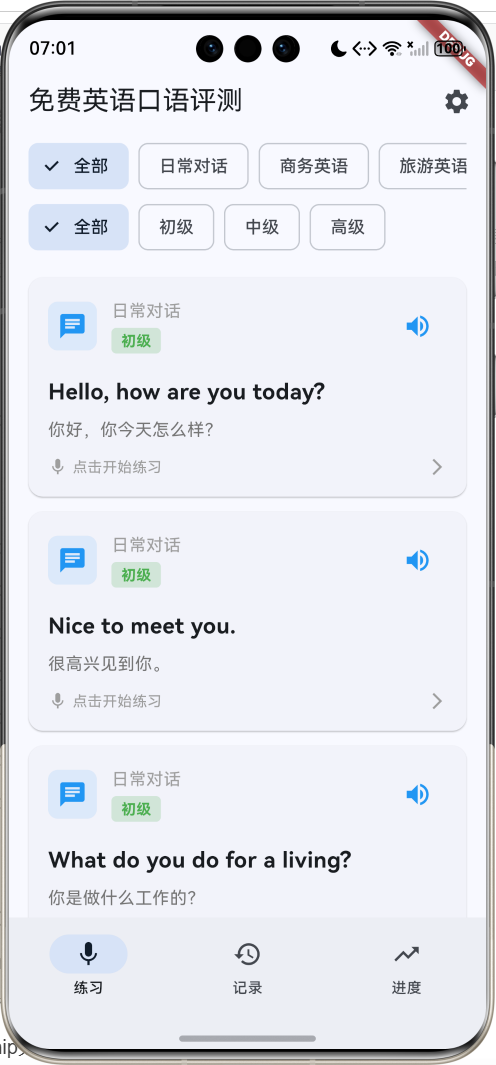
- 句子练习:20个精选英语句子
- 5大分类:日常对话、商务英语、旅游英语、学术英语、面试英语
- 3个难度:初级、中级、高级
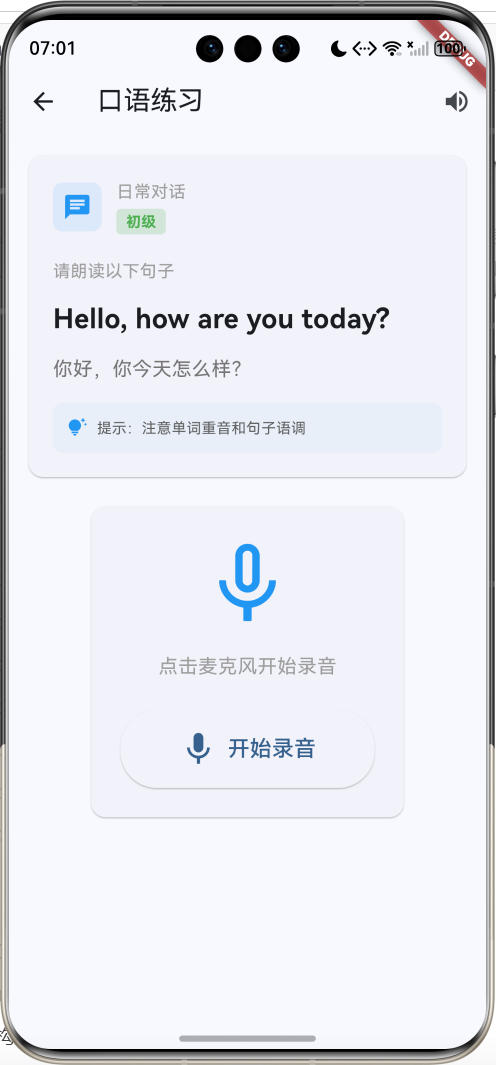
- 录音功能:模拟语音录入
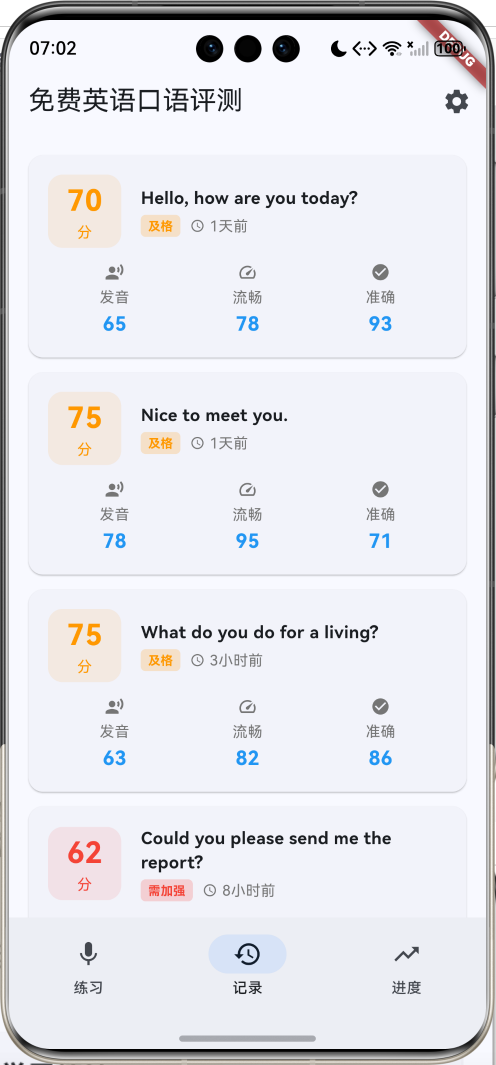
- 智能评分:发音、流畅度、准确度三维评分
- 纠正建议:针对性改进建议
- 练习记录:完整的练习历史
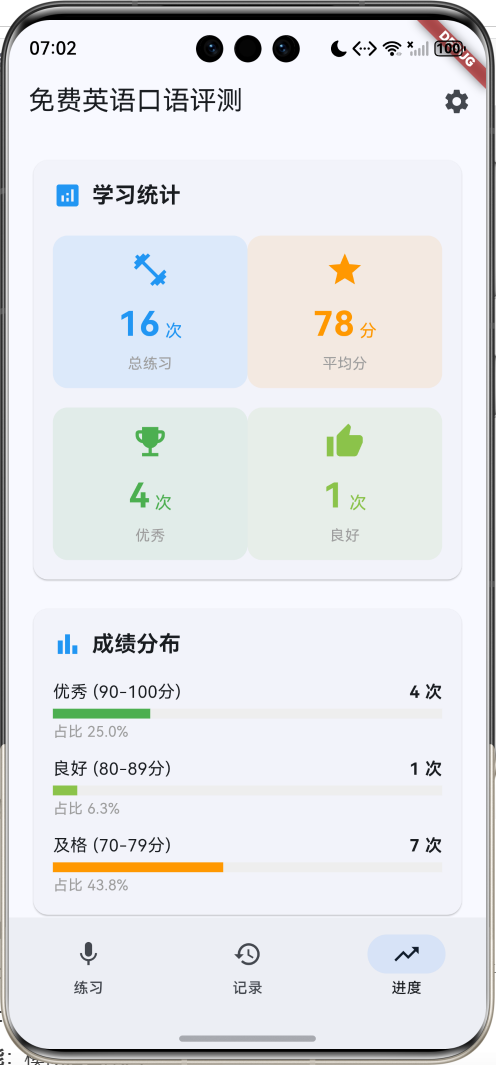
- 进度统计:学习数据可视化
- 成绩分布:优秀、良好、及格统计
- 学习建议:个性化学习指导
技术特点
- Material Design 3设计风格
- NavigationBar底部导航
- 三页面架构(练习、记录、进度)
- ChoiceChip分类筛选
- 录音状态动画
- 评分结果可视化
- LinearProgressIndicator进度展示
- 响应式卡片布局
- 模拟AI评测
- 无需额外依赖包
核心代码实现
1. 句子数据模型
dart
class Sentence {
  final String id;              // 句子ID
  final String english;         // 英文句子
  final String chinese;         // 中文翻译
  final String category;        // 分类
  final String level;           // 难度级别
  final List<String> keywords;  // 关键词
  final String phonetic;        // 音标

  Sentence({
    required this.id,
    required this.english,
    required this.chinese,
    required this.category,
    required this.level,
    required this.keywords,
    required this.phonetic,
  });

  // 计算属性:难度颜色
  Color get levelColor {
    switch (level) {
      case '初级': return Colors.green;
      case '中级': return Colors.orange;
      case '高级': return Colors.red;
      default: return Colors.grey;
    }
  }

  // 计算属性:分类图标
  IconData get categoryIcon {
    switch (category) {
      case '日常对话': return Icons.chat;
      case '商务英语': return Icons.business;
      case '旅游英语': return Icons.flight;
      case '学术英语': return Icons.school;
      case '面试英语': return Icons.work;
      default: return Icons.language;
    }
  }
}模型字段说明:
| 字段 | 类型 | 说明 |
|---|---|---|
| id | String | 唯一标识符 |
| english | String | 英文句子 |
| chinese | String | 中文翻译 |
| category | String | 分类(5种) |
| level | String | 难度级别 |
| keywords | List | 关键词列表 |
| phonetic | String | 音标 |
计算属性:
levelColor:根据难度级别返回对应颜色categoryIcon:根据分类返回对应图标
分类与图标映射:
| 分类 | 图标 | 说明 |
|---|---|---|
| 日常对话 | chat | 日常交流用语 |
| 商务英语 | business | 商务场景用语 |
| 旅游英语 | flight | 旅游场景用语 |
| 学术英语 | school | 学术场景用语 |
| 面试英语 | work | 面试场景用语 |
难度级别与颜色:
| 级别 | 颜色 | 说明 |
|---|---|---|
| 初级 | 绿色 | 简单句子,适合初学者 |
| 中级 | 橙色 | 中等难度,适合有基础者 |
| 高级 | 红色 | 复杂句子,适合高级学习者 |
2. 练习记录数据模型
dart
class PracticeRecord {
  final String id;              // 记录ID
  final String sentenceId;      // 句子ID
  final String sentenceText;    // 句子文本
  final DateTime practiceTime;  // 练习时间
  final int score;              // 总分
  final double pronunciation;   // 发音分数
  final double fluency;         // 流畅度分数
  final double accuracy;        // 准确度分数
  final List<String> mistakes;  // 错误列表
  final List<String> suggestions; // 建议列表

  PracticeRecord({
    required this.id,
    required this.sentenceId,
    required this.sentenceText,
    required this.practiceTime,
    required this.score,
    required this.pronunciation,
    required this.fluency,
    required this.accuracy,
    required this.mistakes,
    required this.suggestions,
  });

  // 计算属性:时间文本
  String get timeText {
    final now = DateTime.now();
    final diff = now.difference(practiceTime);
    if (diff.inMinutes < 1) return '刚刚';
    if (diff.inMinutes < 60) return '${diff.inMinutes}分钟前';
    if (diff.inHours < 24) return '${diff.inHours}小时前';
    return '${diff.inDays}天前';
  }

  // 计算属性:分数颜色
  Color get scoreColor {
    if (score >= 90) return Colors.green;
    if (score >= 70) return Colors.orange;
    return Colors.red;
  }

  // 计算属性:分数等级
  String get scoreLevel {
    if (score >= 90) return '优秀';
    if (score >= 80) return '良好';
    if (score >= 70) return '及格';
    return '需加强';
  }
}记录字段说明:
| 字段 | 类型 | 说明 |
|---|---|---|
| id | String | 记录唯一标识 |
| sentenceId | String | 关联的句子ID |
| sentenceText | String | 句子文本 |
| practiceTime | DateTime | 练习时间 |
| score | int | 总分(0-100) |
| pronunciation | double | 发音分数 |
| fluency | double | 流畅度分数 |
| accuracy | double | 准确度分数 |
| mistakes | List | 错误类型列表 |
| suggestions | List | 改进建议列表 |
计算属性:
timeText:相对时间显示(刚刚、X分钟前、X小时前、X天前)scoreColor:根据分数返回颜色(绿色、橙色、红色)scoreLevel:根据分数返回等级(优秀、良好、及格、需加强)
评分标准:
| 分数范围 | 等级 | 颜色 | 说明 |
|---|---|---|---|
| 90-100 | 优秀 | 绿色 | 发音标准,流畅自然 |
| 80-89 | 良好 | 浅绿 | 发音较好,略有瑕疵 |
| 70-79 | 及格 | 橙色 | 基本达标,需改进 |
| 0-69 | 需加强 | 红色 | 需要大量练习 |
3. 句子数据生成
dart
void _generateSentences() {
  final random = Random();

  final sentences = [
    {'en': 'Hello, how are you today?', 'cn': '你好,你今天怎么样?', 'cat': '日常对话', 'level': '初级'},
    {'en': 'Nice to meet you.', 'cn': '很高兴见到你。', 'cat': '日常对话', 'level': '初级'},
    {'en': 'What do you do for a living?', 'cn': '你是做什么工作的?', 'cat': '日常对话', 'level': '初级'},
    {'en': 'Could you please send me the report?', 'cn': '你能把报告发给我吗?', 'cat': '商务英语', 'level': '中级'},
    {'en': 'Let\'s schedule a meeting for next week.', 'cn': '我们安排下周开个会吧。', 'cat': '商务英语', 'level': '中级'},
    // ... 更多句子
  ];

  for (int i = 0; i < sentences.length; i++) {
    final s = sentences[i];
    _allSentences.add(Sentence(
      id: 'sentence_$i',
      english: s['en'] as String,
      chinese: s['cn'] as String,
      category: s['cat'] as String,
      level: s['level'] as String,
      keywords: (s['en'] as String).split(' ').take(3).toList(),
      phonetic: '/ˈfəʊnətɪk/',
    ));
  }
  _applyFilters();
}数据生成特点:
- 20个精选英语句子
- 涵盖5大分类
- 3个难度级别
- 自动提取关键词(前3个单词)
- 双语对照
- 应用初始筛选
4. 练习记录生成
dart
void _generateRecords() {
  final random = Random();

  for (int i = 0; i < 8; i++) {
    final score = 60 + random.nextInt(40);
    _practiceRecords.add(PracticeRecord(
      id: 'record_$i',
      sentenceId: 'sentence_$i',
      sentenceText: _allSentences[i % _allSentences.length].english,
      practiceTime: DateTime.now().subtract(Duration(hours: random.nextInt(48))),
      score: score,
      pronunciation: 60 + random.nextDouble() * 40,
      fluency: 60 + random.nextDouble() * 40,
      accuracy: 60 + random.nextDouble() * 40,
      mistakes: score < 80 ? ['pronunciation', 'intonation'] : [],
      suggestions: score < 80
          ? ['注意单词重音', '提高语速流畅度', '注意语调变化']
          : ['继续保持'],
    ));
  }
}记录生成逻辑:
- 生成8条练习记录
- 分数范围:60-100分
- 三维评分:各60-100分
- 练习时间:0-48小时前随机
- 根据分数生成错误和建议
5. 筛选功能实现
dart
void _applyFilters() {
  setState(() {
    _filteredSentences = _allSentences.where((sentence) {
      if (_selectedCategory != '全部' && sentence.category != _selectedCategory) {
        return false;
      }
      if (_selectedLevel != '全部' && sentence.level != _selectedLevel) {
        return false;
      }
      return true;
    }).toList();
  });
}筛选条件:
| 筛选项 | 说明 | 实现方式 |
|---|---|---|
| 分类筛选 | 按5大分类筛选 | 精确匹配category字段 |
| 难度筛选 | 按3个级别筛选 | 精确匹配level字段 |
筛选流程:
- 检查分类是否匹配("全部"跳过此检查)
- 检查难度是否匹配("全部"跳过此检查)
- 更新筛选结果列表
- 触发UI重新渲染
6. NavigationBar底部导航
dart
bottomNavigationBar: NavigationBar(
  selectedIndex: _selectedIndex,
  onDestinationSelected: (index) {
    setState(() => _selectedIndex = index);
  },
  destinations: const [
    NavigationDestination(
      icon: Icon(Icons.mic),
      label: '练习',
    ),
    NavigationDestination(
      icon: Icon(Icons.history),
      label: '记录',
    ),
    NavigationDestination(
      icon: Icon(Icons.trending_up),
      label: '进度',
    ),
  ],
),三个页面:
| 页面 | 图标 | 功能 |
|---|---|---|
| 练习 | mic | 显示所有句子,开始练习 |
| 记录 | history | 显示练习历史记录 |
| 进度 | trending_up | 显示学习统计和进度 |
IndexedStack使用:
dart
Expanded(
  child: IndexedStack(
    index: _selectedIndex,
    children: [
      _buildPracticePage(),
      _buildRecordsPage(),
      _buildProgressPage(),
    ],
  ),
),
IndexedStack的优势:
- 保持所有页面状态
- 切换时不重新构建
- 提升用户体验
- 减少资源消耗
7. ChoiceChip分类筛选
dart
Widget _buildCategoryTabs() {
  return Container(
    height: 50,
    padding: const EdgeInsets.symmetric(horizontal: 16),
    child: ListView.builder(
      scrollDirection: Axis.horizontal,
      itemCount: _categories.length,
      itemBuilder: (context, index) {
        final category = _categories[index];
        final isSelected = category == _selectedCategory;
        return Padding(
          padding: const EdgeInsets.only(right: 8),
          child: ChoiceChip(
            label: Text(category),
            selected: isSelected,
            onSelected: (selected) {
              setState(() {
                _selectedCategory = category;
                _applyFilters();
              });
            },
          ),
        );
      },
    ),
  );
}ChoiceChip特点:
- Material Design 3组件
- 自动处理选中状态样式
- 支持单选模式
- 适合标签筛选场景
- 水平滚动布局
分类列表:
- 全部、日常对话、商务英语、旅游英语、学术英语、面试英语
8. 句子卡片设计
dart
Widget _buildSentenceCard(Sentence sentence) {
  return Card(
    margin: const EdgeInsets.only(bottom: 12),
    child: InkWell(
      onTap: () {
        Navigator.push(
          context,
          MaterialPageRoute(
            builder: (_) => PracticeDetailPage(sentence: sentence),
          ),
        );
      },
      child: Padding(
        padding: const EdgeInsets.all(16),
        child: Column(
          crossAxisAlignment: CrossAxisAlignment.start,
          children: [
            Row(
              children: [
                // 左侧:分类图标
                Container(
                  padding: const EdgeInsets.all(8),
                  decoration: BoxDecoration(
                    color: Colors.blue.withValues(alpha: 0.1),
                    borderRadius: BorderRadius.circular(8),
                  ),
                  child: Icon(
                    sentence.categoryIcon,
                    color: Colors.blue,
                    size: 24,
                  ),
                ),
                const SizedBox(width: 12),
                // 中间:分类和难度
                Expanded(
                  child: Column(
                    crossAxisAlignment: CrossAxisAlignment.start,
                    children: [
                      Text(
                        sentence.category,
                        style: const TextStyle(
                          fontSize: 14,
                          color: Colors.grey,
                        ),
                      ),
                      const SizedBox(height: 4),
                      Container(
                        padding: const EdgeInsets.symmetric(
                          horizontal: 8,
                          vertical: 2,
                        ),
                        decoration: BoxDecoration(
                          color: sentence.levelColor.withValues(alpha: 0.2),
                          borderRadius: BorderRadius.circular(4),
                        ),
                        child: Text(
                          sentence.level,
                          style: TextStyle(
                            fontSize: 12,
                            color: sentence.levelColor,
                            fontWeight: FontWeight.bold,
                          ),
                        ),
                      ),
                    ],
                  ),
                ),
                // 右侧:播放按钮
                IconButton(
                  onPressed: () {
                    ScaffoldMessenger.of(context).showSnackBar(
                      const SnackBar(content: Text('播放发音')),
                    );
                  },
                  icon: const Icon(Icons.volume_up, color: Colors.blue),
                ),
              ],
            ),
            const SizedBox(height: 16),
            // 英文句子
            Text(
              sentence.english,
              style: const TextStyle(
                fontSize: 18,
                fontWeight: FontWeight.bold,
                height: 1.5,
              ),
            ),
            const SizedBox(height: 8),
            // 中文翻译
            Text(
              sentence.chinese,
              style: TextStyle(
                fontSize: 14,
                color: Colors.grey[600],
              ),
            ),
            const SizedBox(height: 12),
            // 底部提示
            Row(
              children: [
                const Icon(Icons.mic, size: 16, color: Colors.grey),
                const SizedBox(width: 4),
                const Text(
                  '点击开始练习',
                  style: TextStyle(fontSize: 12, color: Colors.grey),
                ),
                const Spacer(),
                const Icon(Icons.arrow_forward_ios, size: 16, color: Colors.grey),
              ],
            ),
          ],
        ),
      ),
    ),
  );
}卡片布局结构:
- 顶部行:分类图标 + 分类名称/难度标签 + 播放按钮
- 英文句子:粗体显示,行高1.5
- 中文翻译:灰色显示
- 底部提示:麦克风图标 + 提示文字 + 箭头
信息展示:
- 图标:分类对应的图标和蓝色背景
- 分类:灰色文字显示
- 难度:彩色标签(绿/橙/红)
- 播放:音量图标按钮
- 句子:双语对照显示
9. 练习记录卡片
dart
Widget _buildRecordCard(PracticeRecord record) {
  return Card(
    margin: const EdgeInsets.only(bottom: 12),
    child: InkWell(
      onTap: () {
        Navigator.push(
          context,
          MaterialPageRoute(
            builder: (_) => RecordDetailPage(record: record),
          ),
        );
      },
      child: Padding(
        padding: const EdgeInsets.all(16),
        child: Column(
          crossAxisAlignment: CrossAxisAlignment.start,
          children: [
            Row(
              children: [
                // 左侧:分数圆形展示
                Container(
                  width: 60,
                  height: 60,
                  decoration: BoxDecoration(
                    color: record.scoreColor.withValues(alpha: 0.1),
                    borderRadius: BorderRadius.circular(12),
                  ),
                  child: Column(
                    mainAxisAlignment: MainAxisAlignment.center,
                    children: [
                      Text(
                        '${record.score}',
                        style: TextStyle(
                          fontSize: 24,
                          fontWeight: FontWeight.bold,
                          color: record.scoreColor,
                        ),
                      ),
                      Text(
                        '分',
                        style: TextStyle(
                          fontSize: 12,
                          color: record.scoreColor,
                        ),
                      ),
                    ],
                  ),
                ),
                const SizedBox(width: 16),
                // 右侧:句子和信息
                Expanded(
                  child: Column(
                    crossAxisAlignment: CrossAxisAlignment.start,
                    children: [
                      Text(
                        record.sentenceText,
                        style: const TextStyle(
                          fontSize: 14,
                          fontWeight: FontWeight.bold,
                        ),
                        maxLines: 2,
                        overflow: TextOverflow.ellipsis,
                      ),
                      const SizedBox(height: 4),
                      Row(
                        children: [
                          Container(
                            padding: const EdgeInsets.symmetric(
                              horizontal: 6,
                              vertical: 2,
                            ),
                            decoration: BoxDecoration(
                              color: record.scoreColor.withValues(alpha: 0.2),
                              borderRadius: BorderRadius.circular(4),
                            ),
                            child: Text(
                              record.scoreLevel,
                              style: TextStyle(
                                fontSize: 10,
                                color: record.scoreColor,
                                fontWeight: FontWeight.bold,
                              ),
                            ),
                          ),
                          const SizedBox(width: 8),
                          Icon(Icons.access_time, size: 12, color: Colors.grey[600]),
                          const SizedBox(width: 4),
                          Text(
                            record.timeText,
                            style: TextStyle(fontSize: 12, color: Colors.grey[600]),
                          ),
                        ],
                      ),
                    ],
                  ),
                ),
              ],
            ),
            const SizedBox(height: 12),
            // 三维评分展示
            Row(
              children: [
                Expanded(
                  child: _buildScoreItem(
                    '发音',
                    record.pronunciation,
                    Icons.record_voice_over,
                  ),
                ),
                Expanded(
                  child: _buildScoreItem(
                    '流畅',
                    record.fluency,
                    Icons.speed,
                  ),
                ),
                Expanded(
                  child: _buildScoreItem(
                    '准确',
                    record.accuracy,
                    Icons.check_circle,
                  ),
                ),
              ],
            ),
          ],
        ),
      ),
    ),
  );
}

Widget _buildScoreItem(String label, double score, IconData icon) {
  return Column(
    children: [
      Icon(icon, size: 16, color: Colors.grey[600]),
      const SizedBox(height: 4),
      Text(
        label,
        style: TextStyle(fontSize: 12, color: Colors.grey[600]),
      ),
      const SizedBox(height: 2),
      Text(
        score.toStringAsFixed(0),
        style: const TextStyle(
          fontSize: 16,
          fontWeight: FontWeight.bold,
          color: Colors.blue,
        ),
      ),
    ],
  );
}记录卡片布局:
- 左侧:圆角矩形分数展示(60x60)
- 右侧:句子文本、等级标签、时间
- 底部:三维评分(发音、流畅、准确)
三维评分展示:
- 发音:record_voice_over图标
- 流畅:speed图标
- 准确:check_circle图标
- 分数:蓝色粗体显示
10. 进度统计页面
dart
Widget _buildProgressPage() {
  final totalPractice = _practiceRecords.length;
  final avgScore = totalPractice > 0
      ? _practiceRecords.map((r) => r.score).reduce((a, b) => a + b) / totalPractice
      : 0.0;
  final excellentCount = _practiceRecords.where((r) => r.score >= 90).length;
  final goodCount = _practiceRecords.where((r) => r.score >= 80 && r.score < 90).length;
  final passCount = _practiceRecords.where((r) => r.score >= 70 && r.score < 80).length;

  return ListView(
    padding: const EdgeInsets.all(16),
    children: [
      // 学习统计卡片
      Card(
        child: Padding(
          padding: const EdgeInsets.all(16),
          child: Column(
            crossAxisAlignment: CrossAxisAlignment.start,
            children: [
              const Row(
                children: [
                  Icon(Icons.analytics, color: Colors.blue),
                  SizedBox(width: 8),
                  Text(
                    '学习统计',
                    style: TextStyle(fontSize: 18, fontWeight: FontWeight.bold),
                  ),
                ],
              ),
              const SizedBox(height: 20),
              Row(
                children: [
                  Expanded(
                    child: _buildStatItem(
                      '总练习',
                      '$totalPractice',
                      '次',
                      Icons.fitness_center,
                      Colors.blue,
                    ),
                  ),
                  Expanded(
                    child: _buildStatItem(
                      '平均分',
                      avgScore.toStringAsFixed(0),
                      '分',
                      Icons.star,
                      Colors.orange,
                    ),
                  ),
                ],
              ),
              const SizedBox(height: 16),
              Row(
                children: [
                  Expanded(
                    child: _buildStatItem(
                      '优秀',
                      '$excellentCount',
                      '次',
                      Icons.emoji_events,
                      Colors.green,
                    ),
                  ),
                  Expanded(
                    child: _buildStatItem(
                      '良好',
                      '$goodCount',
                      '次',
                      Icons.thumb_up,
                      Colors.lightGreen,
                    ),
                  ),
                ],
              ),
            ],
          ),
        ),
      ),
      const SizedBox(height: 16),
      // 成绩分布卡片
      Card(
        child: Padding(
          padding: const EdgeInsets.all(16),
          child: Column(
            crossAxisAlignment: CrossAxisAlignment.start,
            children: [
              const Row(
                children: [
                  Icon(Icons.bar_chart, color: Colors.blue),
                  SizedBox(width: 8),
                  Text(
                    '成绩分布',
                    style: TextStyle(fontSize: 18, fontWeight: FontWeight.bold),
                  ),
                ],
              ),
              const SizedBox(height: 16),
              _buildDistributionItem('优秀 (90-100分)', excellentCount, totalPractice, Colors.green),
              const SizedBox(height: 12),
              _buildDistributionItem('良好 (80-89分)', goodCount, totalPractice, Colors.lightGreen),
              const SizedBox(height: 12),
              _buildDistributionItem('及格 (70-79分)', passCount, totalPractice, Colors.orange),
            ],
          ),
        ),
      ),
      const SizedBox(height: 16),
      // 学习建议卡片
      Card(
        child: Padding(
          padding: const EdgeInsets.all(16),
          child: Column(
            crossAxisAlignment: CrossAxisAlignment.start,
            children: [
              const Row(
                children: [
                  Icon(Icons.lightbulb, color: Colors.blue),
                  SizedBox(width: 8),
                  Text(
                    '学习建议',
                    style: TextStyle(fontSize: 18, fontWeight: FontWeight.bold),
                  ),
                ],
              ),
              const SizedBox(height: 12),
              _buildSuggestionItem('每天坚持练习15-30分钟'),
              _buildSuggestionItem('重点练习发音较差的句子'),
              _buildSuggestionItem('模仿标准发音,注意语调'),
              _buildSuggestionItem('录音对比,找出差距'),
              _buildSuggestionItem('循序渐进,从简单到复杂'),
            ],
          ),
        ),
      ),
    ],
  );
}统计逻辑:
- 计算总练习次数
- 计算平均分(总分/次数)
- 统计优秀次数(≥90分)
- 统计良好次数(80-89分)
- 统计及格次数(70-79分)
统计项展示:
dart
Widget _buildStatItem(String label, String value, String unit, IconData icon, Color color) {
  return Container(
    padding: const EdgeInsets.all(12),
    decoration: BoxDecoration(
      color: color.withValues(alpha: 0.1),
      borderRadius: BorderRadius.circular(12),
    ),
    child: Column(
      children: [
        Icon(icon, color: color, size: 32),
        const SizedBox(height: 8),
        Row(
          mainAxisAlignment: MainAxisAlignment.center,
          crossAxisAlignment: CrossAxisAlignment.end,
          children: [
            Text(
              value,
              style: TextStyle(
                fontSize: 28,
                fontWeight: FontWeight.bold,
                color: color,
              ),
            ),
            const SizedBox(width: 4),
            Padding(
              padding: const EdgeInsets.only(bottom: 4),
              child: Text(
                unit,
                style: TextStyle(fontSize: 14, color: color),
              ),
            ),
          ],
        ),
        const SizedBox(height: 4),
        Text(
          label,
          style: const TextStyle(fontSize: 12, color: Colors.grey),
        ),
      ],
    ),
  );
}成绩分布可视化:
dart
Widget _buildDistributionItem(String label, int count, int total, Color color) {
  final percentage = total > 0 ? (count / total * 100) : 0.0;
  return Column(
    crossAxisAlignment: CrossAxisAlignment.start,
    children: [
      Row(
        mainAxisAlignment: MainAxisAlignment.spaceBetween,
        children: [
          Text(label, style: const TextStyle(fontSize: 14)),
          Text('$count 次', style: const TextStyle(fontSize: 14, fontWeight: FontWeight.bold)),
        ],
      ),
      const SizedBox(height: 4),
      LinearProgressIndicator(
        value: percentage / 100,
        backgroundColor: Colors.grey[200],
        color: color,
        minHeight: 8,
      ),
      const SizedBox(height: 2),
      Text(
        '占比 ${percentage.toStringAsFixed(1)}%',
        style: const TextStyle(fontSize: 12, color: Colors.grey),
      ),
    ],
  );
}
11. 练习详情页
dart
class PracticeDetailPage extends StatefulWidget {
  final Sentence sentence;

  const PracticeDetailPage({super.key, required this.sentence});

  @override
  State<PracticeDetailPage> createState() => _PracticeDetailPageState();
}

class _PracticeDetailPageState extends State<PracticeDetailPage> {
  bool _isRecording = false;
  bool _hasRecorded = false;
  bool _showResult = false;
  int _score = 0;
  double _pronunciation = 0;
  double _fluency = 0;
  double _accuracy = 0;
  List<String> _mistakes = [];
  List<String> _suggestions = [];

  void _startRecording() {
    setState(() {
      _isRecording = true;
      _hasRecorded = false;
      _showResult = false;
    });

    // 模拟录音3秒后自动停止
    Future.delayed(const Duration(seconds: 3), () {
      if (_isRecording) {
        _stopRecording();
      }
    });
  }

  void _stopRecording() {
    setState(() {
      _isRecording = false;
      _hasRecorded = true;
    });

    // 模拟评分
    _evaluatePronunciation();
  }

  void _evaluatePronunciation() {
    final random = Random();

    setState(() {
      _score = 60 + random.nextInt(40);
      _pronunciation = 60 + random.nextDouble() * 40;
      _fluency = 60 + random.nextDouble() * 40;
      _accuracy = 60 + random.nextDouble() * 40;

      if (_score < 80) {
        _mistakes = ['pronunciation', 'intonation', 'stress'];
        _suggestions = [
          '注意单词 "${widget.sentence.keywords[0]}" 的重音位置',
          '语速可以稍微放慢,保持流畅度',
          '句尾语调应该上扬,表示疑问',
          '多听标准发音,模仿语音语调',
        ];
      } else if (_score < 90) {
        _mistakes = ['intonation'];
        _suggestions = [
          '发音基本准确,继续保持',
          '注意语调的自然变化',
          '可以尝试更快的语速',
        ];
      } else {
        _mistakes = [];
        _suggestions = [
          '发音非常标准!',
          '语调自然流畅',
          '继续保持这个水平',
        ];
      }

      _showResult = true;
    });
  }
}练习流程:
- 显示句子信息
- 点击开始录音
- 录音3秒(自动停止)
- 评测中(模拟AI评分)
- 显示结果(分数+建议)
- 重新录音或完成
状态管理:
_isRecording:是否正在录音_hasRecorded:是否已录音_showResult:是否显示结果_score:总分_pronunciation:发音分数_fluency:流畅度分数_accuracy:准确度分数_mistakes:错误列表_suggestions:建议列表
12. 录音状态展示
dart
Widget _buildRecordingCard() {
  return Card(
    margin: const EdgeInsets.symmetric(horizontal: 16, vertical: 8),
    child: Padding(
      padding: const EdgeInsets.all(24),
      child: Column(
        children: [
          if (!_isRecording && !_hasRecorded) ...[
            const Icon(Icons.mic_none, size: 80, color: Colors.blue),
            const SizedBox(height: 16),
            const Text(
              '点击麦克风开始录音',
              style: TextStyle(fontSize: 16, color: Colors.grey),
            ),
            const SizedBox(height: 24),
            ElevatedButton.icon(
              onPressed: _startRecording,
              icon: const Icon(Icons.mic, size: 32),
              label: const Text('开始录音', style: TextStyle(fontSize: 18)),
              style: ElevatedButton.styleFrom(
                padding: const EdgeInsets.symmetric(
                  horizontal: 48,
                  vertical: 16,
                ),
                shape: RoundedRectangleBorder(
                  borderRadius: BorderRadius.circular(30),
                ),
              ),
            ),
          ],
          if (_isRecording) ...[
            Stack(
              alignment: Alignment.center,
              children: [
                SizedBox(
                  width: 120,
                  height: 120,
                  child: CircularProgressIndicator(
                    strokeWidth: 8,
                    valueColor: AlwaysStoppedAnimation<Color>(
                      Colors.red.withValues(alpha: 0.3),
                    ),
                  ),
                ),
                Container(
                  width: 100,
                  height: 100,
                  decoration: BoxDecoration(
                    color: Colors.red.withValues(alpha: 0.1),
                    shape: BoxShape.circle,
                  ),
                  child: const Icon(Icons.mic, size: 50, color: Colors.red),
                ),
              ],
            ),
            const SizedBox(height: 16),
            const Text(
              '正在录音...',
              style: TextStyle(
                fontSize: 18,
                fontWeight: FontWeight.bold,
                color: Colors.red,
              ),
            ),
            const SizedBox(height: 24),
            ElevatedButton.icon(
              onPressed: _stopRecording,
              icon: const Icon(Icons.stop),
              label: const Text('停止录音'),
              style: ElevatedButton.styleFrom(
                backgroundColor: Colors.red,
                foregroundColor: Colors.white,
                padding: const EdgeInsets.symmetric(
                  horizontal: 32,
                  vertical: 12,
                ),
              ),
            ),
          ],
          if (_hasRecorded && !_showResult) ...[
            const CircularProgressIndicator(),
            const SizedBox(height: 16),
            const Text(
              '正在评测中...',
              style: TextStyle(fontSize: 16, color: Colors.grey),
            ),
          ],
        ],
      ),
    ),
  );
}三种状态展示:
| 状态 | 显示内容 | 说明 |
|---|---|---|
| 待录音 | 麦克风图标 + 开始按钮 | 初始状态 |
| 录音中 | 圆形进度条 + 停止按钮 | 红色动画效果 |
| 评测中 | 加载动画 + 提示文字 | 模拟AI评测 |
录音动画:
- 使用Stack叠加CircularProgressIndicator和麦克风图标
- 红色半透明背景
- 不确定进度的循环动画
13. 评分结果展示
dart
Widget _buildResultCard() {
  final scoreColor = _score >= 90
      ? Colors.green
      : _score >= 70
          ? Colors.orange
          : Colors.red;

  return Column(
    children: [
      Card(
        margin: const EdgeInsets.symmetric(horizontal: 16, vertical: 8),
        child: Padding(
          padding: const EdgeInsets.all(24),
          child: Column(
            children: [
              const Text(
                '评测结果',
                style: TextStyle(fontSize: 18, fontWeight: FontWeight.bold),
              ),
              const SizedBox(height: 24),
              Container(
                width: 120,
                height: 120,
                decoration: BoxDecoration(
                  color: scoreColor.withValues(alpha: 0.1),
                  shape: BoxShape.circle,
                ),
                child: Column(
                  mainAxisAlignment: MainAxisAlignment.center,
                  children: [
                    Text(
                      '$_score',
                      style: TextStyle(
                        fontSize: 48,
                        fontWeight: FontWeight.bold,
                        color: scoreColor,
                      ),
                    ),
                    Text(
                      '分',
                      style: TextStyle(
                        fontSize: 16,
                        color: scoreColor,
                      ),
                    ),
                  ],
                ),
              ),
              const SizedBox(height: 16),
              Text(
                _score >= 90
                    ? '优秀!'
                    : _score >= 80
                        ? '良好'
                        : _score >= 70
                            ? '及格'
                            : '需加强',
                style: TextStyle(
                  fontSize: 20,
                  fontWeight: FontWeight.bold,
                  color: scoreColor,
                ),
              ),
              const SizedBox(height: 24),
              Row(
                children: [
                  Expanded(
                    child: _buildDetailScore(
                      '发音',
                      _pronunciation,
                      Icons.record_voice_over,
                    ),
                  ),
                  Expanded(
                    child: _buildDetailScore(
                      '流畅度',
                      _fluency,
                      Icons.speed,
                    ),
                  ),
                  Expanded(
                    child: _buildDetailScore(
                      '准确度',
                      _accuracy,
                      Icons.check_circle,
                    ),
                  ),
                ],
              ),
            ],
          ),
        ),
      ),
      if (_suggestions.isNotEmpty)
        Card(
          margin: const EdgeInsets.symmetric(horizontal: 16, vertical: 8),
          child: Padding(
            padding: const EdgeInsets.all(16),
            child: Column(
              crossAxisAlignment: CrossAxisAlignment.start,
              children: [
                const Row(
                  children: [
                    Icon(Icons.lightbulb, color: Colors.orange),
                    SizedBox(width: 8),
                    Text(
                      '改进建议',
                      style: TextStyle(
                        fontSize: 16,
                        fontWeight: FontWeight.bold,
                      ),
                    ),
                  ],
                ),
                const SizedBox(height: 12),
                ..._suggestions.map((suggestion) {
                  return Padding(
                    padding: const EdgeInsets.only(bottom: 8),
                    child: Row(
                      crossAxisAlignment: CrossAxisAlignment.start,
                      children: [
                        const Icon(Icons.arrow_right, size: 20, color: Colors.orange),
                        const SizedBox(width: 8),
                        Expanded(
                          child: Text(
                            suggestion,
                            style: const TextStyle(fontSize: 14, height: 1.5),
                          ),
                        ),
                      ],
                    ),
                  );
                }),
              ],
            ),
          ),
        ),
      Padding(
        padding: const EdgeInsets.all(16),
        child: Row(
          children: [
            Expanded(
              child: OutlinedButton.icon(
                onPressed: () {
                  setState(() {
                    _hasRecorded = false;
                    _showResult = false;
                  });
                },
                icon: const Icon(Icons.refresh),
                label: const Text('重新录音'),
                style: OutlinedButton.styleFrom(
                  padding: const EdgeInsets.symmetric(vertical: 16),
                ),
              ),
            ),
            const SizedBox(width: 12),
            Expanded(
              child: ElevatedButton.icon(
                onPressed: () {
                  Navigator.pop(context);
                },
                icon: const Icon(Icons.check),
                label: const Text('完成'),
                style: ElevatedButton.styleFrom(
                  padding: const EdgeInsets.symmetric(vertical: 16),
                ),
              ),
            ),
          ],
        ),
      ),
    ],
  );
}结果展示结构:
- 总分圆形展示(120x120)
- 等级文字(优秀/良好/及格/需加强)
- 三维评分(发音/流畅度/准确度)
- 改进建议列表
- 操作按钮(重新录音/完成)
评分颜色:
- 90-100分:绿色(优秀)
- 70-89分:橙色(良好/及格)
- 0-69分:红色(需加强)
技术要点详解
1. 计算属性的高级应用
计算属性(Getter)可以根据对象状态动态返回值,避免数据冗余。
示例:
dart
class Sentence {
  final String level;

  // 计算属性:难度颜色
  Color get levelColor {
    switch (level) {
      case '初级': return Colors.green;
      case '中级': return Colors.orange;
      case '高级': return Colors.red;
      default: return Colors.grey;
    }
  }

  // 计算属性:分类图标
  IconData get categoryIcon {
    switch (category) {
      case '日常对话': return Icons.chat;
      case '商务英语': return Icons.business;
      // ...
      default: return Icons.language;
    }
  }
}优势:
- 减少存储空间(不需要存储计算结果)
- 保持数据一致性(总是基于最新数据计算)
- 简化代码逻辑(使用时像访问属性一样)
- 便于维护和扩展
使用场景:
- 颜色和图标映射
- 格式化显示
- 状态判断
- 数据组合
2. NavigationBar与IndexedStack
NavigationBar是Material Design 3的底部导航组件,配合IndexedStack实现页面切换。
NavigationBar特点:
- Material Design 3风格
- 自动处理选中状态
- 支持图标和文字标签
- 流畅的切换动画
IndexedStack特点:
- 保持所有子组件状态
- 只显示指定索引的子组件
- 切换时不重新构建
- 提升用户体验
配合使用:
dart
int _selectedIndex = 0;

// 底部导航
NavigationBar(
  selectedIndex: _selectedIndex,
  onDestinationSelected: (index) {
    setState(() => _selectedIndex = index);
  },
  destinations: [
    NavigationDestination(icon: Icon(Icons.mic), label: '练习'),
    NavigationDestination(icon: Icon(Icons.history), label: '记录'),
    NavigationDestination(icon: Icon(Icons.trending_up), label: '进度'),
  ],
)

// 页面内容
IndexedStack(
  index: _selectedIndex,
  children: [
    PracticePage(),
    RecordsPage(),
    ProgressPage(),
  ],
)
3. ChoiceChip筛选组件
ChoiceChip是Material Design中用于单选的芯片组件。
基本用法:
dart
ChoiceChip(
  label: Text('日常对话'),
  selected: isSelected,
  onSelected: (selected) {
    setState(() {
      _selectedCategory = '日常对话';
    });
  },
)属性说明:
label:显示的文本或组件selected:是否选中onSelected:选中状态改变回调selectedColor:选中时的颜色backgroundColor:未选中时的背景色labelStyle:文本样式
使用场景:
- 分类筛选
- 标签选择
- 选项切换
- 过滤条件
4. CircularProgressIndicator动画
CircularProgressIndicator用于显示圆形进度或加载动画。
确定进度模式:
dart
CircularProgressIndicator(
  value: 0.6,  // 0.0-1.0
  strokeWidth: 8,
  color: Colors.blue,
)不确定进度模式:
dart
CircularProgressIndicator() // 不指定value,显示循环动画自定义样式:
dart
CircularProgressIndicator(
  strokeWidth: 8,
  valueColor: AlwaysStoppedAnimation<Color>(Colors.red),
  backgroundColor: Colors.grey[200],
)录音动画实现:
dart
Stack(
  alignment: Alignment.center,
  children: [
    SizedBox(
      width: 120,
      height: 120,
      child: CircularProgressIndicator(
        strokeWidth: 8,
        valueColor: AlwaysStoppedAnimation<Color>(
          Colors.red.withValues(alpha: 0.3),
        ),
      ),
    ),
    Container(
      width: 100,
      height: 100,
      decoration: BoxDecoration(
        color: Colors.red.withValues(alpha: 0.1),
        shape: BoxShape.circle,
      ),
      child: Icon(Icons.mic, size: 50, color: Colors.red),
    ),
  ],
)使用场景:
- 加载动画
- 录音状态
- 上传进度
- 处理中提示
5. LinearProgressIndicator进度条
LinearProgressIndicator用于显示线性进度。
基本用法:
dart
LinearProgressIndicator(
  value: 0.6,  // 0.0-1.0
  backgroundColor: Colors.grey[200],
  color: Colors.blue,
  minHeight: 8,
)成绩分布可视化:
dart
Widget _buildDistributionItem(String label, int count, int total, Color color) {
  final percentage = total > 0 ? (count / total * 100) : 0.0;
  return Column(
    crossAxisAlignment: CrossAxisAlignment.start,
    children: [
      Row(
        mainAxisAlignment: MainAxisAlignment.spaceBetween,
        children: [
          Text(label),
          Text('$count 次'),
        ],
      ),
      const SizedBox(height: 4),
      LinearProgressIndicator(
        value: percentage / 100,
        backgroundColor: Colors.grey[200],
        color: color,
        minHeight: 8,
      ),
      const SizedBox(height: 2),
      Text('占比 ${percentage.toStringAsFixed(1)}%'),
    ],
  );
}使用场景:
- 统计数据可视化
- 文件上传进度
- 任务完成度
- 百分比展示
6. Future.delayed延迟执行
Future.delayed用于延迟执行代码,常用于模拟异步操作。
基本用法:
dart
Future.delayed(Duration(seconds: 3), () {
  print('3秒后执行');
});录音自动停止:
dart
void _startRecording() {
  setState(() {
    _isRecording = true;
  });

  // 模拟录音3秒后自动停止
  Future.delayed(const Duration(seconds: 3), () {
    if (_isRecording) {
      _stopRecording();
    }
  });
}模拟AI评测:
dart
void _stopRecording() {
  setState(() {
    _isRecording = false;
    _hasRecorded = true;
  });

  // 延迟1秒模拟评测
  Future.delayed(const Duration(seconds: 1), () {
    _evaluatePronunciation();
  });
}使用场景:
- 模拟网络请求
- 延迟跳转
- 自动关闭提示
- 定时任务
7. Random随机数生成
Random用于生成随机数,常用于模拟数据。
基本用法:
dart
final random = Random();

// 生成0-99的随机整数
int randomInt = random.nextInt(100);

// 生成0.0-1.0的随机小数
double randomDouble = random.nextDouble();

// 生成随机布尔值
bool randomBool = random.nextBool();评分生成:
dart
void _evaluatePronunciation() {
  final random = Random();

  setState(() {
    _score = 60 + random.nextInt(40);  // 60-100分
    _pronunciation = 60 + random.nextDouble() * 40;  // 60-100分
    _fluency = 60 + random.nextDouble() * 40;
    _accuracy = 60 + random.nextDouble() * 40;
  });
}使用场景:
- 模拟评分
- 测试数据生成
- 随机推荐
- 抽奖功能
8. DateTime时间处理
DateTime用于处理日期和时间。
获取当前时间:
dart
DateTime now = DateTime.now();时间计算:
dart
// 减去时间
DateTime past = DateTime.now().subtract(Duration(hours: 2));

// 增加时间
DateTime future = DateTime.now().add(Duration(days: 7));

// 时间差
Duration diff = DateTime.now().difference(past);相对时间显示:
dart
String get timeText {
  final now = DateTime.now();
  final diff = now.difference(practiceTime);
  if (diff.inMinutes < 1) return '刚刚';
  if (diff.inMinutes < 60) return '${diff.inMinutes}分钟前';
  if (diff.inHours < 24) return '${diff.inHours}小时前';
  return '${diff.inDays}天前';
}使用场景:
- 练习时间记录
- 相对时间显示
- 时间排序
- 有效期判断
9. List高级操作
List提供了丰富的操作方法。
map映射:
dart
// 提取所有分数
List<int> scores = _practiceRecords.map((r) => r.score).toList();reduce归约:
dart
// 计算总分
int totalScore = scores.reduce((a, b) => a + b);

// 计算平均分
double avgScore = totalScore / scores.length;where筛选:
dart
// 筛选优秀记录
List<PracticeRecord> excellent = _practiceRecords
    .where((r) => r.score >= 90)
.toList();take截取:
dart
// 提取前3个单词作为关键词
List<String> keywords = sentence.split(' ').take(3).toList();使用场景:
- 数据统计
- 列表筛选
- 数据转换
- 关键词提取
10. withValues透明度设置
withValues是Flutter 3.27+版本中设置颜色透明度的新方法。
新旧对比:
dart
// 旧方法(已废弃)
Colors.blue.withOpacity(0.5)

// 新方法
Colors.blue.withValues(alpha: 0.5)完整用法:
dart
// 只设置透明度
Colors.blue.withValues(alpha: 0.5)

// 设置多个通道
Colors.blue.withValues(
  alpha: 0.5,
  red: 0.8,
  green: 0.6,
  blue: 0.4,
)alpha参数范围:
- 0.0:完全透明
- 0.5:半透明
- 1.0:完全不透明
使用场景:
- 背景色透明
- 阴影颜色
- 遮罩效果
- 渐变色
功能扩展方向
1. 接入真实语音识别API
当前应用使用模拟评分,可以接入真实的语音识别和评测API。
实现步骤:
- 选择语音识别服务(如讯飞、百度、Google)
- 添加录音权限
- 集成语音识别SDK
- 实现录音功能
- 调用评测API
- 解析评测结果
示例代码:
dart
// 添加依赖
dependencies:
  speech_to_text: ^6.0.0
  permission_handler: ^11.0.0

// 使用示例
import 'package:speech_to_text/speech_to_text.dart';

class SpeechRecognition {
  final SpeechToText _speech = SpeechToText();

  Future<void> initialize() async {
    bool available = await _speech.initialize();
    if (!available) {
      print('语音识别不可用');
    }
  }

  Future<void> startListening() async {
    await _speech.listen(
      onResult: (result) {
        String recognizedText = result.recognizedWords;
        // 处理识别结果
      },
    );
  }

  Future<void> stopListening() async {
    await _speech.stop();
  }
}
2. 添加音标显示
为每个句子添加国际音标(IPA),帮助用户学习正确发音。
实现方案:
- 为每个句子添加音标数据
- 使用特殊字体显示音标
- 点击单词显示音标
- 音标与发音对照
- 重音标记
功能特点:
- 完整句子音标
- 单词音标查询
- 重音位置标注
- 连读规则提示
- 音标学习模式
3. 语音波形可视化
实时显示录音时的语音波形,增强视觉反馈。
实现方案:
- 获取音频数据
- 使用CustomPainter绘制波形
- 实时更新波形
- 波形颜色渐变
- 音量大小显示
功能特点:
- 实时波形显示
- 音量可视化
- 录音状态反馈
- 美观的动画效果
4. 发音对比功能
将用户发音与标准发音进行对比,直观显示差异。
实现方案:
- 播放标准发音
- 播放用户录音
- 波形对比显示
- 差异高亮标注
- 逐句对比
功能特点:
- 双波形对比
- 差异可视化
- 慢速播放
- 循环播放
- 片段重复
5. 学习计划制定
根据用户水平制定个性化学习计划。
实现方案:
- 评估用户水平
- 制定学习目标
- 推荐练习内容
- 每日任务提醒
- 进度跟踪
功能特点:
- 水平测试
- 目标设定
- 智能推荐
- 每日打卡
- 进度报告
6. 社交分享功能
分享学习成果到社交平台,增加学习动力。
实现方案:
- 生成成绩卡片
- 添加分享按钮
- 集成分享SDK
- 自定义分享内容
- 排行榜功能
功能特点:
- 成绩卡片生成
- 一键分享
- 好友PK
- 排行榜
- 学习勋章
7. 离线模式
支持离线练习,无需网络也能学习。
实现方案:
- 本地存储句子数据
- 本地存储音频文件
- 离线评分算法
- 数据同步机制
- 缓存管理
功能特点:
- 离线练习
- 本地评分
- 数据缓存
- 自动同步
- 节省流量
8. 多语言支持
扩展到其他语言学习,如日语、韩语、法语等。
实现方案:
- 多语言数据结构
- 语言切换功能
- 不同语言评测
- 语言特色功能
- 国际化支持
功能特点:
- 多语言选择
- 语言切换
- 专属评测
- 文化学习
- 全球化
常见问题解答
1. 如何接入真实的语音识别?
问题:应用中的评分是模拟的,如何接入真实语音识别?
解答:
- 选择服务商:讯飞、百度、Google、Azure
- 申请API密钥:注册开发者账号获取密钥
- 添加依赖包:speech_to_text、permission_handler
- 请求录音权限:Android和iOS权限配置
- 集成SDK:按照官方文档集成
示例:
dart
// 添加依赖
dependencies:
  speech_to_text: ^6.0.0
  permission_handler: ^11.0.0

// 请求权限
Future<bool> requestPermission() async {
  var status = await Permission.microphone.request();
  return status.isGranted;
}

// 初始化语音识别
final SpeechToText _speech = SpeechToText();
bool available = await _speech.initialize();

// 开始识别
await _speech.listen(
  onResult: (result) {
    String text = result.recognizedWords;
    // 处理识别结果
  },
);
2. 如何实现真实的发音评分?
问题:如何对用户发音进行准确评分?
解答:
- 语音识别:将语音转为文本
- 文本对比:与标准文本对比
- 发音评测API:使用专业评测服务
- 音素分析:分析每个音素的准确度
- 综合评分:发音、流畅度、完整度
评测维度:
- 发音准确度:音素级别评测
- 流畅度:语速、停顿分析
- 完整度:是否完整朗读
- 重音:重音位置是否正确
- 语调:语调变化是否自然
3. 如何优化录音体验?
问题:录音功能如何做得更好用?
解答:
- 实时反馈:显示音量波形
- 倒计时提示:录音前3秒倒计时
- 自动停止:检测静音自动停止
- 重录功能:方便重新录音
- 播放对比:播放录音与标准发音
优化建议:
dart
// 音量检测
void _checkVolume(double volume) {
  if (volume < 0.1) {
    _silentDuration++;
    if (_silentDuration > 30) {  // 3秒静音
      _stopRecording();
    }
  } else {
    _silentDuration = 0;
  }
}

// 倒计时
void _startCountdown() {
  for (int i = 3; i > 0; i--) {
    Future.delayed(Duration(seconds: 3 - i), () {
      setState(() => _countdown = i);
    });
  }
  Future.delayed(Duration(seconds: 3), () {
    _startRecording();
  });
}
4. 如何实现学习进度追踪?
问题:如何记录和展示学习进度?
解答:
- 本地存储:使用SharedPreferences或SQLite
- 数据统计:练习次数、平均分、进步曲线
- 可视化展示:图表展示学习数据
- 目标设定:设置学习目标和提醒
- 成就系统:解锁成就和勋章
示例:
dart
// 保存练习记录
Future<void> savePracticeRecord(PracticeRecord record) async {
  final prefs = await SharedPreferences.getInstance();
  List<String> records = prefs.getStringList('practice_records') ?? [];
  records.add(jsonEncode(record.toJson()));
  await prefs.setStringList('practice_records', records);
}

// 统计数据
Map<String, dynamic> getStatistics() {
  return {
    'totalPractice': _practiceRecords.length,
    'avgScore': _calculateAvgScore(),
    'bestScore': _getBestScore(),
    'improvement': _calculateImprovement(),
  };
}
5. 如何提高应用性能?
问题:应用卡顿,如何优化性能?
解答:
- 列表优化:使用ListView.builder懒加载
- 图片优化:使用合适尺寸的图片
- 状态管理:合理使用setState范围
- 异步加载:使用FutureBuilder
- 减少重建:使用const构造函数
优化技巧:
dart
// 1. 使用const构造函数
const Text('标题')  // 不会重建

// 2. 使用ListView.builder
ListView.builder(
  itemCount: sentences.length,
  itemBuilder: (context, index) {
    return SentenceCard(sentence: sentences[index]);
  },
)

// 3. 避免在build中创建对象
// 错误示例
Widget build(BuildContext context) {
  final list = [1, 2, 3];  // 每次build都创建
  return ListView(children: list.map((i) => Text('$i')).toList());
}

// 正确示例
final list = [1, 2, 3];  // 在类级别定义
Widget build(BuildContext context) {
  return ListView(children: list.map((i) => Text('$i')).toList());
}

// 4. 使用FutureBuilder异步加载
FutureBuilder<List<Sentence>>(
  future: loadSentences(),
  builder: (context, snapshot) {
    if (snapshot.hasData) {
      return SentenceList(sentences: snapshot.data!);
    }
    return CircularProgressIndicator();
  },
)
项目总结
核心功能流程
筛选
点击句子
切换页面
重新录音
完成
启动应用
生成句子数据
显示练习页
用户操作
选择分类/难度
进入练习详情
记录/进度
更新筛选结果
开始录音
录音3秒
停止录音
AI评测
显示结果
用户选择
显示统计数据
数据流转
筛选
练习
原始数据
Sentence模型
_allSentences列表
筛选逻辑
_filteredSentences
UI展示
用户交互
录音评分
PracticeRecord
_practiceRecords
统计分析
技术架构
Flutter应用
UI层
数据层
业务逻辑层
MaterialApp
NavigationBar
页面组件
Sentence模型
PracticeRecord模型
状态管理
筛选逻辑
录音评分
统计计算
项目特色
- Material Design 3:采用最新设计规范,界面美观现代
- 计算属性:充分利用Getter实现动态数据,代码简洁
- 模拟AI评测:完整的评分系统,包含三维评分和建议
- 录音动画:CircularProgressIndicator实现录音状态动画
- 数据可视化:LinearProgressIndicator展示统计数据
- 响应式设计:适配不同屏幕尺寸
- 无需依赖:纯Flutter实现,无需额外包
- 模块化设计:组件复用,代码结构清晰
- 用户体验:流畅的动画和交互
学习收获
通过本项目,你将学会:
- 数据建模:设计合理的数据模型和计算属性
- 列表展示:使用ListView.builder高效展示数据
- 筛选功能:实现多条件组合筛选逻辑
- 底部导航:使用NavigationBar和IndexedStack
- 录音模拟:实现录音状态和动画效果
- 评分系统:设计三维评分和建议生成
- 数据统计:实现学习进度统计和可视化
- 状态管理:使用setState管理应用状态
- UI组件:掌握Card、Chip、CircularProgressIndicator等组件
- 布局技巧:Row、Column、Stack等布局组合
- 交互设计:实现录音、评分、查看记录等交互功能
- 动画效果:CircularProgressIndicator录音动画
性能优化建议
-
列表优化:
- 使用ListView.builder懒加载
- 避免在itemBuilder中创建复杂对象
- 使用const构造函数
-
状态管理:
- 合理使用setState范围
- 考虑使用Provider等状态管理方案
- 避免不必要的重建
-
数据处理:
- 使用异步加载大量数据
- 实现数据缓存
- 优化筛选算法
-
内存管理:
- 及时释放不用的资源
- 避免内存泄漏
- 使用弱引用
-
动画优化:
- 使用AnimatedWidget
- 避免过度动画
- 控制动画帧率
未来优化方向
-
功能增强:
- 接入真实语音识别API
- 添加音标显示
- 语音波形可视化
- 发音对比功能
- 学习计划制定
-
用户体验:
- 添加骨架屏
- 优化加载动画
- 实现下拉刷新
- 添加空状态页面
- 错误处理优化
-
数据管理:
- 实现离线模式
- 添加数据同步
- 实现数据备份
- 优化缓存策略
-
社交功能:
- 成绩分享
- 好友PK
- 排行榜
- 学习社区
-
个性化:
- 推荐算法
- 学习计划
- 个性化首页
- 主题切换
本项目展示了如何使用Flutter构建一个功能完整的英语口语评测应用,涵盖了数据建模、录音模拟、智能评分、统计可视化等核心功能。通过学习本项目,你将掌握Flutter应用开发的基本技能,为开发更复杂的应用打下坚实基础。
欢迎加入开源鸿蒙跨平台社区:https://openharmonycrossplatform.csdn.net