Flutter星座运势详解:探索星座奥秘
项目简介
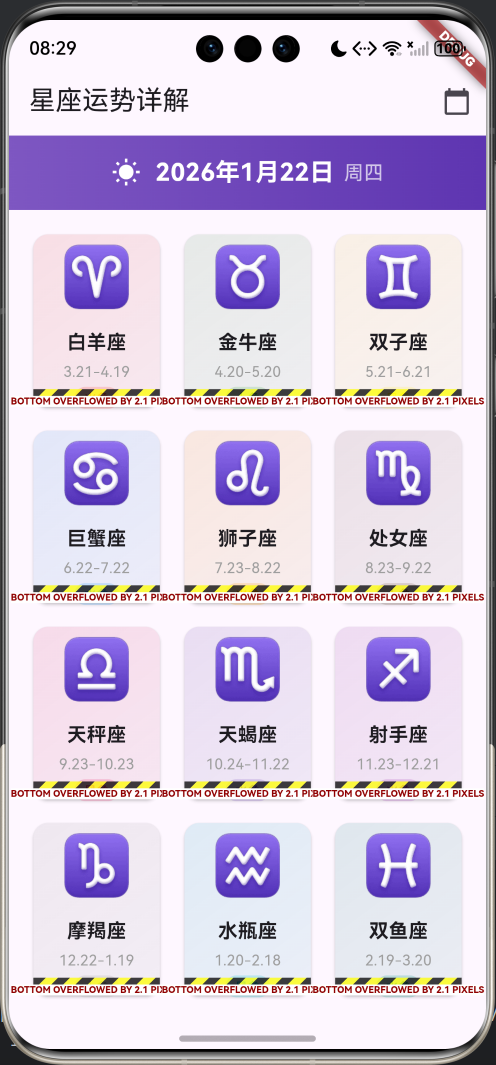
星座运势详解是一款专为星座爱好者打造的Flutter应用,提供12星座的每日运势查询、爱情运势、事业运势、财运分析和健康指数等全方位运势解读。通过精美的UI设计和详细的运势分析,让用户轻松了解每日运势,把握生活节奏。
运行效果图
核心功能
- 12星座查询:涵盖全部12个星座
- 每日运势:综合运势评分和详细解读
- 爱情运势:感情运势分析和建议
- 事业运势:工作运势和职场指导
- 财运分析:财富运势和理财建议
- 健康指数:健康状况和养生提示
- 幸运指南:幸运颜色、数字、方位
- 日期选择:查询任意日期运势
- 精美UI:渐变色卡片和动画效果
- 详细建议:每日运势建议和提示
技术特点
- Material Design 3设计风格
- GridView网格布局展示星座
- 渐变色背景和卡片设计
- CircularProgressIndicator环形进度条
- LinearProgressIndicator线性进度条
- DatePicker日期选择器
- 响应式布局设计
- 模拟运势数据生成
- 无需额外依赖包
核心代码实现
1. 星座数据模型
dart
class Zodiac {
  final String name;            // 星座名称
  final String englishName;     // 英文名称
  final String dateRange;       // 日期范围
  final String element;         // 星座元素
  final String icon;            // 星座符号
  final Color color;            // 主题颜色

  Zodiac({
    required this.name,
    required this.englishName,
    required this.dateRange,
    required this.element,
    required this.icon,
    required this.color,
  });
}模型字段说明:
| 字段 | 类型 | 说明 |
|---|---|---|
| name | String | 星座中文名称 |
| englishName | String | 星座英文名称 |
| dateRange | String | 日期范围(如3.21-4.19) |
| element | String | 星座元素(火/土/风/水) |
| icon | String | 星座符号(Unicode字符) |
| color | Color | 星座主题颜色 |
12星座数据:
| 星座 | 英文 | 日期 | 元素 | 符号 | 颜色 |
|---|---|---|---|---|---|
| 白羊座 | Aries | 3.21-4.19 | 火象 | ♈ | 红色 |
| 金牛座 | Taurus | 4.20-5.20 | 土象 | ♉ | 绿色 |
| 双子座 | Gemini | 5.21-6.21 | 风象 | ♊ | 黄色 |
| 巨蟹座 | Cancer | 6.22-7.22 | 水象 | ♋ | 蓝色 |
| 狮子座 | Leo | 7.23-8.22 | 火象 | ♌ | 橙色 |
| 处女座 | Virgo | 8.23-9.22 | 土象 | ♍ | 棕色 |
| 天秤座 | Libra | 9.23-10.23 | 风象 | ♎ | 粉色 |
| 天蝎座 | Scorpio | 10.24-11.22 | 水象 | ♏ | 深紫 |
| 射手座 | Sagittarius | 11.23-12.21 | 火象 | ♐ | 紫色 |
| 摩羯座 | Capricorn | 12.22-1.19 | 土象 | ♑ | 灰色 |
| 水瓶座 | Aquarius | 1.20-2.18 | 风象 | ♒ | 青色 |
| 双鱼座 | Pisces | 2.19-3.20 | 水象 | ♓ | 蓝绿 |
星座元素分类:
- 火象星座:白羊座、狮子座、射手座(热情、积极、冲动)
- 土象星座:金牛座、处女座、摩羯座(务实、稳重、可靠)
- 风象星座:双子座、天秤座、水瓶座(灵活、善变、社交)
- 水象星座:巨蟹座、天蝎座、双鱼座(感性、敏感、直觉)
2. 运势数据模型
dart
class DailyFortune {
  final String zodiacName;      // 星座名称
  final DateTime date;          // 日期
  final int overallScore;       // 综合评分
  final int loveScore;          // 爱情评分
  final int careerScore;        // 事业评分
  final int wealthScore;        // 财运评分
  final int healthScore;        // 健康评分
  final String overallFortune;  // 综合运势
  final String loveFortune;     // 爱情运势
  final String careerFortune;   // 事业运势
  final String wealthFortune;   // 财运运势
  final String healthFortune;   // 健康运势
  final String luckyColor;      // 幸运颜色
  final int luckyNumber;        // 幸运数字
  final String luckyDirection;  // 幸运方位
  final String suggestion;      // 今日建议

  DailyFortune({
    required this.zodiacName,
    required this.date,
    required this.overallScore,
    required this.loveScore,
    required this.careerScore,
    required this.wealthScore,
    required this.healthScore,
    required this.overallFortune,
    required this.loveFortune,
    required this.careerFortune,
    required this.wealthFortune,
    required this.healthFortune,
    required this.luckyColor,
    required this.luckyNumber,
    required this.luckyDirection,
    required this.suggestion,
  });

  // 评分等级
  String get scoreLevel {
    if (overallScore >= 90) return '极佳';
    if (overallScore >= 75) return '良好';
    if (overallScore >= 60) return '一般';
    if (overallScore >= 45) return '较差';
    return '不佳';
  }

  // 评分颜色
  Color get scoreColor {
    if (overallScore >= 90) return Colors.red;
    if (overallScore >= 75) return Colors.orange;
    if (overallScore >= 60) return Colors.blue;
    if (overallScore >= 45) return Colors.grey;
    return Colors.blueGrey;
  }
}模型字段说明:
| 字段 | 类型 | 说明 |
|---|---|---|
| zodiacName | String | 星座名称 |
| date | DateTime | 运势日期 |
| overallScore | int | 综合评分(40-100) |
| loveScore | int | 爱情评分(40-100) |
| careerScore | int | 事业评分(40-100) |
| wealthScore | int | 财运评分(40-100) |
| healthScore | int | 健康评分(40-100) |
| overallFortune | String | 综合运势描述 |
| loveFortune | String | 爱情运势描述 |
| careerFortune | String | 事业运势描述 |
| wealthFortune | String | 财运运势描述 |
| healthFortune | String | 健康运势描述 |
| luckyColor | String | 幸运颜色 |
| luckyNumber | int | 幸运数字(0-99) |
| luckyDirection | String | 幸运方位 |
| suggestion | String | 今日建议 |
计算属性:
scoreLevel:根据综合评分返回等级文本scoreColor:根据综合评分返回对应颜色
评分等级划分:
| 分数范围 | 等级 | 颜色 | 说明 |
|---|---|---|---|
| 90-100 | 极佳 | 红色 | 运势极好,把握机会 |
| 75-89 | 良好 | 橙色 | 运势不错,顺利发展 |
| 60-74 | 一般 | 蓝色 | 运势平稳,按部就班 |
| 45-59 | 较差 | 灰色 | 运势一般,谨慎行事 |
| 40-44 | 不佳 | 蓝灰 | 运势较弱,低调为宜 |
3. 星座数据初始化
dart
void _initZodiacs() {
  _zodiacs.addAll([
    Zodiac(
      name: '白羊座',
      englishName: 'Aries',
      dateRange: '3.21-4.19',
      element: '火象',
      icon: '♈',
      color: Colors.red,
    ),
    Zodiac(
      name: '金牛座',
      englishName: 'Taurus',
      dateRange: '4.20-5.20',
      element: '土象',
      icon: '♉',
      color: Colors.green,
    ),
    Zodiac(
      name: '双子座',
      englishName: 'Gemini',
      dateRange: '5.21-6.21',
      element: '风象',
      icon: '♊',
      color: Colors.yellow,
    ),
    Zodiac(
      name: '巨蟹座',
      englishName: 'Cancer',
      dateRange: '6.22-7.22',
      element: '水象',
      icon: '♋',
      color: Colors.blue,
    ),
    Zodiac(
      name: '狮子座',
      englishName: 'Leo',
      dateRange: '7.23-8.22',
      element: '火象',
      icon: '♌',
      color: Colors.orange,
    ),
    Zodiac(
      name: '处女座',
      englishName: 'Virgo',
      dateRange: '8.23-9.22',
      element: '土象',
      icon: '♍',
      color: Colors.brown,
    ),
    Zodiac(
      name: '天秤座',
      englishName: 'Libra',
      dateRange: '9.23-10.23',
      element: '风象',
      icon: '♎',
      color: Colors.pink,
    ),
    Zodiac(
      name: '天蝎座',
      englishName: 'Scorpio',
      dateRange: '10.24-11.22',
      element: '水象',
      icon: '♏',
      color: Colors.deepPurple,
    ),
    Zodiac(
      name: '射手座',
      englishName: 'Sagittarius',
      dateRange: '11.23-12.21',
      element: '火象',
      icon: '♐',
      color: Colors.purple,
    ),
    Zodiac(
      name: '摩羯座',
      englishName: 'Capricorn',
      dateRange: '12.22-1.19',
      element: '土象',
      icon: '♑',
      color: Colors.grey,
    ),
    Zodiac(
      name: '水瓶座',
      englishName: 'Aquarius',
      dateRange: '1.20-2.18',
      element: '风象',
      icon: '♒',
      color: Colors.cyan,
    ),
    Zodiac(
      name: '双鱼座',
      englishName: 'Pisces',
      dateRange: '2.19-3.20',
      element: '水象',
      icon: '♓',
      color: Colors.teal,
    ),
  ]);
}初始化特点:
- 12个星座完整数据
- 每个星座独特的颜色
- Unicode星座符号
- 星座元素分类
- 日期范围标注
4. 运势数据生成
dart
DailyFortune _generateFortune(Zodiac zodiac, DateTime date) {
  // 使用日期和星座名称作为随机种子,确保同一天同一星座结果一致
  final random = Random(date.millisecondsSinceEpoch + zodiac.name.hashCode);

  // 生成各项评分(40-100分)
  final overallScore = 40 + random.nextInt(61);
  final loveScore = 40 + random.nextInt(61);
  final careerScore = 40 + random.nextInt(61);
  final wealthScore = 40 + random.nextInt(61);
  final healthScore = 40 + random.nextInt(61);

  // 运势文本库
  final overallTexts = [
    '今天整体运势不错,适合把握机会,积极行动。保持乐观心态,好运会眷顾你。',
    '今日运势平稳,按部就班即可。不要急于求成,稳扎稳打更为重要。',
    '今天可能会遇到一些小挑战,但不要气馁。保持冷静,问题都能迎刃而解。',
    '运势极佳的一天!适合做重要决定,开展新计划。把握机会,勇往直前。',
    '今日运势一般,建议低调行事。多观察少行动,等待更好的时机。',
  ];

  final loveTexts = [
    '单身者有机会遇到心仪对象,主动出击会有好结果。恋爱中的人感情升温,适合表达爱意。',
    '感情运势平稳,与伴侣相处融洽。单身者不要着急,缘分会在合适的时候出现。',
    '可能会有小摩擦,需要多沟通理解。保持耐心,用心倾听对方的想法。',
    '爱情运势极佳!适合表白、约会或增进感情。把握机会,让爱情更甜蜜。',
    '感情方面需要给彼此空间。不要过分依赖,保持独立会让关系更健康。',
  ];

  // 随机选择运势文本
  return DailyFortune(
    zodiacName: zodiac.name,
    date: date,
    overallScore: overallScore,
    loveScore: loveScore,
    careerScore: careerScore,
    wealthScore: wealthScore,
    healthScore: healthScore,
    overallFortune: overallTexts[random.nextInt(overallTexts.length)],
    loveFortune: loveTexts[random.nextInt(loveTexts.length)],
    careerFortune: careerTexts[random.nextInt(careerTexts.length)],
    wealthFortune: wealthTexts[random.nextInt(wealthTexts.length)],
    healthFortune: healthTexts[random.nextInt(healthTexts.length)],
    luckyColor: _luckyColors[random.nextInt(_luckyColors.length)],
    luckyNumber: random.nextInt(100),
    luckyDirection: _directions[random.nextInt(_directions.length)],
    suggestion: suggestions[random.nextInt(suggestions.length)],
  );
}数据生成特点:
- 使用日期和星座作为随机种子
- 确保同一天同一星座结果一致
- 评分范围:40-100分
- 5类运势文本库
- 随机选择幸运元素
幸运元素:
- 幸运颜色:红、橙、黄、绿、蓝、紫、粉、白、黑、金
- 幸运数字:0-99
- 幸运方位:东、南、西、北、东南、西南、东北、西北
5. GridView星座网格
dart
Expanded(
  child: GridView.builder(
    padding: const EdgeInsets.all(16),
    gridDelegate: const SliverGridDelegateWithFixedCrossAxisCount(
      crossAxisCount: 3,        // 3列
      childAspectRatio: 0.85,   // 宽高比
      crossAxisSpacing: 12,     // 横向间距
      mainAxisSpacing: 12,      // 纵向间距
    ),
    itemCount: _zodiacs.length,
    itemBuilder: (context, index) {
      return _buildZodiacCard(_zodiacs[index]);
    },
  ),
),GridView配置:
- 3列网格布局
- 宽高比0.85(略高于正方形)
- 横向和纵向间距12像素
- 使用GridView.builder懒加载
6. 星座卡片设计
dart
Widget _buildZodiacCard(Zodiac zodiac) {
  return Card(
    elevation: 2,
    shape: RoundedRectangleBorder(borderRadius: BorderRadius.circular(12)),
    child: InkWell(
      onTap: () {
        Navigator.push(
          context,
          MaterialPageRoute(
            builder: (_) => FortuneDetailPage(
              zodiac: zodiac,
              fortune: _generateFortune(zodiac, _selectedDate),
            ),
          ),
        );
      },
      borderRadius: BorderRadius.circular(12),
      child: Container(
        decoration: BoxDecoration(
          borderRadius: BorderRadius.circular(12),
          gradient: LinearGradient(
            begin: Alignment.topLeft,
            end: Alignment.bottomRight,
            colors: [
              zodiac.color.withOpacity(0.1),
              zodiac.color.withOpacity(0.05),
            ],
          ),
        ),
        child: Column(
          mainAxisAlignment: MainAxisAlignment.center,
          children: [
            Text(
              zodiac.icon,
              style: TextStyle(fontSize: 48, color: zodiac.color),
            ),
            const SizedBox(height: 8),
            Text(
              zodiac.name,
              style: const TextStyle(
                fontSize: 16,
                fontWeight: FontWeight.bold,
              ),
            ),
            const SizedBox(height: 4),
            Text(
              zodiac.dateRange,
              style: const TextStyle(fontSize: 12, color: Colors.grey),
            ),
            const SizedBox(height: 4),
            Container(
              padding: const EdgeInsets.symmetric(horizontal: 8, vertical: 2),
              decoration: BoxDecoration(
                color: zodiac.color.withOpacity(0.2),
                borderRadius: BorderRadius.circular(12),
              ),
              child: Text(
                zodiac.element,
                style: TextStyle(fontSize: 10, color: zodiac.color),
              ),
            ),
          ],
        ),
      ),
    ),
  );
}卡片设计特点:
- 圆角卡片(12像素圆角)
- 渐变色背景(星座主题色)
- 大号星座符号(48像素)
- 星座名称和日期范围
- 元素标签(火/土/风/水)
- InkWell点击效果
7. DatePicker日期选择
dart
void _selectDate() async {
  final picked = await showDatePicker(
    context: context,
    initialDate: _selectedDate,
    firstDate: DateTime.now().subtract(const Duration(days: 365)),
    lastDate: DateTime.now().add(const Duration(days: 365)),
  );
  if (picked != null) {
    setState(() => _selectedDate = picked);
  }
}日期选择器配置:
- 初始日期:当前选中日期
- 最早日期:一年前
- 最晚日期:一年后
- 选择后更新状态
8. 日期栏设计
dart
Widget _buildDateBar() {
  return Container(
    padding: const EdgeInsets.all(16),
    decoration: BoxDecoration(
      gradient: LinearGradient(
        colors: [Colors.deepPurple.shade400, Colors.deepPurple.shade600],
      ),
    ),
    child: Row(
      mainAxisAlignment: MainAxisAlignment.center,
      children: [
        const Icon(Icons.wb_sunny, color: Colors.white, size: 24),
        const SizedBox(width: 12),
        Text(
          '${_selectedDate.year}年${_selectedDate.month}月${_selectedDate.day}日',
          style: const TextStyle(
            fontSize: 20,
            fontWeight: FontWeight.bold,
            color: Colors.white,
          ),
        ),
        const SizedBox(width: 8),
        Text(
          _getWeekday(_selectedDate),
          style: const TextStyle(fontSize: 16, color: Colors.white70),
        ),
      ],
    ),
  );
}

String _getWeekday(DateTime date) {
  const weekdays = ['周一', '周二', '周三', '周四', '周五', '周六', '周日'];
  return weekdays[date.weekday - 1];
}日期栏特点:
- 紫色渐变背景
- 太阳图标
- 完整日期显示
- 星期显示
- 白色文字
9. 详情页头部
dart
Widget _buildHeader() {
  return Container(
    width: double.infinity,
    padding: const EdgeInsets.all(24),
    decoration: BoxDecoration(
      gradient: LinearGradient(
        colors: [
          zodiac.color.withOpacity(0.3),
          zodiac.color.withOpacity(0.1)
        ],
      ),
    ),
    child: Column(
      children: [
        Text(
          zodiac.icon,
          style: TextStyle(fontSize: 80, color: zodiac.color),
        ),
        const SizedBox(height: 12),
        Text(
          zodiac.name,
          style: const TextStyle(fontSize: 28, fontWeight: FontWeight.bold),
        ),
        const SizedBox(height: 4),
        Text(
          '${zodiac.englishName} · ${zodiac.dateRange}',
          style: const TextStyle(fontSize: 14, color: Colors.grey),
        ),
        const SizedBox(height: 8),
        Container(
          padding: const EdgeInsets.symmetric(horizontal: 12, vertical: 4),
          decoration: BoxDecoration(
            color: zodiac.color.withOpacity(0.2),
            borderRadius: BorderRadius.circular(12),
          ),
          child: Text(
            zodiac.element,
            style: TextStyle(
              color: zodiac.color,
              fontWeight: FontWeight.bold
            ),
          ),
        ),
      ],
    ),
  );
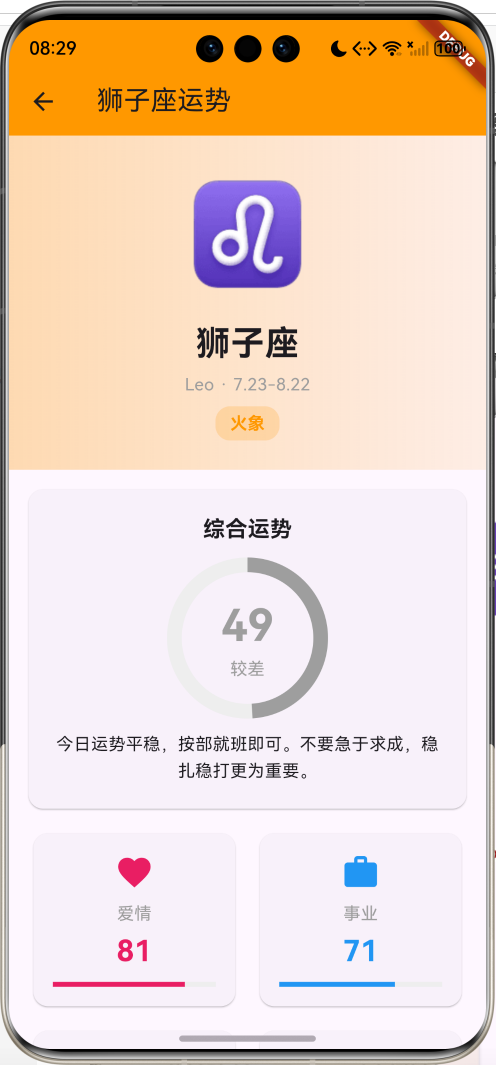
}头部设计:
- 渐变色背景
- 超大星座符号(80像素)
- 星座名称(中英文)
- 日期范围
- 元素标签
10. 综合运势评分
dart
Widget _buildOverallScore() {
  return Card(
    margin: const EdgeInsets.all(16),
    child: Padding(
      padding: const EdgeInsets.all(20),
      child: Column(
        children: [
          const Text(
            '综合运势',
            style: TextStyle(fontSize: 18, fontWeight: FontWeight.bold),
          ),
          const SizedBox(height: 16),
          Stack(
            alignment: Alignment.center,
            children: [
              SizedBox(
                width: 120,
                height: 120,
                child: CircularProgressIndicator(
                  value: fortune.overallScore / 100,
                  strokeWidth: 12,
                  backgroundColor: Colors.grey[200],
                  color: fortune.scoreColor,
                ),
              ),
              Column(
                children: [
                  Text(
                    '${fortune.overallScore}',
                    style: TextStyle(
                      fontSize: 36,
                      fontWeight: FontWeight.bold,
                      color: fortune.scoreColor,
                    ),
                  ),
                  Text(
                    fortune.scoreLevel,
                    style: TextStyle(
                      fontSize: 14,
                      color: fortune.scoreColor
                    ),
                  ),
                ],
              ),
            ],
          ),
          const SizedBox(height: 16),
          Text(
            fortune.overallFortune,
            style: const TextStyle(fontSize: 14, height: 1.6),
            textAlign: TextAlign.center,
          ),
        ],
      ),
    ),
  );
}综合运势设计:
- 环形进度条显示评分
- 中心显示分数和等级
- 根据分数显示不同颜色
- 下方显示运势描述文本
CircularProgressIndicator使用:
value:进度值(0.0-1.0)strokeWidth:线条宽度backgroundColor:背景颜色color:进度条颜色
11. 分项评分卡片
dart
Widget _buildScoreCards() {
  return Padding(
    padding: const EdgeInsets.symmetric(horizontal: 16),
    child: Column(
      children: [
        Row(
          children: [
            Expanded(child: _buildScoreCard(
              '爱情', fortune.loveScore, Icons.favorite, Colors.pink)),
            const SizedBox(width: 12),
            Expanded(child: _buildScoreCard(
              '事业', fortune.careerScore, Icons.work, Colors.blue)),
          ],
        ),
        const SizedBox(height: 12),
        Row(
          children: [
            Expanded(child: _buildScoreCard(
              '财运', fortune.wealthScore, Icons.attach_money, Colors.orange)),
            const SizedBox(width: 12),
            Expanded(child: _buildScoreCard(
              '健康', fortune.healthScore, Icons.favorite_border, Colors.green)),
          ],
        ),
      ],
    ),
  );
}

Widget _buildScoreCard(String label, int score, IconData icon, Color color) {
  return Card(
    child: Padding(
      padding: const EdgeInsets.all(16),
      child: Column(
        children: [
          Icon(icon, color: color, size: 32),
          const SizedBox(height: 8),
          Text(
            label,
            style: const TextStyle(fontSize: 14, color: Colors.grey),
          ),
          const SizedBox(height: 4),
          Text(
            '$score',
            style: TextStyle(
              fontSize: 24,
              fontWeight: FontWeight.bold,
              color: color,
            ),
          ),
          const SizedBox(height: 8),
          LinearProgressIndicator(
            value: score / 100,
            backgroundColor: Colors.grey[200],
            color: color,
          ),
        ],
      ),
    ),
  );
}分项评分特点:
- 2x2网格布局
- 每项独立卡片
- 图标、标签、分数、进度条
- 不同颜色区分类别
四大运势:
| 运势 | 图标 | 颜色 | 说明 |
|---|---|---|---|
| 爱情 | favorite | 粉色 | 感情运势 |
| 事业 | work | 蓝色 | 工作运势 |
| 财运 | attach_money | 橙色 | 财富运势 |
| 健康 | favorite_border | 绿色 | 健康运势 |
12. 运势详情卡片
dart
Widget _buildFortuneDetails() {
  return Padding(
    padding: const EdgeInsets.all(16),
    child: Column(
      children: [
        _buildFortuneCard('爱情运势', fortune.loveFortune,
            Icons.favorite, Colors.pink),
        const SizedBox(height: 12),
        _buildFortuneCard('事业运势', fortune.careerFortune,
            Icons.work, Colors.blue),
        const SizedBox(height: 12),
        _buildFortuneCard('财运运势', fortune.wealthFortune,
            Icons.attach_money, Colors.orange),
        const SizedBox(height: 12),
        _buildFortuneCard('健康运势', fortune.healthFortune,
            Icons.favorite_border, Colors.green),
      ],
    ),
  );
}

Widget _buildFortuneCard(String title, String content,
    IconData icon, Color color) {
  return Card(
    child: Padding(
      padding: const EdgeInsets.all(16),
      child: Column(
        crossAxisAlignment: CrossAxisAlignment.start,
        children: [
          Row(
            children: [
              Icon(icon, color: color, size: 24),
              const SizedBox(width: 8),
              Text(
                title,
                style: const TextStyle(
                  fontSize: 16,
                  fontWeight: FontWeight.bold
                ),
              ),
            ],
          ),
          const SizedBox(height: 12),
          Text(
            content,
            style: const TextStyle(fontSize: 14, height: 1.6),
          ),
        ],
      ),
    ),
  );
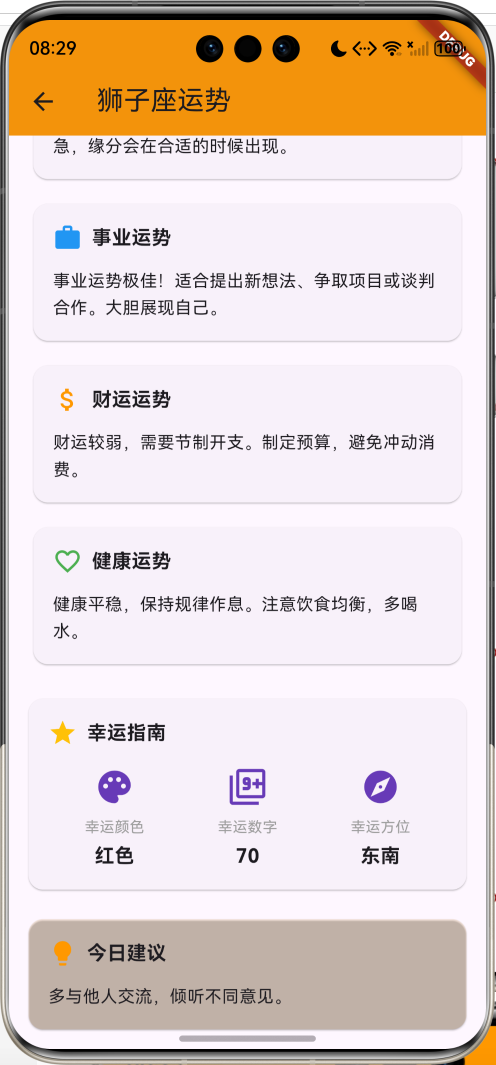
}详情卡片设计:
- 标题带图标
- 详细运势描述
- 行高1.6提升可读性
- 左对齐文本布局
13. 幸运指南
dart
Widget _buildLuckyInfo() {
  return Card(
    margin: const EdgeInsets.symmetric(horizontal: 16, vertical: 8),
    child: Padding(
      padding: const EdgeInsets.all(16),
      child: Column(
        crossAxisAlignment: CrossAxisAlignment.start,
        children: [
          const Row(
            children: [
              Icon(Icons.star, color: Colors.amber, size: 24),
              SizedBox(width: 8),
              Text(
                '幸运指南',
                style: TextStyle(fontSize: 16, fontWeight: FontWeight.bold),
              ),
            ],
          ),
          const SizedBox(height: 16),
          Row(
            mainAxisAlignment: MainAxisAlignment.spaceAround,
            children: [
              _buildLuckyItem('幸运颜色', fortune.luckyColor, Icons.palette),
              _buildLuckyItem('幸运数字', '${fortune.luckyNumber}',
                  Icons.filter_9_plus),
              _buildLuckyItem('幸运方位', fortune.luckyDirection, Icons.explore),
            ],
          ),
        ],
      ),
    ),
  );
}

Widget _buildLuckyItem(String label, String value, IconData icon) {
  return Column(
    children: [
      Icon(icon, color: Colors.deepPurple, size: 32),
      const SizedBox(height: 8),
      Text(
        label,
        style: const TextStyle(fontSize: 12, color: Colors.grey),
      ),
      const SizedBox(height: 4),
      Text(
        value,
        style: const TextStyle(fontSize: 16, fontWeight: FontWeight.bold),
      ),
    ],
  );
}幸运指南特点:
- 三项幸运元素
- 图标、标签、数值
- 均匀分布布局
- 紫色主题图标
14. 今日建议
dart
Widget _buildSuggestion() {
  return Card(
    margin: const EdgeInsets.all(16),
    color: zodiac.color.withOpacity(0.1),
    child: Padding(
      padding: const EdgeInsets.all(16),
      child: Column(
        crossAxisAlignment: CrossAxisAlignment.start,
        children: [
          Row(
            children: [
              Icon(Icons.lightbulb, color: zodiac.color, size: 24),
              const SizedBox(width: 8),
              const Text(
                '今日建议',
                style: TextStyle(fontSize: 16, fontWeight: FontWeight.bold),
              ),
            ],
          ),
          const SizedBox(height: 12),
          Text(
            fortune.suggestion,
            style: const TextStyle(fontSize: 14, height: 1.6),
          ),
        ],
      ),
    ),
  );
}建议卡片设计:
- 星座主题色背景
- 灯泡图标
- 简短建议文本
- 左对齐布局
技术要点详解
1. Random随机数生成器
Random类用于生成随机数,可以指定种子确保结果可重现。
基本用法:
dart
// 无种子随机(每次不同)
final random = Random();
final value = random.nextInt(100);  // 0-99

// 有种子随机(相同种子结果相同)
final random = Random(12345);
final value = random.nextInt(100); // 每次都相同常用方法:
| 方法 | 说明 | 示例 |
|---|---|---|
| nextInt(max) | 生成0到max-1的整数 | random.nextInt(100) |
| nextDouble() | 生成0.0到1.0的小数 | random.nextDouble() |
| nextBool() | 生成true或false | random.nextBool() |
种子的作用:
dart
// 使用日期和星座名称作为种子
final seed = date.millisecondsSinceEpoch + zodiac.name.hashCode;
final random = Random(seed);

// 相同日期和星座,结果总是相同
// 不同日期或星座,结果不同应用场景:
- 运势数据生成
- 随机选择文本
- 模拟数据
- 游戏逻辑
2. GridView网格布局
GridView用于创建网格布局,适合展示多个相似项目。
两种Delegate:
FixedCrossAxisCount(固定列数):
dart
GridView.builder(
  gridDelegate: SliverGridDelegateWithFixedCrossAxisCount(
    crossAxisCount: 3,        // 列数
    childAspectRatio: 0.85,   // 宽高比
    crossAxisSpacing: 12,     // 横向间距
    mainAxisSpacing: 12,      // 纵向间距
  ),
  itemCount: items.length,
  itemBuilder: (context, index) {
    return ItemWidget(items[index]);
  },
)MaxCrossAxisExtent(最大宽度):
dart
GridView.builder(
  gridDelegate: SliverGridDelegateWithMaxCrossAxisExtent(
    maxCrossAxisExtent: 150,  // 最大宽度
    childAspectRatio: 1.0,    // 宽高比
    crossAxisSpacing: 12,     // 横向间距
    mainAxisSpacing: 12,      // 纵向间距
  ),
  itemCount: items.length,
  itemBuilder: (context, index) {
    return ItemWidget(items[index]);
  },
)参数说明:
crossAxisCount:横轴(列)数量maxCrossAxisExtent:横轴最大宽度childAspectRatio:子项宽高比crossAxisSpacing:横向间距mainAxisSpacing:纵向间距
使用场景:
- 星座网格
- 图片画廊
- 商品列表
- 应用图标
3. CircularProgressIndicator环形进度条
CircularProgressIndicator用于显示环形进度。
基本用法:
dart
// 不确定进度(旋转动画)
CircularProgressIndicator()

// 确定进度(显示百分比)
CircularProgressIndicator(
  value: 0.75,  // 0.0-1.0
)自定义样式:
dart
CircularProgressIndicator(
  value: score / 100,
  strokeWidth: 12,                    // 线条宽度
  backgroundColor: Colors.grey[200],  // 背景颜色
  color: Colors.blue,                 // 进度颜色
)与Stack配合使用:
dart
Stack(
  alignment: Alignment.center,
  children: [
    SizedBox(
      width: 120,
      height: 120,
      child: CircularProgressIndicator(
        value: 0.75,
        strokeWidth: 12,
      ),
    ),
    Text('75', style: TextStyle(fontSize: 36)),
  ],
)使用场景:
- 运势评分
- 加载进度
- 完成度显示
- 统计图表
4. LinearProgressIndicator线性进度条
LinearProgressIndicator用于显示线性进度。
基本用法:
dart
// 不确定进度
LinearProgressIndicator()

// 确定进度
LinearProgressIndicator(
  value: 0.6,  // 0.0-1.0
)自定义样式:
dart
LinearProgressIndicator(
  value: score / 100,
  backgroundColor: Colors.grey[200],  // 背景颜色
  color: Colors.green,                // 进度颜色
  minHeight: 8,                       // 最小高度
)圆角进度条:
dart
ClipRRect(
  borderRadius: BorderRadius.circular(10),
  child: LinearProgressIndicator(
    value: 0.7,
    minHeight: 20,
  ),
)使用场景:
- 分项评分
- 下载进度
- 任务完成度
- 数据统计
5. DatePicker日期选择器
DatePicker用于选择日期。
基本用法:
dart
final picked = await showDatePicker(
  context: context,
  initialDate: DateTime.now(),
  firstDate: DateTime(2020),
  lastDate: DateTime(2030),
);

if (picked != null) {
  print('选择的日期:$picked');
}参数说明:
context:上下文initialDate:初始日期firstDate:最早可选日期lastDate:最晚可选日期locale:语言环境helpText:帮助文本cancelText:取消按钮文本confirmText:确认按钮文本
自定义样式:
dart
final picked = await showDatePicker(
  context: context,
  initialDate: DateTime.now(),
  firstDate: DateTime(2020),
  lastDate: DateTime(2030),
  helpText: '选择日期',
  cancelText: '取消',
  confirmText: '确定',
  builder: (context, child) {
    return Theme(
      data: ThemeData.light().copyWith(
        colorScheme: ColorScheme.light(
          primary: Colors.blue,
        ),
      ),
      child: child!,
    );
  },
);使用场景:
- 运势日期选择
- 生日选择
- 预约日期
- 日程安排
6. 渐变色背景
LinearGradient用于创建线性渐变效果。
基本用法:
dart
Container(
  decoration: BoxDecoration(
    gradient: LinearGradient(
      colors: [Colors.blue, Colors.purple],
    ),
  ),
)渐变方向:
dart
// 从上到下
LinearGradient(
  begin: Alignment.topCenter,
  end: Alignment.bottomCenter,
  colors: [Colors.blue, Colors.purple],
)

// 从左到右
LinearGradient(
  begin: Alignment.centerLeft,
  end: Alignment.centerRight,
  colors: [Colors.blue, Colors.purple],
)

// 对角线
LinearGradient(
  begin: Alignment.topLeft,
  end: Alignment.bottomRight,
  colors: [Colors.blue, Colors.purple],
)多色渐变:
dart
LinearGradient(
  colors: [
    Colors.red,
    Colors.orange,
    Colors.yellow,
    Colors.green,
  ],
  stops: [0.0, 0.33, 0.66, 1.0],  // 颜色位置
)透明度渐变:
dart
LinearGradient(
  colors: [
    Colors.blue.withOpacity(0.8),
    Colors.blue.withOpacity(0.2),
  ],
)使用场景:
- 卡片背景
- 头部装饰
- 按钮样式
- 页面背景
7. Unicode字符使用
Unicode字符可以直接在Dart字符串中使用。
星座符号:
dart
const zodiacSymbols = {
  '白羊座': '♈',  // U+2648
  '金牛座': '♉',  // U+2649
  '双子座': '♊',  // U+264A
  '巨蟹座': '♋',  // U+264B
  '狮子座': '♌',  // U+264C
  '处女座': '♍',  // U+264D
  '天秤座': '♎',  // U+264E
  '天蝎座': '♏',  // U+264F
  '射手座': '♐',  // U+2650
  '摩羯座': '♑',  // U+2651
  '水瓶座': '♒',  // U+2652
  '双鱼座': '♓',  // U+2653
};其他常用符号:
dart
// 箭头
'→' '←' '↑' '↓' '↗' '↘' '↙' '↖'

// 星星
'★' '☆' '✦' '✧' '✨'

// 心形
'♥' '♡' '❤' '💕' '💖'

// 天气
'☀' '☁' '☂' '☃' '⛄' '⚡'

// 月相
'🌑' '🌒' '🌓' '🌔' '🌕' '🌖' '🌗' '🌘'使用方式:
dart
// 直接使用
Text('♈', style: TextStyle(fontSize: 48))

// 字符串拼接
String zodiacInfo = '${zodiac.icon} ${zodiac.name}'

// 在Text中使用
Text('今日运势 ★★★★☆')
8. Color透明度处理
Color类提供了多种方式处理透明度。
withOpacity方法:
dart
// 设置透明度(0.0-1.0)
Colors.blue.withOpacity(0.5)  // 50%透明度
Colors.red.withOpacity(0.2)   // 20%透明度
withValues方法(Flutter 3.27+):
dart
// 设置alpha值(0.0-1.0)
Colors.blue.withValues(alpha: 0.5)

// 同时设置多个值
Colors.blue.withValues(
  alpha: 0.8,
  red: 0.5,
  green: 0.7,
  blue: 0.9,
)Color.fromARGB:
dart
// 使用ARGB值(0-255)
Color.fromARGB(128, 255, 0, 0)  // 50%透明的红色
Color.fromARGB(255, 0, 255, 0) // 不透明的绿色Color.fromRGBO:
dart
// 使用RGBO值(RGB: 0-255, O: 0.0-1.0)
Color.fromRGBO(255, 0, 0, 0.5) // 50%透明的红色使用场景:
- 渐变背景
- 卡片阴影
- 遮罩层
- 高亮效果
9. Card卡片组件
Card是Material Design中的卡片组件,提供阴影和圆角效果。
基本用法:
dart
Card(
  child: Padding(
    padding: EdgeInsets.all(16),
    child: Text('卡片内容'),
  ),
)自定义样式:
dart
Card(
  elevation: 4,                    // 阴影高度
  shape: RoundedRectangleBorder(   // 形状
    borderRadius: BorderRadius.circular(12),
  ),
  color: Colors.blue[50],          // 背景颜色
  margin: EdgeInsets.all(16),      // 外边距
  child: Container(),
)带边框的卡片:
dart
Card(
  shape: RoundedRectangleBorder(
    borderRadius: BorderRadius.circular(12),
    side: BorderSide(color: Colors.blue, width: 2),
  ),
  child: Container(),
)使用场景:
- 运势卡片
- 信息展示
- 列表项
- 内容分组
10. Stack层叠布局
Stack用于将子组件层叠放置。
基本用法:
dart
Stack(
  children: [
    Container(color: Colors.blue),
    Positioned(
      top: 10,
      left: 10,
      child: Text('顶部左侧'),
    ),
  ],
)对齐方式:
dart
Stack(
  alignment: Alignment.center,  // 居中对齐
  children: [
    Container(width: 200, height: 200, color: Colors.blue),
    Text('居中文本'),
  ],
)Positioned定位:
dart
Stack(
  children: [
    Container(),
    Positioned(
      top: 10,     // 距顶部
      left: 10,    // 距左侧
      right: 10,   // 距右侧
      bottom: 10,  // 距底部
      child: Container(),
    ),
  ],
)使用场景:
- 进度条中心文字
- 图片上的标签
- 浮动按钮
- 徽章显示
功能扩展方向
1. 接入真实星座API
当前应用使用模拟数据,可以接入真实的星座运势API。
实现步骤:
- 选择星座API服务(聚合数据、天行数据等)
- 使用http包发起网络请求
- 解析JSON数据
- 更新数据模型
- 处理加载状态和错误
示例代码:
dart
import 'package:http/http.dart' as http;
import 'dart:convert';

Future<DailyFortune> fetchFortune(String zodiac, DateTime date) async {
  final response = await http.get(
    Uri.parse('https://api.example.com/fortune?zodiac=$zodiac&date=$date')
  );

  if (response.statusCode == 200) {
    final data = json.decode(response.body);
    return DailyFortune.fromJson(data);
  } else {
    throw Exception('加载失败');
  }
}
2. 周运势和月运势
除了每日运势,还可以添加周运势和月运势功能。
功能设计:
- 本周运势总览
- 每周重点事项
- 本月运势趋势
- 月度幸运日
- 运势曲线图
实现要点:
- 创建WeeklyFortune和MonthlyFortune模型
- 添加时间范围选择
- 使用图表展示趋势
- 提供详细分析
3. 星座配对功能
提供星座配对分析,查看两个星座的匹配度。
功能设计:
- 选择两个星座
- 计算配对指数
- 分析优势和挑战
- 提供相处建议
- 展示配对案例
实现要点:
- 创建配对数据库
- 实现配对算法
- 设计配对页面
- 添加分享功能
4. 星座性格分析
详细分析每个星座的性格特点。
功能设计:
- 性格优点和缺点
- 适合的职业
- 理财风格
- 恋爱特点
- 与其他星座关系
实现要点:
- 建立性格数据库
- 创建详情页面
- 添加图表展示
- 支持分享功能
5. 运势提醒功能
每日推送运势提醒通知。
功能设计:
- 设置提醒时间
- 选择提醒内容
- 推送每日运势
- 重要运势预警
- 幸运时刻提醒
实现要点:
- 使用flutter_local_notifications
- 实现定时任务
- 存储用户设置
- 后台运行支持
6. 运势历史记录
记录和查看历史运势数据。
功能设计:
- 保存每日运势
- 查看历史记录
- 运势趋势分析
- 准确度反馈
- 数据导出
实现要点:
- 使用sqflite数据库
- 实现数据持久化
- 创建历史页面
- 添加统计功能
7. 星座知识库
提供星座相关知识和文章。
功能设计:
- 星座起源故事
- 星座神话传说
- 星座科学知识
- 占星术入门
- 星座趣闻
实现要点:
- 建立知识库
- 分类管理文章
- 搜索功能
- 收藏功能
8. 社交分享功能
分享运势到社交平台。
功能设计:
- 生成运势卡片
- 分享到微信、微博
- 自定义分享文案
- 添加水印
- 保存到相册
实现要点:
- 使用share_plus包
- 生成图片
- 调用系统分享
- 权限处理
常见问题解答
1. 星座运势的数据来源是什么?
问题:应用中的运势数据是如何生成的?
解答 :
当前应用使用模拟数据生成运势,主要通过以下方式:
-
随机数生成:
- 使用日期和星座名称作为种子
- 确保同一天同一星座结果一致
- 评分范围40-100分
-
文本库:
- 预设多种运势描述文本
- 随机选择组合
- 涵盖各种情况
-
真实数据接入:
- 可接入专业星座API
- 聚合数据、天行数据等
- 需要申请API密钥
2. 如何确保运势数据的一致性?
问题:为什么每次查看同一天的运势结果都一样?
解答 :
通过使用固定种子的随机数生成器:
dart
// 使用日期和星座名称生成唯一种子
final seed = date.millisecondsSinceEpoch + zodiac.name.hashCode;
final random = Random(seed);

// 相同的种子产生相同的随机序列
final score = 40 + random.nextInt(61);优势:
- 同一天同一星座结果一致
- 不同日期结果不同
- 不需要存储数据
- 计算速度快
3. 如何添加更多星座符号?
问题:想使用其他星座相关的符号和图标。
解答 :
可以使用Unicode字符或自定义图标:
- Unicode符号:
dart
// 星座符号
'♈' '♉' '♊' '♋' '♌' '♍' '♎' '♏' '♐' '♑' '♒' '♓'

// 星星符号
'★' '☆' '✦' '✧' '✨' '⭐'

// 月亮符号
'☽' '☾' '🌙' '🌛' '🌜'

// 太阳符号
'☀' '☼' '🌞' '🌝'- Material Icons:
dart
Icons.star
Icons.star_border
Icons.star_half
Icons.wb_sunny
Icons.brightness_3- 自定义图标:
dart
// 使用图片
Image.asset('assets/icons/aries.png')

// 使用SVG
SvgPicture.asset('assets/icons/aries.svg')
4. 如何实现运势推送通知?
问题:想每天早上收到运势提醒。
解答 :
使用flutter_local_notifications包实现:
- 添加依赖:
yaml
dependencies:
flutter_local_notifications: ^16.0.0- 初始化:
dart
final FlutterLocalNotificationsPlugin notifications =
    FlutterLocalNotificationsPlugin();

Future<void> initNotifications() async {
  const android = AndroidInitializationSettings('@mipmap/ic_launcher');
  const ios = DarwinInitializationSettings();
  const settings = InitializationSettings(android: android, iOS: ios);

  await notifications.initialize(settings);
}- 定时通知:
dart
Future<void> scheduleDailyNotification() async {
  await notifications.zonedSchedule(
    0,
    '今日运势',
    '查看你的${zodiac.name}运势',
    _nextInstanceOfTime(8, 0),  // 每天8:00
    const NotificationDetails(
      android: AndroidNotificationDetails(
        'daily_fortune',
        '每日运势',
        channelDescription: '每日星座运势提醒',
      ),
    ),
    androidScheduleMode: AndroidScheduleMode.exactAllowWhileIdle,
    uiLocalNotificationDateInterpretation:
        UILocalNotificationDateInterpretation.absoluteTime,
    matchDateTimeComponents: DateTimeComponents.time,
  );
}
5. 如何保存用户的星座选择?
问题:希望记住用户选择的星座,下次打开直接显示。
解答 :
使用SharedPreferences存储用户偏好:
- 添加依赖:
yaml
dependencies:
shared_preferences: ^2.2.0- 保存星座:
dart
Future<void> saveZodiac(String zodiacName) async {
  final prefs = await SharedPreferences.getInstance();
  await prefs.setString('selected_zodiac', zodiacName);
}- 读取星座:
dart
Future<String?> loadZodiac() async {
  final prefs = await SharedPreferences.getInstance();
  return prefs.getString('selected_zodiac');
}- 应用启动时加载:
dart
@override
void initState() {
  super.initState();
  _loadUserZodiac();
}

Future<void> _loadUserZodiac() async {
  final zodiacName = await loadZodiac();
  if (zodiacName != null) {
    setState(() {
      _selectedZodiac = _zodiacs.firstWhere(
        (z) => z.name == zodiacName,
      );
    });
  }
}
项目总结
核心功能流程图
启动应用
显示星座网格
用户操作
选择日期
点击星座
生成运势数据
显示详情页
综合运势
分项评分
运势详情
幸运指南
今日建议
数据流程图
星座数据
用户选择
日期数据
生成种子
Random生成器
评分数据
文本数据
幸运数据
运势对象
UI展示
技术架构图
Flutter应用
UI层
数据层
工具层
主页面
详情页面
自定义组件
日期栏
星座网格
头部展示
综合评分
分项评分
运势详情
幸运指南
星座卡片
评分卡片
运势卡片
星座模型
运势模型
数据生成
随机数生成
日期处理
颜色管理
项目特色总结
-
完整的星座系统
- 12星座完整数据
- 星座符号和颜色
- 元素分类
- 日期范围
-
全面的运势分析
- 综合运势评分
- 爱情、事业、财运、健康
- 详细运势描述
- 幸运指南
-
精美的UI设计
- 渐变色背景
- 环形进度条
- 线性进度条
- 卡片布局
-
良好的用户体验
- 网格布局展示
- 日期选择功能
- 流畅的页面切换
- 直观的数据展示
学习收获
通过本项目,你将掌握:
-
Flutter核心组件
- GridView网格布局
- Card卡片组件
- Stack层叠布局
- CircularProgressIndicator
- LinearProgressIndicator
- DatePicker日期选择器
-
数据处理技巧
- Random随机数生成
- 种子的使用
- 数据模型设计
- 计算属性应用
-
UI设计技能
- 渐变色背景
- 圆角卡片
- 进度条展示
- 颜色搭配
-
状态管理
- setState更新
- 页面导航
- 数据传递
- 用户交互
-
实用技巧
- Unicode字符使用
- 颜色透明度处理
- 日期格式化
- 布局技巧
性能优化建议
-
列表优化
- GridView.builder懒加载
- 避免不必要的重建
- 使用const构造函数
-
数据优化
- 缓存运势数据
- 避免重复计算
- 使用计算属性
-
UI优化
- 合理使用RepaintBoundary
- 减少Widget层级
- 优化渐变效果
-
内存优化
- 及时释放资源
- 避免内存泄漏
- 合理使用缓存
未来优化方向
-
功能增强
- 接入真实API
- 添加周运势月运势
- 星座配对功能
- 性格分析
-
体验提升
- 添加动画效果
- 优化加载状态
- 支持主题切换
- 添加音效
-
社交功能
- 分享运势
- 评论互动
- 运势排行
- 好友对比
-
数据分析
- 运势历史
- 趋势分析
- 准确度统计
- 个性化推荐
欢迎加入开源鸿蒙跨平台社区:https://openharmonycrossplatform.csdn.net