Flutter数字拼图:经典15-Puzzle益智游戏
项目简介
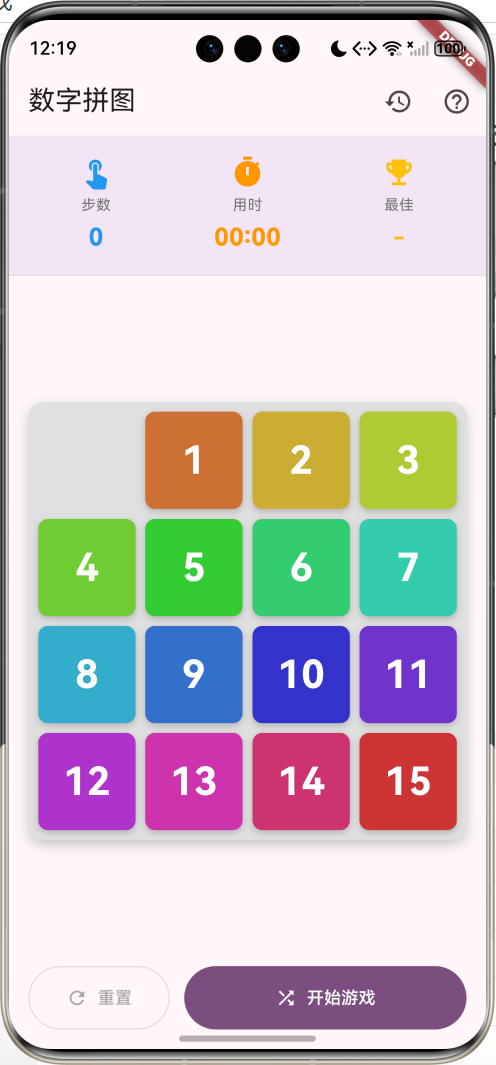
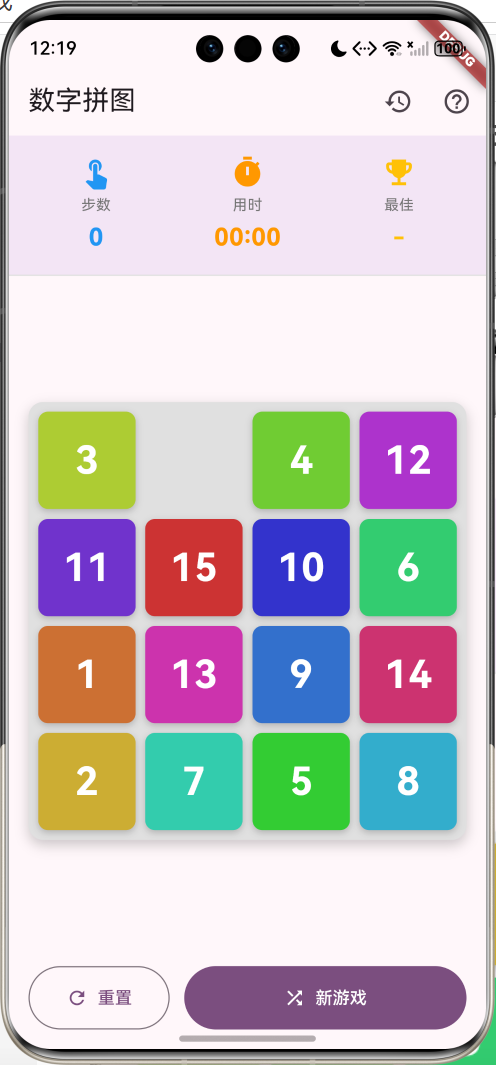
数字拼图(15-Puzzle)是一款经典的滑动拼图游戏。玩家需要通过移动数字方块,将打乱的1-15数字按顺序排列,空格位于右下角。游戏支持步数统计、计时功能、最佳记录保存等特性,是锻炼逻辑思维的益智游戏。
运行效果图

核心功能
- 经典玩法:4x4网格,1-15数字排序
- 智能打乱:确保生成可解的随机排列
- 步数统计:记录每次移动步数
- 计时功能:实时显示游戏用时
- 最佳记录:保存最少步数记录
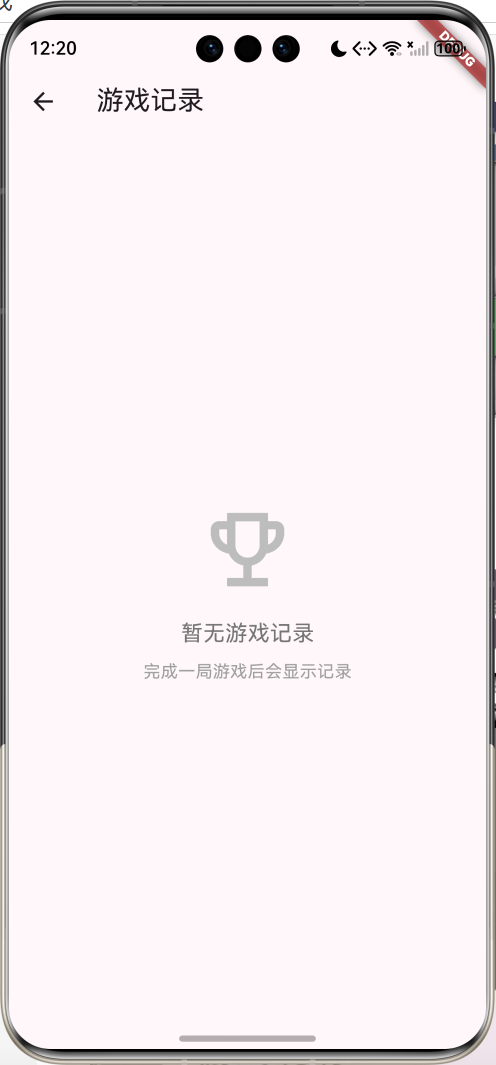
- 游戏历史:查看所有游戏记录
应用特色
| 特色 | 说明 |
|---|---|
| 可解性检测 | 算法确保生成可解的拼图 |
| 流畅动画 | 方块移动带有过渡动画 |
| 彩色方块 | 每个数字不同颜色 |
| 统计完善 | 步数、时间、最佳记录 |
| 记录保存 | 完整的游戏历史记录 |
功能架构
数字拼图
游戏主页
游戏记录
拼图面板
统计栏
控制按钮
4x4网格
数字方块
空格
步数统计
计时显示
最佳记录
开始游戏
重置游戏
游戏说明
统计数据
历史记录
核心功能详解
1. 拼图初始化
生成初始状态和打乱拼图。
初始化:
dart
void _initializePuzzle() {
  _tiles = List.generate(16, (index) => index);
  _emptyIndex = 15;
  _moves = 0;
  _isPlaying = false;
  _startTime = null;
  _elapsedTime = Duration.zero;
}
打乱拼图:
dart
void _shufflePuzzle() {
  setState(() {
    _initializePuzzle();

    // 生成可解的随机排列
    do {
      _tiles.shuffle(Random());
      _emptyIndex = _tiles.indexOf(0);
    } while (!_isSolvable() || _isSolved());

    _isPlaying = true;
    _startTime = DateTime.now();
  });
}
关键点:
- 使用0表示空格
- 确保生成的拼图可解
- 避免生成已完成的状态
2. 可解性检测
15-Puzzle并非所有排列都可解,需要检测。
可解性算法:
dart
bool _isSolvable() {
  int inversions = 0;
  for (int i = 0; i < 16; i++) {
    if (_tiles[i] == 0) continue;
    for (int j = i + 1; j < 16; j++) {
      if (_tiles[j] == 0) continue;
      if (_tiles[i] > _tiles[j]) {
        inversions++;
      }
    }
  }

  int emptyRow = _emptyIndex ~/ 4;

  // 对于4x4拼图,如果空格在奇数行且逆序数为偶数,
  // 或空格在偶数行且逆序数为奇数,则可解
  return (emptyRow % 2 == 0 && inversions % 2 == 1) ||
         (emptyRow % 2 == 1 && inversions % 2 == 0);
}
可解性规则:
- 计算逆序对数量
- 考虑空格所在行
- 奇偶性判断
3. 方块移动
检测并执行方块移动。
移动逻辑:
dart
void _moveTile(int index) {
  if (!_isPlaying) return;

  int row = index ~/ 4;
  int col = index % 4;
  int emptyRow = _emptyIndex ~/ 4;
  int emptyCol = _emptyIndex % 4;

  // 检查是否相邻
  if ((row == emptyRow && (col - emptyCol).abs() == 1) ||
      (col == emptyCol && (row - emptyRow).abs() == 1)) {
    setState(() {
      _tiles[_emptyIndex] = _tiles[index];
      _tiles[index] = 0;
      _emptyIndex = index;
      _moves++;

      if (_isSolved()) {
        _onGameWon();
      }
    });
  }
}
移动条件:
- 游戏进行中
- 方块与空格相邻
- 同行或同列
4. 完成检测
检查拼图是否完成。
完成判断:
dart
bool _isSolved() {
  for (int i = 0; i < 15; i++) {
    if (_tiles[i] != i + 1) return false;
  }
  return _tiles[15] == 0;
}
胜利处理:
dart
void _onGameWon() {
  _isPlaying = false;
  final duration = DateTime.now().difference(_startTime!);

  setState(() {
    _records.insert(
      0,
      GameRecord(
        moves: _moves,
        time: duration,
        date: DateTime.now(),
      ),
    );

    if (_bestMoves == null || _moves < _bestMoves!) {
      _bestMoves = _moves;
    }
  });

  _showWinDialog(duration);
}
5. 统计功能
实时显示游戏统计信息。
统计栏:
dart
Widget _buildStatisticsBar() {
  return Container(
    padding: const EdgeInsets.all(16),
    decoration: BoxDecoration(
      color: Colors.purple[50],
      border: Border(
        bottom: BorderSide(color: Colors.grey[300]!),
      ),
    ),
    child: Row(
      mainAxisAlignment: MainAxisAlignment.spaceAround,
      children: [
        _buildStatItem(
          Icons.touch_app,
          '步数',
          _moves.toString(),
          Colors.blue,
        ),
        _buildStatItem(
          Icons.timer,
          '用时',
          _isPlaying ? _formatDuration(_elapsedTime) : '00:00',
          Colors.orange,
        ),
        _buildStatItem(
          Icons.emoji_events,
          '最佳',
          _bestMoves?.toString() ?? '-',
          Colors.amber,
        ),
      ],
    ),
  );
}
统计项:
dart
Widget _buildStatItem(
  IconData icon,
  String label,
  String value,
  Color color,
) {
  return Column(
    children: [
      Icon(icon, color: color, size: 28),
      const SizedBox(height: 4),
      Text(
        label,
        style: TextStyle(fontSize: 12, color: Colors.grey[600]),
      ),
      const SizedBox(height: 4),
      Text(
        value,
        style: TextStyle(
          fontSize: 20,
          fontWeight: FontWeight.bold,
          color: color,
        ),
      ),
    ],
  );
}
6. 方块绘制
使用GridView绘制拼图面板。
拼图面板:
dart
Widget _buildPuzzleBoard() {
  return AspectRatio(
    aspectRatio: 1,
    child: Container(
      margin: const EdgeInsets.all(16),
      padding: const EdgeInsets.all(8),
      decoration: BoxDecoration(
        color: Colors.grey[300],
        borderRadius: BorderRadius.circular(12),
        boxShadow: [
          BoxShadow(
            color: Colors.black.withValues(alpha: 0.2),
            blurRadius: 8,
            offset: const Offset(0, 4),
          ),
        ],
      ),
      child: GridView.builder(
        physics: const NeverScrollableScrollPhysics(),
        gridDelegate: const SliverGridDelegateWithFixedCrossAxisCount(
          crossAxisCount: 4,
          crossAxisSpacing: 8,
          mainAxisSpacing: 8,
        ),
        itemCount: 16,
        itemBuilder: (context, index) {
          return _buildTile(index);
        },
      ),
    ),
  );
}
方块绘制:
dart
Widget _buildTile(int index) {
  final number = _tiles[index];
  final isEmpty = number == 0;

  return GestureDetector(
    onTap: isEmpty ? null : () => _moveTile(index),
    child: AnimatedContainer(
      duration: const Duration(milliseconds: 200),
      decoration: BoxDecoration(
        color: isEmpty ? Colors.transparent : _getTileColor(number),
        borderRadius: BorderRadius.circular(8),
        boxShadow: isEmpty
            ? null
            : [
                BoxShadow(
                  color: Colors.black.withValues(alpha: 0.2),
                  blurRadius: 4,
                  offset: const Offset(0, 2),
                ),
              ],
      ),
      child: isEmpty
          ? null
          : Center(
              child: Text(
                number.toString(),
                style: const TextStyle(
                  fontSize: 32,
                  fontWeight: FontWeight.bold,
                  color: Colors.white,
                ),
              ),
            ),
    ),
  );
}
颜色生成:
dart
Color _getTileColor(int number) {
  final hue = (number * 24) % 360;
  return HSLColor.fromAHSL(1.0, hue.toDouble(), 0.6, 0.5).toColor();
}
界面设计要点
1. 拼图面板
正方形网格,响应式布局:
dart
AspectRatio(
  aspectRatio: 1,  // 保持正方形
  child: Container(
    margin: const EdgeInsets.all(16),
    child: GridView.builder(
      gridDelegate: const SliverGridDelegateWithFixedCrossAxisCount(
        crossAxisCount: 4,
        crossAxisSpacing: 8,
        mainAxisSpacing: 8,
      ),
      itemCount: 16,
      itemBuilder: (context, index) => _buildTile(index),
    ),
  ),
)
2. 动画效果
使用AnimatedContainer实现过渡:
dart
AnimatedContainer(
  duration: const Duration(milliseconds: 200),
  decoration: BoxDecoration(
    color: _getTileColor(number),
    borderRadius: BorderRadius.circular(8),
  ),
  child: Center(
    child: Text(number.toString()),
  ),
)
3. 颜色方案
| 元素 | 颜色 | 说明 |
|---|---|---|
| 主题色 | Purple | 优雅、智慧 |
| 方块 | HSL动态 | 每个数字不同色相 |
| 空格 | Transparent | 透明显示背景 |
| 背景 | Grey300 | 柔和对比 |
| 阴影 | Black(0.2) | 立体感 |
数据模型设计
游戏记录模型
dart
class GameRecord {
  final int moves;        // 步数
  final Duration time;    // 用时
  final DateTime date;    // 日期

  GameRecord({
    required this.moves,
    required this.time,
    required this.date,
  });
}
核心算法详解
1. 逆序对计算
用于判断可解性:
dart
int inversions = 0;
for (int i = 0; i < 16; i++) {
  if (_tiles[i] == 0) continue;
  for (int j = i + 1; j < 16; j++) {
    if (_tiles[j] == 0) continue;
    if (_tiles[i] > _tiles[j]) {
      inversions++;
    }
  }
}
2. 相邻检测
判断方块是否可移动:
dart
int row = index ~/ 4;
int col = index % 4;
int emptyRow = _emptyIndex ~/ 4;
int emptyCol = _emptyIndex % 4;

bool isAdjacent =
  (row == emptyRow && (col - emptyCol).abs() == 1) ||
  (col == emptyCol && (row - emptyRow).abs() == 1);
3. 坐标转换
索引与行列转换:
dart
// 索引转行列
int row = index ~/ 4;
int col = index % 4;

// 行列转索引
int index = row * 4 + col;
功能扩展建议
1. 难度选择
支持不同尺寸的拼图:
dart
enum Difficulty {
  easy(3),    // 3x3
  normal(4),  // 4x4
  hard(5);    // 5x5

  final int size;
  const Difficulty(this.size);
}

class PuzzleGame {
  final Difficulty difficulty;
  late List<int> tiles;

  PuzzleGame(this.difficulty) {
    final total = difficulty.size * difficulty.size;
    tiles = List.generate(total, (index) => index);
  }

  void shuffle() {
    do {
      tiles.shuffle(Random());
    } while (!isSolvable() || isSolved());
  }
}
2. 自动求解
实现A*算法自动求解:
dart
class PuzzleSolver {
  List<int> solve(List<int> initial) {
    // A*算法实现
    final openSet = PriorityQueue<Node>();
    final closedSet = <String>{};

    openSet.add(Node(initial, 0, _heuristic(initial)));

    while (openSet.isNotEmpty) {
      final current = openSet.removeFirst();

      if (_isSolved(current.state)) {
        return _reconstructPath(current);
      }

      closedSet.add(_stateKey(current.state));

      for (final neighbor in _getNeighbors(current)) {
        if (closedSet.contains(_stateKey(neighbor.state))) {
          continue;
        }
        openSet.add(neighbor);
      }
    }

    return [];
  }

  int _heuristic(List<int> state) {
    // 曼哈顿距离启发式
    int distance = 0;
    for (int i = 0; i < state.length; i++) {
      if (state[i] == 0) continue;
      final target = state[i] - 1;
      final currentRow = i ~/ 4;
      final currentCol = i % 4;
      final targetRow = target ~/ 4;
      final targetCol = target % 4;
      distance += (currentRow - targetRow).abs() +
                  (currentCol - targetCol).abs();
    }
    return distance;
  }
}
3. 提示功能
显示下一步最佳移动:
dart
class HintService {
  int? getNextMove(List<int> tiles) {
    final solver = PuzzleSolver();
    final solution = solver.solve(tiles);

    if (solution.isNotEmpty) {
      return solution.first;
    }
    return null;
  }

  void showHint(BuildContext context, int? move) {
    if (move == null) {
      ScaffoldMessenger.of(context).showSnackBar(
        const SnackBar(content: Text('无法找到提示')),
      );
      return;
    }

    // 高亮显示建议移动的方块
    showDialog(
      context: context,
      builder: (context) => AlertDialog(
        title: const Text('提示'),
        content: Text('建议移动位置 $move 的方块'),
        actions: [
          FilledButton(
            onPressed: () => Navigator.pop(context),
            child: const Text('知道了'),
          ),
        ],
      ),
    );
  }
}
4. 图片拼图
使用图片代替数字:
dart
class ImagePuzzle extends StatelessWidget {
  final String imagePath;
  final List<int> tiles;

  @override
  Widget build(BuildContext context) {
    return GridView.builder(
      gridDelegate: const SliverGridDelegateWithFixedCrossAxisCount(
        crossAxisCount: 4,
      ),
      itemCount: 16,
      itemBuilder: (context, index) {
        final number = tiles[index];
        if (number == 0) return Container();

        return ClipRect(
          child: Align(
            alignment: Alignment(
              ((number - 1) % 4) / 1.5 - 1,
              ((number - 1) ~/ 4) / 1.5 - 1,
            ),
            widthFactor: 0.25,
            heightFactor: 0.25,
            child: Image.asset(imagePath),
          ),
        );
      },
    );
  }
}
5. 排行榜
使用Firebase实现全球排行榜:
dart
import 'package:cloud_firestore/cloud_firestore.dart';

class LeaderboardService {
  final FirebaseFirestore _firestore = FirebaseFirestore.instance;

  Future<void> submitScore({
    required String playerName,
    required int moves,
    required Duration time,
  }) async {
    await _firestore.collection('leaderboard').add({
      'playerName': playerName,
      'moves': moves,
      'time': time.inSeconds,
      'timestamp': FieldValue.serverTimestamp(),
    });
  }

  Stream<List<LeaderboardEntry>> getTopScores({int limit = 10}) {
    return _firestore
      .collection('leaderboard')
      .orderBy('moves')
      .orderBy('time')
      .limit(limit)
      .snapshots()
      .map((snapshot) {
        return snapshot.docs.map((doc) {
          final data = doc.data();
          return LeaderboardEntry(
            playerName: data['playerName'],
            moves: data['moves'],
            time: Duration(seconds: data['time']),
          );
        }).toList();
      });
  }
}
6. 成就系统
添加游戏成就:
dart
enum Achievement {
  firstWin('首次胜利', '完成第一局游戏'),
  speedRunner('速度之王', '在1分钟内完成游戏'),
  efficient('效率大师', '用少于100步完成游戏'),
  perfectGame('完美游戏', '用最优步数完成'),
  persistent('坚持不懈', '完成10局游戏');

  final String title;
  final String description;
  const Achievement(this.title, this.description);
}

class AchievementService {
  final Set<Achievement> _unlocked = {};

  void checkAchievements(GameRecord record, int totalGames) {
    if (totalGames == 1) {
      _unlock(Achievement.firstWin);
    }

    if (record.time.inSeconds < 60) {
      _unlock(Achievement.speedRunner);
    }

    if (record.moves < 100) {
      _unlock(Achievement.efficient);
    }

    if (totalGames >= 10) {
      _unlock(Achievement.persistent);
    }
  }

  void _unlock(Achievement achievement) {
    if (_unlocked.add(achievement)) {
      // 显示解锁动画
      _showUnlockNotification(achievement);
    }
  }
}
7. 音效和震动
添加交互反馈:
dart
import 'package:audioplayers/audioplayers.dart';
import 'package:vibration/vibration.dart';

class FeedbackService {
  final AudioPlayer _player = AudioPlayer();

  Future<void> playMoveSound() async {
    await _player.play(AssetSource('sounds/move.mp3'));
  }

  Future<void> playWinSound() async {
    await _player.play(AssetSource('sounds/win.mp3'));
  }

  Future<void> vibrate() async {
    if (await Vibration.hasVibrator() ?? false) {
      Vibration.vibrate(duration: 50);
    }
  }
}

// 使用
void _moveTile(int index) {
  // ... 移动逻辑
  FeedbackService().playMoveSound();
  FeedbackService().vibrate();
}
8. 数据持久化
保存游戏进度和记录:
dart
import 'package:shared_preferences/shared_preferences.dart';
import 'dart:convert';

class StorageService {
  Future<void> saveGame({
    required List<int> tiles,
    required int moves,
    required DateTime startTime,
  }) async {
    final prefs = await SharedPreferences.getInstance();
    await prefs.setString('current_game', jsonEncode({
      'tiles': tiles,
      'moves': moves,
      'startTime': startTime.toIso8601String(),
    }));
  }

  Future<Map<String, dynamic>?> loadGame() async {
    final prefs = await SharedPreferences.getInstance();
    final jsonStr = prefs.getString('current_game');
    if (jsonStr == null) return null;

    final data = jsonDecode(jsonStr);
    return {
      'tiles': List<int>.from(data['tiles']),
      'moves': data['moves'],
      'startTime': DateTime.parse(data['startTime']),
    };
  }

  Future<void> saveRecords(List<GameRecord> records) async {
    final prefs = await SharedPreferences.getInstance();
    final jsonList = records.map((r) => {
      'moves': r.moves,
      'time': r.time.inSeconds,
      'date': r.date.toIso8601String(),
    }).toList();
    await prefs.setString('game_records', jsonEncode(jsonList));
  }
}
项目结构
lib/
├── main.dart                    # 应用入口
├── models/                      # 数据模型
│   ├── game_record.dart        # 游戏记录
│   ├── puzzle_state.dart       # 拼图状态
│   └── achievement.dart        # 成就
├── pages/                       # 页面
│   ├── puzzle_page.dart        # 主游戏页面
│   ├── records_page.dart       # 记录页面
│   └── leaderboard_page.dart   # 排行榜
├── widgets/                     # 组件
│   ├── puzzle_board.dart       # 拼图面板
│   ├── tile_widget.dart        # 方块组件
│   └── statistics_bar.dart     # 统计栏
├── services/                    # 服务
│   ├── puzzle_solver.dart      # 求解器
│   ├── hint_service.dart       # 提示服务
│   ├── storage_service.dart    # 存储服务
│   ├── feedback_service.dart   # 反馈服务
│   └── leaderboard_service.dart # 排行榜服务
└── utils/                       # 工具
    ├── puzzle_utils.dart       # 拼图工具
    └── formatters.dart         # 格式化工具
使用指南
基本操作
-
开始游戏
- 点击"开始游戏"按钮
- 拼图自动打乱
- 计时开始
-
移动方块
- 点击空格相邻的数字方块
- 方块滑动到空格位置
- 步数自动增加
-
完成拼图
- 将1-15按顺序排列
- 空格在右下角
- 自动弹出胜利对话框
-
查看记录
- 点击右上角历史图标
- 查看所有游戏记录
- 查看统计数据
游戏技巧
-
角落优先
- 先完成角落的数字
- 逐步向中心推进
-
行列策略
- 先完成第一行
- 再完成第一列
- 递归处理剩余部分
-
减少步数
- 提前规划移动路径
- 避免无效移动
- 学习常见模式
常见问题
Q1: 为什么有些排列无法完成?
15-Puzzle的数学性质:
- 只有一半的排列可解
- 通过逆序对判断可解性
- 应用会自动生成可解排列
Q2: 如何计算最优解?
使用A*算法:
dart
// 曼哈顿距离启发式
int manhattanDistance(List<int> state) {
  int distance = 0;
  for (int i = 0; i < state.length; i++) {
    if (state[i] == 0) continue;
    final target = state[i] - 1;
    final currentRow = i ~/ 4;
    final currentCol = i % 4;
    final targetRow = target ~/ 4;
    final targetCol = target % 4;
    distance += (currentRow - targetRow).abs() +
                (currentCol - targetCol).abs();
  }
  return distance;
}
Q3: 如何实现撤销功能?
记录移动历史:
dart
class MoveHistory {
  final List<List<int>> _history = [];

  void push(List<int> state) {
    _history.add(List.from(state));
  }

  List<int>? undo() {
    if (_history.length > 1) {
      _history.removeLast();
      return List.from(_history.last);
    }
    return null;
  }
}
Q4: 如何优化性能?
- 避免不必要的重建
dart
// 使用const构造函数
const Text('数字拼图')

// 提取不变的Widget
final emptyTile = Container(color: Colors.transparent);- 使用RepaintBoundary
dart
RepaintBoundary(
  child: GridView.builder(
    itemBuilder: (context, index) => _buildTile(index),
  ),
)- 优化动画
dart
AnimatedContainer(
  duration: const Duration(milliseconds: 150),
  curve: Curves.easeOut,
  // ...
)
Q5: 如何添加自定义图片?
dart
class ImagePuzzlePage extends StatelessWidget {
  final String imagePath;

  @override
  Widget build(BuildContext context) {
    return FutureBuilder<ui.Image>(
      future: _loadImage(imagePath),
      builder: (context, snapshot) {
        if (!snapshot.hasData) {
          return const CircularProgressIndicator();
        }

        return GridView.builder(
          itemCount: 16,
          itemBuilder: (context, index) {
            return _buildImageTile(snapshot.data!, index);
          },
        );
      },
    );
  }

  Future<ui.Image> _loadImage(String path) async {
    final data = await rootBundle.load(path);
    final codec = await ui.instantiateImageCodec(
      data.buffer.asUint8List()
    );
    final frame = await codec.getNextFrame();
    return frame.image;
  }
}
性能优化
1. 状态管理
使用Provider优化状态管理:
dart
class PuzzleProvider extends ChangeNotifier {
  List<int> _tiles = [];
  int _moves = 0;

  void moveTile(int index) {
    // 移动逻辑
    notifyListeners();
  }
}

// 使用
ChangeNotifierProvider(
  create: (_) => PuzzleProvider(),
  child: Consumer<PuzzleProvider>(
    builder: (context, puzzle, child) {
      return Text('步数: ${puzzle.moves}');
    },
  ),
)
2. 列表优化
使用ListView.builder:
dart
ListView.builder(
  itemCount: records.length,
  itemBuilder: (context, index) {
    return _buildRecordCard(records[index]);
  },
)
3. 图片缓存
缓存图片资源:
dart
class ImageCache {
  static final Map<String, ui.Image> _cache = {};

  static Future<ui.Image> load(String path) async {
    if (_cache.containsKey(path)) {
      return _cache[path]!;
    }

    final image = await _loadImage(path);
    _cache[path] = image;
    return image;
  }
}
总结
数字拼图是一款经典的益智游戏,具有以下特点:
核心优势
- 经典玩法:15-Puzzle经典规则
- 智能算法:确保生成可解拼图
- 完善统计:步数、时间、最佳记录
- 流畅体验:动画过渡、彩色方块
技术亮点
- 可解性检测:逆序对算法
- 相邻判断:行列坐标计算
- 动画效果:AnimatedContainer
- 彩色方块:HSL颜色生成
应用价值
- 锻炼逻辑思维能力
- 提高空间想象力
- 培养耐心和专注力
- 经典益智游戏体验
通过扩展难度选择、自动求解、图片拼图、排行榜等功能,这款游戏可以成为功能丰富的益智游戏平台,适合各年龄段玩家。
欢迎加入开源鸿蒙跨平台社区:https://openharmonycrossplatform.csdn.net