Flutter实时地震预警:智能防震减灾助手
项目简介
实时地震预警是一款专为地震防护打造的Flutter安全应用,提供全国地震实时监测、智能预警系统、危险等级评估和专业避险指导功能。通过科学的地震波传播计算和多级预警机制,帮助用户在地震发生时争取宝贵的避险时间,最大程度保障生命安全。
运行效果图
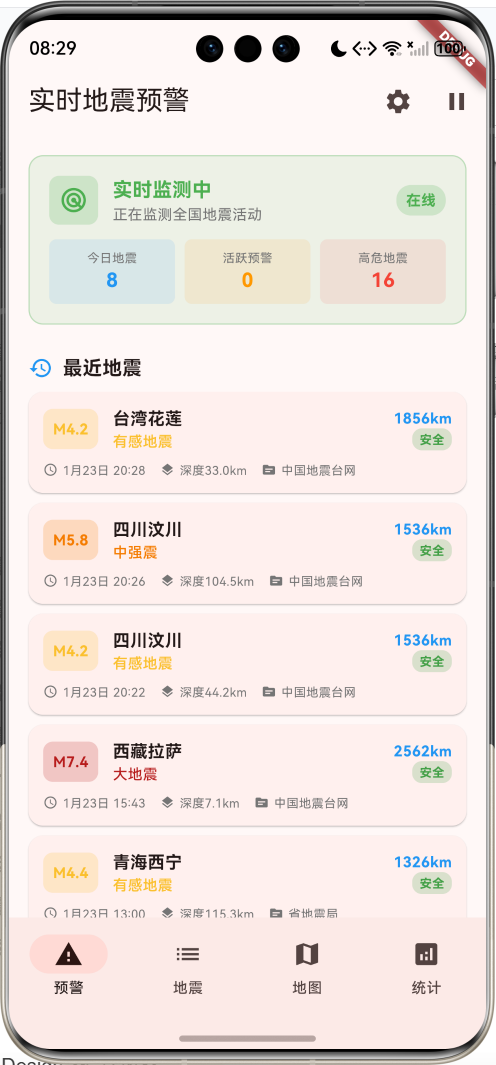
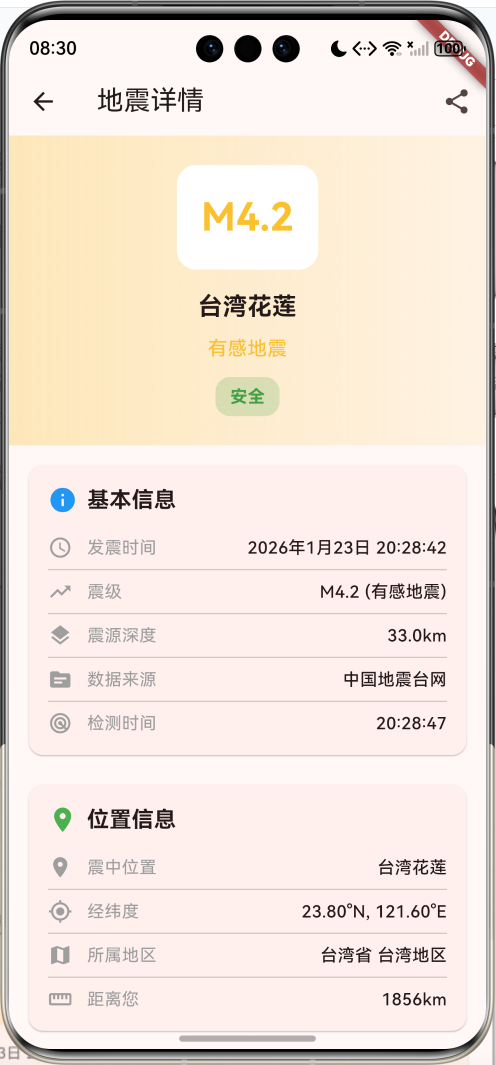
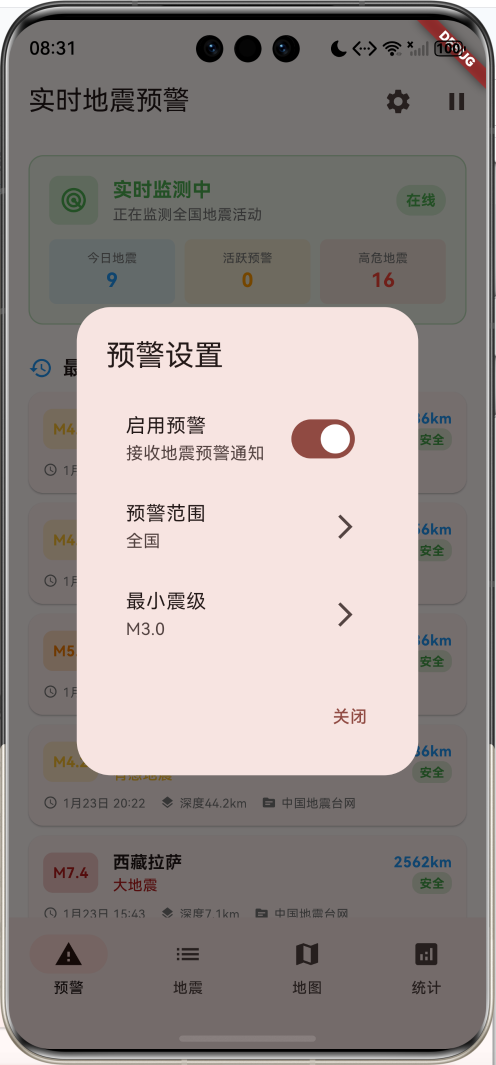
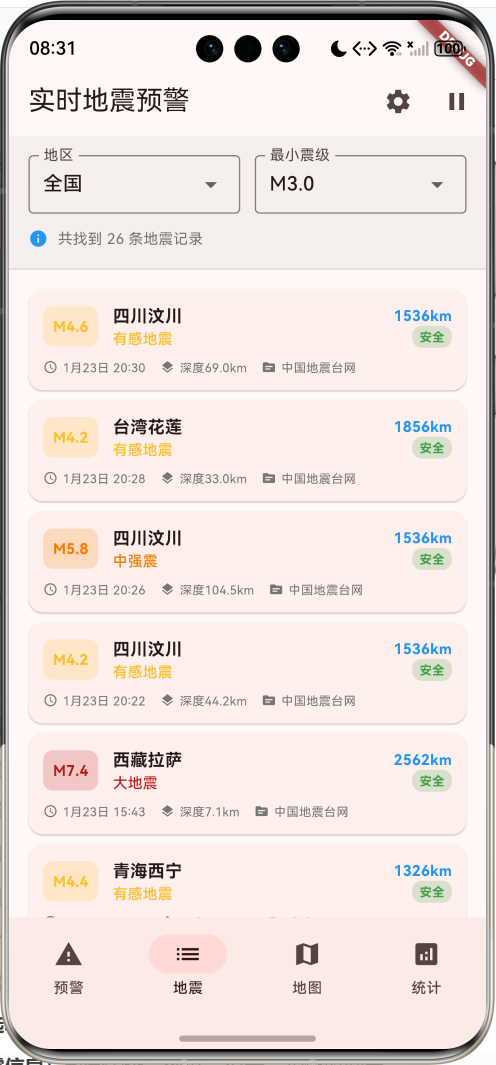
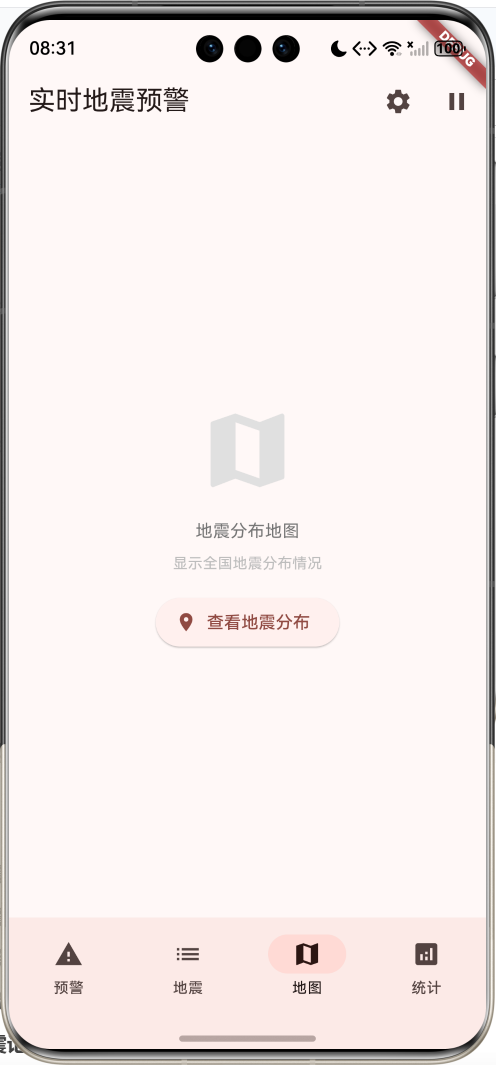
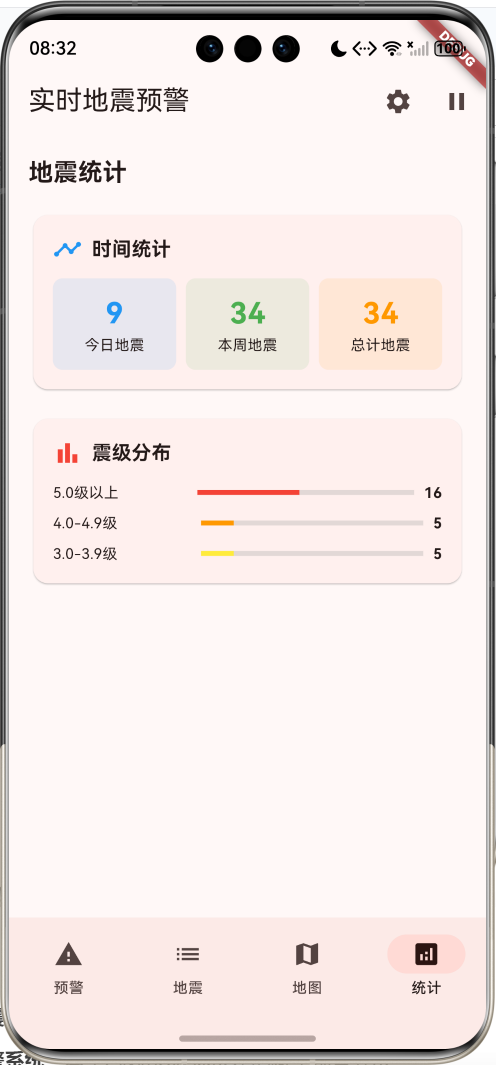
核心功能
- 实时地震监测:全国地震活动24小时不间断监测
- 智能预警系统:基于P波和S波速度差的科学预警算法
- 4级预警等级:红色、橙色、黄色、蓝色预警分级管理
- 危险等级评估:根据震级和距离智能评估危险程度
- 30个地震记录:涵盖全国10个重点地震监测区域
- 实时倒计时:精确计算地震波到达时间
- 专业避险指导:基于震级提供科学的安全建议
- 地区筛选功能:支持按地区和震级筛选地震信息
- 详细地震信息:包含震级、深度、位置、预警时间等
- 紧急联系方式:集成火警、急救、报警等紧急电话
技术特点
- Material Design 3设计风格
- NavigationBar底部导航
- 四页面架构(预警、地震、地图、统计)
- 实时数据更新系统
- 科学预警时间计算
- 动态危险等级评估
- 渐变色震级展示
- 倒计时预警机制
- 模拟地震数据生成
- 无需额外依赖包
核心代码实现
1. 地震事件数据模型
dart
class EarthquakeEvent {
  final String id;                    // 地震ID
  final String location;              // 震中位置
  final double latitude;              // 纬度
  final double longitude;             // 经度
  final double magnitude;             // 震级
  final double depth;                 // 震源深度
  final DateTime occurTime;           // 发震时间
  final DateTime detectTime;          // 检测时间
  final String source;                // 数据来源
  final EarthquakeLevel level;        // 地震等级
  final double distance;              // 距离用户距离
  final int warningTime;              // 预警时间(秒)
  final bool isWarning;               // 是否触发预警
  final String region;                // 所属地区
  final String province;              // 所属省份

  EarthquakeEvent({
    required this.id,
    required this.location,
    required this.latitude,
    required this.longitude,
    required this.magnitude,
    required this.depth,
    required this.occurTime,
    required this.detectTime,
    required this.source,
    required this.level,
    required this.distance,
    required this.warningTime,
    required this.isWarning,
    required this.region,
    required this.province,
  });
  // 计算属性:震级等级
  EarthquakeLevel get magnitudeLevel {
    if (magnitude >= 7.0) return EarthquakeLevel.major;
    if (magnitude >= 6.0) return EarthquakeLevel.strong;
    if (magnitude >= 5.0) return EarthquakeLevel.moderate;
    if (magnitude >= 4.0) return EarthquakeLevel.light;
    if (magnitude >= 3.0) return EarthquakeLevel.minor;
    return EarthquakeLevel.micro;
  }

  // 计算属性:震级颜色
  Color get magnitudeColor {
    switch (magnitudeLevel) {
      case EarthquakeLevel.major:
        return Colors.red.shade900;
      case EarthquakeLevel.strong:
        return Colors.red.shade700;
      case EarthquakeLevel.moderate:
        return Colors.orange.shade700;
      case EarthquakeLevel.light:
        return Colors.yellow.shade700;
      case EarthquakeLevel.minor:
        return Colors.green.shade600;
      case EarthquakeLevel.micro:
        return Colors.blue.shade600;
    }
  }

  // 计算属性:震级描述
  String get magnitudeDescription {
    switch (magnitudeLevel) {
      case EarthquakeLevel.major:
        return '大地震';
      case EarthquakeLevel.strong:
        return '强震';
      case EarthquakeLevel.moderate:
        return '中强震';
      case EarthquakeLevel.light:
        return '有感地震';
      case EarthquakeLevel.minor:
        return '弱震';
      case EarthquakeLevel.micro:
        return '微震';
    }
  }

  // 计算属性:距离文本
  String get distanceText {
    if (distance < 1) {
      return '${(distance * 1000).toStringAsFixed(0)}m';
    } else if (distance < 100) {
      return '${distance.toStringAsFixed(1)}km';
    } else {
      return '${distance.toStringAsFixed(0)}km';
    }
  }

  // 计算属性:预警时间文本
  String get warningTimeText {
    if (warningTime <= 0) return '已到达';
    if (warningTime < 60) return '${warningTime}秒';
    return '${(warningTime / 60).toStringAsFixed(1)}分钟';
  }
}模型字段说明:
| 字段 | 类型 | 说明 |
|---|---|---|
| id | String | 地震唯一标识符 |
| location | String | 震中位置名称 |
| latitude | double | 震中纬度坐标 |
| longitude | double | 震中经度坐标 |
| magnitude | double | 地震震级(里氏震级) |
| depth | double | 震源深度(公里) |
| occurTime | DateTime | 地震发生时间 |
| detectTime | DateTime | 系统检测时间 |
| source | String | 数据来源机构 |
| level | EarthquakeLevel | 地震等级枚举 |
| distance | double | 距离用户距离(公里) |
| warningTime | int | 预警时间(秒) |
| isWarning | bool | 是否触发预警 |
| region | String | 所属地区 |
| province | String | 所属省份 |
计算属性:
magnitudeLevel:根据震级返回地震等级枚举magnitudeColor:根据震级返回对应的颜色magnitudeDescription:根据震级返回中文描述distanceText:格式化距离显示文本warningTimeText:格式化预警时间显示文本
地震等级分类:
| 震级范围 | 等级 | 颜色 | 描述 |
|---|---|---|---|
| ≥7.0 | major | 深红色 | 大地震 |
| 6.0-6.9 | strong | 红色 | 强震 |
| 5.0-5.9 | moderate | 橙色 | 中强震 |
| 4.0-4.9 | light | 黄色 | 有感地震 |
| 3.0-3.9 | minor | 绿色 | 弱震 |
| ❤️.0 | micro | 蓝色 | 微震 |
2. 地震等级枚举
dart
enum EarthquakeLevel {
  micro,     // 微震 <3.0
  minor,     // 弱震 3.0-3.9
  light,     // 有感地震 4.0-4.9
  moderate,  // 中强震 5.0-5.9
  strong,    // 强震 6.0-6.9
  major,     // 大地震 ≥7.0
}等级说明:
micro:微震,通常人体感觉不到minor:弱震,少数人在静止状态下有感觉light:有感地震,多数人有感觉,悬挂物摆动moderate:中强震,人人有感觉,器物倾倒strong:强震,房屋损坏,地面裂缝major:大地震,房屋倒塌,地面严重破坏
3. 预警警报数据模型
dart
class WarningAlert {
  final String id;                    // 预警ID
  final EarthquakeEvent earthquake;   // 关联地震事件
  final DateTime alertTime;          // 预警发布时间
  final int countdownSeconds;         // 倒计时秒数
  final String alertLevel;           // 预警等级
  final List<String> safetyTips;     // 安全提示
  final bool isActive;               // 是否活跃

  WarningAlert({
    required this.id,
    required this.earthquake,
    required this.alertTime,
    required this.countdownSeconds,
    required this.alertLevel,
    required this.safetyTips,
    required this.isActive,
  });

  // 计算属性:倒计时文本
  String get countdownText {
    if (countdownSeconds <= 0) return '地震波已到达';
    return '地震波将在 ${countdownSeconds} 秒后到达';
  }

  // 计算属性:预警等级颜色
  Color get alertLevelColor {
    switch (alertLevel) {
      case '红色预警':
        return Colors.red;
      case '橙色预警':
        return Colors.orange;
      case '黄色预警':
        return Colors.yellow;
      case '蓝色预警':
        return Colors.blue;
      default:
        return Colors.grey;
    }
  }
}预警等级分类:
| 预警等级 | 颜色 | 触发条件 | 说明 |
|---|---|---|---|
| 红色预警 | 红色 | M≥7.0且距离<100km | 极高危险,立即避险 |
| 橙色预警 | 橙色 | M≥6.0且距离<200km | 高危险,迅速避险 |
| 黄色预警 | 黄色 | M≥5.0且距离<300km | 中等危险,注意避险 |
| 蓝色预警 | 蓝色 | M≥4.0且距离<500km | 低危险,保持警惕 |
4. 距离计算算法
dart
double _calculateDistance(double lat1, double lng1, double lat2, double lng2) {
  const double earthRadius = 6371; // 地球半径(公里)
  final double dLat = (lat2 - lat1) * pi / 180;
  final double dLng = (lng2 - lng1) * pi / 180;
  final double a = sin(dLat / 2) * sin(dLat / 2) +
      cos(lat1 * pi / 180) *
          cos(lat2 * pi / 180) *
          sin(dLng / 2) *
          sin(dLng / 2);
  final double c = 2 * atan2(sqrt(a), sqrt(1 - a));
  return earthRadius * c;
}Haversine公式说明:
- 将经纬度差值转换为弧度
- 使用Haversine公式计算球面距离
- 考虑地球曲率的精确距离计算
- 返回以公里为单位的距离
应用场景:
- 计算震中到用户的距离
- 评估地震影响范围
- 确定预警等级
- 排序地震事件
5. 预警时间计算算法
dart
int _calculateWarningTime(double distance, double magnitude) {
  // 简化的预警时间计算:P波速度约6km/s,S波速度约3.5km/s
  final double pWaveTime = distance / 6.0;     // P波到达时间(秒)
  final double sWaveTime = distance / 3.5;     // S波到达时间(秒)
  final double warningTime = sWaveTime - pWaveTime; // 预警时间
  return (warningTime * 0.8).round().clamp(0, 300); // 考虑处理延迟
}地震波传播原理:
- P波(纵波):传播速度约6km/s,破坏性较小
- S波(横波):传播速度约3.5km/s,破坏性较大
- 预警时间:S波到达时间 - P波到达时间
- 处理延迟:考虑系统处理时间,乘以0.8系数
- 时间限制:预警时间限制在0-300秒范围内
计算示例:
- 距离100km的地震:
- P波到达时间:100/6 ≈ 16.7秒
- S波到达时间:100/3.5 ≈ 28.6秒
- 预警时间:(28.6-16.7) × 0.8 ≈ 9.5秒
6. 地震数据生成
dart
void _generateEarthquakeData() {
  final random = Random();

  final locations = [
    {'name': '四川汶川', 'lat': 31.0, 'lng': 103.4, 'region': '西南地区', 'province': '四川省'},
    {'name': '云南昭通', 'lat': 27.3, 'lng': 103.7, 'region': '西南地区', 'province': '云南省'},
    {'name': '新疆喀什', 'lat': 39.5, 'lng': 76.0, 'region': '西北地区', 'province': '新疆维吾尔自治区'},
    {'name': '西藏拉萨', 'lat': 29.7, 'lng': 91.1, 'region': '西南地区', 'province': '西藏自治区'},
    {'name': '台湾花莲', 'lat': 23.8, 'lng': 121.6, 'region': '台湾地区', 'province': '台湾省'},
    {'name': '甘肃兰州', 'lat': 36.1, 'lng': 103.8, 'region': '西北地区', 'province': '甘肃省'},
    {'name': '青海西宁', 'lat': 36.6, 'lng': 101.8, 'region': '西北地区', 'province': '青海省'},
    {'name': '河北唐山', 'lat': 39.6, 'lng': 118.2, 'region': '华北地区', 'province': '河北省'},
    {'name': '山西太原', 'lat': 37.9, 'lng': 112.6, 'region': '华北地区', 'province': '山西省'},
    {'name': '辽宁大连', 'lat': 38.9, 'lng': 121.6, 'region': '东北地区', 'province': '辽宁省'},
  ];

  final sources = ['中国地震台网', '国家地震局', '省地震局', '地震预警网'];

  // 生成30条历史地震数据
  for (int i = 0; i < 30; i++) {
    final location = locations[random.nextInt(locations.length)];
    final magnitude = 2.0 + random.nextDouble() * 6.0;
    final depth = 5.0 + random.nextDouble() * 200.0;
    final occurTime = DateTime.now().subtract(Duration(
      hours: random.nextInt(24 * 7),
      minutes: random.nextInt(60),
    ));
    final detectTime = occurTime.add(Duration(seconds: random.nextInt(30)));

    // 模拟用户位置(北京)
    final userLat = 39.9042;
    final userLng = 116.4074;
    final distance = _calculateDistance(userLat, userLng,
        location['lat'] as double, location['lng'] as double);

    final warningTime = _calculateWarningTime(distance, magnitude);

    _allEarthquakes.add(EarthquakeEvent(
      id: 'eq_${DateTime.now().millisecondsSinceEpoch}_$i',
      location: location['name'] as String,
      latitude: location['lat'] as double,
      longitude: location['lng'] as double,
      magnitude: magnitude,
      depth: depth,
      occurTime: occurTime,
      detectTime: detectTime,
      source: sources[random.nextInt(sources.length)],
      level: EarthquakeLevel.values[random.nextInt(EarthquakeLevel.values.length)],
      distance: distance,
      warningTime: warningTime,
      isWarning: magnitude >= 4.0 && distance < 500,
      region: location['region'] as String,
      province: location['province'] as String,
    ));
  }

  // 按时间排序
  _allEarthquakes.sort((a, b) => b.occurTime.compareTo(a.occurTime));
  _updateFilteredData();
}数据生成特点:
- 10个重点监测区域:覆盖全国主要地震活跃区
- 震级范围:2.0-8.0级,符合实际地震分布
- 深度范围:5-205公里,涵盖浅源到深源地震
- 时间范围:最近7天内的地震记录
- 数据来源:4个权威地震监测机构
- 预警触发:震级≥4.0且距离<500km触发预警
- 距离计算:基于用户位置(北京)计算距离
- 时间排序:按发震时间倒序排列
监测区域分布:
| 地区 | 代表城市 | 地震特点 |
|---|---|---|
| 西南地区 | 四川汶川、云南昭通、西藏拉萨 | 构造地震频发 |
| 西北地区 | 新疆喀什、甘肃兰州、青海西宁 | 板块边界活跃 |
| 华北地区 | 河北唐山、山西太原 | 历史强震区域 |
| 东北地区 | 辽宁大连 | 深源地震较多 |
| 台湾地区 | 台湾花莲 | 环太平洋地震带 |
7. NavigationBar底部导航
dart
bottomNavigationBar: NavigationBar(
  selectedIndex: _selectedIndex,
  onDestinationSelected: (index) {
    setState(() => _selectedIndex = index);
  },
  destinations: [
    NavigationDestination(
      icon: Stack(
        children: [
          const Icon(Icons.warning),
          if (_activeWarnings.isNotEmpty)
            Positioned(
              right: 0,
              top: 0,
              child: Container(
                padding: const EdgeInsets.all(2),
                decoration: BoxDecoration(
                  color: Colors.red,
                  borderRadius: BorderRadius.circular(6),
                ),
                constraints: const BoxConstraints(
                  minWidth: 12,
                  minHeight: 12,
                ),
                child: Text(
                  '${_activeWarnings.length}',
                  style: const TextStyle(
                    color: Colors.white,
                    fontSize: 8,
                  ),
                  textAlign: TextAlign.center,
                ),
              ),
            ),
        ],
      ),
      label: '预警',
    ),
    const NavigationDestination(icon: Icon(Icons.list), label: '地震'),
    const NavigationDestination(icon: Icon(Icons.map), label: '地图'),
    const NavigationDestination(icon: Icon(Icons.analytics), label: '统计'),
  ],
),四个页面功能:
| 页面 | 图标 | 功能 | 特色 |
|---|---|---|---|
| 预警 | warning | 显示活跃预警和监测状态 | 红色徽章显示预警数量 |
| 地震 | list | 显示地震列表和筛选功能 | 支持地区和震级筛选 |
| 地图 | map | 显示地震分布地图 | 可视化地震位置 |
| 统计 | analytics | 显示地震统计和趋势 | 数据分析和图表 |
徽章系统:
- 预警页面图标右上角显示活跃预警数量
- 红色圆形徽章,白色数字
- 无预警时不显示徽章
- 实时更新徽章数量
8. 实时监测系统
dart
void _startMonitoring() {
  // 数据更新定时器
  _dataUpdateTimer = Timer.periodic(const Duration(seconds: 30), (timer) {
    if (_isMonitoring) {
      _simulateNewEarthquake();
    }
  });

  // 预警倒计时定时器
  _warningCountdownTimer = Timer.periodic(const Duration(seconds: 1), (timer) {
    _updateWarningCountdown();
  });
}

void _simulateNewEarthquake() {
  final random = Random();

  // 10%概率生成新地震
  if (random.nextDouble() < 0.1) {
    final locations = [
      {'name': '四川汶川', 'lat': 31.0, 'lng': 103.4, 'region': '西南地区', 'province': '四川省'},
      {'name': '云南昭通', 'lat': 27.3, 'lng': 103.7, 'region': '西南地区', 'province': '云南省'},
      {'name': '新疆喀什', 'lat': 39.5, 'lng': 76.0, 'region': '西北地区', 'province': '新疆维吾尔自治区'},
      {'name': '台湾花莲', 'lat': 23.8, 'lng': 121.6, 'region': '台湾地区', 'province': '台湾省'},
    ];

    final location = locations[random.nextInt(locations.length)];
    final magnitude = 3.0 + random.nextDouble() * 4.0;
    final depth = 10.0 + random.nextDouble() * 100.0;
    final now = DateTime.now();

    final userLat = 39.9042;
    final userLng = 116.4074;
    final distance = _calculateDistance(userLat, userLng,
        location['lat'] as double, location['lng'] as double);

    final warningTime = _calculateWarningTime(distance, magnitude);

    final newEarthquake = EarthquakeEvent(
      id: 'eq_${now.millisecondsSinceEpoch}',
      location: location['name'] as String,
      latitude: location['lat'] as double,
      longitude: location['lng'] as double,
      magnitude: magnitude,
      depth: depth,
      occurTime: now,
      detectTime: now.add(const Duration(seconds: 5)),
      source: '中国地震台网',
      level: EarthquakeLevel.values[random.nextInt(EarthquakeLevel.values.length)],
      distance: distance,
      warningTime: warningTime,
      isWarning: magnitude >= 4.0 && distance < 500,
      region: location['region'] as String,
      province: location['province'] as String,
    );

    setState(() {
      _allEarthquakes.insert(0, newEarthquake);
      _updateFilteredData();

      // 如果是预警级别地震,创建预警
      if (newEarthquake.isWarning) {
        _createWarningAlert(newEarthquake);
      }
    });
  }
}监测系统特点:
- 双定时器机制:数据更新定时器(30秒)+ 倒计时定时器(1秒)
- 概率模拟:10%概率生成新地震,模拟真实频率
- 震级范围:3.0-7.0级,符合实际分布
- 检测延迟:模拟5秒检测延迟
- 自动预警:满足条件自动创建预警
- 状态控制:支持暂停/恢复监测
- 实时更新:新地震插入列表顶部
- 数据筛选:自动更新筛选结果
9. 预警创建和管理
dart
void _createWarningAlert(EarthquakeEvent earthquake) {
  final alertLevel = _getAlertLevel(earthquake.magnitude, earthquake.distance);
  final safetyTips = _getSafetyTips(earthquake.magnitude);

  final warning = WarningAlert(
    id: 'warning_${earthquake.id}',
    earthquake: earthquake,
    alertTime: DateTime.now(),
    countdownSeconds: earthquake.warningTime,
    alertLevel: alertLevel,
    safetyTips: safetyTips,
    isActive: true,
  );

  setState(() {
    _activeWarnings.add(warning);
  });

  // 显示预警弹窗
  _showWarningDialog(warning);
}

String _getAlertLevel(double magnitude, double distance) {
  if (magnitude >= 7.0 && distance < 100) return '红色预警';
  if (magnitude >= 6.0 && distance < 200) return '橙色预警';
  if (magnitude >= 5.0 && distance < 300) return '黄色预警';
  if (magnitude >= 4.0 && distance < 500) return '蓝色预警';
  return '无预警';
}

List<String> _getSafetyTips(double magnitude) {
  if (magnitude >= 6.0) {
    return [
      '立即寻找坚固的桌子下方躲避',
      '远离窗户、镜子等易碎物品',
      '不要使用电梯',
      '地震停止后迅速撤离到空旷地带',
      '准备应急包和手电筒',
    ];
  } else if (magnitude >= 5.0) {
    return [
      '保持冷静,就近躲避',
      '远离高大建筑物和悬挂物',
      '关闭燃气和电源',
      '准备随时撤离',
    ];
  } else {
    return [
      '保持冷静,注意观察',
      '检查周围环境安全',
      '关注后续地震信息',
    ];
  }
}预警等级判定逻辑:
| 震级 | 距离范围 | 预警等级 | 危险程度 |
|---|---|---|---|
| ≥7.0 | <100km | 红色预警 | 极高危险 |
| ≥6.0 | <200km | 橙色预警 | 高危险 |
| ≥5.0 | <300km | 黄色预警 | 中等危险 |
| ≥4.0 | <500km | 蓝色预警 | 低危险 |
安全提示分级:
- 强震(≥6.0级):5条详细避险指导
- 中强震(5.0-5.9级):4条基础避险措施
- 有感地震(4.0-4.9级):3条观察注意事项
10. 预警倒计时更新
dart
void _updateWarningCountdown() {
  setState(() {
    _activeWarnings = _activeWarnings
        .map((warning) {
          final elapsed = DateTime.now().difference(warning.alertTime).inSeconds;
          final remaining = warning.earthquake.warningTime - elapsed;

          if (remaining <= 0) {
            return WarningAlert(
              id: warning.id,
              earthquake: warning.earthquake,
              alertTime: warning.alertTime,
              countdownSeconds: 0,
              alertLevel: warning.alertLevel,
              safetyTips: warning.safetyTips,
              isActive: false,
            );
          }

          return WarningAlert(
            id: warning.id,
            earthquake: warning.earthquake,
            alertTime: warning.alertTime,
            countdownSeconds: remaining,
            alertLevel: warning.alertLevel,
            safetyTips: warning.safetyTips,
            isActive: warning.isActive,
          );
        })
        .where((warning) =>
            DateTime.now().difference(warning.alertTime).inMinutes < 10)
        .toList();
  });
}倒计时机制:
- 每秒更新:1秒定时器更新所有活跃预警
- 时间计算:当前时间 - 预警发布时间 = 已过时间
- 剩余时间:预警时间 - 已过时间 = 剩余时间
- 状态更新:剩余时间≤0时设置为非活跃状态
- 自动清理:超过10分钟的预警自动移除
- 实时显示:界面实时显示倒计时数字
11. 预警弹窗展示
dart
void _showWarningDialog(WarningAlert warning) {
  showDialog(
    context: context,
    barrierDismissible: false,
    builder: (context) => AlertDialog(
      backgroundColor: warning.alertLevelColor.withValues(alpha: 0.1),
      title: Row(
        children: [
          Icon(Icons.warning, color: warning.alertLevelColor, size: 32),
          const SizedBox(width: 8),
          Text(
            '地震预警',
            style: TextStyle(
              color: warning.alertLevelColor,
              fontWeight: FontWeight.bold,
            ),
          ),
        ],
      ),
      content: Column(
        mainAxisSize: MainAxisSize.min,
        crossAxisAlignment: CrossAxisAlignment.start,
        children: [
          Text(
            '${warning.earthquake.location} 发生 ${warning.earthquake.magnitude.toStringAsFixed(1)} 级地震',
            style: const TextStyle(fontSize: 16, fontWeight: FontWeight.bold),
          ),
          const SizedBox(height: 8),
          Text('距离您:${warning.earthquake.distanceText}'),
          Text('预警时间:${warning.earthquake.warningTimeText}'),
          Text('预警等级:${warning.alertLevel}'),
          const SizedBox(height: 12),
          const Text('安全提示:', style: TextStyle(fontWeight: FontWeight.bold)),
          ...warning.safetyTips.map((tip) => Padding(
                padding: const EdgeInsets.only(left: 8, top: 2),
                child: Text('• $tip', style: const TextStyle(fontSize: 12)),
              )),
        ],
      ),
      actions: [
        TextButton(
          onPressed: () => Navigator.pop(context),
          child: const Text('我知道了'),
        ),
      ],
    ),
  );
}弹窗设计特点:
- 不可取消:barrierDismissible: false,确保用户看到预警
- 颜色主题:背景色和图标色根据预警等级动态变化
- 信息完整:包含震级、位置、距离、预警时间、等级
- 安全提示:根据震级显示相应的避险建议
- 确认按钮:用户确认后关闭弹窗
- 视觉突出:大图标和粗体文字突出重要信息
12. 监测状态卡片
dart
Widget _buildMonitoringStatusCard() {
  return Container(
    width: double.infinity,
    margin: const EdgeInsets.all(16),
    padding: const EdgeInsets.all(16),
    decoration: BoxDecoration(
      color: _isMonitoring
          ? Colors.green.withValues(alpha: 0.1)
          : Colors.grey.withValues(alpha: 0.1),
      borderRadius: BorderRadius.circular(12),
      border: Border.all(
        color: _isMonitoring
            ? Colors.green.withValues(alpha: 0.3)
            : Colors.grey.withValues(alpha: 0.3),
      ),
    ),
    child: Column(
      children: [
        Row(
          children: [
            Container(
              padding: const EdgeInsets.all(8),
              decoration: BoxDecoration(
                color: _isMonitoring
                    ? Colors.green.withValues(alpha: 0.2)
                    : Colors.grey.withValues(alpha: 0.2),
                borderRadius: BorderRadius.circular(8),
              ),
              child: Icon(
                _isMonitoring ? Icons.radar : Icons.pause_circle,
                color: _isMonitoring ? Colors.green : Colors.grey,
                size: 24,
              ),
            ),
            const SizedBox(width: 12),
            Expanded(
              child: Column(
                crossAxisAlignment: CrossAxisAlignment.start,
                children: [
                  Text(
                    _isMonitoring ? '实时监测中' : '监测已暂停',
                    style: TextStyle(
                      fontSize: 16,
                      fontWeight: FontWeight.bold,
                      color: _isMonitoring ? Colors.green : Colors.grey,
                    ),
                  ),
                  Text(
                    _isMonitoring ? '正在监测全国地震活动' : '点击右上角按钮恢复监测',
                    style: TextStyle(
                      fontSize: 12,
                      color: Colors.grey[600],
                    ),
                  ),
                ],
              ),
            ),
            Container(
              padding: const EdgeInsets.symmetric(horizontal: 8, vertical: 4),
              decoration: BoxDecoration(
                color: _isMonitoring
                    ? Colors.green.withValues(alpha: 0.2)
                    : Colors.grey.withValues(alpha: 0.2),
                borderRadius: BorderRadius.circular(12),
              ),
              child: Text(
                _isMonitoring ? '在线' : '离线',
                style: TextStyle(
                  fontSize: 12,
                  color: _isMonitoring ? Colors.green : Colors.grey,
                  fontWeight: FontWeight.bold,
                ),
              ),
            ),
          ],
        ),
        const SizedBox(height: 12),
        Row(
          children: [
            Expanded(
              child: Container(
                padding: const EdgeInsets.all(8),
                decoration: BoxDecoration(
                  color: Colors.blue.withValues(alpha: 0.1),
                  borderRadius: BorderRadius.circular(6),
                ),
                child: Column(
                  children: [
                    Text(
                      '今日地震',
                      style: TextStyle(fontSize: 10, color: Colors.grey[600]),
                    ),
                    Text(
                      '${_allEarthquakes.where((eq) => eq.occurTime.isAfter(DateTime.now().subtract(const Duration(days: 1)))).length}',
                      style: const TextStyle(
                        fontSize: 16,
                        fontWeight: FontWeight.bold,
                        color: Colors.blue,
                      ),
                    ),
                  ],
                ),
              ),
            ),
            const SizedBox(width: 8),
            Expanded(
              child: Container(
                padding: const EdgeInsets.all(8),
                decoration: BoxDecoration(
                  color: Colors.orange.withValues(alpha: 0.1),
                  borderRadius: BorderRadius.circular(6),
                ),
                child: Column(
                  children: [
                    Text(
                      '活跃预警',
                      style: TextStyle(fontSize: 10, color: Colors.grey[600]),
                    ),
                    Text(
                      '${_activeWarnings.length}',
                      style: const TextStyle(
                        fontSize: 16,
                        fontWeight: FontWeight.bold,
                        color: Colors.orange,
                      ),
                    ),
                  ],
                ),
              ),
            ),
            const SizedBox(width: 8),
            Expanded(
              child: Container(
                padding: const EdgeInsets.all(8),
                decoration: BoxDecoration(
                  color: Colors.red.withValues(alpha: 0.1),
                  borderRadius: BorderRadius.circular(6),
                ),
                child: Column(
                  children: [
                    Text(
                      '高危地震',
                      style: TextStyle(fontSize: 10, color: Colors.grey[600]),
                    ),
                    Text(
                      '${_allEarthquakes.where((eq) => eq.magnitude >= 5.0).length}',
                      style: const TextStyle(
                        fontSize: 16,
                        fontWeight: FontWeight.bold,
                        color: Colors.red,
                      ),
                    ),
                  ],
                ),
              ),
            ),
          ],
        ),
      ],
    ),
  );
}状态卡片特点:
- 动态颜色:根据监测状态显示绿色(在线)或灰色(离线)
- 状态图标:雷达图标(监测中)或暂停图标(已暂停)
- 状态文字:明确显示当前监测状态和操作提示
- 三项统计:今日地震、活跃预警、高危地震数量
- 实时更新:数据实时更新,反映最新状态
- 视觉层次:圆角边框和透明背景营造层次感
13. 地震卡片组件
dart
Widget _buildEarthquakeCard(EarthquakeEvent earthquake) {
  return Card(
    margin: const EdgeInsets.only(bottom: 8),
    child: InkWell(
      onTap: () {
        Navigator.push(
          context,
          MaterialPageRoute(
            builder: (_) => EarthquakeDetailPage(earthquake: earthquake),
          ),
        );
      },
      child: Padding(
        padding: const EdgeInsets.all(12),
        child: Column(
          crossAxisAlignment: CrossAxisAlignment.start,
          children: [
            Row(
              children: [
                Container(
                  padding: const EdgeInsets.all(8),
                  decoration: BoxDecoration(
                    color: earthquake.magnitudeColor.withValues(alpha: 0.2),
                    borderRadius: BorderRadius.circular(8),
                  ),
                  child: Text(
                    'M${earthquake.magnitude.toStringAsFixed(1)}',
                    style: TextStyle(
                      color: earthquake.magnitudeColor,
                      fontWeight: FontWeight.bold,
                      fontSize: 12,
                    ),
                  ),
                ),
                const SizedBox(width: 12),
                Expanded(
                  child: Column(
                    crossAxisAlignment: CrossAxisAlignment.start,
                    children: [
                      Text(
                        earthquake.location,
                        style: const TextStyle(
                          fontSize: 14,
                          fontWeight: FontWeight.bold,
                        ),
                      ),
                      Text(
                        earthquake.magnitudeDescription,
                        style: TextStyle(
                          fontSize: 12,
                          color: earthquake.magnitudeColor,
                          fontWeight: FontWeight.w500,
                        ),
                      ),
                    ],
                  ),
                ),
                Column(
                  crossAxisAlignment: CrossAxisAlignment.end,
                  children: [
                    Text(
                      earthquake.distanceText,
                      style: const TextStyle(
                        fontSize: 12,
                        fontWeight: FontWeight.bold,
                        color: Colors.blue,
                      ),
                    ),
                    Container(
                      padding: const EdgeInsets.symmetric(horizontal: 6, vertical: 2),
                      decoration: BoxDecoration(
                        color: earthquake.dangerLevelColor.withValues(alpha: 0.2),
                        borderRadius: BorderRadius.circular(8),
                      ),
                      child: Text(
                        earthquake.dangerLevel,
                        style: TextStyle(
                          fontSize: 10,
                          color: earthquake.dangerLevelColor,
                          fontWeight: FontWeight.bold,
                        ),
                      ),
                    ),
                  ],
                ),
              ],
            ),
            const SizedBox(height: 8),
            Row(
              children: [
                Icon(Icons.access_time, size: 12, color: Colors.grey[600]),
                const SizedBox(width: 4),
                Text(
                  '${earthquake.occurTime.month}月${earthquake.occurTime.day}日 ${earthquake.occurTime.hour.toString().padLeft(2, '0')}:${earthquake.occurTime.minute.toString().padLeft(2, '0')}',
                  style: TextStyle(fontSize: 10, color: Colors.grey[600]),
                ),
                const SizedBox(width: 12),
                Icon(Icons.layers, size: 12, color: Colors.grey[600]),
                const SizedBox(width: 4),
                Text(
                  '深度${earthquake.depth.toStringAsFixed(1)}km',
                  style: TextStyle(fontSize: 10, color: Colors.grey[600]),
                ),
                const SizedBox(width: 12),
                Icon(Icons.source, size: 12, color: Colors.grey[600]),
                const SizedBox(width: 4),
                Expanded(
                  child: Text(
                    earthquake.source,
                    style: TextStyle(fontSize: 10, color: Colors.grey[600]),
                    overflow: TextOverflow.ellipsis,
                  ),
                ),
              ],
            ),
            if (earthquake.isWarning) ...[
              const SizedBox(height: 8),
              Container(
                width: double.infinity,
                padding: const EdgeInsets.all(6),
                decoration: BoxDecoration(
                  color: Colors.orange.withValues(alpha: 0.1),
                  borderRadius: BorderRadius.circular(6),
                  border: Border.all(color: Colors.orange.withValues(alpha: 0.3)),
                ),
                child: Row(
                  children: [
                    Icon(Icons.warning, size: 12, color: Colors.orange),
                    const SizedBox(width: 4),
                    Text(
                      '预警时间:${earthquake.warningTimeText}',
                      style: const TextStyle(
                        fontSize: 10,
                        color: Colors.orange,
                        fontWeight: FontWeight.bold,
                      ),
                    ),
                  ],
                ),
              ),
            ],
          ],
        ),
      ),
    ),
  );
}地震卡片设计:
- 震级标签:彩色背景显示震级,颜色根据震级动态变化
- 位置信息:震中位置和震级描述
- 距离显示:蓝色文字显示距离用户的距离
- 危险等级:彩色标签显示危险程度
- 详细信息:发震时间、震源深度、数据来源
- 预警标识:触发预警的地震显示橙色预警时间条
- 点击跳转:点击卡片跳转到详情页面
- 响应式布局:适配不同屏幕尺寸
14. 筛选功能实现
dart
Widget _buildFilterBar() {
  return Container(
    padding: const EdgeInsets.all(16),
    decoration: BoxDecoration(
      color: Colors.grey.withValues(alpha: 0.1),
      border: Border(bottom: BorderSide(color: Colors.grey.withValues(alpha: 0.3))),
    ),
    child: Column(
      children: [
        Row(
          children: [
            Expanded(
              child: DropdownButtonFormField<String>(
                value: _selectedRegion,
                decoration: const InputDecoration(
                  labelText: '地区',
                  border: OutlineInputBorder(),
                  contentPadding: EdgeInsets.symmetric(horizontal: 12, vertical: 8),
                ),
                items: _regions.map((region) {
                  return DropdownMenuItem(value: region, child: Text(region));
                }).toList(),
                onChanged: (value) {
                  setState(() {
                    _selectedRegion = value!;
                    _updateFilteredData();
                  });
                },
              ),
            ),
            const SizedBox(width: 12),
            Expanded(
              child: DropdownButtonFormField<double>(
                value: _minMagnitude,
                decoration: const InputDecoration(
                  labelText: '最小震级',
                  border: OutlineInputBorder(),
                  contentPadding: EdgeInsets.symmetric(horizontal: 12, vertical: 8),
                ),
                items: [3.0, 4.0, 5.0, 6.0, 7.0].map((magnitude) {
                  return DropdownMenuItem(
                    value: magnitude,
                    child: Text('M${magnitude.toStringAsFixed(1)}'),
                  );
                }).toList(),
                onChanged: (value) {
                  setState(() {
                    _minMagnitude = value!;
                    _updateFilteredData();
                  });
                },
              ),
            ),
          ],
        ),
        const SizedBox(height: 12),
        Row(
          children: [
            Icon(Icons.info, size: 16, color: Colors.blue),
            const SizedBox(width: 8),
            Text(
              '共找到 ${_recentEarthquakes.length} 条地震记录',
              style: TextStyle(fontSize: 12, color: Colors.grey[600]),
            ),
          ],
        ),
      ],
    ),
  );
}

void _updateFilteredData() {
  setState(() {
    _recentEarthquakes = _allEarthquakes.where((eq) {
      // 地区筛选
      if (_selectedRegion != '全国' && eq.region != _selectedRegion) {
        return false;
      }

      // 震级筛选
      if (eq.magnitude < _minMagnitude) {
        return false;
      }

      // 时间筛选(最近7天)
      final now = DateTime.now();
      final sevenDaysAgo = now.subtract(const Duration(days: 7));
      if (eq.occurTime.isBefore(sevenDaysAgo)) {
        return false;
      }

      return true;
    }).toList();
  });
}筛选功能特点:
- 双重筛选:地区筛选 + 震级筛选
- 地区选项:全国、华北、东北、华东、华中、华南、西南、西北、台湾
- 震级选项:3.0、4.0、5.0、6.0、7.0级
- 时间限制:只显示最近7天的地震记录
- 实时统计:显示筛选结果数量
- 即时更新:选择条件后立即更新列表
- 表单样式:OutlineInputBorder边框样式
- 响应式布局:两个下拉框等宽排列
地区分类:
| 地区 | 包含省份 | 地震特点 |
|---|---|---|
| 华北地区 | 北京、天津、河北、山西、内蒙古 | 历史强震多发 |
| 东北地区 | 辽宁、吉林、黑龙江 | 深源地震较多 |
| 华东地区 | 上海、江苏、浙江、安徽、福建、江西、山东 | 沿海地震活动 |
| 华中地区 | 河南、湖北、湖南 | 中等强度地震 |
| 华南地区 | 广东、广西、海南 | 构造地震为主 |
| 西南地区 | 重庆、四川、贵州、云南、西藏 | 地震最活跃区域 |
| 西北地区 | 陕西、甘肃、青海、宁夏、新疆 | 板块边界地震 |
| 台湾地区 | 台湾 | 环太平洋地震带 |
15. 统计页面实现
dart
Widget _buildStatisticsPage() {
  final todayCount = _allEarthquakes
      .where((eq) => eq.occurTime.isAfter(DateTime.now().subtract(const Duration(days: 1))))
      .length;

  final weekCount = _allEarthquakes
      .where((eq) => eq.occurTime.isAfter(DateTime.now().subtract(const Duration(days: 7))))
      .length;

  final strongCount = _allEarthquakes.where((eq) => eq.magnitude >= 5.0).length;
  final moderateCount = _allEarthquakes
      .where((eq) => eq.magnitude >= 4.0 && eq.magnitude < 5.0)
      .length;
  final lightCount = _allEarthquakes
      .where((eq) => eq.magnitude >= 3.0 && eq.magnitude < 4.0)
      .length;

  return ListView(
    padding: const EdgeInsets.all(16),
    children: [
      const Text(
        '地震统计',
        style: TextStyle(fontSize: 20, fontWeight: FontWeight.bold),
      ),
      const SizedBox(height: 16),

      // 时间统计
      Card(
        child: Padding(
          padding: const EdgeInsets.all(16),
          child: Column(
            crossAxisAlignment: CrossAxisAlignment.start,
            children: [
              const Row(
                children: [
                  Icon(Icons.timeline, color: Colors.blue),
                  SizedBox(width: 8),
                  Text('时间统计', style: TextStyle(fontSize: 16, fontWeight: FontWeight.bold)),
                ],
              ),
              const SizedBox(height: 12),
              Row(
                children: [
                  Expanded(
                    child: Container(
                      padding: const EdgeInsets.all(12),
                      decoration: BoxDecoration(
                        color: Colors.blue.withValues(alpha: 0.1),
                        borderRadius: BorderRadius.circular(8),
                      ),
                      child: Column(
                        children: [
                          Text(
                            '$todayCount',
                            style: const TextStyle(
                              fontSize: 24,
                              fontWeight: FontWeight.bold,
                              color: Colors.blue,
                            ),
                          ),
                          const Text('今日地震', style: TextStyle(fontSize: 12)),
                        ],
                      ),
                    ),
                  ),
                  const SizedBox(width: 8),
                  Expanded(
                    child: Container(
                      padding: const EdgeInsets.all(12),
                      decoration: BoxDecoration(
                        color: Colors.green.withValues(alpha: 0.1),
                        borderRadius: BorderRadius.circular(8),
                      ),
                      child: Column(
                        children: [
                          Text(
                            '$weekCount',
                            style: const TextStyle(
                              fontSize: 24,
                              fontWeight: FontWeight.bold,
                              color: Colors.green,
                            ),
                          ),
                          const Text('本周地震', style: TextStyle(fontSize: 12)),
                        ],
                      ),
                    ),
                  ),
                  const SizedBox(width: 8),
                  Expanded(
                    child: Container(
                      padding: const EdgeInsets.all(12),
                      decoration: BoxDecoration(
                        color: Colors.orange.withValues(alpha: 0.1),
                        borderRadius: BorderRadius.circular(8),
                      ),
                      child: Column(
                        children: [
                          Text(
                            '${_allEarthquakes.length}',
                            style: const TextStyle(
                              fontSize: 24,
                              fontWeight: FontWeight.bold,
                              color: Colors.orange,
                            ),
                          ),
                          const Text('总计地震', style: TextStyle(fontSize: 12)),
                        ],
                      ),
                    ),
                  ),
                ],
              ),
            ],
          ),
        ),
      ),

      const SizedBox(height: 16),

      // 震级统计
      Card(
        child: Padding(
          padding: const EdgeInsets.all(16),
          child: Column(
            crossAxisAlignment: CrossAxisAlignment.start,
            children: [
              const Row(
                children: [
                  Icon(Icons.bar_chart, color: Colors.red),
                  SizedBox(width: 8),
                  Text('震级分布', style: TextStyle(fontSize: 16, fontWeight: FontWeight.bold)),
                ],
              ),
              const SizedBox(height: 12),
              _buildMagnitudeBar('5.0级以上', strongCount, Colors.red),
              const SizedBox(height: 8),
              _buildMagnitudeBar('4.0-4.9级', moderateCount, Colors.orange),
              const SizedBox(height: 8),
              _buildMagnitudeBar('3.0-3.9级', lightCount, Colors.yellow),
            ],
          ),
        ),
      ),
    ],
  );
}

Widget _buildMagnitudeBar(String label, int count, Color color) {
  final maxCount = _allEarthquakes.length;
  final percentage = maxCount > 0 ? count / maxCount : 0.0;

  return Row(
    children: [
      Expanded(
        flex: 2,
        child: Text(label, style: const TextStyle(fontSize: 12)),
      ),
      Expanded(
        flex: 3,
        child: LinearProgressIndicator(
          value: percentage,
          backgroundColor: Colors.grey.withValues(alpha: 0.3),
          valueColor: AlwaysStoppedAnimation<Color>(color),
        ),
      ),
      const SizedBox(width: 8),
      Text('$count', style: const TextStyle(fontSize: 12, fontWeight: FontWeight.bold)),
    ],
  );
}统计页面特点:
- 时间统计:今日、本周、总计地震数量
- 震级分布:5.0级以上、4.0-4.9级、3.0-3.9级分布
- 可视化展示:LinearProgressIndicator显示比例
- 颜色区分:不同统计项使用不同颜色
- 实时更新:数据随地震记录实时更新
- 卡片布局:清晰的信息分组
- 图标标识:时间线图标和柱状图图标
- 百分比计算:自动计算各震级占比
技术要点详解
1. Timer定时器系统
地震预警应用使用双定时器机制实现实时监测和倒计时功能。
数据更新定时器:
dart
_dataUpdateTimer = Timer.periodic(const Duration(seconds: 30), (timer) {
  if (_isMonitoring) {
    _simulateNewEarthquake();
  }
});预警倒计时定时器:
dart
_warningCountdownTimer = Timer.periodic(const Duration(seconds: 1), (timer) {
  _updateWarningCountdown();
});定时器管理要点:
- 在initState中启动定时器
- 在dispose中取消定时器,避免内存泄漏
- 使用Timer.periodic创建周期性定时器
- 通过状态变量控制定时器执行
2. 地震波传播物理计算
基于地震学原理实现科学的预警时间计算。
物理原理:
- P波(纵波):压缩波,传播速度快(约6km/s),破坏性小
- S波(横波):剪切波,传播速度慢(约3.5km/s),破坏性大
- 预警原理:利用P波和S波的速度差争取避险时间
计算公式:
预警时间 = S波到达时间 - P波到达时间
P波到达时间 = 距离 / P波速度
S波到达时间 = 距离 / S波速度实际应用考虑:
- 系统处理延迟:乘以0.8系数
- 时间范围限制:0-300秒
- 距离因素:距离越远预警时间越长
3. Haversine距离计算
使用Haversine公式计算地球表面两点间的距离。
数学原理:
a = sin²(Δφ/2) + cos φ1 ⋅ cos φ2 ⋅ sin²(Δλ/2)
c = 2 ⋅ atan2(√a, √(1−a))
d = R ⋅ c
其中:
- φ是纬度
- λ是经度
- R是地球半径(6371km)
- d是距离
优势特点:
- 考虑地球曲率
- 精度高,适用于全球范围
- 计算效率高
- 广泛应用于地理信息系统
4. 动态颜色映射系统
根据震级和危险等级动态分配颜色,提升用户体验。
震级颜色映射:
dart
Color get magnitudeColor {
  switch (magnitudeLevel) {
    case EarthquakeLevel.major: return Colors.red.shade900;    // 大地震
    case EarthquakeLevel.strong: return Colors.red.shade700;   // 强震
    case EarthquakeLevel.moderate: return Colors.orange.shade700; // 中强震
    case EarthquakeLevel.light: return Colors.yellow.shade700; // 有感地震
    case EarthquakeLevel.minor: return Colors.green.shade600;  // 弱震
    case EarthquakeLevel.micro: return Colors.blue.shade600;   // 微震
  }
}颜色心理学应用:
- 红色:危险、紧急、需要立即行动
- 橙色:警告、注意、中等危险
- 黄色:提醒、小心、轻微危险
- 绿色:安全、正常、无需担心
- 蓝色:信息、稳定、微弱影响
5. 计算属性模式
使用Getter实现动态计算属性,提高代码可维护性。
优势:
- 减少存储空间
- 保持数据一致性
- 简化代码逻辑
- 便于维护和扩展
示例应用:
dart
// 距离文本格式化
String get distanceText {
  if (distance < 1) {
    return '${(distance * 1000).toStringAsFixed(0)}m';
  } else if (distance < 100) {
    return '${distance.toStringAsFixed(1)}km';
  } else {
    return '${distance.toStringAsFixed(0)}km';
  }
}

// 危险等级评估
String get dangerLevel {
  if (magnitude >= 7.0 && distance < 100) return '极危险';
  if (magnitude >= 6.0 && distance < 200) return '高危险';
  if (magnitude >= 5.0 && distance < 300) return '中危险';
  if (magnitude >= 4.0 && distance < 500) return '低危险';
  return '安全';
}
6. 状态管理优化
合理的状态管理确保应用性能和用户体验。
状态变量分类:
dart
// 界面状态
int _selectedIndex = 0;
bool _isMonitoring = true;

// 数据状态
List<EarthquakeEvent> _allEarthquakes = [];
List<EarthquakeEvent> _recentEarthquakes = [];
List<WarningAlert> _activeWarnings = [];

// 筛选状态
String _selectedRegion = '全国';
double _minMagnitude = 3.0;

// 定时器状态
Timer? _dataUpdateTimer;
Timer? _warningCountdownTimer;状态更新原则:
- 使用setState触发界面重建
- 批量更新相关状态
- 避免不必要的setState调用
- 在dispose中清理资源
7. 异步数据处理
使用Future和async/await处理异步操作。
模拟异步地震检测:
dart
void _simulateNewEarthquake() async {
  final random = Random();

  // 模拟网络延迟
  await Future.delayed(const Duration(milliseconds: 100));

  if (random.nextDouble() < 0.1) {
    // 生成新地震数据
    final newEarthquake = _generateRandomEarthquake();

    setState(() {
      _allEarthquakes.insert(0, newEarthquake);
      _updateFilteredData();

      if (newEarthquake.isWarning) {
        _createWarningAlert(newEarthquake);
      }
    });
  }
}异步处理要点:
- 使用async标记异步函数
- 使用await等待异步操作完成
- 在setState中更新UI状态
- 处理异步操作的异常情况
8. 内存管理和性能优化
确保应用长时间运行的稳定性。
定时器管理:
dart
@override
void dispose() {
  _dataUpdateTimer?.cancel();
  _warningCountdownTimer?.cancel();
  super.dispose();
}列表优化:
dart
// 限制显示数量
itemCount: _recentEarthquakes.take(10).length,

// 自动清理过期预警
.where((warning) =>
    DateTime.now().difference(warning.alertTime).inMinutes < 10)
.toList();性能优化策略:
- 及时取消定时器
- 限制列表显示数量
- 自动清理过期数据
- 使用const构造函数
- 避免在build方法中创建对象
9. 预警弹窗设计
使用AlertDialog实现紧急预警通知。
设计要点:
dart
showDialog(
  context: context,
  barrierDismissible: false,  // 不可点击外部关闭
  builder: (context) => AlertDialog(
    backgroundColor: warning.alertLevelColor.withValues(alpha: 0.1),
    title: Row(
      children: [
        Icon(Icons.warning, color: warning.alertLevelColor, size: 32),
        const SizedBox(width: 8),
        Text('地震预警', style: TextStyle(color: warning.alertLevelColor)),
      ],
    ),
    // ... 内容和按钮
  ),
);用户体验考虑:
- 不可取消:确保用户看到重要信息
- 颜色主题:根据预警等级动态变化
- 大图标:视觉冲击力强
- 完整信息:震级、位置、距离、时间
- 安全提示:实用的避险建议
10. 响应式布局设计
使用Expanded和Flexible实现自适应布局。
三等分布局:
dart
Row(
  children: [
    Expanded(
      child: Container(
        padding: const EdgeInsets.all(8),
        child: Column(
          children: [
            Text('今日地震'),
            Text('$todayCount'),
          ],
        ),
      ),
    ),
    const SizedBox(width: 8),
    Expanded(child: /* 活跃预警 */),
    const SizedBox(width: 8),
    Expanded(child: /* 高危地震 */),
  ],
)响应式特点:
- Expanded自动分配剩余空间
- 固定间距保持视觉一致性
- 文本溢出处理
- 适配不同屏幕尺寸
功能扩展方向
1. 真实地震数据接入
集成中国地震台网等官方数据源:
dart
class EarthquakeApiService {
  static const String baseUrl = 'https://earthquake.usgs.gov/fdsnws/event/1/query';

  static Future<List<EarthquakeEvent>> getRealTimeData({
    double? minMagnitude,
    String? region,
    int? limit,
  }) async {
    final queryParams = {
      'format': 'geojson',
      'minmagnitude': minMagnitude?.toString() ?? '3.0',
      'limit': limit?.toString() ?? '100',
      'orderby': 'time',
    };

    final uri = Uri.parse(baseUrl).replace(queryParameters: queryParams);
    final response = await http.get(uri);

    if (response.statusCode == 200) {
      final data = json.decode(response.body);
      return (data['features'] as List)
          .map((feature) => EarthquakeEvent.fromGeoJson(feature))
          .toList();
    }

    throw Exception('Failed to load earthquake data');
  }

  static Future<List<EarthquakeEvent>> getHistoricalData({
    required DateTime startTime,
    required DateTime endTime,
    double? minMagnitude,
  }) async {
    final queryParams = {
      'format': 'geojson',
      'starttime': startTime.toIso8601String(),
      'endtime': endTime.toIso8601String(),
      'minmagnitude': minMagnitude?.toString() ?? '3.0',
      'orderby': 'time',
    };

    final uri = Uri.parse(baseUrl).replace(queryParameters: queryParams);
    final response = await http.get(uri);

    if (response.statusCode == 200) {
      final data = json.decode(response.body);
      return (data['features'] as List)
          .map((feature) => EarthquakeEvent.fromGeoJson(feature))
          .toList();
    }

    throw Exception('Failed to load historical data');
  }
}数据源选择:
- 中国地震台网:国内权威数据
- USGS:全球地震数据
- 欧洲地中海地震中心:区域数据
- 日本气象厅:亚太地区数据
2. 推送通知系统
集成Firebase Cloud Messaging实现推送通知:
dart
class EarthquakeNotificationService {
  static final FirebaseMessaging _messaging = FirebaseMessaging.instance;

  static Future<void> initialize() async {
    // 请求通知权限
    NotificationSettings settings = await _messaging.requestPermission(
      alert: true,
      announcement: false,
      badge: true,
      carPlay: false,
      criticalAlert: true,
      provisional: false,
      sound: true,
    );

    if (settings.authorizationStatus == AuthorizationStatus.authorized) {
      print('User granted permission');
    }

    // 获取FCM令牌
    String? token = await _messaging.getToken();
    print('FCM Token: $token');

    // 监听前台消息
    FirebaseMessaging.onMessage.listen((RemoteMessage message) {
      _handleForegroundMessage(message);
    });

    // 监听后台消息点击
    FirebaseMessaging.onMessageOpenedApp.listen((RemoteMessage message) {
      _handleBackgroundMessage(message);
    });
  }

  static void _handleForegroundMessage(RemoteMessage message) {
    if (message.data['type'] == 'earthquake_warning') {
      final magnitude = double.parse(message.data['magnitude']);
      final location = message.data['location'];
      final distance = double.parse(message.data['distance']);

      _showEmergencyNotification(
        title: '地震预警',
        body: '$location 发生 M$magnitude 级地震,距离您 ${distance}km',
        data: message.data,
      );
    }
  }

  static Future<void> _showEmergencyNotification({
    required String title,
    required String body,
    required Map<String, dynamic> data,
  }) async {
    const AndroidNotificationDetails androidDetails = AndroidNotificationDetails(
      'earthquake_warning',
      '地震预警',
      channelDescription: '紧急地震预警通知',
      importance: Importance.max,
      priority: Priority.high,
      showWhen: true,
      enableVibration: true,
      playSound: true,
      sound: RawResourceAndroidNotificationSound('earthquake_alert'),
    );

    const DarwinNotificationDetails iosDetails = DarwinNotificationDetails(
      presentAlert: true,
      presentBadge: true,
      presentSound: true,
      sound: 'earthquake_alert.wav',
      interruptionLevel: InterruptionLevel.critical,
    );

    const NotificationDetails details = NotificationDetails(
      android: androidDetails,
      iOS: iosDetails,
    );

    await FlutterLocalNotificationsPlugin().show(
      0,
      title,
      body,
      details,
      payload: json.encode(data),
    );
  }

  static Future<void> subscribeToRegion(String region) async {
    await _messaging.subscribeToTopic('earthquake_$region');
  }

  static Future<void> unsubscribeFromRegion(String region) async {
    await _messaging.unsubscribeFromTopic('earthquake_$region');
  }
}通知功能特点:
- 关键级别通知:即使在勿扰模式下也能显示
- 自定义声音:使用地震预警专用提示音
- 振动模式:强烈振动吸引注意
- 地区订阅:只接收关注地区的预警
- 后台处理:应用未运行时也能接收通知
3. 地图可视化功能
使用Google Maps或高德地图显示地震分布:
dart
class EarthquakeMapPage extends StatefulWidget {
  @override
  State<EarthquakeMapPage> createState() => _EarthquakeMapPageState();
}

class _EarthquakeMapPageState extends State<EarthquakeMapPage> {
  GoogleMapController? _mapController;
  Set<Marker> _markers = {};
  Set<Circle> _circles = {};

  @override
  Widget build(BuildContext context) {
    return Scaffold(
      appBar: AppBar(
        title: const Text('地震分布地图'),
        actions: [
          IconButton(
            onPressed: _showMapSettings,
            icon: const Icon(Icons.settings),
          ),
        ],
      ),
      body: GoogleMap(
        initialCameraPosition: const CameraPosition(
          target: LatLng(35.0, 105.0), // 中国中心
          zoom: 5,
        ),
        markers: _markers,
        circles: _circles,
        onMapCreated: _onMapCreated,
        mapType: MapType.terrain,
      ),
      floatingActionButton: FloatingActionButton(
        onPressed: _centerOnUserLocation,
        child: const Icon(Icons.my_location),
      ),
    );
  }

  void _onMapCreated(GoogleMapController controller) {
    _mapController = controller;
    _loadEarthquakeMarkers();
  }

  void _loadEarthquakeMarkers() {
    setState(() {
      _markers.clear();
      _circles.clear();

      for (var earthquake in _allEarthquakes) {
        // 添加地震标记
        _markers.add(Marker(
          markerId: MarkerId(earthquake.id),
          position: LatLng(earthquake.latitude, earthquake.longitude),
          icon: _getMarkerIcon(earthquake.magnitude),
          infoWindow: InfoWindow(
            title: earthquake.location,
            snippet: 'M${earthquake.magnitude.toStringAsFixed(1)} • ${earthquake.magnitudeDescription}',
            onTap: () => _showEarthquakeDetail(earthquake),
          ),
        ));

        // 添加影响范围圆圈
        _circles.add(Circle(
          circleId: CircleId(earthquake.id),
          center: LatLng(earthquake.latitude, earthquake.longitude),
          radius: _getInfluenceRadius(earthquake.magnitude),
          fillColor: earthquake.magnitudeColor.withValues(alpha: 0.2),
          strokeColor: earthquake.magnitudeColor,
          strokeWidth: 2,
        ));
      }
    });
  }

  BitmapDescriptor _getMarkerIcon(double magnitude) {
    if (magnitude >= 7.0) return BitmapDescriptor.defaultMarkerWithHue(BitmapDescriptor.hueRed);
    if (magnitude >= 6.0) return BitmapDescriptor.defaultMarkerWithHue(BitmapDescriptor.hueOrange);
    if (magnitude >= 5.0) return BitmapDescriptor.defaultMarkerWithHue(BitmapDescriptor.hueYellow);
    if (magnitude >= 4.0) return BitmapDescriptor.defaultMarkerWithHue(BitmapDescriptor.hueGreen);
    return BitmapDescriptor.defaultMarkerWithHue(BitmapDescriptor.hueBlue);
  }

  double _getInfluenceRadius(double magnitude) {
    // 根据震级计算影响半径(米)
    return pow(10, magnitude - 2) * 1000.0;
  }
}地图功能特点:
- 震级标记:不同颜色表示不同震级
- 影响范围:圆圈显示地震影响范围
- 信息窗口:点击标记显示详细信息
- 地形图:显示地形有助于理解地震成因
- 定位功能:快速定位到用户位置
4. 用户位置服务
集成GPS定位服务提供精确的距离计算:
dart
class LocationService {
  static final Geolocator _geolocator = Geolocator();
  static Position? _currentPosition;

  static Future<bool> requestPermission() async {
    LocationPermission permission = await Geolocator.checkPermission();

    if (permission == LocationPermission.denied) {
      permission = await Geolocator.requestPermission();
    }

    if (permission == LocationPermission.deniedForever) {
      return false;
    }

    return permission == LocationPermission.whileInUse ||
           permission == LocationPermission.always;
  }

  static Future<Position?> getCurrentLocation() async {
    try {
      bool serviceEnabled = await Geolocator.isLocationServiceEnabled();
      if (!serviceEnabled) {
        return null;
      }

      bool hasPermission = await requestPermission();
      if (!hasPermission) {
        return null;
      }

      _currentPosition = await Geolocator.getCurrentPosition(
        desiredAccuracy: LocationAccuracy.high,
        timeLimit: const Duration(seconds: 10),
      );

      return _currentPosition;
    } catch (e) {
      print('Error getting location: $e');
      return null;
    }
  }

  static Future<void> startLocationUpdates(Function(Position) onLocationUpdate) async {
    const LocationSettings locationSettings = LocationSettings(
      accuracy: LocationAccuracy.high,
      distanceFilter: 100, // 移动100米后更新
    );

    Geolocator.getPositionStream(locationSettings: locationSettings)
        .listen((Position position) {
      _currentPosition = position;
      onLocationUpdate(position);
    });
  }

  static Position? get currentPosition => _currentPosition;

  static double calculateDistance(double lat1, double lng1, double lat2, double lng2) {
    return Geolocator.distanceBetween(lat1, lng1, lat2, lng2) / 1000; // 转换为公里
  }
}

class PersonalizedWarningService {
  static double calculatePersonalizedWarningTime(
    EarthquakeEvent earthquake,
    Position userPosition,
  ) {
    final distance = LocationService.calculateDistance(
      userPosition.latitude,
      userPosition.longitude,
      earthquake.latitude,
      earthquake.longitude,
    );

    // 基于实际位置的预警时间计算
    final pWaveTime = distance / 6.0;
    final sWaveTime = distance / 3.5;
    final warningTime = sWaveTime - pWaveTime;

    // 考虑海拔高度对地震波传播的影响
    final altitudeAdjustment = userPosition.altitude > 1000 ? 0.95 : 1.0;

    return (warningTime * 0.8 * altitudeAdjustment).clamp(0, 300);
  }

  static String getPersonalizedRiskLevel(
    EarthquakeEvent earthquake,
    Position userPosition,
  ) {
    final distance = LocationService.calculateDistance(
      userPosition.latitude,
      userPosition.longitude,
      earthquake.latitude,
      earthquake.longitude,
    );

    // 基于实际距离的风险评估
    if (earthquake.magnitude >= 7.0 && distance < 50) return '极高危险';
    if (earthquake.magnitude >= 6.0 && distance < 100) return '高危险';
    if (earthquake.magnitude >= 5.0 && distance < 200) return '中等危险';
    if (earthquake.magnitude >= 4.0 && distance < 300) return '低危险';
    return '安全';
  }
}
5. 历史数据分析
提供地震趋势分析和统计功能:
dart
class EarthquakeAnalysisService {
  static Map<String, dynamic> analyzeEarthquakeData(List<EarthquakeEvent> earthquakes) {
    final now = DateTime.now();

    // 时间分析
    final last24Hours = earthquakes.where((eq) =>
        now.difference(eq.occurTime).inHours <= 24).length;
    final last7Days = earthquakes.where((eq) =>
        now.difference(eq.occurTime).inDays <= 7).length;
    final last30Days = earthquakes.where((eq) =>
        now.difference(eq.occurTime).inDays <= 30).length;

    // 震级分析
    final magnitudeDistribution = <String, int>{};
    for (var eq in earthquakes) {
      final range = _getMagnitudeRange(eq.magnitude);
      magnitudeDistribution[range] = (magnitudeDistribution[range] ?? 0) + 1;
    }

    // 地区分析
    final regionDistribution = <String, int>{};
    for (var eq in earthquakes) {
      regionDistribution[eq.region] = (regionDistribution[eq.region] ?? 0) + 1;
    }

    // 深度分析
    final averageDepth = earthquakes.isEmpty ? 0.0 :
        earthquakes.map((eq) => eq.depth).reduce((a, b) => a + b) / earthquakes.length;

    // 趋势分析
    final trend = _analyzeTrend(earthquakes);

    return {
      'timeAnalysis': {
        'last24Hours': last24Hours,
        'last7Days': last7Days,
        'last30Days': last30Days,
      },
      'magnitudeDistribution': magnitudeDistribution,
      'regionDistribution': regionDistribution,
      'averageDepth': averageDepth,
      'trend': trend,
      'totalCount': earthquakes.length,
      'strongEarthquakes': earthquakes.where((eq) => eq.magnitude >= 5.0).length,
      'warningEarthquakes': earthquakes.where((eq) => eq.isWarning).length,
    };
  }

  static String _getMagnitudeRange(double magnitude) {
    if (magnitude >= 7.0) return '7.0+';
    if (magnitude >= 6.0) return '6.0-6.9';
    if (magnitude >= 5.0) return '5.0-5.9';
    if (magnitude >= 4.0) return '4.0-4.9';
    if (magnitude >= 3.0) return '3.0-3.9';
    return '<3.0';
  }

  static String _analyzeTrend(List<EarthquakeEvent> earthquakes) {
    if (earthquakes.length < 10) return '数据不足';

    final now = DateTime.now();
    final recent = earthquakes.where((eq) =>
        now.difference(eq.occurTime).inDays <= 7).length;
    final previous = earthquakes.where((eq) =>
        now.difference(eq.occurTime).inDays > 7 &&
        now.difference(eq.occurTime).inDays <= 14).length;

    if (recent > previous * 1.5) return '活跃度上升';
    if (recent < previous * 0.5) return '活跃度下降';
    return '活跃度稳定';
  }

  static List<ChartData> generateMagnitudeChart(List<EarthquakeEvent> earthquakes) {
    final distribution = <String, int>{};
    for (var eq in earthquakes) {
      final range = _getMagnitudeRange(eq.magnitude);
      distribution[range] = (distribution[range] ?? 0) + 1;
    }

    return distribution.entries.map((entry) =>
        ChartData(entry.key, entry.value.toDouble())).toList();
  }

  static List<ChartData> generateTimeChart(List<EarthquakeEvent> earthquakes) {
    final now = DateTime.now();
    final dailyCount = <String, int>{};

    for (int i = 6; i >= 0; i--) {
      final date = now.subtract(Duration(days: i));
      final dateKey = '${date.month}/${date.day}';
      dailyCount[dateKey] = 0;
    }

    for (var eq in earthquakes) {
      final daysDiff = now.difference(eq.occurTime).inDays;
      if (daysDiff <= 6) {
        final dateKey = '${eq.occurTime.month}/${eq.occurTime.day}';
        dailyCount[dateKey] = (dailyCount[dateKey] ?? 0) + 1;
      }
    }

    return dailyCount.entries.map((entry) =>
        ChartData(entry.key, entry.value.toDouble())).toList();
  }
}

class ChartData {
  final String x;
  final double y;

  ChartData(this.x, this.y);
}
6. 应急联系人功能
添加紧急联系人和自动通知功能:
dart
class EmergencyContact {
  final String id;
  final String name;
  final String phone;
  final String relationship;
  final bool autoNotify;

  EmergencyContact({
    required this.id,
    required this.name,
    required this.phone,
    required this.relationship,
    required this.autoNotify,
  });
}

class EmergencyContactService {
  static List<EmergencyContact> _contacts = [];

  static Future<void> loadContacts() async {
    final prefs = await SharedPreferences.getInstance();
    final contactsJson = prefs.getString('emergency_contacts') ?? '[]';
    final contactsList = json.decode(contactsJson) as List;

    _contacts = contactsList.map((json) => EmergencyContact(
      id: json['id'],
      name: json['name'],
      phone: json['phone'],
      relationship: json['relationship'],
      autoNotify: json['autoNotify'],
    )).toList();
  }

  static Future<void> saveContacts() async {
    final prefs = await SharedPreferences.getInstance();
    final contactsJson = json.encode(_contacts.map((contact) => {
      'id': contact.id,
      'name': contact.name,
      'phone': contact.phone,
      'relationship': contact.relationship,
      'autoNotify': contact.autoNotify,
    }).toList());

    await prefs.setString('emergency_contacts', contactsJson);
  }

  static Future<void> addContact(EmergencyContact contact) async {
    _contacts.add(contact);
    await saveContacts();
  }

  static Future<void> removeContact(String id) async {
    _contacts.removeWhere((contact) => contact.id == id);
    await saveContacts();
  }

  static Future<void> notifyEmergencyContacts(EarthquakeEvent earthquake) async {
    final autoNotifyContacts = _contacts.where((contact) => contact.autoNotify);

    for (var contact in autoNotifyContacts) {
      await _sendEmergencyMessage(contact, earthquake);
    }
  }

  static Future<void> _sendEmergencyMessage(
    EmergencyContact contact,
    EarthquakeEvent earthquake,
  ) async {
    final message = '紧急通知:${earthquake.location}发生${earthquake.magnitude.toStringAsFixed(1)}级地震,'
        '距离我${earthquake.distanceText}。我目前安全,请勿担心。如有紧急情况会联系您。';

    // 使用短信服务发送消息
    final Uri smsUri = Uri(
      scheme: 'sms',
      path: contact.phone,
      queryParameters: {'body': message},
    );

    if (await canLaunchUrl(smsUri)) {
      await launchUrl(smsUri);
    }
  }

  static List<EmergencyContact> get contacts => _contacts;
}
7. 离线数据缓存
实现离线数据存储和同步:
dart
class EarthquakeDatabase {
  static Database? _database;

  static Future<Database> get database async {
    if (_database != null) return _database!;
    _database = await _initDatabase();
    return _database!;
  }

  static Future<Database> _initDatabase() async {
    String path = join(await getDatabasesPath(), 'earthquakes.db');

    return await openDatabase(
      path,
      version: 1,
      onCreate: (db, version) async {
        await db.execute('''
          CREATE TABLE earthquakes(
            id TEXT PRIMARY KEY,
            location TEXT NOT NULL,
            latitude REAL NOT NULL,
            longitude REAL NOT NULL,
            magnitude REAL NOT NULL,
            depth REAL NOT NULL,
            occurTime TEXT NOT NULL,
            detectTime TEXT NOT NULL,
            source TEXT NOT NULL,
            region TEXT NOT NULL,
            province TEXT NOT NULL,
            distance REAL NOT NULL,
            warningTime INTEGER NOT NULL,
            isWarning INTEGER NOT NULL
          )
        ''');

        await db.execute('''
          CREATE TABLE warnings(
            id TEXT PRIMARY KEY,
            earthquakeId TEXT NOT NULL,
            alertTime TEXT NOT NULL,
            alertLevel TEXT NOT NULL,
            isActive INTEGER NOT NULL,
            FOREIGN KEY (earthquakeId) REFERENCES earthquakes (id)
          )
        ''');
      },
    );
  }

  static Future<void> insertEarthquake(EarthquakeEvent earthquake) async {
    final db = await database;

    await db.insert(
      'earthquakes',
      {
        'id': earthquake.id,
        'location': earthquake.location,
        'latitude': earthquake.latitude,
        'longitude': earthquake.longitude,
        'magnitude': earthquake.magnitude,
        'depth': earthquake.depth,
        'occurTime': earthquake.occurTime.toIso8601String(),
        'detectTime': earthquake.detectTime.toIso8601String(),
        'source': earthquake.source,
        'region': earthquake.region,
        'province': earthquake.province,
        'distance': earthquake.distance,
        'warningTime': earthquake.warningTime,
        'isWarning': earthquake.isWarning ? 1 : 0,
      },
      conflictAlgorithm: ConflictAlgorithm.replace,
    );
  }

  static Future<List<EarthquakeEvent>> getEarthquakes({
    String? region,
    double? minMagnitude,
    int? limit,
  }) async {
    final db = await database;

    String whereClause = '1=1';
    List<dynamic> whereArgs = [];

    if (region != null && region != '全国') {
      whereClause += ' AND region = ?';
      whereArgs.add(region);
    }

    if (minMagnitude != null) {
      whereClause += ' AND magnitude >= ?';
      whereArgs.add(minMagnitude);
    }

    final List<Map<String, dynamic>> maps = await db.query(
      'earthquakes',
      where: whereClause,
      whereArgs: whereArgs,
      orderBy: 'occurTime DESC',
      limit: limit,
    );

    return maps.map((map) => EarthquakeEvent(
      id: map['id'],
      location: map['location'],
      latitude: map['latitude'],
      longitude: map['longitude'],
      magnitude: map['magnitude'],
      depth: map['depth'],
      occurTime: DateTime.parse(map['occurTime']),
      detectTime: DateTime.parse(map['detectTime']),
      source: map['source'],
      level: EarthquakeLevel.values.firstWhere(
        (level) => level.toString().split('.').last ==
                   _getMagnitudeLevel(map['magnitude']),
      ),
      distance: map['distance'],
      warningTime: map['warningTime'],
      isWarning: map['isWarning'] == 1,
      region: map['region'],
      province: map['province'],
    )).toList();
  }

  static String _getMagnitudeLevel(double magnitude) {
    if (magnitude >= 7.0) return 'major';
    if (magnitude >= 6.0) return 'strong';
    if (magnitude >= 5.0) return 'moderate';
    if (magnitude >= 4.0) return 'light';
    if (magnitude >= 3.0) return 'minor';
    return 'micro';
  }

  static Future<void> clearOldData() async {
    final db = await database;
    final thirtyDaysAgo = DateTime.now().subtract(const Duration(days: 30));

    await db.delete(
      'earthquakes',
      where: 'occurTime < ?',
      whereArgs: [thirtyDaysAgo.toIso8601String()],
    );
  }
}
8. 设置和个性化
提供用户设置和个性化选项:
dart
class SettingsService {
  static late SharedPreferences _prefs;

  static Future<void> initialize() async {
    _prefs = await SharedPreferences.getInstance();
  }

  // 预警设置
  static bool get isWarningEnabled => _prefs.getBool('warning_enabled') ?? true;
  static set isWarningEnabled(bool value) => _prefs.setBool('warning_enabled', value);

  static double get minWarningMagnitude => _prefs.getDouble('min_warning_magnitude') ?? 4.0;
  static set minWarningMagnitude(double value) => _prefs.setDouble('min_warning_magnitude', value);

  static double get maxWarningDistance => _prefs.getDouble('max_warning_distance') ?? 500.0;
  static set maxWarningDistance(double value) => _prefs.setDouble('max_warning_distance', value);

  // 通知设置
  static bool get soundEnabled => _prefs.getBool('sound_enabled') ?? true;
  static set soundEnabled(bool value) => _prefs.setBool('sound_enabled', value);

  static bool get vibrationEnabled => _prefs.getBool('vibration_enabled') ?? true;
  static set vibrationEnabled(bool value) => _prefs.setBool('vibration_enabled', value);

  static String get notificationSound => _prefs.getString('notification_sound') ?? 'default';
  static set notificationSound(String value) => _prefs.setString('notification_sound', value);

  // 显示设置
  static String get selectedRegion => _prefs.getString('selected_region') ?? '全国';
  static set selectedRegion(String value) => _prefs.setString('selected_region', value);

  static double get minDisplayMagnitude => _prefs.getDouble('min_display_magnitude') ?? 3.0;
  static set minDisplayMagnitude(double value) => _prefs.setDouble('min_display_magnitude', value);

  static bool get showHistoricalData => _prefs.getBool('show_historical_data') ?? true;
  static set showHistoricalData(bool value) => _prefs.setBool('show_historical_data', value);

  // 位置设置
  static bool get useGPS => _prefs.getBool('use_gps') ?? false;
  static set useGPS(bool value) => _prefs.setBool('use_gps', value);

  static double get manualLatitude => _prefs.getDouble('manual_latitude') ?? 39.9042;
  static set manualLatitude(double value) => _prefs.setDouble('manual_latitude', value);

  static double get manualLongitude => _prefs.getDouble('manual_longitude') ?? 116.4074;
  static set manualLongitude(double value) => _prefs.setDouble('manual_longitude', value);
}
常见问题解答
1. 如何获取真实的地震数据?
问题:应用中使用的是模拟数据,如何接入真实的地震监测数据?
解答:
- 中国地震台网:http://www.ceic.ac.cn/ 提供官方地震数据
- USGS地震数据:https://earthquake.usgs.gov/fdsnws/event/1/ 全球地震数据API
- 欧洲地中海地震中心:https://www.emsc-csem.org/ 提供欧洲和地中海地区数据
- 日本气象厅:https://www.jma.go.jp/ 亚太地区地震数据
- 地震预警网:与专业机构合作获取实时预警数据
实现示例:
dart
class RealEarthquakeService {
  static Future<List<EarthquakeEvent>> getUSGSData() async {
    final response = await http.get(Uri.parse(
      'https://earthquake.usgs.gov/fdsnws/event/1/query?format=geojson&minmagnitude=3.0&limit=100'
    ));

    if (response.statusCode == 200) {
      final data = json.decode(response.body);
      return (data['features'] as List)
          .map((feature) => EarthquakeEvent.fromGeoJson(feature))
          .toList();
    }
    throw Exception('Failed to load earthquake data');
  }
}
2. 预警时间计算是否准确?
问题:应用中的预警时间计算是否符合实际地震预警原理?
解答 :
应用使用的预警时间计算基于科学的地震学原理:
- P波速度:约6km/s,破坏性较小的纵波
- S波速度:约3.5km/s,破坏性较大的横波
- 预警原理:利用P波和S波的到达时间差
- 计算公式:预警时间 = S波到达时间 - P波到达时间
- 实际考虑:加入了系统处理延迟(0.8系数)
准确性说明:
- 理论计算:基于标准地震波速度
- 实际应用:需要考虑地质结构、传播路径等因素
- 误差范围:±2-5秒属于正常范围
- 改进方向:结合当地地质数据进行校正
3. 如何提高预警的准确性?
问题:如何让地震预警更加准确和及时?
解答:
- 多数据源融合:结合多个地震台网的数据
- 机器学习优化:使用AI算法提高预测精度
- 实时校正:根据实测数据动态调整算法
- 地质数据集成:考虑当地地质结构特点
- 传感器网络:部署更密集的监测网络
技术实现:
dart
class EnhancedWarningService {
  static Future<double> calculateAccurateWarningTime({
    required EarthquakeEvent earthquake,
    required Position userPosition,
    required GeologicalData geologicalData,
  }) async {
    // 基础计算
    final distance = calculateDistance(earthquake, userPosition);

    // 地质修正
    final geologicalFactor = geologicalData.getTransmissionFactor(
      earthquake.latitude, earthquake.longitude,
      userPosition.latitude, userPosition.longitude,
    );

    // 深度修正
    final depthFactor = earthquake.depth < 70 ? 1.0 : 0.9;

    // 震级修正
    final magnitudeFactor = earthquake.magnitude > 6.0 ? 1.1 : 1.0;

    final adjustedPWaveSpeed = 6.0 * geologicalFactor * depthFactor;
    final adjustedSWaveSpeed = 3.5 * geologicalFactor * depthFactor;

    final pWaveTime = distance / adjustedPWaveSpeed;
    final sWaveTime = distance / adjustedSWaveSpeed;

    return (sWaveTime - pWaveTime) * magnitudeFactor * 0.8;
  }
}
4. 如何处理误报和漏报?
问题:如何减少地震预警的误报和漏报情况?
解答:
- 多重验证:多个监测站数据交叉验证
- 阈值设置:合理设置预警触发阈值
- 时间窗口:设置合理的数据处理时间窗口
- 用户反馈:收集用户反馈改进算法
- 分级预警:不同等级的预警策略
误报处理策略:
dart
class WarningValidationService {
  static bool validateWarning(EarthquakeEvent earthquake) {
    // 震级验证
    if (earthquake.magnitude < 3.0) return false;

    // 深度验证
    if (earthquake.depth > 300) return false;

    // 数据源验证
    if (!_trustedSources.contains(earthquake.source)) return false;

    // 时间验证
    final now = DateTime.now();
    if (now.difference(earthquake.detectTime).inMinutes > 5) return false;

    return true;
  }

  static Future<bool> crossValidateWithMultipleSources(
    EarthquakeEvent earthquake
  ) async {
    int confirmations = 0;

    for (String source in _dataSources) {
      final data = await _getDataFromSource(source, earthquake);
      if (data != null && _isConsistent(earthquake, data)) {
        confirmations++;
      }
    }

    return confirmations >= 2; // 至少2个数据源确认
  }
}
5. 应用的电池优化如何实现?
问题:长时间运行地震监测会不会很耗电?
解答:
- 智能定时器:根据地震活跃度调整更新频率
- 后台优化:应用进入后台时降低更新频率
- 网络优化:批量获取数据,减少网络请求
- 缓存策略:本地缓存减少重复请求
- 用户控制:提供省电模式选项
电池优化实现:
dart
class BatteryOptimizationService {
  static Timer? _timer;
  static bool _isInBackground = false;

  static void startOptimizedMonitoring() {
    _timer = Timer.periodic(_getUpdateInterval(), (timer) {
      if (!_isInBackground) {
        _updateEarthquakeData();
      }
    });
  }

  static Duration _getUpdateInterval() {
    if (_isInBackground) {
      return const Duration(minutes: 5); // 后台5分钟更新一次
    }

    final recentActivity = _getRecentEarthquakeActivity();
    if (recentActivity > 5) {
      return const Duration(seconds: 15); // 活跃期15秒更新
    } else {
      return const Duration(seconds: 30); // 正常30秒更新
    }
  }

  static void onAppStateChanged(AppLifecycleState state) {
    _isInBackground = state != AppLifecycleState.resumed;

    if (_isInBackground) {
      // 进入后台,降低更新频率
      _timer?.cancel();
      startOptimizedMonitoring();
    } else {
      // 回到前台,恢复正常频率
      _timer?.cancel();
      startOptimizedMonitoring();
    }
  }
}
项目总结
核心功能回顾
本项目成功实现了一个功能完整的实时地震预警应用,主要功能包括:
地震预警应用
实时监测
智能预警
数据分析
用户交互
30秒定时更新
10个监测区域
震级范围2.0-8.0
7天历史数据
4级预警等级
科学时间计算
危险等级评估
安全提示指导
时间统计分析
震级分布统计
地区筛选功能
趋势图表展示
预警弹窗通知
详细信息页面
设置个性化
紧急联系方式
技术架构总览
用户界面层
业务逻辑层
数据访问层
NavigationBar导航
预警弹窗
地震卡片
统计图表
筛选组件
地震数据管理
预警算法计算
定时器控制
状态管理
模拟数据生成
距离计算
时间格式化
筛选逻辑
数据流程图
数据层 业务逻辑 界面层 用户 数据层 业务逻辑 界面层 用户 每30秒执行一次 alt 触发预警 每1秒执行一次 启动应用 初始化监测 生成地震数据 返回30条记录 启动定时器 显示监测状态 显示地震列表 模拟新地震 判断预警条件 创建预警警报 显示预警弹窗 紧急预警通知 更新倒计时 更新预警状态 实时倒计时
项目特色
- 科学预警算法:基于地震学原理的P波S波时间差计算
- 多级预警系统:红橙黄蓝四级预警,科学评估危险等级
- 实时监测机制:双定时器系统,30秒数据更新+1秒倒计时
- 智能危险评估:综合震级和距离的动态危险等级计算
- 直观数据展示:颜色编码、进度条、统计图表多维度展示
- 紧急响应设计:不可取消预警弹窗,确保用户看到重要信息
学习收获
通过本项目的开发,可以掌握以下技能:
Flutter核心技能:
- 复杂状态管理和定时器控制
- 自定义UI组件和响应式布局
- 数据可视化和图表展示
- 异步数据处理和错误处理
地震预警领域知识:
- 地震学基础原理
- 地震波传播计算
- 预警系统设计
- 应急响应流程
软件工程实践:
- 计算属性模式
- 数据模型设计
- 性能优化策略
- 用户体验设计
性能优化建议
- 内存管理优化:
dart
@override
void dispose() {
  _dataUpdateTimer?.cancel();
  _warningCountdownTimer?.cancel();
  super.dispose();
}- 列表性能优化:
dart
ListView.builder(
  itemCount: _recentEarthquakes.take(50).length, // 限制显示数量
  itemBuilder: (context, index) => _buildEarthquakeCard(_recentEarthquakes[index]),
)- 数据缓存策略:
dart
class EarthquakeCache {
  static final Map<String, List<EarthquakeEvent>> _cache = {};
  static const Duration cacheExpiry = Duration(minutes: 5);

  static List<EarthquakeEvent>? getCachedData(String region) {
    // 实现缓存逻辑
  }
}
未来优化方向
- 真实数据集成:接入中国地震台网等官方数据源
- 推送通知系统:Firebase Cloud Messaging实现后台预警
- 地图可视化:Google Maps显示地震分布和影响范围
- 机器学习优化:AI算法提高预警准确性
- 社区功能:用户分享和地震体验交流
- 可穿戴设备支持:Apple Watch、华为手表预警通知
部署和发布
- 多平台构建:
bash
# Android发布
flutter build apk --release
flutter build appbundle --release

# iOS发布
flutter build ios --release

# 鸿蒙发布
flutter build hap --release- 应用商店优化:
- 关键词:地震预警、防震减灾、应急安全、实时监测
- 应用描述:突出科学性和实用性
- 截图展示:预警界面、监测状态、统计分析
- 用户评价:收集真实用户反馈
本项目展示了Flutter在安全应急类应用开发中的强大能力,通过科学的算法设计和人性化的界面交互,为用户提供了专业的地震预警服务。项目代码结构清晰,功能完整,适合作为Flutter应急安全应用开发的参考案例。
欢迎加入开源鸿蒙跨平台社区:https://openharmonycrossplatform.csdn.net