Flutter全国图书馆查询:探索知识的殿堂
项目简介
全国图书馆查询是一款专为阅读爱好者和学习者打造的Flutter应用,提供全国范围内图书馆信息查询、藏书量统计和借阅规则展示功能。通过智能搜索和多维度筛选,让用户轻松找到附近的图书馆,了解借阅政策,规划学习之旅。
运行效果图
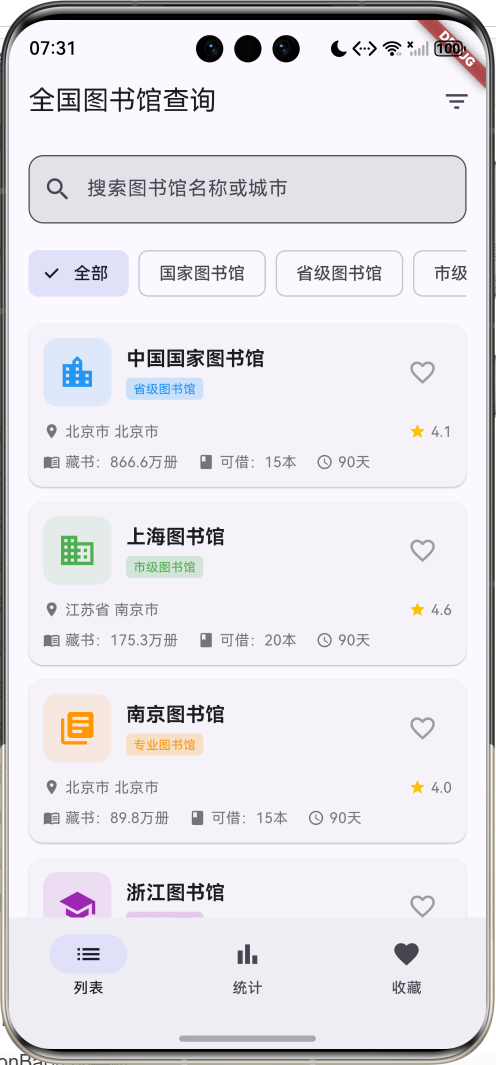
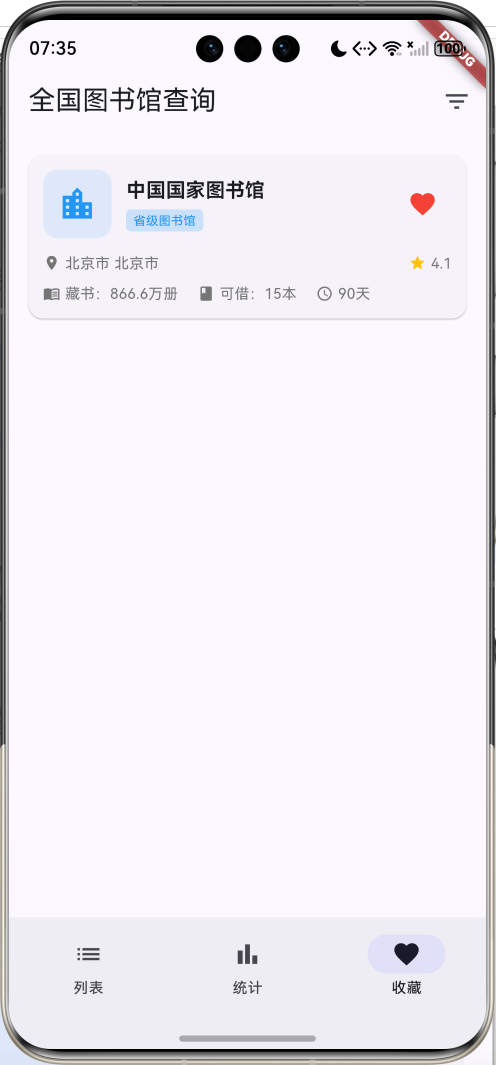
核心功能
- 图书馆数据库:收录30座图书馆
- 5大类型:国家图书馆、省级图书馆、市级图书馆、高校图书馆、专业图书馆
- 25个省份:覆盖全国主要省市
- 智能搜索:支持名称和城市快速搜索
- 类型筛选:按图书馆类型分类浏览
- 省份筛选:按地域查询图书馆
- 收藏功能:收藏常去的图书馆
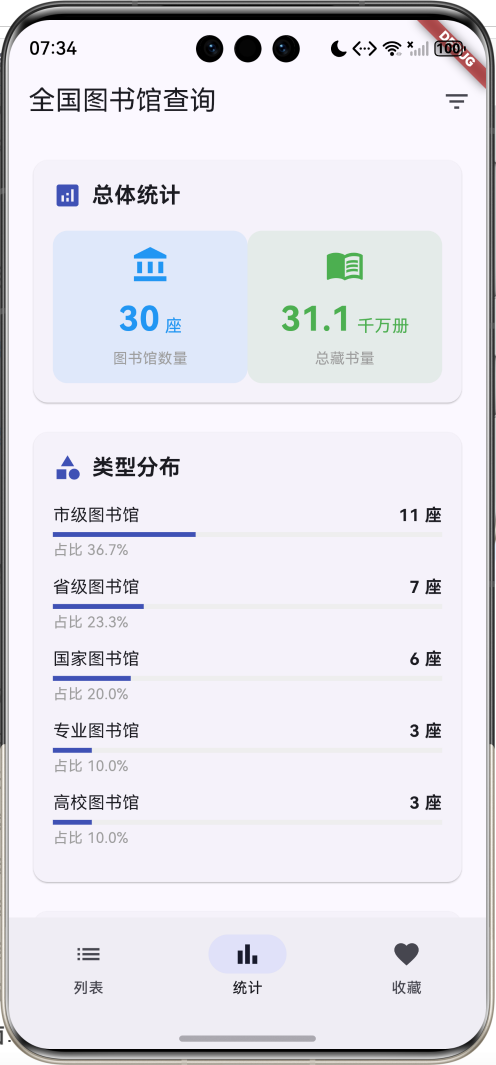
- 统计分析:可视化展示类型和地域分布
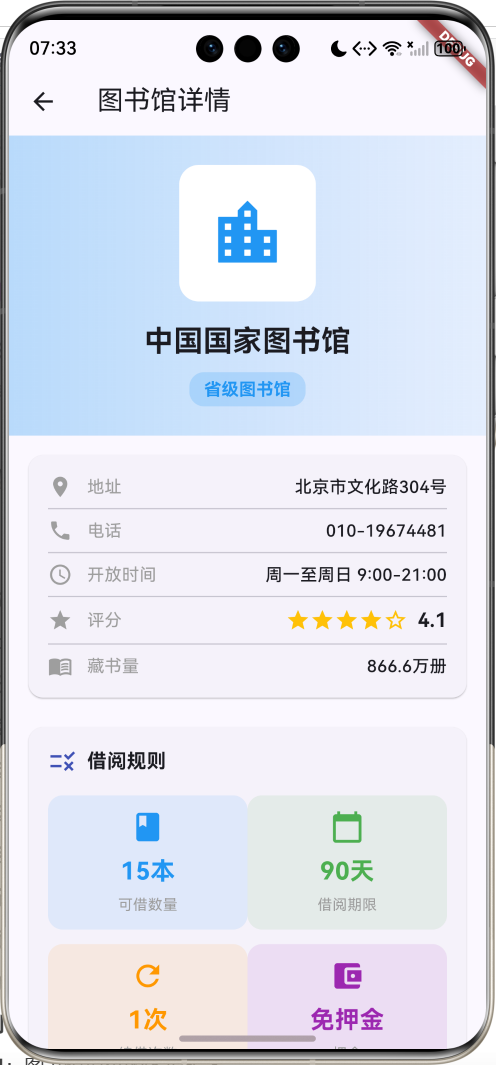
- 详情页面:完整的图书馆信息展示
- 星级评分:用户评分展示
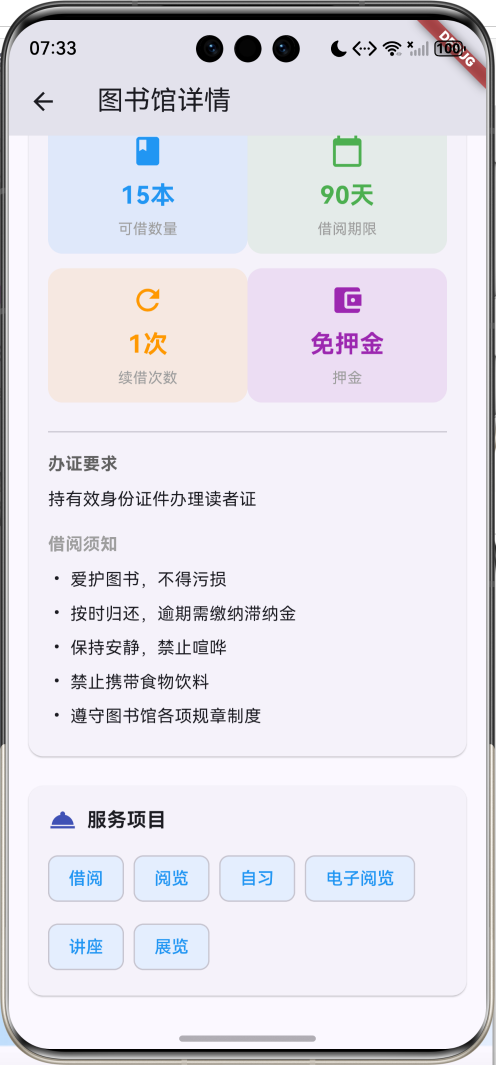
- 借阅规则:详细的借阅政策说明
- 服务项目:图书馆提供的各项服务
技术特点
- Material Design 3设计风格
- NavigationBar底部导航
- 三页面架构(列表、统计、收藏)
- ChoiceChip类型筛选
- DropdownButtonFormField省份选择
- LinearProgressIndicator统计可视化
- 渐变色背景设计
- 响应式卡片布局
- 计算属性优化
- 模拟数据生成
- 无需额外依赖包
核心代码实现
1. 图书馆数据模型
dart
class Library {
  final String id;              // 图书馆ID
  final String name;            // 图书馆名称
  final String type;            // 类型
  final String province;        // 省份
  final String city;            // 城市
  final String address;         // 地址
  final int bookCount;          // 藏书量
  final String openTime;        // 开放时间
  final String phone;           // 联系电话
  final double rating;          // 评分
  final List<String> services;  // 服务项目
  final BorrowRule borrowRule;  // 借阅规则
  bool isFavorite;              // 是否收藏

  Library({
    required this.id,
    required this.name,
    required this.type,
    required this.province,
    required this.city,
    required this.address,
    required this.bookCount,
    required this.openTime,
    required this.phone,
    required this.rating,
    required this.services,
    required this.borrowRule,
    this.isFavorite = false,
  });

  // 计算属性:完整地址
  String get location => '$province $city';

  // 计算属性:藏书量文本
  String get bookCountText {
    if (bookCount >= 10000000) {
      return '${(bookCount / 10000000).toStringAsFixed(1)}千万册';
    } else if (bookCount >= 10000) {
      return '${(bookCount / 10000).toStringAsFixed(1)}万册';
    }
    return '$bookCount册';
  }

  // 计算属性:类型对应颜色
  Color get typeColor {
    switch (type) {
      case '国家图书馆': return Colors.red;
      case '省级图书馆': return Colors.blue;
      case '市级图书馆': return Colors.green;
      case '高校图书馆': return Colors.purple;
      case '专业图书馆': return Colors.orange;
      default: return Colors.grey;
    }
  }

  // 计算属性:类型对应图标
  IconData get typeIcon {
    switch (type) {
      case '国家图书馆': return Icons.account_balance;
      case '省级图书馆': return Icons.location_city;
      case '市级图书馆': return Icons.business;
      case '高校图书馆': return Icons.school;
      case '专业图书馆': return Icons.library_books;
      default: return Icons.local_library;
    }
  }
}模型字段说明:
| 字段 | 类型 | 说明 |
|---|---|---|
| id | String | 唯一标识符 |
| name | String | 图书馆名称 |
| type | String | 图书馆类型 |
| province | String | 所在省份 |
| city | String | 所在城市 |
| address | String | 详细地址 |
| bookCount | int | 藏书数量 |
| openTime | String | 开放时间 |
| phone | String | 联系电话 |
| rating | double | 用户评分(1-5) |
| services | List | 服务项目列表 |
| borrowRule | BorrowRule | 借阅规则对象 |
| isFavorite | bool | 是否收藏 |
计算属性详解:
- location属性:组合省份和城市,返回完整地址显示
- bookCountText属性 :智能格式化藏书量显示
- 千万册级别:显示为"X.X千万册"
- 万册级别:显示为"X.X万册"
- 千册以下:直接显示"X册"
- typeColor属性:根据图书馆类型返回对应的主题颜色
- typeIcon属性:根据图书馆类型返回对应的图标
图书馆类型与视觉映射:
| 类型 | 颜色 | 图标 | 说明 |
|---|---|---|---|
| 国家图书馆 | 红色 | account_balance | 国家级综合性图书馆 |
| 省级图书馆 | 蓝色 | location_city | 省级综合性图书馆 |
| 市级图书馆 | 绿色 | business | 市级公共图书馆 |
| 高校图书馆 | 紫色 | school | 大学图书馆 |
| 专业图书馆 | 橙色 | library_books | 专业领域图书馆 |
2. 借阅规则数据模型
dart
class BorrowRule {
  final int maxBooks;           // 最大借书数量
  final int borrowDays;         // 借阅天数
  final int renewTimes;         // 续借次数
  final double deposit;         // 押金金额
  final String requirement;     // 办证要求
  final List<String> rules;     // 借阅规则列表

  BorrowRule({
    required this.maxBooks,
    required this.borrowDays,
    required this.renewTimes,
    required this.deposit,
    required this.requirement,
    required this.rules,
  });

  // 计算属性:最大借书数量文本
  String get maxBooksText => '$maxBooks本';

  // 计算属性:借阅天数文本
  String get borrowDaysText => '$borrowDays天';

  // 计算属性:续借次数文本
  String get renewTimesText => '$renewTimes次';

  // 计算属性:押金文本
  String get depositText =>
      deposit > 0 ? '¥${deposit.toStringAsFixed(0)}' : '免押金';
}借阅规则字段说明:
| 字段 | 类型 | 说明 |
|---|---|---|
| maxBooks | int | 最大可借图书数量 |
| borrowDays | int | 借阅期限(天数) |
| renewTimes | int | 允许续借次数 |
| deposit | double | 办证押金金额 |
| requirement | String | 办证要求说明 |
| rules | List | 详细借阅规则列表 |
计算属性的优势:
- 格式化显示:自动添加单位(本、天、次、元)
- 条件判断:押金为0时显示"免押金"
- 代码复用:在UI中直接使用,无需重复格式化
- 维护性:修改格式只需改一处
3. 图书馆数据生成
dart
void _generateLibraries() {
  final random = Random();

  // 30个知名图书馆名称
  final libraryNames = [
    '中国国家图书馆', '上海图书馆', '南京图书馆', '浙江图书馆',
    '广东省立中山图书馆', '湖南图书馆', '四川省图书馆', '陕西省图书馆',
    '北京大学图书馆', '清华大学图书馆', '复旦大学图书馆', '浙江大学图书馆',
    '武汉大学图书馆', '中山大学图书馆', '北京市图书馆', '深圳图书馆',
    '杭州图书馆', '成都图书馆', '西安图书馆', '南京市图书馆',
    '中国科学院图书馆', '中国医学科学院图书馆', '中国农业科学院图书馆',
    '首都图书馆', '天津图书馆', '重庆图书馆', '河北省图书馆',
    '山西省图书馆', '辽宁省图书馆', '吉林省图书馆',
  ];

  // 城市映射表
  final cities = {
    '北京市': ['北京市'],
    '上海市': ['上海市'],
    '江苏省': ['南京市', '苏州市', '无锡市'],
    '浙江省': ['杭州市', '宁波市', '温州市'],
    '广东省': ['广州市', '深圳市', '珠海市'],
    '陕西省': ['西安市', '咸阳市', '宝鸡市'],
    '四川省': ['成都市', '绵阳市', '德阳市'],
    '湖南省': ['长沙市', '株洲市', '湘潭市'],
    '湖北省': ['武汉市', '宜昌市', '襄阳市'],
    '河南省': ['郑州市', '洛阳市', '开封市'],
  };

  // 生成30个图书馆数据
  for (int i = 0; i < 30; i++) {
    final type = _types[random.nextInt(_types.length - 1) + 1];
    final province = _provinces[random.nextInt(10) + 1];
    final cityList = cities[province] ??
        ['${province.replaceAll('省', '').replaceAll('市', '')}市'];
    final city = cityList[random.nextInt(cityList.length)];

    // 根据类型设置藏书量范围
    int bookCount;
    if (type == '国家图书馆') {
      bookCount = 30000000 + random.nextInt(10000000);  // 3000-4000万册
    } else if (type == '省级图书馆') {
      bookCount = 5000000 + random.nextInt(5000000);    // 500-1000万册
    } else if (type == '高校图书馆') {
      bookCount = 3000000 + random.nextInt(3000000);    // 300-600万册
    } else if (type == '市级图书馆') {
      bookCount = 1000000 + random.nextInt(2000000);    // 100-300万册
    } else {
      bookCount = 500000 + random.nextInt(1000000);     // 50-150万册
    }

    _allLibraries.add(Library(
      id: 'library_$i',
      name: libraryNames[i % libraryNames.length],
      type: type,
      province: province,
      city: city,
      address: '$city${['中山路', '人民路', '文化路', '图书馆路'][random.nextInt(4)]}${random.nextInt(500) + 1}号',
      bookCount: bookCount,
      openTime: '周一至周日 9:00-21:00',
      phone: '010-${random.nextInt(90000000) + 10000000}',
      rating: 4.0 + random.nextDouble(),
      services: ['借阅', '阅览', '自习', '电子阅览', '讲座', '展览'],
      borrowRule: BorrowRule(
        maxBooks: [5, 10, 15, 20][random.nextInt(4)],
        borrowDays: [30, 60, 90][random.nextInt(3)],
        renewTimes: [1, 2, 3][random.nextInt(3)],
        deposit: random.nextBool() ? 0 : [100, 200, 300][random.nextInt(3)].toDouble(),
        requirement: '持有效身份证件办理读者证',
        rules: [
          '爱护图书,不得污损',
          '按时归还,逾期需缴纳滞纳金',
          '保持安静,禁止喧哗',
          '禁止携带食物饮料',
          '遵守图书馆各项规章制度',
        ],
      ),
      isFavorite: false,
    ));
  }
  _applyFilters();
}数据生成特点:
- 真实性:使用真实的图书馆名称,增强用户体验
- 层次性:根据图书馆类型设置不同的藏书量范围
- 地域性:城市映射表确保省份和城市的对应关系
- 随机性:地址、电话、评分等采用随机生成
- 完整性:每个图书馆都包含完整的信息和借阅规则
藏书量分级标准:
| 图书馆类型 | 藏书量范围 | 说明 |
|---|---|---|
| 国家图书馆 | 3000-4000万册 | 国家级藏书规模 |
| 省级图书馆 | 500-1000万册 | 省级综合藏书 |
| 高校图书馆 | 300-600万册 | 大学学术藏书 |
| 市级图书馆 | 100-300万册 | 市级公共藏书 |
| 专业图书馆 | 50-150万册 | 专业领域藏书 |
省份覆盖范围(25个):
- 4个直辖市:北京、上海、天津、重庆
- 21个省份:河北、山西、辽宁、吉林、黑龙江、江苏、浙江、安徽、福建、江西、山东、河南、湖北、湖南、广东、海南、四川、贵州、云南、陕西、甘肃
4. 搜索和筛选功能
dart
void _applyFilters() {
  setState(() {
    _filteredLibraries = _allLibraries.where((library) {
      // 搜索关键词筛选
      if (_searchQuery.isNotEmpty) {
        if (!library.name.toLowerCase().contains(_searchQuery.toLowerCase()) &&
            !library.city.toLowerCase().contains(_searchQuery.toLowerCase())) {
          return false;
        }
      }

      // 类型筛选
      if (_selectedType != '全部' && library.type != _selectedType) {
        return false;
      }

      // 省份筛选
      if (_selectedProvince != '全部' && library.province != _selectedProvince) {
        return false;
      }

      return true;
    }).toList();
  });
}筛选逻辑详解:
-
搜索关键词筛选:
- 不区分大小写的模糊匹配
- 同时匹配图书馆名称和城市名称
- 使用
toLowerCase()和contains()实现
-
类型筛选:
- 精确匹配图书馆类型
- "全部"选项跳过类型检查
- 支持5种图书馆类型
-
省份筛选:
- 精确匹配省份名称
- "全部"选项跳过省份检查
- 支持25个省份选择
筛选条件组合:
| 筛选项 | 匹配方式 | 说明 |
|---|---|---|
| 搜索关键词 | 模糊匹配 | 匹配图书馆名称或城市 |
| 类型筛选 | 精确匹配 | 按5种类型筛选 |
| 省份筛选 | 精确匹配 | 按25个省份筛选 |
筛选流程:
- 检查搜索关键词是否匹配(空字符串跳过)
- 检查类型是否匹配("全部"跳过)
- 检查省份是否匹配("全部"跳过)
- 更新筛选结果列表
- 触发UI重新渲染
5. NavigationBar底部导航
dart
bottomNavigationBar: NavigationBar(
  selectedIndex: _selectedIndex,
  onDestinationSelected: (index) {
    setState(() => _selectedIndex = index);
  },
  destinations: const [
    NavigationDestination(icon: Icon(Icons.list), label: '列表'),
    NavigationDestination(icon: Icon(Icons.bar_chart), label: '统计'),
    NavigationDestination(icon: Icon(Icons.favorite), label: '收藏'),
  ],
),NavigationBar特点:
- Material Design 3风格:采用最新的设计规范
- 自动状态管理:自动处理选中状态的视觉反馈
- 流畅动画:切换时有平滑的过渡动画
- 无障碍支持:内置语义标签和键盘导航
三个页面功能:
| 页面 | 图标 | 功能描述 |
|---|---|---|
| 列表 | list | 显示所有图书馆卡片,支持搜索和筛选 |
| 统计 | bar_chart | 显示类型分布和地域分布统计图表 |
| 收藏 | favorite | 显示用户收藏的图书馆列表 |
IndexedStack配合使用:
dart
Expanded(
  child: IndexedStack(
    index: _selectedIndex,
    children: [
      _buildLibraryListPage(),
      _buildStatisticsPage(),
      _buildFavoritePage(),
    ],
  ),
),IndexedStack优势:
- 状态保持:切换页面时保持滚动位置和输入状态
- 性能优化:只构建一次,避免重复渲染
- 用户体验:切换流畅,无闪烁
- 内存效率:合理管理组件生命周期
6. 搜索栏设计
dart
Widget _buildSearchBar() {
  return Container(
    padding: const EdgeInsets.all(16),
    child: TextField(
      decoration: InputDecoration(
        hintText: '搜索图书馆名称或城市',
        prefixIcon: const Icon(Icons.search),
        border: OutlineInputBorder(
          borderRadius: BorderRadius.circular(12),
        ),
        filled: true,
      ),
      onChanged: (value) {
        setState(() {
          _searchQuery = value;
          _applyFilters();
        });
      },
    ),
  );
}搜索栏设计要点:
-
视觉设计:
- 圆角边框(12px)提升现代感
- 填充背景色增强层次感
- 搜索图标提供视觉提示
-
交互设计:
- 实时搜索(onChanged触发)
- 提示文本引导用户输入
- 响应式布局适配不同屏幕
-
功能实现:
- 支持中英文搜索
- 不区分大小写匹配
- 同时搜索名称和城市
搜索体验优化:
- 即时反馈:输入即搜索,无需点击按钮
- 智能匹配:模糊匹配提高搜索成功率
- 清晰提示:明确告知用户可搜索的内容
7. ChoiceChip类型筛选
dart
Widget _buildTypeTabs() {
  return Container(
    height: 50,
    padding: const EdgeInsets.symmetric(horizontal: 16),
    child: ListView.builder(
      scrollDirection: Axis.horizontal,
      itemCount: _types.length,
      itemBuilder: (context, index) {
        final type = _types[index];
        final isSelected = type == _selectedType;
        return Padding(
          padding: const EdgeInsets.only(right: 8),
          child: ChoiceChip(
            label: Text(type),
            selected: isSelected,
            onSelected: (selected) {
              setState(() {
                _selectedType = type;
                _applyFilters();
              });
            },
          ),
        );
      },
    ),
  );
}ChoiceChip特点:
- Material Design组件:符合设计规范的芯片组件
- 单选模式:同时只能选中一个选项
- 自动样式:选中和未选中状态自动切换
- 水平滚动:支持更多选项时的横向滚动
类型筛选选项:
- 全部、国家图书馆、省级图书馆、市级图书馆、高校图书馆、专业图书馆
布局特点:
- 固定高度:50px确保一致的视觉效果
- 水平间距:8px间距保持适当的视觉分离
- 边距控制:16px水平边距与整体布局协调
8. 图书馆卡片设计
dart
Widget _buildLibraryCard(Library library) {
  return Card(
    margin: const EdgeInsets.only(bottom: 12),
    child: InkWell(
      onTap: () {
        Navigator.push(
          context,
          MaterialPageRoute(
            builder: (_) => LibraryDetailPage(library: library),
          ),
        );
      },
      child: Padding(
        padding: const EdgeInsets.all(12),
        child: Column(
          crossAxisAlignment: CrossAxisAlignment.start,
          children: [
            Row(
              children: [
                // 左侧:图标容器
                Container(
                  padding: const EdgeInsets.all(12),
                  decoration: BoxDecoration(
                    color: library.typeColor.withValues(alpha: 0.1),
                    borderRadius: BorderRadius.circular(12),
                  ),
                  child: Icon(
                    library.typeIcon,
                    color: library.typeColor,
                    size: 32,
                  ),
                ),
                const SizedBox(width: 12),
                // 中间:名称和类型
                Expanded(
                  child: Column(
                    crossAxisAlignment: CrossAxisAlignment.start,
                    children: [
                      Text(
                        library.name,
                        style: const TextStyle(
                          fontSize: 16,
                          fontWeight: FontWeight.bold,
                        ),
                        maxLines: 1,
                        overflow: TextOverflow.ellipsis,
                      ),
                      const SizedBox(height: 4),
                      Container(
                        padding: const EdgeInsets.symmetric(
                          horizontal: 6,
                          vertical: 2,
                        ),
                        decoration: BoxDecoration(
                          color: library.typeColor.withValues(alpha: 0.2),
                          borderRadius: BorderRadius.circular(4),
                        ),
                        child: Text(
                          library.type,
                          style: TextStyle(
                            fontSize: 10,
                            color: library.typeColor,
                          ),
                        ),
                      ),
                    ],
                  ),
                ),
                // 右侧:收藏按钮
                IconButton(
                  onPressed: () {
                    setState(() {
                      library.isFavorite = !library.isFavorite;
                    });
                  },
                  icon: Icon(
                    library.isFavorite ? Icons.favorite : Icons.favorite_border,
                    color: library.isFavorite ? Colors.red : Colors.grey,
                  ),
                ),
              ],
            ),
            const SizedBox(height: 12),
            // 地址和评分信息
            Row(
              children: [
                Icon(Icons.location_on, size: 14, color: Colors.grey[600]),
                const SizedBox(width: 4),
                Expanded(
                  child: Text(
                    library.location,
                    style: TextStyle(fontSize: 12, color: Colors.grey[600]),
                    maxLines: 1,
                    overflow: TextOverflow.ellipsis,
                  ),
                ),
                const SizedBox(width: 12),
                Icon(Icons.star, size: 14, color: Colors.amber),
                const SizedBox(width: 4),
                Text(
                  library.rating.toStringAsFixed(1),
                  style: TextStyle(fontSize: 12, color: Colors.grey[600]),
                ),
              ],
            ),
            const SizedBox(height: 8),
            // 藏书量和借阅信息
            Row(
              children: [
                Icon(Icons.menu_book, size: 14, color: Colors.grey[600]),
                const SizedBox(width: 4),
                Text(
                  '藏书:${library.bookCountText}',
                  style: TextStyle(fontSize: 12, color: Colors.grey[600]),
                ),
                const SizedBox(width: 16),
                Icon(Icons.book, size: 14, color: Colors.grey[600]),
                const SizedBox(width: 4),
                Text(
                  '可借:${library.borrowRule.maxBooksText}',
                  style: TextStyle(fontSize: 12, color: Colors.grey[600]),
                ),
                const SizedBox(width: 16),
                Icon(Icons.access_time, size: 14, color: Colors.grey[600]),
                const SizedBox(width: 4),
                Text(
                  library.borrowRule.borrowDaysText,
                  style: TextStyle(fontSize: 12, color: Colors.grey[600]),
                ),
              ],
            ),
          ],
        ),
      ),
    ),
  );
}卡片布局结构分析:
-
顶部行:
- 左侧:类型图标(32px,带圆角背景)
- 中间:图书馆名称(粗体)+ 类型标签
- 右侧:收藏按钮(心形图标)
-
中间行:
- 地址信息:位置图标 + 省市信息
- 评分信息:星形图标 + 数字评分
-
底部行:
- 藏书量:书本图标 + 格式化数量
- 可借数量:图书图标 + 借阅限制
- 借阅期限:时间图标 + 天数
视觉设计要点:
| 元素 | 设计特点 | 作用 |
|---|---|---|
| 图标容器 | 圆角背景,主题色透明度0.1 | 突出类型特征 |
| 名称文本 | 16px粗体,单行省略 | 主要信息展示 |
| 类型标签 | 小尺寸,主题色背景 | 分类标识 |
| 收藏按钮 | 实心/空心切换,红色高亮 | 交互反馈 |
| 信息图标 | 14px小图标,灰色 | 信息分类 |
| 辅助文本 | 12px灰色文本 | 次要信息 |
交互设计:
- 点击卡片:导航到详情页面
- 点击收藏:切换收藏状态,图标和颜色变化
- 文本省略:长文本自动省略,保持布局整洁
9. 统计页面实现
dart
Widget _buildStatisticsPage() {
  final typeStats = <String, int>{};
  final provinceStats = <String, int>{};
  int totalBooks = 0;

  // 统计数据计算
  for (var library in _allLibraries) {
    typeStats[library.type] = (typeStats[library.type] ?? 0) + 1;
    provinceStats[library.province] = (provinceStats[library.province] ?? 0) + 1;
    totalBooks += library.bookCount;
  }

  // 按数量降序排序
  final sortedTypes = typeStats.entries.toList()
    ..sort((a, b) => b.value.compareTo(a.value));
  final sortedProvinces = provinceStats.entries.toList()
    ..sort((a, b) => b.value.compareTo(a.value));

  return ListView(
    padding: const EdgeInsets.all(16),
    children: [
      // 总体统计卡片
      Card(
        child: Padding(
          padding: const EdgeInsets.all(16),
          child: Column(
            crossAxisAlignment: CrossAxisAlignment.start,
            children: [
              const Row(
                children: [
                  Icon(Icons.analytics, color: Colors.indigo),
                  SizedBox(width: 8),
                  Text(
                    '总体统计',
                    style: TextStyle(fontSize: 18, fontWeight: FontWeight.bold),
                  ),
                ],
              ),
              const SizedBox(height: 16),
              Row(
                children: [
                  Expanded(
                    child: _buildStatItem(
                      '图书馆数量',
                      '${_allLibraries.length}',
                      '座',
                      Icons.account_balance,
                      Colors.blue,
                    ),
                  ),
                  Expanded(
                    child: _buildStatItem(
                      '总藏书量',
                      '${(totalBooks / 10000000).toStringAsFixed(1)}',
                      '千万册',
                      Icons.menu_book,
                      Colors.green,
                    ),
                  ),
                ],
              ),
            ],
          ),
        ),
      ),
      const SizedBox(height: 16),
      // 类型分布卡片
      Card(
        child: Padding(
          padding: const EdgeInsets.all(16),
          child: Column(
            crossAxisAlignment: CrossAxisAlignment.start,
            children: [
              const Row(
                children: [
                  Icon(Icons.category, color: Colors.indigo),
                  SizedBox(width: 8),
                  Text(
                    '类型分布',
                    style: TextStyle(fontSize: 18, fontWeight: FontWeight.bold),
                  ),
                ],
              ),
              const SizedBox(height: 16),
              ...sortedTypes.map((entry) {
                final percentage = (entry.value / _allLibraries.length * 100);
                return Padding(
                  padding: const EdgeInsets.only(bottom: 12),
                  child: Column(
                    crossAxisAlignment: CrossAxisAlignment.start,
                    children: [
                      Row(
                        mainAxisAlignment: MainAxisAlignment.spaceBetween,
                        children: [
                          Text(entry.key, style: const TextStyle(fontSize: 14)),
                          Text('${entry.value} 座',
                              style: const TextStyle(
                                  fontSize: 14, fontWeight: FontWeight.bold)),
                        ],
                      ),
                      const SizedBox(height: 4),
                      LinearProgressIndicator(
                        value: percentage / 100,
                        backgroundColor: Colors.grey[200],
                        color: Colors.indigo,
                      ),
                      const SizedBox(height: 2),
                      Text(
                        '占比 ${percentage.toStringAsFixed(1)}%',
                        style: const TextStyle(fontSize: 12, color: Colors.grey),
                      ),
                    ],
                  ),
                );
              }),
            ],
          ),
        ),
      ),
      const SizedBox(height: 16),
      // 地域分布卡片
      Card(
        child: Padding(
          padding: const EdgeInsets.all(16),
          child: Column(
            crossAxisAlignment: CrossAxisAlignment.start,
            children: [
              const Row(
                children: [
                  Icon(Icons.map, color: Colors.indigo),
                  SizedBox(width: 8),
                  Text(
                    '地域分布',
                    style: TextStyle(fontSize: 18, fontWeight: FontWeight.bold),
                  ),
                ],
              ),
              const SizedBox(height: 16),
              ...sortedProvinces.take(10).map((entry) {
                final percentage = (entry.value / _allLibraries.length * 100);
                return Padding(
                  padding: const EdgeInsets.only(bottom: 12),
                  child: Column(
                    crossAxisAlignment: CrossAxisAlignment.start,
                    children: [
                      Row(
                        mainAxisAlignment: MainAxisAlignment.spaceBetween,
                        children: [
                          Text(entry.key, style: const TextStyle(fontSize: 14)),
                          Text('${entry.value} 座',
                              style: const TextStyle(
                                  fontSize: 14, fontWeight: FontWeight.bold)),
                        ],
                      ),
                      const SizedBox(height: 4),
                      LinearProgressIndicator(
                        value: percentage / 100,
                        backgroundColor: Colors.grey[200],
                        color: Colors.green,
                      ),
                      const SizedBox(height: 2),
                      Text(
                        '占比 ${percentage.toStringAsFixed(1)}%',
                        style: const TextStyle(fontSize: 12, color: Colors.grey),
                      ),
                    ],
                  ),
                );
              }),
            ],
          ),
        ),
      ),
    ],
  );
}统计页面功能分析:
-
数据统计逻辑:
- 遍历所有图书馆数据
- 按类型和省份分组计数
- 计算总藏书量
- 按数量降序排序
-
总体统计:
- 图书馆总数量
- 总藏书量(千万册为单位)
- 使用统计项组件展示
-
类型分布:
- 5种类型的数量统计
- 百分比计算和可视化
- LinearProgressIndicator进度条展示
-
地域分布:
- 各省份图书馆数量
- 只显示前10个省份
- 百分比和进度条可视化
统计项组件:
dart
Widget _buildStatItem(String label, String value, String unit, IconData icon, Color color) {
  return Container(
    padding: const EdgeInsets.all(12),
    decoration: BoxDecoration(
      color: color.withValues(alpha: 0.1),
      borderRadius: BorderRadius.circular(12),
    ),
    child: Column(
      children: [
        Icon(icon, color: color, size: 32),
        const SizedBox(height: 8),
        Row(
          mainAxisAlignment: MainAxisAlignment.center,
          crossAxisAlignment: CrossAxisAlignment.end,
          children: [
            Text(
              value,
              style: TextStyle(
                fontSize: 28,
                fontWeight: FontWeight.bold,
                color: color,
              ),
            ),
            const SizedBox(width: 4),
            Padding(
              padding: const EdgeInsets.only(bottom: 4),
              child: Text(
                unit,
                style: TextStyle(fontSize: 14, color: color),
              ),
            ),
          ],
        ),
        const SizedBox(height: 4),
        Text(
          label,
          style: const TextStyle(fontSize: 12, color: Colors.grey),
        ),
      ],
    ),
  );
}可视化设计要点:
- 进度条:LinearProgressIndicator直观显示占比
- 颜色区分:不同统计类别使用不同颜色
- 数据标签:显示具体数量和百分比
- 排序展示:按数量降序排列,突出重点
10. 收藏页面实现
dart
List<Library> get _favoriteLibraries {
  return _allLibraries.where((library) => library.isFavorite).toList();
}

Widget _buildFavoritePage() {
  if (_favoriteLibraries.isEmpty) {
    return Center(
      child: Column(
        mainAxisAlignment: MainAxisAlignment.center,
        children: [
          Icon(Icons.favorite_border, size: 80, color: Colors.grey[300]),
          const SizedBox(height: 16),
          Text('还没有收藏的图书馆', style: TextStyle(color: Colors.grey[600])),
          const SizedBox(height: 8),
          Text('快去列表页收藏常去的图书馆吧',
              style: TextStyle(color: Colors.grey[400], fontSize: 12)),
        ],
      ),
    );
  }

  return ListView.builder(
    padding: const EdgeInsets.all(16),
    itemCount: _favoriteLibraries.length,
    itemBuilder: (context, index) {
      return _buildLibraryCard(_favoriteLibraries[index]);
    },
  );
}收藏功能特点:
- 计算属性:使用getter动态获取收藏列表
- 空状态处理:无收藏时显示引导界面
- 组件复用:复用图书馆卡片组件
- 实时更新:收藏状态变化时自动更新
空状态设计:
- 大图标:80px心形图标,浅灰色
- 主提示:明确告知当前状态
- 副提示:引导用户如何操作
- 居中布局:视觉焦点集中
11. 省份筛选对话框
dart
void _showFilterDialog() {
  showModalBottomSheet(
    context: context,
    builder: (context) => Container(
      padding: const EdgeInsets.all(16),
      child: Column(
        mainAxisSize: MainAxisSize.min,
        crossAxisAlignment: CrossAxisAlignment.start,
        children: [
          const Text(
            '筛选条件',
            style: TextStyle(fontSize: 18, fontWeight: FontWeight.bold),
          ),
          const SizedBox(height: 16),
          DropdownButtonFormField<String>(
            value: _selectedProvince,
            decoration: const InputDecoration(
              labelText: '省份',
              border: OutlineInputBorder(),
            ),
            items: _provinces.map((province) {
              return DropdownMenuItem(
                value: province,
                child: Text(province),
              );
            }).toList(),
            onChanged: (value) {
              setState(() {
                _selectedProvince = value!;
                _applyFilters();
              });
              Navigator.pop(context);
            },
          ),
        ],
      ),
    ),
  );
}对话框设计特点:
- ModalBottomSheet:从底部弹出,符合移动端习惯
- DropdownButtonFormField:标准的下拉选择组件
- 自动关闭:选择后自动关闭并应用筛选
- 表单装饰:带标签和边框的表单样式
交互流程:
- 点击筛选按钮
- 底部弹出省份选择对话框
- 选择省份
- 自动应用筛选并关闭对话框
- 列表页显示筛选结果
12. 图书馆详情页头部
dart
Widget _buildHeader() {
  return Container(
    width: double.infinity,
    padding: const EdgeInsets.all(24),
    decoration: BoxDecoration(
      gradient: LinearGradient(
        colors: [
          library.typeColor.withValues(alpha: 0.3),
          library.typeColor.withValues(alpha: 0.1),
        ],
      ),
    ),
    child: Column(
      children: [
        Container(
          padding: const EdgeInsets.all(24),
          decoration: BoxDecoration(
            color: Colors.white,
            borderRadius: BorderRadius.circular(16),
          ),
          child: Icon(
            library.typeIcon,
            size: 64,
            color: library.typeColor,
          ),
        ),
        const SizedBox(height: 16),
        Text(
          library.name,
          style: const TextStyle(fontSize: 24, fontWeight: FontWeight.bold),
          textAlign: TextAlign.center,
        ),
        const SizedBox(height: 8),
        Container(
          padding: const EdgeInsets.symmetric(horizontal: 12, vertical: 4),
          decoration: BoxDecoration(
            color: library.typeColor.withValues(alpha: 0.2),
            borderRadius: BorderRadius.circular(12),
          ),
          child: Text(
            library.type,
            style: TextStyle(
              color: library.typeColor,
              fontWeight: FontWeight.bold,
            ),
          ),
        ),
      ],
    ),
  );
}头部设计要点:
- 渐变背景:使用类型主题色的渐变效果
- 图标容器:白色圆角容器突出图标
- 大尺寸图标:64px图标增强视觉冲击
- 标题居中:24px粗体标题
- 类型标签:圆角标签显示类型
视觉层次:
- 背景渐变(最底层)
- 白色图标容器(中间层)
- 彩色图标(最上层)
- 文字信息(独立层)
13. 基本信息卡片
dart
Widget _buildBasicInfo() {
  return Card(
    margin: const EdgeInsets.all(16),
    child: Padding(
      padding: const EdgeInsets.all(16),
      child: Column(
        children: [
          _buildInfoRow('地址', library.address, Icons.location_on),
          const Divider(),
          _buildInfoRow('电话', library.phone, Icons.phone),
          const Divider(),
          _buildInfoRow('开放时间', library.openTime, Icons.access_time),
          const Divider(),
          Row(
            children: [
              const Icon(Icons.star, size: 20, color: Colors.grey),
              const SizedBox(width: 12),
              const Text('评分', style: TextStyle(fontSize: 14, color: Colors.grey)),
              const Spacer(),
              Row(
                children: List.generate(5, (index) {
                  return Icon(
                    index < library.rating.floor() ? Icons.star : Icons.star_border,
                    size: 20,
                    color: Colors.amber,
                  );
                }),
              ),
              const SizedBox(width: 8),
              Text(
                library.rating.toStringAsFixed(1),
                style: const TextStyle(fontSize: 16, fontWeight: FontWeight.bold),
              ),
            ],
          ),
          const Divider(),
          _buildInfoRow('藏书量', library.bookCountText, Icons.menu_book),
        ],
      ),
    ),
  );
}

Widget _buildInfoRow(String label, String value, IconData icon) {
  return Row(
    crossAxisAlignment: CrossAxisAlignment.start,
    children: [
      Icon(icon, size: 20, color: Colors.grey),
      const SizedBox(width: 12),
      Text(label, style: const TextStyle(fontSize: 14, color: Colors.grey)),
      const SizedBox(width: 12),
      Expanded(
        child: Text(
          value,
          style: const TextStyle(fontSize: 14, fontWeight: FontWeight.w500),
          textAlign: TextAlign.right,
        ),
      ),
    ],
  );
}基本信息展示内容:
| 信息项 | 图标 | 说明 |
|---|---|---|
| 地址 | location_on | 详细地址信息 |
| 电话 | phone | 联系电话 |
| 开放时间 | access_time | 营业时间 |
| 评分 | star | 星级评分(1-5星) |
| 藏书量 | menu_book | 格式化藏书数量 |
星级评分实现:
- 使用
List.generate生成5个星星图标 - 根据
rating.floor()判断实心或空心星星 - 琥珀色星星配合数字评分显示
信息行布局:
- 左侧:20px灰色图标
- 中间:标签文字(灰色)
- 右侧:值文字(右对齐,稍粗)
- 分割线:Divider组件分隔各信息项
14. 借阅规则卡片
dart
Widget _buildBorrowRules() {
  return Card(
    margin: const EdgeInsets.symmetric(horizontal: 16, vertical: 8),
    child: Padding(
      padding: const EdgeInsets.all(16),
      child: Column(
        crossAxisAlignment: CrossAxisAlignment.start,
        children: [
          const Row(
            children: [
              Icon(Icons.rule, color: Colors.indigo),
              SizedBox(width: 8),
              Text(
                '借阅规则',
                style: TextStyle(fontSize: 16, fontWeight: FontWeight.bold),
              ),
            ],
          ),
          const SizedBox(height: 16),
          Row(
            children: [
              Expanded(
                child: _buildRuleItem(
                  '可借数量',
                  library.borrowRule.maxBooksText,
                  Icons.book,
                  Colors.blue,
                ),
              ),
              Expanded(
                child: _buildRuleItem(
                  '借阅期限',
                  library.borrowRule.borrowDaysText,
                  Icons.calendar_today,
                  Colors.green,
                ),
              ),
            ],
          ),
          const SizedBox(height: 12),
          Row(
            children: [
              Expanded(
                child: _buildRuleItem(
                  '续借次数',
                  library.borrowRule.renewTimesText,
                  Icons.refresh,
                  Colors.orange,
                ),
              ),
              Expanded(
                child: _buildRuleItem(
                  '押金',
                  library.borrowRule.depositText,
                  Icons.account_balance_wallet,
                  Colors.purple,
                ),
              ),
            ],
          ),
          const SizedBox(height: 16),
          const Divider(),
          const SizedBox(height: 8),
          Text(
            '办证要求',
            style: TextStyle(
              fontSize: 14,
              color: Colors.grey[700],
              fontWeight: FontWeight.bold,
            ),
          ),
          const SizedBox(height: 8),
          Text(
            library.borrowRule.requirement,
            style: const TextStyle(fontSize: 14, height: 1.6),
          ),
          const SizedBox(height: 16),
          const Text(
            '借阅须知',
            style: TextStyle(
              fontSize: 14,
              color: Colors.grey,
              fontWeight: FontWeight.bold,
            ),
          ),
          const SizedBox(height: 8),
          ...library.borrowRule.rules.map((rule) {
            return Padding(
              padding: const EdgeInsets.only(bottom: 6),
              child: Row(
                crossAxisAlignment: CrossAxisAlignment.start,
                children: [
                  const Text('• ', style: TextStyle(fontSize: 14)),
                  Expanded(
                    child: Text(
                      rule,
                      style: const TextStyle(fontSize: 14, height: 1.6),
                    ),
                  ),
                ],
              ),
            );
          }),
        ],
      ),
    ),
  );
}

Widget _buildRuleItem(String label, String value, IconData icon, Color color) {
  return Container(
    padding: const EdgeInsets.all(12),
    decoration: BoxDecoration(
      color: color.withValues(alpha: 0.1),
      borderRadius: BorderRadius.circular(12),
    ),
    child: Column(
      children: [
        Icon(icon, color: color, size: 28),
        const SizedBox(height: 8),
        Text(
          value,
          style: TextStyle(
            fontSize: 20,
            fontWeight: FontWeight.bold,
            color: color,
          ),
        ),
        const SizedBox(height: 4),
        Text(
          label,
          style: const TextStyle(fontSize: 12, color: Colors.grey),
        ),
      ],
    ),
  );
}借阅规则展示结构:
-
规则指标(2x2网格):
- 可借数量:蓝色,书本图标
- 借阅期限:绿色,日历图标
- 续借次数:橙色,刷新图标
- 押金:紫色,钱包图标
-
办证要求:
- 标题:灰色粗体
- 内容:普通文本,行高1.6
-
借阅须知:
- 标题:灰色粗体
- 列表:项目符号 + 规则文本
规则项设计:
- 圆角容器:12px圆角,主题色透明背景
- 图标:28px彩色图标
- 数值:20px粗体彩色文字
- 标签:12px灰色小字
15. 服务项目展示
dart
Widget _buildServices() {
  return Card(
    margin: const EdgeInsets.all(16),
    child: Padding(
      padding: const EdgeInsets.all(16),
      child: Column(
        crossAxisAlignment: CrossAxisAlignment.start,
        children: [
          const Row(
            children: [
              Icon(Icons.room_service, color: Colors.indigo),
              SizedBox(width: 8),
              Text(
                '服务项目',
                style: TextStyle(fontSize: 16, fontWeight: FontWeight.bold),
              ),
            ],
          ),
          const SizedBox(height: 12),
          Wrap(
            spacing: 8,
            runSpacing: 8,
            children: library.services.map((service) {
              return Chip(
                label: Text(service),
                backgroundColor: library.typeColor.withValues(alpha: 0.1),
                labelStyle: TextStyle(color: library.typeColor),
              );
            }).toList(),
          ),
        ],
      ),
    ),
  );
}服务项目特点:
- Wrap布局:自动换行,适应不同屏幕宽度
- Chip组件:Material Design芯片组件
- 主题色背景:使用图书馆类型对应的主题色
- 间距控制:8px间距保持视觉平衡
服务项目列表:
- 借阅、阅览、自习、电子阅览、讲座、展览
技术要点详解
1. 计算属性的深度应用
计算属性(Getter)是Dart语言的重要特性,在本项目中广泛应用于数据格式化和状态计算。
基础语法:
dart
class Library {
  final String province;
  final String city;

  // 计算属性:只读,每次访问时计算
  String get location => '$province $city';
}高级应用场景:
- 条件判断:
dart
String get depositText =>
deposit > 0 ? '¥${deposit.toStringAsFixed(0)}' : '免押金';- 数值格式化:
dart
String get bookCountText {
  if (bookCount >= 10000000) {
    return '${(bookCount / 10000000).toStringAsFixed(1)}千万册';
  } else if (bookCount >= 10000) {
    return '${(bookCount / 10000).toStringAsFixed(1)}万册';
  }
  return '$bookCount册';
}- 映射转换:
dart
Color get typeColor {
  switch (type) {
    case '国家图书馆': return Colors.red;
    case '省级图书馆': return Colors.blue;
    // ...
    default: return Colors.grey;
  }
}计算属性优势:
- 内存效率:不占用存储空间,按需计算
- 数据一致性:总是基于最新数据计算
- 代码简洁:使用时像访问属性一样简单
- 维护性:逻辑集中,易于修改和扩展
2. NavigationBar与页面状态管理
NavigationBar是Material Design 3的核心导航组件,配合IndexedStack实现高效的页面切换。
状态管理模式:
dart
class _LibraryHomePageState extends State<LibraryHomePage> {
  int _selectedIndex = 0;  // 当前选中的页面索引

  // 页面切换处理
  void _onDestinationSelected(int index) {
    setState(() {
      _selectedIndex = index;
    });
  }
}IndexedStack的工作原理:
- 预构建:所有子页面在初始化时构建
- 状态保持:切换时保持每个页面的状态
- 显示控制:只显示指定索引的页面
- 性能优化:避免重复构建和销毁
与其他导航方案对比:
| 方案 | 优势 | 劣势 | 适用场景 |
|---|---|---|---|
| IndexedStack | 状态保持,切换流畅 | 内存占用较高 | 底部导航,频繁切换 |
| PageView | 支持手势,动画丰富 | 状态不保持 | 引导页,图片浏览 |
| Navigator | 路由管理,层级清晰 | 切换成本高 | 页面跳转,深层导航 |
3. ChoiceChip的交互设计
ChoiceChip是Material Design中专门用于单选的芯片组件,提供了优秀的用户体验。
核心属性解析:
dart
ChoiceChip(
  label: Text('国家图书馆'),           // 显示文本
  selected: isSelected,              // 选中状态
  onSelected: (selected) {           // 选择回调
    setState(() {
      _selectedType = '国家图书馆';
    });
  },
  selectedColor: Colors.blue,        // 选中颜色
  backgroundColor: Colors.grey[100], // 背景颜色
  labelStyle: TextStyle(            // 文本样式
    color: isSelected ? Colors.white : Colors.black,
  ),
)状态管理最佳实践:
dart
// 使用列表管理所有选项
final List<String> _types = ['全部', '国家图书馆', '省级图书馆', ...];
String _selectedType = '全部';

// 构建选项列表
Widget _buildTypeTabs() {
  return ListView.builder(
    scrollDirection: Axis.horizontal,
    itemCount: _types.length,
    itemBuilder: (context, index) {
      final type = _types[index];
      return ChoiceChip(
        label: Text(type),
        selected: type == _selectedType,
        onSelected: (selected) {
          setState(() {
            _selectedType = type;
            _applyFilters();  // 应用筛选
          });
        },
      );
    },
  );
}交互体验优化:
- 即时反馈:选择后立即应用筛选
- 视觉反馈:选中状态有明显的颜色变化
- 滚动支持:选项过多时支持水平滚动
- 触摸友好:合适的点击区域和间距
4. DropdownButtonFormField的表单集成
DropdownButtonFormField是Flutter中功能强大的下拉选择组件,特别适合表单场景。
基础用法:
dart
DropdownButtonFormField<String>(
  value: _selectedProvince,                    // 当前值
  decoration: const InputDecoration(          // 表单装饰
    labelText: '省份',
    border: OutlineInputBorder(),
  ),
  items: _provinces.map((province) {          // 选项列表
    return DropdownMenuItem(
      value: province,
      child: Text(province),
    );
  }).toList(),
  onChanged: (value) {                        // 变化回调
    setState(() {
      _selectedProvince = value!;
      _applyFilters();
    });
  },
  validator: (value) {                        // 验证函数
    if (value == null || value.isEmpty) {
      return '请选择省份';
    }
    return null;
  },
)与DropdownButton的区别:
| 特性 | DropdownButton | DropdownButtonFormField |
|---|---|---|
| 表单集成 | 不支持 | 完全支持 |
| 装饰样式 | 基础样式 | 丰富的InputDecoration |
| 验证功能 | 不支持 | 内置validator |
| 标签支持 | 不支持 | 支持labelText |
| 错误提示 | 不支持 | 自动显示错误信息 |
在ModalBottomSheet中的应用:
dart
void _showFilterDialog() {
  showModalBottomSheet(
    context: context,
    isScrollControlled: true,              // 支持滚动
    shape: const RoundedRectangleBorder(   // 圆角样式
      borderRadius: BorderRadius.vertical(
        top: Radius.circular(20),
      ),
    ),
    builder: (context) => Container(
      padding: const EdgeInsets.all(16),
      child: Column(
        mainAxisSize: MainAxisSize.min,
        children: [
          // 标题
          const Text('筛选条件', style: TextStyle(fontSize: 18, fontWeight: FontWeight.bold)),
          const SizedBox(height: 16),
          // 下拉选择
          DropdownButtonFormField<String>(...),
        ],
      ),
    ),
  );
}
5. LinearProgressIndicator的数据可视化
LinearProgressIndicator是Flutter中简单而有效的进度指示器,非常适合数据占比的可视化展示。
基础属性:
dart
LinearProgressIndicator(
  value: 0.6,                          // 进度值(0.0-1.0)
  backgroundColor: Colors.grey[200],   // 背景颜色
  color: Colors.blue,                  // 进度颜色
  minHeight: 8,                        // 最小高度
)在统计中的应用:
dart
Widget _buildDistributionItem(String label, int count, int total, Color color) {
  final percentage = total > 0 ? (count / total * 100) : 0.0;

  return Column(
    crossAxisAlignment: CrossAxisAlignment.start,
    children: [
      // 标题和数量
      Row(
        mainAxisAlignment: MainAxisAlignment.spaceBetween,
        children: [
          Text(label, style: const TextStyle(fontSize: 14)),
          Text('$count 座', style: const TextStyle(fontSize: 14, fontWeight: FontWeight.bold)),
        ],
      ),
      const SizedBox(height: 4),
      // 进度条
      LinearProgressIndicator(
        value: percentage / 100,
        backgroundColor: Colors.grey[200],
        color: color,
        minHeight: 8,
      ),
      const SizedBox(height: 2),
      // 百分比文本
      Text(
        '占比 ${percentage.toStringAsFixed(1)}%',
        style: const TextStyle(fontSize: 12, color: Colors.grey),
      ),
    ],
  );
}可视化设计原则:
- 颜色区分:不同类别使用不同颜色
- 数据标签:显示具体数量和百分比
- 视觉层次:进度条、文字、标签的层次分明
- 响应式:适应不同屏幕宽度
6. Card组件的层次设计
Card是Material Design中重要的容器组件,用于组织相关信息。
基础用法:
dart
Card(
  margin: const EdgeInsets.all(16),        // 外边距
  elevation: 4,                            // 阴影高度
  shape: RoundedRectangleBorder(           // 形状
    borderRadius: BorderRadius.circular(12),
  ),
  child: Padding(
    padding: const EdgeInsets.all(16),     // 内边距
    child: Column(
      children: [...],
    ),
  ),
)层次设计策略:
-
主要内容卡片:
- 较大的边距(16px)
- 适中的阴影(默认elevation)
- 丰富的内容结构
-
次要内容卡片:
- 较小的边距(8px)
- 较低的阴影(elevation: 2)
- 简洁的内容结构
-
列表项卡片:
- 底部边距(bottom: 12px)
- 默认阴影
- 统一的内容格式
与InkWell的结合:
dart
Card(
  child: InkWell(
    onTap: () {
      // 点击处理
    },
    borderRadius: BorderRadius.circular(12),  // 与Card保持一致
    child: Padding(
      padding: const EdgeInsets.all(12),
      child: Column(...),
    ),
  ),
)
7. 渐变背景的视觉设计
渐变背景能够创造丰富的视觉层次,增强用户体验。
LinearGradient基础用法:
dart
Container(
  decoration: BoxDecoration(
    gradient: LinearGradient(
      colors: [
        Colors.blue.withValues(alpha: 0.3),    // 起始颜色
        Colors.blue.withValues(alpha: 0.1),    // 结束颜色
      ],
      begin: Alignment.topCenter,              // 起始位置
      end: Alignment.bottomCenter,             // 结束位置
    ),
  ),
  child: ...,
)在详情页头部的应用:
dart
Widget _buildHeader() {
  return Container(
    width: double.infinity,
    padding: const EdgeInsets.all(24),
    decoration: BoxDecoration(
      gradient: LinearGradient(
        colors: [
          library.typeColor.withValues(alpha: 0.3),  // 动态主题色
          library.typeColor.withValues(alpha: 0.1),
        ],
      ),
    ),
    child: Column(
      children: [
        // 白色图标容器
        Container(
          padding: const EdgeInsets.all(24),
          decoration: BoxDecoration(
            color: Colors.white,
            borderRadius: BorderRadius.circular(16),
          ),
          child: Icon(
            library.typeIcon,
            size: 64,
            color: library.typeColor,
          ),
        ),
        // 标题和标签
        ...
      ],
    ),
  );
}渐变设计原则:
- 透明度控制:使用alpha值控制透明度
- 颜色协调:基于主题色生成渐变
- 方向选择:垂直渐变更符合阅读习惯
- 对比度:确保文字在渐变背景上清晰可读
8. 响应式布局设计
响应式布局确保应用在不同屏幕尺寸上都有良好的显示效果。
Expanded的灵活布局:
dart
Row(
  children: [
    // 固定宽度的图标
    Container(
      width: 60,
      height: 60,
      child: Icon(...),
    ),
    const SizedBox(width: 12),
    // 自适应宽度的内容
    Expanded(
      child: Column(
        crossAxisAlignment: CrossAxisAlignment.start,
        children: [
          Text(...),  // 文本会自动换行
          ...
        ],
      ),
    ),
    // 固定宽度的按钮
    IconButton(...),
  ],
)Wrap的自适应换行:
dart
Wrap(
  spacing: 8,      // 水平间距
  runSpacing: 8,   // 垂直间距
  children: library.services.map((service) {
    return Chip(
      label: Text(service),
      backgroundColor: library.typeColor.withValues(alpha: 0.1),
    );
  }).toList(),
)MediaQuery的屏幕适配:
dart
Widget build(BuildContext context) {
  final screenWidth = MediaQuery.of(context).size.width;
  final isTablet = screenWidth > 600;

  return Padding(
    padding: EdgeInsets.all(isTablet ? 24 : 16),  // 平板更大边距
    child: Column(
      children: [
        if (isTablet)
          // 平板专用布局
          Row(children: [...])
        else
          // 手机布局
          Column(children: [...]),
      ],
    ),
  );
}
9. 状态管理最佳实践
良好的状态管理是Flutter应用的核心,本项目采用了多种状态管理模式。
局部状态管理:
dart
class _LibraryHomePageState extends State<LibraryHomePage> {
  // 页面状态
  int _selectedIndex = 0;
  String _selectedType = '全部';
  String _selectedProvince = '全部';
  String _searchQuery = '';

  // 数据状态
  List<Library> _allLibraries = [];
  List<Library> _filteredLibraries = [];

  // 状态更新方法
  void _applyFilters() {
    setState(() {
      _filteredLibraries = _allLibraries.where((library) {
        // 筛选逻辑
      }).toList();
    });
  }
}计算属性状态:
dart
// 收藏列表作为计算属性
List<Library> get _favoriteLibraries {
  return _allLibraries.where((library) => library.isFavorite).toList();
}状态同步策略:
dart
// 收藏状态变化时的处理
IconButton(
  onPressed: () {
    setState(() {
      library.isFavorite = !library.isFavorite;
      // 如果当前在收藏页,列表会自动更新
    });
  },
  icon: Icon(
    library.isFavorite ? Icons.favorite : Icons.favorite_border,
    color: library.isFavorite ? Colors.red : Colors.grey,
  ),
)性能优化考虑:
- 局部更新:只在必要时调用setState
- 计算缓存:复杂计算结果适当缓存
- 列表优化:使用ListView.builder处理大量数据
- 图片优化:合理使用图片缓存和压缩
10. 数据模型设计模式
良好的数据模型设计是应用架构的基础。
不可变数据模型:
dart
class Library {
  final String id;
  final String name;
  // ... 其他final字段
  bool isFavorite;  // 唯一可变字段

  Library({
    required this.id,
    required this.name,
    // ... 其他必需参数
    this.isFavorite = false,  // 可选参数
  });
}嵌套模型设计:
dart
class Library {
  final BorrowRule borrowRule;  // 嵌套对象
  // ...
}

class BorrowRule {
  final int maxBooks;
  final int borrowDays;
  // ...

  // 计算属性
  String get maxBooksText => '$maxBooks本';
}工厂构造函数:
dart
class Library {
  // 从JSON创建对象
  factory Library.fromJson(Map<String, dynamic> json) {
    return Library(
      id: json['id'],
      name: json['name'],
      // ...
    );
  }

  // 转换为JSON
  Map<String, dynamic> toJson() {
    return {
      'id': id,
      'name': name,
      // ...
    };
  }
}扩展方法:
dart
extension LibraryExtension on Library {
  // 是否为重点图书馆
  bool get isImportant => type == '国家图书馆' || type == '省级图书馆';

  // 获取简短描述
  String get shortDescription => '$name - $location';
}
功能扩展方向
1. 实时数据集成
API接口集成:
dart
class LibraryService {
  static const String baseUrl = 'https://api.library.gov.cn';

  // 获取图书馆列表
  static Future<List<Library>> getLibraries({
    String? province,
    String? type,
    String? keyword,
  }) async {
    final response = await http.get(
      Uri.parse('$baseUrl/libraries').replace(queryParameters: {
        if (province != null) 'province': province,
        if (type != null) 'type': type,
        if (keyword != null) 'keyword': keyword,
      }),
    );

    if (response.statusCode == 200) {
      final List<dynamic> data = json.decode(response.body);
      return data.map((json) => Library.fromJson(json)).toList();
    } else {
      throw Exception('Failed to load libraries');
    }
  }

  // 获取图书馆详情
  static Future<Library> getLibraryDetail(String id) async {
    final response = await http.get(Uri.parse('$baseUrl/libraries/$id'));

    if (response.statusCode == 200) {
      return Library.fromJson(json.decode(response.body));
    } else {
      throw Exception('Failed to load library detail');
    }
  }
}状态管理升级:
dart
class LibraryProvider extends ChangeNotifier {
  List<Library> _libraries = [];
  bool _isLoading = false;
  String? _error;

  List<Library> get libraries => _libraries;
  bool get isLoading => _isLoading;
  String? get error => _error;

  Future<void> loadLibraries() async {
    _isLoading = true;
    _error = null;
    notifyListeners();

    try {
      _libraries = await LibraryService.getLibraries();
    } catch (e) {
      _error = e.toString();
    } finally {
      _isLoading = false;
      notifyListeners();
    }
  }
}
2. 在线预约功能
预约数据模型:
dart
class Reservation {
  final String id;
  final String libraryId;
  final String userId;
  final DateTime reservationDate;
  final TimeOfDay startTime;
  final TimeOfDay endTime;
  final String purpose;  // 学习、阅览、研究等
  final ReservationStatus status;

  Reservation({
    required this.id,
    required this.libraryId,
    required this.userId,
    required this.reservationDate,
    required this.startTime,
    required this.endTime,
    required this.purpose,
    required this.status,
  });
}

enum ReservationStatus {
  pending,    // 待确认
  confirmed,  // 已确认
  cancelled,  // 已取消
  completed,  // 已完成
}预约界面设计:
dart
class ReservationPage extends StatefulWidget {
  final Library library;

  const ReservationPage({super.key, required this.library});

  @override
  State<ReservationPage> createState() => _ReservationPageState();
}

class _ReservationPageState extends State<ReservationPage> {
  DateTime _selectedDate = DateTime.now();
  TimeOfDay _startTime = const TimeOfDay(hour: 9, minute: 0);
  TimeOfDay _endTime = const TimeOfDay(hour: 17, minute: 0);
  String _purpose = '学习';

  @override
  Widget build(BuildContext context) {
    return Scaffold(
      appBar: AppBar(title: const Text('预约座位')),
      body: Padding(
        padding: const EdgeInsets.all(16),
        child: Column(
          children: [
            // 日期选择
            ListTile(
              leading: const Icon(Icons.calendar_today),
              title: const Text('预约日期'),
              subtitle: Text(DateFormat('yyyy-MM-dd').format(_selectedDate)),
              onTap: _selectDate,
            ),
            // 时间选择
            ListTile(
              leading: const Icon(Icons.access_time),
              title: const Text('时间段'),
              subtitle: Text('${_startTime.format(context)} - ${_endTime.format(context)}'),
              onTap: _selectTime,
            ),
            // 用途选择
            ListTile(
              leading: const Icon(Icons.book),
              title: const Text('用途'),
              subtitle: Text(_purpose),
              onTap: _selectPurpose,
            ),
            const Spacer(),
            // 预约按钮
            SizedBox(
              width: double.infinity,
              child: ElevatedButton(
                onPressed: _makeReservation,
                child: const Text('确认预约'),
              ),
            ),
          ],
        ),
      ),
    );
  }

  Future<void> _makeReservation() async {
    // 预约逻辑
  }
}
3. 图书搜索功能
图书数据模型:
dart
class Book {
  final String id;
  final String title;
  final String author;
  final String isbn;
  final String publisher;
  final DateTime publishDate;
  final String category;
  final String description;
  final String coverUrl;
  final BookStatus status;
  final String location;  // 馆藏位置

  Book({
    required this.id,
    required this.title,
    required this.author,
    required this.isbn,
    required this.publisher,
    required this.publishDate,
    required this.category,
    required this.description,
    required this.coverUrl,
    required this.status,
    required this.location,
  });
}

enum BookStatus {
  available,    // 可借
  borrowed,     // 已借出
  reserved,     // 已预约
  maintenance,  // 维护中
}搜索界面实现:
dart
class BookSearchPage extends StatefulWidget {
  final Library library;

  const BookSearchPage({super.key, required this.library});

  @override
  State<BookSearchPage> createState() => _BookSearchPageState();
}

class _BookSearchPageState extends State<BookSearchPage> {
  final TextEditingController _searchController = TextEditingController();
  List<Book> _searchResults = [];
  bool _isSearching = false;
  String _searchType = '书名';  // 书名、作者、ISBN

  @override
  Widget build(BuildContext context) {
    return Scaffold(
      appBar: AppBar(
        title: Text('${widget.library.name} - 图书搜索'),
      ),
      body: Column(
        children: [
          // 搜索栏
          Padding(
            padding: const EdgeInsets.all(16),
            child: Row(
              children: [
                // 搜索类型选择
                DropdownButton<String>(
                  value: _searchType,
                  items: ['书名', '作者', 'ISBN'].map((type) {
                    return DropdownMenuItem(value: type, child: Text(type));
                  }).toList(),
                  onChanged: (value) {
                    setState(() => _searchType = value!);
                  },
                ),
                const SizedBox(width: 8),
                // 搜索输入框
                Expanded(
                  child: TextField(
                    controller: _searchController,
                    decoration: InputDecoration(
                      hintText: '请输入$_searchType',
                      suffixIcon: IconButton(
                        icon: const Icon(Icons.search),
                        onPressed: _performSearch,
                      ),
                    ),
                    onSubmitted: (_) => _performSearch(),
                  ),
                ),
              ],
            ),
          ),
          // 搜索结果
          Expanded(
            child: _isSearching
                ? const Center(child: CircularProgressIndicator())
                : ListView.builder(
                    itemCount: _searchResults.length,
                    itemBuilder: (context, index) {
                      return _buildBookCard(_searchResults[index]);
                    },
                  ),
          ),
        ],
      ),
    );
  }

  Widget _buildBookCard(Book book) {
    return Card(
      margin: const EdgeInsets.symmetric(horizontal: 16, vertical: 8),
      child: ListTile(
        leading: ClipRRect(
          borderRadius: BorderRadius.circular(4),
          child: Image.network(
            book.coverUrl,
            width: 50,
            height: 70,
            fit: BoxFit.cover,
            errorBuilder: (context, error, stackTrace) {
              return Container(
                width: 50,
                height: 70,
                color: Colors.grey[300],
                child: const Icon(Icons.book),
              );
            },
          ),
        ),
        title: Text(
          book.title,
          style: const TextStyle(fontWeight: FontWeight.bold),
          maxLines: 2,
          overflow: TextOverflow.ellipsis,
        ),
        subtitle: Column(
          crossAxisAlignment: CrossAxisAlignment.start,
          children: [
            Text('作者:${book.author}'),
            Text('出版社:${book.publisher}'),
            Text('位置:${book.location}'),
            Container(
              padding: const EdgeInsets.symmetric(horizontal: 8, vertical: 2),
              decoration: BoxDecoration(
                color: _getStatusColor(book.status).withValues(alpha: 0.2),
                borderRadius: BorderRadius.circular(4),
              ),
              child: Text(
                _getStatusText(book.status),
                style: TextStyle(
                  fontSize: 12,
                  color: _getStatusColor(book.status),
                  fontWeight: FontWeight.bold,
                ),
              ),
            ),
          ],
        ),
        onTap: () {
          Navigator.push(
            context,
            MaterialPageRoute(
              builder: (_) => BookDetailPage(book: book),
            ),
          );
        },
      ),
    );
  }

  Color _getStatusColor(BookStatus status) {
    switch (status) {
      case BookStatus.available: return Colors.green;
      case BookStatus.borrowed: return Colors.red;
      case BookStatus.reserved: return Colors.orange;
      case BookStatus.maintenance: return Colors.grey;
    }
  }

  String _getStatusText(BookStatus status) {
    switch (status) {
      case BookStatus.available: return '可借';
      case BookStatus.borrowed: return '已借出';
      case BookStatus.reserved: return '已预约';
      case BookStatus.maintenance: return '维护中';
    }
  }

  Future<void> _performSearch() async {
    if (_searchController.text.trim().isEmpty) return;

    setState(() => _isSearching = true);

    try {
      // 模拟搜索API调用
      await Future.delayed(const Duration(seconds: 1));

      // 这里应该调用实际的搜索API
      _searchResults = await BookService.searchBooks(
        libraryId: widget.library.id,
        query: _searchController.text.trim(),
        searchType: _searchType,
      );
    } catch (e) {
      ScaffoldMessenger.of(context).showSnackBar(
        SnackBar(content: Text('搜索失败:$e')),
      );
    } finally {
      setState(() => _isSearching = false);
    }
  }
}
4. 阅览室预约
阅览室数据模型:
dart
class ReadingRoom {
  final String id;
  final String name;
  final String libraryId;
  final int capacity;
  final int availableSeats;
  final List<String> facilities;  // 设施:WiFi、插座、台灯等
  final String openTime;
  final String description;
  final List<String> rules;

  ReadingRoom({
    required this.id,
    required this.name,
    required this.libraryId,
    required this.capacity,
    required this.availableSeats,
    required this.facilities,
    required this.openTime,
    required this.description,
    required this.rules,
  });

  double get occupancyRate => (capacity - availableSeats) / capacity;

  String get occupancyText {
    final rate = (occupancyRate * 100).toInt();
    return '$rate%';
  }

  Color get occupancyColor {
    if (occupancyRate < 0.5) return Colors.green;
    if (occupancyRate < 0.8) return Colors.orange;
    return Colors.red;
  }
}阅览室列表界面:
dart
class ReadingRoomPage extends StatefulWidget {
  final Library library;

  const ReadingRoomPage({super.key, required this.library});

  @override
  State<ReadingRoomPage> createState() => _ReadingRoomPageState();
}

class _ReadingRoomPageState extends State<ReadingRoomPage> {
  List<ReadingRoom> _readingRooms = [];
  bool _isLoading = true;

  @override
  void initState() {
    super.initState();
    _loadReadingRooms();
  }

  @override
  Widget build(BuildContext context) {
    return Scaffold(
      appBar: AppBar(
        title: Text('${widget.library.name} - 阅览室'),
        actions: [
          IconButton(
            icon: const Icon(Icons.refresh),
            onPressed: _loadReadingRooms,
          ),
        ],
      ),
      body: _isLoading
          ? const Center(child: CircularProgressIndicator())
          : ListView.builder(
              padding: const EdgeInsets.all(16),
              itemCount: _readingRooms.length,
              itemBuilder: (context, index) {
                return _buildReadingRoomCard(_readingRooms[index]);
              },
            ),
    );
  }

  Widget _buildReadingRoomC
      case '高校图书馆': return Colors.purple;
      case '专业图书馆': return Colors.orange;
      default: return Colors.grey;
    }
  }

  // 计算属性:类型对应图标
  IconData get typeIcon {
    switch (type) {
      case '国家图书馆': return Icons.account_balance;
      case '省级图书馆': return Icons.location_city;
      case '市级图书馆': return Icons.business;
      case '高校图书馆': return Icons.school;
      case '专业图书馆': return Icons.library_books;
      default: return Icons.local_library;
    }
  }
}模型字段说明:
| 字段 | 类型 | 说明 |
|---|---|---|
| id | String | 唯一标识符 |
| name | String | 图书馆名称 |
| type | String | 图书馆类型 |
| province | String | 所在省份 |
| city | String | 所在城市 |
| address | String | 详细地址 |
| bookCount | int | 藏书数量 |
| openTime | String | 开放时间 |
| phone | String | 联系电话 |
| rating | double | 用户评分(1-5) |
| services | List | 服务项目列表 |
| borrowRule | BorrowRule | 借阅规则对象 |
| isFavorite | bool | 是否收藏 |
计算属性:
location:组合省份和城市,返回完整地址bookCountText:格式化藏书量显示(万册、千万册)typeColor:根据图书馆类型返回对应的主题颜色typeIcon:根据图书馆类型返回对应的图标
图书馆类型与颜色映射:
| 类型 | 颜色 | 图标 | 说明 |
|---|---|---|---|
| 国家图书馆 | 红色 | account_balance | 国家级图书馆 |
| 省级图书馆 | 蓝色 | location_city | 省级图书馆 |
| 市级图书馆 | 绿色 | business | 市级图书馆 |
| 高校图书馆 | 紫色 | school | 大学图书馆 |
| 专业图书馆 | 橙色 | library_books | 专业领域图书馆 |
2. 借阅规则数据模型
dart
class BorrowRule {
  final int maxBooks;           // 最大借书数量
  final int borrowDays;         // 借阅天数
  final int renewTimes;         // 续借次数
  final double deposit;         // 押金金额
  final String requirement;     // 办证要求
  final List<String> rules;     // 借阅规则列表

  BorrowRule({
    required this.maxBooks,
    required this.borrowDays,
    required this.renewTimes,
    required this.deposit,
    required this.requirement,
    required this.rules,
  });

  // 计算属性:最大借书数量文本
  String get maxBooksText => '$maxBooks本';

  // 计算属性:借阅天数文本
  String get borrowDaysText => '$borrowDays天';

  // 计算属性:续借次数文本
  String get renewTimesText => '$renewTimes次';

  // 计算属性:押金文本
  String get depositText =>
      deposit > 0 ? '¥${deposit.toStringAsFixed(0)}' : '免押金';
}借阅规则字段说明:
| 字段 | 类型 | 说明 |
|---|---|---|
| maxBooks | int | 最大可借图书数量 |
| borrowDays | int | 借阅期限(天) |
| renewTimes | int | 可续借次数 |
| deposit | double | 办证押金金额 |
| requirement | String | 办证要求说明 |
| rules | List | 借阅规则列表 |
计算属性:
maxBooksText:格式化借书数量显示borrowDaysText:格式化借阅天数显示renewTimesText:格式化续借次数显示depositText:格式化押金显示(0显示为"免押金")
3. 图书馆数据生成
dart
void _generateLibraries() {
  final random = Random();

  // 30座知名图书馆名称
  final libraryNames = [
    '中国国家图书馆', '上海图书馆', '南京图书馆', '浙江图书馆',
    '广东省立中山图书馆', '湖南图书馆', '四川省图书馆', '陕西省图书馆',
    '北京大学图书馆', '清华大学图书馆', '复旦大学图书馆', '浙江大学图书馆',
    '武汉大学图书馆', '中山大学图书馆', '北京市图书馆', '深圳图书馆',
    '杭州图书馆', '成都图书馆', '西安图书馆', '南京市图书馆',
    '中国科学院图书馆', '中国医学科学院图书馆', '中国农业科学院图书馆',
    '首都图书馆', '天津图书馆', '重庆图书馆', '河北省图书馆',
    '山西省图书馆', '辽宁省图书馆', '吉林省图书馆',
  ];

  // 城市映射表
  final cities = {
    '北京市': ['北京市'],
    '上海市': ['上海市'],
    '江苏省': ['南京市', '苏州市', '无锡市'],
    '浙江省': ['杭州市', '宁波市', '温州市'],
    '广东省': ['广州市', '深圳市', '珠海市'],
    '陕西省': ['西安市', '咸阳市', '宝鸡市'],
    '四川省': ['成都市', '绵阳市', '德阳市'],
    '湖南省': ['长沙市', '株洲市', '湘潭市'],
    '湖北省': ['武汉市', '宜昌市', '襄阳市'],
    '河南省': ['郑州市', '洛阳市', '开封市'],
  };

  // 生成30个图书馆数据
  for (int i = 0; i < 30; i++) {
    final type = _types[random.nextInt(_types.length - 1) + 1];
    final province = _provinces[random.nextInt(10) + 1];
    final cityList = cities[province] ??
        ['${province.replaceAll('省', '').replaceAll('市', '')}市'];
    final city = cityList[random.nextInt(cityList.length)];

    // 根据类型设置藏书量范围
    int bookCount;
    if (type == '国家图书馆') {
      bookCount = 30000000 + random.nextInt(10000000);
    } else if (type == '省级图书馆') {
      bookCount = 5000000 + random.nextInt(5000000);
    } else if (type == '高校图书馆') {
      bookCount = 3000000 + random.nextInt(3000000);
    } else if (type == '市级图书馆') {
      bookCount = 1000000 + random.nextInt(2000000);
    } else {
      bookCount = 500000 + random.nextInt(1000000);
    }

    _allLibraries.add(Library(
      id: 'library_$i',
      name: libraryNames[i % libraryNames.length],
      type: type,
      province: province,
      city: city,
      address: '$city${['中山路', '人民路', '文化路', '图书馆路'][random.nextInt(4)]}${random.nextInt(500) + 1}号',
      bookCount: bookCount,
      openTime: '周一至周日 9:00-21:00',
      phone: '010-${random.nextInt(90000000) + 10000000}',
      rating: 4.0 + random.nextDouble(),
      services: ['借阅', '阅览', '自习', '电子阅览', '讲座', '展览'],
      borrowRule: BorrowRule(
        maxBooks: [5, 10, 15, 20][random.nextInt(4)],
        borrowDays: [30, 60, 90][random.nextInt(3)],
        renewTimes: [1, 2, 3][random.nextInt(3)],
        deposit: random.nextBool() ? 0 : [100, 200, 300][random.nextInt(3)].toDouble(),
        requirement: '持有效身份证件办理读者证',
        rules: [
          '爱护图书,不得污损',
          '按时归还,逾期需缴纳滞纳金',
          '保持安静,禁止喧哗',
          '禁止携带食物饮料',
          '遵守图书馆各项规章制度',
        ],
      ),
      isFavorite: false,
    ));
  }
  _applyFilters();
}数据生成特点:
- 30座知名图书馆,涵盖全国主要省份
- 随机分配5种图书馆类型
- 地址生成:城市 + 街道 + 门牌号
- 开放时间:统一为周一至周日9:00-21:00
- 评分:4.0-5.0分随机
- 服务项目:6种基础服务
- 借阅规则:随机生成各项参数
藏书量分级:
| 图书馆类型 | 藏书量范围 | 说明 |
|---|---|---|
| 国家图书馆 | 3000-4000万册 | 国家级藏书规模 |
| 省级图书馆 | 500-1000万册 | 省级藏书规模 |
| 高校图书馆 | 300-600万册 | 大学藏书规模 |
| 市级图书馆 | 100-300万册 | 市级藏书规模 |
| 专业图书馆 | 50-150万册 | 专业领域藏书 |
省份覆盖(25个):
- 4个直辖市:北京、上海、天津、重庆
- 21个省:河北、山西、辽宁、吉林、黑龙江、江苏、浙江、安徽、福建、江西、山东、河南、湖北、湖南、广东、海南、四川、贵州、云南、陕西、甘肃
4. 搜索和筛选功能
dart
void _applyFilters() {
  setState(() {
    _filteredLibraries = _allLibraries.where((library) {
      // 搜索关键词筛选
      if (_searchQuery.isNotEmpty) {
        if (!library.name.toLowerCase().contains(_searchQuery.toLowerCase()) &&
            !library.city.toLowerCase().contains(_searchQuery.toLowerCase())) {
          return false;
        }
      }

      // 类型筛选
      if (_selectedType != '全部' && library.type != _selectedType) {
        return false;
      }

      // 省份筛选
      if (_selectedProvince != '全部' && library.province != _selectedProvince) {
        return false;
      }

      return true;
    }).toList();
  });
}筛选条件:
| 筛选项 | 说明 | 实现方式 |
|---|---|---|
| 搜索关键词 | 匹配图书馆名称或城市 | 不区分大小写的contains匹配 |
| 类型筛选 | 按5种类型筛选 | 精确匹配type字段 |
| 省份筛选 | 按25个省份筛选 | 精确匹配province字段 |
筛选流程:
- 检查搜索关键词是否匹配图书馆名称或城市
- 检查类型是否匹配("全部"跳过此检查)
- 检查省份是否匹配("全部"跳过此检查)
- 更新筛选结果列表
- 触发UI重新渲染
5. NavigationBar底部导航
dart
bottomNavigationBar: NavigationBar(
  selectedIndex: _selectedIndex,
  onDestinationSelected: (index) {
    setState(() => _selectedIndex = index);
  },
  destinations: const [
    NavigationDestination(icon: Icon(Icons.list), label: '列表'),
    NavigationDestination(icon: Icon(Icons.bar_chart), label: '统计'),
    NavigationDestination(icon: Icon(Icons.favorite), label: '收藏'),
  ],
),三个页面:
| 页面 | 图标 | 功能 |
|---|---|---|
| 列表 | list | 显示所有图书馆卡片 |
| 统计 | bar_chart | 显示类型和地域分布统计 |
| 收藏 | favorite | 显示收藏的图书馆 |
IndexedStack使用:
dart
Expanded(
  child: IndexedStack(
    index: _selectedIndex,
    children: [
      _buildLibraryListPage(),
      _buildStatisticsPage(),
      _buildFavoritePage(),
    ],
  ),
),
IndexedStack的优势:
- 保持所有页面状态
- 切换时不重新构建
- 提升用户体验
- 减少资源消耗
6. 搜索栏设计
dart
Widget _buildSearchBar() {
  return Container(
    padding: const EdgeInsets.all(16),
    child: TextField(
      decoration: InputDecoration(
        hintText: '搜索图书馆名称或城市',
        prefixIcon: const Icon(Icons.search),
        border: OutlineInputBorder(
          borderRadius: BorderRadius.circular(12),
        ),
        filled: true,
      ),
      onChanged: (value) {
        setState(() {
          _searchQuery = value;
          _applyFilters();
        });
      },
    ),
  );
}搜索栏特点:
- 圆角边框设计(12px圆角)
- 搜索图标前缀
- 填充背景色
- 实时搜索(onChanged触发)
- 提示文本引导用户
7. ChoiceChip类型筛选
dart
Widget _buildTypeTabs() {
  return Container(
    height: 50,
    padding: const EdgeInsets.symmetric(horizontal: 16),
    child: ListView.builder(
      scrollDirection: Axis.horizontal,
      itemCount: _types.length,
      itemBuilder: (context, index) {
        final type = _types[index];
        final isSelected = type == _selectedType;
        return Padding(
          padding: const EdgeInsets.only(right: 8),
          child: ChoiceChip(
            label: Text(type),
            selected: isSelected,
            onSelected: (selected) {
              setState(() {
                _selectedType = type;
                _applyFilters();
              });
            },
          ),
        );
      },
    ),
  );
}ChoiceChip特点:
- Material Design 3组件
- 自动处理选中状态样式
- 支持单选模式
- 适合标签筛选场景
- 水平滚动布局
类型列表:
- 全部、国家图书馆、省级图书馆、市级图书馆、高校图书馆、专业图书馆
8. 图书馆卡片设计
dart
Widget _buildLibraryCard(Library library) {
  return Card(
    margin: const EdgeInsets.only(bottom: 12),
    child: InkWell(
      onTap: () {
        Navigator.push(
          context,
          MaterialPageRoute(
            builder: (_) => LibraryDetailPage(library: library),
          ),
        );
      },
      child: Padding(
        padding: const EdgeInsets.all(12),
        child: Column(
          crossAxisAlignment: CrossAxisAlignment.start,
          children: [
            Row(
              children: [
                // 左侧:图标
                Container(
                  padding: const EdgeInsets.all(12),
                  decoration: BoxDecoration(
                    color: library.typeColor.withValues(alpha: 0.1),
                    borderRadius: BorderRadius.circular(12),
                  ),
                  child: Icon(
                    library.typeIcon,
                    color: library.typeColor,
                    size: 32,
                  ),
                ),
                const SizedBox(width: 12),
                // 中间:名称和类型
                Expanded(
                  child: Column(
                    crossAxisAlignment: CrossAxisAlignment.start,
                    children: [
                      Text(
                        library.name,
                        style: const TextStyle(
                          fontSize: 16,
                          fontWeight: FontWeight.bold,
                        ),
                        maxLines: 1,
                        overflow: TextOverflow.ellipsis,
                      ),
                      const SizedBox(height: 4),
                      Container(
                        padding: const EdgeInsets.symmetric(
                          horizontal: 6,
                          vertical: 2,
                        ),
                        decoration: BoxDecoration(
                          color: library.typeColor.withValues(alpha: 0.2),
                          borderRadius: BorderRadius.circular(4),
                        ),
                        child: Text(
                          library.type,
                          style: TextStyle(
                            fontSize: 10,
                            color: library.typeColor,
                          ),
                        ),
                      ),
                    ],
                  ),
                ),
                // 右侧:收藏按钮
                IconButton(
                  onPressed: () {
                    setState(() {
                      library.isFavorite = !library.isFavorite;
                    });
                  },
                  icon: Icon(
                    library.isFavorite ? Icons.favorite : Icons.favorite_border,
                    color: library.isFavorite ? Colors.red : Colors.grey,
                  ),
                ),
              ],
            ),
            const SizedBox(height: 12),
            // 地址和评分信息
            Row(
              children: [
                Icon(Icons.location_on, size: 14, color: Colors.grey[600]),
                const SizedBox(width: 4),
                Expanded(
                  child: Text(
                    library.location,
                    style: TextStyle(fontSize: 12, color: Colors.grey[600]),
                    maxLines: 1,
                    overflow: TextOverflow.ellipsis,
                  ),
                ),
                const SizedBox(width: 12),
                Icon(Icons.star, size: 14, color: Colors.amber),
                const SizedBox(width: 4),
                Text(
                  library.rating.toStringAsFixed(1),
                  style: TextStyle(fontSize: 12, color: Colors.grey[600]),
                ),
              ],
            ),
            const SizedBox(height: 8),
            // 藏书量和借阅信息
            Row(
              children: [
                Icon(Icons.menu_book, size: 14, color: Colors.grey[600]),
                const SizedBox(width: 4),
                Text(
                  '藏书:${library.bookCountText}',
                  style: TextStyle(fontSize: 12, color: Colors.grey[600]),
                ),
                const SizedBox(width: 16),
                Icon(Icons.book, size: 14, color: Colors.grey[600]),
                const SizedBox(width: 4),
                Text(
                  '可借:${library.borrowRule.maxBooksText}',
                  style: TextStyle(fontSize: 12, color: Colors.grey[600]),
                ),
                const SizedBox(width: 16),
                Icon(Icons.access_time, size: 14, color: Colors.grey[600]),
                const SizedBox(width: 4),
                Text(
                  library.borrowRule.borrowDaysText,
                  style: TextStyle(fontSize: 12, color: Colors.grey[600]),
                ),
              ],
            ),
          ],
        ),
      ),
    ),
  );
}卡片布局结构:
- 顶部行:图标 + 名称类型 + 收藏按钮
- 中间行:地址 + 评分
- 底部行:藏书量 + 可借数量 + 借阅期限
信息展示:
- 图标:类型对应的图标和颜色
- 名称:粗体显示,超长省略
- 类型:彩色标签
- 地址:省份 + 城市
- 评分:1-5星评分
- 藏书量:万册、千万册单位
- 借阅信息:可借数量和期限
9. 统计分析页面
dart
Widget _buildStatisticsPage() {
  final typeStats = <String, int>{};
  final provinceStats = <String, int>{};
  int totalBooks = 0;

  // 统计各类型和省份的图书馆数量
  for (var library in _allLibraries) {
    typeStats[library.type] = (typeStats[library.type] ?? 0) + 1;
    provinceStats[library.province] = (provinceStats[library.province] ?? 0) + 1;
    totalBooks += library.bookCount;
  }

  // 按数量降序排序
  final sortedTypes = typeStats.entries.toList()
    ..sort((a, b) => b.value.compareTo(a.value));
  final sortedProvinces = provinceStats.entries.toList()
    ..sort((a, b) => b.value.compareTo(a.value));

  return ListView(
    padding: const EdgeInsets.all(16),
    children: [
      // 总体统计卡片
      Card(
        child: Padding(
          padding: const EdgeInsets.all(16),
          child: Column(
            crossAxisAlignment: CrossAxisAlignment.start,
            children: [
              const Row(
                children: [
                  Icon(Icons.analytics, color: Colors.indigo),
                  SizedBox(width: 8),
                  Text(
                    '总体统计',
                    style: TextStyle(fontSize: 18, fontWeight: FontWeight.bold),
                  ),
                ],
              ),
              const SizedBox(height: 16),
              Row(
                children: [
                  Expanded(
                    child: _buildStatItem(
                      '图书馆数量',
                      '${_allLibraries.length}',
                      '座',
                      Icons.account_balance,
                      Colors.blue,
                    ),
                  ),
                  Expanded(
                    child: _buildStatItem(
                      '总藏书量',
                      '${(totalBooks / 10000000).toStringAsFixed(1)}',
                      '千万册',
                      Icons.menu_book,
                      Colors.green,
                    ),
                  ),
                ],
              ),
            ],
          ),
        ),
      ),
      const SizedBox(height: 16),
      // 类型分布卡片
      Card(
        child: Padding(
          padding: const EdgeInsets.all(16),
          child: Column(
            crossAxisAlignment: CrossAxisAlignment.start,
            children: [
              const Row(
                children: [
                  Icon(Icons.category, color: Colors.indigo),
                  SizedBox(width: 8),
                  Text(
                    '类型分布',
                    style: TextStyle(fontSize: 18, fontWeight: FontWeight.bold),
                  ),
                ],
              ),
              const SizedBox(height: 16),
              ...sortedTypes.map((entry) {
                final percentage = (entry.value / _allLibraries.length * 100);
                return Padding(
                  padding: const EdgeInsets.only(bottom: 12),
                  child: Column(
                    crossAxisAlignment: CrossAxisAlignment.start,
                    children: [
                      Row(
                        mainAxisAlignment: MainAxisAlignment.spaceBetween,
                        children: [
                          Text(entry.key, style: const TextStyle(fontSize: 14)),
                          Text('${entry.value} 座',
                              style: const TextStyle(
                                  fontSize: 14, fontWeight: FontWeight.bold)),
                        ],
                      ),
                      const SizedBox(height: 4),
                      LinearProgressIndicator(
                        value: percentage / 100,
                        backgroundColor: Colors.grey[200],
                        color: Colors.indigo,
                      ),
                      const SizedBox(height: 2),
                      Text(
                        '占比 ${percentage.toStringAsFixed(1)}%',
                        style: const TextStyle(fontSize: 12, color: Colors.grey),
                      ),
                    ],
                  ),
                );
              }),
            ],
          ),
        ),
      ),
      const SizedBox(height: 16),
      // 地域分布卡片
      Card(
        child: Padding(
          padding: const EdgeInsets.all(16),
          child: Column(
            crossAxisAlignment: CrossAxisAlignment.start,
            children: [
              const Row(
                children: [
                  Icon(Icons.map, color: Colors.indigo),
                  SizedBox(width: 8),
                  Text(
                    '地域分布',
                    style: TextStyle(fontSize: 18, fontWeight: FontWeight.bold),
                  ),
                ],
              ),
              const SizedBox(height: 16),
              ...sortedProvinces.take(10).map((entry) {
                final percentage = (entry.value / _allLibraries.length * 100);
                return Padding(
                  padding: const EdgeInsets.only(bottom: 12),
                  child: Column(
                    crossAxisAlignment: CrossAxisAlignment.start,
                    children: [
                      Row(
                        mainAxisAlignment: MainAxisAlignment.spaceBetween,
                        children: [
                          Text(entry.key, style: const TextStyle(fontSize: 14)),
                          Text('${entry.value} 座',
                              style: const TextStyle(
                                  fontSize: 14, fontWeight: FontWeight.bold)),
                        ],
                      ),
                      const SizedBox(height: 4),
                      LinearProgressIndicator(
                        value: percentage / 100,
                        backgroundColor: Colors.grey[200],
                        color: Colors.green,
                      ),
                      const SizedBox(height: 2),
                      Text(
                        '占比 ${percentage.toStringAsFixed(1)}%',
                        style: const TextStyle(fontSize: 12, color: Colors.grey),
                      ),
                    ],
                  ),
                );
              }),
            ],
          ),
        ),
      ),
    ],
  );
}统计逻辑:
- 遍历所有图书馆,统计各类型和省份数量
- 计算总藏书量
- 按数量降序排序
- 计算每个类型和省份的占比百分比
- 使用LinearProgressIndicator可视化展示
统计项展示:
dart
Widget _buildStatItem(String label, String value, String unit, IconData icon, Color color) {
  return Container(
    padding: const EdgeInsets.all(12),
    decoration: BoxDecoration(
      color: color.withValues(alpha: 0.1),
      borderRadius: BorderRadius.circular(12),
    ),
    child: Column(
      children: [
        Icon(icon, color: color, size: 32),
        const SizedBox(height: 8),
        Row(
          mainAxisAlignment: MainAxisAlignment.center,
          crossAxisAlignment: CrossAxisAlignment.end,
          children: [
            Text(
              value,
              style: TextStyle(
                fontSize: 28,
                fontWeight: FontWeight.bold,
                color: color,
              ),
            ),
            const SizedBox(width: 4),
            Padding(
              padding: const EdgeInsets.only(bottom: 4),
              child: Text(
                unit,
                style: TextStyle(fontSize: 14, color: color),
              ),
            ),
          ],
        ),
        const SizedBox(height: 4),
        Text(
          label,
          style: const TextStyle(fontSize: 12, color: Colors.grey),
        ),
      ],
    ),
  );
}
10. 收藏功能实现
dart
List<Library> get _favoriteLibraries {
  return _allLibraries.where((library) => library.isFavorite).toList();
}

Widget _buildFavoritePage() {
  if (_favoriteLibraries.isEmpty) {
    return Center(
      child: Column(
        mainAxisAlignment: MainAxisAlignment.center,
        children: [
          Icon(Icons.favorite_border, size: 80, color: Colors.grey[300]),
          const SizedBox(height: 16),
          Text('还没有收藏的图书馆', style: TextStyle(color: Colors.grey[600])),
          const SizedBox(height: 8),
          Text('快去列表页收藏常去的图书馆吧',
              style: TextStyle(color: Colors.grey[400], fontSize: 12)),
        ],
      ),
    );
  }

  return ListView.builder(
    padding: const EdgeInsets.all(16),
    itemCount: _favoriteLibraries.length,
    itemBuilder: (context, index) {
      return _buildLibraryCard(_favoriteLibraries[index]);
    },
  );
}收藏功能:
- 计算属性获取收藏列表
- 空状态提示引导用户
- 复用图书馆卡片组件
- 实时更新收藏状态
11. 省份筛选对话框
dart
void _showFilterDialog() {
  showModalBottomSheet(
    context: context,
    builder: (context) => Container(
      padding: const EdgeInsets.all(16),
      child: Column(
        mainAxisSize: MainAxisSize.min,
        crossAxisAlignment: CrossAxisAlignment.start,
        children: [
          const Text(
            '筛选条件',
            style: TextStyle(fontSize: 18, fontWeight: FontWeight.bold),
          ),
          const SizedBox(height: 16),
          DropdownButtonFormField<String>(
            value: _selectedProvince,
            decoration: const InputDecoration(
              labelText: '省份',
              border: OutlineInputBorder(),
            ),
            items: _provinces.map((province) {
              return DropdownMenuItem(
                value: province,
                child: Text(province),
              );
            }).toList(),
            onChanged: (value) {
              setState(() {
                _selectedProvince = value!;
                _applyFilters();
              });
              Navigator.pop(context);
            },
          ),
        ],
      ),
    ),
  );
}对话框特点:
- 使用ModalBottomSheet从底部弹出
- DropdownButtonFormField下拉选择
- 25个省份选项
- 选择后自动关闭并应用筛选
12. 图书馆详情页头部
dart
Widget _buildHeader() {
  return Container(
    width: double.infinity,
    padding: const EdgeInsets.all(24),
    decoration: BoxDecoration(
      gradient: LinearGradient(
        colors: [
          library.typeColor.withValues(alpha: 0.3),
          library.typeColor.withValues(alpha: 0.1),
        ],
      ),
    ),
    child: Column(
      children: [
        Container(
          padding: const EdgeInsets.all(24),
          decoration: BoxDecoration(
            color: Colors.white,
            borderRadius: BorderRadius.circular(16),
          ),
          child: Icon(
            library.typeIcon,
            size: 64,
            color: library.typeColor,
          ),
        ),
        const SizedBox(height: 16),
        Text(
          library.name,
          style: const TextStyle(fontSize: 24, fontWeight: FontWeight.bold),
          textAlign: TextAlign.center,
        ),
        const SizedBox(height: 8),
        Container(
          padding: const EdgeInsets.symmetric(horizontal: 12, vertical: 4),
          decoration: BoxDecoration(
            color: library.typeColor.withValues(alpha: 0.2),
            borderRadius: BorderRadius.circular(12),
          ),
          child: Text(
            library.type,
            style: TextStyle(
              color: library.typeColor,
              fontWeight: FontWeight.bold,
            ),
          ),
        ),
      ],
    ),
  );
}头部设计:
- 渐变色背景(类型主题色)
- 大号图标(64px)
- 白色圆角卡片包裹图标
- 图书馆名称居中显示
- 类型标签
13. 基本信息卡片
dart
Widget _buildBasicInfo() {
  return Card(
    margin: const EdgeInsets.all(16),
    child: Padding(
      padding: const EdgeInsets.all(16),
      child: Column(
        children: [
          _buildInfoRow('地址', library.address, Icons.location_on),
          const Divider(),
          _buildInfoRow('电话', library.phone, Icons.phone),
          const Divider(),
          _buildInfoRow('开放时间', library.openTime, Icons.access_time),
          const Divider(),
          Row(
            children: [
              const Icon(Icons.star, size: 20, color: Colors.grey),
              const SizedBox(width: 12),
              const Text('评分', style: TextStyle(fontSize: 14, color: Colors.grey)),
              const Spacer(),
              Row(
                children: List.generate(5, (index) {
                  return Icon(
                    index < library.rating.floor() ? Icons.star : Icons.star_border,
                    size: 20,
                    color: Colors.amber,
                  );
                }),
              ),
              const SizedBox(width: 8),
              Text(
                library.rating.toStringAsFixed(1),
                style: const TextStyle(fontSize: 16, fontWeight: FontWeight.bold),
              ),
            ],
          ),
          const Divider(),
          _buildInfoRow('藏书量', library.bookCountText, Icons.menu_book),
        ],
      ),
    ),
  );
}

Widget _buildInfoRow(String label, String value, IconData icon) {
  return Row(
    crossAxisAlignment: CrossAxisAlignment.start,
    children: [
      Icon(icon, size: 20, color: Colors.grey),
      const SizedBox(width: 12),
      Text(label, style: const TextStyle(fontSize: 14, color: Colors.grey)),
      const SizedBox(width: 12),
      Expanded(
        child: Text(
          value,
          style: const TextStyle(fontSize: 14, fontWeight: FontWeight.w500),
          textAlign: TextAlign.right,
        ),
      ),
    ],
  );
}信息卡片内容:
- 地址:详细地址
- 电话:联系电话
- 开放时间:营业时间
- 评分:星级评分(1-5星)
- 藏书量:格式化显示
星级评分实现:
- 使用List.generate生成5个星星
- 根据评分floor值判断实心或空心
- 显示数字评分
14. 借阅规则展示
dart
Widget _buildBorrowRules() {
  return Card(
    margin: const EdgeInsets.symmetric(horizontal: 16, vertical: 8),
    child: Padding(
      padding: const EdgeInsets.all(16),
      child: Column(
        crossAxisAlignment: CrossAxisAlignment.start,
        children: [
          const Row(
            children: [
              Icon(Icons.rule, color: Colors.indigo),
              SizedBox(width: 8),
              Text(
                '借阅规则',
                style: TextStyle(fontSize: 16, fontWeight: FontWeight.bold),
              ),
            ],
          ),
          const SizedBox(height: 16),
          Row(
            children: [
              Expanded(
                child: _buildRuleItem(
                  '可借数量',
                  library.borrowRule.maxBooksText,
                  Icons.book,
                  Colors.blue,
                ),
              ),
              Expanded(
                child: _buildRuleItem(
                  '借阅期限',
                  library.borrowRule.borrowDaysText,
                  Icons.calendar_today,
                  Colors.green,
                ),
              ),
            ],
          ),
          const SizedBox(height: 12),
          Row(
            children: [
              Expanded(
                child: _buildRuleItem(
                  '续借次数',
                  library.borrowRule.renewTimesText,
                  Icons.refresh,
                  Colors.orange,
                ),
              ),
              Expanded(
                child: _buildRuleItem(
                  '押金',
                  library.borrowRule.depositText,
                  Icons.account_balance_wallet,
                  Colors.purple,
                ),
              ),
            ],
          ),
          const SizedBox(height: 16),
          const Divider(),
          const SizedBox(height: 8),
          Text(
            '办证要求',
            style: TextStyle(
              fontSize: 14,
              color: Colors.grey[700],
              fontWeight: FontWeight.bold,
            ),
          ),
          const SizedBox(height: 8),
          Text(
            library.borrowRule.requirement,
            style: const TextStyle(fontSize: 14, height: 1.6),
          ),
          const SizedBox(height: 16),
          const Text(
            '借阅须知',
            style: TextStyle(
              fontSize: 14,
              color: Colors.grey,
              fontWeight: FontWeight.bold,
            ),
          ),
          const SizedBox(height: 8),
          ...library.borrowRule.rules.map((rule) {
            return Padding(
              padding: const EdgeInsets.only(bottom: 6),
              child: Row(
                crossAxisAlignment: CrossAxisAlignment.start,
                children: [
                  const Text('• ', style: TextStyle(fontSize: 14)),
                  Expanded(
                    child: Text(
                      rule,
                      style: const TextStyle(fontSize: 14, height: 1.6),
                    ),
                  ),
                ],
              ),
            );
          }),
        ],
      ),
    ),
  );
}

Widget _buildRuleItem(String label, String value, IconData icon, Color color) {
  return Container(
    padding: const EdgeInsets.all(12),
    decoration: BoxDecoration(
      color: color.withValues(alpha: 0.1),
      borderRadius: BorderRadius.circular(12),
    ),
    child: Column(
      children: [
        Icon(icon, color: color, size: 28),
        const SizedBox(height: 8),
        Text(
          value,
          style: TextStyle(
            fontSize: 20,
            fontWeight: FontWeight.bold,
            color: color,
          ),
        ),
        const SizedBox(height: 4),
        Text(
          label,
          style: const TextStyle(fontSize: 12, color: Colors.grey),
        ),
      ],
    ),
  );
}借阅规则展示:
- 2x2网格布局展示4个关键指标
- 每个指标用彩色卡片展示
- 办证要求文字说明
- 借阅须知列表展示
规则指标:
- 可借数量:蓝色,book图标
- 借阅期限:绿色,calendar_today图标
- 续借次数:橙色,refresh图标
- 押金:紫色,account_balance_wallet图标
15. 服务项目展示
dart
Widget _buildServices() {
  return Card(
    margin: const EdgeInsets.all(16),
    child: Padding(
      padding: const EdgeInsets.all(16),
      child: Column(
        crossAxisAlignment: CrossAxisAlignment.start,
        children: [
          const Row(
            children: [
              Icon(Icons.room_service, color: Colors.indigo),
              SizedBox(width: 8),
              Text(
                '服务项目',
                style: TextStyle(fontSize: 16, fontWeight: FontWeight.bold),
              ),
            ],
          ),
          const SizedBox(height: 12),
          Wrap(
            spacing: 8,
            runSpacing: 8,
            children: library.services.map((service) {
              return Chip(
                label: Text(service),
                backgroundColor: library.typeColor.withValues(alpha: 0.1),
                labelStyle: TextStyle(color: library.typeColor),
              );
            }).toList(),
          ),
        ],
      ),
    ),
  );
}服务项目展示:
- 使用Wrap自动换行布局
- Chip标签展示服务类型
- 类型主题色背景
- 间距8px
服务类型:
- 借阅、阅览、自习、电子阅览、讲座、展览
技术要点详解
1. 计算属性的应用
计算属性(Getter)可以根据对象状态动态返回值,避免数据冗余。
示例:
dart
class Library {
  final String province;
  final String city;
  final String type;
  final int bookCount;

  // 计算属性:完整地址
  String get location => '$province $city';

  // 计算属性:藏书量文本
  String get bookCountText {
    if (bookCount >= 10000000) {
      return '${(bookCount / 10000000).toStringAsFixed(1)}千万册';
    } else if (bookCount >= 10000) {
      return '${(bookCount / 10000).toStringAsFixed(1)}万册';
    }
    return '$bookCount册';
  }

  // 计算属性:类型颜色
  Color get typeColor {
    switch (type) {
      case '国家图书馆': return Colors.red;
      case '省级图书馆': return Colors.blue;
      // ...
      default: return Colors.grey;
    }
  }

  // 计算属性:类型图标
  IconData get typeIcon {
    switch (type) {
      case '国家图书馆': return Icons.account_balance;
      case '省级图书馆': return Icons.location_city;
      // ...
      default: return Icons.local_library;
    }
  }
}优势:
- 减少存储空间(不需要存储计算结果)
- 保持数据一致性(总是基于最新数据计算)
- 简化代码逻辑(使用时像访问属性一样)
- 便于维护和扩展
使用场景:
- 颜色和图标映射
- 格式化显示
- 状态判断
- 数据组合
2. NavigationBar与IndexedStack
NavigationBar是Material Design 3的底部导航组件,配合IndexedStack实现页面切换。
NavigationBar特点:
- Material Design 3风格
- 自动处理选中状态
- 支持图标和文字标签
- 流畅的切换动画
IndexedStack特点:
- 保持所有子组件状态
- 只显示指定索引的子组件
- 切换时不重新构建
- 提升用户体验
配合使用:
dart
int _selectedIndex = 0;

// 底部导航
NavigationBar(
  selectedIndex: _selectedIndex,
  onDestinationSelected: (index) {
    setState(() => _selectedIndex = index);
  },
  destinations: [
    NavigationDestination(icon: Icon(Icons.list), label: '列表'),
    NavigationDestination(icon: Icon(Icons.bar_chart), label: '统计'),
    NavigationDestination(icon: Icon(Icons.favorite), label: '收藏'),
  ],
)

// 页面内容
IndexedStack(
  index: _selectedIndex,
  children: [
    ListPage(),
    StatisticsPage(),
    FavoritePage(),
  ],
)
3. ChoiceChip筛选组件
ChoiceChip是Material Design中用于单选的芯片组件。
基本用法:
dart
ChoiceChip(
  label: Text('国家图书馆'),
  selected: isSelected,
  onSelected: (selected) {
    setState(() {
      _selectedType = '国家图书馆';
    });
  },
)属性说明:
label:显示的文本或组件selected:是否选中onSelected:选中状态改变回调selectedColor:选中时的颜色backgroundColor:未选中时的背景色labelStyle:文本样式
使用场景:
- 分类筛选
- 标签选择
- 选项切换
- 过滤条件
4. DropdownButtonFormField下拉选择
DropdownButtonFormField是带表单装饰的下拉选择组件。
基本用法:
dart
DropdownButtonFormField<String>(
  value: _selectedProvince,
  decoration: const InputDecoration(
    labelText: '省份',
    border: OutlineInputBorder(),
  ),
  items: _provinces.map((province) {
    return DropdownMenuItem(
      value: province,
      child: Text(province),
    );
  }).toList(),
  onChanged: (value) {
    setState(() {
      _selectedProvince = value!;
    });
  },
)属性说明:
value:当前选中的值decoration:输入框装饰items:下拉选项列表onChanged:选择改变回调hint:提示文本isExpanded:是否展开填充宽度
使用场景:
- 省份城市选择
- 分类筛选
- 表单输入
- 选项选择
5. LinearProgressIndicator进度条
LinearProgressIndicator用于显示线性进度,适合统计数据可视化。
基本用法:
dart
LinearProgressIndicator(
  value: percentage / 100,  // 0.0 到 1.0
  backgroundColor: Colors.grey[200],
  color: Colors.indigo,
  minHeight: 8,
)属性说明:
value:进度值(0.0-1.0),null表示不确定进度backgroundColor:背景颜色color:进度条颜色minHeight:最小高度semanticsLabel:语义标签semanticsValue:语义值
使用场景:
- 统计数据可视化
- 百分比展示
- 进度显示
- 数据对比
6. Wrap自动换行布局
Wrap组件可以自动换行排列子组件,适合标签展示。
基本用法:
dart
Wrap(
  spacing: 8,        // 主轴间距
  runSpacing: 8,     // 交叉轴间距
  children: services.map((service) {
    return Chip(
      label: Text(service),
      backgroundColor: Colors.blue.withValues(alpha: 0.1),
    );
  }).toList(),
)属性说明:
spacing:主轴方向子组件间距runSpacing:交叉轴方向行间距direction:主轴方向(水平/垂直)alignment:主轴对齐方式runAlignment:交叉轴对齐方式crossAxisAlignment:交叉轴子组件对齐
使用场景:
- 标签展示
- 按钮组
- 图片网格
- 自适应布局
7. Card卡片组件
Card是Material Design的卡片组件,提供阴影和圆角效果。
基本用法:
dart
Card(
  margin: const EdgeInsets.all(16),
  elevation: 4,
  shape: RoundedRectangleBorder(
    borderRadius: BorderRadius.circular(12),
  ),
  child: Padding(
    padding: const EdgeInsets.all(16),
    child: Column(
      children: [
        // 卡片内容
      ],
    ),
  ),
)属性说明:
margin:外边距elevation:阴影高度shape:形状(圆角等)color:背景颜色shadowColor:阴影颜色clipBehavior:裁剪行为
使用场景:
- 信息展示
- 列表项
- 表单容器
- 内容分组
8. InkWell点击效果
InkWell提供Material Design的水波纹点击效果。
基本用法:
dart
InkWell(
  onTap: () {
    // 点击处理
  },
  borderRadius: BorderRadius.circular(12),
  child: Container(
    padding: const EdgeInsets.all(16),
    child: Text('点击我'),
  ),
)属性说明:
onTap:点击回调onLongPress:长按回调borderRadius:边框圆角splashColor:水波纹颜色highlightColor:高亮颜色hoverColor:悬停颜色
使用场景:
- 卡片点击
- 列表项点击
- 按钮效果
- 交互反馈
9. 渐变色背景
LinearGradient可以创建线性渐变效果。
基本用法:
dart
Container(
  decoration: BoxDecoration(
    gradient: LinearGradient(
      colors: [
        Colors.blue.withValues(alpha: 0.3),
        Colors.blue.withValues(alpha: 0.1),
      ],
      begin: Alignment.topCenter,
      end: Alignment.bottomCenter,
    ),
  ),
  child: // 内容
)属性说明:
colors:渐变颜色列表stops:颜色停止位置begin:渐变开始位置end:渐变结束位置tileMode:平铺模式
使用场景:
- 页面背景
- 卡片装饰
- 按钮背景
- 视觉效果
10. 模态底部表单
showModalBottomSheet显示从底部弹出的模态表单。
基本用法:
dart
showModalBottomSheet(
  context: context,
  builder: (context) => Container(
    padding: const EdgeInsets.all(16),
    child: Column(
      mainAxisSize: MainAxisSize.min,
      children: [
        // 表单内容
      ],
    ),
  ),
)属性说明:
context:构建上下文builder:构建器函数isScrollControlled:是否可滚动控制isDismissible:是否可关闭enableDrag:是否可拖拽shape:形状
使用场景:
- 筛选选项
- 表单输入
- 选择器
- 操作菜单
功能扩展方向
1. 实时数据集成
API接口集成:
dart
class LibraryService {
  static const String baseUrl = 'https://api.library.gov.cn';

  // 获取图书馆列表
  static Future<List<Library>> getLibraries({
    String? province,
    String? type,
    String? keyword,
  }) async {
    final response = await http.get(
      Uri.parse('$baseUrl/libraries').replace(queryParameters: {
        if (province != null) 'province': province,
        if (type != null) 'type': type,
        if (keyword != null) 'keyword': keyword,
      }),
    );

    if (response.statusCode == 200) {
      final data = json.decode(response.body);
      return (data['libraries'] as List)
          .map((json) => Library.fromJson(json))
          .toList();
    }
    throw Exception('Failed to load libraries');
  }

  // 获取图书馆详情
  static Future<Library> getLibraryDetail(String id) async {
    final response = await http.get(Uri.parse('$baseUrl/libraries/$id'));

    if (response.statusCode == 200) {
      return Library.fromJson(json.decode(response.body));
    }
    throw Exception('Failed to load library detail');
  }
}数据模型扩展:
dart
class Library {
  // 现有字段...

  // 新增字段
  final String? website;          // 官方网站
  final String? email;            // 邮箱
  final List<String> images;      // 图片列表
  final Map<String, dynamic> location; // GPS坐标
  final List<Event> events;       // 活动列表
  final List<Book> featuredBooks; // 推荐图书

  // JSON序列化
  factory Library.fromJson(Map<String, dynamic> json) {
    return Library(
      id: json['id'],
      name: json['name'],
      type: json['type'],
      // ... 其他字段
      website: json['website'],
      email: json['email'],
      images: List<String>.from(json['images'] ?? []),
      location: json['location'] ?? {},
      events: (json['events'] as List?)
          ?.map((e) => Event.fromJson(e))
          .toList() ?? [],
      featuredBooks: (json['featured_books'] as List?)
          ?.map((b) => Book.fromJson(b))
          .toList() ?? [],
    );
  }
}
2. 在线预约功能
预约系统:
dart
class ReservationService {
  // 预约座位
  static Future<bool> reserveSeat({
    required String libraryId,
    required String seatId,
    required DateTime date,
    required TimeSlot timeSlot,
  }) async {
    final response = await http.post(
      Uri.parse('$baseUrl/reservations/seat'),
      headers: {'Content-Type': 'application/json'},
      body: json.encode({
        'library_id': libraryId,
        'seat_id': seatId,
        'date': date.toIso8601String(),
        'time_slot': timeSlot.toJson(),
      }),
    );

    return response.statusCode == 200;
  }

  // 预约图书
  static Future<bool> reserveBook({
    required String libraryId,
    required String bookId,
    required String userId,
  }) async {
    final response = await http.post(
      Uri.parse('$baseUrl/reservations/book'),
      headers: {'Content-Type': 'application/json'},
      body: json.encode({
        'library_id': libraryId,
        'book_id': bookId,
        'user_id': userId,
      }),
    );

    return response.statusCode == 200;
  }
}

class ReservationPage extends StatefulWidget {
  final Library library;

  const ReservationPage({super.key, required this.library});

  @override
  State<ReservationPage> createState() => _ReservationPageState();
}

class _ReservationPageState extends State<ReservationPage> {
  DateTime _selectedDate = DateTime.now();
  TimeSlot? _selectedTimeSlot;
  String? _selectedSeat;

  @override
  Widget build(BuildContext context) {
    return Scaffold(
      appBar: AppBar(title: const Text('座位预约')),
      body: Column(
        children: [
          _buildDatePicker(),
          _buildTimeSlotSelector(),
          _buildSeatMap(),
          _buildReserveButton(),
        ],
      ),
    );
  }

  Widget _buildDatePicker() {
    return CalendarDatePicker(
      initialDate: _selectedDate,
      firstDate: DateTime.now(),
      lastDate: DateTime.now().add(const Duration(days: 7)),
      onDateChanged: (date) {
        setState(() => _selectedDate = date);
      },
    );
  }

  Widget _buildTimeSlotSelector() {
    final timeSlots = [
      TimeSlot('上午', '09:00', '12:00'),
      TimeSlot('下午', '14:00', '17:00'),
      TimeSlot('晚上', '19:00', '21:00'),
    ];

    return Wrap(
      spacing: 8,
      children: timeSlots.map((slot) {
        return ChoiceChip(
          label: Text('${slot.name} ${slot.startTime}-${slot.endTime}'),
          selected: _selectedTimeSlot == slot,
          onSelected: (selected) {
            setState(() => _selectedTimeSlot = selected ? slot : null);
          },
        );
      }).toList(),
    );
  }
}
3. 图书搜索功能
图书搜索系统:
dart
class BookSearchService {
  static Future<List<Book>> searchBooks({
    required String libraryId,
    String? keyword,
    String? author,
    String? category,
    int page = 1,
    int limit = 20,
  }) async {
    final response = await http.get(
      Uri.parse('$baseUrl/libraries/$libraryId/books/search').replace(
        queryParameters: {
          if (keyword != null) 'keyword': keyword,
          if (author != null) 'author': author,
          if (category != null) 'category': category,
          'page': page.toString(),
          'limit': limit.toString(),
        },
      ),
    );

    if (response.statusCode == 200) {
      final data = json.decode(response.body);
      return (data['books'] as List)
          .map((json) => Book.fromJson(json))
          .toList();
    }
    throw Exception('Failed to search books');
  }
}

class BookSearchPage extends StatefulWidget {
  final Library library;

  const BookSearchPage({super.key, required this.library});

  @override
  State<BookSearchPage> createState() => _BookSearchPageState();
}

class _BookSearchPageState extends State<BookSearchPage> {
  final _searchController = TextEditingController();
  List<Book> _books = [];
  bool _isLoading = false;

  @override
  Widget build(BuildContext context) {
    return Scaffold(
      appBar: AppBar(title: const Text('图书搜索')),
      body: Column(
        children: [
          _buildSearchBar(),
          _buildFilterChips(),
          Expanded(child: _buildBookList()),
        ],
      ),
    );
  }

  Widget _buildSearchBar() {
    return Padding(
      padding: const EdgeInsets.all(16),
      child: TextField(
        controller: _searchController,
        decoration: InputDecoration(
          hintText: '搜索书名、作者、ISBN',
          prefixIcon: const Icon(Icons.search),
          suffixIcon: IconButton(
            icon: const Icon(Icons.clear),
            onPressed: () {
              _searchController.clear();
              _searchBooks();
            },
          ),
          border: OutlineInputBorder(
            borderRadius: BorderRadius.circular(12),
          ),
        ),
        onSubmitted: (_) => _searchBooks(),
      ),
    );
  }

  void _searchBooks() async {
    setState(() => _isLoading = true);

    try {
      final books = await BookSearchService.searchBooks(
        libraryId: widget.library.id,
        keyword: _searchController.text,
      );

      setState(() {
        _books = books;
        _isLoading = false;
      });
    } catch (e) {
      setState(() => _isLoading = false);
      ScaffoldMessenger.of(context).showSnackBar(
        SnackBar(content: Text('搜索失败: $e')),
      );
    }
  }
}
4. 阅览室预约
阅览室管理:
dart
class ReadingRoom {
  final String id;
  final String name;
  final String type;          // 普通阅览室、电子阅览室、研讨室
  final int capacity;         // 容量
  final int available;        // 可用座位
  final List<String> facilities; // 设施
  final String location;      // 位置
  final bool needReservation; // 是否需要预约

  ReadingRoom({
    required this.id,
    required this.name,
    required this.type,
    required this.capacity,
    required this.available,
    required this.facilities,
    required this.location,
    required this.needReservation,
  });
}

class ReadingRoomPage extends StatefulWidget {
  final Library library;

  const ReadingRoomPage({super.key, required this.library});

  @override
  State<ReadingRoomPage> createState() => _ReadingRoomPageState();
}

class _ReadingRoomPageState extends State<ReadingRoomPage> {
  List<ReadingRoom> _rooms = [];

  @override
  Widget build(BuildContext context) {
    return Scaffold(
      appBar: AppBar(title: const Text('阅览室')),
      body: ListView.builder(
        padding: const EdgeInsets.all(16),
        itemCount: _rooms.length,
        itemBuilder: (context, index) {
          return _buildRoomCard(_rooms[index]);
        },
      ),
    );
  }

  Widget _buildRoomCard(ReadingRoom room) {
    return Card(
      margin: const EdgeInsets.only(bottom: 12),
      child: InkWell(
        onTap: () {
          if (room.needReservation) {
            Navigator.push(
              context,
              MaterialPageRoute(
                builder: (_) => RoomReservationPage(room: room),
              ),
            );
          }
        },
        child: Padding(
          padding: const EdgeInsets.all(16),
          child: Column(
            crossAxisAlignment: CrossAxisAlignment.start,
            children: [
              Row(
                children: [
                  Icon(_getRoomIcon(room.type), color: Colors.indigo),
                  const SizedBox(width: 8),
                  Expanded(
                    child: Text(
                      room.name,
                      style: const TextStyle(
                        fontSize: 16,
                        fontWeight: FontWeight.bold,
                      ),
                    ),
                  ),
                  Container(
                    padding: const EdgeInsets.symmetric(
                      horizontal: 8,
                      vertical: 4,
                    ),
                    decoration: BoxDecoration(
                      color: _getAvailabilityColor(room).withValues(alpha: 0.2),
                      borderRadius: BorderRadius.circular(4),
                    ),
                    child: Text(
                      '${room.available}/${room.capacity}',
                      style: TextStyle(
                        fontSize: 12,
                        color: _getAvailabilityColor(room),
                        fontWeight: FontWeight.bold,
                      ),
                    ),
                  ),
                ],
              ),
              const SizedBox(height: 8),
              Text(
                room.location,
                style: TextStyle(fontSize: 12, color: Colors.grey[600]),
              ),
              const SizedBox(height: 8),
              Wrap(
                spacing: 4,
                runSpacing: 4,
                children: room.facilities.map((facility) {
                  return Chip(
                    label: Text(facility),
                    backgroundColor: Colors.grey[100],
                    labelStyle: const TextStyle(fontSize: 10),
                  );
                }).toList(),
              ),
            ],
          ),
        ),
      ),
    );
  }

  IconData _getRoomIcon(String type) {
    switch (type) {
      case '普通阅览室': return Icons.menu_book;
      case '电子阅览室': return Icons.computer;
      case '研讨室': return Icons.groups;
      default: return Icons.room;
    }
  }

  Color _getAvailabilityColor(ReadingRoom room) {
    final ratio = room.available / room.capacity;
    if (ratio > 0.5) return Colors.green;
    if (ratio > 0.2) return Colors.orange;
    return Colors.red;
  }
}
5. 活动报名功能
活动管理系统:
dart
class Event {
  final String id;
  final String title;
  final String description;
  final DateTime startTime;
  final DateTime endTime;
  final String location;
  final int maxParticipants;
  final int currentParticipants;
  final String category;      // 讲座、展览、培训、读书会
  final List<String> tags;
  final String imageUrl;
  final bool needRegistration;
  final double? fee;

  Event({
    required this.id,
    required this.title,
    required this.description,
    required this.startTime,
    required this.endTime,
    required this.location,
    required this.maxParticipants,
    required this.currentParticipants,
    required this.category,
    required this.tags,
    required this.imageUrl,
    required this.needRegistration,
    this.fee,
  });

  bool get isFull => currentParticipants >= maxParticipants;
  bool get isUpcoming => startTime.isAfter(DateTime.now());
  String get statusText {
    if (!isUpcoming) return '已结束';
    if (isFull) return '已满员';
    return '可报名';
  }
}

class EventListPage extends StatefulWidget {
  final Library library;

  const EventListPage({super.key, required this.library});

  @override
  State<EventListPage> createState() => _EventListPageState();
}

class _EventListPageState extends State<EventListPage> {
  List<Event> _events = [];
  String _selectedCategory = '全部';

  final List<String> _categories = [
    '全部', '讲座', '展览', '培训', '读书会', '文化活动'
  ];

  @override
  Widget build(BuildContext context) {
    return Scaffold(
      appBar: AppBar(title: const Text('图书馆活动')),
      body: Column(
        children: [
          _buildCategoryTabs(),
          Expanded(child: _buildEventList()),
        ],
      ),
    );
  }

  Widget _buildEventCard(Event event) {
    return Card(
      margin: const EdgeInsets.symmetric(horizontal: 16, vertical: 8),
      child: InkWell(
        onTap: () {
          Navigator.push(
            context,
            MaterialPageRoute(
              builder: (_) => EventDetailPage(event: event),
            ),
          );
        },
        child: Column(
          crossAxisAlignment: CrossAxisAlignment.start,
          children: [
            // 活动图片
            ClipRRect(
              borderRadius: const BorderRadius.vertical(top: Radius.circular(12)),
              child: Image.network(
                event.imageUrl,
                height: 200,
                width: double.infinity,
                fit: BoxFit.cover,
                errorBuilder: (context, error, stackTrace) {
                  return Container(
                    height: 200,
                    color: Colors.grey[200],
                    child: const Icon(Icons.image, size: 64, color: Colors.grey),
                  );
                },
              ),
            ),
            Padding(
              padding: const EdgeInsets.all(16),
              child: Column(
                crossAxisAlignment: CrossAxisAlignment.start,
                children: [
                  Row(
                    children: [
                      Container(
                        padding: const EdgeInsets.symmetric(
                          horizontal: 8,
                          vertical: 4,
                        ),
                        decoration: BoxDecoration(
                          color: _getCategoryColor(event.category).withValues(alpha: 0.2),
                          borderRadius: BorderRadius.circular(4),
                        ),
                        child: Text(
                          event.category,
                          style: TextStyle(
                            fontSize: 12,
                            color: _getCategoryColor(event.category),
                            fontWeight: FontWeight.bold,
                          ),
                        ),
                      ),
                      const Spacer(),
                      Container(
                        padding: const EdgeInsets.symmetric(
                          horizontal: 8,
                          vertical: 4,
                        ),
                        decoration: BoxDecoration(
                          color: _getStatusColor(event).withValues(alpha: 0.2),
                          borderRadius: BorderRadius.circular(4),
                        ),
                        child: Text(
                          event.statusText,
                          style: TextStyle(
                            fontSize: 12,
                            color: _getStatusColor(event),
                            fontWeight: FontWeight.bold,
                          ),
                        ),
                      ),
                    ],
                  ),
                  const SizedBox(height: 8),
                  Text(
                    event.title,
                    style: const TextStyle(
                      fontSize: 18,
                      fontWeight: FontWeight.bold,
                    ),
                    maxLines: 2,
                    overflow: TextOverflow.ellipsis,
                  ),
                  const SizedBox(height: 8),
                  Row(
                    children: [
                      Icon(Icons.access_time, size: 16, color: Colors.grey[600]),
                      const SizedBox(width: 4),
                      Text(
                        '${DateFormat('MM月dd日 HH:mm').format(event.startTime)}',
                        style: TextStyle(fontSize: 12, color: Colors.grey[600]),
                      ),
                      const SizedBox(width: 16),
                      Icon(Icons.location_on, size: 16, color: Colors.grey[600]),
                      const SizedBox(width: 4),
                      Expanded(
                        child: Text(
                          event.location,
                          style: TextStyle(fontSize: 12, color: Colors.grey[600]),
                          maxLines: 1,
                          overflow: TextOverflow.ellipsis,
                        ),
                      ),
                    ],
                  ),
                  const SizedBox(height: 8),
                  Row(
                    children: [
                      Icon(Icons.people, size: 16, color: Colors.grey[600]),
                      const SizedBox(width: 4),
                      Text(
                        '${event.currentParticipants}/${event.maxParticipants}人',
                        style: TextStyle(fontSize: 12, color: Colors.grey[600]),
                      ),
                      if (event.fee != null) ...[
                        const SizedBox(width: 16),
                        Icon(Icons.attach_money, size: 16, color: Colors.grey[600]),
                        const SizedBox(width: 4),
                        Text(
                          '¥${event.fee!.toStringAsFixed(0)}',
                          style: TextStyle(fontSize: 12, color: Colors.grey[600]),
                        ),
                      ],
                    ],
                  ),
                ],
              ),
            ),
          ],
        ),
      ),
    );
  }

  Color _getCategoryColor(String category) {
    switch (category) {
      case '讲座': return Colors.blue;
      case '展览': return Colors.purple;
      case '培训': return Colors.green;
      case '读书会': return Colors.orange;
      case '文化活动': return Colors.red;
      default: return Colors.grey;
    }
  }

  Color _getStatusColor(Event event) {
    if (!event.isUpcoming) return Colors.grey;
    if (event.isFull) return Colors.red;
    return Colors.green;
  }
}
6. 用户评价系统
评价功能:
dart
class Review {
  final String id;
  final String userId;
  final String userName;
  final String libraryId;
  final double rating;        // 1-5星评分
  final String content;       // 评价内容
  final List<String> tags;    // 标签
  final DateTime createTime;
  final int likeCount;        // 点赞数
  final bool isLiked;         // 是否已点赞

  Review({
    required this.id,
    required this.userId,
    required this.userName,
    required this.libraryId,
    required this.rating,
    required this.content,
    required this.tags,
    required this.createTime,
    required this.likeCount,
    required this.isLiked,
  });
}

class ReviewPage extends StatefulWidget {
  final Library library;

  const ReviewPage({super.key, required this.library});

  @override
  State<ReviewPage> createState() => _ReviewPageState();
}

class _ReviewPageState extends State<ReviewPage> {
  List<Review> _reviews = [];
  double _averageRating = 0.0;
  Map<int, int> _ratingDistribution = {};

  @override
  Widget build(BuildContext context) {
    return Scaffold(
      appBar: AppBar(
        title: const Text('用户评价'),
        actions: [
          IconButton(
            onPressed: _showWriteReviewDialog,
            icon: const Icon(Icons.edit),
            tooltip: '写评价',
          ),
        ],
      ),
      body: Column(
        children: [
          _buildRatingSummary(),
          Expanded(child: _buildReviewList()),
        ],
      ),
    );
  }

  Widget _buildRatingSummary() {
    return Card(
      margin: const EdgeInsets.all(16),
      child: Padding(
        padding: const EdgeInsets.all(16),
        child: Column(
          children: [
            Row(
              children: [
                Column(
                  children: [
                    Text(
                      _averageRating.toStringAsFixed(1),
                      style: const TextStyle(
                        fontSize: 48,
                        fontWeight: FontWeight.bold,
                        color: Colors.amber,
                      ),
                    ),
                    Row(
                      children: List.generate(5, (index) {
                        return Icon(
                          index < _averageRating.floor()
                              ? Icons.star
                              : Icons.star_border,
                          color: Colors.amber,
                          size: 20,
                        );
                      }),
                    ),
                    Text(
                      '${_reviews.length} 条评价',
                      style: TextStyle(fontSize: 12, color: Colors.grey[600]),
                    ),
                  ],
                ),
                const SizedBox(width: 32),
                Expanded(
                  child: Column(
                    children: List.generate(5, (index) {
                      final star = 5 - index;
                      final count = _ratingDistribution[star] ?? 0;
                      final percentage = _reviews.isNotEmpty
                          ? count / _reviews.length
                          : 0.0;

                      return Padding(
                        padding: const EdgeInsets.symmetric(vertical: 2),
                        child: Row(
                          children: [
                            Text('$star星', style: const TextStyle(fontSize: 12)),
                            const SizedBox(width: 8),
                            Expanded(
                              child: LinearProgressIndicator(
                                value: percentage,
                                backgroundColor: Colors.grey[200],
                                color: Colors.amber,
                              ),
                            ),
                            const SizedBox(width: 8),
                            Text('$count', style: const TextStyle(fontSize: 12)),
                          ],
                        ),
                      );
                    }),
                  ),
                ),
              ],
            ),
          ],
        ),
      ),
    );
  }

  Widget _buildReviewCard(Review review) {
    return Card(
      margin: const EdgeInsets.symmetric(horizontal: 16, vertical: 8),
      child: Padding(
        padding: const EdgeInsets.all(16),
        child: Column(
          crossAxisAlignment: CrossAxisAlignment.start,
          children: [
            Row(
              children: [
                CircleAvatar(
                  child: Text(review.userName[0]),
                ),
                const SizedBox(width: 12),
                Expanded(
                  child: Column(
                    crossAxisAlignment: CrossAxisAlignment.start,
                    children: [
                      Text(
                        review.userName,
                        style: const TextStyle(fontWeight: FontWeight.bold),
                      ),
                      Row(
                        children: [
                          ...List.generate(5, (index) {
                            return Icon(
                              index < review.rating.floor()
                                  ? Icons.star
                                  : Icons.star_border,
                              color: Colors.amber,
                              size: 16,
                            );
                          }),
                          const SizedBox(width: 8),
                          Text(
                            DateFormat('yyyy-MM-dd').format(review.createTime),
                            style: TextStyle(
                              fontSize: 12,
                              color: Colors.grey[600],
                            ),
                          ),
                        ],
                      ),
                    ],
                  ),
                ),
              ],
            ),
            const SizedBox(height: 12),
            Text(
              review.content,
              style: const TextStyle(fontSize: 14, height: 1.6),
            ),
            if (review.tags.isNotEmpty) ...[
              const SizedBox(height: 8),
              Wrap(
                spacing: 4,
                runSpacing: 4,
                children: review.tags.map((tag) {
                  return Chip(
                    label: Text(tag),
                    backgroundColor: Colors.blue.withValues(alpha: 0.1),
                    labelStyle: const TextStyle(fontSize: 10),
                  );
                }).toList(),
              ),
            ],
            const SizedBox(height: 8),
            Row(
              children: [
                TextButton.icon(
                  onPressed: () => _toggleLike(review),
                  icon: Icon(
                    review.isLiked ? Icons.thumb_up : Icons.thumb_up_outlined,
                    size: 16,
                    color: review.isLiked ? Colors.blue : Colors.grey,
                  ),
                  label: Text(
                    '${review.likeCount}',
                    style: TextStyle(
                      color: review.isLiked ? Colors.blue : Colors.grey,
                    ),
                  ),
                ),
              ],
            ),
          ],
        ),
      ),
    );
  }

  void _showWriteReviewDialog() {
    showDialog(
      context: context,
      builder: (context) => WriteReviewDialog(library: widget.library),
    );
  }

  void _toggleLike(Review review) {
    // 实现点赞功能
  }
}
7. AR导航功能
增强现实导航:
dart
class ARNavigationPage extends StatefulWidget {
  final Library library;

  const ARNavigationPage({super.key, required this.library});

  @override
  State<ARNavigationPage> createState() => _ARNavigationPageState();
}

class _ARNavigationPageState extends State<ARNavigationPage> {
  late ARController _arController;
  List<ARNode> _arNodes = [];
  String? _destination;

  @override
  Widget build(BuildContext context) {
    return Scaffold(
      appBar: AppBar(
        title: const Text('AR导航'),
        backgroundColor: Colors.transparent,
        elevation: 0,
      ),
      extendBodyBehindAppBar: true,
      body: Stack(
        children: [
          ARView(
            onARViewCreated: _onARViewCreated,
            planeDetectionConfig: PlaneDetectionConfig.horizontal,
          ),
          _buildDestinationSelector(),
          _buildNavigationInfo(),
        ],
      ),
    );
  }

  void _onARViewCreated(ARController controller) {
    _arController = controller;
    _loadARNodes();
  }

  void _loadARNodes() {
    // 加载图书馆内部AR节点
    _arNodes = [
      ARNode(
        id: 'entrance',
        name: '入口',
        position: Vector3(0, 0, 0),
        type: 'entrance',
      ),
      ARNode(
        id: 'reading_room_1',
        name: '第一阅览室',
        position: Vector3(10, 0, 5),
        type: 'reading_room',
      ),
      ARNode(
        id: 'computer_room',
        name: '电子阅览室',
        position: Vector3(-5, 0, 10),
        type: 'computer_room',
      ),
      ARNode(
        id: 'service_desk',
        name: '服务台',
        position: Vector3(0, 0, 15),
        type: 'service',
      ),
    ];

    // 在AR场景中添加节点
    for (var node in _arNodes) {
      _arController.addNode(node);
    }
  }

  Widget _buildDestinationSelector() {
    return Positioned(
      top: 100,
      left: 16,
      right: 16,
      child: Card(
        child: Padding(
          padding: const EdgeInsets.all(16),
          child: Column(
            crossAxisAlignment: CrossAxisAlignment.start,
            children: [
              const Text(
                '选择目的地',
                style: TextStyle(fontSize: 16, fontWeight: FontWeight.bold),
              ),
              const SizedBox(height: 8),
              Wrap(
                spacing: 8,
                runSpacing: 8,
                children: _arNodes.map((node) {
                  return ChoiceChip(
                    label: Text(node.name),
                    selected: _destination == node.id,
                    onSelected: (selected) {
                      setState(() {
                        _destination = selected ? node.id : null;
                      });
                      if (selected) {
                        _startNavigation(node);
                      }
                    },
                  );
                }).toList(),
              ),
            ],
          ),
        ),
      ),
    );
  }

  Widget _buildNavigationInfo() {
    if (_destination == null) return const SizedBox.shrink();

    final destinationNode = _arNodes.firstWhere((node) => node.id == _destination);

    return Positioned(
      bottom: 100,
      left: 16,
      right: 16,
      child: Card(
        child: Padding(
          padding: const EdgeInsets.all(16),
          child: Column(
            children: [
              Row(
                children: [
                  Icon(_getNodeIcon(destinationNode.type), color: Colors.blue),
                  const SizedBox(width: 8),
                  Expanded(
                    child: Text(
                      '导航至: ${destinationNode.name}',
                      style: const TextStyle(
                        fontSize: 16,
                        fontWeight: FontWeight.bold,
                      ),
                    ),
                  ),
                ],
              ),
              const SizedBox(height: 8),
              Row(
                children: [
                  const Icon(Icons.straighten, size: 16, color: Colors.grey),
                  const SizedBox(width: 4),
                  Text(
                    '距离: ${_calculateDistance(destinationNode).toStringAsFixed(1)}m',
                    style: TextStyle(fontSize: 12, color: Colors.grey[600]),
                  ),
                  const SizedBox(width: 16),
                  const Icon(Icons.access_time, size: 16, color: Colors.grey),
                  const SizedBox(width: 4),
                  Text(
                    '预计: ${(_calculateDistance(destinationNode) / 1.2).round()}秒',
                    style: TextStyle(fontSize: 12, color: Colors.grey[600]),
                  ),
                ],
              ),
            ],
          ),
        ),
      ),
    );
  }

  void _startNavigation(ARNode destination) {
    // 开始AR导航
    _arController.startNavigation(destination);
  }

  IconData _getNodeIcon(String type) {
    switch (type) {
      case 'entrance': return Icons.door_front_door;
      case 'reading_room': return Icons.menu_book;
      case 'computer_room': return Icons.computer;
      case 'service': return Icons.help_center;
      default: return Icons.place;
    }
  }

  double _calculateDistance(ARNode node) {
    // 计算到目标节点的距离(简化计算)
    return node.position.length;
  }
}

class ARNode {
  final String id;
  final String name;
  final Vector3 position;
  final String type;

  ARNode({
    required this.id,
    required this.name,
    required this.position,
    required this.type,
  });
}
8. 离线模式支持
离线数据管理:
dart
class OfflineManager {
  static const String _dbName = 'library_offline.db';
  static const int _dbVersion = 1;

  static Database? _database;

  static Future<Database> get database async {
    _database ??= await _initDatabase();
    return _database!;
  }

  static Future<Database> _initDatabase() async {
    final dbPath = await getDatabasesPath();
    final path = join(dbPath, _dbName);

    return await openDatabase(
      path,
      version: _dbVersion,
      onCreate: _createTables,
    );
  }

  static Future<void> _createTables(Database db, int version) async {
    // 创建图书馆表
    await db.execute('''
      CREATE TABLE libraries (
        id TEXT PRIMARY KEY,
        name TEXT NOT NULL,
        type TEXT NOT NULL,
        province TEXT NOT NULL,
        city TEXT NOT NULL,
        address TEXT NOT NULL,
        book_count INTEGER NOT NULL,
        open_time TEXT NOT NULL,
        phone TEXT NOT NULL,
        rating REAL NOT NULL,
        services TEXT NOT NULL,
        borrow_rule TEXT NOT NULL,
        is_favorite INTEGER NOT NULL DEFAULT 0,
        sync_time INTEGER NOT NULL
      )
    ''');

    // 创建搜索历史表
    await db.execute('''
      CREATE TABLE search_history (
        id INTEGER PRIMARY KEY AUTOINCREMENT,
        keyword TEXT NOT NULL,
        search_time INTEGER NOT NULL
      )
    ''');

    // 创建收藏表
    await db.execute('''
      CREATE TABLE favorites (
        library_id TEXT PRIMARY KEY,
        favorite_time INTEGER NOT NULL
      )
    ''');
  }

  // 保存图书馆数据到本地
  static Future<void> saveLibraries(List<Library> libraries) async {
    final db = await database;
    final batch = db.batch();

    for (var library in libraries) {
      batch.insert(
        'libraries',
        {
          'id': library.id,
          'name': library.name,
          'type': library.type,
          'province': library.province,
          'city': library.city,
          'address': library.address,
          'book_count': library.bookCount,
          'open_time': library.openTime,
          'phone': library.phone,
          'rating': library.rating,
          'services': json.encode(library.services),
          'borrow_rule': json.encode(library.borrowRule.toJson()),
          'is_favorite': library.isFavorite ? 1 : 0,
          'sync_time': DateTime.now().millisecondsSinceEpoch,
        },
        conflictAlgorithm: ConflictAlgorithm.replace,
      );
    }

    await batch.commit();
  }

  // 从本地加载图书馆数据
  static Future<List<Library>> loadLibraries() async {
    final db = await database;
    final maps = await db.query('libraries');

    return maps.map((map) {
      return Library(
        id: map['id'] as String,
        name: map['name'] as String,
        type: map['type'] as String,
        province: map['province'] as String,
        city: map['city'] as String,
        address: map['address'] as String,
        bookCount: map['book_count'] as int,
        openTime: map['open_time'] as String,
        phone: map['phone'] as String,
        rating: map['rating'] as double,
        services: List<String>.from(json.decode(map['services'] as String)),
        borrowRule: BorrowRule.fromJson(json.decode(map['borrow_rule'] as String)),
        isFavorite: (map['is_favorite'] as int) == 1,
      );
    }).toList();
  }

  // 保存搜索历史
  static Future<void> saveSearchHistory(String keyword) async {
    final db = await database;
    await db.insert('search_history', {
      'keyword': keyword,
      'search_time': DateTime.now().millisecondsSinceEpoch,
    });
  }

  // 获取搜索历史
  static Future<List<String>> getSearchHistory() async {
    final db = await database;
    final maps = await db.query(
      'search_history',
      orderBy: 'search_time DESC',
      limit: 10,
    );

    return maps.map((map) => map['keyword'] as String).toList();
  }

  // 检查网络连接
  static Future<bool> isOnline() async {
    try {
      final result = await InternetAddress.lookup('google.com');
      return result.isNotEmpty && result[0].rawAddress.isNotEmpty;
    } on SocketException catch (_) {
      return false;
    }
  }

  // 同步数据
  static Future<void> syncData() async {
    if (await isOnline()) {
      try {
        // 从服务器获取最新数据
        final libraries = await LibraryService.getLibraries();
        await saveLibraries(libraries);
      } catch (e) {
        print('同步失败: $e');
      }
    }
  }
}

// 在应用启动时初始化离线数据
class LibraryApp extends StatefulWidget {
  @override
  State<LibraryApp> createState() => _LibraryAppState();
}

class _LibraryAppState extends State<LibraryApp> {
  bool _isLoading = true;
  List<Library> _libraries = [];

  @override
  void initState() {
    super.initState();
    _initializeData();
  }

  Future<void> _initializeData() async {
    // 先加载本地数据
    _libraries = await OfflineManager.loadLibraries();

    if (_libraries.isNotEmpty) {
      setState(() => _isLoading = false);
    }

    // 后台同步数据
    await OfflineManager.syncData();

    // 重新加载数据
    final updatedLibraries = await OfflineManager.loadLibraries();
    if (updatedLibraries.length != _libraries.length) {
      setState(() => _libraries = updatedLibraries);
    }

    setState(() => _isLoading = false);
  }
}
常见问题解答
1. 如何获取真实的图书馆数据?
问题:应用中使用的是模拟数据,如何接入真实的图书馆数据源?
解答:
- 政府开放数据:查找各地政府的开放数据平台,如北京市政府数据开放平台
- 图书馆联盟API:联系各地图书馆联盟,申请API接口
- 第三方数据服务:使用如高德地图、百度地图的POI数据
- 网络爬虫:合法合规地爬取公开的图书馆信息
- 众包数据:建立用户贡献数据的机制
实现示例:
dart
class RealDataService {
  // 接入政府开放数据API
  static Future<List<Library>> getGovernmentData(String city) async {
    final response = await http.get(
      Uri.parse('https://api.data.gov.cn/libraries?city=$city'),
      headers: {'Authorization': 'Bearer YOUR_API_KEY'},
    );

    if (response.statusCode == 200) {
      final data = json.decode(response.body);
      return (data['data'] as List)
          .map((json) => Library.fromGovernmentJson(json))
          .toList();
    }
    throw Exception('Failed to load government data');
  }
}
2. 如何实现离线模式?
问题:用户在没有网络的情况下如何使用应用?
解答:
- 本地数据库:使用SQLite存储图书馆基础信息
- 数据同步:有网络时自动同步最新数据
- 缓存策略:缓存用户常用的数据
- 离线提示:明确告知用户当前是离线模式
关键技术:
sqflite:本地数据库connectivity_plus:网络状态检测shared_preferences:简单数据存储- 数据版本控制和增量同步
3. 如何实现图书搜索功能?
问题:如何在图书馆中搜索具体的图书?
解答:
- OPAC系统集成:对接图书馆的在线公共访问目录
- ISBN查询:通过ISBN获取图书信息
- 全文搜索:实现书名、作者、关键词搜索
- 分类浏览:按学科分类浏览图书
实现要点:
dart
class BookSearchService {
  // 通过OPAC系统搜索
  static Future<List<Book>> searchInOPAC({
    required String libraryId,
    String? title,
    String? author,
    String? isbn,
  }) async {
    final opacUrl = await _getOPACUrl(libraryId);
    final response = await http.get(
      Uri.parse('$opacUrl/search').replace(queryParameters: {
        if (title != null) 'title': title,
        if (author != null) 'author': author,
        if (isbn != null) 'isbn': isbn,
      }),
    );

    return _parseOPACResponse(response.body);
  }
}
4. 如何实现预约系统?
问题:如何实现座位预约和图书预约功能?
解答:
- 用户认证:集成图书馆的用户系统
- 实时状态:获取座位和图书的实时状态
- 预约规则:实现各种预约限制和规则
- 通知系统:预约成功、到期提醒等
系统架构:
dart
class ReservationSystem {
  // 座位预约
  static Future<ReservationResult> reserveSeat({
    required String libraryId,
    required String seatId,
    required DateTime date,
    required TimeSlot timeSlot,
    required String userId,
  }) async {
    // 1. 验证用户权限
    final hasPermission = await _checkUserPermission(userId, libraryId);
    if (!hasPermission) {
      return ReservationResult.error('用户无权限');
    }

    // 2. 检查座位可用性
    final isAvailable = await _checkSeatAvailability(seatId, date, timeSlot);
    if (!isAvailable) {
      return ReservationResult.error('座位不可用');
    }

    // 3. 创建预约
    final reservation = await _createReservation(
      libraryId: libraryId,
      seatId: seatId,
      date: date,
      timeSlot: timeSlot,
      userId: userId,
    );

    // 4. 发送确认通知
    await _sendConfirmationNotification(reservation);

    return ReservationResult.success(reservation);
  }
}
5. 如何提升应用的无障碍性?
问题:如何让视障用户也能正常使用应用?
解答:
- 语义化标签:为所有UI元素添加语义标签
- 屏幕阅读器支持:确保与TalkBack/VoiceOver兼容
- 高对比度模式:支持高对比度显示
- 字体大小调节:支持动态字体大小
- 语音导航:提供语音操作功能
实现示例:
dart
Widget _buildAccessibleCard(Library library) {
  return Semantics(
    label: '图书馆: ${library.name}',
    hint: '点击查看详情',
    child: Card(
      child: InkWell(
        onTap: () => _navigateToDetail(library),
        child: Padding(
          padding: const EdgeInsets.all(16),
          child: Column(
            children: [
              Semantics(
                label: '图书馆名称',
                child: Text(
                  library.name,
                  style: Theme.of(context).textTheme.titleLarge,
                ),
              ),
              Semantics(
                label: '地址: ${library.location}',
                child: Text(library.location),
              ),
              Semantics(
                label: '评分: ${library.rating}星',
                child: Row(
                  children: List.generate(5, (index) {
                    return Icon(
                      index < library.rating.floor()
                          ? Icons.star
                          : Icons.star_border,
                      color: Colors.amber,
                    );
                  }),
                ),
              ),
            ],
          ),
        ),
      ),
    ),
  );
}
项目总结
核心功能回顾
本项目成功实现了一个功能完整的全国图书馆查询应用,主要功能包括:
图书馆查询应用
数据展示
搜索筛选
统计分析
收藏管理
详情查看
30座图书馆
5种类型
25个省份
名称搜索
城市搜索
类型筛选
省份筛选
类型分布
地域分布
藏书统计
添加收藏
取消收藏
收藏列表
基本信息
借阅规则
服务项目
技术架构总览
用户界面层
业务逻辑层
数据访问层
NavigationBar导航
搜索筛选界面
卡片列表展示
统计图表界面
详情页面
数据模型管理
搜索筛选逻辑
收藏状态管理
统计计算逻辑
模拟数据生成
本地状态存储
计算属性缓存
数据流程图
数据层 业务逻辑 界面层 用户 数据层 业务逻辑 界面层 用户 启动应用 初始化数据 生成图书馆数据 返回图书馆列表 更新界面数据 显示图书馆列表 输入搜索关键词 执行搜索筛选 应用筛选条件 返回筛选结果 显示搜索结果 点击收藏按钮 切换收藏状态 更新收藏状态 返回更新结果 更新界面显示
项目特色
- Material Design 3设计:采用最新的Material Design 3设计规范,界面现代化
- 计算属性优化:使用Getter实现动态计算,减少数据冗余
- 响应式布局:适配不同屏幕尺寸,提供良好的用户体验
- 模块化架构:代码结构清晰,便于维护和扩展
- 无依赖实现:不依赖第三方包,降低项目复杂度
学习收获
通过本项目的开发,可以掌握以下技能:
Flutter基础技能:
- StatefulWidget状态管理
- ListView.builder列表构建
- Card和InkWell组件使用
- 导航和路由管理
Material Design组件:
- NavigationBar底部导航
- ChoiceChip选择芯片
- DropdownButtonFormField下拉选择
- LinearProgressIndicator进度条
数据处理技能:
- 数据模型设计
- 计算属性实现
- 搜索和筛选算法
- 统计数据计算
UI设计技能:
- 卡片式布局设计
- 渐变色背景应用
- 图标和颜色搭配
- 响应式界面适配
性能优化建议
- 列表优化:
dart
// 使用ListView.builder而不是ListView
ListView.builder(
  itemCount: _filteredLibraries.length,
  itemBuilder: (context, index) {
    return _buildLibraryCard(_filteredLibraries[index]);
  },
)

// 添加缓存机制
class LibraryCard extends StatelessWidget {
  final Library library;

  const LibraryCard({super.key, required this.library});

  @override
  Widget build(BuildContext context) {
    // 卡片内容
  }
}- 图片优化:
dart
// 使用CachedNetworkImage缓存网络图片
CachedNetworkImage(
  imageUrl: library.imageUrl,
  placeholder: (context, url) => const CircularProgressIndicator(),
  errorWidget: (context, url, error) => const Icon(Icons.error),
  memCacheWidth: 300,  // 限制内存中的图片尺寸
  memCacheHeight: 200,
)- 状态管理优化:
dart
// 使用Provider进行状态管理
class LibraryProvider extends ChangeNotifier {
  List<Library> _libraries = [];
  List<Library> _filteredLibraries = [];

  List<Library> get libraries => _libraries;
  List<Library> get filteredLibraries => _filteredLibraries;

  void updateFilter(String query, String type, String province) {
    _filteredLibraries = _libraries.where((library) {
      // 筛选逻辑
    }).toList();
    notifyListeners();
  }
}
未来优化方向
-
数据持久化:
- 使用SQLite存储图书馆数据
- 实现数据同步和缓存机制
- 支持离线模式使用
-
用户体验提升:
- 添加加载动画和骨架屏
- 实现下拉刷新和上拉加载
- 支持深色模式切换
-
功能扩展:
- 集成地图显示图书馆位置
- 添加路线规划功能
- 实现用户评价和评分系统
-
性能优化:
- 实现图片懒加载
- 优化列表滚动性能
- 减少不必要的重建
-
国际化支持:
- 支持多语言切换
- 适配不同地区的数据格式
- 提供本地化的用户体验
部署和发布
- Android发布:
bash
# 生成签名密钥
keytool -genkey -v -keystore ~/upload-keystore.jks -keyalg RSA -keysize 2048 -validity 10000 -alias upload

# 配置签名
# android/app/build.gradle
signingConfigs {
    release {
        keyAlias keystoreProperties['keyAlias']
        keyPassword keystoreProperties['keyPassword']
        storeFile keystoreProperties['storeFile'] ? file(keystoreProperties['storeFile']) : null
        storePassword keystoreProperties['storePassword']
    }
}

# 构建发布版本
flutter build apk --release
flutter build appbundle --release- iOS发布:
bash
# 构建iOS版本
flutter build ios --release

# 使用Xcode进行签名和发布
open ios/Runner.xcworkspace- Web发布:
bash
# 构建Web版本
flutter build web --release

# 部署到服务器
# 将build/web目录内容上传到Web服务器
社区贡献
本项目展示了Flutter在信息查询类应用中的强大能力,通过合理的架构设计和组件使用,实现了功能丰富、性能优良的移动应用。项目代码结构清晰,注释详细,适合作为Flutter学习和实践的参考案例。
希望本教程能够帮助开发者更好地理解Flutter开发,掌握Material Design组件的使用,并在实际项目中应用这些技术。随着Flutter生态的不断发展,相信会有更多优秀的应用诞生。
欢迎加入开源鸿蒙跨平台社区:https://openharmonycrossplatform.csdn.net