背景
在开发一个需要为多个学校/客户提供定制化界面的Vue项目时,每个客户都需要不同的标题、Logo、主题色等配置。传统的方式是通过环境变量手动切换,但操作繁琐且容易出错。为此,设计了一套自动化配置方案,实现了"一键切换客户配置"的功能。
整体架构
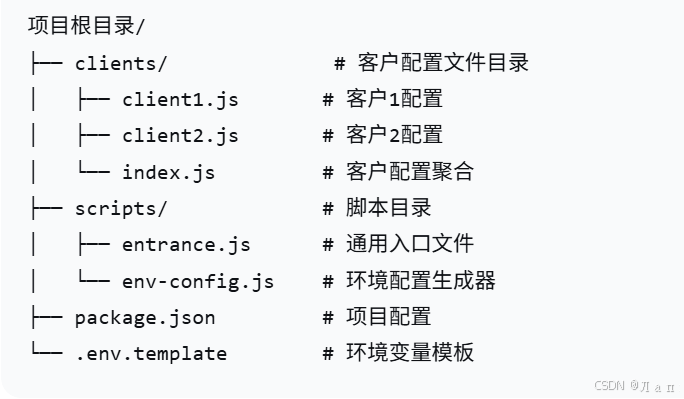
核心思想
- 配置与代码分离:将客户特定的配置抽取到独立的配置文件中
- 自动化流程:通过命令行交互自动完成配置切换
- 动态构建:根据选择的客户动态生成构建配置
详细实现
1. 客户配置文件 (clients/)
- 客户1:clients/client1.js
javascript
module.exports = {
  id: 1,
  name: '第一中学',
  description: '第一中学智慧校园系统',
  code: 'school1',
  logo: '/school1/logo.png',
  bgImage: '/school1/bg.jpg',
  primaryColor: '#1890ff',
  theme: 'blue',
  apiBaseUrl: 'https://api.school1.com'
}- 客户2:clients/client2.js
javascript
module.exports = {
  id: 2,
  name: '第二中学',
  description: '第二中学智慧校园系统',
  code: 'school2',
  logo: '/school2/logo.png',
  bgImage: '/school2/bg.jpg',
  primaryColor: '#52c41a',
  theme: 'green',
  apiBaseUrl: 'https://api.school2.com'
}- 客户配置聚合:clients/index.js
javascript
const clients = {
  1: require('./client1'),
  2: require('./client2'),
  3: require('./client3')
}

// 获取所有客户列表
exports.getClientList = () => {
  return Object.values(clients).map(client => ({
    id: client.id,
    name: client.name,
    code: client.code
  }))
}

// 根据ID获取客户配置
exports.getClientById = (id) => {
  return clients[id]
}

// 根据代码获取客户配置
exports.getClientByCode = (code) => {
  return Object.values(clients).find(client => client.code === code)
}
2. 通用入口文件 (scripts/entrance.js)
javascript
const fs = require('fs-extra')
const path = require('path')
const inquirer = require('inquirer')
const { execSync } = require('child_process')
const { getClientList, getClientById } = require('../clients')

class ConfigManager {
  constructor() {
    this.rootDir = path.resolve(__dirname, '..')
    this.packagePath = path.join(this.rootDir, 'package.json')
    this.envTemplatePath = path.join(this.rootDir, '.env.template')
    this.envPath = path.join(this.rootDir, '.env.local')
  }

  // 显示客户选择菜单
  async selectClient() {
    const clients = getClientList()

    const answers = await inquirer.prompt([
      {
        type: 'list',
        name: 'clientId',
        message: '请选择要配置的客户:',
        choices: clients.map(client => ({
          name: `${client.id}. ${client.name} (${client.code})`,
          value: client.id
        }))
      },
      {
        type: 'confirm',
        name: 'confirm',
        message: '确认选择此客户配置吗?',
        default: true
      }
    ])

    if (!answers.confirm) {
      console.log('❌ 操作已取消')
      process.exit(0)
    }

    return answers.clientId
  }

  // 更新package.json配置
  updatePackageJson(client) {
    const packageJson = require(this.packagePath)

    packageJson.name = `app-${client.code}`
    packageJson.description = client.description
    packageJson.version = `1.0.0-${client.code}`

    // 更新构建脚本
    packageJson.scripts = {
      ...packageJson.scripts,
      [`serve:${client.code}`]: `vue-cli-service serve --mode ${client.code}`,
      [`build:${client.code}`]: `vue-cli-service build --mode ${client.code}`,
      [`lint:${client.code}`]: `vue-cli-service lint --mode ${client.code}`
    }

    fs.writeJsonSync(this.packagePath, packageJson, { spaces: 2 })
    console.log(`✅ package.json 已更新 (${client.name})`)
  }

  // 生成环境变量文件
  generateEnvFile(client) {
    // 读取模板
    let envContent = fs.existsSync(this.envTemplatePath)
      ? fs.readFileSync(this.envTemplatePath, 'utf8')
      : ''

    // 更新客户特定变量
    const clientVars = {
      VUE_APP_CLIENT_ID: client.id,
      VUE_APP_CLIENT_NAME: client.name,
      VUE_APP_CLIENT_CODE: client.code,
      VUE_APP_LOGO_URL: client.logo,
      VUE_APP_BG_IMAGE: client.bgImage,
      VUE_APP_PRIMARY_COLOR: client.primaryColor,
      VUE_APP_THEME: client.theme,
      VUE_APP_API_BASE_URL: client.apiBaseUrl,
      VUE_APP_BUILD_TIME: new Date().toISOString()
    }

    // 替换或添加变量
    Object.entries(clientVars).forEach(([key, value]) => {
      const regex = new RegExp(`^${key}=.*`, 'm')
      const newLine = `${key}=${value}`

      if (regex.test(envContent)) {
        envContent = envContent.replace(regex, newLine)
      } else {
        envContent += `\n${newLine}`
      }
    })

    fs.writeFileSync(this.envPath, envContent.trim())
    console.log(`✅ 环境变量文件已生成: .env.local`)

    // 同时生成客户特定的.env文件
    const clientEnvPath = path.join(this.rootDir, `.env.${client.code}`)
    fs.writeFileSync(clientEnvPath, envContent.trim())
    console.log(`✅ 客户环境文件已生成: .env.${client.code}`)
  }

  // 执行构建或开发命令
  async runCommand(command, client) {
    console.log(`🚀 开始执行 ${command} (${client.name})...`)

    try {
      const env = { ...process.env, NODE_ENV: command === 'build' ? 'production' : 'development' }

      execSync(`npm run ${command}:${client.code}`, {
        stdio: 'inherit',
        env,
        cwd: this.rootDir
      })

      console.log(`✅ ${command} 执行完成!`)
    } catch (error) {
      console.error(`❌ ${command} 执行失败:`, error.message)
      process.exit(1)
    }
  }

  // 主流程
  async start(args) {
    console.log('🎯 Vue项目多客户配置工具\n')

    // 解析命令行参数
    const [command, clientId] = args
    const validCommands = ['serve', 'build', 'lint']

    if (!validCommands.includes(command)) {
      console.error(`❌ 无效命令: ${command}`)
      console.log(`可用命令: ${validCommands.join(', ')}`)
      process.exit(1)
    }

    let selectedClientId = clientId

    // 如果没有指定clientId,显示选择菜单
    if (!selectedClientId) {
      selectedClientId = await this.selectClient()
    }

    // 获取客户配置
    const client = getClientById(parseInt(selectedClientId))
    if (!client) {
      console.error(`❌ 未找到客户配置: ${selectedClientId}`)
      process.exit(1)
    }

    console.log(`\n📋 选择的客户: ${client.name}`)
    console.log(`📝 客户代码: ${client.code}`)
    console.log('─'.repeat(50))

    // 更新配置
    this.updatePackageJson(client)
    this.generateEnvFile(client)

    console.log('─'.repeat(50))

    // 执行命令
    await this.runCommand(command, client)
  }
}

// 导出工具类
module.exports = ConfigManager

// 如果直接运行此文件
if (require.main === module) {
  const manager = new ConfigManager()
  manager.start(process.argv.slice(2))
}
3. 分环境脚本 (scripts/env-config.js)
javascript
const ConfigManager = require('./entrance')

// 开发环境
if (process.argv[2] === 'dev') {
  const manager = new ConfigManager()
  manager.start(['serve', process.argv[3]])
}

// 构建环境
else if (process.argv[2] === 'prod') {
  const manager = new ConfigManager()
  manager.start(['build', process.argv[3]])
}

// 批量构建所有客户
else if (process.argv[2] === 'build-all') {
  const fs = require('fs')
  const path = require('path')
  const { execSync } = require('child_process')
  const { getClientList } = require('../clients')

  const clients = getClientList()
  const manager = new ConfigManager()

  console.log('🚀 开始批量构建所有客户...\n')

  clients.forEach(client => {
    console.log(`\n🔧 正在构建: ${client.name}`)
    console.log('─'.repeat(40))

    try {
      // 更新配置
      const clientConfig = require(`../clients/client${client.id}`)
      manager.updatePackageJson(clientConfig)
      manager.generateEnvFile(clientConfig)

      // 执行构建
      execSync(`npm run build:${client.code}`, {
        stdio: 'inherit',
        env: { ...process.env, NODE_ENV: 'production' },
        cwd: path.resolve(__dirname, '..')
      })

      console.log(`✅ ${client.name} 构建成功!`)
    } catch (error) {
      console.error(`❌ ${client.name} 构建失败:`, error.message)
    }
  })

  console.log('\n🎉 批量构建完成!')
}
4. 更新 package.json 配置
javascript
{
  "name": "vue-multi-client",
  "version": "1.0.0",
  "description": "多客户Vue项目",
  "scripts": {
    "dev": "node scripts/env-config.js dev",
    "build": "node scripts/env-config.js prod",
    "build:all": "node scripts/env-config.js build-all",
    "client:list": "node -e \"console.log(require('./clients').getClientList().map(c => `${c.id}. ${c.name}`).join('\\n'))\""
  },
  "devDependencies": {
    "inquirer": "^9.0.0",
    "fs-extra": "^11.0.0"
  }
}
使用方法
- 开发环境(选择客户)
bash
# 显示客户选择菜单
npm run dev

# 直接指定客户ID
npm run dev 1- 构建模式
bash
# 显示客户选择菜单
npm run build

# 直接指定客户ID
npm run build 2- 批量构建所有客户
bash
npm run build:all- 查看可用客户列表
bash
npm run client:list项目中使用配置
javascript
<template>
  <div :style="{ '--primary-color': primaryColor }" class="app">
    <header class="header">
      <img :src="clientLogo" :alt="clientName" class="logo">
      <h1>{{ clientName }}</h1>
    </header>

    <main :style="{ backgroundImage: `url(${bgImage})` }">
      <!-- 页面内容 -->
    </main>
  </div>
</template>

<script>
export default {
  computed: {
    clientName() {
      return process.env.VUE_APP_CLIENT_NAME || '默认客户'
    },
    clientLogo() {
      return process.env.VUE_APP_LOGO_URL || '/default-logo.png'
    },
    bgImage() {
      return process.env.VUE_APP_BG_IMAGE || '/default-bg.jpg'
    },
    primaryColor() {
      return process.env.VUE_APP_PRIMARY_COLOR || '#1890ff'
    }
  },

  mounted() {
    // 设置页面标题
    document.title = this.clientName

    // 应用主题色
    this.applyTheme()
  },

  methods: {
    applyTheme() {
      // 动态设置CSS变量
      document.documentElement.style.setProperty(
        '--primary-color',
        this.primaryColor
      )
    }
  }
}
</script>

<style>
.app {
  --primary-color: #1890ff;
}

.header {
  color: var(--primary-color);
}
</style>
效果展示
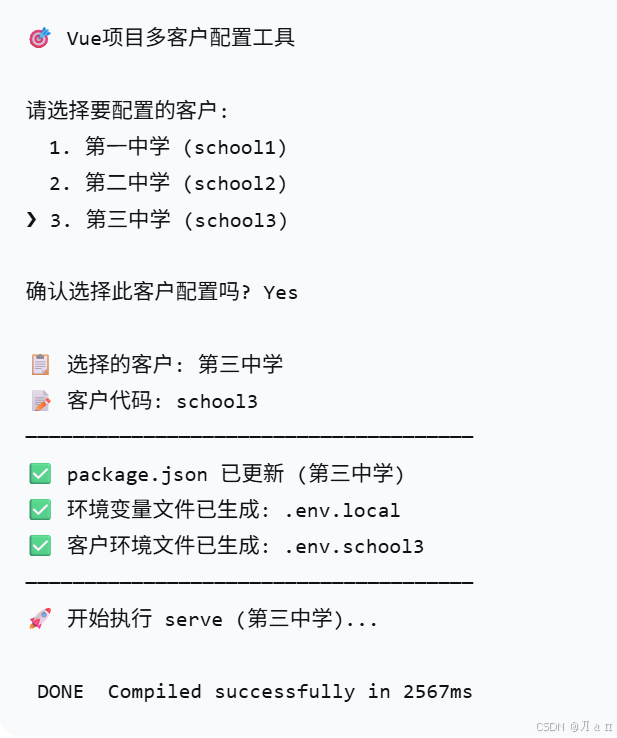
遇到的问题与解决方案
- 环境变量缓存
- 现象:修改配置后,Vue项目没有立即生效
- 解决:清理缓存并重新安装依赖
bash
rm -rf node_modules/.cache
npm run dev- 路径引用问题
- 现象:静态资源路径错误
- 解决:使用环境变量配置publicPath
javascript
// vue.config.js
module.exports = {
  publicPath: process.env.VUE_APP_PUBLIC_PATH || '/'
}- 批量构建时间长
- 优化:并行构建加速
javascript
// 使用Promise.all并行执行
await Promise.all(clients.map(client => buildClient(client)))
方案优势
- 高度自动化:一键完成配置切换和构建
- 易于维护:客户配置集中管理,修改方便
- 灵活扩展:新增客户只需添加一个配置文件
- 减少错误:避免手动修改环境变量带来的错误
- 开发友好:交互式命令行界面,使用简单