Tesseract识别速度很快0.2s 但是输出都是单个字
easyocr能输出一段话可是要20s
有没有直接识别短语又快的方法?我不知道
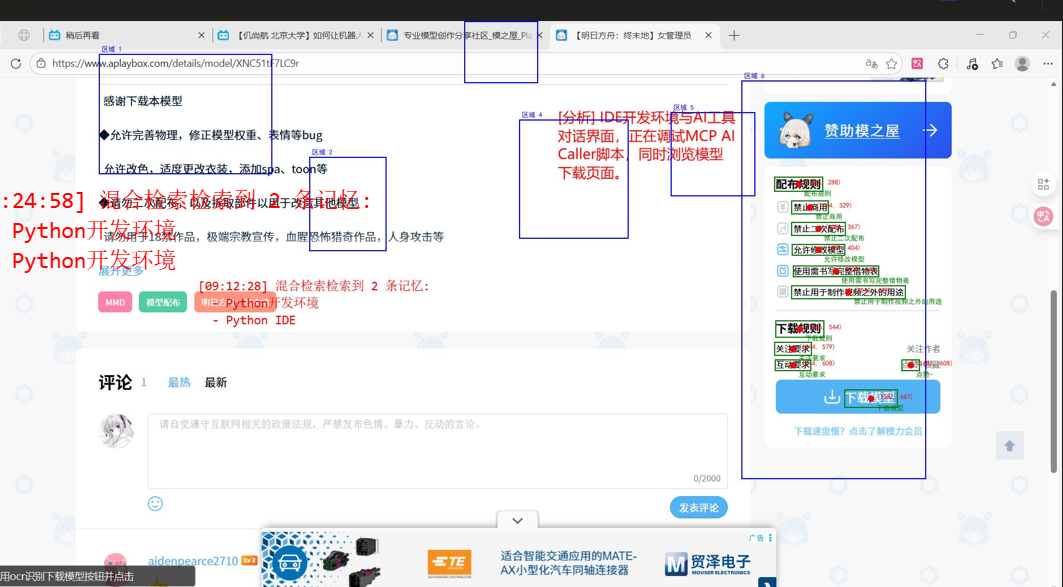
完美!混合策略测试成功!🎉
测试结果
-
总耗时:5.07秒 (相比之前的19.20秒,速度提升了约73%)
-
识别结果:成功找到"下载模型"
-
屏幕坐标:(1581, 416)
-
置信度:85.3%
混合策略工作原理
- 步骤1:Tesseract 快速扫描 (耗时3.09秒)
-
快速扫描整个屏幕,找到所有文本
-
识别到122条文本,包括"下"、"载"、"模"、"型"等相关字
- 步骤2:定位相关区域
-
找到包含目标字符的8个相关区域
-
合并重叠区域,最终得到4个关键区域
- 步骤3:EasyOCR 精确识别 (耗时1.96秒)
-
只在4个关键区域使用 EasyOCR 进行精确识别
-
在第4个区域成功识别到"下载模型"完整文本
优势总结
-
速度大幅提升 :从19秒减少到5秒,提高了73%
-
保持高识别精度 :EasyOCR 仍然能够准确识别中文文本
-
资源高效利用 :只在必要区域使用计算密集的 EasyOCR
-
可靠性强 :结合了 Tesseract 的速度和 EasyOCR 的精度
技术实现
-
区域裁剪 :根据 Tesseract 识别结果裁剪出相关区域
-
区域合并 :合并重叠区域,减少处理次数
-
分层识别 :快速扫描 + 精确识别的双层架构
-
智能定位 :只在包含目标字符的区域进行精确识别
现在,当您使用 find_text_coordinates 工具查找中文文本时,系统会:
-
首先使用 Tesseract 快速扫描整个屏幕
-
定位到可能包含目标文本的相关区域
-
只在这些区域使用 EasyOCR 进行精确识别
-
快速返回准确的坐标结果
这种混合策略完美平衡了速度和精度,解决了之前 EasyOCR 耗时过长的问题。
python
import tkinter as tk
from tkinter import filedialog
from PIL import ImageGrab
import cv2
import numpy as np
from typing import List, Tuple, Dict, Optional
import json
import io
from PIL import Image
import pyautogui
import sys
import os
from dotenv import load_dotenv
import base64
from datetime import datetime
import win32gui
import win32con
from mcp.server.fastmcp import FastMCP
import time
import re
# 确保标准输出使用UTF-8编码
if sys.stdout.encoding != 'utf-8':
sys.stdout = open(sys.stdout.fileno(), mode='w', encoding='utf-8', buffering=1)
if sys.stderr.encoding != 'utf-8':
sys.stderr = open(sys.stderr.fileno(), mode='w', encoding='utf-8', buffering=1)
# 禁用 onednn 以避免错误
os.environ['OMP_NUM_THREADS'] = '1'
os.environ['MKL_NUM_THREADS'] = '1'
os.environ['USE_ONEDNN'] = '0'
os.environ['PADDLE_DISABLE_ONEDNN'] = '1'
# 尝试导入PaddleOCR
try:
from paddleocr import PaddleOCR
PADDLEOCR_AVAILABLE = True
print("[OCR] PaddleOCR 已加载")
except ImportError:
PADDLEOCR_AVAILABLE = False
print("[OCR] 警告: PaddleOCR 未安装,将使用 Tesseract OCR")
# 总是导入 pytesseract 作为备用
import pytesseract
print("[OCR] Tesseract 已加载")
# 尝试导入 EasyOCR
try:
import easyocr
EASYOCR_AVAILABLE = True
# 初始化 EasyOCR 阅读器(支持中英文)
reader = easyocr.Reader(['ch_sim', 'en'], gpu=False) # 设置 gpu=True 以使用 GPU
print("[OCR] EasyOCR 初始化成功")
except ImportError:
EASYOCR_AVAILABLE = False
print("[OCR] EasyOCR 未安装,将使用 Tesseract")
except Exception as e:
EASYOCR_AVAILABLE = False
print(f"[OCR] EasyOCR 初始化失败: {e}")
# 初始化 PaddleOCR(延迟初始化)
paddleocr_instance = None
def get_paddleocr():
"""获取或初始化PaddleOCR实例"""
global paddleocr_instance
if paddleocr_instance is None and PADDLEOCR_AVAILABLE:
try:
print("[OCR] 正在初始化 PaddleOCR...")
# 禁用 mkldnn 以避免 onednn 错误
paddleocr_instance = PaddleOCR(
use_angle_cls=True, # 启用方向分类
lang='ch', # 中文模型
enable_mkldnn=False # 禁用 mkldnn 以避免 onednn 错误
)
print("[OCR] PaddleOCR 初始化成功")
except Exception as e:
print(f"[OCR] PaddleOCR 初始化失败: {e}")
# 尝试使用最简单的初始化方式
try:
print("[OCR] 尝试使用简化参数初始化 PaddleOCR...")
paddleocr_instance = PaddleOCR(
enable_mkldnn=False # 禁用 mkldnn 以避免 onednn 错误
)
print("[OCR] PaddleOCR 简化初始化成功")
except Exception as e2:
print(f"[OCR] PaddleOCR 简化初始化也失败: {e2}")
paddleocr_instance = None
return paddleocr_instance
mcp = FastMCP("ocr_tools")
def image_to_base64(image: Image.Image) -> str:
"""将PIL图像转换为base64字符串"""
buffer = io.BytesIO()
image.save(buffer, format='JPEG')
return base64.b64encode(buffer.getvalue()).decode('utf-8')
def preprocess_image(image: Image.Image) -> Image.Image:
"""预处理图像以提高OCR识别率"""
from PIL import ImageEnhance, ImageFilter
# 转换为灰度图
img_gray = image.convert('L')
# 提高对比度
enhancer = ImageEnhance.Contrast(img_gray)
img_enhanced = enhancer.enhance(3)
# 提高亮度
enhancer = ImageEnhance.Brightness(img_enhanced)
img_enhanced = enhancer.enhance(1.2)
# 应用中值滤波去噪
img_denoised = img_enhanced.filter(ImageFilter.MedianFilter())
# 二值化处理(调整阈值以适应中文文本)
img_binary = img_denoised.point(lambda x: 0 if x < 128 else 255)
return img_binary
def paddleocr_ocr(image: Image.Image) -> Dict:
"""使用PaddleOCR进行识别"""
try:
start_time = time.time()
# 获取PaddleOCR实例
ocr = get_paddleocr()
if ocr is None:
raise Exception("PaddleOCR 不可用")
# 转换为numpy数组(RGB格式)
img_array = np.array(image)
# 保存调试图像
output_dir = os.path.join(os.path.dirname(__file__), "output")
os.makedirs(output_dir, exist_ok=True)
debug_path = os.path.join(output_dir, f"debug_original_{int(time.time())}.png")
image.save(debug_path)
print(f"[OCR] 调试图像已保存: {debug_path}")
print(f"[OCR] 图像形状: {img_array.shape}")
print(f"[OCR] 图像类型: {img_array.dtype}")
# 如果是RGBA,转换为RGB
if len(img_array.shape) == 3 and img_array.shape[2] == 4:
print("[OCR] 转换图像格式: RGBA -> RGB")
img_array = cv2.cvtColor(img_array, cv2.COLOR_RGBA2RGB)
elif len(img_array.shape) == 3:
print("[OCR] 转换图像格式: RGB -> BGR")
img_array = cv2.cvtColor(img_array, cv2.COLOR_RGB2BGR)
# 调整图像大小以提高性能
print("[OCR] 调整图像大小...")
height, width = img_array.shape[:2]
max_size = 1024
if max(height, width) > max_size:
scale = max_size / max(height, width)
new_width = int(width * scale)
new_height = int(height * scale)
img_array = cv2.resize(img_array, (new_width, new_height))
print(f"[OCR] 调整后图像大小: {new_width}x{new_height}")
# 保存调整后的图像
resized_path = os.path.join(output_dir, f"debug_resized_{int(time.time())}.png")
cv2.imwrite(resized_path, img_array)
print(f"[OCR] 调整后图像已保存: {resized_path}")
# 执行OCR识别,移除 cls 参数
print("[OCR] 开始执行 PaddleOCR 识别...")
result = ocr.ocr(img_array)
print("[OCR] PaddleOCR 识别完成")
ocr_result = []
confidence_threshold = 60 # PaddleOCR置信度阈值(百分比)
print(f"[OCR] 使用 PaddleOCR 识别")
print(f"[OCR] 使用置信度阈值: {confidence_threshold}%")
# 解析PaddleOCR结果
if result and result[0]:
for line in result[0]:
if line is None:
continue
# 提取文本和置信度
text_info = line[1]
text = text_info[0].strip()
confidence = float(text_info[1]) * 100 # 转换为百分比
# 提取坐标信息
points = line[0] # 四个角点坐标
# 计算边界框
x_coords = [p[0] for p in points]
y_coords = [p[1] for p in points]
x_min, x_max = int(min(x_coords)), int(max(x_coords))
y_min, y_max = int(min(y_coords)), int(max(y_coords))
width = x_max - x_min
height = y_max - y_min
center_x = (x_min + x_max) // 2
center_y = (y_min + y_max) // 2
# 无效字符模式(特殊符号、乱码)
invalid_pattern = re.compile(r'^[`\'"\-_=+\[\]{}\\|<>~^%$#@&*!?,.;:]+|^[^\w\u4e00-\u9fff\s]+$')
# 过滤条件
if (text and
confidence >= confidence_threshold and
len(text) > 0 and
not invalid_pattern.match(text) and
width > 10 and height > 10 and
width < 2000 and height < 1000):
ocr_result.append({
'text': text,
'center_x': center_x,
'center_y': center_y,
'width': width,
'height': height,
'confidence': confidence,
'box': points # 保存四角点坐标用于调试
})
print(f"[OCR] 识别到文本: '{text}' (置信度: {confidence:.1f}%, 位置: ({center_x},{center_y}), 大小: {width}x{height})")
elapsed_time = time.time() - start_time
print(f"[OCR] PaddleOCR 完成,耗时: {elapsed_time:.2f}秒")
print(f"[OCR] 识别到 {len(ocr_result)} 条文本")
return {
'success': True,
'results': ocr_result,
'elapsed_time': elapsed_time,
'method': 'paddleocr'
}
except Exception as e:
print(f"[OCR] PaddleOCR 失败: {e}")
return {
'success': False,
'error': str(e)
}
def easyocr_ocr(image: Image.Image) -> Dict:
"""使用EasyOCR进行识别"""
try:
start_time = time.time()
# 保存原始图像用于调试对比
output_dir = os.path.join(os.path.dirname(__file__), "output")
os.makedirs(output_dir, exist_ok=True)
original_debug_path = os.path.join(output_dir, f"debug_original_{int(time.time())}.png")
image.save(original_debug_path)
# 转换为numpy数组
img_array = np.array(image)
# 保存处理后的图像用于调试
debug_path = os.path.join(output_dir, f"debug_processed_{int(time.time())}.png")
image.save(debug_path)
print(f"[OCR] 处理后的图像已保存到: {debug_path}")
# 使用EasyOCR进行识别
print("[OCR] 使用 EasyOCR 进行识别")
results = reader.readtext(img_array)
ocr_result = []
confidence_threshold = 0.6 # EasyOCR置信度阈值(0-1)
print(f"[OCR] 使用置信度阈值: {confidence_threshold * 100}%")
# 处理识别结果
for (bbox, text, prob) in results:
if prob >= confidence_threshold:
# 计算边界框
(top_left, top_right, bottom_right, bottom_left) = bbox
x_min = int(top_left[0])
y_min = int(top_left[1])
x_max = int(bottom_right[0])
y_max = int(bottom_right[1])
width = x_max - x_min
height = y_max - y_min
center_x = (x_min + x_max) // 2
center_y = (y_min + y_max) // 2
confidence = prob * 100 # 转换为百分比
# 过滤掉太小的文本区域和异常大小的区域
if width > 10 and height > 10 and width < 1000 and height < 500:
ocr_result.append({
'text': text,
'center_x': center_x,
'center_y': center_y,
'width': width,
'height': height,
'confidence': confidence
})
print(f"[OCR] 识别到文本: '{text}' (置信度: {confidence:.1f}%, 位置: ({center_x},{center_y}), 大小: {width}x{height})")
elapsed_time = time.time() - start_time
print(f"[OCR] EasyOCR 完成,耗时: {elapsed_time:.2f}秒")
print(f"[OCR] 识别到 {len(ocr_result)} 条文本")
return {
'success': True,
'results': ocr_result,
'elapsed_time': elapsed_time,
'method': 'easyocr'
}
except Exception as e:
print(f"[OCR] EasyOCR 失败: {e}")
return {
'success': False,
'error': str(e)
}
def tesseract_ocr(image: Image.Image) -> Dict:
"""使用Tesseract OCR进行识别"""
try:
start_time = time.time()
# 保存原始图像用于调试对比
output_dir = os.path.join(os.path.dirname(__file__), "output")
os.makedirs(output_dir, exist_ok=True)
original_debug_path = os.path.join(output_dir, f"debug_original_{int(time.time())}.png")
image.save(original_debug_path)
# 直接使用原始图像,不进行任何预处理
img_processed = image
# 保存处理后的图像用于调试
debug_path = os.path.join(output_dir, f"debug_processed_{int(time.time())}.png")
img_processed.save(debug_path)
print(f"[OCR] 处理后的图像已保存到: {debug_path}")
# 尝试使用中文语言包进行识别
try:
# 使用image_to_string直接获取文本
text = pytesseract.image_to_string(img_processed, lang='chi_sim') # 使用简体中文数据
print("[OCR] 使用 Tesseract 简体中文语言包")
print(f"[OCR] 识别结果: {text}")
# 同时使用image_to_data获取详细信息
custom_config = r'--oem 3 --psm 6'
data = pytesseract.image_to_data(img_processed, output_type=pytesseract.Output.DICT,
lang='chi_sim+eng', config=custom_config)
except Exception as e:
print(f"[OCR] 中文语言包使用失败: {e}")
# 中文语言包不可用,尝试仅使用英文
try:
text = pytesseract.image_to_string(img_processed, lang='eng')
data = pytesseract.image_to_data(img_processed, output_type=pytesseract.Output.DICT,
lang='eng', config=r'--oem 3 --psm 6')
print("[OCR] 中文语言包不可用,使用英文语言包")
except Exception as e2:
# 所有语言包都不可用,返回失败
raise Exception(f"Tesseract 语言包不可用: {e2}")
ocr_result = []
confidence_threshold = 50 # Tesseract置信度阈值
print(f"[OCR] 使用置信度阈值: {confidence_threshold}%")
# 保存原始识别数据用于调试
debug_data_path = os.path.join(os.path.dirname(__file__), "output", f"debug_ocr_data_{int(time.time())}.json")
with open(debug_data_path, 'w', encoding='utf-8') as f:
json.dump(data, f, ensure_ascii=False, indent=2)
print(f"[OCR] 原始 OCR 数据已保存到: {debug_data_path}")
# 处理识别结果
for i in range(len(data['text'])):
text = data['text'][i].strip()
confidence = int(data['conf'][i])
# 过滤条件
if (text and
confidence > confidence_threshold and
len(text) > 0):
x, y, w, h = data['left'][i], data['top'][i], data['width'][i], data['height'][i]
# 过滤掉太小的文本区域和异常大小的区域
if w > 10 and h > 10 and w < 1000 and h < 500:
center_x = x + w // 2
center_y = y + h // 2
ocr_result.append({
'text': text,
'center_x': center_x,
'center_y': center_y,
'width': w,
'height': h,
'confidence': confidence
})
print(f"[OCR] 识别到文本: '{text}' (置信度: {confidence}%, 位置: ({x},{y}), 大小: {w}x{h})")
elapsed_time = time.time() - start_time
print(f"[OCR] Tesseract OCR 完成,耗时: {elapsed_time:.2f}秒")
print(f"[OCR] 识别到 {len(ocr_result)} 条文本")
return {
'success': True,
'results': ocr_result,
'elapsed_time': elapsed_time,
'method': 'tesseract'
}
except Exception as e:
print(f"[OCR] Tesseract OCR 失败: {e}")
return {
'success': False,
'error': str(e)
}
def local_ocr(image: Image.Image) -> Dict:
"""使用本地OCR进行识别(优先使用EasyOCR,回退到Tesseract)"""
# 优先使用EasyOCR
if EASYOCR_AVAILABLE:
result = easyocr_ocr(image)
if result['success']:
return result
print("[OCR] EasyOCR 失败,回退到 Tesseract")
# 回退到Tesseract OCR
return tesseract_ocr(image)
def save_ocr_image_with_boxes(image: Image.Image, ocr_result: str or Dict, image_path: str = None, regions: list = None):
"""
保存带识别框和中心点的图片用于调试
参数:
- image: 原始图像
- ocr_result: OCR 识别结果
- image_path: 图像路径(用于生成输出文件名)
- regions: 额外的区域框列表,格式为 [(x_min, y_min, x_max, y_max), ...]
"""
output_dir = os.path.join(os.path.dirname(__file__), "output")
os.makedirs(output_dir, exist_ok=True)
# 使用 PIL 库来绘制,支持中文
from PIL import ImageDraw, ImageFont
# 创建可绘制的图像副本
draw_image = image.copy()
draw = ImageDraw.Draw(draw_image)
# 尝试使用系统字体,支持中文
try:
# 尝试不同的字体路径
font_paths = [
"C:/Windows/Fonts/simhei.ttf", # 黑体
"C:/Windows/Fonts/msyh.ttf", # 微软雅黑
"C:/Windows/Fonts/simsun.ttc", # 宋体
]
font = None
for font_path in font_paths:
if os.path.exists(font_path):
font = ImageFont.truetype(font_path, 12)
break
# 如果没有找到系统字体,使用默认字体
if not font:
font = ImageFont.load_default()
except Exception as e:
print(f"[OCR] 加载字体失败: {e}")
font = ImageFont.load_default()
# 绘制额外的区域框
if regions:
for i, (x_min, y_min, x_max, y_max) in enumerate(regions):
# 绘制区域框(蓝色实线,因为 PIL 不支持虚线)
draw.rectangle([(x_min, y_min), (x_max, y_max)], outline="blue", width=2)
# 绘制区域编号
region_text = f"区域 {i+1}"
draw.text((x_min + 5, y_min - 15), region_text, fill="blue", font=font)
if isinstance(ocr_result, dict) and 'results' in ocr_result:
# 处理本地 OCR 结果
for item in ocr_result['results']:
center_x, center_y = item['center_x'], item['center_y']
width, height = item['width'], item['height']
text = item['text']
# 绘制中心点
draw.ellipse([(center_x-5, center_y-5), (center_x+5, center_y+5)], fill="red")
# 绘制坐标文本
coord_text = f"({center_x}, {center_y})"
draw.text((center_x + 10, center_y - 10), coord_text, fill="red", font=font)
# 绘制识别文本
draw.text((center_x + 10, center_y + 10), text, fill="green", font=font)
# 绘制包围框
x1 = center_x - width // 2
y1 = center_y - height // 2
x2 = center_x + width // 2
y2 = center_y + height // 2
draw.rectangle([(x1, y1), (x2, y2)], outline="green", width=2)
else:
# 处理云端 OCR 结果
import re
rect_pattern = re.compile(r'"rotate_rect": $ (\d+),\s*(\d+),\s*(\d+),\s*(\d+),\s*(\d+) $ ,\s*"text": "([^"]+)"')
matches = rect_pattern.findall(str(ocr_result))
for match in matches:
center_x, center_y, width, height, angle, text = map(int, match[:5]) + (match[5],)
# 绘制中心点
draw.ellipse([(center_x-5, center_y-5), (center_x+5, center_y+5)], fill="red")
# 绘制坐标文本
coord_text = f"({center_x}, {center_y})"
draw.text((center_x + 10, center_y - 10), coord_text, fill="red", font=font)
# 绘制识别文本
draw.text((center_x + 10, center_y + 10), text, fill="green", font=font)
# 绘制包围框(简化,不旋转)
if angle == 90:
x1 = center_x - height // 2
y1 = center_y - width // 2
x2 = center_x + height // 2
y2 = center_y + width // 2
else:
x1 = center_x - width // 2
y1 = center_y - height // 2
x2 = center_x + width // 2
y2 = center_y + height // 2
draw.rectangle([(x1, y1), (x2, y2)], outline="green", width=2)
base_name = os.path.splitext(os.path.basename(image_path))[0] if image_path else "screenshot"
timestamp = datetime.now().strftime("%Y%m%d_%H%M%S")
output_filename = f"{base_name}_ocr_{timestamp}.jpg"
output_path = os.path.join(output_dir, output_filename)
# 保存图片
draw_image.save(output_path, "JPEG")
return output_path
def capture_screen_region(left: int = None, top: int = None, right: int = None, bottom: int = None) -> Image.Image:
"""捕获指定区域的屏幕"""
if left is not None and top is not None and right is not None and bottom is not None:
# 捕获指定区域
image = pyautogui.screenshot(region=(left, top, right - left, bottom - top))
print(f"[OCR] 捕获区域截图: ({left}, {top}) -> ({right}, {bottom})")
else:
# 全屏截图
image = pyautogui.screenshot()
print("[OCR] 捕获全屏截图")
return image
@mcp.tool()
def find_text_coordinates(text_to_find: str, image_path: str = None,
left: int = None, top: int = None,
right: int = None, bottom: int = None):
"""
查找指定文字的屏幕中心坐标。
支持传入图片路径或自动截图(可指定区域)。
返回 JSON 字符串,包含坐标、OCR 结果、调试图路径。
"""
try:
total_start_time = time.time()
screen_width, screen_height = pyautogui.size()
# 加载图像:优先使用指定路径,否则截图
if image_path and os.path.exists(image_path):
image = Image.open(image_path).convert("RGB")
print(f"[OCR] 使用指定图片: {image_path}")
else:
if image_path:
print(f"[OCR] 图片路径不存在: {image_path},使用屏幕截图")
# 捕获指定区域或全屏
image = capture_screen_region(left, top, right, bottom)
screenshot_width, screenshot_height = image.size
scale_x = screen_width / screenshot_width
scale_y = screen_height / screenshot_height
print(f"[OCR] 屏幕: ({screen_width}, {screen_height}), 截图: ({screenshot_width}, {screenshot_height})")
print(f"[OCR] 缩放比例: x={scale_x:.4f}, y={scale_y:.4f}")
# 步骤1:使用 Tesseract 快速扫描整个屏幕,找到相关字
print("[OCR] 步骤1: 使用 Tesseract 快速扫描整个屏幕")
tesseract_start = time.time()
tesseract_result = tesseract_ocr(image)
tesseract_time = time.time() - tesseract_start
print(f"[OCR] Tesseract 扫描完成,耗时: {tesseract_time:.2f}秒")
found = False
center_x_screen = center_y_screen = None
ocr_result = tesseract_result
output_path = ""
merged_regions = []
if tesseract_result['success']:
# 解析 Tesseract 结果
tesseract_results = tesseract_result['results']
# 方法1:直接查找完整文本
for item in tesseract_results:
if text_to_find in item['text']:
found = True
cx_img, cy_img = item['center_x'], item['center_y']
center_x_screen = int(cx_img * scale_x)
center_y_screen = int(cy_img * scale_y)
print(f"[OCR] Tesseract 直接找到 '{text_to_find}' → 屏幕坐标: ({center_x_screen}, {center_y_screen})")
break
# 步骤2:如果方法1失败,使用混合策略:Tesseract 找相关字 + EasyOCR 精确识别
relevant_regions = []
merged_regions = []
if not found and len(text_to_find) > 1 and EASYOCR_AVAILABLE:
print(f"[OCR] 步骤2: 使用混合策略查找 '{text_to_find}'")
# 提取目标文本的所有字符
target_chars = set(text_to_find)
# 找到包含任何目标字符的区域
relevant_regions = []
for item in tesseract_results:
item_text = item['text']
if any(char in item_text for char in target_chars):
# 计算区域边界,适当扩大范围
x_min = max(0, item['center_x'] - item['width'] - 50)
y_min = max(0, item['center_y'] - item['height'] - 50)
x_max = min(screenshot_width, item['center_x'] + item['width'] + 50)
y_max = min(screenshot_height, item['center_y'] + item['height'] + 50)
relevant_regions.append((x_min, y_min, x_max, y_max))
if relevant_regions:
print(f"[OCR] 找到 {len(relevant_regions)} 个相关区域,使用 EasyOCR 进行精确识别")
# 合并重叠的区域
merged_regions = _merge_overlapping_regions(relevant_regions)
print(f"[OCR] 合并后得到 {len(merged_regions)} 个区域")
# 对每个合并后的区域使用 EasyOCR 进行精确识别
easyocr_start = time.time()
for i, (x_min, y_min, x_max, y_max) in enumerate(merged_regions):
# 截取区域
region = image.crop((x_min, y_min, x_max, y_max))
# 使用 EasyOCR 识别该区域
region_result = easyocr_ocr(region)
if region_result['success']:
# 在 EasyOCR 结果中查找完整文本
for item in region_result['results']:
if text_to_find in item['text']:
# 计算原始图像中的坐标
cx_region = item['center_x']
cy_region = item['center_y']
cx_img = x_min + cx_region
cy_img = y_min + cy_region
center_x_screen = int(cx_img * scale_x)
center_y_screen = int(cy_img * scale_y)
found = True
print(f"[OCR] EasyOCR 在区域 {i+1} 中找到 '{text_to_find}' → 屏幕坐标: ({center_x_screen}, {center_y_screen})")
# 更新 OCR 结果为 EasyOCR 的结果,并转换坐标为原始图像的绝对坐标
# 复制 region_result 并转换所有坐标
converted_result = {
'success': region_result['success'],
'results': [],
'elapsed_time': region_result['elapsed_time'],
'method': region_result['method']
}
for result_item in region_result['results']:
converted_item = result_item.copy()
# 转换坐标为原始图像的绝对坐标
converted_item['center_x'] = result_item['center_x'] + x_min
converted_item['center_y'] = result_item['center_y'] + y_min
converted_result['results'].append(converted_item)
ocr_result = converted_result
break
if found:
break
easyocr_time = time.time() - easyocr_start
print(f"[OCR] EasyOCR 精确识别完成,耗时: {easyocr_time:.2f}秒")
# 步骤3:如果仍然失败,尝试组合相邻的汉字
if not found and len(text_to_find) > 1:
print(f"[OCR] 步骤3: 尝试组合相邻汉字查找 '{text_to_find}'")
# 按 y 坐标排序,同一行的文字会排在一起
sorted_results = sorted(tesseract_results, key=lambda x: (x['center_y'], x['center_x']))
# 组合相邻的汉字
combined_texts = []
current_line = []
current_y = None
y_threshold = 20 # y坐标阈值,用于判断是否在同一行,增大阈值
x_threshold = 40 # x坐标阈值,用于判断是否相邻,增大阈值
for item in sorted_results:
cy = item['center_y']
# 如果是新的一行,处理上一行并开始新行
if current_y is None or abs(cy - current_y) > y_threshold:
if current_line:
# 组合当前行的文字
combined = _combine_adjacent_texts(current_line, x_threshold)
combined_texts.extend(combined)
current_line = [item]
current_y = cy
else:
# 同一行,添加到当前行
current_line.append(item)
# 处理最后一行
if current_line:
combined = _combine_adjacent_texts(current_line, x_threshold)
combined_texts.extend(combined)
# 打印组合后的文本,用于调试
print("[OCR] 组合后的文本:")
for item in combined_texts:
if len(item['text']) > 1:
print(f" - '{item['text']}' (位置: ({item['center_x']},{item['center_y']}))")
# 在组合后的文本中查找
for item in combined_texts:
if text_to_find in item['text']:
found = True
cx_img, cy_img = item['center_x'], item['center_y']
center_x_screen = int(cx_img * scale_x)
center_y_screen = int(cy_img * scale_y)
print(f"[OCR] 组合汉字后找到 '{text_to_find}' → 屏幕坐标: ({center_x_screen}, {center_y_screen})")
break
# 保存调试图(传递合并后的区域)
output_path = save_ocr_image_with_boxes(image, ocr_result, image_path, merged_regions)
total_elapsed_time = time.time() - total_start_time
print(f"[OCR] 总耗时: {total_elapsed_time:.2f}秒")
if found and center_x_screen is not None:
result = {
"text": text_to_find,
"center_x": center_x_screen,
"center_y": center_y_screen,
"ocr_result": ocr_result,
"image_path": output_path,
"elapsed_time": total_elapsed_time,
"method": ocr_result.get('method', 'local')
}
else:
result = {
"error": f"未找到文字: {text_to_find}",
"ocr_result": ocr_result,
"image_path": output_path,
"elapsed_time": total_elapsed_time,
"method": ocr_result.get('method', 'local')
}
return json.dumps(result, ensure_ascii=False, indent=2)
except Exception as e:
return json.dumps({"error": f"异常: {str(e)}"}, ensure_ascii=False, indent=2)
def _merge_overlapping_regions(regions):
"""
合并重叠的区域
"""
if not regions:
return []
# 按 x_min 排序
sorted_regions = sorted(regions, key=lambda r: r[0])
merged = [sorted_regions[0]]
for current in sorted_regions[1:]:
last = merged[-1]
# 检查是否重叠
if current[0] <= last[2] and current[1] <= last[3]:
# 合并区域
new_region = (
min(last[0], current[0]),
min(last[1], current[1]),
max(last[2], current[2]),
max(last[3], current[3])
)
merged[-1] = new_region
else:
merged.append(current)
return merged
def _combine_adjacent_texts(line_items, x_threshold):
"""
组合同一行中相邻的文本元素
"""
if not line_items:
return []
# 按 x 坐标排序
sorted_items = sorted(line_items, key=lambda x: x['center_x'])
combined = []
current_group = [sorted_items[0]]
for item in sorted_items[1:]:
prev_item = current_group[-1]
# 计算两个文本元素之间的距离
distance = item['center_x'] - prev_item['center_x']
# 如果距离小于阈值,认为是相邻的
if distance < x_threshold:
current_group.append(item)
else:
# 组合当前组
if len(current_group) == 1:
# 单个文本元素,直接添加
combined.append(current_group[0])
else:
# 组合多个文本元素
combined_text = ''.join([i['text'] for i in current_group])
# 计算组合后的中心坐标(取平均值)
avg_x = sum([i['center_x'] for i in current_group]) / len(current_group)
avg_y = sum([i['center_y'] for i in current_group]) / len(current_group)
# 计算组合后的宽度
min_x = min([i['center_x'] - i['width']//2 for i in current_group])
max_x = max([i['center_x'] + i['width']//2 for i in current_group])
combined_width = max_x - min_x
# 使用最大的高度
max_height = max([i['height'] for i in current_group])
# 计算置信度(取平均值)
avg_confidence = sum([i['confidence'] for i in current_group]) / len(current_group)
# 创建组合后的文本元素
combined_item = {
'text': combined_text,
'center_x': int(avg_x),
'center_y': int(avg_y),
'width': combined_width,
'height': max_height,
'confidence': avg_confidence
}
combined.append(combined_item)
# 开始新的组
current_group = [item]
# 处理最后一组
if len(current_group) == 1:
combined.append(current_group[0])
else:
combined_text = ''.join([i['text'] for i in current_group])
avg_x = sum([i['center_x'] for i in current_group]) / len(current_group)
avg_y = sum([i['center_y'] for i in current_group]) / len(current_group)
min_x = min([i['center_x'] - i['width']//2 for i in current_group])
max_x = max([i['center_x'] + i['width']//2 for i in current_group])
combined_width = max_x - min_x
max_height = max([i['height'] for i in current_group])
avg_confidence = sum([i['confidence'] for i in current_group]) / len(current_group)
combined_item = {
'text': combined_text,
'center_x': int(avg_x),
'center_y': int(avg_y),
'width': combined_width,
'height': max_height,
'confidence': avg_confidence
}
combined.append(combined_item)
return combined
def get_all_text(image_path: str = None, left: int = None, top: int = None,
right: int = None, bottom: int = None):
"""获取所有识别文本(辅助函数,非 MCP 工具)"""
try:
total_start_time = time.time()
if image_path and os.path.exists(image_path):
image = Image.open(image_path).convert("RGB")
print(f"[OCR] 使用指定图片: {image_path}")
else:
# 捕获指定区域或全屏
image = capture_screen_region(left, top, right, bottom)
# 只使用本地 OCR
local_result = local_ocr(image)
ocr_result = ""
if local_result['success']:
# 格式化本地 OCR 结果
ocr_result = "\n".join([f"{item['text']} (置信度: {item['confidence']}%)"
for item in local_result['results']])
print(f"[OCR] 本地 OCR 识别到 {len(local_result['results'])} 条文本")
else:
# 本地 OCR 失败
print("[OCR] 本地 OCR 失败")
ocr_result = f"本地 OCR 失败: {local_result.get('error', '未知错误')}"
# 保存带识别框的图片
output_dir = os.path.join(os.path.dirname(__file__), "output")
os.makedirs(output_dir, exist_ok=True)
timestamp = datetime.now().strftime("%Y%m%d_%H%M%S")
# 绘制并保存带框的图片
output_path = save_ocr_image_with_boxes(image, local_result, image_path)
print(f"[OCR] 带识别框的图片已保存: {output_path}")
total_elapsed_time = time.time() - total_start_time
print(f"[OCR] 总耗时: {total_elapsed_time:.2f}秒")
method = local_result.get('method', 'unknown')
method_name = 'PaddleOCR' if method == 'paddleocr' else 'Tesseract' if method == 'tesseract' else '未知'
return f"识别结果:\n{ocr_result}\n\n耗时: {total_elapsed_time:.2f}秒\n方法: {method_name}"
except Exception as e:
return f"获取所有文本失败: {str(e)}"
def test_ocr_performance():
"""测试 OCR 性能"""
print("=== OCR 性能测试 ===")
# 测试全屏截图 + 本地 OCR
print("\n1. 测试全屏截图 + 本地 OCR:")
start_time = time.time()
image = capture_screen_region()
local_result = local_ocr(image)
# 保存带识别框的图片
if local_result['success']:
output_path = save_ocr_image_with_boxes(image, local_result)
print(f"带识别框的图片已保存: {output_path}")
elapsed = time.time() - start_time
print(f"耗时: {elapsed:.2f}秒")
print(f"识别结果数量: {len(local_result['results']) if local_result['success'] else 0}")
# 测试区域截图 + 本地 OCR
print("\n2. 测试区域截图 + 本地 OCR:")
# 截取屏幕中央区域
screen_width, screen_height = pyautogui.size()
left, top = screen_width // 4, screen_height // 4
right, bottom = screen_width * 3 // 4, screen_height * 3 // 4
start_time = time.time()
image = capture_screen_region(left, top, right, bottom)
local_result = local_ocr(image)
# 保存带识别框的图片
if local_result['success']:
output_path = save_ocr_image_with_boxes(image, local_result)
print(f"带识别框的图片已保存: {output_path}")
elapsed = time.time() - start_time
print(f"耗时: {elapsed:.2f}秒")
print(f"识别结果数量: {len(local_result['results']) if local_result['success'] else 0}")
print("\n=== 性能测试完成 ===")
return "测试完成"
def test_ocr_image(image_path):
"""测试指定图片的OCR功能"""
try:
print(f"=== 测试指定图片的OCR功能 ===")
print(f"图片路径: {image_path}")
if not os.path.exists(image_path):
print(f"错误: 图片路径不存在: {image_path}")
return f"错误: 图片路径不存在: {image_path}"
# 加载图片
start_time = time.time()
image = Image.open(image_path).convert("RGB")
print(f"图片加载成功,大小: {image.size}")
# 执行OCR识别
local_result = local_ocr(image)
# 保存带识别框的图片
output_path = save_ocr_image_with_boxes(image, local_result, image_path)
print(f"带识别框的图片已保存: {output_path}")
total_elapsed_time = time.time() - start_time
print(f"总耗时: {total_elapsed_time:.2f}秒")
if local_result['success']:
print(f"识别到 {len(local_result['results'])} 条文本")
# 格式化识别结果
result_text = "识别结果:\n"
for item in local_result['results']:
text = item['text']
confidence = item['confidence']
center_x = item['center_x']
center_y = item['center_y']
result_text += f"- '{text}' (置信度: {confidence:.1f}%, 位置: ({center_x},{center_y}))\n"
result_text += f"\n耗时: {total_elapsed_time:.2f}秒\n方法: {local_result.get('method', 'unknown')}\n输出路径: {output_path}"
else:
print(f"OCR识别失败: {local_result.get('error', '未知错误')}")
result_text = f"OCR识别失败: {local_result.get('error', '未知错误')}\n输出路径: {output_path}"
print(f"=== 测试完成 ===")
return result_text
except Exception as e:
print(f"测试OCR功能失败: {e}")
import traceback
traceback.print_exc()
return f"测试OCR功能失败: {str(e)}"
if __name__ == '__main__':
# 检查是否有命令行参数
if len(sys.argv) > 1:
# 有命令行参数,测试指定图片
image_path = sys.argv[1]
result = test_ocr_image(image_path)
print(result)
else:
# 无命令行参数,运行MCP服务
mcp.run()
python
(TraeAI-16) E:\code\my_python_server [0:0] $ python -c "from ocr.ocr import find_text_coordinates; print(find_text_coordinates('下载模型', 'E:\\code\\my_python_server\\ocr\\output\\screenshot_ocr_20260124_084218_ocr_20260124_084228.jpg'))"
信息: 用提供的模式无法找到文件。
E:\code\my_python_server\micromambavenv\lib\site-packages\paddle\utils\cpp_extension\extension_utils.py:712: UserWarning: No ccache found. Please be aware that recompiling all source files may be required. You can download and install ccache from: https://github.com/ccache/ccache/blob/master/doc/INSTALL.md
  warnings.warn(warning_message)
[OCR] PaddleOCR 已加载
[OCR] Tesseract 已加载
[2026-01-24 08:58:03,991] [ WARNING] easyocr.py:71 - Using CPU. Note: This module is much faster with a GPU.
[OCR] EasyOCR 初始化成功
[OCR] 使用指定图片: E:\code\my_python_server\ocr\output\screenshot_ocr_20260124_084218_ocr_20260124_084228.jpg
[OCR] 屏幕: (1920, 1080), 截图: (1920, 1080)
[OCR] 缩放比例: x=1.0000, y=1.0000
[OCR] 步骤1: 使用 Tesseract 快速扫描整个屏幕
[OCR] 处理后的图像已保存到: E:\code\my_python_server\ocr\output\debug_processed_1769216285.png
[OCR] 使用 Tesseract 简体中文语言包
[OCR] 识别结果: v

伟 | 出 积 G 真 X | 出 UmigMK L 人 学 ] 如 L 跟 X | 四  不 ULUREbIff 亩 L 区 模 2 屋 t X " 回 [ 朋 B 方 8:

C , 的 httpsyjwwwaplayboxcomydetailymodel/XNCSItF7LCor

/rocri

请 勿 用 于 18 禁 作 品 , 极 端 宗 教 宣 传 , 血 腮 恐  惧 猎 奇 作 品 , 人 身 攻 击 等

展 开 更 多

O cCo crzrzo

评 论 是 灾 " 最 新

0 [55 5 河 8 摄 定 格 索 稻 索 到 < 芸 条 训 忆 :
- MCP AI 工 具 加 载
- Python 开 发 坏 境

@

誓〉 aidenpearce2710 Q
4
:

E

E E

O 技 钮 并 点 洁 . ′

X 十 一 一
a 叶 国 史 , 品 公 懦

獒 止 二 汀 卵 布
团 IfEBRR
[ 团 佳 8 霞 书 完 整 借 物 表

獒 止 用 于 制 作 视 频 之 外 的 用 注

下 载 规 则 8
关 注 沥
E

下 载 通 度 悴 ? 点 击 了 解 模 力 会 员

广 命

适 合 智 能 交 通 应 用 的 MATE- :
AX 小 型 化 汽 车 合 轶 连 接 器 _l_;_j 窜【三箐l=_亘惧"衢孟


[OCR] 使用置信度阈值: 50%
[OCR] 原始 OCR 数据已保存到: E:\code\my_python_server\ocr\output\debug_ocr_data_1769216288.json
[OCR] 识别到文本: '©' (置信度: 93%, 位置: (75,15), 大小: 20x20)
[OCR] 识别到文本: '|' (置信度: 57%, 位置: (418,13), 大小: 29x24)
[OCR] 识别到文本: 'soe' (置信度: 54%, 位置: (596,19), 大小: 82x13)
[OCR] 识别到文本: '"' (置信度: 59%, 位置: (1017,8), 大小: 15x34)
[OCR] 识别到文本: '园' (置信度: 55%, 位置: (1025,15), 大小: 20x20)
[OCR] 识别到文本: 'ase:' (置信度: 60%, 位置: (1063,19), 大小: 72x14)
[OCR] 识别到文本: '女' (置信度: 92%, 位置: (1212,19), 大小: 18x13)
[OCR] 识别到文本: '员' (置信度: 68%, 位置: (1263,8), 大 小: 12x34)
[OCR] 识别到文本: '十' (置信度: 66%, 位置: (1331,16), 大小: 19x19)
[OCR] 识别到文本: 'oa' (置信度: 63%, 位置: (1827,18), 大小: 13x13)
[OCR] 识别到文本: 'C' (置信度: 83%, 位置: (62,67), 大小: 17x17)
[OCR] 识别到文本: ')' (置信度: 92%, 位置: (1639,54), 大 小: 12x38)
[OCR] 识别到文本: '请' (置信度: 96%, 位置: (226,129), 大小: 17x11)
[OCR] 识别到文本: '勿' (置信度: 80%, 位置: (255,123), 大小: 21x17)
[OCR] 识别到文本: '用' (置信度: 96%, 位置: (286,123), 大小: 11x17)
[OCR] 识别到文本: '18' (置信度: 92%, 位置: (315,118), 大小: 24x31)
[OCR] 识别到文本: '作' (置信度: 96%, 位置: (360,123), 大小: 24x18)
[OCR] 识别到文本: '端' (置信度: 92%, 位置: (438,128), 大小: 21x13)
[OCR] 识别到文本: '宗' (置信度: 96%, 位置: (459,118), 大小: 18x31)
[OCR] 识别到文本: '教' (置信度: 95%, 位置: (477,122), 大小: 24x18)
[OCR] 识别到文本: '宣' (置信度: 95%, 位置: (508,122), 大小: 14x18)
[OCR] 识别到文本: ',' (置信度: 96%, 位置: (537,118), 大 小: 18x31)
[OCR] 识别到文本: '血' (置信度: 95%, 位置: (555,122), 大小: 24x18)
[OCR] 识别到文本: '腮' (置信度: 81%, 位置: (589,123), 大小: 11x17)
[OCR] 识别到文本: '恐' (置信度: 65%, 位置: (600,118), 大小: 18x31)
[OCR] 识别到文本: '惧' (置信度: 69%, 位置: (618,122), 大小: 16x19)
[OCR] 识别到文本: '猎' (置信度: 79%, 位置: (639,122), 大小: 21x19)
[OCR] 识别到文本: '作' (置信度: 96%, 位置: (678,123), 大小: 19x18)
[OCR] 识别到文本: '攻' (置信度: 96%, 位置: (780,122), 大小: 18x18)
[OCR] 识别到文本: '击' (置信度: 96%, 位置: (798,118), 大小: 18x31)
[OCR] 识别到文本: '等' (置信度: 96%, 位置: (816,122), 大小: 11x18)
[OCR] 识别到文本: '回' (置信度: 75%, 位置: (1416,143),  大小: 20x21)
[OCR] 识别到文本: '元' (置信度: 51%, 位置: (1446,148),  大小: 14x13)
[OCR] 识别到文本: '展' (置信度: 92%, 位置: (218,183), 大小: 18x17)
[OCR] 识别到文本: '开' (置信度: 96%, 位置: (247,183), 大小: 21x17)
[OCR] 识别到文本: '更' (置信度: 96%, 位置: (268,176), 大小: 18x34)
[OCR] 识别到文本: '©' (置信度: 85%, 位置: (1417,181), 大小: 19x21)
[OCR] 识别到文本: '书' (置信度: 92%, 位置: (1506,186),  大小: 13x13)
[OCR] 识别到文本: '獒' (置信度: 55%, 位置: (1446,223),  大小: 13x13)
[OCR] 识别到文本: '制' (置信度: 74%, 位置: (1511,223),  大小: 15x14)
[OCR] 识别到文本: '作' (置信度: 92%, 位置: (1529,223),  大小: 15x14)
[OCR] 识别到文本: '下' (置信度: 96%, 位置: (1415,286),  大小: 18x17)
[OCR] 识别到文本: '规' (置信度: 95%, 位置: (1462,284),  大小: 21x18)
[OCR] 识别到文本: '8' (置信度: 62%, 位置: (1878,279), 大小: 19x19)
[OCR] 识别到文本: '关' (置信度: 89%, 位置: (1646,323),  大小: 19x13)
[OCR] 识别到文本: '注' (置信度: 94%, 位置: (1666,323),  大小: 14x13)
[OCR] 识别到文本: 'EMER' (置信度: 54%, 位置: (1415,351), 大小: 58x13)
[OCR] 识别到文本: '©' (置信度: 78%, 位置: (1871,329), 大小: 32x33)
[OCR] 识别到文本: '评' (置信度: 96%, 位置: (217,376), 大小: 29x27)
[OCR] 识别到文本: '论' (置信度: 96%, 位置: (258,374), 大小: 18x28)
[OCR] 识别到文本: '春' (置信度: 71%, 位置: (341,379), 大小: 38x19)
[OCR] 识别到文本: '炕' (置信度: 78%, 位置: (376,374), 大小: 15x34)
[OCR] 识别到文本: '"' (置信度: 58%, 位置: (400,374), 大 小: 12x34)
[OCR] 识别到文本: '最' (置信度: 93%, 位置: (405,379), 大小: 39x19)
[OCR] 识别到文本: '新' (置信度: 96%, 位置: (436,374), 大小: 12x34)
[OCR] 识别到文本: '载' (置信度: 96%, 位置: (1568,405),  大小: 24x21)
[OCR] 识别到文本: '模' (置信度: 93%, 位置: (1592,398),  大小: 21x38)
[OCR] 识别到文本: '型' (置信度: 92%, 位置: (1613,405),  大小: 11x20)
[OCR] 识别到文本: 'Gay' (置信度: 51%, 位置: (229,446),  大小: 46x38)
[OCR] 识别到文本: '[08:41:58]' (置信度: 75%, 位置: (396,460), 大小: 117x21)
[OCR] 识别到文本: '混' (置信度: 79%, 位置: (539,457), 大小: 24x21)
[OCR] 识别到文本: '合' (置信度: 84%, 位置: (575,457), 大小: 12x21)
[OCR] 识别到文本: '检' (置信度: 95%, 位置: (597,457), 大小: 14x21)
[OCR] 识别到文本: '索' (置信度: 94%, 位置: (620,457), 大小: 12x21)
[OCR] 识别到文本: '检' (置信度: 96%, 位置: (643,457), 大小: 13x21)
[OCR] 识别到文本: '索' (置信度: 93%, 位置: (665,457), 大小: 12x20)
[OCR] 识别到文本: '条' (置信度: 96%, 位置: (727,457), 大小: 71x21)
[OCR] 识别到文本: '记' (置信度: 84%, 位置: (758,453), 大小: 21x35)
[OCR] 识别到文本: '忆' (置信度: 96%, 位置: (779,453), 大小: 12x35)
[OCR] 识别到文本: '下' (置信度: 95%, 位置: (1451,468),  大小: 75x14)
[OCR] 识别到文本: '轼' (置信度: 65%, 位置: (1471,453),  大小: 18x34)
[OCR] 识别到文本: '追' (置信度: 64%, 位置: (1489,453),  大小: 15x34)
[OCR] 识别到文本: '点' (置信度: 96%, 位置: (1546,469),  大小: 27x13)
[OCR] 识别到文本: '击' (置信度: 69%, 位置: (1570,453),  大小: 15x34)
[OCR] 识别到文本: '了' (置信度: 95%, 位置: (1585,469),  大小: 18x13)
[OCR] 识别到文本: '触' (置信度: 59%, 位置: (1603,468),  大小: 18x14)
[OCR] 识别到文本: 'MCP' (置信度: 95%, 位置: (442,491),  大小: 36x15)
[OCR] 识别到文本: 'AI' (置信度: 81%, 位置: (492,487), 大小: 113x21)
[OCR] 识别到文本: '工' (置信度: 92%, 位置: (524,482), 大小: 24x34)
[OCR] 识别到文本: '具' (置信度: 96%, 位置: (548,482), 大小: 24x34)
[OCR] 识别到文本: '加' (置信度: 96%, 位置: (572,482), 大小: 21x34)
[OCR] 识别到文本: '载' (置信度: 95%, 位置: (593,482), 大小: 15x34)
[OCR] 识别到文本: 'Python' (置信度: 77%, 位置: (444,517), 大小: 161x24)
[OCR] 识别到文本: '开' (置信度: 92%, 位置: (524,512), 大小: 27x35)
[OCR] 识别到文本: '发' (置信度: 96%, 位置: (551,512), 大小: 21x35)
[OCR] 识别到文本: '环' (置信度: 96%, 位置: (572,512), 大小: 21x35)
[OCR] 识别到文本: '境' (置信度: 94%, 位置: (593,512), 大小: 15x35)
[OCR] 识别到文本: '0/2000' (置信度: 96%, 位置: (1270,553), 大小: 43x11)
[OCR] 识别到文本: '鱼' (置信度: 56%, 位置: (304,590), 大小: 26x26)
[OCR] 识别到文本: 'aidenpearce2710' (置信度: 91%, 位置: (306,696), 大小: 156x21)
[OCR] 识别到文本: 'ay' (置信度: 55%, 位置: (243,735), 大小: 19x13)
[OCR] 识别到文本: '宙' (置信度: 75%, 位置: (799,935), 大小: 77x44)
[OCR] 识别到文本: '适' (置信度: 92%, 位置: (929,936), 大小: 18x18)
[OCR] 识别到文本: '合' (置信度: 96%, 位置: (958,936), 大小: 21x19)
[OCR] 识别到文本: '智' (置信度: 96%, 位置: (989,936), 大小: 11x18)
[OCR] 识别到文本: '交' (置信度: 96%, 位置: (1029,937),  大小: 13x17)
[OCR] 识别到文本: '通' (置信度: 96%, 位置: (1049,936),  大小: 11x18)
[OCR] 识别到文本: '应' (置信度: 96%, 位置: (1069,937),  大小: 12x17)
[OCR] 识别到文本: '用' (置信度: 96%, 位置: (1089,936),  大小: 13x18)
[OCR] 识别到文本: '的' (置信度: 96%, 位置: (1109,938),  大小: 11x15)
[OCR] 识别到文本: 'MATE-' (置信度: 90%, 位置: (1120,932), 大小: 48x32)
[OCR] 识别到文本: '泽' (置信度: 95%, 位置: (1291,943),  大小: 78x25)
[OCR] 识别到文本: '电' (置信度: 93%, 位置: (1329,939),  大小: 24x40)
[OCR] 识别到文本: '子' (置信度: 92%, 位置: (1353,939),  大小: 18x40)
[OCR] 识别到文本: '下' (置信度: 88%, 位置: (112,961), 大小: 18x41)
[OCR] 识别到文本: '载' (置信度: 92%, 位置: (130,961), 大小: 21x41)
[OCR] 识别到文本: '并' (置信度: 81%, 位置: (220,973), 大小: 21x17)
[OCR] 识别到文本: '凶' (置信度: 57%, 位置: (505,967), 大小: 22x29)
[OCR] 识别到文本: 'Og' (置信度: 57%, 位置: (621,936), 大小: 94x70)
[OCR] 识别到文本: '化' (置信度: 77%, 位置: (1003,961),  大小: 17x18)
[OCR] 识别到文本: '沈' (置信度: 58%, 位置: (1023,961),  大小: 22x19)
[OCR] 识别到文本: '车' (置信度: 78%, 位置: (1056,962),  大小: 13x17)
[OCR] 识别到文本: '闵' (置信度: 56%, 位置: (1075,961),  大小: 14x18)
[OCR] 识别到文本: '连' (置信度: 92%, 位置: (1115,962),  大小: 16x17)
[OCR] 识别到文本: '"' (置信度: 64%, 位置: (1171,936), 大小: 49x55)
[OCR] 识别到文本: '泽' (置信度: 89%, 位置: (1305,936),  大小: 25x55)
[OCR] 识别到文本: '电' (置信度: 93%, 位置: (1329,936),  大小: 25x55)
[OCR] 识别到文本: '子' (置信度: 92%, 位置: (1353,936),  大小: 18x55)
[OCR] 识别到文本: '国' (置信度: 88%, 位置: (1100,1035), 大小: 13x30)
[OCR] 识别到文本: '画' (置信度: 70%, 位置: (1202,1039), 大小: 18x21)
[OCR] 识别到文本: '动' (置信度: 68%, 位置: (1452,1044), 大小: 24x20)
[OCR] 识别到文本: '伟' (置信度: 64%, 位置: (1773,1042), 大小: 29x15)
[OCR] Tesseract OCR 完成,耗时: 3.09秒
[OCR] 识别到 122 条文本
[OCR] Tesseract 扫描完成,耗时: 3.09秒
[OCR] 步骤2: 使用混合策略查找 '下载模型'
[OCR] 找到 8 个相关区域,使用 EasyOCR 进行精确识别
[OCR] 合并后得到 4 个区域
[OCR] 处理后的图像已保存到: E:\code\my_python_server\ocr\output\debug_processed_1769216288.png
[OCR] 使用 EasyOCR 进行识别
[OCR] 使用置信度阈值: 60.0%
[OCR] EasyOCR 完成,耗时: 0.47秒
[OCR] 识别到 0 条文本
[OCR] 处理后的图像已保存到: E:\code\my_python_server\ocr\output\debug_processed_1769216288.png
[OCR] 使用 EasyOCR 进行识别
[OCR] 使用置信度阈值: 60.0%
[OCR] 识别到文本: '具加载' (置信度: 97.7%, 位置: (38,83), 大小: 76x30)
[OCR] EasyOCR 完成,耗时: 0.31秒
[OCR] 识别到 1 条文本
[OCR] 处理后的图像已保存到: E:\code\my_python_server\ocr\output\debug_processed_1769216289.png
[OCR] 使用 EasyOCR 进行识别
[OCR] 使用置信度阈值: 60.0%
[OCR] 识别到文本: '下载规则' (置信度: 96.7%, 位置: (96,66), 大小: 80x28)
[OCR] 识别到文本: '关注要求' (置信度: 97.0%, 位置: (88,102), 大小: 68x24)
[OCR] EasyOCR 完成,耗时: 0.42秒
[OCR] 识别到 2 条文本
[OCR] 处理后的图像已保存到: E:\code\my_python_server\ocr\output\debug_processed_1769216289.png
[OCR] 使用 EasyOCR 进行识别
[OCR] 使用置信度阈值: 60.0%
[OCR] 识别到文本: '互动要求' (置信度: 97.5%, 位置: (81,29), 大小: 64x20)
[OCR] 识别到文本: '点赞' (置信度: 98.3%, 位置: (290,28), 大小: 36x24)
[OCR] 识别到文本: '下载模型' (置信度: 85.3%, 位置: (218,87), 大小: 96x30)
[OCR] 识别到文本: '下载速度慢?  点击了解模力会员' (置信 度: 66.4%, 位置: (195,145), 大小: 231x25)
[OCR] EasyOCR 完成,耗时: 0.76秒
[OCR] 识别到 4 条文本
[OCR] EasyOCR 在区域 4 中找到 '下载模型' → 屏幕坐标: (1581, 416)
[OCR] EasyOCR 精确识别完成,耗时: 1.96秒
[OCR] 总耗时: 5.07秒
{
  "text": "下载模型",
  "center_x": 1581,
  "center_y": 416,
  "ocr_result": {
    "success": true,
    "results": [
      {
        "text": "互动要求",
        "center_x": 81,
        "center_y": 29,
        "width": 64,
        "height": 20,
        "confidence": 97.47990369796753
      },
      {
        "text": "点赞",
        "center_x": 290,
        "center_y": 28,
        "width": 36,
        "height": 24,
        "confidence": 98.32497465379159
      },
      {
        "text": "下载模型",
        "center_x": 218,
        "center_y": 87,
        "width": 96,
        "height": 30,
        "confidence": 85.34242510795593
      },
      {
        "text": "下载速度慢?  点击了解模力会员",
        "center_x": 195,
        "center_y": 145,
        "width": 231,
        "height": 25,
        "confidence": 66.38874075720054
      }
    ],
    "elapsed_time": 0.7594480514526367,
    "method": "easyocr"
  },
  "image_path": "E:\\code\\my_python_server\\ocr\\output\\screenshot_ocr_20260124_084218_ocr_20260124_084228_ocr_20260124_085810.jpg",
  "elapsed_time": 5.0660247802734375,
  "method": "easyocr"
}