适合四六级/考研/雅思背单词|支持自定义内容|一键生成可打印 PDF
在备考英语时,制作实体单词卡是一种高效的记忆方法。但手动排版费时费力?本文教你用 Python + ReportLab 自动将单词列表转为 A4 双面打印闪卡 PDF,正面是单词,反面是释义+例句,支持中文、自适应字体大小,打印裁剪即可使用!
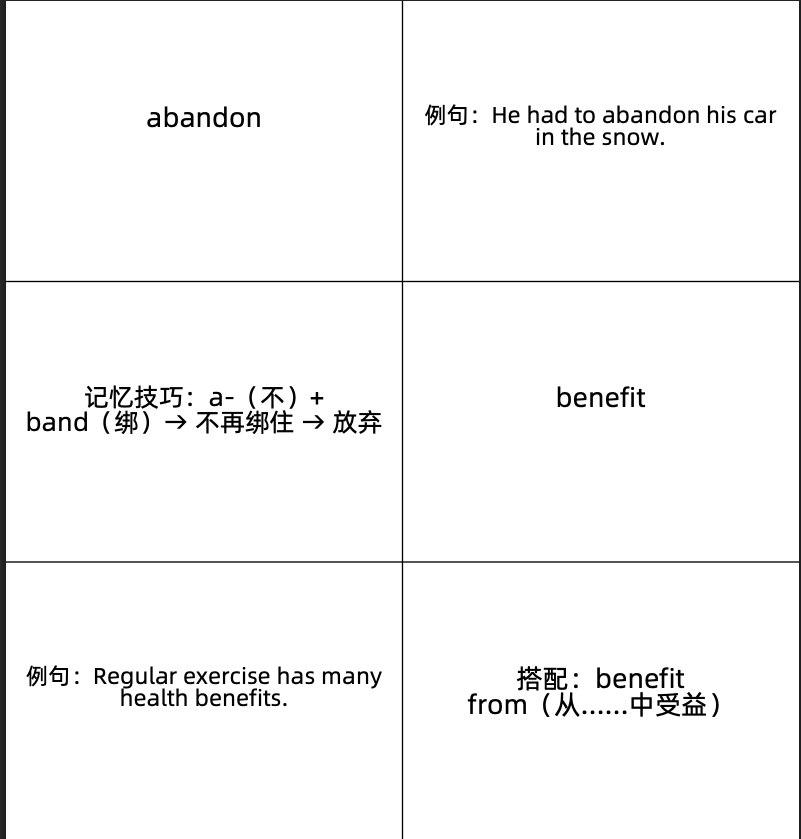
✅ 最终效果
- 每页 A4 纸包含 8 张卡片(4 行 × 2 列)
- 正面:英文单词(居中大字)
- 反面:词性、中文释义、例句、记忆技巧(自动换行,字体自适应)
- 正反面自动对齐,方便双面打印后裁剪
- 支持任意数量单词,自动分页补空
🔧 所需环境
bash
pip install reportlab确保你的项目目录下有:
Alibaba-PuHuiTi-Regular.ttf(阿里普惠体,免费可商用,下载地址)- 单词数据文件(如
words.txt)或直接写在代码中
📄 完整代码(可直接运行)
python
from reportlab.pdfgen import canvas
from reportlab.lib.pagesizes import A4
from reportlab.lib.units import mm
from reportlab.pdfbase.ttfonts import TTFont
from reportlab.pdfbase import pdfmetrics
from reportlab.platypus import Paragraph, Frame
from reportlab.lib.styles import getSampleStyleSheet, ParagraphStyle
from reportlab.lib.enums import TA_CENTER, TA_JUSTIFY
import re

def add_font():
    """注册中文字体"""
    pdfmetrics.registerFont(TTFont('Alibaba-PuHuiTi-Regular', 'Alibaba-PuHuiTi-Regular.ttf'))

def adjust_font_size(text, width, height, initial_font_size, min_font_size=6, max_font_size=16):
    """根据文本长度和单元格大小动态调整字体"""
    text_length = len(text)
    if text_length < 20:
        font_size = max_font_size
    elif text_length > 100:
        font_size = min_font_size + 2
    else:
        font_size = max_font_size - (text_length - 20) * (max_font_size - min_font_size - 2) // 80

    styles = getSampleStyleSheet()
    while font_size >= min_font_size:
        style = ParagraphStyle(
            'temp',
            parent=styles['Normal'],
            fontName='Alibaba-PuHuiTi-Regular',
            fontSize=font_size,
            alignment=TA_JUSTIFY,
            leading=font_size * 1.2,
        )
        para = Paragraph(text, style)
        w, h = para.wrap(width - 4 * mm, height - 4 * mm)
        if h <= height - 4 * mm:
            return font_size
        font_size -= 1
    return min_font_size

def draw_text_in_cell(c, text, x, y, width, height, font_size=16):
    """绘制反面内容(左对齐/两端对齐)"""
    adjusted_font_size = adjust_font_size(text, width, height, font_size)
    style = ParagraphStyle(
        'back',
        parent=getSampleStyleSheet()['Normal'],
        fontName='Alibaba-PuHuiTi-Regular',
        fontSize=adjusted_font_size,
        alignment=TA_JUSTIFY,
        leading=adjusted_font_size * 1.2,
    )
    para = Paragraph(text, style)
    frame_padding = 3 * mm
    frame = Frame(
        x + frame_padding,
        y + frame_padding,
        max(width - 2 * frame_padding, 1),
        max(height - 2 * frame_padding, 1),
        showBoundary=0
    )
    frame.addFromList([para], c)

def draw_text_in_cell1(c, text, x, y, width, height, font_size=20):
    """绘制正面内容(居中)"""
    adjusted_font_size = adjust_font_size(text, width, height, font_size, max_font_size=20)
    style = ParagraphStyle(
        'front',
        parent=getSampleStyleSheet()['Normal'],
        fontName='Alibaba-PuHuiTi-Regular',
        fontSize=adjusted_font_size,
        alignment=TA_CENTER,
        leading=adjusted_font_size,
    )
    para = Paragraph(text, style)
    frame_padding = 2 * mm
    frame = Frame(
        x + frame_padding,
        y - 20 * mm,  # 微调垂直位置
        max(width - 2 * frame_padding, 1),
        max(height - 2 * frame_padding, 1),
        showBoundary=0
    )
    frame.addFromList([para], c)

def draw_grid(c, page_width, page_height, rows, cols, page_num):
    """绘制网格线和页码"""
    row_height = page_height / rows
    col_width = page_width / cols
    for i in range(1, rows):
        c.line(0, i * row_height, page_width, i * row_height)
    for j in range(1, cols):
        c.line(j * col_width, 0, j * col_width, page_height)
    c.setFont("Alibaba-PuHuiTi-Regular", 10)
    c.drawCentredString(page_width / 2, 10 * mm, f"第 {page_num} 页")

def generate_flashcards(upload_data, output_file="english_flashcards.pdf"):
    c = canvas.Canvas(output_file, pagesize=A4)
    page_width, page_height = A4
    add_font()

    rows, cols = 4, 2
    cells_per_page = rows * cols  # 每页8个卡片

    # 清理"考点X."前缀
    cleaned_upload_data = re.sub(r'考点\d+\.\s*', '', upload_data)
    lines = [line.strip() for line in cleaned_upload_data.strip().split("\n") if line.strip()]

    # 补足8的倍数
    remainder = len(lines) % cells_per_page
    if remainder != 0:
        lines.extend(["|||"] * (cells_per_page - remainder))

    fronts, backs = [], []
    for item in lines:
        parts = item.split("|||", 1)  # 只分割一次
        fronts.append(parts[0].strip() or "无单词")
        backs.append(parts[1].strip() if len(parts) > 1 else "无释义")

    page_num = 1
    for i in range(0, len(fronts), cells_per_page):
        # 正面页
        draw_grid(c, page_width, page_height, rows, cols, page_num)
        for j in range(cells_per_page):
            idx = i + j
            if idx >= len(fronts): break
            row, col = j // cols, j % cols
            x = col * (page_width / cols)
            y = page_height - (row + 1) * (page_height / rows)
            draw_text_in_cell1(c, fronts[idx], x, y, page_width / cols, page_height / rows)
        c.showPage()
        page_num += 1

        # 反面页(左右镜像,便于双面打印)
        draw_grid(c, page_width, page_height, rows, cols, page_num)
        for j in range(cells_per_page):
            idx = i + j
            if idx >= len(backs): break
            row = j // cols
            col = (cols - 1) - (j % cols)  # 镜像列
            x = col * (page_width / cols)
            y = page_height - (row + 1) * (page_height / rows)
            draw_text_in_cell(c, backs[idx], x, y, page_width / cols, page_height / rows)
        c.showPage()
        page_num += 1

    c.save()
    print(f"✅ 单词闪卡 PDF 已生成:{output_file}")

# =============== 使用方式 ===============
if __name__ == "__main__":
    # 方式1:从字符串直接输入(推荐初学者)
    upload_data = """
考点1. abandon ||| v. 放弃,抛弃
例句:He had to abandon his car in the snow.
记忆技巧:a-(不)+ band(绑)→ 不再绑住 → 放弃

考点2. benefit ||| n. 好处;v. 使受益
例句:Regular exercise has many health benefits.
搭配:benefit from(从......中受益)

考点3. consistent ||| adj. 始终如一的,一致的
例句:She's been consistent in her support for the project.
反义词:inconsistent

考点4. diverse ||| adj. 多样的,不同的
例句:The city has a diverse population.
词根:di-(分开)+ vers(转)→ 转向不同方向 → 多样

考点5. efficient ||| adj. 高效的,有效的
例句:This machine is more efficient than the old one.
近义词:effective(但 effective 强调结果,efficient 强调资源利用)

考点6. flexible ||| adj. 灵活的;可弯曲的
例句:You need to be flexible when dealing with customers.
联想:flex(弯曲)→ 能弯 → 灵活

考点7. generate ||| v. 产生,生成
例句:Wind turbines generate electricity.
常见于科技/环保话题

考点8. highlight ||| v. 强调;n. 最精彩部分
例句:The report highlights the main problems.
写作高频词!
    """

    # 方式2:从文件读取(适合大量单词)
    # with open("words.txt", "r", encoding="utf-8") as f:
    #     upload_data = f.read()

    generate_flashcards(upload_data)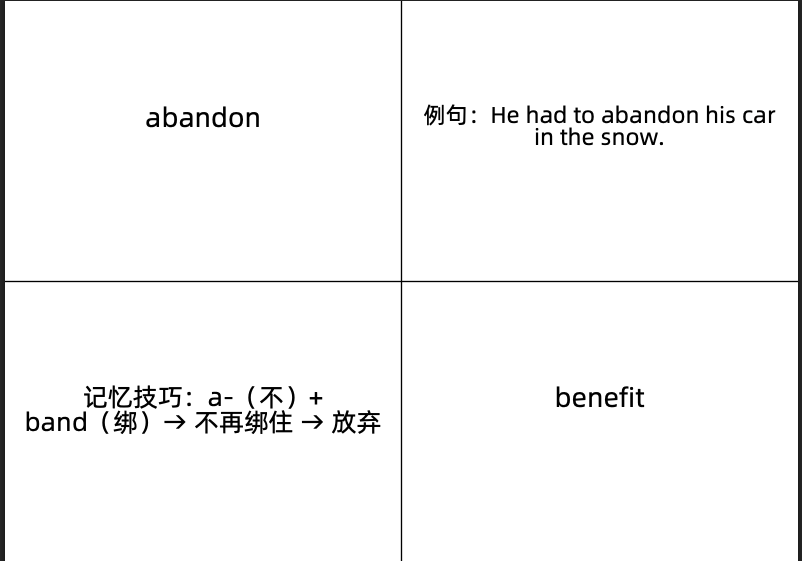
📝 使用说明
1. 准备字体
- 下载 阿里普惠体(免费可商用)
- 将
Alibaba-PuHuiTi-Regular.ttf放在代码同目录
2. 编辑单词内容
- 每行格式:
单词 ||| 释义+例句+技巧 - 可加
考点1.前缀(会被自动忽略,方便整理) - 空行会被自动跳过
3. 运行生成 PDF
bash
python flashcard_generator.py输出文件:english_flashcards.pdf
4. 打印建议
- 打印时选择 "双面打印(短边翻转)"
- 裁剪成 8 张小卡片(每张约 10.5cm × 7.4cm)
- 背面内容已镜像,确保正反面对齐!
💡 小贴士
- 单词太多?把内容存入
words.txt,用文件读取更方便。 - 想要更大字体?调整
draw_text_in_cell1中的max_font_size=20。 - 无中文字体?可替换为
Helvetica,但中文会显示方框。
🎯 总结
通过这段代码,你可以:
- 快速将单词表转为专业排版的闪卡
- 节省手动排版时间
- 提升背单词效率(实体卡片记忆效果更好!)
动手试试吧!让 Python 成为你的学习助手! 💪