Flutter鸿蒙开发实战:从零实现Dio网络请求与猫咪API调用

🌸你好呀!我是 lbb小魔仙
🌟 感谢陪伴~ 小白博主在线求友
🌿 跟着小白学Linux/Java/Python
📖 专栏汇总:
《Linux》专栏 | 《Java》专栏 | 《Python》专栏

- Flutter鸿蒙开发实战:从零实现Dio网络请求与猫咪API调用
-
- 一、项目简介
- 二、环境准备
-
- [2.1 必装软件](#2.1 必装软件)
- [2.2 创建项目](#2.2 创建项目)
- 三、项目结构设计
- 四、核心代码实现
-
- [4.1 配置依赖(pubspec.yaml)](#4.1 配置依赖(pubspec.yaml))
- [4.2 API常量配置](#4.2 API常量配置)
- [4.3 HTTP工具类封装](#4.3 HTTP工具类封装)
- [4.4 数据模型](#4.4 数据模型)
- [4.5 API服务封装](#4.5 API服务封装)
- [4.6 状态管理(Provider)](#4.6 状态管理(Provider))
- [4.7 UI组件 - 猫咪卡片](#4.7 UI组件 - 猫咪卡片)
- [4.8 页面 - 猫咪图库](#4.8 页面 - 猫咪图库)
- [4.9 主页](#4.9 主页)
- [4.10 路由配置](#4.10 路由配置)
- [4.11 应用入口](#4.11 应用入口)
- 五、运行项目
-
- [5.1 鸿蒙端运行](#5.1 鸿蒙端运行)
- [5.2 安卓端运行](#5.2 安卓端运行)
- 六、遇到的问题与解决方案
-
- [问题1:网络请求失败 - Certificate Verify Failed](#问题1:网络请求失败 - Certificate Verify Failed)
- 问题2:图片加载缓慢或超时
- [问题3:Provider 状态未更新](#问题3:Provider 状态未更新)
- 问题4:鸿蒙平台打包失败
- [问题5:import 路径报错](#问题5:import 路径报错)
- 七、总结
前言:本文记录了从零开始构建一个Flutter鸿蒙项目的完整过程,使用Dio库实现网络请求,调用猫咪图片API,并展示在鸿蒙和安卓双平台上。
一、项目简介
本项目是一个Flutter鸿蒙跨平台应用,实现了以下功能:
- 使用 Dio 库进行网络请求
- 调用 The Cat API 获取随机猫咪图片
- 使用 Provider 进行状态管理
- 支持 鸿蒙(HarmonyOS) 和 Android 双平台运行
技术栈
| 技术 | 版本 | 说明 |
|---|---|---|
| Flutter | 3.x | 跨平台UI框架 |
| Dart | 3.x | 编程语言 |
| Dio | ^5.5.0+1 | HTTP网络请求库 |
| Provider | ^6.1.2 | 状态管理 |
二、环境准备
2.1 必装软件
- Android Studio(最新版)
- Flutter SDK(需适配鸿蒙版本)
- Dart插件 + Flutter插件
验证鸿蒙适配:在终端运行
flutter --version,确认支持 ohos 平台。
2.2 创建项目
bash
# 创建Flutter项目
flutter create my_harmonyos_three

# 添加鸿蒙平台支持
flutter create --platform ohos .
三、项目结构设计
采用分层架构,职责清晰:
lib/
├── api/           # API服务层(封装网络请求)
├── components/    # 可复用UI组件
├── contents/      # 常量配置(API地址等)
├── pages/         # 页面
│   ├── Main/      # 主页
│   ├── Login/     # 登录页
│   └── Cats/      # 猫咪图库页
├── routes/        # 路由配置
├── stores/        # 状态管理(Provider)
├── utils/         # 工具类
├── viewmodels/    # 数据模型
└── main.dart      # 应用入口
架构原则
UI层 (pages) → API层 (api) → 工具层 (utils) → 数据层 (viewmodels)
                  ↓
            状态管理层 (stores)
四、核心代码实现
4.1 配置依赖(pubspec.yaml)
yaml
dependencies:
  flutter:
    sdk: flutter
  dio: ^5.5.0+1      # 网络请求
  provider: ^6.1.2   # 状态管理
  cupertino_icons: ^1.0.8
安装依赖:
bash
flutter pub get4.2 API常量配置
文件:lib/contents/api_constants.dart
dart
class ApiConstants {
  // 猫咪API
  static const String catBaseUrl = 'https://api.thecatapi.com/v1';
  static const String catImagesEndpoint = '/images/search';

  // 默认配置
  static const int defaultPageSize = 10;
  static const int defaultTimeout = 15; // 秒
}
设计思路:集中管理API地址,避免硬编码,便于后续维护和环境切换。
4.3 HTTP工具类封装
文件:lib/utils/http_util.dart
dart
import 'package:dio/dio.dart';

class HttpUtil {
  static final HttpUtil _instance = HttpUtil._internal();
  late Dio _dio;

  factory HttpUtil() => _instance;

  HttpUtil._internal() {
    _dio = Dio(BaseOptions(
      connectTimeout: const Duration(seconds: 15),
      receiveTimeout: const Duration(seconds: 15),
    ));
  }

  Dio get dio => _dio;

  // 通用GET请求
  Future<dynamic> get(String endpoint, {Map<String, dynamic>? queryParams}) async {
    try {
      final response = await _dio.get(endpoint, queryParameters: queryParams);
      return response.data;
    } on DioException catch (e) {
      throw _handleError(e);
    }
  }

  String _handleError(DioException e) {
    switch (e.type) {
      case DioExceptionType.connectionTimeout:
      case DioExceptionType.sendTimeout:
      case DioExceptionType.receiveTimeout:
        return '网络连接超时,请检查网络';
      case DioExceptionType.badResponse:
        return '服务器错误: ${e.response?.statusCode}';
      case DioExceptionType.cancel:
        return '请求已取消';
      default:
        return '网络错误: ${e.message}';
    }
  }
}
设计亮点:
- 单例模式:全局唯一实例,避免重复创建
- 统一错误处理:将DioException转换为用户友好的中文提示
4.4 数据模型
文件:lib/viewmodels/cat_model.dart
dart
class CatModel {
  final String id;
  final String url;
  final int width;
  final int height;

  CatModel({
    required this.id,
    required this.url,
    required this.width,
    required this.height,
  });

  factory CatModel.fromJson(Map<String, dynamic> json) {
    return CatModel(
      id: json['id'] ?? '',
      url: json['url'] ?? '',
      width: json['width'] ?? 0,
      height: json['height'] ?? 0,
    );
  }

  Map<String, dynamic> toJson() => {
    'id': id,
    'url': url,
    'width': width,
    'height': height,
  };
}
API返回格式:
json[{ "id": "MTgxNTAxOA", "url": "https://cdn2.thecatapi.com/images/MTgxNTAxOA.jpg", "width": 560, "height": 443 }]
4.5 API服务封装
文件:lib/api/cat_api.dart
dart
import 'package:my_harmonyos_three/utils/http_util.dart';
import 'package:my_harmonyos_three/viewmodels/cat_model.dart';
import 'package:my_harmonyos_three/contents/api_constants.dart';

class CatApi {
  static final HttpUtil _http = HttpUtil();

  // 获取猫咪图片列表(基础方法)
  static Future<List<CatModel>> getCatImages({
    int limit = 1,
    int? page,
    String? order,
    bool? hasBreeds,
    String? breedIds,
    String? categoryIds,
    int? subId,
  }) async {
    try {
      final Map<String, dynamic> queryParams = {'limit': limit};

      if (page != null) queryParams['page'] = page;
      if (order != null) queryParams['order'] = order;
      if (hasBreeds != null) queryParams['has_breeds'] = hasBreeds ? 1 : 0;
      if (breedIds != null) queryParams['breed_ids'] = breedIds;
      if (categoryIds != null) queryParams['category_ids'] = categoryIds;
      if (subId != null) queryParams['sub_id'] = subId;

      final data = await _http.get(
        '${ApiConstants.catBaseUrl}${ApiConstants.catImagesEndpoint}',
        queryParams: queryParams,
      );

      if (data is List) {
        return data.map((json) => CatModel.fromJson(json)).toList();
      } else {
        throw Exception('返回数据格式错误');
      }
    } catch (e) {
      rethrow;
    }
  }

  // 获取单张猫咪图片(简化方法)
  static Future<CatModel> getSingleCat() async {
    final cats = await getCatImages(limit: 1);
    return cats.first;
  }

  // 获取多张猫咪图片
  static Future<List<CatModel>> getMultipleCats(int count) async {
    return await getCatImages(limit: count);
  }
}
4.6 状态管理(Provider)
文件:lib/stores/cat_store.dart
dart
import 'package:flutter/material.dart';
import 'package:my_harmonyos_three/api/cat_api.dart';
import 'package:my_harmonyos_three/viewmodels/cat_model.dart';

class CatStore extends ChangeNotifier {
  List<CatModel> _cats = [];
  bool _isLoading = false;
  String? _error;
  int _currentPage = 1;

  List<CatModel> get cats => _cats;
  bool get isLoading => _isLoading;
  String? get error => _error;
  int get currentPage => _currentPage;

  // 获取猫咪图片
  Future<void> fetchCats({
    int limit = 10,
    bool hasBreeds = false,
    bool loadMore = false,
  }) async {
    if (!loadMore) {
      _currentPage = 1;
    }

    _isLoading = true;
    _error = null;
    notifyListeners();

    try {
      final newCats = await CatApi.getCatImages(
        limit: limit,
        page: _currentPage,
        hasBreeds: hasBreeds,
      );

      if (loadMore) {
        _cats.addAll(newCats);
      } else {
        _cats = newCats;
      }

      _currentPage++;
    } catch (e) {
      _error = e.toString();
    } finally {
      _isLoading = false;
      notifyListeners();
    }
  }

  // 刷新数据
  Future<void> refresh() async {
    await fetchCats(limit: _cats.length);
  }

  // 清空数据
  void clear() {
    _cats = [];
    _error = null;
    _currentPage = 1;
    notifyListeners();
  }
}
4.7 UI组件 - 猫咪卡片
文件:lib/components/cat_card.dart
dart
import 'package:flutter/material.dart';
import 'package:my_harmonyos_three/viewmodels/cat_model.dart';

class CatCard extends StatelessWidget {
  final CatModel cat;

  const CatCard({
    super.key,
    required this.cat,
  });

  @override
  Widget build(BuildContext context) {
    return Card(
      shape: RoundedRectangleBorder(
        borderRadius: BorderRadius.circular(12),
      ),
      elevation: 2,
      child: Column(
        children: [
          // 猫咪图片
          ClipRRect(
            borderRadius: const BorderRadius.vertical(
              top: Radius.circular(12),
            ),
            child: SizedBox(
              width: double.infinity,
              height: 200,
              child: Image.network(
                cat.url,
                fit: BoxFit.cover,
                loadingBuilder: (context, child, loadingProgress) {
                  if (loadingProgress == null) return child;
                  return Center(
                    child: CircularProgressIndicator(
                      value: loadingProgress.expectedTotalBytes != null
                          ? loadingProgress.cumulativeBytesLoaded /
                              loadingProgress.expectedTotalBytes!
                          : null,
                    ),
                  );
                },
                errorBuilder: (context, error, stackTrace) {
                  return Container(
                    color: Colors.grey[100],
                    child: const Center(
                      child: Icon(
                        Icons.image_not_supported,
                        size: 50,
                        color: Colors.grey,
                      ),
                    ),
                  );
                },
              ),
            ),
          ),
          // 猫咪信息
          Padding(
            padding: const EdgeInsets.all(12),
            child: Column(
              crossAxisAlignment: CrossAxisAlignment.start,
              children: [
                Text(
                  '尺寸: ${cat.width} × ${cat.height}',
                  style: const TextStyle(
                    fontSize: 14,
                    fontWeight: FontWeight.w500,
                  ),
                ),
                const SizedBox(height: 4),
                Text(
                  'ID: ${cat.id}',
                  style: TextStyle(
                    fontSize: 12,
                    color: Colors.grey[600],
                  ),
                ),
              ],
            ),
          ),
        ],
      ),
    );
  }
}
4.8 页面 - 猫咪图库
文件:lib/pages/Cats/index.dart
dart
import 'package:flutter/material.dart';
import 'package:my_harmonyos_three/api/cat_api.dart';
import 'package:my_harmonyos_three/viewmodels/cat_model.dart';
import 'package:my_harmonyos_three/components/cat_card.dart';

class CatsPage extends StatefulWidget {
  const CatsPage({super.key});

  @override
  State<CatsPage> createState() => _CatsPageState();
}

class _CatsPageState extends State<CatsPage> {
  CatModel? _cat;
  bool _isLoading = false;
  String? _error;

  @override
  void initState() {
    super.initState();
    _fetchCat();
  }

  Future<void> _fetchCat() async {
    setState(() {
      _isLoading = true;
      _error = null;
    });

    try {
      final cat = await CatApi.getSingleCat();
      setState(() {
        _cat = cat;
      });
    } catch (e) {
      setState(() {
        _error = e.toString();
      });
    } finally {
      setState(() {
        _isLoading = false;
      });
    }
  }

  @override
  Widget build(BuildContext context) {
    return Scaffold(
      appBar: AppBar(
        title: const Text('随机猫咪'),
        actions: [
          IconButton(
            icon: const Icon(Icons.refresh),
            onPressed: _fetchCat,
          ),
        ],
      ),
      body: _buildBody(),
    );
  }

  Widget _buildBody() {
    if (_isLoading) {
      return const Center(child: CircularProgressIndicator());
    }

    if (_error != null) {
      return Center(
        child: Column(
          mainAxisAlignment: MainAxisAlignment.center,
          children: [
            const Icon(Icons.error_outline, size: 64, color: Colors.red),
            const SizedBox(height: 16),
            Text('加载失败: $_error'),
            const SizedBox(height: 16),
            ElevatedButton(
              onPressed: _fetchCat,
              child: const Text('重新获取'),
            ),
          ],
        ),
      );
    }

    if (_cat == null) {
      return const Center(child: Text('暂无猫咪图片'));
    }

    return SingleChildScrollView(
      child: Center(
        child: Padding(
          padding: const EdgeInsets.all(20),
          child: Column(
            mainAxisAlignment: MainAxisAlignment.center,
            children: [
              CatCard(cat: _cat!),
              const SizedBox(height: 20),
              Wrap(
                spacing: 12,
                children: [
                  ElevatedButton.icon(
                    onPressed: _fetchCat,
                    icon: const Icon(Icons.refresh),
                    label: const Text('换一张'),
                  ),
                  OutlinedButton.icon(
                    onPressed: () {
                      // 保存功能待实现
                    },
                    icon: const Icon(Icons.download),
                    label: const Text('保存'),
                  ),
                ],
              ),
              const SizedBox(height: 20),
              Container(
                padding: const EdgeInsets.all(16),
                decoration: BoxDecoration(
                  color: Colors.grey[50],
                  borderRadius: BorderRadius.circular(12),
                ),
                child: Column(
                  crossAxisAlignment: CrossAxisAlignment.start,
                  children: [
                    const Text(
                      '图片信息',
                      style: TextStyle(
                        fontSize: 16,
                        fontWeight: FontWeight.bold,
                      ),
                    ),
                    const SizedBox(height: 8),
                    Text('ID: ${_cat!.id}'),
                    Text('宽度: ${_cat!.width} 像素'),
                    Text('高度: ${_cat!.height} 像素'),
                    Text('URL: ${_cat!.url}'),
                  ],
                ),
              ),
            ],
          ),
        ),
      ),
    );
  }
}
4.9 主页
文件:lib/pages/Main/index.dart
dart
import 'package:flutter/material.dart';

class MainPage extends StatelessWidget {
  const MainPage({super.key});

  @override
  Widget build(BuildContext context) {
    return Scaffold(
      appBar: AppBar(
        title: const Text('My HarmonyOS Three'),
      ),
      body: Center(
        child: Column(
          mainAxisAlignment: MainAxisAlignment.center,
          children: [
            const Text(
              '欢迎使用 My HarmonyOS Three',
              style: TextStyle(fontSize: 24, fontWeight: FontWeight.bold),
            ),
            const SizedBox(height: 40),
            SizedBox(
              width: 200,
              child: ElevatedButton.icon(
                onPressed: () {
                  Navigator.pushNamed(context, '/cats');
                },
                icon: const Icon(Icons.pets),
                label: const Text('猫咪图库'),
                style: ElevatedButton.styleFrom(
                  padding: const EdgeInsets.symmetric(vertical: 16),
                ),
              ),
            ),
            const SizedBox(height: 16),
            SizedBox(
              width: 200,
              child: OutlinedButton(
                onPressed: () {
                  Navigator.pushNamed(context, '/login');
                },
                child: const Text('用户登录'),
              ),
            ),
          ],
        ),
      ),
    );
  }
}
4.10 路由配置
文件:lib/routes/index.dart
dart
import 'package:flutter/material.dart';
import 'package:my_harmonyos_three/pages/Login/index.dart';
import 'package:my_harmonyos_three/pages/Main/index.dart';
import 'package:my_harmonyos_three/pages/Cats/index.dart';

// 返回App根组件
Widget getRootWidget() {
  return MaterialApp(
    initialRoute: '/',
    routes: getRootRoutes(),
  );
}

// 返回该App的路由配置
Map<String, Widget Function(BuildContext)> getRootRoutes() {
  return {
    '/': (context) => const MainPage(),
    '/login': (context) => const LoginPage(),
    '/cats': (context) => const CatsPage(),
  };
}
4.11 应用入口
文件:lib/main.dart
dart
import 'package:flutter/material.dart';
import 'package:provider/provider.dart';
import 'package:my_harmonyos_three/routes/index.dart';
import 'package:my_harmonyos_three/stores/cat_store.dart';

void main() {
  runApp(
    MultiProvider(
      providers: [
        ChangeNotifierProvider(create: (_) => CatStore()),
      ],
      child: getRootWidget(),
    ),
  );
}
五、运行项目
5.1 鸿蒙端运行
- 打开 Deveco Studio
- 选择鸿蒙模拟器
- 点击运行按钮
5.2 安卓端运行
- 选择安卓模拟器
- 点击运行按钮
六、遇到的问题与解决方案
问题1:网络请求失败 - Certificate Verify Failed
错误现象:
DioError: HandshakeException: Handshake error in client原因分析:
- HTTPS证书验证问题
- 部分模拟器缺少CA证书
解决方案:
dart
// 在 HttpUtil._internal() 中添加
_dio = Dio(BaseOptions(
  connectTimeout: const Duration(seconds: 15),
  receiveTimeout: const Duration(seconds: 15),
));

// 开发环境可临时禁用SSL验证(不推荐用于生产)
(_dio.httpClientAdapter as DefaultHttpClientAdapter).onHttpClientCreate = (client) {
  client.badCertificateCallback = (cert, host, port) => true;
  return client;
};
问题2:图片加载缓慢或超时
原因分析:
- 网络环境不稳定
- 图片服务器响应慢
解决方案:
dart
// 1. 增加超时时间
_dio = Dio(BaseOptions(
  connectTimeout: const Duration(seconds: 30),  // 改为30秒
  receiveTimeout: const Duration(seconds: 30),
));

// 2. 添加图片缓存
// 在 pubspec.yaml 添加
dependencies:
  cached_network_image: ^3.3.0

// 使用 CachedNetworkImage 替代 Image.network
CachedNetworkImage(
  imageUrl: cat.url,
  placeholder: (context, url) => CircularProgressIndicator(),
  errorWidget: (context, url, error) => Icon(Icons.error),
)
问题3:Provider 状态未更新
错误现象:
界面没有随数据变化而刷新
原因分析:
- 忘记调用
notifyListeners() - 没有使用
Consumer或context.watch
解决方案:
dart
// 方案1:确保状态更新后调用 notifyListeners()
_cats = newCats;
notifyListeners();  // 不要忘记这行

// 方案2:在UI中使用 Consumer
Consumer<CatStore>(
  builder: (context, catStore, child) {
    if (catStore.isLoading) {
      return CircularProgressIndicator();
    }
    return YourWidget();
  },
)
问题4:鸿蒙平台打包失败
错误现象:
Execution failed for task ':ohos:assembleDebug'原因分析:
- Flutter SDK 未适配鸿蒙
- DevEco Studio 配置问题
解决方案:
-
确认使用鸿蒙适配版 Flutter SDK
-
安装 DevEco Studio 并配置环境变量
-
重新创建鸿蒙项目:
bashflutter create --platform ohos .
问题5:import 路径报错
错误现象:
Target of URI doesn't exist: 'package:my_harmonyos_three/...'原因分析:
- 项目名与
pubspec.yaml中的name不一致
解决方案:
确保 import 路径与 pubspec.yaml 中的 name 一致:
yaml
# pubspec.yaml
name: my_harmonyos_three  # 与项目名一致
dart
// 正确的import方式
import 'package:my_harmonyos_three/utils/http_util.dart';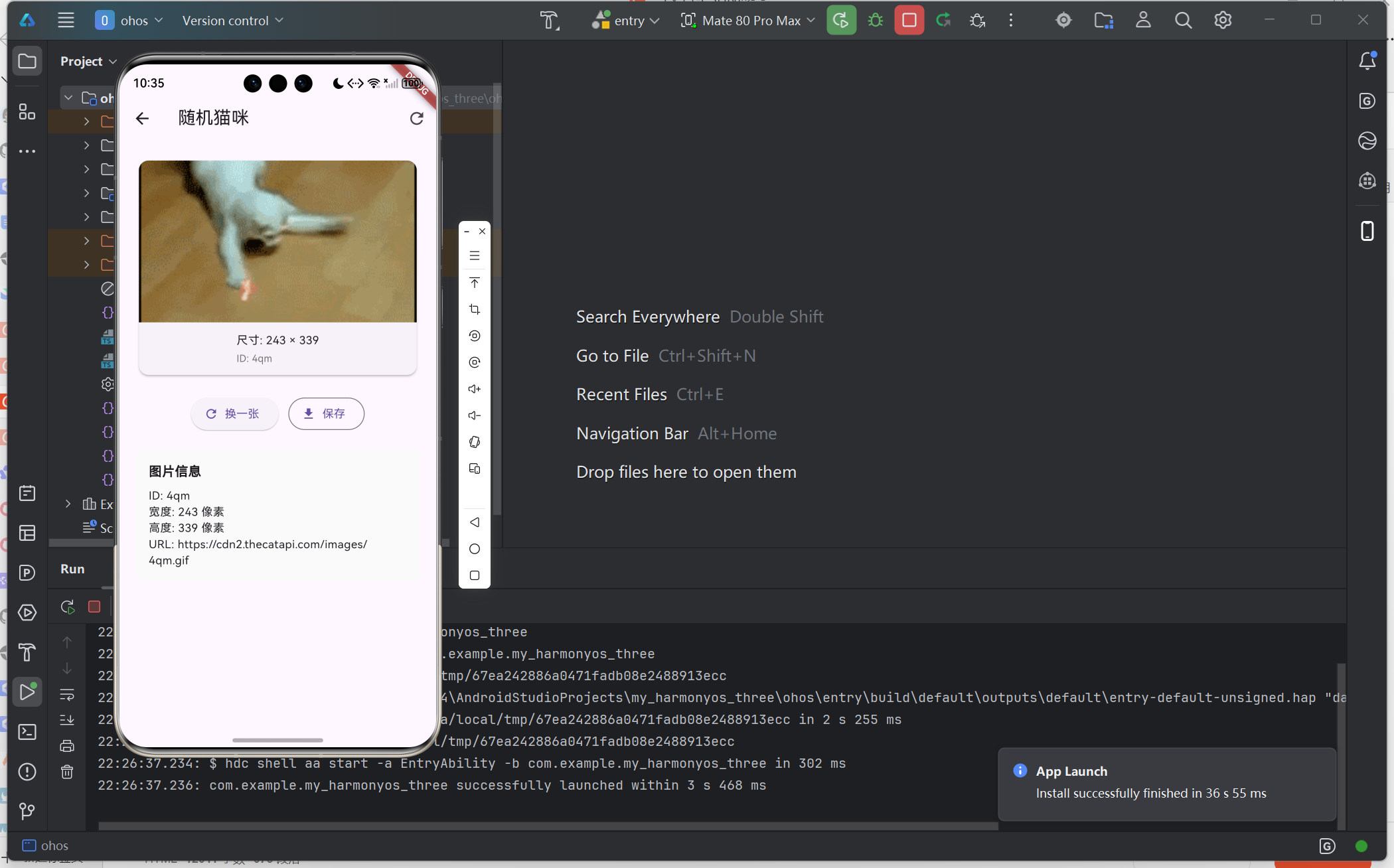
七、总结
本项目从零实现了一个 Flutter 鸿蒙网络请求应用,涵盖了:
- Dio 网络请求封装
- Provider 状态管理
- 分层架构设计
- 鸿蒙/安卓双平台适配
学习收获
| 要点 | 说明 |
|---|---|
| 单例模式 | HttpUtil 采用单例,全局共享 |
| 错误处理 | 统一处理网络异常,提升用户体验 |
| 组件化设计 | CatCard 可复用,职责单一 |
| 状态管理 | Provider 实现数据与UI分离 |
后续优化方向
- 添加图片缓存机制
- 实现下拉刷新/上拉加载更多
- 添加收藏功能
- 接入真实的用户登录API
如果本文对你有帮助,欢迎点赞收藏!有问题欢迎评论区讨论。
欢迎加入开源鸿蒙跨平台社区:
https://openharmonycrossplatform.csdn.net
📕个人领域 :Linux/C++/java/AI
🚀 个人主页 :有点流鼻涕 · CSDN
💬 座右铭 : "向光而行,沐光而生。"
