Flutter书法印章制作记录应用开发教程
项目简介
书法印章制作记录应用是一款专为印章制作工艺师设计的管理工具,帮助记录和追踪印章制作的全过程。应用涵盖了从设计到完成的每个制作步骤,同时管理材料库存、客户信息和业务统计,是印章制作行业的数字化管理解决方案。
运行效果图
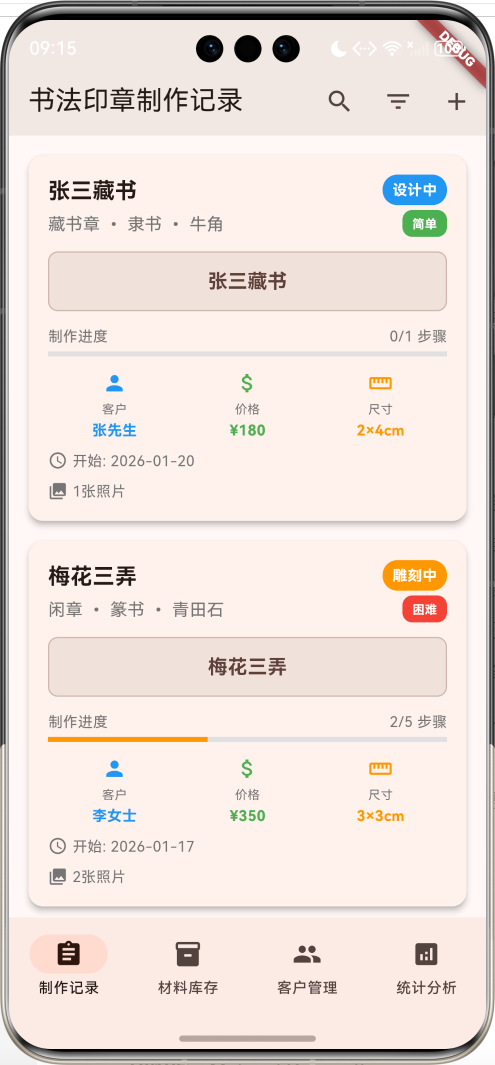
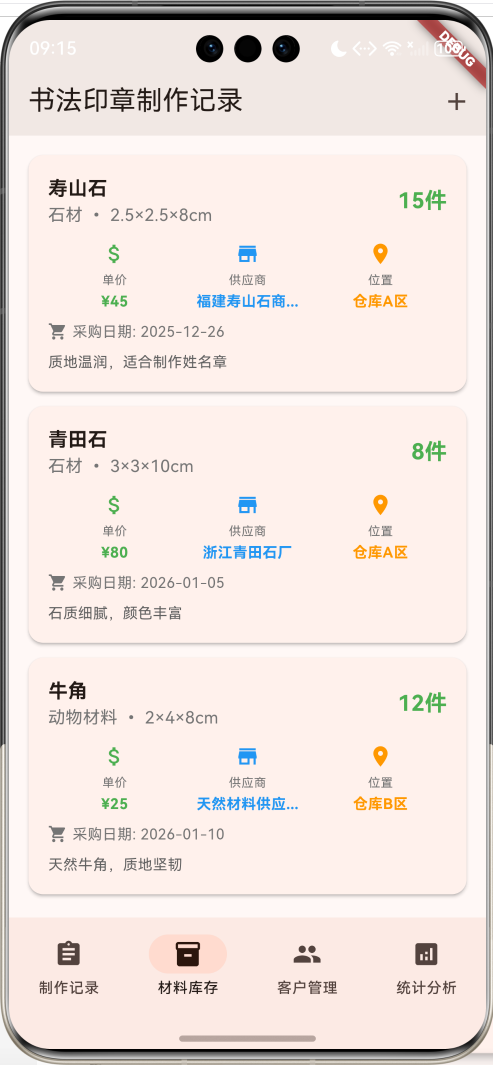
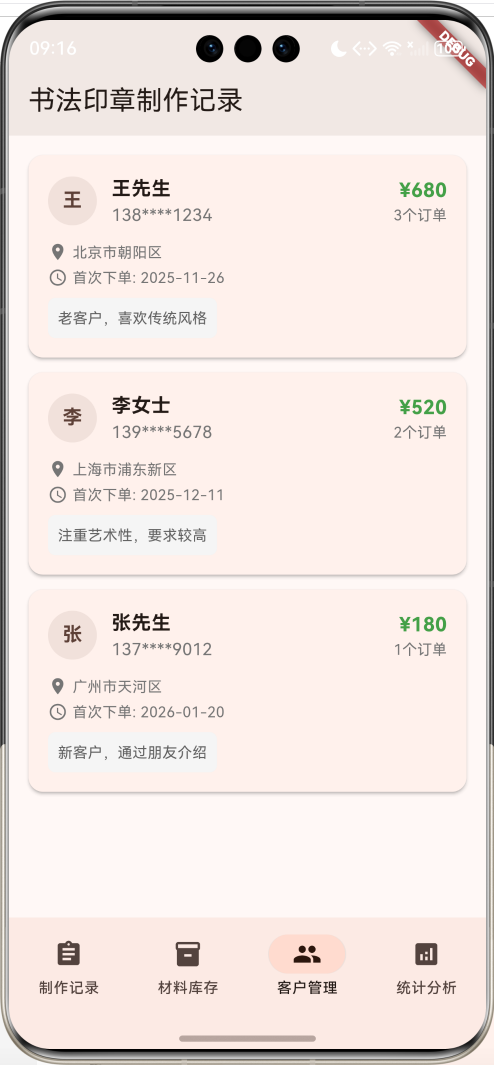
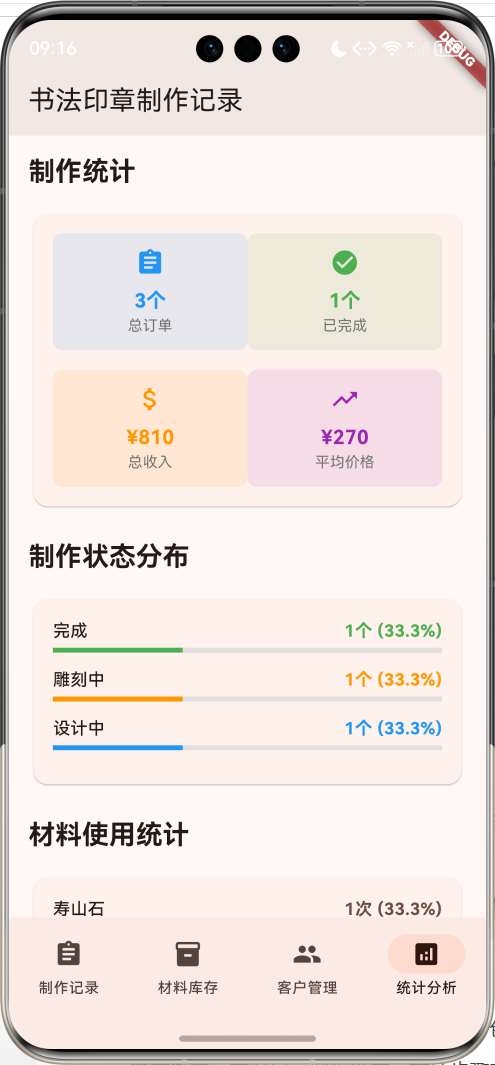
核心功能特性
- 制作记录管理:完整记录印章制作过程,包括设计、雕刻、打磨等各个步骤
- 进度追踪:实时显示制作进度,支持步骤完成状态管理
- 材料库存管理:管理各类印章制作材料,监控库存状态
- 客户信息管理:维护客户档案,记录订单历史和消费统计
- 多维度筛选:支持按状态、类型、书体等条件筛选记录
- 统计分析:提供制作统计、材料使用分析、客户统计等数据洞察
- 智能提醒:库存不足提醒、制作进度监控
- 动画效果:流畅的界面动画,提升用户体验
技术架构
开发环境
- 框架:Flutter 3.x
- 开发语言:Dart
- UI组件:Material Design 3
- 状态管理:StatefulWidget
- 数据存储:内存存储(可扩展为本地数据库)
项目结构
lib/
├── main.dart                 # 应用入口和主要逻辑
├── models/                   # 数据模型(本教程中集成在main.dart)
│   ├── seal_making_record.dart
│   ├── process_step.dart
│   ├── material_inventory.dart
│   └── client_info.dart
├── pages/                    # 页面组件
│   ├── records_page.dart
│   ├── materials_page.dart
│   ├── clients_page.dart
│   └── statistics_page.dart
└── widgets/                  # 自定义组件
    ├── record_card.dart
    ├── material_card.dart
    └── client_card.dart
数据模型设计
1. 印章制作记录模型(SealMakingRecord)
dart
class SealMakingRecord {
  final String id;              // 记录ID
  final String sealName;        // 印章名称
  final String content;         // 印章内容/文字
  final String sealType;        // 印章类型:姓名章、闲章、藏书章等
  final String style;           // 书体:篆书、隶书、楷书等
  final String material;        // 材质:寿山石、青田石、牛角等
  final String size;            // 尺寸
  final DateTime startDate;     // 开始制作日期
  final DateTime? completionDate; // 完成日期
  final String status;          // 状态:设计中、雕刻中、完成、暂停
  final String clientName;      // 客户姓名
  final String clientContact;   // 客户联系方式
  final double price;           // 价格
  final String notes;           // 备注
  final List<String> photos;    // 制作过程照片
  final List<ProcessStep> processSteps; // 制作步骤
  final String difficulty;      // 难度等级:简单、中等、困难
}设计要点:
- 使用可选的
completionDate来区分进行中和已完成的记录 processSteps列表记录详细的制作步骤photos列表存储制作过程的图片路径difficulty字段帮助评估制作复杂度
2. 制作步骤模型(ProcessStep)
dart
class ProcessStep {
  final String id;              // 步骤ID
  final String stepName;        // 步骤名称
  final String description;     // 步骤描述
  final DateTime? completedDate; // 完成日期
  final bool isCompleted;       // 是否完成
  final String notes;           // 步骤备注
  final List<String> photos;    // 步骤照片
  final int estimatedHours;     // 预计耗时
  final int actualHours;        // 实际耗时
}设计要点:
- 支持时间估算和实际用时对比
- 每个步骤可以独立记录照片和备注
isCompleted字段用于进度计算
3. 材料库存模型(MaterialInventory)
dart
class MaterialInventory {
  final String id;              // 材料ID
  final String materialName;    // 材料名称
  final String category;        // 分类:石材、木材、金属等
  final String specification;   // 规格
  final int quantity;           // 数量
  final double unitPrice;       // 单价
  final String supplier;        // 供应商
  final DateTime purchaseDate;  // 采购日期
  final String storageLocation; // 存放位置
  final String notes;           // 备注
}设计要点:
- 支持多种材料分类管理
- 记录采购信息便于成本核算
storageLocation帮助快速定位材料
4. 客户信息模型(ClientInfo)
dart
class ClientInfo {
  final String id;              // 客户ID
  final String name;            // 姓名
  final String phone;           // 电话
  final String email;           // 邮箱
  final String address;         // 地址
  final DateTime firstOrderDate; // 首次下单日期
  final int totalOrders;        // 总订单数
  final double totalSpent;      // 总消费金额
  final String notes;           // 备注
  final List<String> orderHistory; // 订单历史
}设计要点:
- 记录客户的完整消费历史
- 支持客户价值分析
orderHistory关联具体的制作记录
核心功能实现
1. 制作记录管理
记录列表展示
dart
Widget _buildRecordCard(SealMakingRecord record) {
  final completedSteps = record.processSteps.where((step) => step.isCompleted).length;
  final totalSteps = record.processSteps.length;
  final progress = totalSteps > 0 ? completedSteps / totalSteps : 0.0;

  return Card(
    elevation: 4,
    margin: const EdgeInsets.only(bottom: 16),
    child: InkWell(
      onTap: () => _showRecordDetail(record),
      child: Padding(
        padding: const EdgeInsets.all(16),
        child: Column(
          crossAxisAlignment: CrossAxisAlignment.start,
          children: [
            // 标题和状态
            Row(
              children: [
                Expanded(
                  child: Column(
                    crossAxisAlignment: CrossAxisAlignment.start,
                    children: [
                      Text(record.sealName, style: TextStyle(fontSize: 18, fontWeight: FontWeight.bold)),
                      Text('${record.sealType} • ${record.style} • ${record.material}'),
                    ],
                  ),
                ),
                Container(
                  padding: EdgeInsets.symmetric(horizontal: 8, vertical: 4),
                  decoration: BoxDecoration(
                    color: _getStatusColor(record.status),
                    borderRadius: BorderRadius.circular(12),
                  ),
                  child: Text(record.status, style: TextStyle(color: Colors.white)),
                ),
              ],
            ),

            // 印章内容展示
            Container(
              padding: EdgeInsets.all(12),
              decoration: BoxDecoration(
                color: Colors.brown.withValues(alpha: 0.1),
                borderRadius: BorderRadius.circular(8),
                border: Border.all(color: Colors.brown.withValues(alpha: 0.3)),
              ),
              child: Center(
                child: Text(record.content, style: TextStyle(fontSize: 16, fontWeight: FontWeight.bold)),
              ),
            ),

            // 进度条
            LinearProgressIndicator(
              value: progress,
              backgroundColor: Colors.grey.shade300,
              valueColor: AlwaysStoppedAnimation<Color>(_getStatusColor(record.status)),
            ),
          ],
        ),
      ),
    ),
  );
}实现要点:
- 动态计算制作进度百分比
- 使用不同颜色表示制作状态
- 印章内容使用特殊样式突出显示
- 支持点击查看详情
多维度筛选功能
dart
List<SealMakingRecord> _getFilteredRecords() {
  return _sealRecords.where((record) {
    // 搜索过滤
    if (_searchQuery.isNotEmpty) {
      final query = _searchQuery.toLowerCase();
      if (!record.sealName.toLowerCase().contains(query) &&
          !record.content.toLowerCase().contains(query) &&
          !record.clientName.toLowerCase().contains(query)) {
        return false;
      }
    }

    // 状态过滤
    if (_selectedStatus != null && record.status != _selectedStatus) {
      return false;
    }

    // 类型过滤
    if (_selectedType != null && record.sealType != _selectedType) {
      return false;
    }

    // 书体过滤
    if (_selectedStyle != null && record.style != _selectedStyle) {
      return false;
    }

    // 完成状态过滤
    if (_showCompletedOnly && record.status != '完成') {
      return false;
    }

    return true;
  }).toList()..sort((a, b) => b.startDate.compareTo(a.startDate));
}实现要点:
- 支持文本搜索(印章名称、内容、客户姓名)
- 多个筛选条件可以组合使用
- 结果按开始日期倒序排列
- 实时筛选,无需刷新页面
2. 材料库存管理
库存状态监控
dart
Widget _buildMaterialCard(MaterialInventory material) {
  final isLowStock = material.quantity < 5;

  return Card(
    child: Padding(
      padding: const EdgeInsets.all(16),
      child: Column(
        children: [
          Row(
            children: [
              Expanded(
                child: Column(
                  crossAxisAlignment: CrossAxisAlignment.start,
                  children: [
                    Text(material.materialName, style: TextStyle(fontSize: 16, fontWeight: FontWeight.bold)),
                    Text('${material.category} • ${material.specification}'),
                  ],
                ),
              ),
              Column(
                crossAxisAlignment: CrossAxisAlignment.end,
                children: [
                  Text(
                    '${material.quantity}件',
                    style: TextStyle(
                      fontSize: 18,
                      fontWeight: FontWeight.bold,
                      color: isLowStock ? Colors.red : Colors.green,
                    ),
                  ),
                  if (isLowStock)
                    Container(
                      padding: EdgeInsets.symmetric(horizontal: 6, vertical: 2),
                      decoration: BoxDecoration(
                        color: Colors.red,
                        borderRadius: BorderRadius.circular(8),
                      ),
                      child: Text('库存不足', style: TextStyle(color: Colors.white, fontSize: 10)),
                    ),
                ],
              ),
            ],
          ),
        ],
      ),
    ),
  );
}实现要点:
- 自动检测库存不足(数量<5)
- 使用颜色区分库存状态
- 显示库存不足警告标签
- 记录供应商和采购信息
3. 客户管理系统
客户信息展示
dart
Widget _buildClientCard(ClientInfo client) {
  return Card(
    child: InkWell(
      onTap: () => _showClientDetail(client),
      child: Padding(
        padding: const EdgeInsets.all(16),
        child: Column(
          children: [
            Row(
              children: [
                CircleAvatar(
                  backgroundColor: Colors.brown.withValues(alpha: 0.1),
                  child: Text(client.name.isNotEmpty ? client.name[0] : '?'),
                ),
                SizedBox(width: 12),
                Expanded(
                  child: Column(
                    crossAxisAlignment: CrossAxisAlignment.start,
                    children: [
                      Text(client.name, style: TextStyle(fontSize: 16, fontWeight: FontWeight.bold)),
                      Text(client.phone),
                    ],
                  ),
                ),
                Column(
                  crossAxisAlignment: CrossAxisAlignment.end,
                  children: [
                    Text('¥${client.totalSpent.toStringAsFixed(0)}',
                         style: TextStyle(fontSize: 16, fontWeight: FontWeight.bold, color: Colors.green.shade600)),
                    Text('${client.totalOrders}个订单'),
                  ],
                ),
              ],
            ),
          ],
        ),
      ),
    ),
  );
}实现要点:
- 使用头像显示客户姓名首字母
- 突出显示客户价值(总消费金额)
- 记录客户的订单统计
- 支持点击查看详细信息
4. 统计分析功能
总体统计
dart
Widget _buildOverallStatsCard() {
  final totalRecords = _sealRecords.length;
  final completedRecords = _sealRecords.where((r) => r.status == '完成').length;
  final totalRevenue = _sealRecords.fold(0.0, (sum, record) => sum + record.price);
  final avgPrice = totalRecords > 0 ? totalRevenue / totalRecords : 0.0;

  return Card(
    child: Padding(
      padding: const EdgeInsets.all(16),
      child: Column(
        children: [
          Row(
            children: [
              Expanded(child: _buildStatItem('总订单', '$totalRecords个', Icons.assignment, Colors.blue)),
              Expanded(child: _buildStatItem('已完成', '$completedRecords个', Icons.check_circle, Colors.green)),
            ],
          ),
          SizedBox(height: 16),
          Row(
            children: [
              Expanded(child: _buildStatItem('总收入', '¥${totalRevenue.toStringAsFixed(0)}', Icons.attach_money, Colors.orange)),
              Expanded(child: _buildStatItem('平均价格', '¥${avgPrice.toStringAsFixed(0)}', Icons.trending_up, Colors.purple)),
            ],
          ),
        ],
      ),
    ),
  );
}实现要点:
- 计算总订单数和完成率
- 统计总收入和平均价格
- 使用图标和颜色区分不同指标
- 数据实时更新
状态分布统计
dart
Widget _buildStatusDistributionCard() {
  final statusStats = <String, int>{};
  for (final record in _sealRecords) {
    statusStats[record.status] = (statusStats[record.status] ?? 0) + 1;
  }

  return Card(
    child: Padding(
      padding: const EdgeInsets.all(16),
      child: Column(
        children: statusStats.entries.map((entry) {
          final percentage = entry.value / _sealRecords.length;
          return Column(
            children: [
              Row(
                mainAxisAlignment: MainAxisAlignment.spaceBetween,
                children: [
                  Text(entry.key),
                  Text('${entry.value}个 (${(percentage * 100).toStringAsFixed(1)}%)'),
                ],
              ),
              LinearProgressIndicator(
                value: percentage,
                valueColor: AlwaysStoppedAnimation<Color>(_getStatusColor(entry.key)),
              ),
            ],
          );
        }).toList(),
      ),
    ),
  );
}实现要点:
- 统计各状态的记录数量
- 计算百分比分布
- 使用进度条可视化比例
- 颜色与状态保持一致
动画效果实现
1. 页面淡入动画
dart
void _setupAnimations() {
  _fadeAnimationController = AnimationController(
    duration: const Duration(milliseconds: 800),
    vsync: this,
  );

  _fadeAnimation = Tween<double>(
    begin: 0.0,
    end: 1.0,
  ).animate(CurvedAnimation(
    parent: _fadeAnimationController,
    curve: Curves.easeInOut,
  ));

  _fadeAnimationController.forward();
}

// 在build方法中使用
FadeTransition(
  opacity: _fadeAnimation,
  child: IndexedStack(
    index: _selectedIndex,
    children: [
      _buildRecordsPage(),
      _buildMaterialsPage(),
      _buildClientsPage(),
      _buildStatisticsPage(),
    ],
  ),
)
2. 进度条动画
dart
AnimatedBuilder(
  animation: _progressAnimation,
  builder: (context, child) {
    return LinearProgressIndicator(
      value: progress * _progressAnimation.value,
      backgroundColor: Colors.grey.shade300,
      valueColor: AlwaysStoppedAnimation<Color>(_getStatusColor(record.status)),
    );
  },
)动画特点:
- 页面切换时的平滑淡入效果
- 进度条的动态加载动画
- 使用不同的缓动曲线增强视觉效果
用户界面设计
1. 色彩方案
dart
theme: ThemeData(
  colorScheme: ColorScheme.fromSeed(seedColor: Colors.brown),
  useMaterial3: true,
),设计理念:
- 主色调使用棕色,符合印章制作的传统文化氛围
- 采用Material Design 3设计规范
- 状态颜色:蓝色(设计中)、橙色(雕刻中)、绿色(完成)、红色(取消)
2. 卡片设计
dart
Card(
  elevation: 4,
  margin: const EdgeInsets.only(bottom: 16),
  child: InkWell(
    onTap: () => _showRecordDetail(record),
    child: Padding(
      padding: const EdgeInsets.all(16),
      child: // 卡片内容
    ),
  ),
)设计要点:
- 使用阴影增强层次感
- 支持点击交互
- 统一的内边距和外边距
- 圆角设计更加现代
3. 信息层次
dart
Widget _buildInfoItem(IconData icon, String label, String value, Color color) {
  return Column(
    children: [
      Icon(icon, color: color, size: 20),
      SizedBox(height: 4),
      Text(label, style: TextStyle(fontSize: 10, color: Colors.grey.shade600)),
      SizedBox(height: 2),
      Text(value, style: TextStyle(fontSize: 12, fontWeight: FontWeight.bold, color: color)),
    ],
  );
}设计原则:
- 图标+标签+数值的三层信息结构
- 使用颜色区分不同类型的信息
- 字体大小层次分明
数据管理策略
1. 示例数据初始化
dart
void _initializeData() {
  _sealRecords = [
    SealMakingRecord(
      id: '1',
      sealName: '王羲之印',
      content: '王羲之印',
      sealType: '姓名章',
      style: '篆书',
      material: '寿山石',
      size: '2.5×2.5cm',
      startDate: DateTime.now().subtract(const Duration(days: 15)),
      completionDate: DateTime.now().subtract(const Duration(days: 3)),
      status: '完成',
      clientName: '王先生',
      clientContact: '138****1234',
      price: 280.0,
      notes: '客户要求古朴风格,字体要求工整',
      photos: ['design_1.jpg', 'carving_1.jpg', 'finished_1.jpg'],
      processSteps: [
        ProcessStep(
          id: '1-1',
          stepName: '设计稿',
          description: '根据客户要求设计印章布局和字体',
          completedDate: DateTime.now().subtract(const Duration(days: 14)),
          isCompleted: true,
          notes: '采用汉印风格,布局均匀',
          photos: ['design_sketch.jpg'],
          estimatedHours: 2,
          actualHours: 3,
        ),
        // 更多步骤...
      ],
      difficulty: '中等',
    ),
    // 更多记录...
  ];
}
2. 数据筛选和搜索
dart
// 搜索功能
void _showSearchDialog() {
  showDialog(
    context: context,
    builder: (context) => AlertDialog(
      title: const Text('搜索记录'),
      content: TextField(
        autofocus: true,
        decoration: const InputDecoration(
          hintText: '输入印章名称、内容或客户姓名',
          prefixIcon: Icon(Icons.search),
        ),
        onChanged: (value) => _searchQuery = value,
        onSubmitted: (value) {
          Navigator.of(context).pop();
          setState(() {});
        },
      ),
      actions: [
        TextButton(onPressed: () => Navigator.of(context).pop(), child: const Text('取消')),
        ElevatedButton(
          onPressed: () {
            Navigator.of(context).pop();
            setState(() {});
          },
          child: const Text('搜索'),
        ),
      ],
    ),
  );
}
扩展功能建议
1. 数据持久化
dart
// 使用SharedPreferences存储数据
import 'package:shared_preferences/shared_preferences.dart';
import 'dart:convert';

class DataManager {
  static const String _recordsKey = 'seal_records';
  static const String _materialsKey = 'materials';
  static const String _clientsKey = 'clients';

  static Future<void> saveRecords(List<SealMakingRecord> records) async {
    final prefs = await SharedPreferences.getInstance();
    final recordsJson = records.map((r) => r.toJson()).toList();
    await prefs.setString(_recordsKey, json.encode(recordsJson));
  }

  static Future<List<SealMakingRecord>> loadRecords() async {
    final prefs = await SharedPreferences.getInstance();
    final recordsString = prefs.getString(_recordsKey);
    if (recordsString != null) {
      final recordsJson = json.decode(recordsString) as List;
      return recordsJson.map((json) => SealMakingRecord.fromJson(json)).toList();
    }
    return [];
  }
}
2. 图片管理
dart
// 使用image_picker选择图片
import 'package:image_picker/image_picker.dart';

class ImageManager {
  static final ImagePicker _picker = ImagePicker();

  static Future<String?> pickImage() async {
    final XFile? image = await _picker.pickImage(source: ImageSource.gallery);
    return image?.path;
  }

  static Future<List<String>> pickMultipleImages() async {
    final List<XFile> images = await _picker.pickMultiImage();
    return images.map((image) => image.path).toList();
  }
}
3. 导出功能
dart
// 导出制作记录为PDF
import 'package:pdf/pdf.dart';
import 'package:pdf/widgets.dart' as pw;

class ExportManager {
  static Future<void> exportRecordToPDF(SealMakingRecord record) async {
    final pdf = pw.Document();

    pdf.addPage(
      pw.Page(
        build: (pw.Context context) {
          return pw.Column(
            crossAxisAlignment: pw.CrossAxisAlignment.start,
            children: [
              pw.Text('印章制作记录', style: pw.TextStyle(fontSize: 24, fontWeight: pw.FontWeight.bold)),
              pw.SizedBox(height: 20),
              pw.Text('印章名称: ${record.sealName}'),
              pw.Text('印章内容: ${record.content}'),
              pw.Text('印章类型: ${record.sealType}'),
              pw.Text('书体: ${record.style}'),
              pw.Text('材质: ${record.material}'),
              pw.Text('尺寸: ${record.size}'),
              pw.Text('客户: ${record.clientName}'),
              pw.Text('价格: ¥${record.price}'),
              pw.SizedBox(height: 20),
              pw.Text('制作步骤:', style: pw.TextStyle(fontSize: 18, fontWeight: pw.FontWeight.bold)),
              ...record.processSteps.map((step) => pw.Text('• ${step.stepName}: ${step.description}')),
            ],
          );
        },
      ),
    );

    // 保存PDF文件
    // final output = await getTemporaryDirectory();
    // final file = File("${output.path}/seal_record_${record.id}.pdf");
    // await file.writeAsBytes(await pdf.save());
  }
}
4. 通知提醒
dart
// 使用flutter_local_notifications实现提醒
import 'package:flutter_local_notifications/flutter_local_notifications.dart';

class NotificationManager {
  static final FlutterLocalNotificationsPlugin _notifications = FlutterLocalNotificationsPlugin();

  static Future<void> initialize() async {
    const AndroidInitializationSettings initializationSettingsAndroid =
        AndroidInitializationSettings('@mipmap/ic_launcher');

    const InitializationSettings initializationSettings = InitializationSettings(
      android: initializationSettingsAndroid,
    );

    await _notifications.initialize(initializationSettings);
  }

  static Future<void> scheduleReminder(String title, String body, DateTime scheduledDate) async {
    await _notifications.schedule(
      0,
      title,
      body,
      scheduledDate,
      const NotificationDetails(
        android: AndroidNotificationDetails(
          'seal_making_channel',
          '印章制作提醒',
          channelDescription: '印章制作进度和库存提醒',
          importance: Importance.max,
          priority: Priority.high,
        ),
      ),
    );
  }
}
性能优化建议
1. 列表优化
dart
// 使用ListView.builder进行懒加载
ListView.builder(
  itemCount: filteredRecords.length,
  itemBuilder: (context, index) {
    final record = filteredRecords[index];
    return _buildRecordCard(record);
  },
)

// 对于大量数据,可以使用分页加载
class PaginatedRecordsList extends StatefulWidget {
  @override
  _PaginatedRecordsListState createState() => _PaginatedRecordsListState();
}

class _PaginatedRecordsListState extends State<PaginatedRecordsList> {
  final ScrollController _scrollController = ScrollController();
  List<SealMakingRecord> _displayedRecords = [];
  int _currentPage = 0;
  final int _pageSize = 20;

  @override
  void initState() {
    super.initState();
    _loadMoreRecords();
    _scrollController.addListener(_onScroll);
  }

  void _onScroll() {
    if (_scrollController.position.pixels == _scrollController.position.maxScrollExtent) {
      _loadMoreRecords();
    }
  }

  void _loadMoreRecords() {
    final startIndex = _currentPage * _pageSize;
    final endIndex = startIndex + _pageSize;
    final newRecords = _allRecords.skip(startIndex).take(_pageSize).toList();

    setState(() {
      _displayedRecords.addAll(newRecords);
      _currentPage++;
    });
  }
}
2. 图片缓存
dart
// 使用cached_network_image缓存网络图片
import 'package:cached_network_image/cached_network_image.dart';

Widget _buildPhotoThumbnail(String photoPath) {
  return CachedNetworkImage(
    imageUrl: photoPath,
    width: 60,
    height: 60,
    fit: BoxFit.cover,
    placeholder: (context, url) => Container(
      width: 60,
      height: 60,
      color: Colors.grey.shade300,
      child: Icon(Icons.image, color: Colors.grey.shade600),
    ),
    errorWidget: (context, url, error) => Container(
      width: 60,
      height: 60,
      color: Colors.grey.shade300,
      child: Icon(Icons.error, color: Colors.red),
    ),
  );
}
3. 状态管理优化
dart
// 使用Provider进行状态管理
import 'package:provider/provider.dart';

class SealMakingProvider extends ChangeNotifier {
  List<SealMakingRecord> _records = [];
  List<MaterialInventory> _materials = [];
  List<ClientInfo> _clients = [];

  String _searchQuery = '';
  String? _selectedStatus;

  List<SealMakingRecord> get filteredRecords {
    return _records.where((record) {
      if (_searchQuery.isNotEmpty) {
        final query = _searchQuery.toLowerCase();
        if (!record.sealName.toLowerCase().contains(query)) {
          return false;
        }
      }
      if (_selectedStatus != null && record.status != _selectedStatus) {
        return false;
      }
      return true;
    }).toList();
  }

  void updateSearchQuery(String query) {
    _searchQuery = query;
    notifyListeners();
  }

  void updateStatusFilter(String? status) {
    _selectedStatus = status;
    notifyListeners();
  }
}
测试策略
1. 单元测试
dart
// test/models/seal_making_record_test.dart
import 'package:flutter_test/flutter_test.dart';
import 'package:your_app/models/seal_making_record.dart';

void main() {
  group('SealMakingRecord', () {
    test('should calculate progress correctly', () {
      final record = SealMakingRecord(
        id: '1',
        sealName: 'Test Seal',
        // ... 其他必需字段
        processSteps: [
          ProcessStep(id: '1', stepName: 'Step 1', isCompleted: true, /* ... */),
          ProcessStep(id: '2', stepName: 'Step 2', isCompleted: false, /* ... */),
        ],
      );

      final progress = record.calculateProgress();
      expect(progress, equals(0.5));
    });

    test('should identify completed records', () {
      final record = SealMakingRecord(
        id: '1',
        status: '完成',
        completionDate: DateTime.now(),
        // ... 其他字段
      );

      expect(record.isCompleted, isTrue);
    });
  });
}
2. Widget测试
dart
// test/widgets/record_card_test.dart
import 'package:flutter/material.dart';
import 'package:flutter_test/flutter_test.dart';
import 'package:your_app/widgets/record_card.dart';

void main() {
  group('RecordCard', () {
    testWidgets('should display record information correctly', (WidgetTester tester) async {
      final record = SealMakingRecord(
        id: '1',
        sealName: 'Test Seal',
        content: 'Test Content',
        status: '完成',
        // ... 其他字段
      );

      await tester.pumpWidget(
        MaterialApp(
          home: Scaffold(
            body: RecordCard(record: record),
          ),
        ),
      );

      expect(find.text('Test Seal'), findsOneWidget);
      expect(find.text('Test Content'), findsOneWidget);
      expect(find.text('完成'), findsOneWidget);
    });

    testWidgets('should show progress indicator', (WidgetTester tester) async {
      final record = SealMakingRecord(
        // ... 字段设置
        processSteps: [
          ProcessStep(isCompleted: true, /* ... */),
          ProcessStep(isCompleted: false, /* ... */),
        ],
      );

      await tester.pumpWidget(
        MaterialApp(
          home: Scaffold(
            body: RecordCard(record: record),
          ),
        ),
      );

      expect(find.byType(LinearProgressIndicator), findsOneWidget);
    });
  });
}
3. 集成测试
dart
// integration_test/app_test.dart
import 'package:flutter/material.dart';
import 'package:flutter_test/flutter_test.dart';
import 'package:integration_test/integration_test.dart';
import 'package:your_app/main.dart' as app;

void main() {
  IntegrationTestWidgetsFlutterBinding.ensureInitialized();

  group('App Integration Tests', () {
    testWidgets('should navigate between tabs', (WidgetTester tester) async {
      app.main();
      await tester.pumpAndSettle();

      // 测试底部导航
      expect(find.text('制作记录'), findsOneWidget);

      await tester.tap(find.text('材料库存'));
      await tester.pumpAndSettle();
      expect(find.text('材料库存'), findsOneWidget);

      await tester.tap(find.text('客户管理'));
      await tester.pumpAndSettle();
      expect(find.text('客户管理'), findsOneWidget);

      await tester.tap(find.text('统计分析'));
      await tester.pumpAndSettle();
      expect(find.text('统计分析'), findsOneWidget);
    });

    testWidgets('should filter records correctly', (WidgetTester tester) async {
      app.main();
      await tester.pumpAndSettle();

      // 打开筛选对话框
      await tester.tap(find.byIcon(Icons.filter_list));
      await tester.pumpAndSettle();

      // 选择状态筛选
      await tester.tap(find.text('完成'));
      await tester.pumpAndSettle();

      await tester.tap(find.text('应用'));
      await tester.pumpAndSettle();

      // 验证筛选结果
      expect(find.byType(Card), findsWidgets);
    });
  });
}
部署和发布
1. Android打包
bash
# 生成签名密钥
keytool -genkey -v -keystore ~/seal-making-key.jks -keyalg RSA -keysize 2048 -validity 10000 -alias seal-making

# 配置android/app/build.gradle
android {
    signingConfigs {
        release {
            keyAlias keystoreProperties['keyAlias']
            keyPassword keystoreProperties['keyPassword']
            storeFile keystoreProperties['storeFile'] ? file(keystoreProperties['storeFile']) : null
            storePassword keystoreProperties['storePassword']
        }
    }
    buildTypes {
        release {
            signingConfig signingConfigs.release
        }
    }
}

# 构建APK
flutter build apk --release
2. iOS打包
bash
# 构建iOS应用
flutter build ios --release

# 使用Xcode进行最终打包和发布
open ios/Runner.xcworkspace
3. 应用商店发布
Google Play Store发布清单:
- 应用图标(512x512px)
- 应用截图(至少2张)
- 应用描述和关键词
- 隐私政策链接
- 应用分级评定
- 测试版本验证
App Store发布清单:
- 应用图标(1024x1024px)
- 应用截图(多种设备尺寸)
- 应用描述和关键词
- 应用分类选择
- 年龄分级设置
- TestFlight测试
总结
Flutter书法印章制作记录应用是一个功能完整的行业管理工具,涵盖了制作记录管理、材料库存监控、客户关系维护和数据统计分析等核心功能。通过本教程,你学习了:
- 完整的数据模型设计:从印章制作记录到客户信息的全面数据结构
- 丰富的UI组件实现:卡片式布局、进度显示、状态标识等现代化界面
- 智能的筛选和搜索:多维度数据筛选和实时搜索功能
- 直观的统计分析:业务数据的可视化展示和分析
- 流畅的动画效果:页面切换和进度显示的动画实现
- 可扩展的架构设计:支持数据持久化、图片管理、导出等功能扩展
这个应用不仅适用于印章制作行业,其设计模式和实现方法也可以应用到其他手工艺品制作、定制服务等相关领域。通过学习本教程,你掌握了Flutter应用开发的核心技能,能够独立开发类似的行业管理应用。
欢迎加入开源鸿蒙跨平台社区:https://openharmonycrossplatform.csdn.net